How to Run Multiple Puppeteer Instances at Once
Learn when to use multiple Puppeteer pages, browser contexts, or browser processes, with bounded concurrency patterns, cleanup, troubleshooting, and a hosted option.

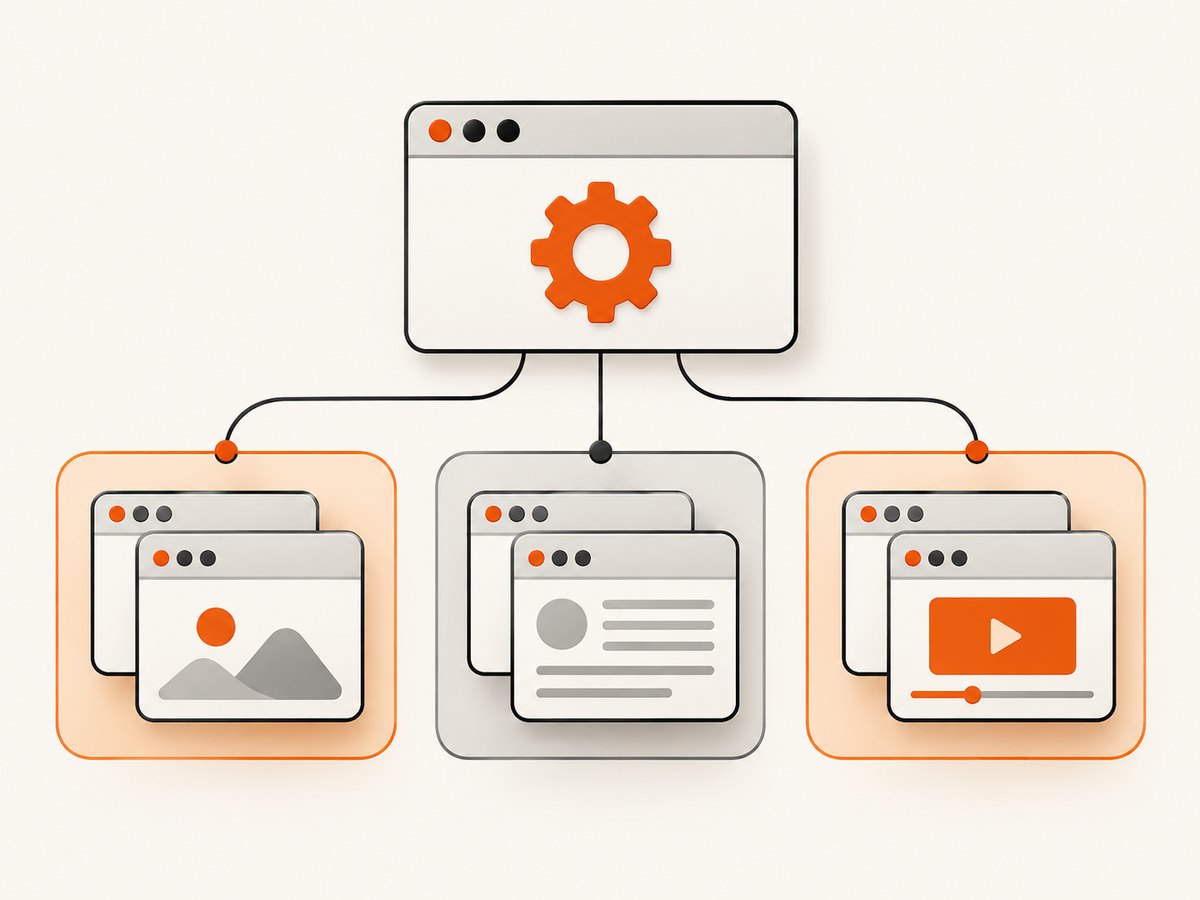
Direct answer: choose the smallest isolation boundary that meets your requirements. Use multiple Page objects when tasks can share one browser session. Use separate BrowserContext objects when each task needs isolated cookies, local storage, and cache. Launch separate Browser processes when you need process-level separation or independent browser lifecycles. Puppeteer does not publish a universal safe concurrency limit, so measure your workload and enforce a queue limit for the machine you actually run on.
This guide shows each model, complete Node.js examples, cleanup rules, bounded workers, failure handling, and deployment trade-offs. It also explains when a screenshot API is a better fit than maintaining Chromium yourself.
Choose pages, contexts, or browser processes
| Unit | Isolation | Startup cost | Use it when | Cleanup |
|---|---|---|---|---|
Page |
Tab-level; pages in a context share that context’s session state | Lowest | Jobs can share cookies and local storage, or the site is public | Close each page, or close its context/browser |
BrowserContext |
Separate cookies and local storage; the creation API also states contexts do not share cache | Lower than a new browser | Each job needs a separate user session inside one browser | Close the context; its pages close with it |
Browser |
Process-level boundary | Highest | Jobs require independent browser processes or lifecycles | browser.close() shuts down that browser |
Puppeteer’s browser-management guide describes one browser with multiple pages, contexts for isolated sessions, and separate browser instances. See the official browser-management guide and the Page API.
Pattern 1: multiple pages in one browser
A page is a tab. One browser can create many pages, so this is the simplest way to run independent navigations in parallel when shared session state is acceptable.
import puppeteer from 'puppeteer';

const urls = [
  'https://example.com',
  'https://developer.mozilla.org/',
  'https://pptr.dev/'
];

const browser = await puppeteer.launch({ headless: true });

try {
  const results = await Promise.all(urls.map(async (url) => {
    const page = await browser.newPage();
    try {
      await page.goto(url, { waitUntil: 'domcontentloaded', timeout: 30_000 });
      return { url, title: await page.title() };
    } finally {
      await page.close();
    }
  }));

  console.log(results);
} finally {
  await browser.close();
}
Promise.all() starts every supplied task immediately. That is useful for a short list, but it is not a concurrency limit. For a large queue, use the bounded worker pattern later in this article.
When pages are enough
- Every task visits public pages and does not log in.
- Sharing a cookie jar is harmless or intentional.
- You want low setup overhead and simple cleanup.
- A failure in one page should not require a new browser process.
Do not assume pages isolate every browser-level feature. They are tabs inside the same browser and context, so mutable application state that you keep outside Puppeteer can still be shared by your own code.
Pattern 2: one browser with a context per task
Use a context when jobs represent different users, tenants, or authentication sessions. Cookies and local storage are isolated between contexts, and createBrowserContext() does not share cache between them. The default browser context cannot be closed; contexts you create can.
import puppeteer from 'puppeteer';

const urls = [
  'https://example.com/account',
  'https://example.com/dashboard',
  'https://example.com/reports'
];

const browser = await puppeteer.launch({ headless: true });

async function runTask(url) {
  const context = await browser.createBrowserContext();
  try {
    const page = await context.newPage();
    await page.goto(url, {
      waitUntil: 'networkidle2',
      timeout: 45_000
    });
    return {
      url,
      title: await page.title(),
      cookies: (await page.cookies()).length
    };
  } finally {
    // Closes pages owned by this context.
    await context.close();
  }
}

try {
  const results = await Promise.all(urls.map(runTask));
  console.log(results);
} finally {
  await browser.close();
}
Read the BrowserContext API and createBrowserContext API for the current lifecycle details.
Context-specific settings
Set emulation, extra headers, permissions, or authentication on the page or context according to the API you use. Keep credentials in your secret store, not in source code. If a task needs a clean session, create a fresh context instead of trying to delete every cookie from a shared one.
Pattern 3: separate browser processes
Call puppeteer.launch() once per process when process-level separation matters. This gives each browser its own lifecycle and browser-level resources, with greater startup and memory overhead that you must measure for your workload.
import puppeteer from 'puppeteer';

async function runInBrowser(url) {
  const browser = await puppeteer.launch({
    headless: true,
    timeout: 30_000
  });
  try {
    const page = await browser.newPage();
    await page.goto(url, { waitUntil: 'domcontentloaded', timeout: 30_000 });
    return await page.title();
  } finally {
    await browser.close();
  }
}

const urls = ['https://example.com', 'https://pptr.dev/'];
const titles = await Promise.all(urls.map(runInBrowser));
console.log(titles);
Separate launches are appropriate when a browser crash, browser-wide setting, or resource policy must not affect another job. They are usually the most expensive option because every launch starts another browser process tree. Do not treat that observation as a Puppeteer benchmark; profile your own pages and launch configuration.
Connecting to an externally managed browser
If another service starts Chromium, use puppeteer.connect() with its WebSocket endpoint. Call disconnect() when your script is finished if the external service should keep running. browser.close() instead shuts down the connected browser.
import puppeteer from 'puppeteer';

const browser = await puppeteer.connect({
  browserWSEndpoint: process.env.BROWSER_WS_ENDPOINT
});

try {
  const page = await browser.newPage();
  await page.goto('https://example.com', { waitUntil: 'domcontentloaded' });
  console.log(await page.title());
  await page.close();
} finally {
  await browser.disconnect();
}
Bound concurrency with a worker queue
There is no documented universal Puppeteer concurrency limit. CPU, memory, navigation time, page size, downloads, fonts, and JavaScript execution vary widely. Pick an initial worker count for your host, observe CPU and memory, then increase or decrease it based on measured failure rates and latency.
import puppeteer from 'puppeteer';

const urls = Array.from({ length: 20 }, (_, i) => `https://example.com/?job=${i}`);
const workerCount = 3; // Tune this for your host and workload.
const browser = await puppeteer.launch({ headless: true });
let next = 0;

async function worker() {
  while (true) {
    const index = next++;
    if (index >= urls.length) return;

    const url = urls[index];
    const page = await browser.newPage();
    try {
      await page.goto(url, {
        waitUntil: 'domcontentloaded',
        timeout: 30_000
      });
      console.log(index, await page.title());
    } catch (error) {
      console.error('job failed', { index, url, error: error.message });
    } finally {
      await page.close();
    }
  }
}

try {
  await Promise.all(
    Array.from({ length: workerCount }, () => worker())
  );
} finally {
  await browser.close();
}
Use a context inside each worker when sessions must be isolated. For retries, create a new page or context after a timeout rather than reusing a page known to be stuck.
Launch configuration that affects parallel jobs
LaunchOptions includes browser selection, executablePath, headless mode, userDataDir, startup timeout, and signal handling. Puppeteer documents that it is guaranteed to work with its bundled browser; using a custom executable path is your responsibility. Consult the LaunchOptions reference before changing these values.
- Headless mode: use the mode supported by your installed Puppeteer version and deployment environment.
- Startup timeout: set a finite value so a worker cannot wait forever for Chromium.
- User data directory: avoid sharing one writable profile among concurrent browser processes unless you deliberately coordinate access.
- Signals: ensure shutdown handlers close browsers when your process receives a termination signal.
- Executable path: verify the binary exists in the deployment image and matches the Puppeteer version you support.
Reliability checklist
- Set navigation and launch timeouts.
- Close pages in a
finallyblock. - Close every created context in
finally. - Close owned browsers during normal shutdown.
- Use
disconnect(), rather thanclose(), for externally managed browsers you must leave running. - Record URL, worker ID, duration, timeout type, and browser error for each job.
- Bound the queue instead of passing an unbounded list to
Promise.all(). - Retry transient navigation failures with a fresh page or context and a limit on attempts.
- Keep application-level mutable state task-local unless sharing is intentional.
Performance and cost considerations
Pages usually minimize startup overhead. Contexts add session isolation while reusing one browser. Separate browsers add process isolation but also launch work and resource consumption. The official documentation does not provide a universal benchmark or safe instance count, so measure startup time, resident memory, CPU, navigation latency, and failed jobs on representative URLs.
For a long-running service, monitor open pages and contexts, queue depth, browser restarts, and timeouts. A gradual memory increase often indicates that pages, contexts, event listeners, or downloaded data are not being released. A bounded queue protects the host from accepting more simultaneous work than it can serve.
Self-hosted Puppeteer costs are driven by the machines and runtime you operate. A hosted screenshot API can move browser lifecycle management out of your application, which may be useful for scheduled captures, previews, and document generation.
Or skip the browser setup
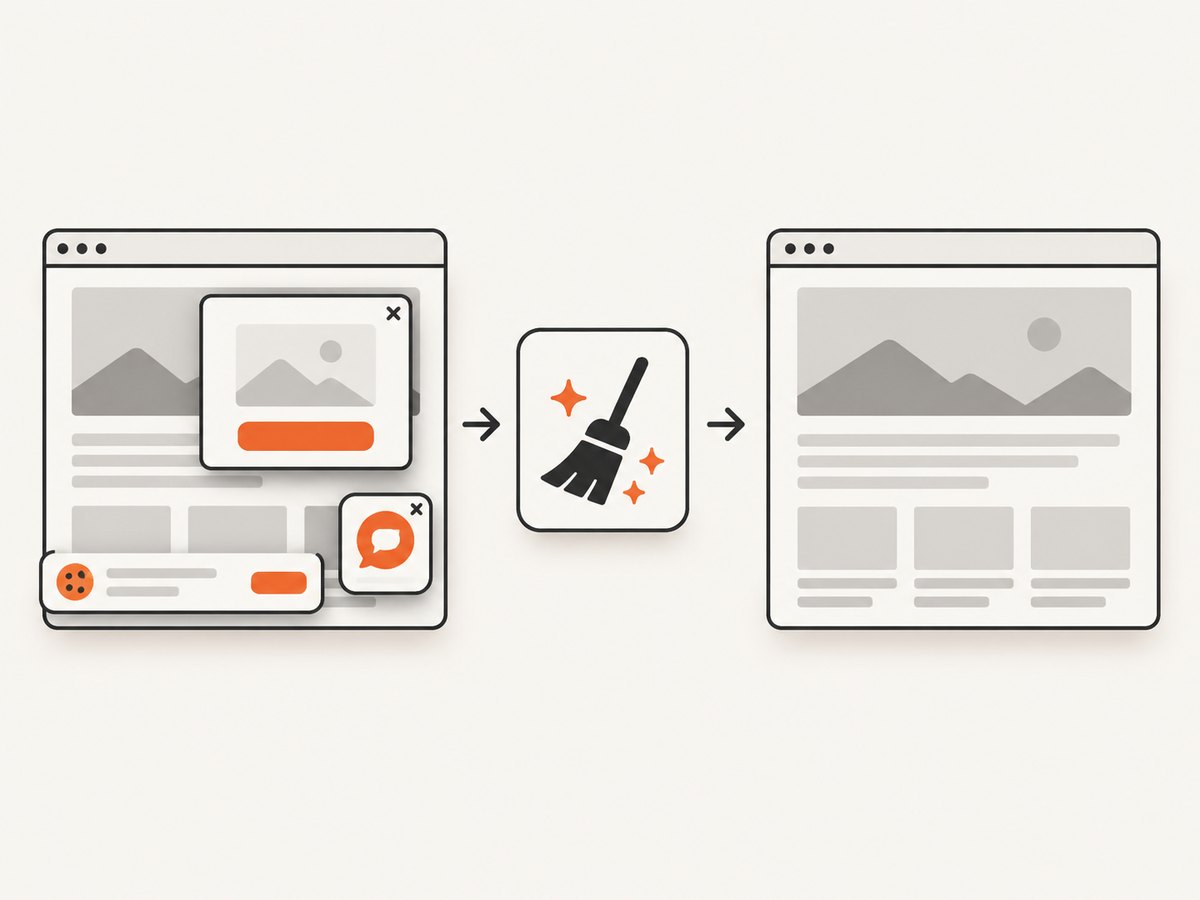
ScreenshotNeo provides a website screenshot API and MCP server. One GET request returns PNG, JPEG, WebP, or PDF output. It accepts cookie and consent banners like a visitor, then removes more than 60 known consent platforms, newsletter popups, and chat widgets before capture; each step can be turned off. Bot checks and CAPTCHAs, blank pages, timeouts, failed loads, and cache hits cost nothing, and response headers report the page verdict and whether it was billed.
See the ScreenshotNeo documentation for all options. The basic call is:
curl -G "https://api.screenshotneo.com/v1/shot" -d access_key=YOUR_API_KEY --data-urlencode url=https://stripe.com -o shot.webpimport requests
r = requests.get(
"https://api.screenshotneo.com/v1/shot",
params={"access_key": "YOUR_API_KEY", "url": "https://stripe.com"},
timeout=90,
)
r.raise_for_status()
open("shot.webp", "wb").write(r.content)const q = new URLSearchParams({
access_key: 'YOUR_API_KEY',
url: 'https://stripe.com'
});
const res = await fetch(`https://api.screenshotneo.com/v1/shot?${q}`);
if (!res.ok) throw new Error(`HTTP ${res.status}`);
const image = Buffer.from(await res.arrayBuffer());ScreenshotNeo also supports full-page captures with lazy images loaded, CSS-selector element capture, dark mode, device presets and custom viewports, retina scale, PDF paper and margin settings, custom CSS and JavaScript, clicks, selector or network-idle waits, request blocking, headers, cookies, user agents, authorization, timezone, geolocation, transparent backgrounds, resizing, configurable caching, signed image links, asynchronous jobs with signed webhooks, bulk capture of up to 100 URLs per call, a usage API, and an OpenAPI specification. An MCP server exposes take_screenshot, get_page_info, and capture_pdf to Claude, Cursor, and other MCP clients.
There is a free plan with 1,000 screenshots per month and no card. Paid plans start at $5 for 3,000 shots; every feature is available on every plan. Create a free ScreenshotNeo account.
Troubleshooting
Jobs appear to run sequentially
Cause: an accidental await inside a loop waits for each task before starting the next. Fix: collect promises and use a bounded worker queue, or map a small batch to Promise.all().
Memory usage keeps rising
Cause: pages or contexts are not closed, or the queue creates more work than the host can release. Fix: close resources in finally, cap workers, and record open-resource counts.
Cookies leak between jobs
Cause: jobs share a page or browser context. Fix: create one BrowserContext per session and close it after the job.
Closing Puppeteer stops a shared browser
Cause: calling browser.close() on a browser owned by another service. Fix: call browser.disconnect() when you only need to detach.
Chromium never starts
Cause: an invalid executable path, missing system dependency, or startup timeout. Fix: use Puppeteer’s bundled browser where possible, verify the deployment image, and set a diagnostic startup timeout. The custom executable path is not covered by Puppeteer’s bundled-browser guarantee.
Navigation times out under load
Cause: too many simultaneous network-heavy pages or a site that never reaches the chosen readiness condition. Fix: lower worker count, choose an appropriate waitUntil condition, set a finite timeout, and retry selectively with a fresh page.
FAQ
What is the easiest way to run multiple Puppeteer tasks?
Launch one browser and create one page per task. Add a worker queue when the task list is large.
Do browser contexts create separate Chrome processes?
No. They provide separate sessions inside one browser. Use separate launch() calls for process-level separation.
Can I close the default browser context?
No. The default context cannot be closed. Close contexts created with createBrowserContext().
Does Puppeteer define a maximum number of concurrent instances?
The reviewed official documentation does not publish a universal number. Establish a limit through measurement on your host and workload.
When should I use a hosted screenshot service?
Use one when you want screenshots or PDFs without packaging Chromium, managing browser processes, or implementing cleanup and queueing. ScreenshotNeo adds consent cleanup, verdict-based billing, and an MCP server for AI agents.


