Saving a PDF to an Amazon S3 Bucket in C# with HttpClient
Upload a PDF to Amazon S3 from C# with HttpClient using a secure presigned PUT URL, with complete code, diagnostics, and an SDK alternative.

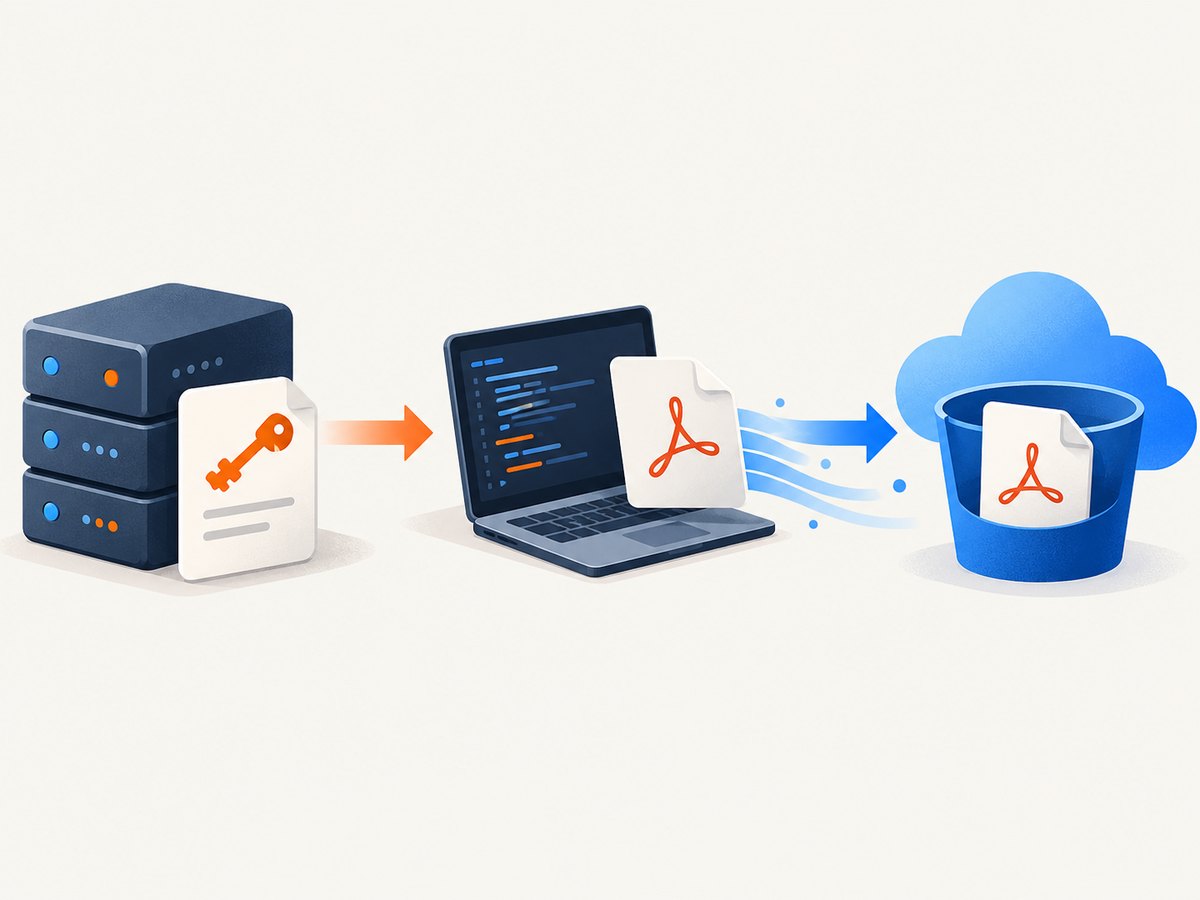
Use a presigned S3 PUT URL when a trusted server should authorize the upload but C# code should send the PDF with ordinary HTTP. Your server creates a URL for one bucket, one object key, and the PUT verb. The uploader opens the PDF as a stream, wraps it in StreamContent, and sends HttpClient.PutAsync. The URL expires, so the uploader never receives long-lived AWS credentials.
This guide covers the complete flow, a direct AWS SDK alternative, content type and signed-header choices, large-file and failure handling, diagnostics, and operational concerns.
How the presigned upload works
- Trusted backend code creates a presigned URL with the bucket name, object key,
PUTverb, region, and expiry. - The backend gives that URL to the component that has the PDF. It may be another service, a desktop process, or a worker.
- C# uses
HttpClientto stream the file to the URL. - The uploader checks the HTTP response and records the status and response body when S3 rejects the request.
A presigned URL authorizes a particular S3 operation. The AWS .NET example explicitly sets Verb = HttpVerb.PUT, the bucket, an object key, and an expiration before calling GetPreSignedURL.AWS .NET code examples The HTTP method must match the method that was signed.
Prerequisites and project setup
Install the AWS SDK package in the trusted service that creates URLs:
dotnet add package AWSSDK.S3The uploading process only needs an HTTP client if it receives a presigned URL. Keep AWS credentials in the trusted URL-generating service. Do not put access keys in an untrusted desktop, browser, or distributed client.
Choose the S3 region used by the bucket when constructing the AWS client. The URL must target the bucket’s actual region. Also decide how object keys are formed, for example invoices/2026/09/statement-123.pdf. S3 keys are object names, so prefixes and file extensions are part of your application’s naming scheme.
Generate a presigned PUT URL in C#
The following method runs in trusted server-side code. Its credentials need permission to put the intended object. The duration is an example; choose an expiry that gives the uploader enough time without leaving the URL valid unnecessarily long.
using Amazon;
using Amazon.S3;
using Amazon.S3.Model;

public static class S3PresignedUploads
{
    public static string CreatePdfUploadUrl(
        string bucketName,
        string objectKey,
        TimeSpan lifetime)
    {
        var config = new AmazonS3Config
        {
            RegionEndpoint = RegionEndpoint.USEast1 // use the bucket's region
        };

        using var s3 = new AmazonS3Client(config);

        var request = new GetPreSignedUrlRequest
        {
            BucketName = bucketName,
            Key = objectKey,
            Verb = HttpVerb.PUT,
            Expires = DateTime.UtcNow.Add(lifetime)
        };

        return s3.GetPreSignedURL(request);
    }
}
In a web application, create the AWS client through dependency injection and reuse it rather than constructing one per request. Pass the generated URL to the uploader over your authenticated application channel. A URL is bearer authorization: anyone who obtains it can attempt the signed operation until it expires, subject to the signed request and bucket policy.
Upload the PDF with HttpClient
This is the central upload. It follows the AWS sample’s pattern: open the local file, wrap it in StreamContent, await PutAsync, and base success on IsSuccessStatusCode.AWS SDK for .NET example
using System.Net.Http;

public static class PdfUploader
{
    public static async Task UploadAsync(
        HttpClient httpClient,
        string presignedUrl,
        string pdfPath,
        CancellationToken cancellationToken = default)
    {
        await using var file = new FileStream(
            pdfPath,
            FileMode.Open,
            FileAccess.Read,
            FileShare.Read,
            bufferSize: 1024 * 64,
            useAsync: true);

        using var content = new StreamContent(file);
        content.Headers.ContentType =
            new System.Net.Http.Headers.MediaTypeHeaderValue("application/pdf");

        using var response = await httpClient.PutAsync(
            presignedUrl,
            content,
            cancellationToken);

        if (!response.IsSuccessStatusCode)
        {
            var error = await response.Content.ReadAsStringAsync(cancellationToken);
            throw new HttpRequestException(
                $"S3 upload failed with {(int)response.StatusCode} " +
                $"({response.ReasonPhrase}). Body: {error}");
        }
    }
}
Use a long-lived, injected HttpClient or an IHttpClientFactory-managed client. The file stream must remain open until the awaited request completes, then be disposed. Streaming avoids loading the entire PDF into memory.
Should you set Content-Type?
Set application/pdf when consumers should see PDF metadata when downloading or displaying the object. A content-type header can be part of the signature configuration. If the presigner signs that header, send exactly the same value during the PUT. If the URL was generated without signing it, verify the behavior required by your chosen presigning configuration before relying on it. The AWS examples do not establish a universal PDF-specific header requirement.
Complete console example
using System.Net.Http;
using Amazon;
using Amazon.S3;
using Amazon.S3.Model;

const string bucket = "example-bucket";
const string key = "incoming/report.pdf";
const string path = "report.pdf";

var s3Config = new AmazonS3Config
{
    RegionEndpoint = RegionEndpoint.USEast1
};

using var s3 = new AmazonS3Client(s3Config);
var signingRequest = new GetPreSignedUrlRequest
{
    BucketName = bucket,
    Key = key,
    Verb = HttpVerb.PUT,
    Expires = DateTime.UtcNow.AddMinutes(15)
};

var url = s3.GetPreSignedURL(signingRequest);

using var http = new HttpClient
{
    Timeout = TimeSpan.FromMinutes(10)
};

await using var file = File.OpenRead(path);
using var body = new StreamContent(file);
body.Headers.ContentType =
    new System.Net.Http.Headers.MediaTypeHeaderValue("application/pdf");

using var response = await http.PutAsync(url, body);
var responseText = await response.Content.ReadAsStringAsync();

Console.WriteLine($"Status: {(int)response.StatusCode} {response.ReasonPhrase}");
if (!response.IsSuccessStatusCode)
    Console.WriteLine(responseText);
Direct AWS SDK upload: when HttpClient is unnecessary
If the application already owns AWS credentials and an initialized S3 client, call PutObjectAsync directly. This keeps authorization and transfer in the AWS SDK. AWS’s example sets the bucket, key, and local file path on PutObjectRequest; the API also supports stream input.AWS SDK for .NET upload examples
using Amazon.S3;
using Amazon.S3.Model;

var request = new PutObjectRequest
{
    BucketName = "example-bucket",
    Key = "incoming/report.pdf",
    FilePath = "report.pdf",
    ContentType = "application/pdf"
};

var result = await s3.PutObjectAsync(request);
Console.WriteLine($"S3 status: {result.HttpStatusCode}");| Decision | Presigned URL plus HttpClient | Direct SDK |
|---|---|---|
| Caller | Any component holding the expiring URL | Application with AWS credentials and an S3 client |
| Authorization | Trusted code signs bucket, key, verb, and expiry | IAM credentials authorize the SDK request |
| Best fit | Separate upload client or service boundary | Backend already integrated with AWS |
| Transfer | HTTP PUT with streamed content | PutObjectAsync with a path or stream |
This distinction follows from the mechanics documented by AWS: use the presigned flow when the uploader should not make a normal credentialed SDK call; use the SDK directly when the application already owns that authenticated interaction.
Options for production uploads
Object keys and overwrites
A PUT to an existing key replaces that object. Generate collision-resistant keys when uploads must be immutable, such as a database identifier plus a random suffix. Store the key alongside your application record so downloads do not depend on parsing a filename.
Headers, encryption, checksums, and tags
S3 supports optional request features including checksums and server-side encryption headers.S3 PutObject API If you require one, include it when creating the presigned request and send the identical header with HttpClient. The same rule applies to tags and conditional-write headers. Verify current S3 behavior for your encryption mode and SDK version.
Do not treat every returned ETag as an MD5 checksum. The S3 API documentation explicitly notes cases, including SSE-C, where the ETag is not the object’s MD5.
Large PDFs and retries
Keep using a stream so memory use is independent of file size. For very large objects, evaluate S3 multipart upload rather than repeatedly retrying one long PUT. A presigned URL has a fixed lifetime; a slow upload can outlive it. Retry only failures that are safe to retry, and generate a fresh URL when the old one has expired. Do not blindly retry after an ambiguous network disconnect without deciding how your application will detect or reconcile a completed object.
Timeouts and cancellation
Set an HTTP timeout appropriate for the largest expected PDF and network speed. Pass a cancellation token from the request or job system. Cancelled uploads should be marked incomplete in application state and reconciled with the destination key rather than assumed to have failed.
Troubleshooting
| Symptom | Likely cause | Fix |
|---|---|---|
| 403 SignatureDoesNotMatch | HTTP verb, region, key, or signed header differs | Use PUT, the bucket’s region, the exact URL, and identical signed headers. |
| 403 AccessDenied | Presigner lacks permission or a bucket policy denies the request | Check IAM permission for the specific key and bucket policy conditions. |
| 400 Bad Request | Malformed request or unexpected signed metadata | Capture S3’s XML error body and compare request headers with the presigned configuration. |
| Request expired | URL lifetime elapsed before the PUT completed | Use a suitable expiry, upload promptly, or generate a new URL. |
| Content type appears wrong | Header was omitted or did not match the signed value | Set application/pdf consistently when metadata is required. |
| Out-of-memory exception | Entire PDF was buffered | Use FileStream and StreamContent; avoid ReadAllBytes. |
| Upload seems successful but object is missing | Wrong bucket, key, account, or region | Log the exact destination key and inspect the response and account. |
| TLS or connection failure | Network interruption or proxy configuration | Use a managed HttpClient, capture the inner exception, and retry transient failures with limits. |
On success, S3 accepts the whole object; it does not add partial objects. The AWS PutObject reference states that a success response means the entire object was added.Amazon S3 PutObject API reference Preserve the status code, request identifiers, destination key, and useful error body for support.

Performance, reliability, and cost notes
- Performance: streaming limits application memory. Keep the file and HTTP connection on the same path and avoid unnecessary buffering or base64 encoding.
- Reliability: use a bounded retry policy for transient transport errors, but do not retry every 4xx response. Expired or signature-invalid URLs require correction or regeneration.
- Observability: log object key, byte count, elapsed time, status, and S3 request identifiers without logging the complete presigned URL.
- Security: make keys narrowly scoped, keep expiries short enough for the transfer, and protect the URL like a temporary credential.
- Storage cost: S3 charges depend on storage, requests, and transfer under your AWS account and region. This article does not establish a price; consult the current AWS pricing page for your workload.
Or skip the browser setup
If your workflow starts with a web page that must become a PDF or image, ScreenshotNeo provides a single API request. It accepts cookie and consent banners like a visitor, then removes more than 60 known consent platforms, newsletter popups, and chat widgets before capture; each step can be disabled. Only clean shots are billed: bot checks, blank pages, timeouts, failed loads, and cache hits cost nothing, and the response identifies the result with X-Page-Verdict and X-Billed headers.
See the ScreenshotNeo API documentation for all options, including PDF paper size, margins, landscape mode, page ranges, waiting for selectors or network idle, custom CSS and JavaScript, headers and cookies, geolocation, caching, signed links, async jobs, and bulk capture.
cURL
curl -G "https://api.screenshotneo.com/v1/shot" -d access_key=YOUR_API_KEY --data-urlencode url=https://stripe.com -o shot.webpPython
import requests
r = requests.get("https://api.screenshotneo.com/v1/shot", params={"access_key": "YOUR_API_KEY", "url": "https://stripe.com"}, timeout=90)
open("shot.webp", "wb").write(r.content)
Node.js
const q = new URLSearchParams({ access_key: 'YOUR_API_KEY', url: 'https://stripe.com' });
const res = await fetch(`https://api.screenshotneo.com/v1/shot?${q}`);
ScreenshotNeo also provides an MCP server with take_screenshot, get_page_info, and capture_pdf tools for Claude, Cursor, and other MCP clients. The free plan includes 1,000 screenshots per month with no card; paid plans start at $5 for 3,000. Create a free ScreenshotNeo account.
FAQ
Can a presigned URL be used more than once?
It authorizes the signed operation until expiry. Design your key and application state for whether repeated PUTs should replace the object or be rejected by your workflow.
Does HttpClient need AWS credentials?
No. The uploader needs only the presigned URL. The trusted component that generated it needs AWS authorization.
Is a successful response proof that the PDF is valid?
No. It confirms S3 accepted the bytes. Validate PDF structure separately if your application requires it.
Should I use multipart upload for every PDF?
No. A streamed single PUT is simpler for ordinary files. Evaluate multipart upload when object size, transfer duration, or recovery requirements make one request impractical.
Can I download the object immediately?
S3’s successful PUT response means the object was accepted. Use the exact bucket, region, and key when reading it, and apply your normal authorization rules for downloads.


