How to Scrape Cars and Bids: Auction Listings, Bids, and Specs
Cars & Bids prohibits unauthorized scraping. Learn what you can review, how to request permission, and how to build a compliant workflow.
Direct answer: do not build an automated scraper for Cars & Bids unless the company has given you explicit written permission. Its current Terms of Use prohibit unauthorized spidering, scraping, harvesting, and automated compilation. The same section also prohibits manual or automated extraction, aggregation, or reproduction for commercial purposes, competitive analysis, AI/ML training, or another purpose that Cars & Bids has not expressly authorized.
You can still inspect a small number of public listings manually for a legitimate question. If you need a recurring dataset of auction listings, bids, specifications, historical results, or content for redistribution, contact legal@carsandbids.com first and obtain written approval that describes the allowed fields, method, frequency, retention, attribution, and reuse.
What the public pages show
The public index and individual listing pages render information such as a vehicle title, headline specifications, auction state, current bid amount, and time remaining when those fields are available. A live index is a presentation layer, not a documented bulk-data interface. Public visibility does not grant permission to crawl, store, republish, or analyze the content systematically.
Cars & Bids also says listing material comes from seller-provided or seller-confirmed information and is not independently verified for accuracy or completeness. Treat every specification as a seller-provided claim until you verify an important fact through an independent source. A displayed bid is an auction state at a particular moment; it is not a final sale price until the auction closes and the outcome is confirmed.
Step 1: Decide whether your project needs permission
| Use case | Recommended action |
|---|---|
| Answering one question about a few listings | Review the official pages manually and record only what you need for that question. |
| Monitoring many active auctions | Pause and request written authorization before any automated collection. |
| Building a commercial, competitive, or research dataset | Request written permission that explicitly covers extraction, storage, analysis, and reuse. |
| Training an AI or machine-learning model | Do not collect until Cars & Bids expressly authorizes that purpose. |
| Republishing listing text, photos, or specifications | Ask for content-reuse approval and required attribution in writing. |
Do not treat a robots.txt file, an undocumented JSON response, a browser’s developer tools, or a page that loads without a login as permission. Do not rotate proxies, disguise a crawler, bypass a bot check, defeat a rate limit, or probe hidden endpoints. Those techniques address a technical obstacle while leaving the contractual question unresolved.
Step 2: Ask for a precise written scope
Send a request that lets Cars & Bids approve or reject a concrete plan. Include:
- Purpose: the research, internal analysis, product, or publication you have in mind.
- Fields: for example, listing URL, title, year, make, model, presented specifications, current bid, auction status, and timestamps.
- Coverage: active auctions, completed auctions, a date range, or a defined sample.
- Access method and frequency: manual review, an approved feed, or another method they specify; include expected request volume.
- Storage and retention: where records will live, how long, and whether snapshots or images are retained.
- Use and redistribution: internal analysis, a public report, an API, model training, or another downstream use.
- Attribution: the credit line and links they require.
- Commercial terms: ask whether a fee, license, or data agreement applies.
Keep the approval with your project records. If the scope changes, request an updated approval instead of assuming the original permission covers the new use.
Step 3: Review a small sample manually
For a limited, non-automated research question, use the official site as a normal visitor:
- Open the newly listed auctions index or a known listing URL.
- Read the title, displayed vehicle attributes, current bid, auction state, and remaining time.
- Record the URL and the time of your observation so the bid value has context.
- Save only the minimum notes needed for your question. Do not copy entire pages, seller comments, photos, or personal information unless your written permission covers them.
- Verify material vehicle facts independently and label your notes as seller-provided listing claims.
- When reporting a bid, say whether it was current, ended, or otherwise displayed at the observation time.
A practical spreadsheet might contain listing_url, observed_at_utc, title_as_displayed, specs_as_displayed, current_bid_usd, time_remaining_as_displayed, and source_note. This is a note-taking structure for an authorized, limited review, not a recommendation to crawl the site.
Bid rules to label and recheck
The official FAQ says bids are submitted in United States dollars, including for vehicles located in Canada. It lists a $100 minimum opening bid and these increments:
| Bid range | Increment |
|---|---|
| Up to $14,999 | $100 |
| $15,000–$49,999 | $250 |
| $50,000–$199,999 | $500 |
| $200,000 and above | $1,000 |
The FAQ also describes a card hold equal to 5% of a submitted bid until the auction ends if the bidder does not win. The support page describes a buyer-fee hold with a $250 minimum and $7,500 maximum. These statements have different context, so quote the current pages carefully and check them again before publication; marketplace rules can change.
What is not documented
The reviewed official pages do not document a public API or bulk feed. Do not infer that one exists from network requests made by the website. Ask Cars & Bids whether an approved feed or licensed export is available and what its fields, update cadence, limits, historical coverage, retention rights, and cost would be. Until the company confirms those details, present no access method as approved.
Or skip the browser setup
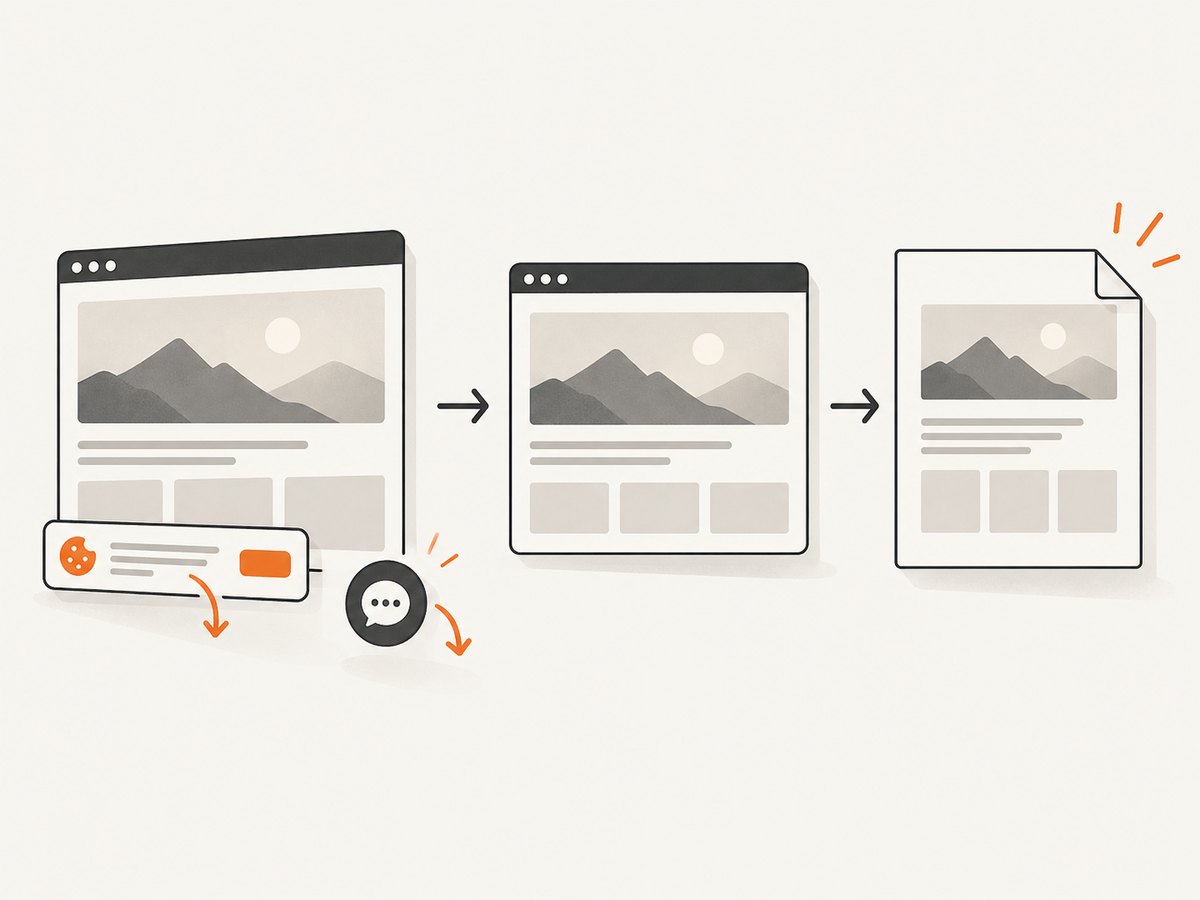
If you have permission to capture a page for documentation or a small approved workflow, ScreenshotNeo can return a clean image or PDF from one request. Its consent step accepts cookie banners and removes more than 60 known consent platforms, newsletter popups, and chat widgets before capture; each step can be disabled. Bot checks, blank pages, timeouts, failed loads, and cache hits are not billed, and response headers identify the page verdict and billing result. Use it only within the scope Cars & Bids has authorized.
See the ScreenshotNeo API documentation for all options. Replace the example URL with an approved Cars & Bids listing URL:
cURL
curl -G "https://api.screenshotneo.com/v1/shot" \
  -d access_key=YOUR_API_KEY \
  --data-urlencode url=https://carsandbids.com/ \
  -o cars-bids.webp
Python
import requests

r = requests.get(
    "https://api.screenshotneo.com/v1/shot",
    params={
        "access_key": "YOUR_API_KEY",
        "url": "https://carsandbids.com/",
    },
    timeout=90,
)
r.raise_for_status()
open("cars-bids.webp", "wb").write(r.content)
Node.js
const q = new URLSearchParams({
  access_key: 'YOUR_API_KEY',
  url: 'https://carsandbids.com/'
});
const res = await fetch(`https://api.screenshotneo.com/v1/shot?${q}`);
if (!res.ok) throw new Error(`HTTP ${res.status}`);
const data = Buffer.from(await res.arrayBuffer());
await import('node:fs/promises').then(fs => fs.writeFile('cars-bids.webp', data));
ScreenshotNeo supports full-page capture with lazy images loaded, CSS-element capture, custom CSS and JavaScript, clicks, selector or delay waits, network-idle waits, custom headers and cookies, user-agent, timezone, geolocation, image resizing, caching with a chosen TTL, PDFs, asynchronous jobs, signed webhooks, bulk capture of up to 100 URLs per call, and a usage API. Those options can help preserve an authorized visual record, but they do not expand your legal permission to collect or reuse Cars & Bids content.
Data-quality, reliability, and cost controls
Use timestamps and provenance
Store the page URL, observation time in UTC, capture identifier, and the exact fields you transcribed. Keep seller claims separate from independently verified facts. Never call a current bid a final price without a confirmed auction result.
Handle changing pages
Auction pages change while an auction is live. A later capture can show a different bid, remaining time, comments, or status. If your permission allows repeated captures, define a cadence in writing and record every observation rather than overwriting history.
Control capture cost
For authorized ScreenshotNeo work, caching with a TTL can avoid duplicate captures, while element capture or resized images can reduce unnecessary output. Failed loads, blank pages, bot checks, timeouts, and cache hits are not billed; inspect the X-Page-Verdict and X-Billed headers in your logs. ScreenshotNeo has 1,000 shots per month free with no card; paid plans start at $5 for 3,000 shots, and every feature is included on every plan. Yearly billing provides two months free.
Plan for failures
Use a reasonable timeout, record non-200 responses, and retry only when your written access agreement permits it. Keep retries bounded so a transient error does not become an unapproved request burst. For long-running authorized jobs, asynchronous capture and signed webhooks can separate submission from result handling.
Troubleshooting
| Symptom | Likely cause | Fix |
|---|---|---|
| A request is blocked or challenged | Access controls or a bot check | Stop automated attempts, do not bypass the control, and ask Cars & Bids for an approved method. |
| The page is blank | JavaScript failed, a timeout occurred, or the site returned an interstitial | Check the page manually, record the failure, and contact the site if the issue affects an authorized workflow. |
| A bid changed between captures | The auction is live | Use UTC timestamps and describe each value as an observation, not a final price. |
| Specifications look incomplete | Seller content may omit fields or be unverified | Keep the value as “not displayed,” do not fill gaps by inference, and verify important facts independently. |
| ScreenshotNeo returns an error | Invalid key, malformed URL, or capture failure | Check the API key, URL encoding, timeout, and response status; consult the docs and inspect verdict headers. |
| You need hundreds of pages | The project has become bulk collection | Pause and obtain written permission covering volume, cadence, fields, retention, and redistribution before continuing. |
FAQ
Can I scrape Cars & Bids if the listings are public?
Not without authorization. Public visibility is not approval for systematic extraction or reuse.
Is there a Cars & Bids API?
No public API or bulk feed was documented in the reviewed official pages. Ask the company directly rather than relying on undocumented endpoints.
Can I use the data for a vehicle-price model?
Ask for explicit written permission. The Terms specifically address extraction for commercial purposes, competitive analysis, and AI/ML training.
Are displayed specifications guaranteed accurate?
No. Cars & Bids says listing content is seller-provided or seller-confirmed and is not independently verified for accuracy or completeness.
What does ScreenshotNeo add?
With authorization, it provides a one-call screenshot or PDF workflow, removes common consent banners, popups, and chat widgets before capture, reports whether a result was billable, and offers an MCP server so AI agents can use take_screenshot, get_page_info, and capture_pdf.
Start with permission
For a few listings, manual review is the safest path. For anything systematic, get written approval from Cars & Bids first. Once your scope is approved, ScreenshotNeo can handle the browser capture: cookie banners, popups, and chat widgets are removed before the shot; bot checks, blank pages, and failed loads are never billed; an MCP server lets AI agents take screenshots; and 1,000 screenshots a month are free with no card, with paid plans starting at $5 for 3,000. Create a free ScreenshotNeo account.


