How to Scrape Data from Multiple Web Pages
Learn how to scrape multiple pages with Python, Beautiful Soup, Scrapy, or Playwright. Handle pagination, JavaScript, retries, and clean structured output.

To scrape data from multiple web pages, start with a list of URLs and a stable output schema. Fetch each page, select the fields you need, normalize them, and write one record per item. For pagination, read the next-page link, turn it into an absolute URL, and continue until there is no next link. Use Requests and Beautiful Soup for small server-rendered jobs, Scrapy for larger repeatable crawls, and Playwright when the content genuinely requires a browser.
This guide builds those patterns in runnable Python, then covers pagination, JavaScript-rendered content, reliability, common failures, and choosing an approach for the job.
1. Define the pages and the output before scraping
First decide what one output record represents. If each page contains many products, a record might have name, url, and price. If each page itself is a record, use one record per page. Keep field names and types consistent across every response.
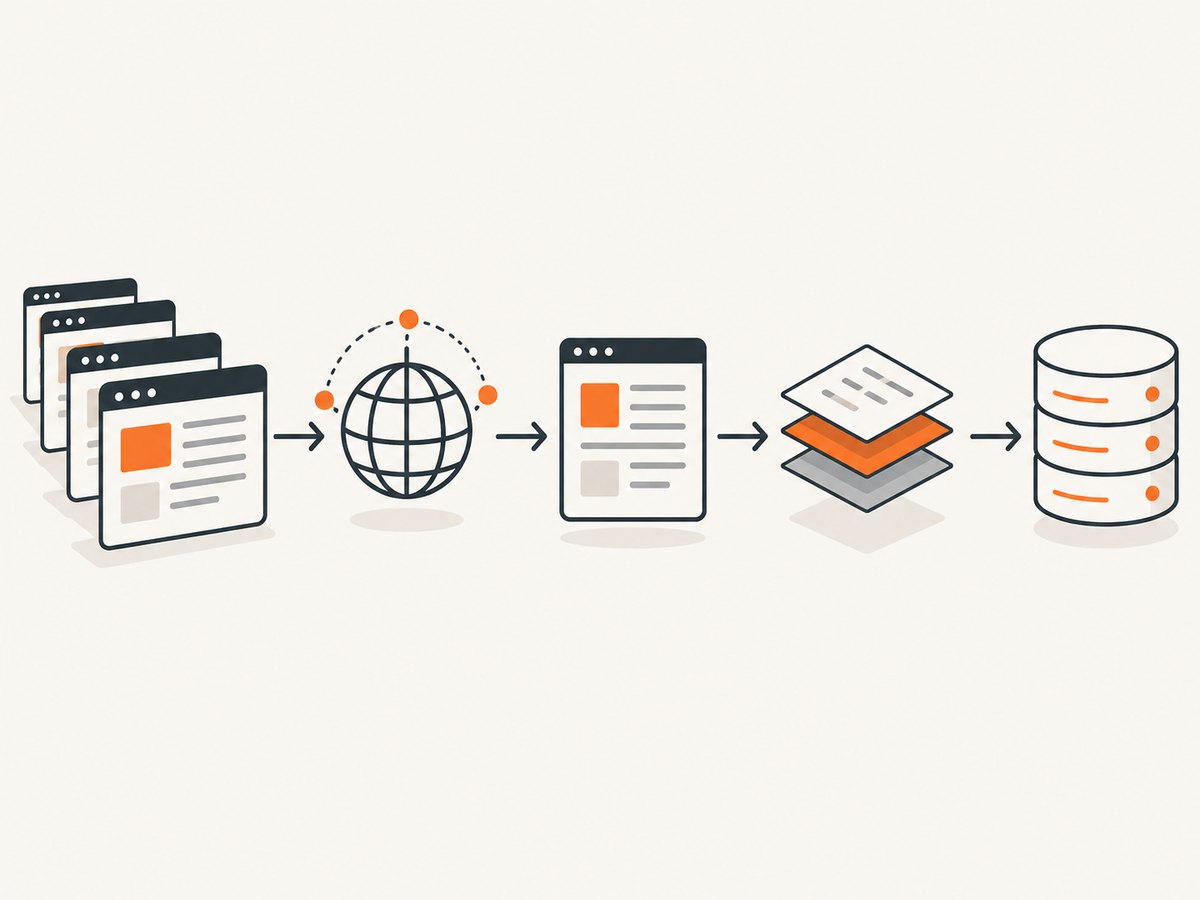
Make a small representative URL list and inspect saved responses before scaling up. Pages that look similar in a browser may have different markup, missing fields, redirects, or pagination patterns. Normalize whitespace, dates, prices, and relative URLs at extraction time. Choose a stable source key, usually a URL or item identifier, for deduplication.
Before crawling, review the site’s robots.txt, terms, authentication boundaries, privacy obligations, and copyright constraints. Technical access does not establish permission. Scrapy can honor robots.txt, but what is permissible depends on the site’s rules and applicable law.
2. A complete small-job example with Requests and Beautiful Soup
Install the dependencies:
python -m pip install requests beautifulsoup4Save this as scrape_catalog.py. It visits a fixed set of pages, extracts product cards, normalizes links and whitespace, retries transient server errors, skips failed pages with a logged message, deduplicates records by URL, validates required fields, and writes JSON Lines so results can be processed incrementally.
import json
import logging
import time
from urllib.parse import urljoin

import requests
from bs4 import BeautifulSoup
from requests.adapters import HTTPAdapter
from urllib3.util.retry import Retry

logging.basicConfig(level=logging.INFO, format="%(levelname)s %(message)s")

START_URLS = [
    "https://example.com/catalog?page=1",
    "https://example.com/catalog?page=2",
]

session = requests.Session()
retry = Retry(
    total=4,
    connect=3,
    read=3,
    status=3,
    backoff_factor=0.5,
    status_forcelist=(429, 500, 502, 503, 504),
    allowed_methods=frozenset(["GET"]),
    respect_retry_after_header=True,
)
session.mount("https://", HTTPAdapter(max_retries=retry))
session.mount("http://", HTTPAdapter(max_retries=retry))
session.headers.update({"User-Agent": "ExampleResearchBot/1.0 (contact: you@example.org)"})

seen = set()
with open("items.jsonl", "w", encoding="utf-8") as out:
    for page_url in START_URLS:
        try:
            response = session.get(page_url, timeout=(5, 30))
            response.raise_for_status()
        except requests.RequestException as exc:
            logging.error("Could not fetch %s: %s", page_url, exc)
            continue

        soup = BeautifulSoup(response.text, "html.parser")
        for card in soup.select("article.product"):
            name = " ".join(card.select_one("h2").get_text(" ", strip=True).split()) if card.select_one("h2") else ""
            anchor = card.select_one("a[href]")
            item_url = urljoin(response.url, anchor["href"]) if anchor else ""
            price_node = card.select_one(".price")
            price = price_node.get_text(" ", strip=True) if price_node else ""

            if not name or not item_url:
                logging.warning("Skipping incomplete card on %s", response.url)
                continue
            if item_url in seen:
                continue
            seen.add(item_url)
            out.write(json.dumps({"name": name, "url": item_url, "price": price}, ensure_ascii=False) + "\n")

        logging.info("Processed %s; found %d unique records", response.url, len(seen))
        time.sleep(1)  # Set a considerate per-site pace.

session.close()
logging.info("Wrote %d records to items.jsonl", len(seen))
Replace the example URLs and CSS selectors with those from the target site’s HTML. The example assumes product cards are article.product; it does not assume that every card has a price. The timeout tuple limits connection setup and response waiting separately. The retry policy is limited to GET and includes common temporary HTTP statuses, while respecting a server’s Retry-After instruction.
When this approach fits
Requests plus Beautiful Soup works well when the HTML response already contains the fields you need, the URL set is modest, and you want to keep the fetch loop explicit. Beautiful Soup is tolerant of imperfect markup and offers a convenient object model; Scrapy’s selector documentation notes that it is slower than lxml-backed selectors. If parsing throughput or crawl orchestration matters, consider Scrapy.
3. Follow pagination automatically
If the site exposes a next link, do not guess the next page number unless the site’s structure requires it. Extract the link, resolve it against the current response URL, and stop when the link is absent. Track visited pages to avoid loops caused by malformed or repeated links.
from urllib.parse import urljoin

url = "https://example.com/catalog"
visited_pages = set()

while url and url not in visited_pages:
    visited_pages.add(url)
    response = session.get(url, timeout=(5, 30))
    response.raise_for_status()
    soup = BeautifulSoup(response.text, "html.parser")

    for card in soup.select("article.product"):
        # Extract and write one normalized item record here.
        pass

    next_link = soup.select_one("a.next[href]")
    url = urljoin(response.url, next_link["href"]) if next_link else None
The key details are the visited-page set and urljoin(response.url, href): pagination links are often relative, such as ?page=3 or /catalog?page=3. The Scrapy tutorial uses the same general callback loop and provides response.follow to resolve and schedule a link.
4. Use Scrapy for many pages or branching links
Scrapy is a better fit when a crawl has many URLs, follows links across pages, needs repeatable scheduling and exports, or needs explicit per-domain concurrency controls. A spider defines starting requests and callbacks; yielded requests are scheduled asynchronously, and duplicate URLs are filtered by default.
Install Scrapy:
python -m pip install scrapySave as catalog_spider.py and run with scrapy runspider catalog_spider.py -O items.jsonl:
import scrapy

class CatalogSpider(scrapy.Spider):
    name = "catalog"
    start_urls = ["https://example.com/catalog"]
    allowed_domains = ["example.com"]
    custom_settings = {
        "ROBOTSTXT_OBEY": True,
        "CONCURRENT_REQUESTS_PER_DOMAIN": 2,
        "DOWNLOAD_DELAY": 1.0,
        "AUTOTHROTTLE_ENABLED": True,
        "AUTOTHROTTLE_START_DELAY": 1.0,
        "AUTOTHROTTLE_MAX_DELAY": 10.0,
        "RETRY_TIMES": 3,
        "FEED_EXPORT_ENCODING": "utf-8",
    }

    def parse(self, response):
        for card in response.css("article.product"):
            name = " ".join(card.css("h2::text").get(default="").split())
            href = card.css("a::attr(href)").get()
            price = " ".join(card.css(".price::text").get(default="").split())
            if name and href:
                yield {
                    "name": name,
                    "url": response.urljoin(href),
                    "price": price,
                    "source_page": response.url,
                }

        next_href = response.css("a.next::attr(href)").get()
        if next_href:
            yield response.follow(next_href, callback=self.parse)
Use -O to overwrite the output file for a new run; use -o when you want Scrapy’s feed export to append to an existing file. Selectors and domain settings must match the target. The concurrency, delay, auto-throttle, retry, robots, and feed export settings shown are starting points, not universal values: tune them to the site’s rules and observed responses.
Scrapy options that affect a crawl
- Concurrency and delay:
CONCURRENT_REQUESTS_PER_DOMAINandDOWNLOAD_DELAYlimit request pace. Increase restraint if the site slows down or asks you to reduce traffic. - Auto-throttle: adjusts crawl speed based on observed latency within configured bounds; it does not grant permission or remove the need to check site rules.
- Robots policy:
ROBOTSTXT_OBEYenables robots.txt handling. - Retry: retry settings help with temporary failures. They cannot repair blocked access, bad selectors, or a permanently missing page.
- Exports and pipelines: feed exports can write common formats such as JSON, CSV, and XML. Pipelines can validate, transform, deduplicate, or persist items.
- Duplicate filtering: repeated scheduled URLs are filtered by default. Keep item-level deduplication too, because different pages can contain the same record.
5. Handle JavaScript-rendered pages
Before opening a browser, inspect the page’s network activity and look for a documented or otherwise permitted JSON endpoint that returns the displayed data. Fetching the underlying data can be simpler and less resource-intensive than rendering a full page. Check the endpoint’s terms and access requirements; do not bypass authentication or access controls.
If a real browser is necessary, Playwright can navigate and expose request, response, request-finished, and request-failed events. A navigation or request completing at the HTTP layer does not mean the response is successful: HTTP 404 or 503 responses are still completed HTTP responses. Inspect status codes explicitly.
import asyncio
from playwright.async_api import async_playwright

async def main():
    async with async_playwright() as p:
        browser = await p.chromium.launch()
        page = await browser.new_page()
        page.on("response", lambda response: print(response.status, response.url)
                if response.status >= 400 else None)
        await page.goto("https://example.com/catalog", wait_until="domcontentloaded", timeout=30000)
        await page.locator("article.product").first.wait_for(timeout=10000)

        items = await page.locator("article.product").evaluate_all("cards => cards.map(card => ({\n          name: card.querySelector('h2')?.textContent?.trim() ?? '',\n          href: card.querySelector('a')?.href ?? ''\n        }))")
        print(items)
        await browser.close()

asyncio.run(main())
Install the Python package and browser binaries with python -m pip install playwright followed by python -m playwright install chromium. Replace the example selector and decide what readiness condition represents usable data. A fixed sleep may be needed for a known delayed interface, but waiting for a meaningful selector is generally more reliable than guessing a delay.
For several pages, put the navigation and extraction into a function, keep a visited URL set, and obtain the next-page link from the rendered DOM. Use bounded concurrency and close browser contexts and pages when finished. A browser costs more memory and startup work than an HTTP client, so use it only for pages where rendering is required.
6. Turn pages into reliable records
Scraping is not finished when selectors return values. Before exporting, define what counts as a valid item and how missing values are represented. Keep the original URL or a source-page field for traceability, and store raw responses when later auditing or selector changes matter.
- Normalize: trim and collapse whitespace; parse prices and dates into consistent representations; resolve URLs; preserve the source’s original value if conversion could lose information.
- Validate: reject or quarantine records missing required identifiers. Do not silently turn a selector failure into a plausible empty record.
- Deduplicate: use a stable key such as canonical item URL or source ID. Normalize URL fragments or tracking parameters only when you know they do not distinguish records.
- Checkpoint: persist completed page URLs or write items incrementally so an interrupted run can resume without starting over.
- Log structured context: include page URL, status, retry count, and extraction counts. Avoid logging secrets or personal data.
7. Troubleshooting common failures
| Symptom | Likely cause | Fix |
|---|---|---|
| No items, but the page opens in a browser | The HTML response lacks client-rendered content, or selectors no longer match. | Save and inspect the response body. Check for a permitted data endpoint; otherwise render with Playwright and wait for the actual content selector. |
| Relative links become broken URLs | The scraper treats an href as absolute. |
Resolve it against the final response URL with urljoin or Scrapy’s response.urljoin. |
| Pagination repeats forever | The next link points to the same page or cycles among pages. | Track visited page URLs, canonicalize consistently, and stop when a URL has already been processed. |
| 429 or 503 responses | The server is rate-limiting traffic or temporarily unavailable. | Reduce concurrency, add delay and bounded retries, respect Retry-After, and pause if access is denied. Do not respond by evading access controls. |
| Requests succeeds but data is malformed | A 4xx/5xx response was parsed as if it were a normal page, or the page structure changed. | Check status before parsing, log response URL and status, and validate required fields. |
| Playwright times out waiting for navigation | The page keeps network connections open, or the chosen load state is too strict. | Use an appropriate navigation state such as domcontentloaded, then wait for the content selector that matters. Keep a bounded timeout and inspect failed requests. |
| Some pages are missing after a run | A fetch failed, a redirect changed the URL, or the job stopped before output was flushed. | Write incrementally, keep a page checkpoint, record failures for retry, and compare scheduled, completed, and failed URL counts. |
| Duplicate items in output | Records appear on multiple pages or have multiple URL forms. | Deduplicate by a stable item identifier after normalization, not by page position. |
8. Performance, reliability, and cost
There is no single page-per-second figure that applies across sites: latency, response size, server limits, page rendering, and selector work differ. Measure on a small representative sample and record time spent fetching, rendering, parsing, and writing. Keep per-domain concurrency within the site’s rules and observed capacity. More parallel requests can increase errors or harm the target without improving useful throughput.
Requests with Beautiful Soup has low setup and memory overhead for HTML that arrives in the response. Scrapy is designed to schedule asynchronous requests and offers concurrency, delays, auto-throttling, retries, duplicate filtering, and export support. Playwright starts and operates a browser, so reserve it for JavaScript rendering or browser-dependent behavior. If several pages share the same assets or data, consider caching permitted responses locally and avoid fetching the same URL repeatedly.
Reliability comes from bounded timeouts, selective retries, checkpoints, schema validation, and observable logs. Retry transient network errors and temporary server responses, not every failure indefinitely. A missing selector after a site redesign is an extraction problem; retrying the same HTML will not fix it.
Direct scraping’s infrastructure cost is the compute, storage, and maintenance you run; browser rendering generally uses more resources than plain HTTP fetching. Budget for the time needed to detect markup changes and reprocess incomplete pages. Never estimate cost from an unsupported universal throughput benchmark.
9. Or skip the browser setup
If the next task is capturing page images or PDFs rather than extracting structured records, ScreenshotNeo provides a website screenshot API and MCP server. One GET request returns a screenshot or PDF; it is a capture tool, not a replacement for extracting a dataset. See the API documentation.

curl -G "https://api.screenshotneo.com/v1/shot" -d access_key=YOUR_API_KEY --data-urlencode url=https://stripe.com -o shot.webpimport requests
r = requests.get("https://api.screenshotneo.com/v1/shot", params={"access_key": "YOUR_API_KEY", "url": "https://stripe.com"}, timeout=90)
open("shot.webp", "wb").write(r.content)const q = new URLSearchParams({ access_key: 'YOUR_API_KEY', url: 'https://stripe.com' });
const res = await fetch(`https://api.screenshotneo.com/v1/shot?${q}`);
const bytes = Buffer.from(await res.arrayBuffer());
await import('node:fs/promises').then(fs => fs.writeFile('shot.webp', bytes));With ScreenshotNeo, cookie banners, popups, and chat widgets are removed before the shot. Bot checks, blank pages, and failed loads are never billed. Its MCP server lets AI agents take screenshots. The free plan includes 1,000 screenshots a month with no card; paid plans start at $5 for 3,000. Sign up for 1,000 free screenshots a month, no card required.
10. Which tool should you choose?
| Need | Good starting point | Why |
|---|---|---|
| A few server-rendered pages and simple fields | Requests + Beautiful Soup | Explicit loop, straightforward parsing and output. |
| Many pages, link discovery, repeatable crawling | Scrapy | Scheduling, asynchronous processing, duplicate filtering, crawl controls, and exports are built around spider workflows. |
| Content appears only after page JavaScript runs | Underlying permitted data endpoint, then Playwright if needed | Prefer direct structured data when available; use browser execution when the interface requires it. |
| Page screenshots or PDF captures | ScreenshotNeo | One-call capture, cleanup before capture, and only clean shots are billed. |
11. FAQ
Can I scrape pages from different domains in one job?
Yes, if the sites permit it. Keep per-domain pacing and rules separate, and do not assume one site’s pagination or selectors apply to another.
Should I save HTML as well as extracted records?
For audits or debugging, saving responses or a response provenance field helps explain where a record came from and diagnose selector changes. Consider storage limits and data-handling obligations.
Is a screenshot enough to extract page data?
No. Screenshots are visual captures. Structured extraction needs HTML, a data response, or browser DOM access. Use a screenshot API when the desired output is an image or PDF.
Can retries guarantee a complete crawl?
No. Retries can recover some transient failures, but they cannot fix permanently unavailable pages, access restrictions, changed markup, or invalid selectors. Track failed URLs and report coverage explicitly.


