How to Scrape Websites with Dynamic Pagination
Learn how to find the request behind dynamic pagination, follow its real continuation signal, and use Playwright when you need a browser.

To scrape a site with dynamic pagination, first inspect the browser’s Network panel while triggering one more batch of results. If a request returns the records, reproduce that request and follow its page number, offset, cursor, next URL, or continuation flag. Use browser automation when the next results depend on browser state, interaction, or rendered content that is impractical to reproduce. In either approach, stop only when the target’s actual continuation signal says there are no more results.
This guide shows how to investigate both patterns, build a bounded crawler, and handle common failures. The examples use a fictional JSON endpoint and fictional HTML selectors: replace them with values observed on the site you are permitted to crawl. No live target was specified, so its endpoint, selectors, access rules, and page limits must be verified independently.
1. Determine how the page gets its next results
A page can look like one long list while loading its results in separate batches. A “Next” button might navigate to another document, request JSON in the background, or update client-side state. Infinite scrolling is an interaction pattern, not a particular data source. Inspect what the browser actually does before choosing a scraper.
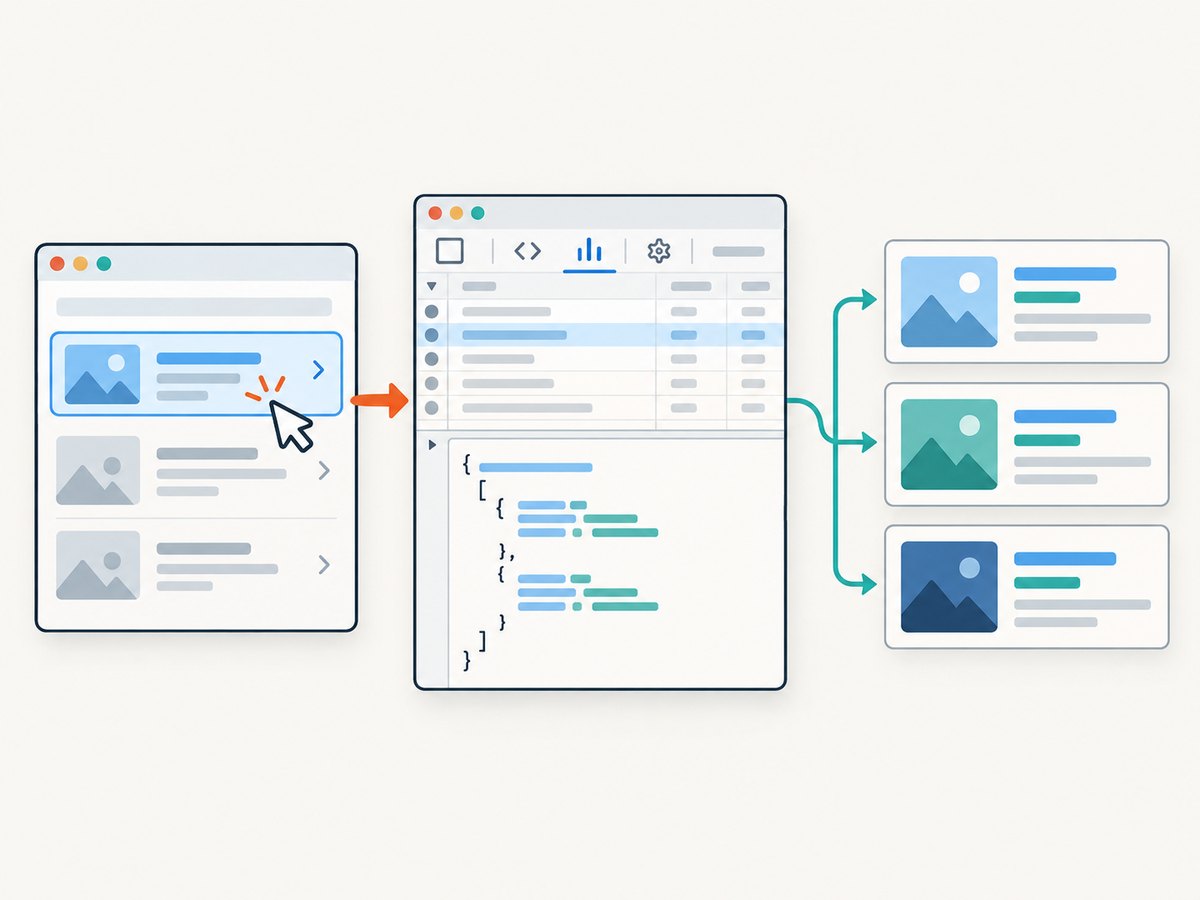
- Compare the raw response and rendered page. Fetch the document with a plain HTTP client and inspect its HTML. Compare it with the browser’s rendered DOM. Check page source and embedded data too: records may already be in the initial response even when they are awkward to locate visually.
- Observe one pagination action. Open Developer Tools → Network, enable Preserve log, and filter to Fetch/XHR if useful. Reload the page, then click Next, click Load more, or scroll until another batch appears. Find the request whose response contains those records.
- Inspect the request and response. Note its method, URL, query parameters, headers, cookies, and body. In the response, identify the records and any pagination fields, such as
next_cursor,has_next,next, or a total count. Do not assume a field name: these are examples, not a site contract. - Replay the request manually. Try the request in a client or terminal and compare its response with the browser’s. Keep only the request details that are actually needed. A session cookie or anti-CSRF token may be required, but do not copy credentials into source control or logs.
- Choose the extraction method. If a stable, understandable request returns the records, parse that response. If data depends on rendered DOM state or interactions that are hard to reproduce, automate a browser and wait for a page-specific result condition.
Scrapy’s official guidance describes inspecting browser requests to discover dynamically loaded data and reproducing the relevant request where practical. Its examples include both following next links and using a JSON continuation flag. See Scrapy’s Developer Tools guide, Selecting dynamically loaded content, and Scrapy at a glance.
2. Replay the data request with Python
The example below models an endpoint that accepts a cursor and returns items plus a next_cursor. It deduplicates records by ID, checks HTTP status, validates the response shape, and has a page limit so a malformed endpoint cannot cause an infinite loop. The endpoint and schema are placeholders; substitute what you observed.
import json
import time
import requests

API_URL = "https://example.com/api/results"
HEADERS = {"Accept": "application/json"}
# Add only observed, necessary values. Keep secrets outside the source file.
# HEADERS["Authorization"] = f"Bearer {token}"
# COOKIES = {"session": session_cookie}
COOKIES = None
MAX_PAGES = 500

seen_cursors = set()
items_by_id = {}
cursor = None

with requests.Session() as session:
    for page_number in range(1, MAX_PAGES + 1):
        params = {"limit": 50}
        if cursor is not None:
            params["cursor"] = cursor

        response = session.get(
            API_URL,
            params=params,
            headers=HEADERS,
            cookies=COOKIES,
            timeout=(10, 30),
        )
        response.raise_for_status()

        try:
            payload = response.json()
        except requests.exceptions.JSONDecodeError as exc:
            raise RuntimeError(
                f"Page {page_number} did not return JSON"
            ) from exc

        if not isinstance(payload, dict):
            raise RuntimeError(f"Unexpected response type on page {page_number}")
        if not isinstance(payload.get("items"), list):
            raise RuntimeError(f"Missing items list on page {page_number}")

        for item in payload["items"]:
            item_id = item.get("id")
            if item_id is None:
                raise RuntimeError("An item has no stable id; choose a dedupe key")
            items_by_id[item_id] = item

        next_cursor = payload.get("next_cursor")
        has_next = payload.get("has_next")

        # Prefer the endpoint's explicit continuation field when it supplies one.
        if has_next is False or next_cursor in (None, ""):
            break
        if next_cursor in seen_cursors:
            raise RuntimeError(f"Repeated cursor detected: {next_cursor!r}")

        seen_cursors.add(next_cursor)
        cursor = next_cursor
        time.sleep(0.25)  # Set a proportionate delay for the target.
    else:
        raise RuntimeError(f"Stopped at safety limit ({MAX_PAGES} pages)")

with open("results.json", "w", encoding="utf-8") as output:
    json.dump(list(items_by_id.values()), output, ensure_ascii=False, indent=2)

print(f"Saved {len(items_by_id)} unique records")
If the endpoint uses a page number or offset, replace cursor handling with the observed rule. For example, increment page until has_next is false, or increment offset by the returned batch size. If the response supplies a full next URL, validate its host before following it; do not blindly send session credentials to an unexpected domain.
cURL: inspect one response
Use cURL to confirm the request’s method and parameters before building the loop. This example assumes a GET endpoint and a fictional cursor parameter:
curl --fail-with-body --get 'https://example.com/api/results' \
  --data-urlencode 'limit=50' \
  --data-urlencode 'cursor=CURSOR_FROM_PREVIOUS_RESPONSE' \
  --header 'Accept: application/json'
For a POST endpoint, send the observed JSON body with --request POST and --data; do not change the method just because a GET example is convenient. Add cookies or authorization only if the browser request shows they are required and you are authorized to use them.
Node.js: cursor loop
With a recent Node.js runtime that provides fetch, the following illustrates the same cursor pattern. It checks response status and a repeated cursor. Replace the endpoint, response fields, and delay based on observation.
const endpoint = 'https://example.com/api/results';
const itemsById = new Map();
const seenCursors = new Set();
let cursor;
const maxPages = 500;

for (let page = 1; page <= maxPages; page++) {
  const url = new URL(endpoint);
  url.searchParams.set('limit', '50');
  if (cursor !== undefined) url.searchParams.set('cursor', cursor);

  const response = await fetch(url, {
    headers: { Accept: 'application/json' },
    signal: AbortSignal.timeout(30000),
  });
  if (!response.ok) {
    throw new Error(`Page ${page}: HTTP ${response.status}`);
  }

  const payload = await response.json();
  if (!Array.isArray(payload.items)) {
    throw new Error(`Page ${page}: missing items array`);
  }
  for (const item of payload.items) {
    if (item.id == null) throw new Error('Item missing stable id');
    itemsById.set(item.id, item);
  }

  const next = payload.next_cursor;
  if (payload.has_next === false || next == null || next === '') break;
  if (seenCursors.has(next)) throw new Error(`Repeated cursor: ${next}`);
  seenCursors.add(next);
  cursor = next;

  await new Promise(resolve => setTimeout(resolve, 250));
  if (page === maxPages) throw new Error('Page safety limit reached');
}

console.log(JSON.stringify([...itemsById.values()], null, 2));
3. Follow the site’s real stopping signal
Pagination is complete when the source says it is complete. The right rule depends on the observed mechanism:

| Observed mechanism | Continue while | Stop when |
|---|---|---|
| Next-page link | A valid next link exists | The link is absent or disabled |
| Cursor API | A new cursor or next URL is present | The cursor/URL is absent, empty, or the explicit flag is false |
| Offset or page number | The endpoint indicates another batch | The explicit flag is false, or the documented final-page condition occurs |
| Browser-only interaction | A new item appears after the action | A stable end marker appears or the control is disabled |
Do not treat an empty batch as definitive if the endpoint can return transient empty results while still providing a next cursor. Likewise, a total count can become stale as a site changes. Prefer the endpoint’s explicit continuation signal when it is consistent, and log state transitions so an unexpected response is visible. A repeated cursor should be an error, not a reason to silently claim success.
Deduplicate using a stable record key because pages can overlap, particularly when records change during a crawl. If no unique ID exists, identify a composite key from stable fields and document the choice. Keep a record of requested page/cursor, response status, item count, and failure. This makes partial crawls distinguishable from complete ones.
4. Use Playwright when the browser is part of the data path
When records only appear after browser interaction, wait for a meaningful change in the page. The example clicks a “Load more” control until it disappears or becomes disabled, and waits for the result count to increase after each click. Update the selectors for the target and ensure the count really reflects loaded records.
import asyncio
from playwright.async_api import async_playwright

async def main():
    async with async_playwright() as p:
        browser = await p.chromium.launch(headless=True)
        page = await browser.new_page()
        await page.goto("https://example.com/list", wait_until="domcontentloaded")

        cards = page.locator("article.result")
        load_more = page.get_by_role("button", name="Load more")
        previous_count = await cards.count()

        for _ in range(100):
            if await load_more.count() == 0 or not await load_more.is_enabled():
                break
            await load_more.click()
            try:
                await page.wait_for_function(
                    "previous => document.querySelectorAll('article.result').length > previous",
                    arg=previous_count,
                    timeout=15000,
                )
            except Exception as exc:
                raise RuntimeError(
                    "Click produced no new result; inspect the selector, request, "
                    "or end-of-results behavior"
                ) from exc
            previous_count = await cards.count()
        else:
            raise RuntimeError("Browser pagination safety limit reached")

        records = await cards.evaluate_all("nodes => nodes.map(n => ({
            text: n.innerText,
            href: n.querySelector('a')?.href ?? null
        }))")
        print(records)
        await browser.close()

asyncio.run(main())
Install Playwright and its browser using the official Playwright for Python installation guide. The snippet’s selectors are examples; inspect the actual DOM and prefer stable roles, labels, or attributes over fragile positional selectors. For an infinite-scroll page, scroll the relevant container, then wait until a new item appears or an end marker is visible. Avoid a fixed sleep as the sole readiness check.
The browser’s load event concerns document loading; later JavaScript requests can still populate results. Playwright recommends waiting for the needed page condition and cautions against treating generic network-idle as a universal signal. See Playwright navigations and the Page API reference.
5. Make the crawl respectful and recoverable
- Check access expectations. Review the site’s terms and
robots.txt, identify any published API or data export, and keep requests proportionate. RFC 9309 describes robots rules as crawler guidance and explicitly says they do not grant access authorization. See the Robots Exclusion Protocol. This article is not a legal determination for a specific crawl. - Use bounded retries. Retry transient network errors and selected server failures with exponential backoff and a maximum attempt count. Avoid retrying indefinitely or hammering a server after rate-limit responses. Honor a published
Retry-Aftervalue where applicable. - Persist progress. Save the last confirmed cursor/page and collected records so an interruption does not require restarting everything. Persist atomically where possible, and mark a crawl complete only after the terminal condition is reached.
- Keep concurrency modest. Sequential requests are a sensible baseline. Only add concurrency if the target’s documented limits and the pagination structure allow it; cursors often require one response before the next request can be formed.
- Protect credentials and data. Keep tokens in environment variables or a secrets manager, redact sensitive headers from logs, and collect only fields needed for the stated purpose.
6. Performance, reliability, and cost
Replaying a data request usually avoids rendering each page, so it can reduce setup and processing compared with browser automation. That is a qualitative tradeoff, not a measured speed claim: actual results depend on the site, network, response size, and required interactions. The time spent discovering and maintaining an endpoint can outweigh the simpler extraction if the site changes often.
Browser automation adds a browser runtime and page readiness logic, but can handle rendered state and user actions directly. It can also be more timing-sensitive. Use bounded waits tied to results, record timeouts, and distinguish “no more pages” from “the expected result never appeared.” For either approach, monitor response status, schema changes, duplicate counts, and completion state. A partial result set should be reported as partial.
Cost depends on your own compute, network traffic, and any infrastructure or service you choose; no universal price or performance figure follows from these techniques. Minimize unnecessary document loads, use the record endpoint where practical, and set a crawl budget. If you need screenshots to inspect or document page appearance rather than extract records, a screenshot API is a separate tool from a pagination crawler.
7. Troubleshooting
| Symptom | Likely cause | Fix |
|---|---|---|
| Browser shows records; HTTP response does not | Records load through JavaScript or a separate request | Inspect Fetch/XHR traffic and replay the request that returns the records; otherwise use browser automation. |
| Endpoint returns 401 or 403 | Missing/expired credentials, required headers, or access denied | Compare the observed request, refresh authorized session credentials, and check published access rules. Do not try to bypass access controls. |
| Endpoint returns 429 | Rate limit or request frequency is too high | Stop or slow down, honor Retry-After, reduce concurrency, and use bounded backoff. |
| Only the first batch is saved | Cursor/page parameter is missing, malformed, or not updated | Compare the second browser request with your client request and verify the response’s continuation field. |
| Loop never finishes | Continuation flag ignored, cursor repeats, or terminal state misunderstood | Track cursors, detect repeats, inspect the final response, and stop on the observed source rule. |
| Browser timeout after clicking | Selector is wrong, request failed, or no new results are expected | Inspect the DOM and Network panel; wait for a new item or end marker and report a timeout separately from completion. |
| Duplicate or missing records | Pages overlap, records change during crawl, or dedupe key is unsuitable | Choose a stable key, deduplicate, log page boundaries, and consider whether the source offers a snapshot or stable sort. |
| JSON parsing or schema error | HTML error page, changed endpoint, or unexpected response | Check content type and status, save a redacted sample, and fail visibly until the parser matches the current schema. |
8. Or skip the browser setup
If your goal is to capture how a page looks, rather than collect every paginated record, ScreenshotNeo can return a screenshot or PDF with one GET request. It is a website screenshot API and MCP server; it does not replace a crawler for extracting a dataset. See the ScreenshotNeo API documentation.
curl -G "https://api.screenshotneo.com/v1/shot" -d access_key=YOUR_API_KEY --data-urlencode url=https://stripe.com -o shot.webpimport requests
r = requests.get("https://api.screenshotneo.com/v1/shot", params={"access_key": "YOUR_API_KEY", "url": "https://stripe.com"}, timeout=90)
open("shot.webp", "wb").write(r.content)const q = new URLSearchParams({ access_key: 'YOUR_API_KEY', url: 'https://stripe.com' });
const res = await fetch(`https://api.screenshotneo.com/v1/shot?${q}`);- Cookie banners are accepted like a visitor, and 60+ known consent platforms, newsletter popups, and chat widgets are removed before the shot; each step can be turned off.
- Bot checks/CAPTCHAs, blank pages, timeouts, failed loads, and cache hits are never billed; response headers say which page verdict and billing outcome applied.
- An MCP server gives Claude, Cursor, and other MCP clients the
take_screenshot,get_page_info, andcapture_pdftools. - The Free plan includes 1,000 shots/month with no card; paid plans start at $5 for 3,000 shots. Every feature is on every plan.
Sign up free for 1,000 screenshots a month, no card required.
9. FAQ
Can I scrape infinite scroll?
Yes, if you can identify the request or interaction that loads each batch and use a reliable end condition. Scrolling alone does not reveal whether the page is done; check for a continuation signal, new items, or an explicit end marker.
How do I know when there are no more pages?
Use the target’s actual terminal signal: no next link, false continuation flag, absent cursor/next URL, disabled control, or stable end marker. A fixed number of pages is a fallback safety limit, not proof of completion.
Should I use an API request or a headless browser?
Use the request when it can be reproduced and returns the records directly. Use a browser when required state or interaction is difficult to reproduce. You can also inspect with a browser first, then use the discovered request for collection.
Does robots.txt mean a site has authorized my crawl?
No. RFC 9309 states that robots rules “are not a form of access authorization.” Check the site’s terms and applicable requirements as well as its crawler rules.


