How to Scrape Emails From a Website With Python
Learn to fetch one permitted page, extract visible email candidates and mailto links with Python, and understand the limits and responsible-use rules.

To extract email addresses from a website with Python, fetch a page you are permitted to access, parse the HTML returned by the server, collect visible text and mailto: links, then identify likely address strings. Treat matches as candidates: a basic HTTP request may not include content rendered later by JavaScript, and a pattern match cannot prove an address is valid, current, or appropriate to use.
This guide shows a conservative, single-page workflow using Python’s standard library, then a Requests version. It covers robots.txt checks, response handling, common failure modes, and what address collection does—and does not—authorize.
1. Understand what the script can see
A typical extraction has four stages:
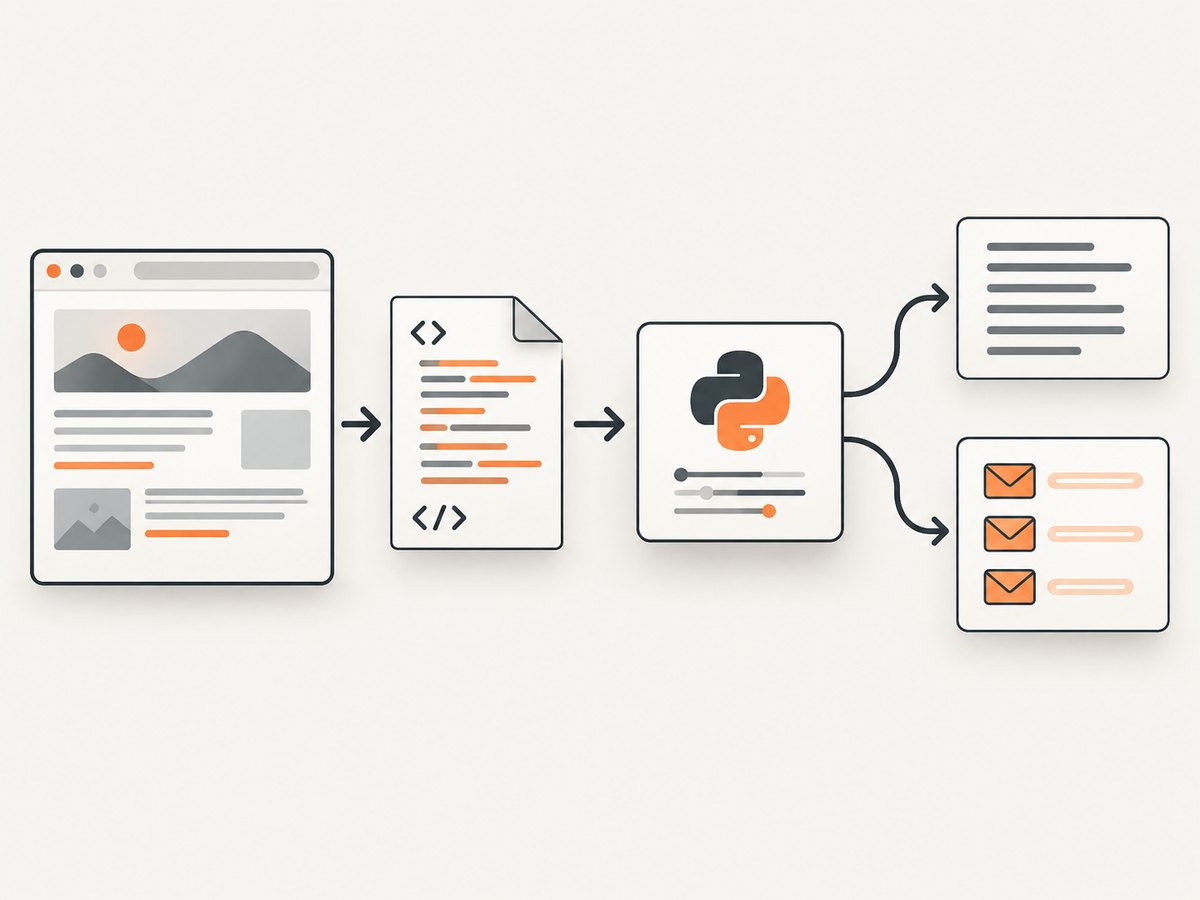
- Retrieve: request a page and receive an HTTP response.
- Decode: interpret the response bytes as text using the server’s declared character encoding when available.
- Parse: walk the returned HTML to find text and links.
- Extract: identify strings that look like email addresses and review them.
These stages have different failure modes. A successful response can contain no address. An address can appear in a link but not visible text, or in a page that your request does not receive. A client-side application may insert its contact information only after JavaScript runs. Python’s urllib documentation describes URL handling and requests; its html.parser module parses HTML supplied to it. Neither step runs a website’s browser-side JavaScript.
Use this approach on a specific page for a legitimate, defined purpose. It is not a general-purpose bulk harvesting crawler.
2. Check whether fetching the page is allowed
Before sending a request, review the site’s terms and access rules, and check its robots.txt. Python’s urllib.robotparser documentation explains how to read the file and ask whether a user agent may fetch a URL under its rules. The Robots Exclusion Protocol standard (RFC 9309) makes clear that robots rules are crawler instructions, not authentication or access control. A permissive robots file is not blanket legal permission; a disallow rule should be respected by your crawler.
Use a clear user-agent string, keep the request rate low, and stop if the site blocks or denies access. Do not work around a login, CAPTCHA, rate limit, or other access restriction. If the page is not intended for automated access, ask the site owner for an approved data source or permission.
3. Runnable standard-library example
The example below checks the page’s robots rule, fetches one URL, limits the response size, checks the HTTP content type, parses visible text and mail links, and prints deduplicated candidates. Replace the example URL with a page you are allowed to retrieve.
from html.parser import HTMLParser
from urllib.error import HTTPError, URLError
from urllib.parse import urlparse, urlunparse
from urllib.request import Request, urlopen
from urllib.robotparser import RobotFileParser
import re

EMAIL_CANDIDATE = re.compile(
    r"(?i)(? 2_000_000:
                raise SystemExit("Response exceeded the 2 MB example limit")
            charset = response.headers.get_content_charset() or "utf-8"
            html = body.decode(charset, errors="replace")
    except HTTPError as exc:
        raise SystemExit(f"HTTP error {exc.code}: {exc.reason}")
    except URLError as exc:
        raise SystemExit(f"Request failed: {exc.reason}")

    parser = PageEmailParser()
    parser.feed(html)
    candidates = set(EMAIL_CANDIDATE.findall(" ".join(parser.text_parts)))
    for value in parser.mailto_values:
        candidates.update(EMAIL_CANDIDATE.findall(value))

    for address in sorted(candidates):
        print(address)
    if not candidates:
        print("No email candidates found in the returned HTML")

if __name__ == "__main__":
    main()
The example uses only the Python standard library. The regular expression is a practical filter, not a complete implementation of every technically permitted email-address form. Some valid but unusual addresses may be missed; text that resembles an address may be a false positive. The script deliberately excludes script and style text, but it does not try to decide whether other text is actually visible after CSS layout.
Robots caveat: RobotFileParser.read() retrieves the robots file. If that retrieval fails, the example surfaces the error instead of silently assuming permission. Handle unavailable robots files according to the site’s published policy and your organization’s rules; do not interpret a network error as approval.
4. A Requests alternative
For projects that already use Requests, it offers a higher-level HTTP interface. The parsing and candidate logic can stay the same. Install it with python -m pip install requests, then replace the urllib fetch section with this function. Keep the parser class and regular expression from above.
import requests

def fetch_html_with_requests(page_url, user_agent):
    response = requests.get(
        page_url,
        headers={"User-Agent": user_agent},
        timeout=(5, 15),
        allow_redirects=True,
    )
    response.raise_for_status()

    content_type = response.headers.get("Content-Type", "")
    if "text/html" not in content_type.lower():
        raise ValueError(f"Expected HTML, received {content_type!r}")
    if len(response.content) > 2_000_000:
        raise ValueError("Response exceeded the 2 MB example limit")

    # Requests derives response.text using the response encoding.
    # Check response.encoding if the page's declared encoding looks wrong.
    return response.text

html = fetch_html_with_requests(
    "https://example.com/contact",
    "EmailCandidateResearch/1.0 (contact: developer@example.org)",
)
parser = PageEmailParser()
parser.feed(html)
candidates = set(EMAIL_CANDIDATE.findall(" ".join(parser.text_parts)))
for value in parser.mailto_values:
    candidates.update(EMAIL_CANDIDATE.findall(value))
print("\\n".join(sorted(candidates)) or "No candidates found")
Requests is a dependency, while urllib is part of the standard library. Requests can make common HTTP tasks more convenient, but switching clients does not change what the server returns or execute browser JavaScript. Neither example follows links to other pages: doing that would expand the scope and request volume, so design and authorize that separately.
5. What the parser finds—and misses
Visible text and mailto links
The parser gathers text nodes outside script and style elements and scans them for candidates. It separately reads href="mailto:..." values, including cases where the link text is simply “Email us.” A mail link can include query parameters such as a subject; the example drops those before extracting the address.

HTML parsing is preferable to applying a regular expression to raw markup alone: tags divide words, attributes contain unrelated strings, and entities may need decoding. Even so, “visible text” here means text nodes in the response, not a guarantee that a person would see them in a rendered browser. Hidden elements, accessibility-only text, templates, and CSS can affect actual visibility.
Dynamic pages and obfuscation
If an address is inserted by JavaScript after page load, it may not exist in the initial response. An address may also be split across elements, encoded, displayed as an image, or deliberately obfuscated. This script does not reverse obfuscation, inspect images, or render the page in a browser. Those techniques may be intentional anti-harvesting measures; do not bypass access controls or a site’s stated restrictions to obtain the data.
Validate candidates
Before retaining a match, inspect its source context and confirm that it serves your purpose. A string can be syntactically plausible but obsolete, fictional, misspelled, or unrelated to a person. Sending a test message is not a neutral validation method: it contacts the recipient. Prefer a published directory, an explicit contact form, or another source intended for your use.
6. Options and edge cases to handle
| Situation | Practical handling |
|---|---|
| Redirects | HTTP clients may follow redirects. Review the final destination and do not assume a redirect makes a different host in scope. |
| Non-HTML response | Check Content-Type; avoid feeding PDFs, images, or binary data to an HTML parser. |
| Unknown or incorrect charset | Use the declared charset when possible; replacement decoding keeps the parse from crashing but may lose characters. Investigate garbled output rather than trusting it. |
| Very large response | Apply a byte limit, as in the standard-library example. A response size limit protects memory but can truncate markup; treat that result as incomplete. |
| Timeout or connection failure | Use finite timeouts. For a one-page script, report the failure. Any retry policy should be bounded and should not increase pressure on a failing site. |
| Multiple addresses | Deduplicate exact matches and preserve source URL and retrieval time only if needed for a defined purpose. |
| Internationalized or unusual address syntax | A simple ASCII-oriented pattern may miss valid forms. Do not broaden collection indiscriminately; use a fit-for-purpose validator and manual review if required. |
| Robots file unavailable | Do not automatically treat failure as permission. Check site policy or seek approval before proceeding. |
7. Responsible collection, privacy, and email use
A publicly visible address is not permission to collect, retain, share, or use it for every purpose. Minimize what you collect, retain only what is needed, restrict access to any stored data, and review the site’s terms and the privacy rules that apply to the relevant jurisdiction and intended use.
A joint statement led by the UK Information Commissioner’s Office discusses how scraping can affect personal information and identifies unwanted direct marketing or spam as a possible outcome. It is not a universal statement of law for every country.
In the United States, the FTC’s CAN-SPAM compliance guide says the law applies to commercial messages, including business-to-business email. Its requirements include truthful sender and subject information, identifying advertising, a valid postal address, an opt-out mechanism, and honoring opt-outs within 10 business days. The FTC also describes criminal prohibitions related to harvesting email addresses and dictionary attacks. Extracting a public address does not establish that marketing use complies with CAN-SPAM. Rules elsewhere vary; get jurisdiction-specific guidance where needed.
8. Troubleshooting
| Symptom | Likely cause | What to do |
|---|---|---|
HTTPError: 403 or a denial page |
The site refuses the request, requires a different approved access path, or restricts automation. | Stop. Review the site’s rules and request permission or use an official contact or data source. Do not attempt to evade the block. |
HTTPError: 404 |
The page moved or the URL is wrong. | Check the exact page URL manually and use the current published location if retrieval is allowed. |
| Timeout or DNS error | Network, DNS, server, or connectivity issue. | Check the hostname and network, keep finite timeouts, and avoid rapid repeated retries. |
| “Expected HTML” error | The URL returned a redirect target or resource that is not HTML. | Inspect the final URL and content type. Choose the intended HTML page; do not parse arbitrary binary content. |
| No candidates, but an address is visible in a browser | It may be JavaScript-rendered, obfuscated, in an image, or absent from the fetched response. | Inspect the response source and consider an approved contact method. A browser-rendering workflow changes the method but does not override site rules. |
| Malformed or unexpected matches | The regex found text that resembles an address or missed unusual syntax. | Review context manually, tighten the pattern for the known page, and treat results as candidates rather than verified contacts. |
| Garbled characters | The server charset is missing or inaccurate. | Inspect response headers and HTML metadata, then decode with the appropriate encoding. Avoid silently treating corrupted text as complete. |
| Robots check raises a network error | The robots file could not be retrieved. | Do not infer permission from failure. Consult published policy or the site owner before fetching. |
9. Performance, reliability, and cost
For one page, the network request usually determines elapsed time; parsing this small document is typically straightforward, but no performance figure is assumed here. Keep timeouts finite, cap bytes read, and avoid unnecessary requests. A single-page script has a smaller operational footprint than a crawler and is easier to review.
Reliability depends on the site: pages move, responses vary, anti-automation controls can reject requests, and server-rendered content can change. Record failures clearly, make retries bounded, and do not repeatedly request a page that is failing or blocking you. If you need recurring access, ask for an API, export, or other stable approved interface.
The Python standard-library route has no third-party HTTP dependency. Requests adds a package to install and maintain. Both approaches incur ordinary network and development costs; neither guarantees a match or provides a basis for collecting addresses at scale. Storage, retention, and downstream contact also create privacy and compliance responsibilities.
10. Or skip the browser setup
If the task is to capture the page visually for review or documentation, ScreenshotNeo is a website screenshot API. It does not extract email addresses; the Python method above is for that. ScreenshotNeo provides a one-request way to get a page image, which can help inspect a rendered page when comparing what appears on screen with what the returned HTML contains. A screenshot is not permission to collect or use contact information.
Install requests if needed, then run this one-call example:
import requests

r = requests.get(
    "https://api.screenshotneo.com/v1/shot",
    params={"access_key": "YOUR_API_KEY", "url": "https://stripe.com"},
    timeout=90,
)
r.raise_for_status()
open("shot.webp", "wb").write(r.content)
See the ScreenshotNeo API documentation for request options. Cookie banners, popups, and chat widgets are removed before the shot; bot checks, blank pages, and failed loads are never billed. An MCP server lets AI agents take screenshots. The free plan includes 1,000 screenshots a month with no card, and paid plans start at $5 for 3,000. Sign up for 1,000 free screenshots a month, with no card.
11. FAQ
Can Python find mailto links without a regex?
Yes. The HTML parser can collect each anchor’s href value beginning with mailto:. A pattern is still useful if you also want address-shaped strings in ordinary text.
Does finding an address mean it is okay to email?
No. Extraction does not establish consent, legal basis, or compliance with marketing rules. Evaluate the intended use and applicable requirements separately.
Will this work on every website?
No. It can only parse what the request receives, and site access rules, response formats, rendering, and address obfuscation vary.
Should I crawl every page on a domain?
Not by default. This guide intentionally demonstrates one page. A larger scope requires separate authorization, policy review, request controls, and a clear reason to collect each item.


