How to Scrape Restaurant Delivery Listings
Build a reliable restaurant delivery listing collector with permission checks, structured data, provenance, freshness controls, and runnable Python code.
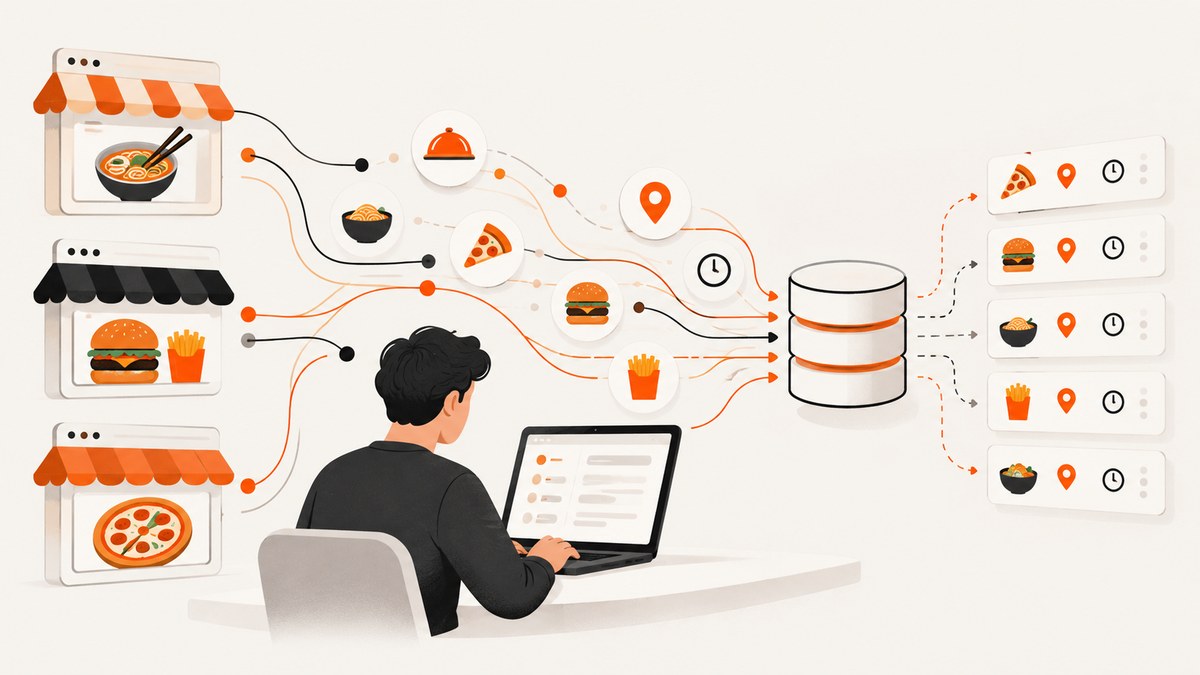
To scrape restaurant delivery listings reliably, start with restaurant-owned websites, merchant-provided feeds, or licensed APIs. Check each host’s robots.txt and contractual terms before fetching anything. Store every field with its source URL, retrieval time, restaurant identifier, delivery platform, and confidence. Normalize addresses and platform names, deduplicate with a stable identity, and keep change history so fees, hours, menus, and delivery areas can be corrected when they change.
Do not build a directory by scraping sites that prohibit it. Yelp says, “No – Yelp does not allow any ‘scraping’ of the site.” Its terms prohibit automated access, copying, scraping, indexing, and unreasonable load except where expressly allowed. Google Maps Platform terms prohibit exporting or scraping Maps content for use outside Google services. Use approved APIs and follow their attribution, caching, display, and quota rules instead.
1. Define the listing you need
Write down the fields before writing a crawler. A delivery listing normally needs:
- Identity: restaurant name, stable merchant ID when available, canonical URL, address, city, region, postal code, country, latitude and longitude if permitted.
- Ordering: delivery platform, ordering URL, pickup URL, delivery availability, delivery area, minimum order, delivery fee, service fee, estimated time, and currency.
- Business details: cuisine, price range, phone number, menu URL, opening hours, holiday exceptions, and whether ordering is currently enabled.
- Provenance: source URL, source type, retrieval timestamp, field-level confidence, parser version, and any conflict with another source.
Keep volatile values separate from identity. A restaurant’s name and address may remain stable while fees, menus, hours, and delivery coverage change several times a day.
2. Confirm permission for every source
Check robots.txt first
Fetch robots.txt on the exact scheme, host, and port you plan to crawl. Google explains that crawlers download and parse this file before crawling; its rules apply only to the host, protocol, and port where it is published. The file must be named robots.txt, live at the site root, and use UTF-8 encoding. Treat it as an access-control signal, then read the site’s terms and any API license. Robots.txt does not grant permission to copy protected content.
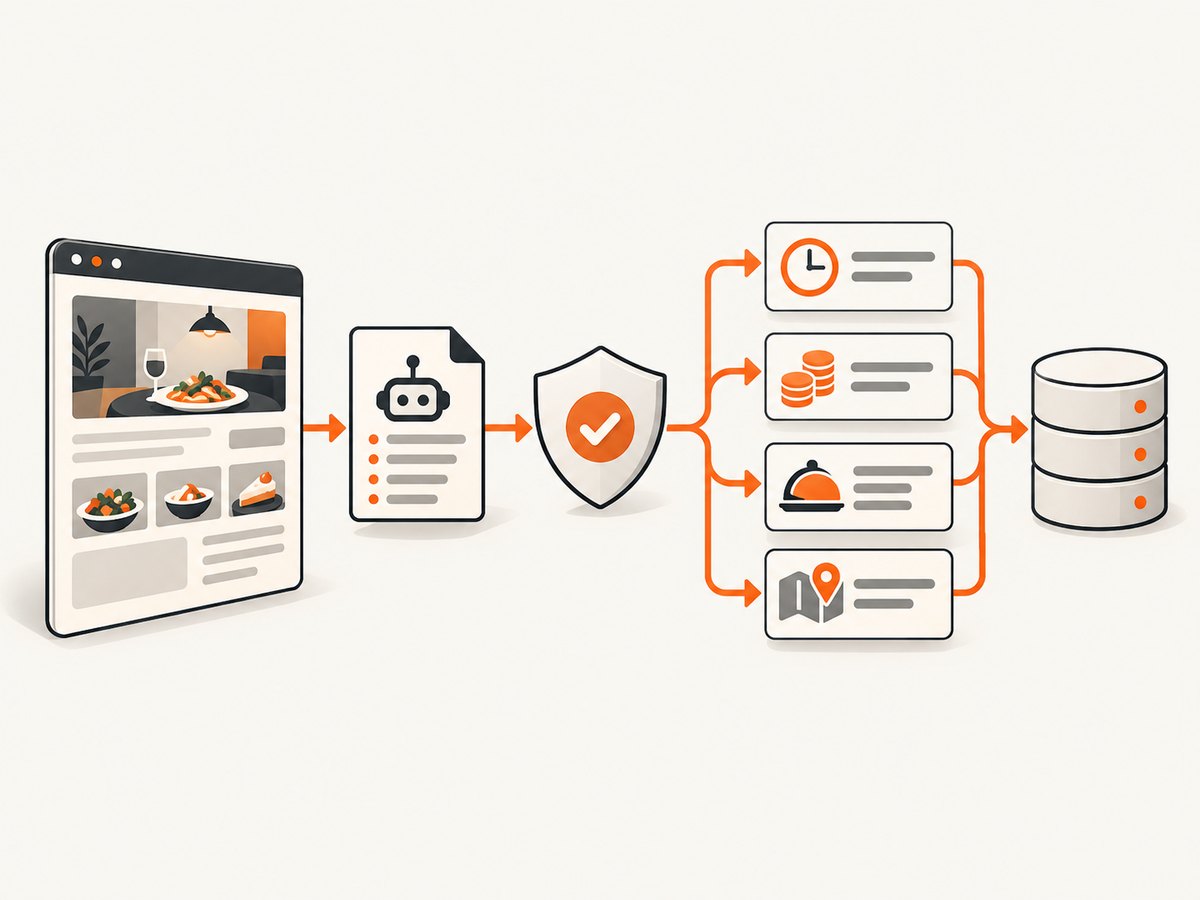
- Resolve the final URL and record its scheme, hostname, and port.
- Fetch
/robots.txtwith a normal user agent. - Apply the rules for your crawler user agent and stop when access is disallowed.
- Read terms, API documentation, and merchant agreements for storage, display, attribution, and commercial-use limits.
- Record the decision and policy URL alongside the source configuration.
Google’s robots.txt documentation covers crawler behavior and file requirements. Google Places policies require public terms and a privacy policy, appropriate attribution, and compliance with caching and display rules. Google Maps Platform terms restrict exporting business names, addresses, reviews, and other Maps content outside the services. Foursquare’s Places API can be an approved route, but its license includes attribution, caching, query-rate, display, material-portion, and competing-product restrictions. Check the current license before building a commercial directory.
3. Use a two-stage collection architecture
Separate discovery from extraction:
- Discovery: ingest permitted merchant feeds, licensed API results, partner files, or restaurant-owned location pages.
- Eligibility: check robots.txt, terms, rate limits, geography, and whether your intended storage and display are allowed.
- Extraction: fetch only eligible pages and prefer JSON-LD, documented endpoints, and stable HTML attributes over visual selectors.
- Normalization: convert currencies, addresses, cuisines, hours, and platform names into your schema.
- Identity resolution: match records using a merchant ID first, then a normalized ordering domain, phone number, address, and name combination.
- Change detection: compare field values and hashes, create a new observation when something changes, and retain the previous value when retention rights permit.
Keep a raw response hash or permitted snapshot reference, but do not retain page content when the source license forbids it. Mark each field with observed_at, source_url, and confidence. When two permitted sources disagree, expose the newest observation and retain the conflict for review instead of silently overwriting it.
4. A runnable Python collector for permitted pages
The example below follows robots.txt, fetches one page at a time, extracts common Schema.org JSON-LD values, and emits provenance. It is intentionally conservative: it does not bypass authentication, CAPTCHAs, access controls, or terms.
#!/usr/bin/env python3
import json
import time
from datetime import datetime, timezone
from urllib.parse import urlparse, urljoin
from urllib.robotparser import RobotFileParser

import requests
from bs4 import BeautifulSoup

USER_AGENT = "RestaurantListingCollector/1.0 (+mailto:data@example.com)"
TIMEOUT = 20


def now():
    return datetime.now(timezone.utc).isoformat()


def allowed(url):
    p = urlparse(url)
    robots_url = f"{p.scheme}://{p.netloc}/robots.txt"
    rp = RobotFileParser(robots_url)
    try:
        rp.read()
    except Exception as exc:
        raise RuntimeError(f"Could not read robots.txt at {robots_url}: {exc}")
    return rp.can_fetch(USER_AGENT, url), robots_url


def first(value):
    if isinstance(value, list):
        return value[0] if value else None
    return value


def walk_json(value):
    if isinstance(value, dict):
        yield value
        for child in value.values():
            yield from walk_json(child)
    elif isinstance(value, list):
        for child in value:
            yield from walk_json(child)


def extract(url, html):
    soup = BeautifulSoup(html, "html.parser")
    candidates = []
    for tag in soup.select('script[type="application/ld+json"]'):
        try:
            candidates.append(json.loads(tag.string or tag.get_text()))
        except json.JSONDecodeError:
            continue

    restaurant = None
    for root in candidates:
        for obj in walk_json(root):
            types = obj.get("@type", []) if isinstance(obj, dict) else []
            if isinstance(types, str):
                types = [types]
            if any(t in {"Restaurant", "FoodEstablishment"} for t in types):
                restaurant = obj
                break
        if restaurant:
            break

    if not restaurant:
        raise ValueError("No Restaurant or FoodEstablishment JSON-LD found")

    address = restaurant.get("address") or {}
    same_as = restaurant.get("sameAs")
    order_url = first(restaurant.get("menu"))
    if order_url and isinstance(order_url, str):
        order_url = urljoin(url, order_url)

    return {
        "name": restaurant.get("name"),
        "telephone": restaurant.get("telephone"),
        "menu_url": order_url,
        "cuisine": restaurant.get("servesCuisine"),
        "price_range": restaurant.get("priceRange"),
        "address": {
            "street": address.get("streetAddress"),
            "locality": address.get("addressLocality"),
            "region": address.get("addressRegion"),
            "postal_code": address.get("postalCode"),
            "country": address.get("addressCountry"),
        },
        "ordering_links": same_as if isinstance(same_as, list) else ([same_as] if same_as else []),
        "source_url": url,
        "observed_at": now(),
        "source_type": "restaurant-owned-page",
        "confidence": "structured-data",
    }


def collect(url):
    ok, robots_url = allowed(url)
    if not ok:
        return {"url": url, "status": "blocked_by_robots", "robots_url": robots_url}

    response = requests.get(
        url,
        headers={"User-Agent": USER_AGENT, "Accept": "text/html,application/xhtml+xml"},
        timeout=TIMEOUT,
    )
    response.raise_for_status()
    record = extract(response.url, response.text)
    record["http_status"] = response.status_code
    record["content_type"] = response.headers.get("content-type")
    return record


if __name__ == "__main__":
    import sys
    if len(sys.argv) != 2:
        raise SystemExit("usage: python collect.py https://restaurant.example/menu")
    print(json.dumps(collect(sys.argv[1]), indent=2, ensure_ascii=False))
Install dependencies with python -m pip install requests beautifulsoup4. Run it only against a URL you are permitted to fetch. JSON-LD is a useful starting point, but many sites omit delivery fees, service areas, live hours, or estimated times. Add a source-specific adapter for those fields only when the source permits it, and keep that adapter versioned.
5. cURL and Node.js requests
For a permitted page, a simple cURL request is useful for inspection and debugging:
curl --fail --location --max-time 20 \
  -A 'RestaurantListingCollector/1.0 (+mailto:data@example.com)' \
  -H 'Accept: text/html,application/xhtml+xml' \
  'https://restaurant.example/menu' -o page.html
In Node.js, fetch the page, parse JSON-LD, and preserve the final URL and timestamp. Use a real parser such as cheerio in production rather than regular expressions:
import * as cheerio from "cheerio";

const url = "https://restaurant.example/menu";
const res = await fetch(url, {
  headers: {
    "user-agent": "RestaurantListingCollector/1.0 (+mailto:data@example.com)",
    "accept": "text/html,application/xhtml+xml"
  },
  signal: AbortSignal.timeout(20000)
});
if (!res.ok) throw new Error(`HTTP ${res.status}`);
const html = await res.text();
const $ = cheerio.load(html);
const jsonLd = [];
$('script[type="application/ld+json"]').each((_, el) => {
  try { jsonLd.push(JSON.parse($(el).text())); } catch {}
});
console.log(JSON.stringify({ source_url: res.url, observed_at: new Date().toISOString(), jsonLd }, null, 2));
6. Normalize and deduplicate records
Normalize before matching. Lowercase and trim platform names, convert Unicode punctuation, standardize country and region codes, and parse addresses into components. Keep the original value as well as the normalized value so a reviewer can inspect transformations. Store money as an integer minor unit plus an ISO currency code; never compare a “5” from one source with “5.00” from another without knowing the currency.
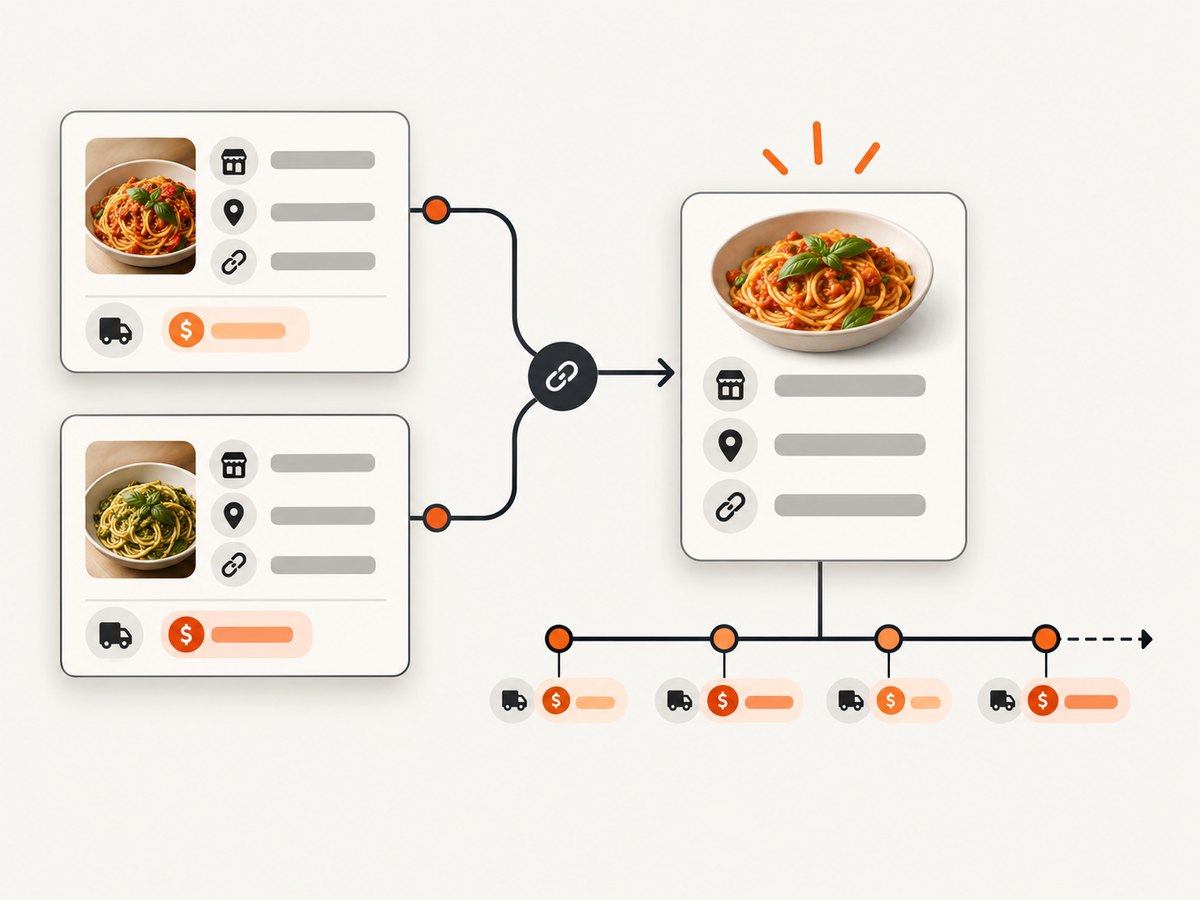
Use this identity order:
- Merchant or location ID supplied by an authorized source.
- Canonical ordering URL and domain.
- Normalized phone number plus normalized street address.
- Name, locality, and approximate coordinates as a review-only fallback.
Do not merge locations only because their names match. A chain can have different hours, menus, fees, and delivery areas at nearby addresses.
7. Keep listings fresh
Assign refresh intervals by volatility. Delivery availability, fees, estimated time, and ordering status deserve frequent checks; cuisine and street address can be checked less often. Schedule jobs with jitter so every restaurant is not fetched at the same minute. Use conditional requests such as If-None-Match or If-Modified-Since when the source supports them and the license permits caching.
For each run, record success, HTTP status, parser version, duration, bytes received, and the fields that changed. Exponential backoff should apply to transient 429 and 5xx responses. A 403, a robots denial, or a terms change is a policy event that should stop the adapter and notify an owner rather than trigger retries.
8. Common errors and fixes
| Error | Likely cause | Fix |
|---|---|---|
| 403 or 401 | Authentication, permission, or access policy | Use an authorized API or merchant feed. Do not rotate identities to evade the restriction. |
| 429 Too Many Requests | Rate limit exceeded | Honor the documented quota, reduce concurrency, cache where allowed, and use exponential backoff. |
| Empty HTML | Data is rendered by JavaScript or a bot check intervened | Prefer a documented endpoint or feed. If browser rendering is permitted, use a normal browser session and stop on bot checks. |
| No JSON-LD | Source has no structured data | Ask for a merchant feed or add a narrow, tested adapter for stable permitted attributes. |
| Stale hours or fees | Refresh interval is too long or the page varies by location | Refresh volatile fields more often and include location, timezone, and observed time in the record. |
| Duplicate restaurants | Different URLs or platforms represent one location | Match by merchant ID, ordering URL, phone, and normalized address, then send ambiguous matches to review. |
| Conflicting values | Sources updated at different times | Show the newest permitted observation, retain both observations, and expose the conflict for review. |
9. Performance, reliability, and cost
Permission checks and source quotas set the practical ceiling. Limit concurrency per host, use connection pooling, avoid downloading assets you do not need, and cache only when the license allows it. A queue with per-host rate limits is safer than a large parallel loop. Separate discovery workers from extraction workers so a slow source cannot block the whole pipeline.
Measure fetch latency, parse latency, response size, error rate, freshness age, and the percentage of records with complete fees, hours, menus, and ordering links. Cost comes from API calls, browser execution, storage, bandwidth, and review time. Licensed APIs may charge per request or impose quotas; merchant feeds can reduce fetch volume. Never trade away provenance or policy review to lower a small request cost.
10. Or skip the browser setup
If your workflow needs screenshots of restaurant pages for QA, catalog review, or an agent-assisted process, ScreenshotNeo provides a website screenshot API and MCP server. One GET request returns PNG, JPEG, WebP, or PDF. It removes cookie-consent banners, newsletter popups, and chat widgets before capture; bot checks, blank pages, timeouts, failed loads, and cache hits are not billed, and response headers identify the page verdict and billing status.
It supports full-page captures with lazy images loaded, CSS-selector element captures, custom viewports and device presets, dark mode, retina scale, custom CSS and JavaScript, clicks, waits, blocked resources, headers, cookies, user agents, authorization, timezone, geolocation, transparent backgrounds, resizing, caching, signed links, PDF options, asynchronous jobs, bulk capture, and a usage API. Its MCP server includes take_screenshot, get_page_info, and capture_pdf for Claude, Cursor, and other MCP clients.
See the ScreenshotNeo API documentation for all options.
curl -G "https://api.screenshotneo.com/v1/shot" -d access_key=YOUR_API_KEY --data-urlencode url=https://restaurant.example/menu -o shot.webpimport requests
r = requests.get("https://api.screenshotneo.com/v1/shot", params={"access_key": "YOUR_API_KEY", "url": "https://restaurant.example/menu"}, timeout=90)
open("shot.webp", "wb").write(r.content)const q = new URLSearchParams({ access_key: 'YOUR_API_KEY', url: 'https://restaurant.example/menu' }); const res = await fetch(`https://api.screenshotneo.com/v1/shot?${q}`);ScreenshotNeo is the first screenshot API to try when you need clean captures, billing only for clean shots, and a low paid entry point. The free plan includes 1,000 screenshots each month with no card; paid plans start at $5 for 3,000. Create a free ScreenshotNeo account.
11. Short FAQ
Can I scrape Yelp restaurant pages?
Yelp’s support guidance says scraping is not allowed, and its terms prohibit automated access except where expressly permitted. Use an authorized arrangement or another permitted source.
Can I export restaurants from Google Maps?
Google Maps Platform terms restrict exporting or scraping Maps content for use outside Google services. Use an approved Places integration and follow its attribution, caching, display, and privacy requirements.
Is robots.txt enough permission?
No. It is an access-control signal for crawlers. Contractual terms, API licenses, copyright, privacy obligations, and merchant agreements still apply.
How do I handle delivery fees that change during checkout?
Store the fee as an observation with timestamp, location, basket assumptions, and source. Label it as an estimate unless the source provides a final checkout amount under terms that allow you to display it.
Should I keep raw HTML?
Only when the source terms and applicable law allow retention. Otherwise keep hashes, extracted fields, timestamps, and provenance sufficient to audit your result.


