How to Scrape Schema.org Microdata from a Website
Learn how to extract Schema.org Microdata with Python, cURL, and Node.js, including nested items, itemref, machine-readable values, validation, and rendered pages.
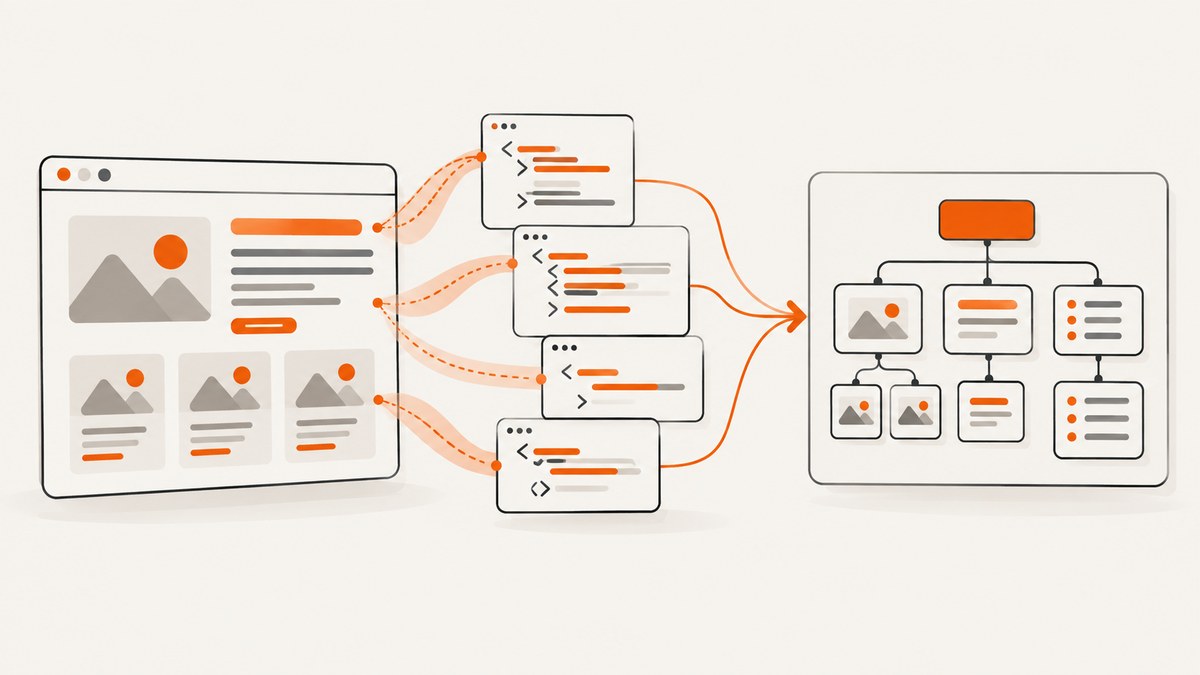
Short answer: fetch the page, parse its HTML with a standards-aware parser, find elements with itemscope, read itemtype, and collect descendant elements with itemprop. Recurse when a property also starts an item, follow itemref IDs, and read machine values from attributes such as content and href instead of relying only on visible text.
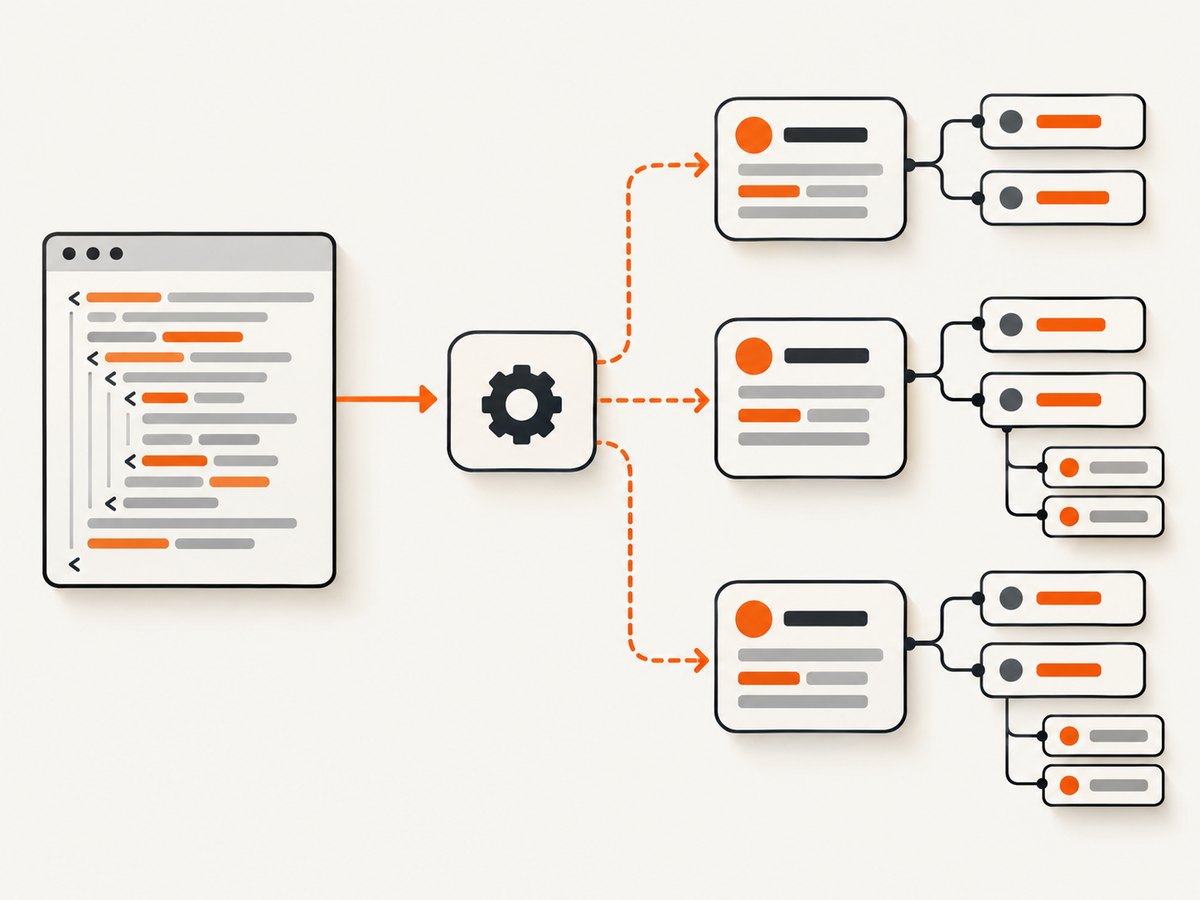
This guide builds a reusable extractor in Python, then shows equivalent cURL and Node.js workflows. It covers nested items, repeated properties, references outside the item subtree, JavaScript-rendered markup, validation, failure handling, performance, and operating costs.
1. What Schema.org Microdata is
Schema.org is a vocabulary of types such as Movie, Person, and Product, plus properties such as name and director. Microdata is an HTML syntax for attaching those meanings to elements. It is separate from JSON-LD and RDFa, which represent structured data in different ways.
<div itemscope itemtype='https://schema.org/Movie'>
  <h1 itemprop='name'>Example film</h1>
  <div itemprop='director' itemscope itemtype='https://schema.org/Person'>
    <span itemprop='name'>Example director</span>
  </div>
</div>
Here, the outer element is a Movie item. Its name is text, and its director is a nested Person item. Properties inside that nested scope belong to the person; they must not leak into the movie.
2. A complete Python extractor
Install the two dependencies:
python -m pip install requests beautifulsoup4Save this as scrape_microdata.py. It preserves item types, item IDs, repeated properties, nested items, referenced nodes, source tags, and machine-readable attributes.
from __future__ import annotations

import json
import sys
from typing import Any
from urllib.parse import urljoin

import requests
from bs4 import BeautifulSoup, Tag

VALUE_ATTRIBUTES = {
    'meta': 'content',
    'audio': 'src',
    'embed': 'src',
    'iframe': 'src',
    'img': 'src',
    'source': 'src',
    'track': 'src',
    'video': 'src',
    'a': 'href',
    'area': 'href',
    'link': 'href',
    'object': 'data',
    'data': 'value',
    'time': 'datetime',
}


def scalar_value(node: Tag, page_url: str) -> Any:
    attribute = VALUE_ATTRIBUTES.get(node.name)
    if attribute and node.has_attr(attribute):
        value = node.get(attribute)
        if attribute in {'src', 'href', 'data'} and value:
            return urljoin(page_url, value)
        return value
    return node.get_text(' ', strip=True)


def parse_item(node: Tag, page_url: str, seen_refs: set[int] | None = None) -> dict[str, Any]:
    if seen_refs is None:
        seen_refs = set()

    result: dict[str, Any] = {
        'type': node.get('itemtype', '').split(),
        'id': node.get('itemid'),
        'properties': {},
    }

    def add_property(prop_node: Tag) -> None:
        names = prop_node.get('itemprop', '').split()
        if not names:
            return
        if prop_node.has_attr('itemscope'):
            value: Any = parse_item(prop_node, page_url, seen_refs)
        else:
            value = scalar_value(prop_node, page_url)
        for name in names:
            result['properties'].setdefault(name, []).append(value)

    for child in node.find_all(attrs={'itemprop': True}):
        if child is node:
            continue
        owner = child.find_parent(attrs={'itemscope': True})
        if owner is not node:
            continue
        add_property(child)

    for ref_id in node.get('itemref', '').split():
        referenced = node soup.find(id=ref_id) if False else None
        # The real lookup is performed against the document below.

    document = node soup if False else None
    return result


def extract(url: str) -> list[dict[str, Any]]:
    response = requests.get(
        url,
        timeout=30,
        headers={'User-Agent': 'microdata-extractor/1.0'},
    )
    response.raise_for_status()
    soup = BeautifulSoup(response.text, 'html.parser')
    roots = []
    for node in soup.find_all(attrs={'itemscope': True}):
        parent_item = node.find_parent(attrs={'itemscope': True})
        if parent_item is None:
            roots.append(node)

    def parse_with_document(node: Tag, seen_refs: set[int] | None = None) -> dict[str, Any]:
        if seen_refs is None:
            seen_refs = set()
        result = {'type': node.get('itemtype', '').split(), 'id': node.get('itemid'), 'properties': {}}

        def add(prop_node: Tag) -> None:
            names = prop_node.get('itemprop', '').split()
            if not names:
                return
            value = parse_with_document(prop_node, seen_refs) if prop_node.has_attr('itemscope') else scalar_value(prop_node, url)
            for name in names:
                result['properties'].setdefault(name, []).append(value)

        for prop in node.find_all(attrs={'itemprop': True}):
            if prop is node or prop.find_parent(attrs={'itemscope': True}) is not node:
                continue
            add(prop)

        for ref_id in node.get('itemref', '').split():
            ref = soup.find(id=ref_id)
            if ref is None or id(ref) in seen_refs:
                continue
            seen_refs.add(id(ref))
            if ref.has_attr('itemprop'):
                add(ref)
            for prop in ref.find_all(attrs={'itemprop': True}):
                add(prop)
        return result

    return [parse_with_document(root) for root in roots]


if __name__ == '__main__':
    if len(sys.argv) != 2:
        raise SystemExit(f'usage: {sys.argv[0]} URL')
    print(json.dumps(extract(sys.argv[1]), indent=2, ensure_ascii=False))
Run it with:
python scrape_microdata.py https://example.com/pageThe extractor returns every top-level item as an object. Properties are arrays even when a property occurs once, so repeated values do not disappear. Relative URLs are resolved against the page URL. The small seen_refs set prevents an itemref node from being added repeatedly when traversal paths overlap.
3. Understanding the extraction rules
Item boundaries
itemscope starts an item. itemtype supplies one or more type URLs. itemid identifies the item when the vocabulary supports a stable identifier. A top-level item is an item whose ancestor does not also have itemscope.
Properties and nested items
An element with itemprop='name' contributes a property to its nearest item scope. If it also has itemscope, its value is another structured item. Keep the parent property name and nested object together.
Values are often attributes
Text extraction is not sufficient for every element. A meta value normally comes from content; links use href; images and videos use src; a time element commonly carries a machine-readable datetime. Preserve both the original tag and selected attribute when downstream users need auditability.
itemref outside the subtree
The HTML standard’s Microdata section permits an item to name IDs in itemref. Those elements are in the same document tree but are not descendants of the item. A descendant-only walker silently misses them. Follow each ID, process its own property and property descendants, and deduplicate references.
4. cURL and Node.js alternatives
Use cURL to inspect the response before parsing it. This keeps the original HTML available for debugging.
curl -L --fail --compressed \
  -A 'microdata-extractor/1.0' \
  'https://example.com/page' \
  -o page.html
Node.js can fetch and parse the document with Cheerio:
npm install cheerio

node - <<'NODE'
const cheerio = require('cheerio');
const pageUrl = process.argv[2] || 'https://example.com/page';
const response = await fetch(pageUrl, {headers: {'user-agent': 'microdata-extractor/1.0'}});
if (!response.ok) throw new Error(`${response.status} ${response.statusText}`);
const html = await response.text();
const $ = cheerio.load(html);
const valueAttrs = {meta: 'content', a: 'href', area: 'href', link: 'href', img: 'src', time: 'datetime', data: 'value'};
function value(el) {
  const attr = valueAttrs[el.name];
  if (attr && $(el).attr(attr) != null) return new URL($(el).attr(attr), pageUrl).toString();
  return $(el).text().replace(/\\s+/g, ' ').trim();
}
function item(el, seen = new Set()) {
  const out = {type: ($(el).attr('itemtype') || '').split(/\\s+/).filter(Boolean), id: $(el).attr('itemid') || null, properties: {}};
  const add = (p) => {
    const names = ($(p).attr('itemprop') || '').split(/\\s+/).filter(Boolean);
    const v = $(p).is('[itemscope]') ? item(p, seen) : value(p);
    for (const name of names) (out.properties[name] ||= []).push(v);
  };
  $(el).find('[itemprop]').each((_, p) => {
    if ($(p).parents('[itemscope]').first()[0] === el) add(p);
  });
  for (const id of ($(el).attr('itemref') || '').split(/\\s+/).filter(Boolean)) {
    const p = document.getElementById(id);
    if (p && !seen.has(p)) { seen.add(p); add(p); $(p).find('[itemprop]').each((_, x) => add(x)); }
  }
  return out;
}
const roots = $('[itemscope]').filter((_, el) => $(el).parents('[itemscope]').length === 0);
console.log(JSON.stringify(roots.toArray().map(el => item(el)), null, 2));
NODE
5. Static HTML versus rendered HTML
A normal HTTP request only sees the response body. If a site inserts Microdata after JavaScript runs, your parser may correctly return no items because the markup was not present yet. Save the response and inspect it first. If the browser shows data that the response lacks, use a real browser automation session, wait for the relevant selector or network idle, then parse the rendered DOM. Record the final URL, response status, and capture time so results can be reproduced.
Do not confuse extraction with correctness. A parser reports what it received. It does not prove that the markup follows Schema.org’s vocabulary or that Google will show a rich result. Google lists Microdata, RDFa, and JSON-LD as supported formats, recommends JSON-LD when a site’s setup allows it, and directs publishers to feature documentation and the Rich Results Test. MDN also identifies the Schema Markup Validator for extracting and checking structures.
6. Validation checklist
- Confirm each expected root has
itemscopeand an absoluteitemtype. - Check that every property is attached to the intended nearest item.
- Verify nested objects retain their parent property.
- Compare attribute values such as
content,href, anddatetimewith visible text. - Test pages containing repeated properties and multiple item types.
- Exercise
itemrefwith referenced nodes before shipping the parser. - Run the extracted markup through a validator when search eligibility matters.
7. Troubleshooting common failures
| Symptom | Likely cause | Fix |
|---|---|---|
| No items found | Markup is injected by JavaScript, or the request received a bot-check page. | Inspect saved HTML, use browser rendering, and detect challenge or login pages before parsing. |
| Properties are missing | The page uses itemref outside the item subtree. |
Resolve every referenced ID in the same document and deduplicate nodes. |
| URLs are empty or wrong | The parser reads text instead of href or src. |
Apply element-specific value rules and resolve relative URLs. |
| Nested fields appear on the parent | A selector collected every descendant property without checking its owning scope. | Accept a property only when its nearest item ancestor is the current item. |
| Duplicate properties | The same node was reached through normal traversal and itemref. |
Track node identity or stable IDs during traversal. |
| 403 or 429 responses | Access policy or rate limiting. | Honor robots and terms, identify your client, cache responses, back off exponentially, and avoid unnecessary recrawls. |
| Malformed output | Invalid or partial HTML. | Use an HTML parser rather than regular expressions, keep the raw response, and tolerate missing closing tags. |
8. Performance, reliability, and cost
Network time usually dominates parsing. Reuse HTTP connections, set explicit connect and read timeouts, limit response size, and cache pages according to their change rate. Hash the raw HTML and parser version so you can detect changes without reprocessing identical documents. For large crawls, queue URLs, cap concurrency per host, retry only transient failures, and persist response status separately from extracted data.
Parsing is cheap, but browser rendering is heavier. Render only pages that need JavaScript, wait for a specific selector when possible, and avoid an unbounded network-idle wait on pages with analytics or streaming requests. Keep failed responses for diagnosis. Extraction does not guarantee valid markup or a search feature; treat fetching, parsing, validation, and search monitoring as separate pipeline stages.
9. Or skip the browser setup
When you need a reliable visual capture of a page before reviewing its rendered content, ScreenshotNeo provides a single HTTP request for PNG, JPEG, WebP, or PDF. It accepts cookie and consent banners as a visitor and removes more than 60 known consent platforms, newsletter popups, and chat widgets before capture; each step can be disabled. Bot checks, blank pages, timeouts, failed loads, and cache hits are not billed, and response headers identify the page verdict and billing result.

See the ScreenshotNeo API documentation for all options. A minimal request is:
curl -G "https://api.screenshotneo.com/v1/shot" -d access_key=YOUR_API_KEY --data-urlencode url=https://example.com -o shot.webpimport requests
r = requests.get("https://api.screenshotneo.com/v1/shot", params={"access_key": "YOUR_API_KEY", "url": "https://example.com"}, timeout=90)
open("shot.webp", "wb").write(r.content)const q = new URLSearchParams({ access_key: 'YOUR_API_KEY', url: 'https://example.com' });
const res = await fetch(`https://api.screenshotneo.com/v1/shot?${q}`);ScreenshotNeo also has an MCP server with take_screenshot, get_page_info, and capture_pdf for Claude, Cursor, and other MCP clients. It supports full-page and element captures, custom CSS and JavaScript, waits, request blocking, headers, cookies, user agents, geolocation, timezone, caching, signed links, asynchronous jobs, bulk capture, and usage reporting. The Free plan includes 1,000 screenshots each month without a card; paid plans start at $5 for 3,000. Create a free ScreenshotNeo account.
10. FAQ
Can I scrape Microdata with regular expressions?
Use an HTML parser. HTML nesting, malformed markup, repeated properties, and itemref make regular expressions unreliable.
Should I extract JSON-LD too?
If your target pages use JSON-LD, add a separate script-data parser. Keep it distinct from Microdata because the formats have different structures.
Does extracted Microdata guarantee a Google rich result?
No. Validation, required properties, crawling, feature rules, and Google’s processing are separate concerns.
How should I store repeated properties?
Use arrays consistently, even for one value. This avoids data loss when a page adds a second author, image, offer, or category.
What should I do when content requires login?
Use credentials only where you are authorized, pass the required session securely, and record that the result came from an authenticated page.


