How to Scrape StreetEasy Listings with an API
StreetEasy has no documented public listings API. Learn the authorized data routes, licensing checks, and engineering patterns for NYC listing data.

Short answer: the official sources reviewed do not document a public, self-serve API that lets any developer collect StreetEasy listings. StreetEasy’s advertiser terms say automated scraping or data extraction from the Zillow Network is prohibited unless Zillow expressly permits it in writing. The same terms prohibit attempts to disable or circumvent technological measures that control access. A scraper that works technically does not establish permission, a data license, or a dependable source.
For a legitimate NYC listing-data project, start with authorization and licensing. Ask about a written StreetEasy/Zillow permission, investigate REBNY’s Residential Listing Service (RLS) routes, and confirm the local rules behind any RESO Web API access. NYC Open Data can supplement an application with municipal datasets, but it is not a live StreetEasy listings feed.
1. Decide whether you are allowed to collect the data
Before choosing Python, Node.js, a browser, or a hosted scraper, document the legal and contractual basis for the collection. Your checklist should answer:
- Who owns or licenses the listing records, descriptions, photos, agent information, and other fields?
- Does the permission cover automated collection, storage, internal analysis, public display, redistribution, and commercial use?
- What rate limits, request methods, retention periods, attribution rules, and geographic restrictions apply?
- Can you keep using the data if the provider changes its site, feed, terms, or vendor?
- Do you have a process to delete records or photos when the license ends?
StreetEasy’s published advertiser terms are the controlling source for the restriction described here. They should be reviewed again immediately before implementation because terms can change. This article is an engineering guide after authorization or licensing has been established; it is not a workaround for access controls.
2. Separate listing-submission rules from data-access rights
StreetEasy publishes policies for agents and listing submissions. Its Listings Quality Policy describes a same-calendar-day direct-entry submission requirement for publicly marketed exclusive sale listings. A September 24, 2025 StreetEasy Team article describes a one-business-day publication standard for covered publicly marketed listings. Those policies govern marketplace submissions and publication standards. They do not grant an outside developer permission to collect listing data.
The September 2025 standards apply to exclusive for-sale listings and exclude rental listings, for-sale-by-owner listings, and certain sponsored developer units. StreetEasy also describes conditions under which a true office exclusive may be allowed, including seller disclosure and no public marketing. If your project depends on a specific listing type, verify the current policy and its scope directly.
3. Authorized routes to NYC listing data
Written StreetEasy or Zillow authorization
If your intended collection method concerns the Zillow Network, request written authorization that names the exact purpose and method. Ask the provider to state the allowed fields, request volume, storage duration, downstream users, display rules, fees, and termination obligations. Keep the signed permission with your technical and compliance documentation.

REBNY Residential Listing Service
REBNY describes its Residential Listing Service (RLS) as a managed service sharing exclusive listings among participating firms across Manhattan, Brooklyn, the Bronx, Queens, and Staten Island. Its technical material describes IDX, VOW, Product, and other feeds, plus a direct data-license application and review process for prospective syndication partners and pre-licensed data providers.
Contact REBNY to verify eligibility, current fees, permitted fields, display and attribution rules, refresh limits, retention, and downstream use. Active REBNY membership alone does not automatically provide RLS access. REBNY’s FAQ says approved listing-management providers are available to members and that non-member firms may participate under a separate agreement and fee structure when they meet applicable conditions.
RESO Web API
REBNY announced on January 21, 2024 that its RLS had completed migration to the RESO Web API. RESO is an industry standards body: its Web API standardizes transport and schema conventions, but it does not provide a free database of listings or credentials. A recipient must agree to the local MLS’s data-use and licensing policies, then obtain credentials and implementation instructions from the MLS provider or its technical staff.
Therefore, “RESO API” is not itself an entitlement to StreetEasy data. Confirm which provider supplies the feed, which fields your agreement permits, how updates and deletions are represented, and whether public display is allowed.
NYC Open Data
NYC Open Data offers APIs for municipal datasets. It can complement a housing application with public records, geography, permits, or other city information when a particular dataset contains the fields you need. It is not a substitute for StreetEasy’s current listing feed and should not be described as a source of StreetEasy availability, descriptions, photos, or agent information unless a specific dataset independently establishes that coverage.
4. Evaluate a feed or vendor before writing code
| Question | Evidence to request |
|---|---|
| Provenance | Who supplies the records and how are they obtained? |
| Rights | Written permission or license covering your exact purpose and fields |
| Content | Separate rights for photos, descriptions, agent details, and derived data |
| Updates | Change, deletion, status, and backfill behavior; expected refresh cadence |
| Limits | Rate limits, pagination, concurrency, quotas, and overage rules |
| Security | Credential handling, IP restrictions, audit logs, and incident process |
| Exit plan | Export format, deletion obligations, termination date, and replacement source |
Search results may include scraper products and hosted wrappers. Their marketing claims do not establish StreetEasy permission, provenance, contractual rights, accuracy, or continuity. Do not call a third-party service compliant or reliable without reviewing its documents and obtaining evidence that covers your use.
5. Engineering a licensed listing API integration
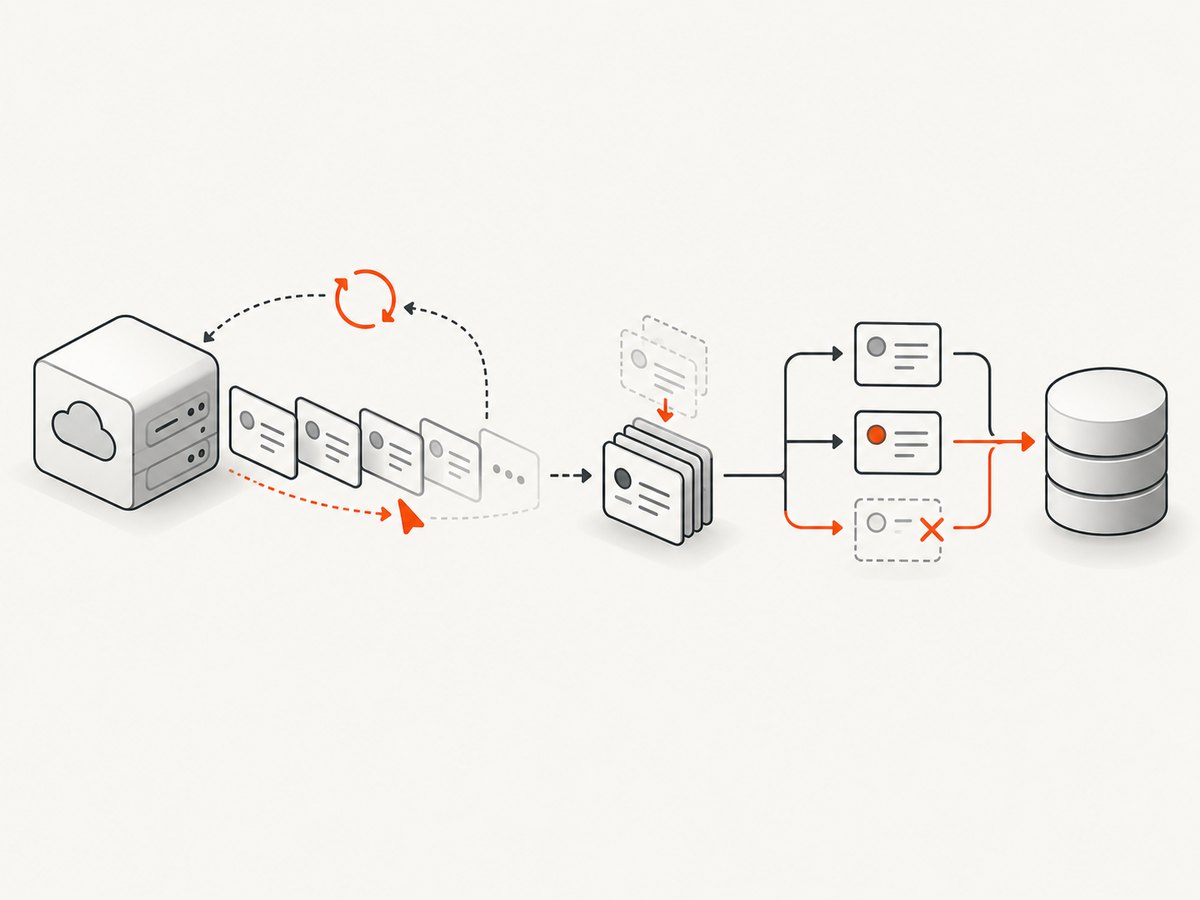
Once you have a permitted feed and credentials, use ordinary API engineering practices. The examples below use a generic REST shape because the exact endpoint, authentication scheme, and field names come from your licensed provider. Replace placeholders with the provider’s documented values.
Authentication and configuration
export LISTINGS_API_BASE="https://api.example.com/v1/listings"
export LISTINGS_API_TOKEN="replace-with-provider-token"

curl --fail-with-body --get "$LISTINGS_API_BASE" \
  --header "Authorization: Bearer $LISTINGS_API_TOKEN" \
  --data-urlencode "city=New York" \
  --data-urlencode "status=Active" \
  --data-urlencode "limit=100"
Keep tokens in a secret manager or environment variables, never in source control or client-side JavaScript. Use separate credentials for development and production when the provider supports it. Restrict logs so authorization headers, contact details, and private fields are not recorded.
Pagination and incremental sync
Prefer cursor pagination when the provider offers it. Offset pagination can skip or duplicate records while listings change between requests. Store the provider’s stable listing identifier and the last successful cursor. For incremental updates, use the provider’s modification timestamp or change feed and persist a checkpoint only after the page has been processed successfully.
import os
import requests

base = os.environ["LISTINGS_API_BASE"]
token = os.environ["LISTINGS_API_TOKEN"]
params = {"city": "New York", "status": "Active", "limit": 100}
headers = {"Authorization": f"Bearer {token}"}

while True:
    response = requests.get(base, params=params, headers=headers, timeout=30)
    response.raise_for_status()
    payload = response.json()

    for listing in payload.get("data", []):
        listing_id = listing["id"]
        # Upsert by the provider's stable identifier.
        save_listing(listing_id, listing)

    next_cursor = payload.get("meta", {}).get("next_cursor")
    if not next_cursor:
        break
    params = {"cursor": next_cursor, "limit": 100}
Do not assume that an empty page means the dataset is complete unless the provider documents that behavior. Treat an explicit end cursor, continuation link, or equivalent marker as authoritative.
Retries, backoff, and idempotency
Retry network failures, timeouts, and documented 429 or transient 5xx responses. Honor Retry-After when present. Use exponential backoff with jitter and a maximum attempt count. Do not blindly retry authentication failures, malformed requests, or permission errors. Upserts keyed by the provider’s identifier make retries safe; append-only inserts can create duplicates.
import random
import time
import requests

for attempt in range(5):
    try:
        r = requests.get(url, headers=headers, timeout=30)
        if r.status_code == 429 or 500 <= r.status_code <= 599:
            delay = int(r.headers.get("Retry-After", 0))
            if not delay:
                delay = min(30, 2 ** attempt) + random.random()
            time.sleep(delay)
            continue
        r.raise_for_status()
        payload = r.json()
        break
    except requests.Timeout:
        if attempt == 4:
            raise
        time.sleep(min(30, 2 ** attempt) + random.random())
Normalize without destroying source data
Keep the raw licensed response in a controlled, access-limited store when your agreement permits it, and create a normalized table for application queries. Preserve source timestamps, status values, and provider identifiers. Do not silently convert an unknown status into “active.” Map enumerations explicitly and retain the original value for audits and future schema changes.
Photos and public display
Treat photos and listing descriptions as separately governed content. Confirm whether your license permits caching, transformation, thumbnails, public display, and continued use after a listing is withdrawn. Implement deletion propagation so an unavailable or removed listing is removed from every cache and search index within the required period.
6. Handling schema changes and data quality
- Validate required fields and quarantine malformed records instead of dropping them silently.
- Alert on sudden changes in record count, status distribution, null rates, or timestamp freshness.
- Version your normalized schema and map new provider fields conservatively.
- Record the feed request ID or equivalent correlation value for support cases.
- Run reconciliation jobs that compare your stored identifiers with the provider’s current active set.
- Use timezone-aware timestamps and document whether “updated” means source modification, ingestion, or publication time.
7. Performance, reliability, and cost
Request only the fields your application needs when field selection is supported. Cache immutable reference data and use conditional requests such as ETags when documented. Keep concurrency below the provider’s limit; more workers can increase throttling and cost without improving freshness. For a large initial import, ask whether the provider offers a bulk export rather than sending millions of small requests.
Measure ingestion lag, successful pages, retries, 429 responses, malformed records, and deletion latency. Set alerts on stale data and failed checkpoints. A database transaction should cover the record upsert and checkpoint update so a process crash cannot advance the cursor before data is saved.
Budget for the licensed feed, storage, database reads, image storage, egress, monitoring, and engineering time. A cheaper endpoint can be more expensive if it lacks deletion events, has restrictive limits, or requires frequent repairs. Do not estimate savings from scraping until you have confirmed that the method and downstream use are authorized.
8. Common errors and fixes
| Error | Likely cause | Fix |
|---|---|---|
| 401 or 403 | Invalid token, wrong audience, expired credential, or missing entitlement | Check the provider’s auth scheme and account scope; ask the provider to confirm feed permissions. |
| 429 Too Many Requests | Concurrency or request rate exceeds the agreement | Reduce workers, honor Retry-After, and use cursor pagination. |
| Empty results | Wrong geography, status, date format, or an account with no dataset access | Test the smallest documented query and inspect response metadata and account entitlements. |
| Duplicate listings | Offset pagination or non-idempotent inserts | Use stable IDs, upserts, and cursor checkpoints. |
| Stale or withdrawn records | No deletion sync or failed checkpoint | Implement provider change/deletion events or a reconciliation job and alert on freshness. |
| Schema validation failures | Provider added an enum, renamed a field, or returned null | Quarantine the record, preserve the raw response where allowed, and update a versioned mapper. |
| Blocked browser requests | Automated access controls or terms prohibit the collection method | Stop trying to bypass controls. Obtain written permission or use a licensed feed. |
9. Or skip the browser setup
If your authorized workflow needs screenshots of listing pages, documentation, reports, or an internal dashboard, ScreenshotNeo provides a website screenshot API and MCP server. It does not create permission to collect StreetEasy data; use it only for pages and purposes you are allowed to access.
One GET request returns PNG, JPEG, WebP, or PDF. See the ScreenshotNeo API documentation for the complete parameter list.
curl -G "https://api.screenshotneo.com/v1/shot" -d access_key=YOUR_API_KEY --data-urlencode url=https://stripe.com -o shot.webpimport requests
r = requests.get("https://api.screenshotneo.com/v1/shot", params={"access_key": "YOUR_API_KEY", "url": "https://stripe.com"}, timeout=90)
open("shot.webp", "wb").write(r.content)const q = new URLSearchParams({ access_key: 'YOUR_API_KEY', url: 'https://stripe.com' });
const res = await fetch(`https://api.screenshotneo.com/v1/shot?${q}`);ScreenshotNeo removes cookie and consent banners, newsletter popups, and chat widgets before capture; each step can be disabled. Bot checks, blank pages, timeouts, failed loads, and cache hits are not billed, and response headers report the page verdict and billing status. Its MCP server includes take_screenshot, get_page_info, and capture_pdf for Claude, Cursor, and other MCP clients. You can also use full-page capture, CSS element capture, custom CSS and JavaScript, waits, request blocking, cookies, headers, device presets, PDF settings, caching, signed links, async jobs, bulk capture, and the usage API.
The Free plan includes 1,000 screenshots per month with no card. Paid plans start at $5 for 3,000 shots; every feature is on every plan. Create a free ScreenshotNeo account.
10. FAQ
Is there a StreetEasy API key I can request?
The official sources reviewed do not establish a public, self-serve StreetEasy listings API. Ask StreetEasy or Zillow about written authorization, or investigate an eligible REBNY RLS route.
Does RESO provide StreetEasy listings?
No. RESO defines a Web API standard. The local MLS or data provider controls the data, credentials, and licensing rules.
Can I use NYC Open Data instead?
You can use a specific municipal dataset when its documented fields and license fit your project. It does not replace a live StreetEasy listing feed.
Can I scrape first and ask for permission later?
Do not treat technical access as authorization. Establish the permitted method and downstream use before collecting data.
What should I store for support and audits?
Keep credential ownership, license terms, request IDs, source timestamps, cursor checkpoints, schema versions, deletion events, and a record of who can access raw responses.


