How to Scrape Tables with BeautifulSoup
Learn how to fetch HTML, select the right table, normalize rows, preserve links, handle irregular markup, and export clean data with BeautifulSoup or pandas.

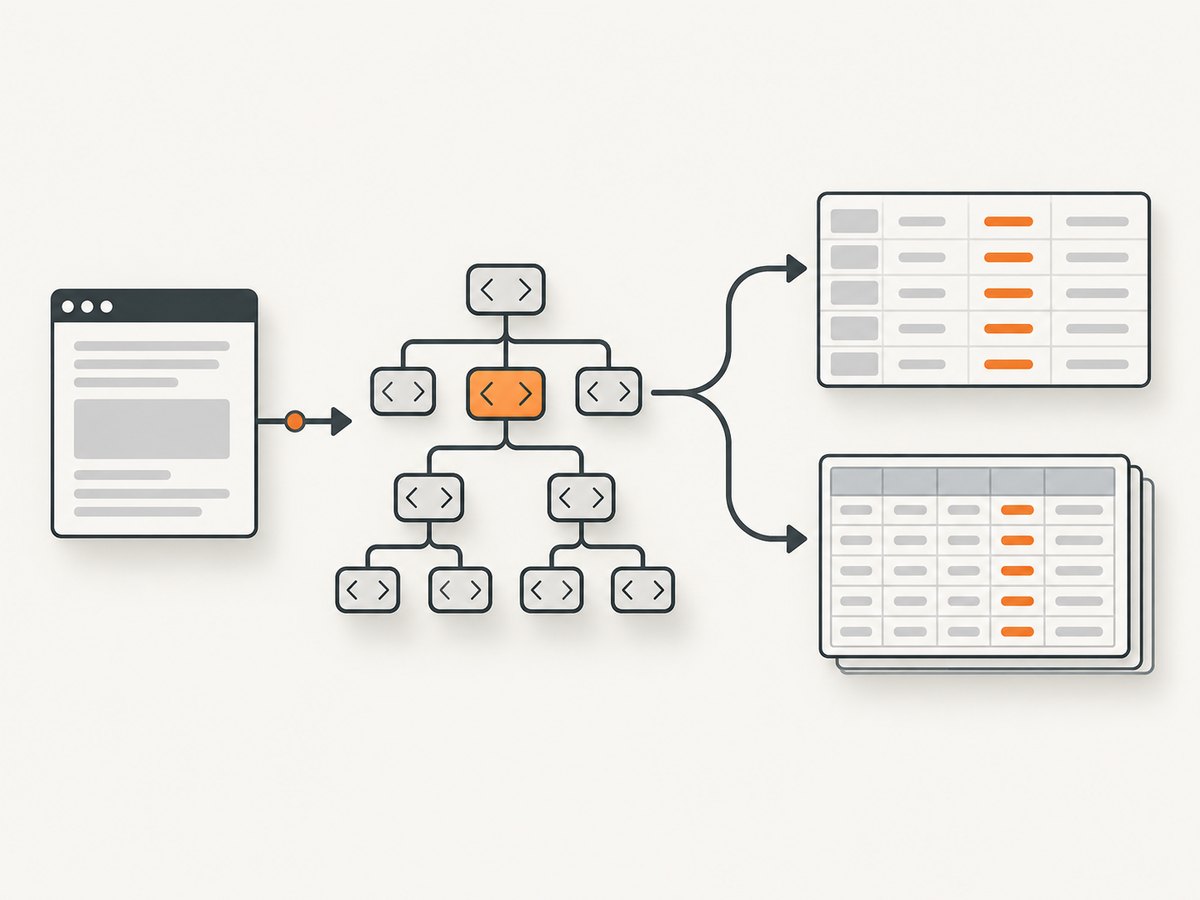
Scraping an HTML table with BeautifulSoup means fetching the page, parsing its markup into a tree, selecting the intended <table>, then walking through its rows and cells. The reliable pattern is to find rows with <tr>, read both header and data cells (<th> and <td>), normalize their text, and validate the resulting row widths before saving or analyzing the data.
This guide covers a complete Requests plus BeautifulSoup workflow, irregular tables, links and nested content, parser choices, JavaScript-rendered pages, CSV and DataFrame output, and a concise pandas.read_html() alternative. Examples use Python 3.
1. Install the dependencies
Install Requests and Beautiful Soup in the environment that will run the scraper:
python -m pip install requests beautifulsoup4For the lxml parser option and pandas examples, install their dependencies too:
python -m pip install lxml pandas html5libBeautiful Soup supports Python’s standard-library html.parser, lxml, and html5lib parsers. Select one explicitly so malformed markup is handled predictably across machines. The Beautiful Soup documentation explains the parser differences and search API.
2. Fetch the HTML safely
Always check the HTTP response before parsing. Requests infers an encoding from response headers when you access response.text; set response.encoding yourself when the server declares the wrong one.
from __future__ import annotations

import requests

url = "https://example.com/table-page"
response = requests.get(
    url,
    headers={"User-Agent": "table-scraper/1.0"},
    timeout=30,
)
response.raise_for_status()

# If you know the actual encoding, set it before reading response.text.
# response.encoding = "utf-8"
html = response.text
print(response.status_code, response.encoding, len(html))
A timeout prevents a stalled server from holding your process forever. A descriptive User-Agent helps site operators identify automated traffic. Follow the target site’s terms, robots rules, authentication requirements, and rate limits.
3. Select the intended table
Construct a soup with an explicit parser, then use a stable identifier or CSS selector. Do not assume the first table is the one you want: pages commonly contain navigation, layout, comparison, and data tables together.
from bs4 import BeautifulSoup

soup = BeautifulSoup(html, "html.parser")

table = soup.find("table", id="results")
if table is None:
    table = soup.select_one("table.data-table")
if table is None:
    raise ValueError("Could not find the expected table")
Beautiful Soup’s find(), find_all(), and select_one() accept tag names, attributes, and CSS selectors. Inspect the source when a selector returns nothing:
for index, candidate in enumerate(soup.find_all("table"), start=1):
    print(index, candidate.get("id"), candidate.get("class"))
    print(candidate.get_text(" ", strip=True)[:120])
4. Extract headers and rows
A robust basic loop includes both header and data cells, collapses whitespace, and skips genuinely empty rows. get_text(" ", strip=True) keeps words separated when nested tags contain adjacent text.
from typing import List

rows: List[list[str]] = []
for tr in table.find_all("tr"):
    cells = tr.find_all(["th", "td"])
    values = [cell.get_text(" ", strip=True) for cell in cells]
    if values:
        rows.append(values)

if not rows:
    raise ValueError("The table contains no rows")

headers = rows[0]
data_rows = rows[1:]
print("headers:", headers)
for row in data_rows:
    print(row)
This assumes the first non-empty row is a header. Some tables put headers in a separate <thead>, omit them entirely, or repeat them inside <tbody>. Handle those structures deliberately:
thead = table.find("thead")
header_cells = thead.find_all(["th", "td"]) if thead else []
headers = [cell.get_text(" ", strip=True) for cell in header_cells]

body = table.find("tbody") or table
for tr in body.find_all("tr"):
    # recursive=False prevents accidentally collecting cells from nested tables.
    cells = tr.find_all(["th", "td"], recursive=False)
    values = [cell.get_text(" ", strip=True) for cell in cells]
    if values:
        print(values)
5. A complete scraper that validates the shape
The following script fetches a table by CSS selector, separates headers, checks row widths, and writes a CSV file. Replace the URL and selector with values from the page you are allowed to access.
from __future__ import annotations

import csv
from pathlib import Path

import requests
from bs4 import BeautifulSoup

URL = "https://example.com/table-page"
TABLE_SELECTOR = "table#results"
OUTPUT = Path("results.csv")

response = requests.get(
    URL,
    headers={"User-Agent": "table-scraper/1.0"},
    timeout=30,
)
response.raise_for_status()

soup = BeautifulSoup(response.text, "html.parser")
table = soup.select_one(TABLE_SELECTOR)
if table is None:
    raise RuntimeError(f"No table matched {TABLE_SELECTOR!r}")

header_row = table.select_one("thead tr")
if header_row is None:
    header_row = table.find("tr")
if header_row is None:
    raise RuntimeError("The table has no row")

headers = [
    cell.get_text(" ", strip=True)
    for cell in header_row.find_all(["th", "td"], recursive=False)
]
if not headers:
    raise RuntimeError("The header row has no cells")

records: list[list[str]] = []
body = table.select_one("tbody") or table
for tr in body.find_all("tr"):
    if tr is header_row:
        continue
    cells = tr.find_all(["th", "td"], recursive=False)
    values = [cell.get_text(" ", strip=True) for cell in cells]
    if not values:
        continue
    if len(values) != len(headers):
        raise ValueError(
            f"Expected {len(headers)} cells, got {len(values)}: {values!r}"
        )
    records.append(values)

with OUTPUT.open("w", newline="", encoding="utf-8") as file:
    writer = csv.writer(file)
    writer.writerow(headers)
    writer.writerows(records)

print(f"Wrote {len(records)} rows to {OUTPUT}")
Failing on a width mismatch is safer than silently shifting values into the wrong columns. If the source intentionally uses colspan or rowspan, use the expansion strategy described below instead of treating every row as rectangular.
6. Preserve links, attributes, and structured cell content
get_text() returns visible text only. It does not retain an anchor’s URL, image source, data attributes, or the distinction between nested semantic elements. Extract those fields before converting the cell to text.
for tr in table.find_all("tr"):
    record = []
    for cell in tr.find_all(["th", "td"], recursive=False):
        link = cell.find("a", href=True)
        record.append({
            "text": cell.get_text(" ", strip=True),
            "href": link["href"] if link else None,
            "data_id": cell.get("data-id"),
        })
    if record:
        print(record)
Convert relative links with urllib.parse.urljoin:
from urllib.parse import urljoin

absolute_url = urljoin(URL, link["href"]) if link else None
For numbers and dates, keep the raw string until you have handled locale-specific separators, currency symbols, missing values, and footnote markers. Then convert with explicit functions and report conversion failures instead of turning them into misleading zeros.
7. Handle irregular tables
Nested tables
find_all() searches descendants by default. If a cell contains a nested table, an unrestricted search can collect its rows as if they belonged to the outer table. Use recursive=False for direct children, or remove nested tables before extraction.
Colspan and rowspan
HTML can represent one visual column with colspan or carry a value downward with rowspan. A simple list of cells cannot reconstruct that grid. Build a matrix, track occupied coordinates, and place each cell into the next free column for its row; repeat a rowspan value into later rows. Validate the final width against the header width. For complex spans, pandas may save implementation time, but inspect its output carefully.
Missing cells and repeated headers
Some rows intentionally omit a cell, while others repeat headings after pagination. Detect repeated header values and either discard those rows or mark them as section headers. Represent missing cells as None or an empty string according to your downstream schema; do not infer a value from a neighboring row without a documented rule.
Malformed markup
Different parsers can build different trees from invalid HTML. Try html.parser, lxml, or html5lib explicitly and pin the dependency versions when reproducibility matters:
soup = BeautifulSoup(html, "lxml")
# or: soup = BeautifulSoup(html, "html5lib")
The Beautiful Soup documentation notes that parser choice affects how broken markup is repaired; it describes lxml as faster than the other choices when parsing speed is important.
8. Use pandas when a DataFrame is the real output
For conventional rectangular tables, pandas.read_html() is concise. The pandas API describes it as reading HTML tables into a list of DataFrame objects. It searches for <table> elements and returns a list even when only one table is present.
import pandas as pd

frames = pd.read_html(
    URL,
    match="Revenue",
    attrs={"id": "results"},
    header=0,
)
if not frames:
    raise ValueError("No matching tables")
df = frames[0]
print(df.head())
df.to_csv("results.csv", index=False)
Useful options include match for text that identifies a table, attrs for valid table attributes, header, index_col, skiprows, converters, and missing-value handling. Pandas attempts to handle rowspan and colspan, but its documentation advises inspecting and cleaning the result because source structures vary and column names may need to be assigned manually.
Choose manual BeautifulSoup parsing when you need cell-level control, links or attributes, non-rectangular content, or custom validation. Choose pandas when quickly producing a DataFrame from an ordinary table is the main goal. The pandas.read_html() reference and its HTML parsing gotchas document parser dependencies and fallback behavior.
9. When the table is not in the downloaded HTML
If soup.find("table") returns nothing, save and inspect the response body first:
Path("debug.html").write_text(response.text, encoding="utf-8")
print(response.url, response.headers.get("content-type"))
Common explanations are a wrong selector, an authentication or bot-check page, malformed markup, a parser difference, or a page that inserts rows after the initial response with client-side JavaScript. BeautifulSoup does not execute JavaScript. If the data arrives from a documented JSON endpoint, requesting that endpoint can be simpler and more stable. Otherwise, use a browser automation tool that is permitted for the site, wait for the table selector, and then pass the rendered HTML to BeautifulSoup.
10. Or skip the browser setup
If you need a clean image or PDF of the page containing the table rather than the raw cell values, ScreenshotNeo provides a website screenshot API and MCP server. One GET request returns PNG, JPEG, WebP, or PDF. Its capture steps can accept cookie banners and remove more than 60 known consent platforms, newsletter popups, and chat widgets before the shot. Bot checks, blank pages, timeouts, failed loads, and cache hits are not billed, and the response identifies the result with X-Page-Verdict and X-Billed headers.

See the ScreenshotNeo API documentation for all options, including full-page capture with lazy images, CSS-selector element capture, custom JavaScript and CSS, waits, request blocking, headers, cookies, user agents, timezone and geolocation, PDF settings, caching, signed links, asynchronous jobs, bulk capture, and usage information.
curl -G "https://api.screenshotneo.com/v1/shot" -d access_key=YOUR_API_KEY --data-urlencode url=https://stripe.com -o shot.webpimport requests
r = requests.get("https://api.screenshotneo.com/v1/shot", params={"access_key": "YOUR_API_KEY", "url": "https://stripe.com"}, timeout=90)
open("shot.webp", "wb").write(r.content)const q = new URLSearchParams({ access_key: 'YOUR_API_KEY', url: 'https://stripe.com' }); const res = await fetch(`https://api.screenshotneo.com/v1/shot?${q}`);An MCP server lets Claude, Cursor, and other MCP clients use take_screenshot, get_page_info, and capture_pdf. The free plan includes 1,000 screenshots each month without a card; paid plans start at $5 for 3,000. Create a free ScreenshotNeo account.
11. Troubleshooting checklist
| Symptom | Likely cause | Fix |
|---|---|---|
| No table found | Wrong selector, different response, malformed tree, or client-side rendering | Print response.url, save the HTML, list all table IDs/classes, try an explicit parser, and inspect network requests. |
| Only headers are returned | Rows are outside the selected tbody or nested structure differs |
Use table.find_all("tr") or inspect direct children rather than assuming a tbody. |
| Cells shift columns | colspan, rowspan, or missing cells |
Expand spans into a matrix and validate every row width before export. |
| Text is joined incorrectly | Nested tags have no separator | Use get_text(" ", strip=True) and apply field-specific cleanup. |
| Encoding looks wrong | Incorrect server declaration | Check response.apparent_encoding and set response.encoding before reading text. |
| 403, 429, or a challenge page | Access controls, rate limits, or bot detection | Respect site rules, authenticate where allowed, slow requests, cache responses, and do not attempt to bypass controls. |
| pandas raises an import or parser error | Missing lxml, BeautifulSoup, or html5lib dependency |
Install the documented parser dependencies and check the installed pandas version. |
12. Performance, reliability, and cost considerations
- Fetch once: cache the response during development and avoid requesting the same page repeatedly.
- Parse only what you need: select the target table before expensive cell-level processing, and avoid broad descendant searches when direct children are sufficient.
- Choose the parser intentionally:
lxmlis described by Beautiful Soup as faster, whilehtml5libcan be useful when browser-like repair of invalid markup is needed. - Bound every request: set connect and read timeouts, record status codes, and retry only transient failures with backoff.
- Validate outputs: check expected headers, row counts, widths, data types, and duplicate keys before writing downstream records.
- Keep provenance: store the source URL, retrieval time, parser choice, and a hash of the raw HTML when auditability matters.
- Control concurrency: parallel requests can trigger rate limits and increase load. Use a small worker pool and per-host throttling.
BeautifulSoup and pandas are local libraries; their license and runtime cost are separate from the target site’s access rules and your hosting costs. ScreenshotNeo usage is metered by clean shots: failed loads, bot checks, blank pages, timeouts, and cache hits are not billed according to the product facts above. Its listed plans are Free (1,000/month), Starter ($5 for 3,000), Growth ($15 for 15,000), Pro ($39 for 60,000), Scale ($99 for 250,000), and Business ($249 for 1,000,000); yearly billing gives two months free and every feature is on every plan.
13. Short FAQ
Can BeautifulSoup scrape a table loaded by JavaScript?
Not from the original response alone. BeautifulSoup parses supplied HTML; it does not run JavaScript. Find an allowed data endpoint, render the page with a browser, or use another permitted capture workflow.
Should I use find_all("td") or select rows first?
Select rows first. Row-first traversal preserves boundaries and lets you handle headers, nested tables, missing cells, and row-level validation.
How do I keep hyperlinks?
Read cell.find("a", href=True)["href"] separately and resolve it with urljoin; get_text() keeps only visible text.
Why does read_html() return a list?
A page can contain multiple tables, so pandas consistently returns a list of DataFrames. Select the intended frame by using match, attrs, or an index after inspection.
How can I make a scraper maintainable?
Keep fetching, selection, extraction, normalization, validation, and export in separate functions. Add fixtures for representative HTML, log parser and selector versions, and fail loudly when the schema changes.
14. Practical checklist
- Fetch with a timeout and check the response status and encoding.
- Parse with an explicit, installed parser.
- Select the table by a stable ID, class, or other distinguishing attribute.
- Traverse rows, then direct header/data cells.
- Normalize whitespace while preserving links and attributes separately.
- Handle empty rows, repeated headers, missing cells, and spans.
- Validate headers, widths, types, and duplicates before export.
- Use pandas for ordinary DataFrame output; use manual parsing for custom extraction.
- Investigate the raw HTML when the table is absent, and account for client-side rendering.


