How to Scrape Travel, Event, and Real Estate Listings
Build a reliable listings pipeline with APIs or permitted pages, careful extraction, validation, deduplication, and freshness checks.

To collect travel, event, or real-estate listings reliably, use an official API or licensed feed first. If you need to read HTML pages, first check the site’s terms, robots.txt, API rules, and access controls. Then fetch conservatively, extract structured data where available, preserve the source and collection time, validate and deduplicate records, and monitor freshness. Stop if the publisher prohibits automated collection or blocks your requests.
This guide covers the permitted-source pipeline, data fields for each listing type, runnable Python examples for a documented API and JSON-LD pages, validation, storage, operations, and common failures. A screenshot can help inspect a permitted page during parser development, but it is not a substitute for permission to collect its data.
1. Choose a permitted source before writing a scraper
Start with the source owner’s API documentation or a licensed feed. An API can expose stable fields and documented quotas, and can give the data owner more control over third-party collection. Confirm what the license allows: storage, redistribution, commercial use, attribution, and refresh frequency may have separate terms.
If no suitable API or feed exists, review the target site’s terms, robots.txt, authentication requirements, and documented rate limits before requesting pages. A robots.txt file gives crawlers instructions about which areas to access; it is not a license or a replacement for the site’s terms. CNIL advises excluding sites that oppose scraping through terms, robots.txt, CAPTCHAs, or comparable technical measures. Do not work around a CAPTCHA, access restriction, or block. Digital.gov’s robots.txt overview, CNIL’s scraping guidance, and the Office of the Privacy Commissioner of Canada on web scraping are useful starting points.
Permission checklist
- Identify the publisher and the exact pages or API endpoints you need.
- Read the current terms, API license, authentication rules, quotas, and robots.txt.
- Confirm whether your use includes personal data, republishing, or commercial use.
- Set a low request rate, cache responses, and define a stop-on-block rule.
- Record the source, license or terms review date, and any required attribution.
GDPR may apply when collection involves personal-data processing, including collection, storage, organization, or retrieval. Minimize personal data, use reliable sources, validate it, and keep timestamps. The EDPB’s guidance on personal data and web scraping discusses these responsibilities. This is an engineering guide, not legal advice; obtain appropriate advice for your use and jurisdictions.
2. Design one common record, with source-specific fields
Listings have different meanings across verticals. Keep a shared envelope for provenance and lifecycle, then store fields specific to a stay, event, or property. Preserve the source’s original price and currency alongside any normalized representation; do not silently convert or treat a base price as a final total.
| Listing type | Useful fields | Validation focus |
|---|---|---|
| Travel and lodging | Property identity, address, coordinates, amenities; room or accommodation type; offer price, currency, occupancy, stay dates, and terms | Stay dates, occupancy, currency, included fees, and whether the price is nightly or total |
| Events | Unique event URL, name, start and end dates, venue and location, organizer, ticket URL, price, currency, availability, and sale timing | Correct event identity and location, date order, availability, and whether listed ticket prices include fees |
| Real estate | Listing URL and source ID, property type, sale or lease status, price and currency, bedrooms, bathrooms, floor and lot size when supplied, year built, address, coordinates, broker or agent, and listing/update timestamps | Nonnegative price, supported units, plausible location, and whether the listing is still active |
For lodging, Schema.org’s LodgingBusiness, Accommodation, and Offer distinguish the property, room, and sale terms. Structured data can be expressed as JSON-LD, Microdata, or RDFa. Google’s event structured-data guidance calls for a unique event URL and accurate name, start date, and location. For real estate, Schema.org’s Accommodation examples include bedrooms, bathrooms, floor size, year built, address, and coordinates; adapt fields to what the source actually provides.
A practical shared record might include source, source_id, canonical_url, listing_type, retrieved_at, source_updated_at, raw_price, currency, and a JSON object of vertical-specific fields. Keep source identifiers even when two sites appear to describe the same listing.
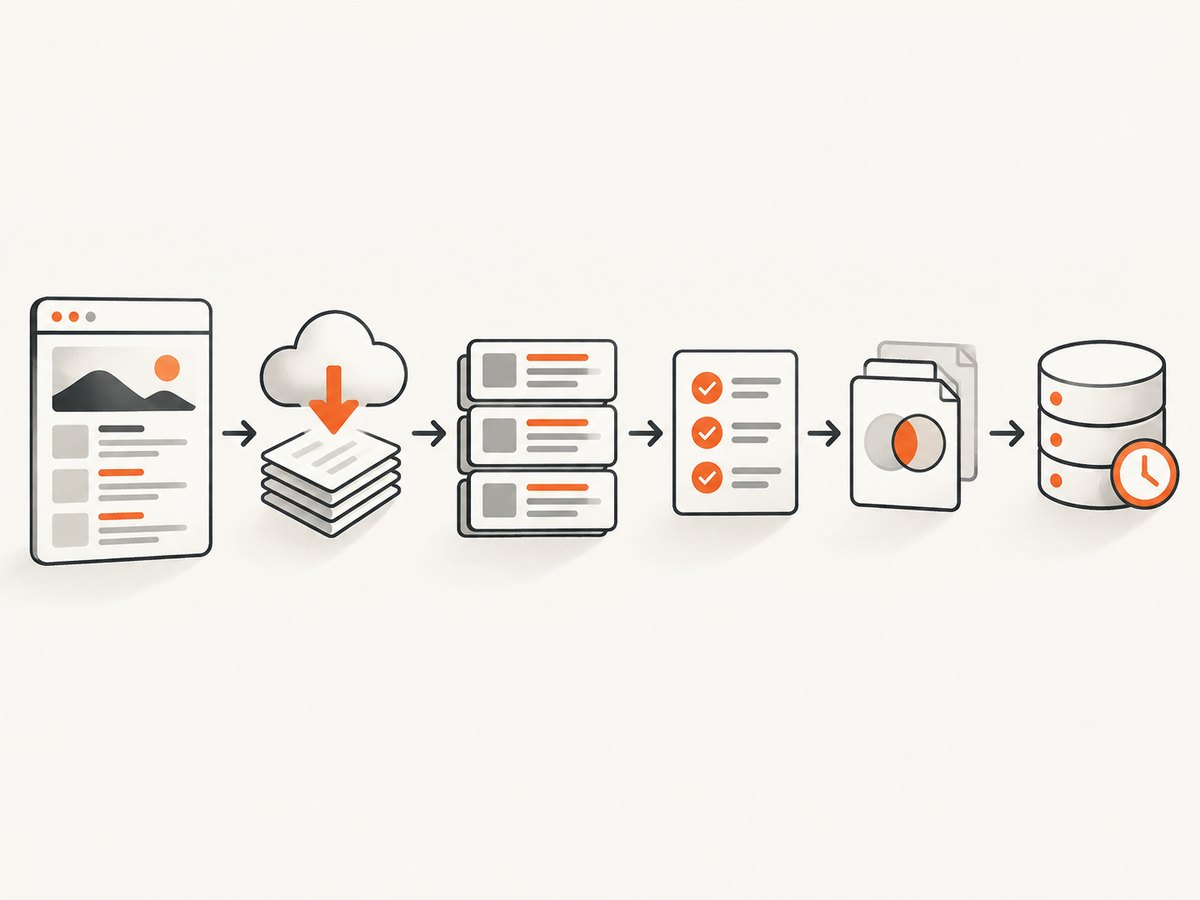
3. Build a conservative collection pipeline
- Discover: Enumerate API results, licensed feed entries, or permitted pages and sitemaps. Avoid broad crawling when a bounded listing endpoint exists.
- Fetch: Set a descriptive user agent, explicit timeout, documented quota, cache policy, and small concurrency limit. Respect retry instructions and stop on blocks.
- Extract: Prefer documented JSON fields. For permitted HTML, inspect JSON-LD before relying on layout-dependent selectors. Keep a response hash or lawful snapshot when needed to audit parser changes.
- Normalize: Parse timestamps with the source timezone retained, convert comparable timestamps to UTC, and preserve original money values and units.
- Validate and deduplicate: Require a stable source ID or canonical URL. Check dates, currency, location, and price; match on source ID first, then canonical URL, with title/location/date as a cautious fallback.
- Refresh and monitor: Store retrieval and source-update times, choose a refresh interval per source, and alert on errors, empty results, blocks, schema changes, and field drift.
Travel rates and event availability can change quickly, so refresh intervals should reflect source rules and the volatility of the field. Do not imply that a collected price is current indefinitely.
4. Runnable Python example: fetch an official JSON API
Use the provider’s actual endpoint, authentication method, and documented parameters. The example below is intentionally a template: replace the endpoint and field names with those in the API documentation. It makes one request, applies a timeout, checks status, and retains retrieval time and source provenance.
from datetime import datetime, timezone
import requests

API_URL = "https://api.example.com/v1/listings"  # Replace with documented endpoint
API_KEY = "YOUR_API_KEY"

response = requests.get(
    API_URL,
    headers={
        "Authorization": f"Bearer {API_KEY}",
        "User-Agent": "ListingsResearchBot/1.0 (contact: data@example.com)",
    },
    params={"page": 1},  # Use only documented parameters
    timeout=(5, 30),     # connect timeout, read timeout
)
response.raise_for_status()
payload = response.json()
retrieved_at = datetime.now(timezone.utc).isoformat()

records = []
for item in payload["results"]:  # Adapt to the provider's response schema
    records.append({
        "source": "example-provider",
        "source_id": str(item["id"]),
        "canonical_url": item["url"],
        "retrieved_at": retrieved_at,
        "source_updated_at": item.get("updated_at"),
        "name": item.get("name"),
        "raw_price": item.get("price"),
        "currency": item.get("currency"),
        "raw": item,
    })

for record in records:
    print(record)
For paginated APIs, follow the provider’s documented cursor or next-page field, and stop at the documented page boundary. Do not guess at hidden endpoints. Honor quota headers and retry instructions. If an API returns a rate-limit response, wait for the specified interval; if it provides no guidance, back off and reduce request volume rather than looping rapidly.
5. Extract JSON-LD from a permitted listing page
When HTML collection is allowed, JSON-LD is often more stable than selectors tied to visual markup. This example retrieves exactly one page, then parses JSON-LD script blocks. Sites can use different schemas and nested structures, so inspect and map the actual permitted source rather than assuming one universal listing shape.
import json
import requests
from bs4 import BeautifulSoup
from datetime import datetime, timezone

URL = "https://example.com/permitted-listing"

response = requests.get(
    URL,
    headers={"User-Agent": "ListingsResearchBot/1.0 (contact: data@example.com)"},
    timeout=(5, 30),
)
response.raise_for_status()
soup = BeautifulSoup(response.text, "html.parser")
retrieved_at = datetime.now(timezone.utc).isoformat()

objects = []
for script in soup.select('script[type="application/ld+json"]'):
    try:
        value = json.loads(script.string or script.get_text())
    except json.JSONDecodeError:
        continue  # Record a parse warning in a production pipeline
    objects.extend(value if isinstance(value, list) else [value])

for obj in objects:
    # @graph and nested offers are common; keep the source object for mapping.
    print({"retrieved_at": retrieved_at, "source_url": URL, "jsonld": obj})
Install dependencies with python -m pip install requests beautifulsoup4. For a production parser, handle @graph, nested objects, multiple offers, missing fields, malformed JSON, and pages with no structured data. Preserve the original JSON-LD object or a hash where lawful so a later schema change can be diagnosed.
6. Normalize prices, dates, and identities without losing meaning
Prices and fees
Store the reported amount, currency code, unit or pricing basis, and fee context separately. A nightly room price is different from a stay total; a ticket base amount is different from the total including mandatory charges. If you normalize to a numeric decimal, retain the original string and source field too. Avoid binary floating-point for monetary calculations.
The FTC’s rule effective May 12, 2025 covers businesses offering, displaying, or advertising live-event tickets and short-term lodging. Covered advertised prices must disclose the total mandatory price upfront, while optional charges, taxes, government charges, and shipping have separate treatment. Do not present a known base price as the final total. Check the FTC rule guidance and determine whether it applies to your display and business.
Dates, IDs, and deduplication
- Parse dates with an explicit source timezone; preserve that timezone and the original date text if ambiguity matters.
- Check event end is not before event start, and lodging check-out is after check-in.
- Use the publisher’s stable ID and canonical URL as primary deduplication keys.
- Use title, place, and date only as a fallback match; similar events or properties can be distinct records.
- Keep source-specific records even if you create a cross-source entity match.
7. Rate limits, caching, retries, and reliability
Follow documented quotas. If none are published and collection is permitted, begin with low concurrency and modest request frequency. Cache successful responses and use conditional requests such as If-Modified-Since or If-None-Match when the server provides validators. Use exponential backoff with jitter for transient network failures and server errors, with a small retry limit. Avoid retrying authorization failures, not-found responses, CAPTCHAs, or access blocks as if they were temporary network errors.
Use explicit connect and read timeouts so one stalled host does not occupy workers indefinitely. Keep per-source queues and circuit breakers: after repeated failures, pause that source, alert an operator, and resume only after the cause is understood. Log status code, latency, response size, parser version, and outcome without logging secrets or unnecessary personal data. A cited Requests guide documents HTTP requests and status handling; the API or site owner remains the authority for its rate policy.
8. Inspect permitted pages visually during parser development
A screenshot is useful for diagnosing a layout change, checking whether a listing is blank, or comparing a rendered element with the structured data your parser found. It does not grant permission to collect the page or bypass an access control. You can inspect a page manually, or use an authorized capture service. ScreenshotNeo is a website screenshot API and MCP server; its API returns PNG, JPEG, WebP, or PDF from a URL.

curl -G "https://api.screenshotneo.com/v1/shot" \
  -d access_key=YOUR_API_KEY \
  --data-urlencode url=https://example.com/permitted-listing \
  -o listing.webp
See the ScreenshotNeo API documentation for request options. Its cookie and consent handling can accept banners and remove 60+ known consent platforms, newsletter popups, and chat widgets before capture; each step can be turned off. Responses indicate the page verdict and billing status, and bot checks/CAPTCHAs, blank pages, timeouts, failed loads, and cache hits are not billed. Its MCP server provides take_screenshot, get_page_info, and capture_pdf for Claude, Cursor, and other MCP clients. Features include full-page and selector capture, device and viewport settings, custom CSS and JavaScript, wait conditions, request blocking, headers and cookies, caching, signed links, async jobs, bulk capture, and a usage API.
9. Or skip the browser setup
For an authorized page, one GET request can capture it without setting up a browser:
import requests
r = requests.get("https://api.screenshotneo.com/v1/shot", params={"access_key": "YOUR_API_KEY", "url": "https://example.com/permitted-listing"}, timeout=90)
open("listing.webp", "wb").write(r.content)
Cookie banners, popups, and chat widgets are removed before the shot. Bot checks, blank pages, and failed loads are never billed. An MCP server lets AI agents take screenshots. The Free plan includes 1,000 screenshots per month with no card; paid plans start at $5 for 3,000. Every feature is on every plan. See the docs, then sign up for 1,000 free screenshots a month, with no card.
10. Troubleshooting
| Symptom | Likely cause | Fix |
|---|---|---|
| 401 or 403 response | Missing credentials, wrong scope, or access not permitted | Check documented authentication and permissions. Do not rotate identities or evade a block. |
| 429 rate limit | Request rate or quota exceeded | Pause, follow retry headers or provider guidance, reduce concurrency, and cache more. |
| CAPTCHA or bot challenge | The site is signaling an access control or opposition to automated requests | Stop automated collection from that source. Seek an official API, license, or permission. |
| Parser returns no listings | Markup changed, JSON-LD is nested, or page content is client-rendered | Inspect a permitted response and schema; support @graph; alert on sudden empty rates. Ask the publisher for a feed if data is unavailable in the response. |
| Duplicate records | Tracking query parameters, multiple offers, or unstable IDs | Canonicalize only known tracking parameters, preserve source IDs, and deduplicate offers separately from properties or events. |
| Prices disagree | Different occupancy, date range, currency, fees, or stale availability | Store the quote context and retrieval time. Compare like-for-like totals and refresh according to source rules. |
| Dates shift by a day | Local event or property timezone was discarded | Retain the source timezone and convert only for comparison or storage conventions. |
| Timeouts or intermittent 5xx | Network or source instability, oversized responses, or excess load | Use bounded retries with backoff, timeouts, caching, and low concurrency; pause after repeated errors. |
11. Performance, cost, and operational tradeoffs
APIs and feeds usually reduce parser maintenance, but may have quota, licensing, coverage, or freshness limits. HTML extraction can expose fields unavailable elsewhere, but it adds maintenance when markup changes and can create legal, privacy, and reliability risks. Browser rendering is slower and more resource-intensive than reading structured responses; reserve it for pages whose relevant permitted data only appears after rendering or for visual diagnostics.
Control cost by collecting only needed fields, scheduling refreshes according to volatility, caching unchanged content, and avoiding duplicate requests across workers. Keep a per-source budget and measure requests, bytes, successful records, parser failures, stale-record rate, and refresh latency. Do not increase throughput to overcome blocks. For a source that cannot be accessed within its published rules, seek permission or another source.
12. FAQ
Can I use a screenshot to extract listing data?
A screenshot is an image, not structured listing data. It can help a person inspect a page or diagnose rendering; use an authorized API/feed or permitted structured content for dependable records.
How often should listings be refreshed?
There is no universal interval. Follow the source’s quotas and terms, then choose an interval based on how quickly that field changes and how current your application needs the result to be. Recheck event availability and lodging prices before presenting them as current.
Should I keep raw source responses?
Keep a lawful snapshot or hash when it helps audit extraction and parser changes. Apply retention limits, minimize personal data, and respect license terms.
What should happen when a source blocks the collector?
Stop requests to that source, preserve the error for diagnosis, and seek an approved API, feed, or permission. Do not try to bypass the restriction.


