How to Scrape Websites with n8n
Build an n8n workflow that fetches web pages and extracts structured data with CSS selectors. Learn pagination, error handling, and when browser rendering is needed.
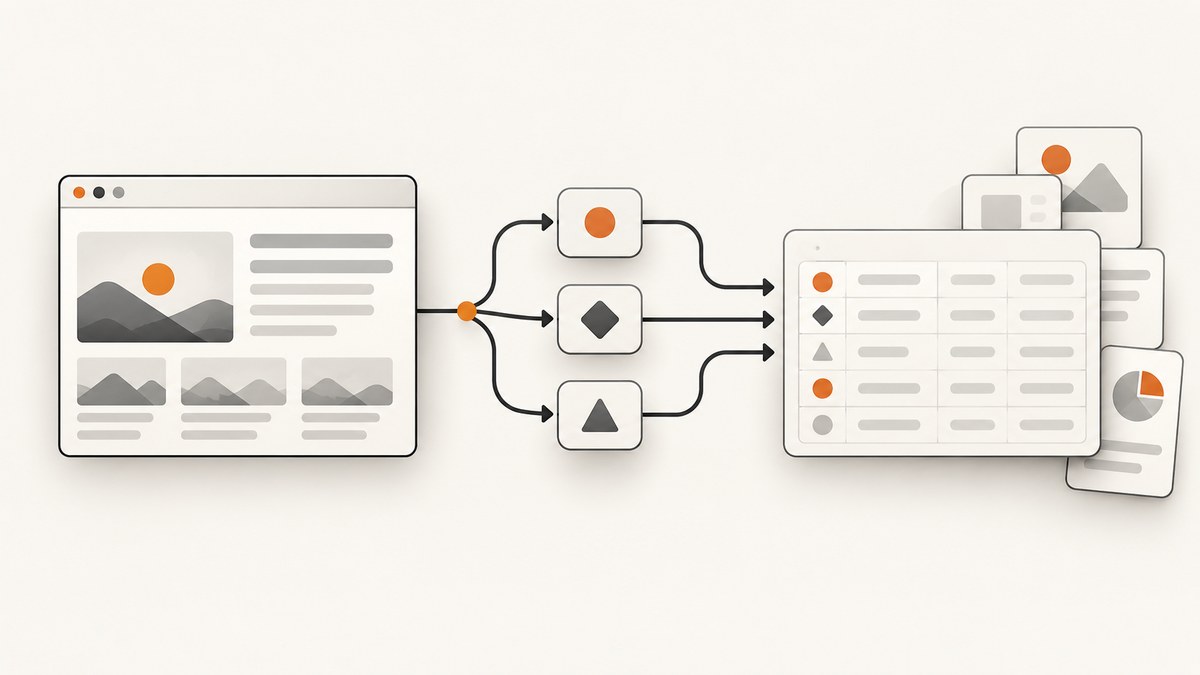
To scrape a page with n8n, use an HTTP Request node to fetch its HTML, then pass the response to an HTML node configured with CSS selectors. This works when the server returns the content you need in its HTML response. If the page builds that content in the browser with JavaScript, the basic HTTP Request and HTML combination may not include it; inspect the response before building the workflow.
Use this approach only for targets you are allowed to access and process. Check the target site’s terms and applicable rules, and do not assume that receiving an HTTP response grants permission to reuse its contents.
1. Check the target page first
Before wiring nodes together, make one request to the page and inspect the returned body. Look for the exact text or data fields you intend to extract. A successful status code only tells you that a response arrived; it does not prove that the page contains the expected content or that the content is permitted for your use.
- Choose an allowed page or endpoint and note its pagination rules.
- Open its response body using a normal GET request or a suitable inspection tool.
- Confirm the relevant elements and their attributes are present in the returned HTML.
- Identify whether each field is text, an attribute such as
href, or repeated data that needs an array.
If the content is available through an official API, compare that option before extracting page markup. An API may offer more stable fields and a documented pagination mechanism. The right choice depends on the target, its authentication requirements, the fields it exposes, and the rules governing your use.
2. Build the basic n8n workflow
Start with a Manual Trigger for a one-off run. Add an HTTP Request node, followed by an HTML node. The HTTP Request node performs network access; the HTML node extracts values from HTML in JSON or binary input. In current n8n documentation, the HTML node replaced the older HTML Extract node in version 0.213.0, so older tutorials may show a different node name. Check the documentation for your installed version.
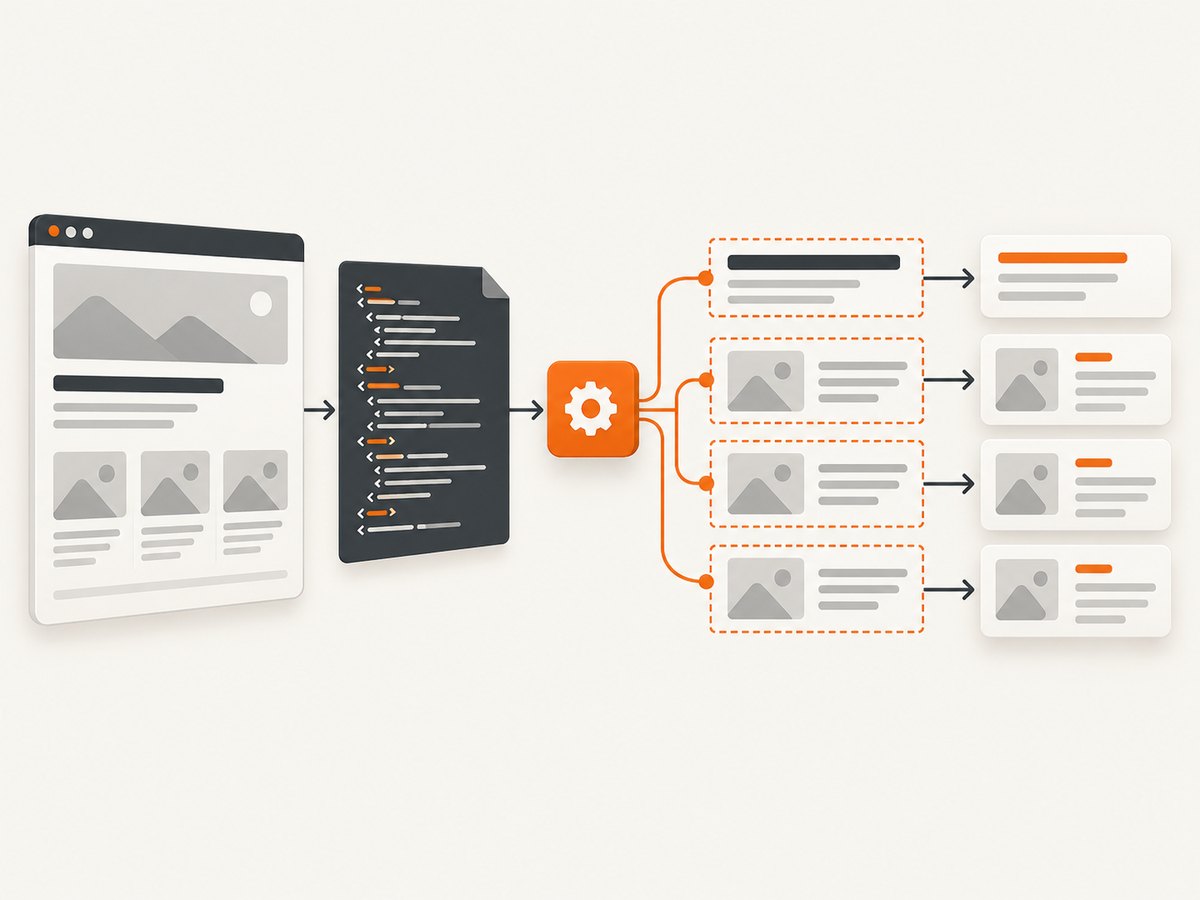
- Manual Trigger: use it while designing and validating the workflow.
- HTTP Request: set method to
GETand URL to the target page. A GET asks the server for the page representation without submitting a form or changing server-side state by design. - Response settings: choose a response format that preserves the HTML body. Enable response status and headers while debugging if you need to distinguish a page response from a redirect or error.
- HTML: select the incoming property that contains the HTML, then add one extraction operation per field.
- Run and inspect: confirm the output contains the expected values before connecting storage or downstream actions.
For the HTTP Request node, configure authentication, query parameters, and headers only when the target requires them. Use the node’s timeout, redirect, response, batching, pagination, and proxy controls as appropriate to the target and your environment. The available controls are documented in the n8n HTTP Request node documentation.
3. Extract text and attributes with CSS selectors
In the HTML node, choose an operation that extracts text, inner HTML, an attribute, or a form value. Enter the CSS selector for the element you want and set the input property to the field carrying the fetched HTML. For a selector that matches several elements, configure the operation to return an array rather than assuming there is only one match.
For example, a page with article cards might use a selector for each card, then separate selectors for its title and link. A title is usually text; a link is usually the href attribute. The exact selectors depend on the target markup and are not universal. Inspect the actual response and test each selector against it.
- Text: use for visible wording such as headings, prices, or summaries.
- Attribute: use for values such as
href,src, or a data attribute. - Inner HTML: use when downstream processing needs markup, and treat it as untrusted input.
- Form value: use when a relevant field is represented as a form control.
- Multiple matches: enable array output and verify that item order and count match the page.
Trim whitespace and normalize values where needed. Account for absent elements explicitly: a page may omit a field, show a different layout, or return an error page that happens to contain similar markup. The HTML node’s input and extraction options are covered in the n8n HTML node documentation.
4. Handle pagination, batches, and pacing
Pagination is determined by the target. Some endpoints accept a page number or cursor parameter; some pages provide a next-page URL; others use a different mechanism. Inspect a real response and the service’s pagination rules before configuring the HTTP Request node’s pagination options.
- Identify the target’s next-page signal: a URL, cursor, offset, or page number.
- Configure the HTTP Request node to update the relevant parameter or follow the next URL.
- Set a sensible page or request limit for the job, and check how the target signals the final page.
- Test the first page, a middle page, and the final page to catch duplicate or missing records.
For a known list of independent URLs, process items in batches and use an interval where appropriate. Avoid launching an unbounded set of requests at once. The target’s limits and your workflow’s available resources should guide batch size and pacing. n8n’s documentation notes that pagination behavior and limits vary by API and target, so there is no single safe configuration for every site.
5. Add transformations and validation
Use the Code node for transformations that are awkward to express through extraction settings: renaming fields, converting strings, filtering records, or adding validation. It can run JavaScript or Python, but it is not the node for making HTTP requests; keep network access in the HTTP Request node.
Python execution and external module availability depend on n8n version and hosting. The current Code node documentation describes native Python support in newer releases, identifies Pyodide as a legacy option, and explains differences between Cloud and self-hosted package imports. Check your installed version and hosting setup before following code examples that import packages. See the n8n Code node documentation.
Before sending extracted data to another system, validate required fields. A practical workflow can route missing titles, unexpected status codes, or empty result arrays to an error path. This makes a changed page structure visible instead of silently producing incomplete records.
6. Make the workflow maintainable
Selectors are coupled to page markup. A redesign can rename classes, change nesting, or remove an element. Keep the extraction rules easy to find, preserve representative sample outputs for comparison, and revisit the workflow when the target changes. If the page has multiple layouts, test each one you expect to encounter.
Use clear node names such as “Fetch article page” and “Extract title and URL.” Keep credentials in n8n’s credential system rather than embedding secrets in URLs or Code node source. When the site requires authentication, configure the appropriate authentication method or headers in the HTTP Request node and make sure the workflow’s access is authorized.
For scheduled workflows, decide what should happen when the target is temporarily unavailable: retry within a bounded policy, record the failure, or alert an operator. Repeated retries can add load and may not help when a selector has broken or access is denied. Treat status, response body, and extracted-field checks as separate signals.
7. When basic HTML fetching is not enough
The HTTP Request plus HTML pattern fetches a server response and parses its HTML. The reviewed n8n node documentation does not establish that this combination runs a browser or renders JavaScript-generated content. If the required data appears only after browser execution, first check whether the target offers an API or another permitted source. Otherwise, select a browser-based capture or automation approach that fits the task and its rules.

A screenshot is useful when the required output is a visual record of a page rather than structured fields. For structured data, a screenshot alone does not replace selector extraction: you still need a suitable way to interpret the content, and the source must be available to you under applicable terms.
Or skip the browser setup
For a visual capture, ScreenshotNeo is a website screenshot API and MCP server from Yorker Media. One GET request returns an image or PDF. Its clean-shot flow accepts cookie and consent banners like a visitor and removes more than 60 known consent platforms, newsletter popups, and chat widgets before capture; each step can be turned off. Bot checks and CAPTCHAs, blank pages, timeouts, failed loads, and cache hits are not billed, and responses identify the page verdict and billing status in headers. AI agents can use its MCP server tools, including take_screenshot, get_page_info, and capture_pdf.
See the ScreenshotNeo API documentation. This cURL example saves a WebP capture of Stripe:
curl -G "https://api.screenshotneo.com/v1/shot" \
  -d access_key=YOUR_API_KEY \
  --data-urlencode url=https://stripe.com \
  -o shot.webp
The same request in Python:
import requests

r = requests.get(
    "https://api.screenshotneo.com/v1/shot",
    params={"access_key": "YOUR_API_KEY", "url": "https://stripe.com"},
    timeout=90,
)
open("shot.webp", "wb").write(r.content)
And in Node.js:
const q = new URLSearchParams({
  access_key: 'YOUR_API_KEY',
  url: 'https://stripe.com'
});
const res = await fetch(`https://api.screenshotneo.com/v1/shot?${q}`);
ScreenshotNeo offers 1,000 screenshots per month free with no card; paid plans start at $5 for 3,000. Create a free account for 1,000 screenshots a month, with no card.
8. Troubleshooting common problems
| Symptom | Likely cause | What to check or change |
|---|---|---|
| HTTP Request returns an error status | The URL, authentication, headers, or access may be wrong, or the target is unavailable. | Inspect status and response body; verify the URL and required credentials; confirm access is allowed. Do not pass an error page to extraction as if it were normal content. |
| Request times out | The target is slow, unreachable, or waiting on a response beyond the configured timeout. | Check whether the page is reachable and adjust timeout deliberately. Use bounded retries only where appropriate; a longer timeout cannot fix a permanently unavailable target. |
| HTML node sees no input | The HTML body is in a different property or response format than the node expects. | Inspect the previous node’s output, set the HTML node’s input property correctly, and choose response settings that preserve the body. |
| Selector returns no value | The selector does not match the response, the page structure changed, or the content is not in server-returned HTML. | Inspect the current HTML, test a narrower or corrected selector, and check whether the content depends on browser-side JavaScript. |
| Only the first matching item appears | The extraction operation is configured for a single result. | Enable array output for selectors that can match multiple elements, then verify count and ordering. |
| Output contains an access or challenge page | The response is not the intended content, possibly due to access controls or a bot check. | Inspect status and body, respect the target’s access rules, and use an authorized API or approved access path where available. |
| Pagination repeats or skips records | The cursor or next-page rule is configured incorrectly, or the target has unusual page boundaries. | Compare page parameters and returned identifiers across several pages; verify the terminal condition and target-specific limits. |
| Code node import fails | The package is unavailable in the current n8n hosting mode or Python execution model. | Check current Code node documentation for your version and hosting. Keep HTTP requests in HTTP Request and avoid assuming Cloud and self-hosted imports behave alike. |
9. Performance, reliability, and cost considerations
For this workflow, time and resource use depend on response size, number of pages, pacing, transformations, and the target’s response time. Fetch only the pages and fields needed, keep batches bounded, and avoid repeating work where the target offers a stable API or another suitable source. A timeout, redirect, proxy, or batch setting changes request behavior; configure it for the actual target rather than copying a value from an unrelated tutorial.
Reliability comes from checking each stage: did the request return the intended page, did the selector match, and did the output pass validation? Treat an empty result as a condition to investigate, not automatically as a valid record. Monitor workflow failures and revisit selectors after target changes. Follow the target’s usage rules and applicable limits when deciding frequency and concurrency.
n8n hosting cost depends on the plan or infrastructure you choose; the supplied documentation establishes node capabilities, not a universal cost for a scraping workload. Estimate your workflow’s run volume, hosting needs, and operational requirements using current n8n plan or hosting information. Do not treat HTTP success as proof of permission to collect or reuse a page’s content.
FAQ
Can n8n scrape multiple websites in one workflow?
Yes. Supply a list of URLs as workflow items and process them with bounded batching and appropriate pacing. Each target can have different markup, authentication, and rules, so validate them separately.
Do I need a Code node to scrape a page?
No. The basic workflow uses HTTP Request to fetch the response and HTML to extract fields. Add Code when you need custom transformations or validation logic.
Does a 200 status mean the extracted data is correct?
No. Validate the response content and required fields. A page can return successfully while showing a challenge, an error-like page, or markup that no longer matches your selectors.
Which node should make the web request?
Use HTTP Request for network access. The Code node is for code-based data transformation and logic.
Which node should older n8n tutorials refer to?
Tutorials written before n8n 0.213.0 may call the extraction node HTML Extract. Current documentation uses HTML; check the version you run.


