How to Scrape YouTube Videos and Data with an API
Use YouTube Data API v3 to find videos and collect permitted metadata. Learn setup, Python, cURL, Node.js, pagination, quota, and caption limits.

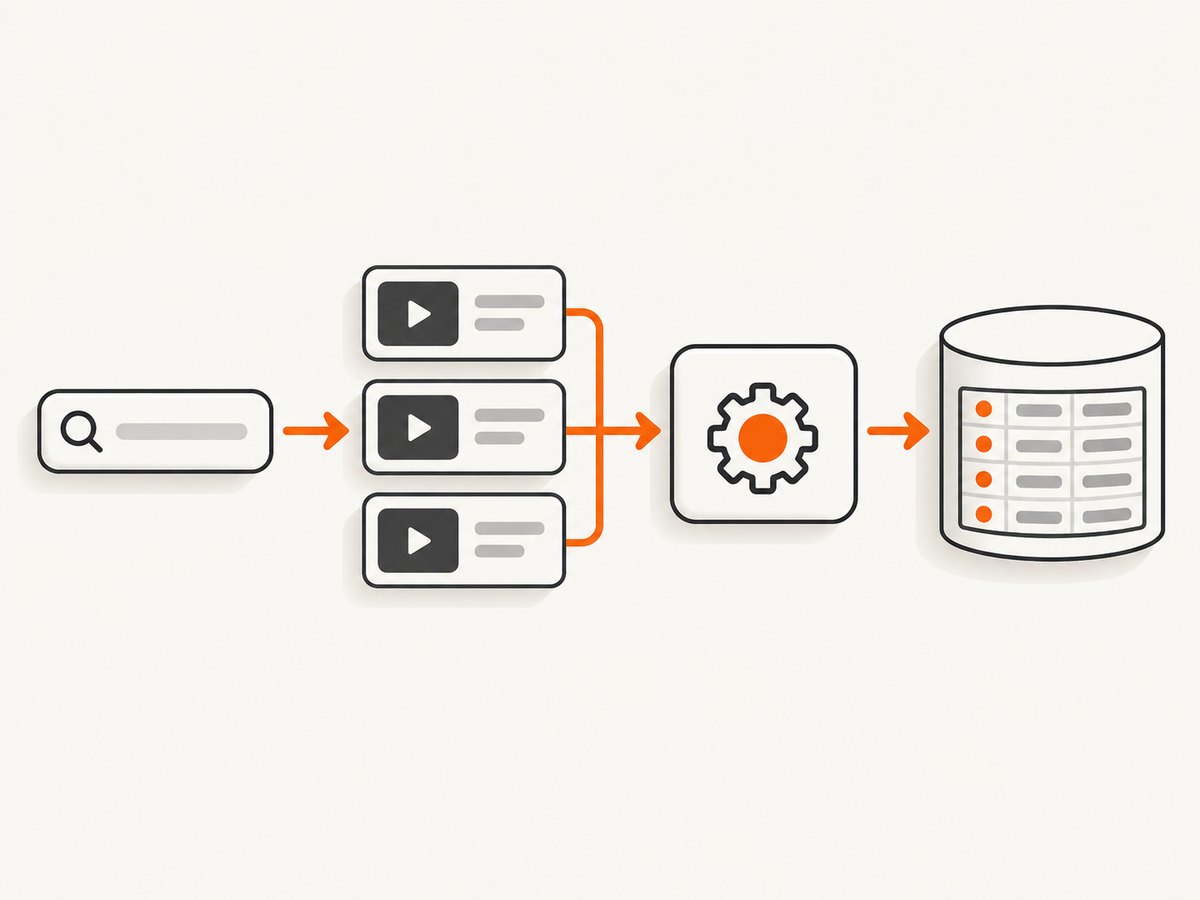
Direct answer: Use the YouTube Data API v3 to search for videos and retrieve documented metadata. Call search.list to find video IDs, then call videos.list to request the resource fields you need. This is API-based collection of metadata; it is not a general way to download video files, bypass access controls, or obtain any public video’s transcript.
The search method requires a Google Cloud project and API credentials. Public-data requests commonly use an API key; access to private or user-owned resources requires the appropriate OAuth authorization and endpoint scopes. Plan around pagination and project quota, and do not promise a complete index of YouTube.
1. What “scraping YouTube with an API” means
In this guide, scraping means collecting information exposed by documented API resources. A search result can contain a video ID and snippet information such as title, description, channel details, publication date, and thumbnail references. The search result is a pointer to a resource, not a durable video record by itself. Use the ID with videos.list when you need selected fields from the video resource.
The API does not establish a generic endpoint for fetching arbitrary video media. It also does not turn caption availability into unrestricted transcript access. Keep collection within the methods, authorization rules, and quota documented by Google. Google’s YouTube API Services Terms say: “You and your API Client(s) will not, and will not attempt to, exceed or circumvent use or quota restrictions.” [YouTube API Services Terms]
2. Set up API access
- Choose or create a project in Google Cloud / Google Developers Console.
- Enable YouTube Data API v3 for that project.
- Create an API key for public-data requests. Restrict the key according to the environments where it will be used, and keep it out of source control and browser code.
- Use OAuth 2.0 when an endpoint needs the caller to authorize access to their own or otherwise authorized resources. An API key identifies the project; it does not grant access to private user data.
- Check the project’s current quota in Google Cloud Console before scheduling a large collection job.
Google’s getting-started guide covers project prerequisites, OAuth, and client libraries. Its sample requests distinguish public requests from requests for a user’s own videos. [Getting started with YouTube Data API] [API reference]

3. Find videos with search.list
A search request typically supplies part=snippet, a q query, and type=video. Without a type constraint, search can return video, channel, or playlist resources. Filters can narrow results by channel, region, language relevance, and caption availability. Search is discovery; use the returned video ID for subsequent retrieval.
cURL: one search request
export YOUTUBE_API_KEY='YOUR_API_KEY'
curl --get 'https://www.googleapis.com/youtube/v3/search' \
  --data-urlencode "key=$YOUTUBE_API_KEY" \
  --data-urlencode 'part=snippet' \
  --data-urlencode 'q=python tutorial' \
  --data-urlencode 'type=video' \
  --data-urlencode 'maxResults=25'
The response’s items contain IDs and snippets. Save items[].id.videoId for video results. The API reference documents the supported parameters and response shape. [search.list]
Python: search and retrieve selected fields
import os
import requests

API_KEY = os.environ["YOUTUBE_API_KEY"]
BASE = "https://www.googleapis.com/youtube/v3"

search_response = requests.get(
    f"{BASE}/search",
    params={
        "key": API_KEY,
        "part": "snippet",
        "q": "python tutorial",
        "type": "video",
        "maxResults": 25,
    },
    timeout=30,
)
search_response.raise_for_status()
search_data = search_response.json()
video_ids = [item["id"]["videoId"] for item in search_data.get("items", [])]

if video_ids:
    videos_response = requests.get(
        f"{BASE}/videos",
        params={
            "key": API_KEY,
            "part": "snippet,contentDetails,statistics",
            "id": ",".join(video_ids),
        },
        timeout=30,
    )
    videos_response.raise_for_status()
    for video in videos_response.json().get("items", []):
        snippet = video.get("snippet", {})
        stats = video.get("statistics", {})
        print({
            "id": video["id"],
            "title": snippet.get("title"),
            "channel_id": snippet.get("channelId"),
            "published_at": snippet.get("publishedAt"),
            "view_count": stats.get("viewCount"),
        })
Set YOUTUBE_API_KEY in the process environment before running. The sample prints only fields returned by requested parts; not every field is necessarily present on every resource. videos.list accepts comma-separated IDs and lets the caller choose resource parts such as snippet. [videos.list]
Node.js: search request
const apiKey = process.env.YOUTUBE_API_KEY;
if (!apiKey) throw new Error("Set YOUTUBE_API_KEY first");

const params = new URLSearchParams({
  key: apiKey,
  part: "snippet",
  q: "python tutorial",
  type: "video",
  maxResults: "25",
});

const response = await fetch(
  `https://www.googleapis.com/youtube/v3/search?${params}`
);
if (!response.ok) {
  const detail = await response.text();
  throw new Error(`YouTube API ${response.status}: ${detail}`);
}
const data = await response.json();
for (const item of data.items ?? []) {
  console.log({
    videoId: item.id.videoId,
    title: item.snippet.title,
    channelId: item.snippet.channelId,
  });
}
4. Retrieve metadata with videos.list
Use the IDs from search and ask for only the parts your application needs. For example, part=snippet includes channel ID, title, description, tags, and category ID. Other useful documented parts include contentDetails and statistics. A smaller response is easier to store and process; request fields deliberately rather than assuming every possible field is available.
curl --get 'https://www.googleapis.com/youtube/v3/videos' \
  --data-urlencode "key=$YOUTUBE_API_KEY" \
  --data-urlencode 'part=snippet,contentDetails,statistics' \
  --data-urlencode 'id=VIDEO_ID_1,VIDEO_ID_2'
The documented videos.list result set has a maximum retrieval set of 1,000 videos, even if a reported total is higher. For larger workflows, divide the work into bounded batches and preserve IDs and processing state. [videos.list reference]
5. Paginate without assuming complete coverage
Search responses can include nextPageToken. Send that token as pageToken on the next request, with the same query and filters. Each additional page is another request and consumes quota. Do not use pageInfo.totalResults as an exact count or as proof that all matching videos can be enumerated: Google describes it as approximate. A channel-constrained video search has a documented 500-video cap for the specified parameter combination, with exceptions for certain owner, developer, or user filters. These constraints make “all YouTube videos matching X” an unsafe promise.
page_token = None
all_ids = []

while True:
    params = {
        "key": API_KEY,
        "part": "snippet",
        "q": "python tutorial",
        "type": "video",
        "maxResults": 50,
    }
    if page_token:
        params["pageToken"] = page_token
    response = requests.get(f"{BASE}/search", params=params, timeout=30)
    response.raise_for_status()
    data = response.json()
    all_ids.extend(item["id"]["videoId"] for item in data.get("items", []))
    page_token = data.get("nextPageToken")
    if not page_token:
        break

print(f"Collected {len(all_ids)} IDs returned by these pages")
Use a stopping condition suited to the job: a maximum page count, time window, or stored cursor can prevent an unexpectedly broad query from growing without bound. Persist progress after each page so an interrupted job can resume without repeating completed work.
6. Search filters and request choices
| Need | Parameter or approach | Notes |
|---|---|---|
| Only videos | type=video |
Prevents channel and playlist results from entering a video-ID pipeline. |
| Terms | q |
Use focused terms; broad terms create more pages and more processing. |
| One channel | channelId |
Documented result caps apply to some channel-constrained searches. |
| Geographic relevance | regionCode |
Use only when regional relevance fits the task. |
| Caption availability | videoCaption |
Filters discovery; it does not return transcript text. |
| Further pages | pageToken |
Use the token returned by the preceding response. |
Use part to select resource sections, and use partial-resource and ETag support where appropriate to reduce unnecessary transfer and help with caching or overwrite protection. Google’s overview explains these mechanisms. [API overview and resource representations]
7. Can I get YouTube transcripts through the API?
Not through captions.list alone, and not as unrestricted access to arbitrary public videos. The method returns caption-track metadata, not caption contents. Downloading a track is a separate captions.download operation. The captions list method requires authorization scopes such as youtube.force-ssl or youtubepartner; the documentation does not support promising that any API user can download captions for any public video. Treat caption-track content as a separate, authorized workflow and consult its method requirements. [captions.list] [captions.download]
8. Quota, cost, and operational planning
Quota is a project-level constraint and can change. Google for Developers documentation accessed September 29, 2026 describes a default allocation of 100 search.list calls per day, 100 videos.insert calls per day, and 10,000 units per day combined for other endpoints. The quota calculator says search.list calls cost one unit in their own bucket, invalid requests incur at least one unit, additional page requests incur the method cost, and daily quotas reset at midnight Pacific Time. Google’s revision history also describes a transition beginning June 1, 2026 toward granular quota buckets. Check the live quota shown for your project before relying on any number here. [Quota costs] [Quota calculator]
Google says an audit demonstrating compliance is required before requesting an extension beyond default quota. Do not rotate keys, disguise traffic, or retry around quota enforcement. Those tactics do not create legitimate capacity and conflict with the terms. [Quota extensions and compliance audits]
Reliability and cost checklist
- Estimate search pages and detail lookups before starting a batch; include retries in the budget.
- Store page tokens and completed IDs so jobs can resume safely.
- Cache results responsibly and refresh only when the application needs current values.
- Request only needed resource parts and handle missing optional fields.
- Use bounded retries with backoff for transient transport or server failures, but do not retry authorization, invalid-parameter, or quota errors unchanged.
- Log status, endpoint, request parameters excluding secrets, and Google’s returned error reason for diagnosis.
The Data API itself is not priced as a per-request commercial API in this workflow; the practical limit to budget is project quota and the engineering cost of processing and storing results. Confirm the project’s current allocation and applicable Google terms rather than treating this article’s date-sensitive quota figures as a guarantee.
9. Troubleshooting common failures
| Symptom | Likely cause | Fix |
|---|---|---|
keyInvalid or key-related 400/403 |
Missing, malformed, restricted, or wrong-project API key. | Check the key environment variable, enabled API, and key restrictions in the owning Cloud project. |
accessNotConfigured |
YouTube Data API v3 is not enabled for the project tied to the credential. | Enable the API in that project and allow configuration changes to take effect. |
quotaExceeded |
The relevant project quota bucket is exhausted. | Stop the job, inspect live project quota and usage, reduce page volume, and follow Google’s extension/audit process if needed. |
Empty items |
No matches under the query and filters, or the page token/query combination is wrong. | Check type, channel and region filters, spelling, and token handling. Empty results are not necessarily an API failure. |
Missing statistics or other field |
The requested part was omitted or that data is unavailable in the returned resource. | Request the appropriate part, then read fields defensively rather than assuming every property exists. |
| Caption download denied | The caller lacks required authorization, or the track is not available to that caller. | Use the documented OAuth scope and authorized resource context; do not assume public discoverability means download access. |
| Repeated or skipped records | Page state was not persisted consistently, or IDs were appended more than once after a retry. | Persist page progress and upsert by video ID; make page processing idempotent. |
| HTTP 5xx or network timeout | Transient service or connection failure. | Retry a limited number of times with exponential backoff and jitter, preserving the same request; stop if the error becomes a quota or authorization failure. |
10. Performance and data hygiene
Search is usually the discovery stage, while resource retrieval should be batched by ID rather than issued once per video. Keep the requested parts small, use cache validators where applicable, and avoid polling just to keep a local copy warm. Record when a value was retrieved so downstream users can distinguish a fresh observation from a cached one. Deduplicate on video ID and preserve the source query and retrieval time if the dataset will be analyzed later.
Descriptions and tags are data, not trusted markup or executable content. Escape them when rendering HTML, validate outbound links if you expose them, and limit stored fields to what the application actually needs. Secure the API key on the server and use OAuth credentials with only the authorization needed for the operation.
11. Or skip the browser setup
If the job is to capture how a YouTube page looks, a screenshot is a different output from API metadata. ScreenshotNeo is a website screenshot API and MCP server; it does not replace YouTube Data API metadata or provide video transcripts. For a visual page capture, one GET request returns an image or PDF. See the ScreenshotNeo API documentation.
curl -G "https://api.screenshotneo.com/v1/shot" -d access_key=YOUR_API_KEY --data-urlencode url=https://www.youtube.com/watch?v=VIDEO_ID -o shot.webpScreenshotNeo accepts cookie and consent banners before capture and removes more than 60 known consent platforms, newsletter popups, and chat widgets; each step can be turned off. Bot checks, blank pages, failed loads, timeouts, and cache hits are not billed, and response headers report the page verdict and billing status. Its MCP server gives AI agents tools for screenshots, page information, and PDF capture. The free plan includes 1,000 screenshots a month with no card; paid plans start at $5 for 3,000. Every feature is on every plan. Sign up for 1,000 free screenshots a month, with no card.
FAQ
Can I scrape every video for a broad search term?
No. Search pagination, approximate totals, and documented result caps mean you should describe the dataset as the results returned under your query and filters, not a complete platform inventory.
Should I use OAuth for every search?
Not necessarily. Public-data requests can use a project API key. OAuth is needed when an operation accesses user-authorized or private resources and should use the applicable scopes.
Does a caption filter give me the transcript?
No. It can filter search results by caption availability. Caption-track metadata and caption content are separate methods, and content retrieval has authorization requirements.
Can I use this tutorial to download MP4 files?
No. The methods described retrieve documented API resources and caption tracks under their rules; they do not provide a generic arbitrary-video download endpoint.
What is the safest unit to store for later enrichment?
Store the video ID along with retrieval time and the query context. It is a stable key for joining the search discovery step to later resource lookups, while individual fields may be absent or change.