Screenshotlayer Alternative for More Throughput
Learn how Screenshotlayer workers limit concurrency, estimate capacity, and compare throughput options, including ScreenshotNeo’s billing and plan limits.

For more screenshot throughput than Screenshotlayer’s 10, 20, or 40 dedicated workers, start by measuring the concurrency your workload needs, then compare the alternatives’ published limits and pricing. Screenshotlayer defines one worker as a server entity assigned to one screenshot, so a 10-worker plan can capture, process, and store 10 snapshots concurrently. Its published paid plans list 10 workers on Basic, 20 on Professional, and 40 on Enterprise. ScreenshotNeo is the first alternative to evaluate: only clean shots are billed, failed or cached captures cost nothing, and its paid plans start at $5 for 3,000 shots.
1. How Screenshotlayer throughput works
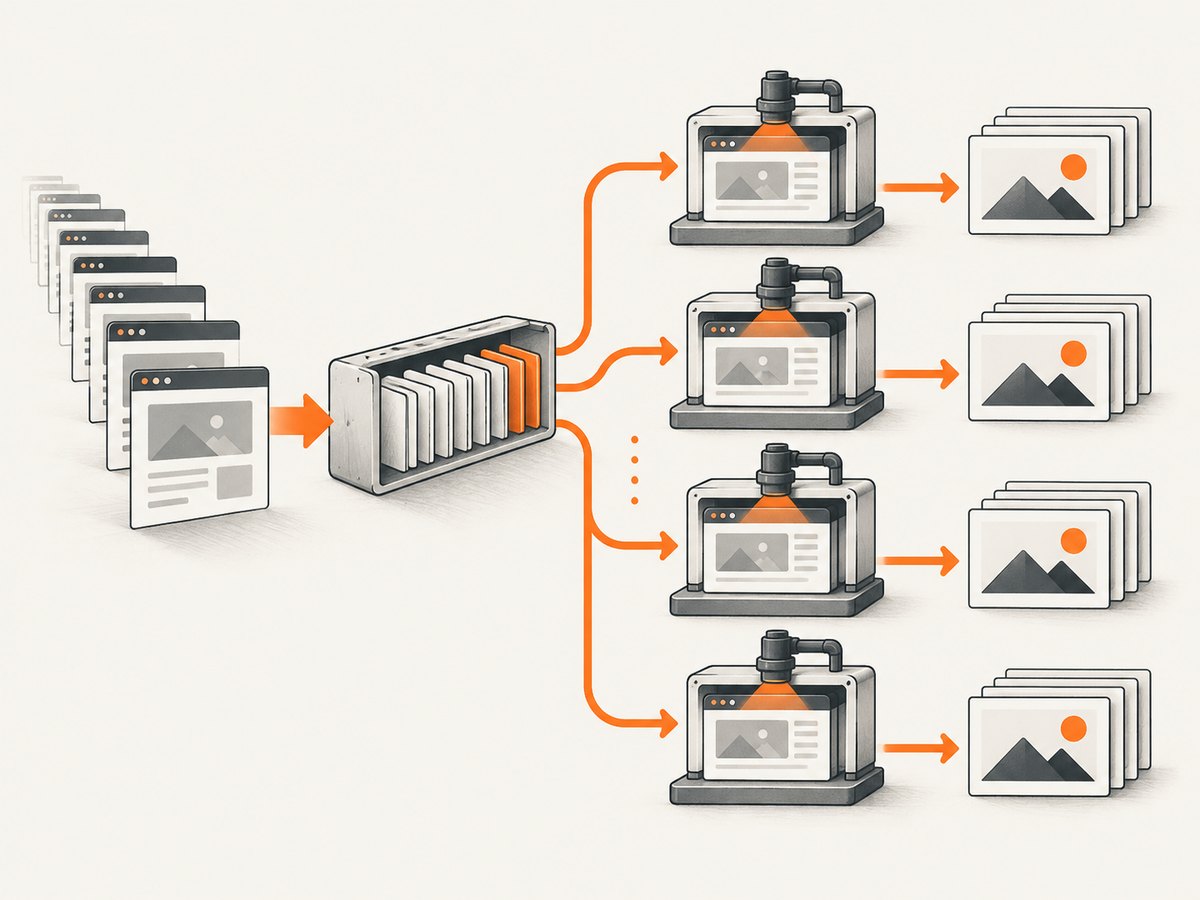
Screenshotlayer’s dedicated-worker count is its published measure of simultaneous screenshot work. If your plan has 10 workers, up to 10 captures can be in progress concurrently. A worker handles one screenshot task at a time. Requests above that concurrency may wait for capacity, so a monthly allowance alone does not tell you how quickly a burst of URLs will finish. The vendor FAQ describes this worker model directly. Screenshotlayer product information
| Plan | Published monthly snapshots | Dedicated workers | Monthly price |
|---|---|---|---|
| Free | 100 | Not listed in the cited pricing figures | Free; non-commercial use |
| Basic | 10,000 | 10 | $19.99 |
| Professional | 30,000 | 20 | $59.99 |
| Enterprise | 75,000 | 40 | $149.99 |
Screenshotlayer advertises annual billing at up to 15% below monthly billing. Its FAQ describes usage notifications at 75%, 90%, and 100%, and says overage fees can apply after the allowance is reached. Check your current plan terms and billing page before planning around overages. Screenshotlayer pricing and FAQ
Capacity is more than the monthly quota
Estimate the work rate you need in two dimensions:
- Monthly volume: expected captures over the billing period, including retries and recurring jobs.
- Peak concurrency: captures you need running at the same time during a burst or deadline.
For example, a batch of 1,000 URLs on a 10-worker plan requires at least 100 waves if every capture takes the same time and workers are continuously occupied. That is a planning illustration, not a performance benchmark: real pages vary in load time, and queueing, retries, network conditions, and rendering features affect completion time. If a job has a deadline, measure actual end-to-end capture duration on representative pages and leave room for slow pages and retry handling.
2. Decide what “more throughput” means for your workload
Before changing providers, record a few days of actual work or model a representative batch. Separate normal steady traffic from scheduled bursts; an API that fits the monthly count can still be too slow at peak.
- Count screenshots per day and per month. Include scheduled recaptures and expected growth.
- Measure request arrival rate during the busiest interval, such as a release, crawl, or report generation run.
- Measure the time from submission to usable output, not just HTTP response time. For queued APIs, include queue delay and polling or webhook delivery.
- Mark the share of captures that need full-page rendering, selector waits, custom scripts, PDF, or other heavier options.
- Define a failure and retry budget. Avoid retry storms that multiply load when the provider or a target site is slow.
- Compare each provider’s concurrency model, monthly allowance, overage behavior, response semantics, and price using the same workload.
A useful rough estimate is concurrency ≈ arrival rate × average service time. If you need to process two URLs per second and a capture averages five seconds end to end, roughly ten simultaneous slots are needed to keep pace at that average. This estimate does not guarantee capacity: long-tail pages and bursty arrivals require headroom. Treat it as a sizing starting point, then validate against your own latency distribution and deadline.
3. Compare alternatives on concurrency, not just price per screenshot
Published alternative prices can become stale and often describe monthly quota rather than simultaneous workers. The comparison figures below were reported by a secondary comparison dated April 1, 2026; verify current vendor pricing, trial conditions, throughput limits, and overages directly before purchase.
| Provider | Published comparison figure | What to verify for throughput |
|---|---|---|
| ScreenshotNeo | Free: 1,000 shots/month; Starter $5 for 3,000; Growth $15 for 15,000; Pro $39 for 60,000; Scale $99 for 250,000; Business $249 for 1,000,000 | Measure your workload; responses identify clean, failed, and cached outcomes, and only clean shots are billed. Every feature is on every plan. |
| GetScreenshot | 500 free/month; $9 at 1,000 shots | Current concurrency, trial terms, and overages |
| ScreenshotOne | 1,000-shot trial; $17 at 1,000 shots | Current worker/queue limits and plan details |
| Urlbox | No free tier; $19 at 1,000 shots | Current concurrency and whether the listed volume includes retries |
| CaptureKit | 100 free/month; $7 at 1,000 shots | Current concurrency and free-tier conditions |
ScreenshotNeo’s published plan amounts are product facts for this article; the other providers’ figures above are secondary-source snapshots and are not a like-for-like capacity comparison. A low unit price does not establish that an API can run more concurrent work. Ask vendors or consult current docs for hard concurrency caps, rate limits, queue semantics, timeout limits, and overage rules. Avoid choosing from a per-thousand price alone.
Rendering and output still matter
Screenshotlayer lists PNG, JPEG, and GIF output, viewport and device controls, full-height capture, custom CSS, delays, caching, and S3/FTP export. Its FAQ says the rendering engine supports CSS3, HTML5, webfonts, graphs, and SVG. When moving providers, check whether the pages that matter render correctly and whether equivalent controls are available. Screenshotlayer product information
Screenshotlayer’s FAQ says uptime is “around 99.9%” and that public statistics are not offered. Its terms prohibit unreasonable or abusive request volume and describe a usage-limit error. For a production migration, check the current service terms, the provider’s status information, and the exact behavior returned at rate or usage limits rather than assuming a plan’s monthly quota guarantees a particular response time. Screenshotlayer FAQ and terms
4. ScreenshotNeo: a throughput alternative to try first
ScreenshotNeo is a website screenshot API and MCP server from Yorker Media. Its pricing starts with 1,000 shots per month free without a card, then $5 for 3,000 shots on Starter. Higher published tiers are Growth at $15 for 15,000, Pro at $39 for 60,000, Scale at $99 for 250,000, and Business at $249 for 1,000,000. Yearly billing gives two months free. Every feature is available on every plan.

For capacity planning, a key difference is billing behavior: ScreenshotNeo bills only clean shots. Bot checks or CAPTCHAs, blank pages, timeouts, failed loads, and cache hits cost nothing; the response includes X-Page-Verdict and X-Billed headers to identify the outcome. This makes your bill easier to reconcile with useful captures, although it does not mean those outcomes consume no time in your own workflow. Handle the verdict and retry only when a retry is likely to help.
The API accepts common screenshot parameter names used by other screenshot APIs, which can make migration simpler. It supports full-page capture with lazy images loaded, CSS selector element capture, device and viewport settings, retina scale, PDF controls, custom CSS and JavaScript, click and wait actions, resource blocking, headers and cookies, geolocation and timezone, transparent backgrounds, image resizing, caching with a chosen TTL, signed links, asynchronous jobs with signed webhooks, bulk capture of up to 100 URLs per call, a usage API, and an OpenAPI spec. Confirm the exact request parameter syntax in the ScreenshotNeo API documentation.
5. Migrate safely and prove the new capacity
- Inventory calls. Find all Screenshotlayer request paths, parameters, output formats, timeout assumptions, and downstream storage or processing.
- Choose representative URLs. Include fast and slow pages, pages with consent banners, dynamic content, and any selector or full-height cases your product depends on.
- Build a compatibility adapter. Keep your application’s internal screenshot request shape stable and map it to the new provider. This lets you compare providers without changing every caller.
- Run a small comparison batch. Capture the same URLs with both APIs. Compare image dimensions, format, page content, completion time, error rates, and resulting billable status.
- Increase concurrency gradually. Start below the target rate, then raise it while watching response codes, end-to-end latency, queue age, and provider usage.
- Enable retries deliberately. Retry transient network or service errors with exponential backoff and jitter. Do not retry a CAPTCHA or bot challenge indefinitely; it is usually a target-site response, not a transient rendering defect.
- Keep rollback available. Route a small share first, compare results, and retain the previous integration until the new one meets the workload’s output and timing needs.
Do not infer capacity from a successful handful of requests. A useful migration check includes a burst at the planned peak, a sustained run at normal load, and slow pages that exercise your configured timeout. Record the request identifier, result verdict, elapsed time, and retry count so an apparent throughput issue can be separated from target-site failures.
6. Request patterns and operational details
When comparing capture APIs, preserve the exact URL and output options in logs while redacting credentials and sensitive headers. Use a stable idempotency or job identifier if the provider offers one; otherwise, make downstream writes safe to repeat. With async jobs, acknowledge that submission is not completion: poll at a reasonable interval or use signed webhooks, and make webhook handling idempotent because deliveries may repeat.
For batches, throttle according to the provider’s documented limit rather than launching every URL at once. Bulk submission reduces client overhead, but it does not necessarily increase render capacity. A 100-URL bulk call is useful for organizing work; it should not be interpreted as 100 simultaneous browsers. Capture APIs can also be slowed by the target websites, especially when the page waits for network idle or loads many third-party resources.
Cost and reliability checklist
- Calculate monthly clean captures and peak burst size separately.
- Include retries, recaptures, and development traffic in quota estimates.
- Check what conditions are billable, and how cache hits are counted.
- Confirm rate limits, concurrency caps, timeout behavior, and overage rules in current documentation or contract terms.
- Set alerts before the limit. Screenshotlayer describes alerts at 75%, 90%, and 100%; confirm that they apply to the account and notification channel you use.
- Measure useful output rate, not only request acceptance rate.
7. Troubleshooting throughput and migration problems
| Symptom | Likely cause | What to do |
|---|---|---|
| Requests finish slowly during a burst | Demand exceeds available workers or provider rate limits; slow target pages also occupy workers longer | Measure queue age and end-to-end duration. Reduce bursts with a bounded queue, verify the plan’s concurrency cap, or move to a provider whose documented capacity fits. |
| Usage-limit error | The monthly allowance or an applicable request limit has been reached | Check account usage and current plan terms. Reduce nonessential captures, add quota, or schedule work across the period. Do not assume a monthly plan includes unlimited bursts. |
| Bill is higher than expected | Overages, retries, recurring recaptures, or differing billable-result rules | Compare provider usage records with your request logs. Record result status and avoid automatic retry loops; check the current overage policy. |
| Images are blank or incomplete | Capture occurred before content appeared, a script failed, or the site returned a challenge | Use a selector or delay suited to the page, inspect the response verdict, and test the page directly. Avoid increasing waits globally when only a subset needs them. |
| New provider output differs | Different viewport, device scale, wait condition, browser behavior, or output format | Match dimensions and capture conditions. Compare representative URLs and accept intentional differences explicitly. |
| Retries increase load but do not recover | Persistent bot detection, CAPTCHA, blocked access, or a non-transient page error | Stop repeated retries, inspect the page outcome, and route the case for policy-compliant handling or manual review. |
| Webhook processing duplicates work | Repeated delivery or handler retry after a timeout | Make the receiver idempotent by tracking the job identifier and acknowledge only after durable processing. |
8. Or skip the browser setup
One GET request returns an image or PDF, and ScreenshotNeo handles the capture path. The API accepts the target URL and common screenshot options; see the API docs for the full parameter list.
curl -G "https://api.screenshotneo.com/v1/shot" -d access_key=YOUR_API_KEY --data-urlencode url=https://stripe.com -o shot.webpimport requests
r = requests.get("https://api.screenshotneo.com/v1/shot", params={"access_key": "YOUR_API_KEY", "url": "https://stripe.com"}, timeout=90)
open("shot.webp", "wb").write(r.content)const q = new URLSearchParams({ access_key: 'YOUR_API_KEY', url: 'https://stripe.com' });
const res = await fetch(`https://api.screenshotneo.com/v1/shot?${q}`);Cookie banners, popups, and chat widgets are removed before the shot. Bot checks, blank pages, and failed loads are never billed. An MCP server lets AI agents take screenshots. The free plan includes 1,000 shots a month with no card; paid plans start at $5 for 3,000.
Sign up free for 1,000 screenshots a month, no card required.
9. Frequently asked questions
How many screenshots can Screenshotlayer process concurrently?
Its FAQ says the number of dedicated workers determines simultaneous captures: 10 workers means 10 concurrent snapshots. Published paid tiers list 10, 20, and 40 workers.
Does a larger monthly quota always mean higher throughput?
No. Quota measures allowed monthly volume; concurrency and request-rate limits determine how quickly a burst can be processed. Check both.
Can I keep Screenshotlayer’s output formats after moving?
Screenshotlayer lists PNG, JPEG, and GIF. Compare your target provider’s supported formats and check whether your consumers depend on a particular encoding or file extension.
Is ScreenshotNeo suitable for AI agent workflows?
ScreenshotNeo provides an MCP server with take_screenshot, get_page_info, and capture_pdf tools for Claude, Cursor, and any MCP client.
What is the safest way to choose a plan?
Estimate monthly volume, then test peak concurrency and slow-page behavior with representative URLs. Confirm current limits and billing terms before committing.