How to Scroll and Load More Content with JavaScript
Build accessible infinite scrolling and Load more controls with IntersectionObserver, request guards, pagination, crawlable URLs, and robust error handling.

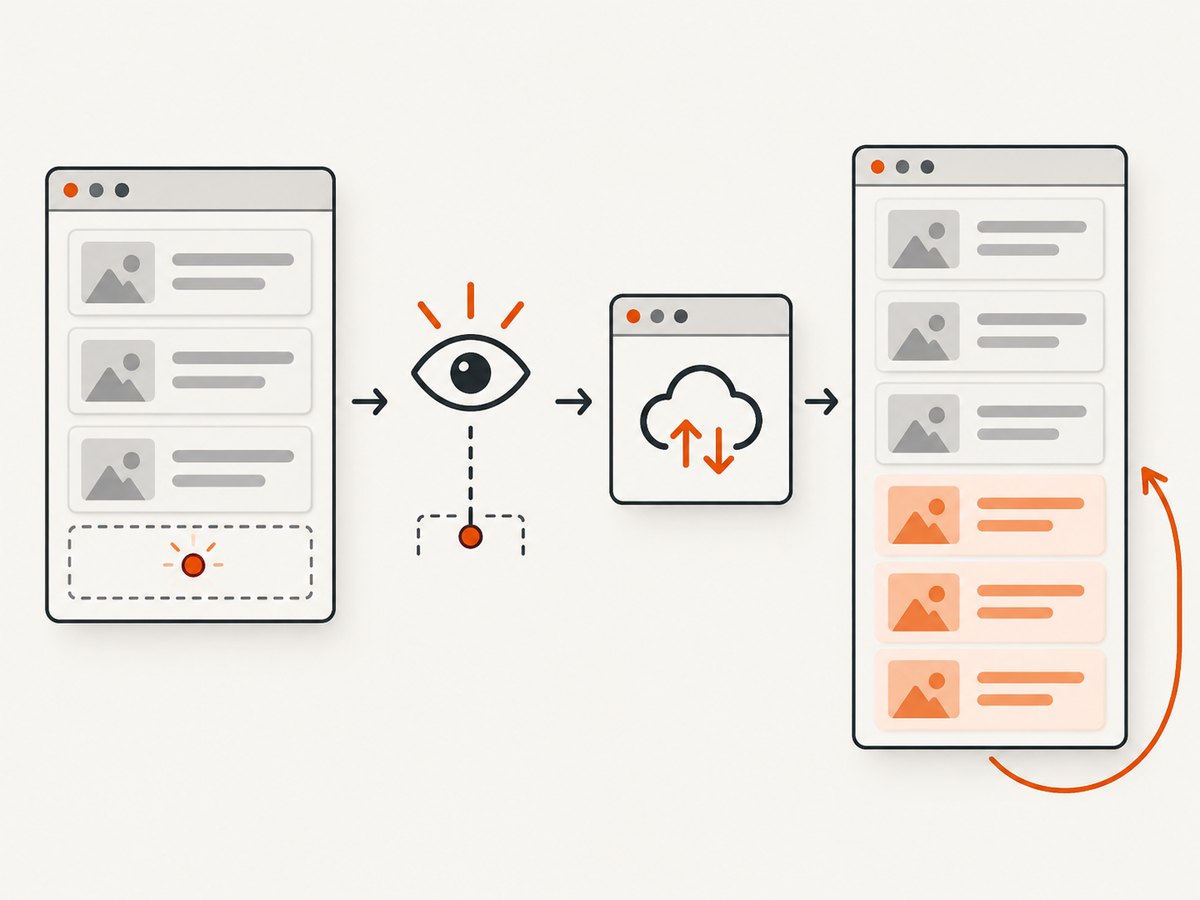
To load another batch of content as a visitor approaches the end of a list, place a small sentinel element after the current items and watch it with IntersectionObserver. When the sentinel intersects the viewport (or a chosen scroll container), fetch the next page, append the results, and advance your cursor only after a successful response. Keep a real Load more button as an explicit, keyboard-friendly fallback.
MDN documents IntersectionObserver as an asynchronous way to detect when a target intersects a viewport or designated root, including infinite scrolling use cases. It has been available across browsers since March 2019. The implementation below separates four concerns: detecting proximity, preventing duplicate requests, rendering data, and deciding when there is no more data.
Choose an automatic sentinel, a button, or both
| Approach | Trigger | Strengths | Costs and risks |
|---|---|---|---|
| Sentinel | IntersectionObserver callback | Low friction; can fetch before the user reaches the end | Needs request guards, cleanup, and a crawlable URL plan |
| Load more button | Native button activation | Clear user control and natural keyboard behavior | Requires an extra action for every page |
| Both | Observer plus button fallback | Fast for most users, usable when automatic loading is unsuitable | Two triggers must share the same loading state |
Use the sentinel for feeds, search results, and galleries where continuous browsing is useful. Prefer a button when each request is expensive, users need a stopping point, or search indexing is central. A hybrid gives you an automatic path while preserving an explicit control.
Minimal working example with IntersectionObserver
This complete example uses page numbers. The API returns {"items":[...],"nextPage":number|null}; adapt the response mapping to your service. The guard prevents the observer and button from starting overlapping requests.
<main>
  <h1>Articles</h1>
  <ol id="results" aria-live="polite"></ol>
  <p id="status" role="status" aria-live="polite"></p>
  <button id="load-more" type="button">Load more</button>
  <div id="sentinel" aria-hidden="true"></div>
</main>

<script type="module">
const list = document.querySelector('#results');
const status = document.querySelector('#status');
const button = document.querySelector('#load-more');
const sentinel = document.querySelector('#sentinel');

let page = 1;
let isLoading = false;
let hasMore = true;
let observer;

function renderItems(items) {
  const fragment = document.createDocumentFragment();
  for (const item of items) {
    const li = document.createElement('li');
    const link = document.createElement('a');
    link.href = item.url;
    link.textContent = item.title;
    li.append(link);
    fragment.append(li);
  }
  list.append(fragment);
}

async function loadNextPage() {
  if (isLoading || !hasMore) return;
  isLoading = true;
  button.disabled = true;
  status.textContent = 'Loading more results…';

  const requestedPage = page;
  try {
    const response = await fetch(`/api/articles?page=${requestedPage}`, {
      headers: { Accept: 'application/json' }
    });
    if (!response.ok) throw new Error(`HTTP ${response.status}`);
    const data = await response.json();
    if (!Array.isArray(data.items)) throw new Error('Invalid items array');

    renderItems(data.items);
    page = requestedPage + 1;
    hasMore = data.nextPage !== null && data.nextPage !== undefined;
    if (typeof data.nextPage === 'number') page = data.nextPage;

    if (!hasMore) {
      status.textContent = 'You have reached the end.';
      button.hidden = true;
      observer?.disconnect();
    } else {
      status.textContent = '';
    }
  } catch (error) {
    console.error(error);
    status.textContent = 'Could not load more results. Try again.';
  } finally {
    isLoading = false;
    button.disabled = false;
  }
}

button.addEventListener('click', loadNextPage);

observer = new IntersectionObserver((entries) => {
  if (entries.some(entry => entry.isIntersecting)) loadNextPage();
}, {
  root: null,
  rootMargin: '400px 0px',
  threshold: 0
});
observer.observe(sentinel);

window.addEventListener('pagehide', () => observer?.disconnect(), { once: true });
loadNextPage();
</script>
The positive rootMargin starts the request before the sentinel is visible, giving the network time to respond. Tune it to your response latency and item height; a large margin can fetch pages the user never reads.
How the observer works
Place the sentinel after the current content
The sentinel can be an empty div or a small loading marker. It must be inside the scroll root and after the rendered items. With root: null, the browser viewport is used. For a nested panel, pass that element as root:
const panel = document.querySelector('.results-panel');
const observer = new IntersectionObserver(onIntersect, {
  root: panel,
  rootMargin: '200px 0px',
  threshold: 0
});
A small sentinel normally needs only threshold 0. Thresholds from 0 to 1 are useful when you need a specific visible proportion, but they can produce more callbacks than necessary.
Keep loading state separate from pagination state
Track at least isLoading and hasMore, plus a page number or cursor. The callback may run again while a request is active. Return immediately in that case. Advance the cursor only after the server confirms success; otherwise a transient failure can silently skip a page.
Cursor APIs are often safer when records can be inserted while a visitor is browsing:
let nextCursor = null;
let hasMore = true;

async function loadCursorPage() {
  if (isLoading || !hasMore) return;
  isLoading = true;
  try {
    const url = new URL('/api/articles', location.origin);
    if (nextCursor) url.searchParams.set('cursor', nextCursor);
    const response = await fetch(url);
    if (!response.ok) throw new Error(`HTTP ${response.status}`);
    const data = await response.json();
    renderItems(data.items);
    nextCursor = data.nextCursor;
    hasMore = Boolean(nextCursor);
  } finally {
    isLoading = false;
  }
}
Do not trust a client-provided page count for authorization or billing decisions; enforce limits on the server as well.
Load more buttons and accessibility
Use <button type="button"> for an action. web.dev explains that native buttons provide mouse and keyboard behavior that a clickable div does not. Disable the button during a request, expose progress through a status region, and keep focus where the user expects. Appending items should not move focus unexpectedly.
If you use automatic loading, retain a visible button when users may have reduced motion, metered connectivity, or difficulty with continuously changing content. A button can call the same loadNextPage function as the observer, so both paths share duplicate-request protection.
The ARIA feed role is a specialized pattern for article streams. MDN’s feed guidance includes keyboard navigation, positional metadata, and rules for inserting or removing articles. Do not add role="feed" to a generic list unless you implement those requirements.
Search indexing and progressive enhancement
Google Search says its crawler does not scroll or click to trigger content. Important chunks therefore need stable, unique URLs. Use conventional pagination such as /articles?page=2 or a server-rendered route, then enhance it with an observer for interactive visitors. Google’s lazy-loaded content guidance recommends persistent URLs for infinite-scroll chunks.

A robust structure is:
- Render page one on the server or in the initial HTML.
- Expose ordinary links to page two and later pages.
- Intercept those links for an in-place append when JavaScript is available.
- Update the URL with
history.pushStateonly when the visible chunk changes, and support back/forward navigation.
function updateUrl(pageNumber) {
  const url = new URL(location.href);
  url.searchParams.set('page', String(pageNumber));
  history.pushState({ page: pageNumber }, '', url);
}
Do not make essential content reachable only after a scroll event. This progressive enhancement also gives users a usable experience when JavaScript, observers, or network requests fail.
Lazy-load images separately
Fetching the next data page and deferring images are different tasks. For offscreen images, use native lazy loading:
<img src="thumb.webp" alt="Article illustration" loading="lazy" width="320" height="180">MDN’s lazy-loading guide also describes event-handler fallbacks for compatibility-sensitive cases. Set dimensions or an aspect ratio so appended media does not cause large layout shifts. Lazy-load embeds only when their content is not needed immediately.
Cleanup, cancellation, and component lifecycles
Disconnect the observer when there is no next page and when the component is removed. unobserve(target) is useful for one target; disconnect() removes all observations. In a single-page application, abort an in-flight request during teardown:
const controller = new AbortController();

async function loadWithAbort(url) {
  const response = await fetch(url, { signal: controller.signal });
  return response.json();
}

// Call when navigating away or unmounting:
controller.abort();
observer.disconnect();
Treat an AbortError as normal cancellation rather than showing a failure toast. If your framework has an unmount hook, perform both operations there.
Reliability and performance checklist
- Guard every trigger with
isLoadingandhasMore. - Use a server cursor or an immutable page contract to avoid duplicates.
- Render with a
DocumentFragmentor framework batch update instead of repeatedly forcing layout. - Keep each page bounded; very large DOMs increase memory and accessibility work. Consider a “Show fewer” or virtualized list for extremely long sessions.
- Retry only safe, idempotent reads, with a visible retry button and backoff. Do not retry forever.
- Handle empty pages, malformed JSON, HTTP 401/403/429/5xx responses, offline transitions, and timeouts.
- Reserve media space and use appropriately sized thumbnails.
- Log request IDs and cursor values so duplicate or missing pages can be diagnosed.
There is no universal “best” root margin. Measure your API response time and choose a margin that keeps the next page ready without fetching many unused pages. IntersectionObserver callbacks are asynchronous, so never use callback frequency as a substitute for request state.
Troubleshooting common failures
| Symptom | Likely cause | Fix |
|---|---|---|
| Nothing loads | Sentinel is outside the scroll root, hidden by layout, or observer was never attached | Confirm the sentinel follows the list, inspect its size and position, and set the correct root for nested scrolling. |
| Pages load twice | Observer and button both fired, or the callback ran during an active request | Guard with isLoading; advance the cursor only after success. |
| Requests loop forever | hasMore is never cleared or the API repeats the same cursor |
Validate nextCursor/nextPage, detect unchanged cursors, and disconnect at the end. |
| Items disappear or reorder | Client replaced the list instead of appending, or concurrent responses completed out of order | Append in one controlled path and prevent concurrent requests; preserve server order. |
| Scroll position jumps | Images have no dimensions or focus is moved after append | Set width/height or aspect ratio and leave focus on the button or current control. |
| Search misses later items | Content exists only after scrolling | Provide crawlable, unique paginated URLs and server-rendered or link-accessible chunks. |
| 429 or intermittent 5xx errors | Rate limits, overloaded API, or network loss | Show a retry action, use bounded exponential backoff for safe GETs, and avoid aggressive root margins. |
Or skip the browser setup
If your goal is to capture a page after its JavaScript has loaded more content, ScreenshotNeo provides a single screenshot API request. See the ScreenshotNeo documentation for all options.
curl -G "https://api.screenshotneo.com/v1/shot" -d access_key=YOUR_API_KEY --data-urlencode url=https://stripe.com -o shot.webpimport requests
r = requests.get("https://api.screenshotneo.com/v1/shot", params={"access_key": "YOUR_API_KEY", "url": "https://stripe.com"}, timeout=90)
open("shot.webp", "wb").write(r.content)const q = new URLSearchParams({ access_key: 'YOUR_API_KEY', url: 'https://stripe.com' });
const res = await fetch(`https://api.screenshotneo.com/v1/shot?${q}`);ScreenshotNeo can load lazy images and capture a full page, wait for a selector, delay, or network idle, click an element before capture, run custom JavaScript, and hide selectors. Cookie banners, newsletter popups, and chat widgets are removed before the shot. Bot checks, blank pages, failed loads, timeouts, and cache hits are not billed; response headers identify the page verdict and whether it was billed. An MCP server lets Claude, Cursor, and other MCP clients call take_screenshot, get_page_info, and capture_pdf. The Free plan includes 1,000 screenshots each month with no card; paid plans start at $5 for 3,000 shots. Create a free ScreenshotNeo account.
FAQ
Is IntersectionObserver required for infinite scrolling?
No. A scroll event can work, but it requires throttling and manual geometry checks. IntersectionObserver expresses the proximity test directly and avoids tying your logic to every scroll event.
Should I use page numbers or cursors?
Page numbers make stable URLs and replayable requests straightforward. Cursors are often better when records change during a session. Choose the contract your API can guarantee and do not mix cursor advancement with rendering failures.
How early should the next request start?
Start before the sentinel becomes visible with a modest positive root margin. Tune it using real response latency, item size, and the cost of fetching unused pages.
Can I remove old items to save memory?
You can, but removing content changes scroll height and can harm keyboard and screen-reader context. If you virtualize, preserve a stable reading experience and test focus, history navigation, and restoration carefully.
Does native image lazy loading load the next data page?
No. loading="lazy" defers an image resource; it does not fetch JSON or append list items. Keep those mechanisms separate.