How to Scroll Pages with Scrapy-Playwright
Learn reliable document and inner-container scrolling with Scrapy-Playwright, wait for new content, stop safely, and avoid common browser pitfalls.

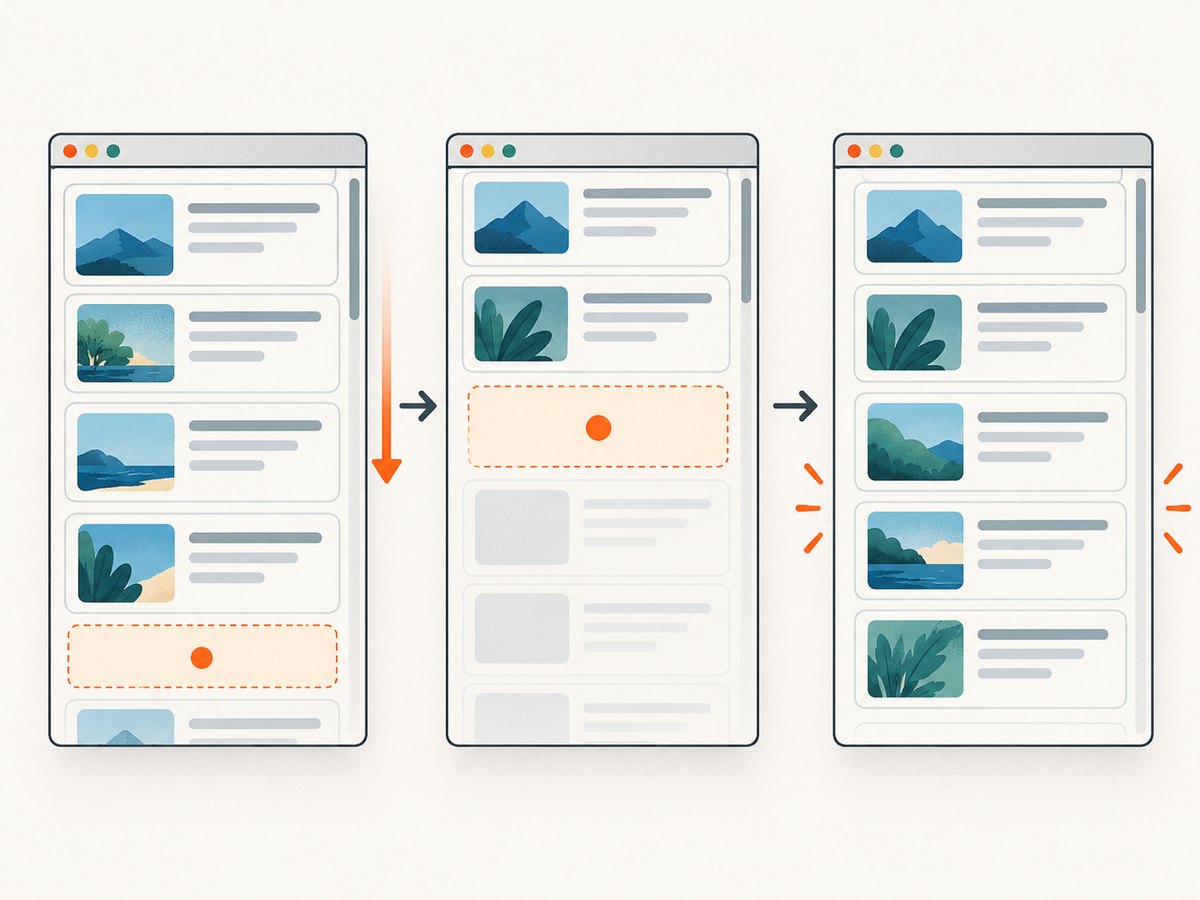
To scroll a page with Scrapy-Playwright, enable Playwright in the request metadata and provide PageMethod actions. A reliable scroll always has a wait condition that proves new content arrived. For a document, scroll the window and wait for a new card or sentinel. For a feed inside a panel, scroll that element instead of the window. Keep the number of rounds bounded by a condition such as an unchanged item count, a missing next-page signal, or a terminal element.
scrapy-playwright is a Scrapy download handler that performs requests with Playwright while preserving Scrapy scheduling and item processing. At the time of the referenced documentation, its minimum versions were Python 3.10, Scrapy 2.7, and Playwright 1.40; verify the repository before pinning versions because requirements can change.
1. Enable Playwright for the request
Install the integration and the browser binaries:
pip install scrapy-playwright
playwright install
Configure the download handler in settings.py:
DOWNLOAD_HANDLERS = {
    'http': 'scrapy_playwright.handler.ScrapyPlaywrightDownloadHandler',
    'https': 'scrapy_playwright.handler.ScrapyPlaywrightDownloadHandler',
}
TWISTED_REACTOR = 'twisted.internet.asyncioreactor.AsyncioSelectorReactor'
A request opts into the browser with meta={'playwright': True}. Actions in playwright_page_methods run before Scrapy receives the response, so your callback can parse the rendered HTML without handling a Playwright object.
import scrapy
from scrapy_playwright.page import PageMethod

class QuotesSpider(scrapy.Spider):
    name = 'quotes'

    def start_requests(self):
        yield scrapy.Request(
            'https://quotes.toscrape.com/scroll',
            meta={
                'playwright': True,
                'playwright_page_methods': [
                    PageMethod('wait_for_selector', 'div.quote'),
                ],
            },
        )

    def parse(self, response):
        for quote in response.css('div.quote'):
            yield {
                'text': quote.css('span.text::text').get(),
                'author': quote.css('small.author::text').get(),
            }
Set playwright_include_page=True only when callback code needs the live Page object for more actions, screenshots, or inspection. Included pages must be closed explicitly; otherwise browser contexts accumulate.
2. Scroll the document and wait for a new item
The canonical pattern is a scroll followed by a selector that cannot exist until the next batch has loaded:
from scrapy_playwright.page import PageMethod

yield scrapy.Request(
    'https://quotes.toscrape.com/scroll',
    meta={
        'playwright': True,
        'playwright_page_methods': [
            PageMethod('wait_for_selector', 'div.quote'),
            PageMethod('evaluate', 'window.scrollBy(0, document.body.scrollHeight)'),
            PageMethod('wait_for_selector', 'div.quote:nth-child(11)'),
        ],
    },
)
The first wait confirms that the initial DOM is ready. The evaluation sends a document scroll. The second wait is the proof of progress: the eleventh quote is a new node for this fixture. A fixed sleep only waits for time to pass; it does not establish that the DOM changed. Prefer a selector for a newly expected item, a count increase, or a visible end-of-results marker.
When a site uses a loading indicator, wait for it to disappear and then wait for the new card:
PageMethod('evaluate', 'window.scrollTo(0, document.body.scrollHeight)'),
PageMethod('wait_for_selector', '[data-testid="loading"]', state='hidden'),
PageMethod('wait_for_selector', '[data-testid="card-21"]')
Do not use the selector for the first card as the post-scroll wait. It already exists and can return immediately, masking a failed scroll.
3. Repeat scrolling with a bounded stopping rule
For several rounds, use a callable that receives the Playwright Page. The callable can inspect the current count, scroll, and wait for a sentinel. A stopping policy is application-specific; the project does not publish a universal iteration count or delay.
from scrapy_playwright.page import PageMethod

async def scroll_until_progress(page):
    previous = await page.locator('article.quote').count()
    for _ in range(20):
        await page.evaluate('window.scrollBy(0, document.body.scrollHeight)')
        try:
            await page.locator('article.quote').nth(previous).wait_for(
                state='attached', timeout=8000
            )
        except Exception:
            # No new card appeared during this round.
            break
        current = await page.locator('article.quote').count()
        if current <= previous:
            break
        previous = current
        if await page.locator('text=No more results').count():
            break

yield scrapy.Request(
    url,
    meta={
        'playwright': True,
        'playwright_page_methods': [PageMethod(scroll_until_progress)],
    },
)
The loop has both a safety cap and content-based exits. Other useful terminal signals include a disabled “Load more” button, a next-page link that disappears, or a known footer element. If a site appends duplicate cards, compare stable IDs rather than only the raw count.
For pages where the scroll itself is not enough, combine a scroll with a network or DOM signal. Waiting for networkidle can work, but analytics, ads, and long polling may prevent idleness. A specific card or loading-state transition is usually more deterministic.
4. Scroll an inner container
Feeds, chat histories, and modal panels often own the scrollbar. Scrolling window then does nothing useful. Locate the container, hover it when using wheel input, and scroll the element.

async def scroll_panel(page):
    panel = page.get_by_role('region', name='Results')
    await panel.hover()
    await page.mouse.wheel(0, 900)
    await panel.get_by_role('article').nth(20).wait_for(state='attached')
Playwright documents mouse.wheel for wheel input. For deterministic movement, update scrollTop through Locator.evaluate:
async def scroll_panel_by(page, amount=900):
    panel = page.locator('[data-testid="results-panel"]')
    await panel.evaluate(
        '(element, distance) => { element.scrollTop += distance; }',
        amount,
    )
Check that the element is actually scrollable. Its computed height must be smaller than its scroll height, and CSS such as overflow: auto or overflow-y: scroll must allow movement. If a nested child owns the overflow, target that child. A quick diagnostic is to read scrollTop before and after the operation.
before = await panel.evaluate('(element) => element.scrollTop')
await panel.evaluate('(element) => element.scrollTop += 900')
after = await panel.evaluate('(element) => element.scrollTop')
if after == before:
    raise RuntimeError('The selected element did not scroll')
5. Choose stable locators and precise waits
Prefer user-facing locators such as roles, labels, and visible text. They describe the contract a user sees and are less coupled to generated class names. CSS and XPath remain useful when the page has no accessible or stable semantic hook.
# Preferred
sentinel = page.get_by_role('article').nth(20)
load_more = page.get_by_role('button', name='Load more')

# Acceptable when the DOM exposes a stable hook
sentinel = page.locator('[data-testid="product-card-21"]')

# Last resort for a structure with no stable attributes
sentinel = page.locator('div.feed > div:nth-child(21)')
Wait for the state that represents progress: attached when a node is inserted, visible when it must be displayed, or hidden for a spinner. Use a bounded timeout and handle a timeout as a possible end of the feed, not automatically as a fatal error.
Playwright automatically scrolls elements into view for many actions. Manual scrolling is needed when you are deliberately triggering infinite loading, controlling a particular container, or reproducing wheel behavior. scroll_into_view_if_needed() is useful when a known sentinel exists:
sentinel = page.get_by_text('End of current batch')
await sentinel.scroll_into_view_if_needed()
await page.get_by_role('article').nth(30).wait_for(state='attached')
6. Manage the page lifecycle
Let scrapy-playwright own the page when PageMethods are sufficient. If callback logic needs the handle, include it and close it in a finally block:
async def parse_with_page(self, response):
    page = response.meta['playwright_page']
    try:
        title = await page.title()
        yield {'url': response.url, 'title': title}
    finally:
        await page.close()

yield scrapy.Request(
    url,
    callback=self.parse_with_page,
    meta={'playwright': True, 'playwright_include_page': True},
)
Keep the browser context alive only as long as needed. Pages left open consume memory and can eventually exhaust the browser. Scrapy’s duplicate filtering, scheduling, retries, and item pipelines remain useful when browser work stays inside the download handler; driving Playwright outside that workflow can bypass those components.
7. Complete runnable spider
This spider scrolls until the number of cards stops increasing, extracts unique quotes, and closes the page. Adapt selectors and the terminal condition to the target site.
import scrapy
from scrapy_playwright.page import PageMethod

class InfiniteQuotesSpider(scrapy.Spider):
    name = 'infinite_quotes'
    start_urls = ['https://quotes.toscrape.com/scroll']

    async def scroll_page(self, page):
        cards = page.locator('div.quote')
        previous = await cards.count()
        for _ in range(15):
            await page.evaluate('window.scrollBy(0, document.body.scrollHeight)')
            try:
                await cards.nth(previous).wait_for(state='attached', timeout=7000)
            except Exception:
                break
            current = await cards.count()
            if current <= previous:
                break
            previous = current
            if await page.get_by_text('No more results').count():
                break

    def start_requests(self):
        for url in self.start_urls:
            yield scrapy.Request(
                url,
                meta={
                    'playwright': True,
                    'playwright_page_methods': [
                        PageMethod('wait_for_selector', 'div.quote'),
                        PageMethod(self.scroll_page),
                    ],
                },
            )

    def parse(self, response):
        seen = set()
        for quote in response.css('div.quote'):
            text = quote.css('span.text::text').get()
            author = quote.css('small.author::text').get()
            key = (text, author)
            if key not in seen:
                seen.add(key)
                yield {'text': text, 'author': author}
8. Troubleshooting
| Symptom | Likely cause | Fix |
|---|---|---|
| Scroll runs but no cards load | The scrollbar belongs to an inner element. | Inspect overflow, target the panel, and use mouse.wheel or scrollTop. |
| Wait returns immediately | The selector already existed before scrolling. | Wait for a new index, unique ID, count increase, or loading transition. |
| Only the first batch is scraped | The request performs one scroll and then ends. | Use a bounded loop with a progress check. |
| Timeout on the next card | The site is slow, the selector is wrong, or the feed ended. | Confirm the selector manually, wait for a loading state, increase the timeout modestly, and treat repeated no-progress rounds as terminal. |
| Page memory keeps growing | Included pages are never closed. | Close response.meta['playwright_page'] in finally, or omit playwright_include_page. |
| Browser fails to launch | Playwright browser binaries or versions are missing. | Run playwright install and verify Python, Scrapy, Playwright, and scrapy-playwright versions against the repository. |
| Duplicate items appear | Virtualized lists recycle nodes or the site repeats results. | Extract a stable ID and deduplicate in the spider or item pipeline. |
| Network-idle wait never completes | Analytics, ads, or long polling keep requests active. | Wait for a specific card or spinner state instead. |
9. Performance, reliability and cost
- Reuse a browser context where your crawl design allows it, but bound concurrent pages to the capacity of the host. More pages increase CPU, memory, and site load.
- Prefer a precise sentinel over long fixed sleeps. It reduces idle time while still proving progress.
- Stop as soon as the item count is unchanged or a terminal marker appears. Unbounded scrolling wastes browser work and can loop forever on a broken feed.
- Use Scrapy’s normal concurrency, retry, throttling, and duplicate-filter settings. Keep browser actions inside scrapy-playwright so those controls continue to apply.
- Virtualized lists may remove old nodes as you scroll. Extract each batch before it is recycled, or use the site’s API when permitted.
- Do not assume a scroll loads every record. Some sites require a button click, authentication, geolocation, or a separate API request.
10. Or skip the browser setup
If your goal is a clean image or PDF of a page rather than DOM extraction, ScreenshotNeo provides a single GET request. Its capture pipeline accepts cookie and consent banners, removes more than 60 known consent platforms plus newsletter popups and chat widgets, and lets you turn each step off. Bot checks, CAPTCHAs, blank pages, timeouts, failed loads, and cache hits are not billed; response headers identify the page verdict and whether the shot was billed.
See the ScreenshotNeo API documentation for all options. A minimal cURL request is:
curl -G 'https://api.screenshotneo.com/v1/shot' \
  -d access_key=YOUR_API_KEY \
  --data-urlencode url=https://stripe.com \
  -o shot.webp
Python:
import requests
r = requests.get(
    'https://api.screenshotneo.com/v1/shot',
    params={'access_key': 'YOUR_API_KEY', 'url': 'https://stripe.com'},
    timeout=90,
)
r.raise_for_status()
open('shot.webp', 'wb').write(r.content)
Node.js:
const q = new URLSearchParams({ access_key: 'YOUR_API_KEY', url: 'https://stripe.com' });
const res = await fetch(`https://api.screenshotneo.com/v1/shot?${q}`);
if (!res.ok) throw new Error(`HTTP ${res.status}`);
const fs = await import('node:fs/promises');
await fs.writeFile('shot.webp', Buffer.from(await res.arrayBuffer()));
ScreenshotNeo also supports full-page captures with lazy images loaded, CSS-selector element shots, dark mode, device presets and custom viewports, retina scale, PDF paper and page settings, custom CSS and JavaScript, clicks, selector or network-idle waits, request blocking, headers, cookies, user agents, authorization, timezone, geolocation, transparent backgrounds, resizing, chosen cache TTLs, signed links, asynchronous jobs with signed webhooks, bulk capture of up to 100 URLs per call, a usage API, and an OpenAPI specification. An MCP server exposes take_screenshot, get_page_info, and capture_pdf to Claude, Cursor, and other MCP clients.
There are 1,000 free shots each month with no card. Paid plans start at $5 for 3,000 shots; yearly billing gives two months free, and every feature is included on every plan. Create a free ScreenshotNeo account to get started.
11. FAQ
Should I use a fixed delay after scrolling?
Use a DOM or loading-state wait whenever possible. A short delay can be a fallback for pages with no observable signal, but it cannot prove that new content arrived.
How do I know which element scrolls?
Inspect the page for an element whose scrollHeight exceeds clientHeight and whose overflow permits scrolling. Compare its scrollTop before and after a test movement.
Can PageMethods run JavaScript?
Yes. Use PageMethod('evaluate', '...') for a browser-side expression, or pass a callable for multi-step asynchronous logic.
When is playwright_include_page necessary?
Only when callback code needs the live Page handle. For ordinary scrolling described entirely by PageMethods, leave it disabled and let the integration manage the lifecycle.
Why does Playwright scroll automatically sometimes?
Playwright automatically brings many target elements into view before actions. Explicit scrolling remains necessary for infinite-scroll triggers, wheel simulation, and selecting the correct nested scroll owner.
Can I scrape a list without a browser?
If the site exposes a stable JSON endpoint, a normal Scrapy request is usually lighter. Use Playwright when JavaScript execution, interaction, or browser state is required.


