How to Scroll and Screenshot Each Tweet with Puppeteer
Capture one image per tweet as Puppeteer scrolls an infinite feed. Learn to wait for visual readiness, deduplicate virtualized posts, and stop safely.
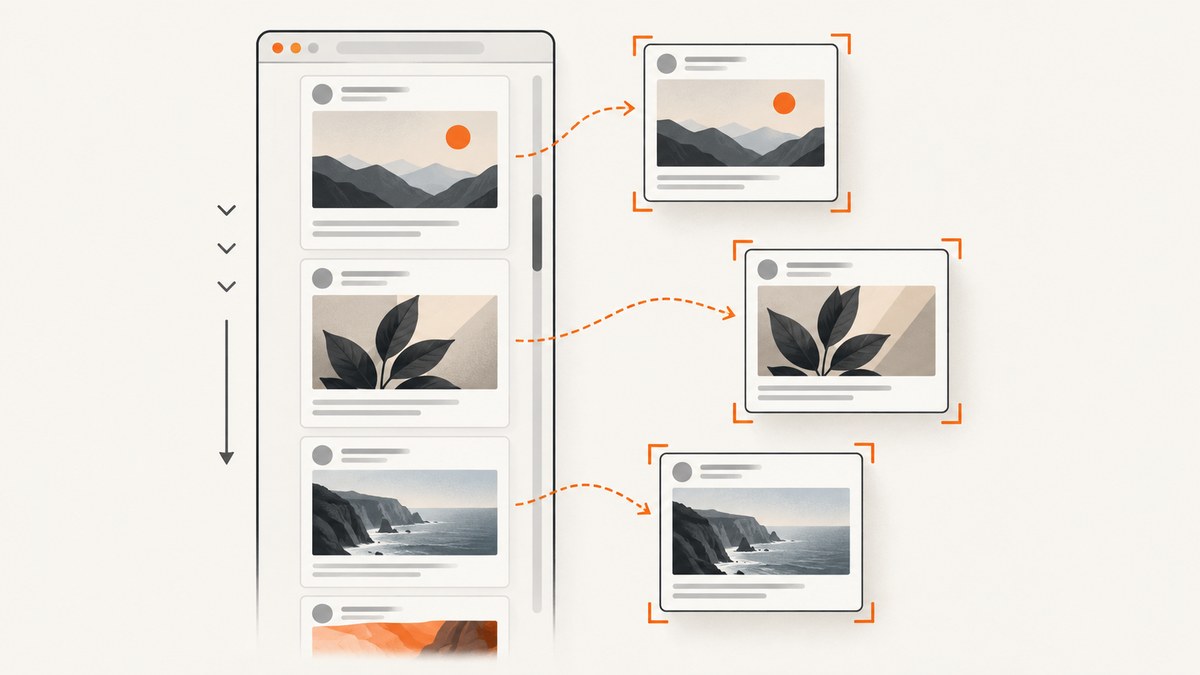
To save one screenshot per tweet from an infinite feed, use Puppeteer’s ElementHandle.screenshot() on each rendered tweet element. Scroll in bounded steps, identify each tweet by its stable status URL or ID, and skip IDs you have already saved. A page screenshot captures the viewport or the current document; fullPage: true does not load tweets that have not yet been rendered.
The key challenge is not taking the screenshot. It is knowing which posts have appeared, waiting until each is visually ready, and stopping without saving duplicates or scrolling forever. The example below implements those controls and writes numbered PNG files to disk.
What you need before you start
This example uses Node.js, Puppeteer, and a Chromium browser. It assumes you have permission to access the feed and that it is available to the browser session. X/Twitter selectors, access requirements, and feed behavior can change, so inspect the target page and confirm the tweet selector and status-link pattern before relying on the script.
mkdir tweet-captures
cd tweet-captures
npm init -y
npm install puppeteer
Save the program below as capture-tweets.js. It creates an output directory automatically. Set TARGET_URL to the timeline or search page you want to capture. The [data-testid="tweet"] selector is an example, not a permanent contract.
Runnable Puppeteer example
const fs = require('node:fs/promises');
const path = require('node:path');
const puppeteer = require('puppeteer');

const TARGET_URL = process.env.TARGET_URL || 'https://x.com/';
const TARGET_COUNT = Number(process.env.TARGET_COUNT || 20);
const MAX_PASSES = Number(process.env.MAX_PASSES || 40);
const OUTPUT_DIR = process.env.OUTPUT_DIR || 'output';
const TWEET_SELECTOR = process.env.TWEET_SELECTOR || '[data-testid="tweet"]';
const SCROLL_STEP_RATIO = 0.8;
const STAGNANT_LIMIT = 3;

function safeFilePart(value) {
  return value.replace(/[^a-zA-Z0-9_-]/g, '_').slice(-80) || 'tweet';
}

async function main() {
  if (!Number.isInteger(TARGET_COUNT) || TARGET_COUNT < 1) {
    throw new Error('TARGET_COUNT must be a positive integer');
  }
  await fs.mkdir(OUTPUT_DIR, { recursive: true });
  const browser = await puppeteer.launch({ headless: true });
  try {
    const page = await browser.newPage();
    await page.setViewport({ width: 1280, height: 900, deviceScaleFactor: 1 });

    const response = await page.goto(TARGET_URL, {
      waitUntil: 'domcontentloaded',
      timeout: 45000,
    });
    if (response && response.status() >= 400) {
      throw new Error(`Navigation returned HTTP ${response.status()}`);
    }

    await page.waitForSelector(TWEET_SELECTOR, { timeout: 30000 });
    const seen = new Set();
    let stagnant = 0;
    let saved = 0;

    for (let pass = 0; pass < MAX_PASSES && saved < TARGET_COUNT; pass++) {
      // Select the first status link as a stable identity. Review this pattern
      // for the target site; avoid text-only identity when posts repeat.
      const cards = await page.$$(TWEET_SELECTOR);
      for (const card of cards) {
        try {
          const statusUrl = await card.evaluate(el => {
            const link = el.querySelector('a[href*="/status/"]');
            return link ? link.href : null;
          });
          if (!statusUrl || seen.has(statusUrl)) continue;

          // This helper is strongest for pages you control. On third-party
          // sites, add a site-specific readiness condition if needed.
          await card.evaluate(async el => {
            await document.fonts.ready;
            const images = Array.from(el.querySelectorAll('img'));
            await Promise.all(images.map(img => {
              if (img.complete) return Promise.resolve();
              return new Promise(resolve => {
                img.addEventListener('load', resolve, { once: true });
                img.addEventListener('error', resolve, { once: true });
                setTimeout(resolve, 5000);
              });
            }));
          });

          const file = path.join(OUTPUT_DIR, `${String(saved + 1).padStart(4, '0')}-${safeFilePart(statusUrl)}.png`);
          await card.screenshot({ path: file, type: 'png' });
          seen.add(statusUrl);
          saved++;
          if (saved >= TARGET_COUNT) break;
        } finally {
          await card.dispose();
        }
      }
      if (saved >= TARGET_COUNT) break;

      const before = await page.evaluate(() => ({
        height: document.documentElement.scrollHeight,
        last: [...document.querySelectorAll('[data-testid="tweet"]')]
          .at(-1)?.querySelector('a[href*="/status/"]')?.href || null,
      }));
      await page.evaluate(ratio => {
        window.scrollBy(0, Math.floor(window.innerHeight * ratio));
      }, SCROLL_STEP_RATIO);
      try {
        await page.waitForFunction(
          previous => {
            const height = document.documentElement.scrollHeight;
            const last = [...document.querySelectorAll('[data-testid="tweet"]')]
              .at(-1)?.querySelector('a[href*="/status/"]')?.href || null;
            return height > previous.height || (last && last !== previous.last);
          },
          { timeout: 5000 },
          before,
        );
      } catch {
        // A timeout means no detectable progress during this wait, not
        // necessarily end-of-feed. The repeated-pass guard handles stopping.
      }
      const afterHeight = await page.evaluate(() => document.documentElement.scrollHeight);
      stagnant = afterHeight === before.height ? stagnant + 1 : 0;
      if (stagnant >= STAGNANT_LIMIT) break;
    }

    console.log(`Saved ${saved} unique tweets to ${OUTPUT_DIR}`);
    if (saved < TARGET_COUNT) {
      console.warn(`Reached a stopping condition before the target of ${TARGET_COUNT}.`);
    }
  } finally {
    await browser.close();
  }
}

main().catch(error => {
  console.error(error);
  process.exitCode = 1;
});
Run it with environment variables so the same script can capture a different page or count:
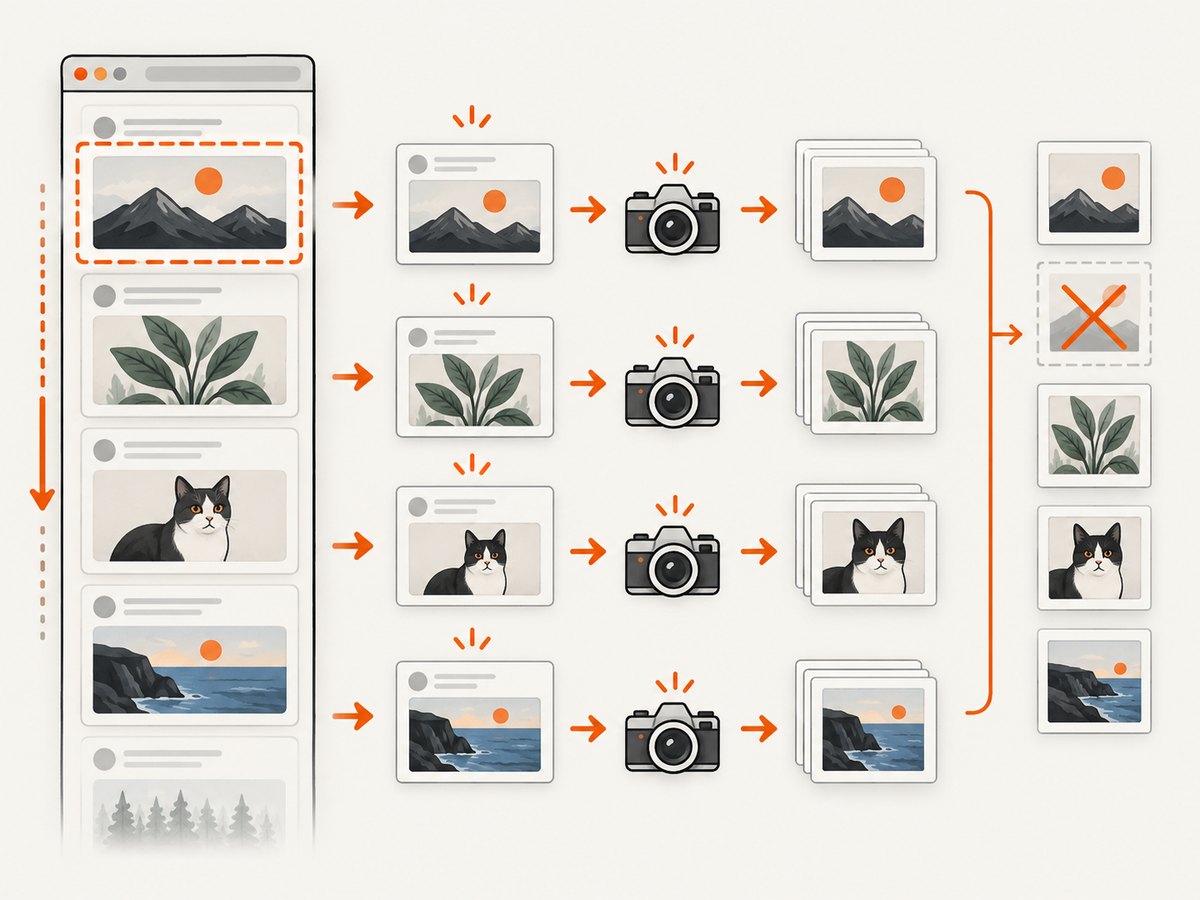
TARGET_URL='https://x.com/search?q=puppeteer&src=typed_query' TARGET_COUNT=50 node capture-tweets.jsThe output names include a sequence number and a sanitized form of the status URL. The URL is useful for tracing the image back to the source; the sequence number reflects discovery order, which may not equal the feed’s final order if the site inserts promoted posts or rearranges content.
How the capture loop works
1. Set the viewport before navigation
Viewport dimensions affect line wrapping, card height, image layout, and responsive breakpoints. Configure the viewport before loading the page so that the first render and later captures use the same dimensions. If you need a mobile layout, change the width and height and consider a mobile device emulation profile rather than changing the viewport halfway through the run.
2. Wait for the first tweet, not just page navigation
domcontentloaded only indicates that the initial document has been parsed. A feed may render asynchronously after that point. Waiting for a tweet selector provides a useful minimum readiness check, but it only confirms that an element exists. It does not prove that fonts, photos, video posters, or client-side content are ready. For an application you control, expose a visual-ready marker or wait for the relevant network and rendering state. For a third-party feed, combine the selector wait with checks for the media that matters to your capture.
3. Deduplicate by a stable identity
Infinite feeds often recycle DOM nodes: a card handle can refer to different content after scrolling. The script reads the status URL before capturing and adds it to seen after a successful screenshot. This prevents saving the same tweet twice. Prefer the platform’s stable status URL or ID. Text is a weak fallback because separate posts can have identical text, and text can change when the page expands or localizes content.
4. Capture the element, then dispose the handle
ElementHandle.screenshot() captures the rendered tweet card as an image. Puppeteer scrolls an element into view if it is hidden, which is convenient but may adjust the page position during the pass. Dispose each handle when finished so a long-running capture does not retain unnecessary browser-side references. The official [Puppeteer screenshots guide](https://pptr.dev/guides/screenshots) covers page screenshots and element screenshots.
5. Scroll with limits and stop conditions
The loop stops when it reaches the target count, exhausts MAX_PASSES, or sees no document-height increase for three consecutive passes. It also waits up to five seconds for a height change or a different last status URL after each scroll. These are separate safeguards: a page can append content without changing height immediately, and a virtualized feed can change visible posts while keeping roughly the same height.
For feeds whose document height stays constant, use a content-based stop condition as well. For example, track the last visible status ID on every pass and stop only after that ID remains unchanged for several scrolls. Conversely, a changing footer or loading spinner may increase document height without adding tweets, so height alone should not determine whether new posts were captured.
Options and useful variations
| Need | Change | Trade-off |
|---|---|---|
| Capture a specific number | Set TARGET_COUNT. |
A feed with fewer accessible posts may stop early. |
| Bound a slow or endless feed | Lower or raise MAX_PASSES; keep a finite value. |
More passes increase runtime and browser work. |
| Use a different site or markup | Set TWEET_SELECTOR and adjust the status-link query. |
Selectors tied to private markup can break after a redesign. |
| Change screenshot dimensions | Set viewport width, height, and deviceScaleFactor. |
Higher pixel density creates larger PNG files and takes more memory. |
| Capture a fixed region | Use page.screenshot({ clip: { x, y, width, height } }). |
A clip captures page coordinates, not a semantic tweet element. |
| Save JPEG or WebP | Use supported type and quality options in Puppeteer’s screenshot API. |
Lossy compression can soften small text; check the format supported by your installed version. |
| Capture full current document | Use page.screenshot({ path, fullPage: true }). |
This includes the current document only; it does not load additional feed entries. |
If the page virtualizes aggressively and old cards disappear before your loop finds them, reduce the scroll step, inspect cards more frequently, and capture immediately once a new stable ID appears. An alternative is to collect IDs first and then revisit each status URL individually, if the site and your use case permit it. That can make the capture set easier to audit, but each navigation costs more time and may show a different page state.
Readiness, images, and dynamic content
The sample waits for the browser’s font set and for images inside each card to either load or error. Its image wait has a five-second upper bound per image so one broken request cannot hang the entire run. Treat this as a starting point: lazy-loaded image elements may not receive a source until the card is near the viewport, animated media may have no final frame, and some sites render media through background images or canvas.
For pages you own, the most reliable approach is to define a page-level condition that means the content is ready for visual capture. Examples include a data attribute on the card after rendering finishes, a known image decode promise, or an app event that signals the card has settled. document.fonts.ready waits for font loading work known to the document at that point; it does not force every later font or image to appear. Avoid relying only on arbitrary sleeps: they make fast pages wait unnecessarily and may still be too short on slow pages.
If the feed displays video, decide what the screenshot should represent: the poster frame, the currently rendered frame, or a card with playback controls. Pause or suppress animation when a consistent capture is important and when you control the page. Also be aware that a screenshot may include hover states, focus rings, sticky controls, or consent overlays depending on the page state at capture time.
cURL, Python, and Node.js alternatives
cURL and Python do not provide Puppeteer’s browser automation API. They can request a page or call a screenshot service, but they do not independently scroll a JavaScript-driven feed and identify rendered tweet elements. For this workflow, Puppeteer’s Node.js code above performs the scrolling and per-element capture. These examples show how to retrieve a single rendered-page screenshot from ScreenshotNeo when you do not need the custom per-tweet iteration.

cURL
curl -G "https://api.screenshotneo.com/v1/shot" \
  -d access_key=YOUR_API_KEY \
  --data-urlencode url=https://x.com/ \
  -o feed.webp
Python
import requests

r = requests.get(
    "https://api.screenshotneo.com/v1/shot",
    params={"access_key": "YOUR_API_KEY", "url": "https://x.com/"},
    timeout=90,
)
r.raise_for_status()
with open("feed.webp", "wb") as f:
    f.write(r.content)
Node.js
const q = new URLSearchParams({
  access_key: 'YOUR_API_KEY',
  url: 'https://x.com/',
});
const res = await fetch(`https://api.screenshotneo.com/v1/shot?${q}`);
if (!res.ok) throw new Error(`Screenshot request failed: ${res.status}`);
await require('node:fs/promises').writeFile('feed.webp', Buffer.from(await res.arrayBuffer()));
For one image per tweet with a custom infinite-scroll stop condition, keep the Puppeteer loop. The API examples capture a page URL and do not replace your selector, deduplication, or feed traversal logic. See the [ScreenshotNeo API documentation](https://screenshotneo.com/docs/) for request options and configuration.
Or skip the browser setup
ScreenshotNeo is a website screenshot API and MCP server for developers. Its one-call capture is useful when you need a page screenshot without installing and maintaining a browser. Cookie banners are accepted and removed before the shot, and known consent platforms, newsletter popups, and chat widgets can be removed; each cleanup step can be turned off. Bot checks and CAPTCHAs, blank pages, timeouts, failed loads, and cache hits are not billed, and response headers say which page verdict and billing status applied.
This is a page capture, so it does not run the custom loop above to emit one image per tweet from an infinite feed. The ScreenshotNeo MCP server gives AI agents tools including take_screenshot, get_page_info, and capture_pdf. Its free plan includes 1,000 shots per month without a card; paid plans start at $5 for 3,000 shots. All features are available on every plan. See [ScreenshotNeo](https://screenshotneo.com) and its [API docs](https://screenshotneo.com/docs/).
curl -G "https://api.screenshotneo.com/v1/shot" \
  -d access_key=YOUR_API_KEY \
  --data-urlencode url=https://x.com/ \
  -o shot.webp
Sign up for 1,000 free screenshots a month, no card required.
Troubleshooting
| Symptom | Likely cause | Fix |
|---|---|---|
waitForSelector times out |
The selector changed, the page did not load, or access/login is required. | Inspect the rendered DOM, verify the URL and session, and set a selector that matches actual cards. |
| No files are saved | The cards do not contain a matching status link, so the script skips them. | Inspect each card’s anchors and adapt the identity query to the site’s stable post URL or ID. |
| Duplicate images appear | The identity query is unstable, or duplicate posts have different URL variants. | Normalize the URL or extract the canonical status ID before checking the seen set. |
| Images show placeholders | The card was captured before lazy media finished, or the site uses a different media rendering path. | Wait for the expected source or decode state, scroll the card fully into view, and use an app-specific ready check. |
| Some tweets are skipped | Scrolling is faster than the capture loop, virtualization removes cards, or loading is delayed. | Reduce the scroll step, wait for a new stable ID, and capture each new card promptly. |
| The run stops too early | Document height stays unchanged, or three height-stagnant passes occur during delayed loading. | Use last-ID stagnation as an additional stop rule, increase the stagnation limit, and retain a maximum-pass limit. |
| The run never reaches the target count | The account or feed has fewer accessible posts, the selector excludes some card types, or a login wall blocks results. | Check visible page content and selector coverage; reduce the target or use a valid authorized session. |
| Screenshots are clipped or inconsistent | Viewport, sticky elements, or responsive layout changed during capture. | Set the viewport before navigation, keep it constant, and consider hiding irrelevant fixed elements with page-controlled CSS. |
| Browser memory rises during a long run | Handles or pages remain alive, images are large, or the feed retains rendered content. | Dispose handles, close pages after use, lower device scale or output dimensions, and cap passes and target count. |
| ScreenshotNeo returns an unexpected page | The target may show a bot check, blank state, login wall, or failed load. | Inspect the response’s X-Page-Verdict and X-Billed headers. Those responses are not billed under the stated policy; a page screenshot also does not traverse an infinite feed. |
Performance, reliability, and cost
Local Puppeteer cost is mainly browser runtime, CPU, memory, and image storage. Each card capture requires browser work and PNG encoding. Large viewports, high device scale, media-heavy posts, and long waits increase time and output size. Set a target count, pass limit, navigation timeout, and media-readiness timeout so a feed cannot run indefinitely. For repeatable jobs, record the URL, capture time, viewport, selector, and status IDs alongside the image files.
Reliability depends on the page’s current markup and access state. A selector that works today may fail after a site redesign; validate it at startup and treat a missing stable ID as a skipped card rather than silently assigning an unreliable index. If the result matters, save a manifest mapping each output filename to its status URL and report skipped cards. Use retries only around transient navigation or screenshot failures, with a finite retry count; retrying every selector error can hide a real markup change.
ScreenshotNeo pricing is $0 for 1,000 monthly shots, $5 for 3,000 on Starter, $15 for 15,000 on Growth, $39 for 60,000 on Pro, $99 for 250,000 on Scale, and $249 for 1,000,000 on Business. Yearly billing gives two months free. Those are page-shot plan quantities and prices; this article’s custom per-tweet browser workflow still needs its own feed traversal logic. Only clean shots are billed by ScreenshotNeo, with verdict and billing information in response headers. Review the service’s [docs](https://screenshotneo.com/docs/) for the options that fit a single-page capture.
FAQ
Can I use a single full-page screenshot to capture every tweet?
Only tweets already loaded into the current document can appear. Scroll and wait for additional content first, or capture each element as the feed renders it.
Should I use text as the tweet ID?
Use a stable post URL or platform ID whenever possible. Text can repeat or change and does not reliably identify a unique post.
Why does Puppeteer move the page during an element screenshot?
The element screenshot operation brings an off-screen element into view. If the viewport position matters, account for that movement or capture a fixed page region instead.
Can the service call capture each tweet individually?
The ScreenshotNeo one-call example captures a URL. The custom feed traversal and per-card selection in this guide are handled by Puppeteer.


