How to Secure Nginx Against Clickjacking With X-Frame-Options
Add and verify X-Frame-Options in Nginx, choose DENY or SAMEORIGIN, and use CSP frame-ancestors for modern allowlists.
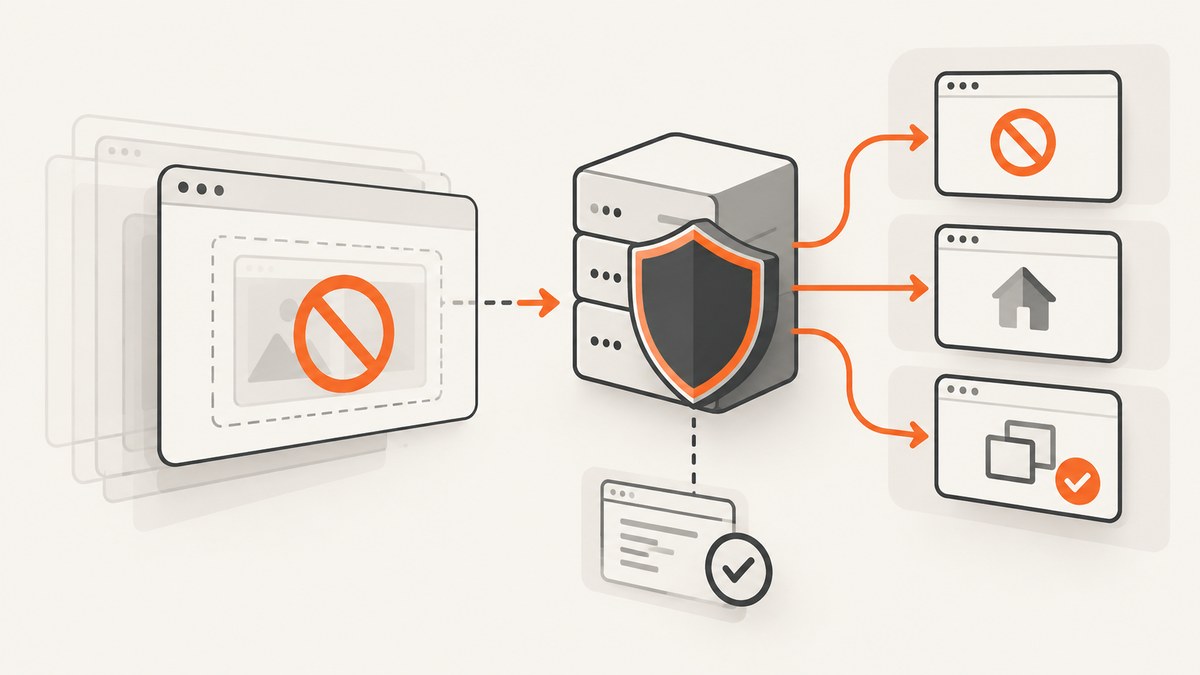
Clickjacking happens when an attacker places your real page inside a frame and tricks a visitor into clicking controls they cannot see or do not recognize. The browser still sends the click to your site, so actions such as changing an account setting, authorizing an integration, or deleting data can be abused.
The fastest Nginx fix is an HTTP response header:
server {
    add_header X-Frame-Options "DENY" always;
}
DENY prevents every site, including your own, from framing the response. If your application legitimately embeds pages from the same origin, use SAMEORIGIN instead:
server {
    add_header X-Frame-Options "SAMEORIGIN" always;
}
For a list of approved external origins, use Content Security Policy (CSP) with frame-ancestors. The obsolete ALLOW-FROM value is not a dependable solution in modern browsers. This guide shows where to place the directives, how Nginx inheritance affects them, how to verify real responses, and how to troubleshoot missing headers.
1. Choose the framing policy your application actually needs
| Requirement | Header policy | Result |
|---|---|---|
| No framing anywhere | X-Frame-Options: DENY |
Blocks framing by same-origin and cross-origin pages. |
| Framing by pages on this origin | X-Frame-Options: SAMEORIGIN |
Allows ancestors with the same origin. |
| Specific external embedding sites | Content-Security-Policy: frame-ancestors ... |
Allows multiple explicitly listed origins. |
OWASP describes X-Frame-Options as a response header that tells a browser whether it may render a page in a <frame> or <iframe>. It must be sent by the server; placing it in an HTML <meta> element does not provide the same protection. See the OWASP Clickjacking Defense Cheat Sheet.
Start with DENY unless you have a documented embedding requirement. Before choosing SAMEORIGIN, list every route that is embedded and confirm that the parent and child pages really share scheme, host, and port. A page on https://app.example.com is not same-origin with https://www.example.com.
2. Add X-Frame-Options in Nginx
Server-wide configuration
Put the directive in the server block that serves your HTML:

server {
    listen 443 ssl;
    server_name example.com;

    add_header X-Frame-Options "DENY" always;

    root /var/www/example;
    index index.html;
}
The Nginx syntax is add_header name value [always];. Nginx documents the directive in the HTTP headers module reference. Without always, Nginx adds the header only for its listed status codes, including 200, 201, 204, 206, 301, 302, 303, 304, 307, and 308. Add always when the policy should also accompany errors such as 401, 403, 404, and 500.
Location-specific configuration
If only an application area needs protection, place the directive in that location:
server {
    server_name example.com;

    location /account/ {
        add_header X-Frame-Options "DENY" always;
        proxy_pass http://account_backend;
    }
}
Applying the header at the server level is usually easier to audit because every matching route inherits it unless a child context changes the rules.
Important inheritance behavior
Nginx normally inherits add_header directives only when the current configuration level has no add_header directives of its own. A nested location that adds a different header can therefore stop inheriting the server-level X-Frame-Options value.
server {
    add_header X-Frame-Options "DENY" always;

    location /app/ {
        # This own add_header can stop normal inheritance.
        add_header Content-Security-Policy "default-src 'self'" always;
    }
}
On Nginx 1.29.3 and newer, add_header_inherit merge; can retain parent headers while adding child headers:
server {
    add_header_inherit merge;
    add_header X-Frame-Options "DENY" always;

    location /app/ {
        add_header Content-Security-Policy "default-src 'self'" always;
    }
}
Confirm the deployed version before using this directive. On older versions, repeat the required headers in the child block or reorganize the configuration so the child does not define its own add_header.
3. Use CSP frame-ancestors for modern allowlists
X-Frame-Options cannot express a reliable list of external sites. For example, do not try to create an allowlist by sending multiple X-Frame-Options values. Use CSP instead:

server {
    add_header Content-Security-Policy "frame-ancestors 'self' https://partner.example" always;
}
To block all framing with CSP:
add_header Content-Security-Policy "frame-ancestors 'none'" always;To allow only same-origin ancestors:
add_header Content-Security-Policy "frame-ancestors 'self'" always;Quote the special source values 'self' and 'none'. The directive belongs in the HTTP response header, not a meta element. CSP supports multiple origins, so include each exact scheme and host that needs to embed the page. Avoid copying a restrictive full CSP such as default-src 'self' without designing it for your scripts, styles, images, workers, and other resources.
MDN explains that supporting browsers use frame-ancestors when it is present, ignoring X-Frame-Options for that decision. Sending both can still provide compatibility for older browsers: CSP supplies the flexible policy and X-Frame-Options supplies a legacy fallback. Read the MDN clickjacking guide.
4. Validate the effective configuration
- Check the installed version and configuration syntax.
- Reload Nginx using your normal service procedure.
- Inspect representative HTML routes, nested locations, redirects, and error responses.
sudo nginx -t
sudo systemctl reload nginx
curl -sSI https://example.com/
curl -sSI https://example.com/account/
curl -sSI https://example.com/missing-page
Look for exactly one effective policy, for example:
X-Frame-Options: DENY
Content-Security-Policy: frame-ancestors 'none'
A homepage check does not prove that every route is protected. Test routes served by different locations, upstream applications, and authentication handlers. Check both successful and failing responses when you expect always to apply.
If Nginx proxies an upstream, inspect which layer owns the header. The application, reverse proxy, CDN, or Nginx may add, replace, or hide it. Nginx’s proxy_hide_header can remove an upstream response field; Nginx’s add_header controls fields Nginx itself sends under its status and inheritance rules.
5. Common errors and fixes
Header missing on a nested route
Cause: The location defines another add_header, so normal inheritance stops.
Fix: Repeat X-Frame-Options in that location, remove the child add_header, or use add_header_inherit merge on Nginx 1.29.3 or newer.
Header missing on a 401, 403, 404, or 500 response
Cause: The directive omitted always.
Fix:
add_header X-Frame-Options "DENY" always;Same-origin iframe stopped working
Cause: DENY blocks even same-origin ancestors.
Fix: Use SAMEORIGIN if the embedding is required, or replace it with a CSP frame-ancestors 'self' policy. Confirm that the parent and child are truly same-origin.
A partner cannot embed the page
Cause: X-Frame-Options does not support a dependable external allowlist, or CSP does not list the partner’s exact origin.
Fix: Configure CSP with the partner origin:
add_header Content-Security-Policy "frame-ancestors 'self' https://partner.example" always;Remove obsolete ALLOW-FROM values. OWASP notes that modern browsers do not reliably support them and unsupported browsers may fail open.
Two conflicting policies appear
Cause: Different layers or locations add different values.
Fix: Inspect the complete response with curl -sSI, then inspect the effective Nginx configuration and upstream headers. Standardize ownership so one deliberate policy reaches the client.
Configuration test passes but behavior is unchanged
Cause: The request is reaching another virtual host, CDN, load balancer, or cached response.
Fix: Confirm DNS and the selected server_name, test the public endpoint, purge or bypass caches according to your deployment process, and inspect each response layer.
6. Operational, performance, and reliability notes
These headers are small and do not require browser JavaScript, an extra request, or a rendering step. Their performance cost is normally negligible compared with application and network work. The reliability risk is configuration drift: a new location, alternate hostname, error handler, or CDN rule can omit or override the policy.
- Keep the policy in version-controlled Nginx configuration.
- Review every new
locationblock foradd_headerinheritance effects. - Test redirects and error responses, not just the homepage.
- Document every legitimate iframe consumer before choosing
SAMEORIGINor an external CSP allowlist. - Use browser developer tools and command-line header checks during deployment verification.
Clickjacking headers do not replace authorization and CSRF defenses. A framed page should still enforce authentication, authorization, CSRF tokens, origin checks where appropriate, and safe state-changing request design.
7. Capture protected pages without building a browser service
If your workflow needs screenshots of an Nginx-protected site for regression checks, documentation, or support, ScreenshotNeo provides a website screenshot API and MCP server. It can send custom headers, cookies, user agents, and Authorization values, which lets a capture request reach pages that require those controls. Its clean-shot process accepts consent banners and removes more than 60 known consent platforms, newsletter popups, and chat widgets before capture.
Or skip the browser setup
Use one GET request to capture a PNG, JPEG, WebP, or PDF. Full API documentation is at ScreenshotNeo’s API docs.
curl -G "https://api.screenshotneo.com/v1/shot" -d access_key=YOUR_API_KEY --data-urlencode url=https://example.com -o shot.webpimport requests
r = requests.get(
"https://api.screenshotneo.com/v1/shot",
params={"access_key": "YOUR_API_KEY", "url": "https://example.com"},
timeout=90,
)
r.raise_for_status()
open("shot.webp", "wb").write(r.content)const q = new URLSearchParams({ access_key: 'YOUR_API_KEY', url: 'https://example.com' });
const res = await fetch(`https://api.screenshotneo.com/v1/shot?${q}`);
if (!res.ok) throw new Error(`HTTP ${res.status}`);
const body = Buffer.from(await res.arrayBuffer());
require('fs').writeFileSync('shot.webp', body);Cookie banners, popups, and chat widgets are removed before the shot. Bot checks, blank pages, failed loads, timeouts, and cache hits are not billed; response headers identify the page verdict and whether it was billed. An MCP server lets Claude, Cursor, and other MCP clients call take_screenshot, get_page_info, and capture_pdf. The free plan includes 1,000 screenshots each month with no card, and paid plans start at $5 for 3,000 shots. Create a free ScreenshotNeo account.
8. Cost and scaling considerations
Nginx header rules do not add a per-request vendor charge. Your main costs remain hosting, traffic, logging, and any upstream services. If you automate visual captures, control concurrency and use caching where appropriate. ScreenshotNeo supports a TTL you choose, async jobs with signed webhooks, bulk capture of up to 100 URLs per call, and a usage API. These options can reduce repeated browser work in scheduled pipelines. Treat cache hits and verdict headers as part of your accounting logic rather than assuming every request is billable.
FAQ
Can I set X-Frame-Options in HTML?
No. It must be an HTTP response header emitted by Nginx, your application, or another response layer.
Should I use DENY or SAMEORIGIN?
Use DENY unless same-origin framing is required. Use SAMEORIGIN only after confirming the exact embedding routes.
How do I allow one external site to iframe my page?
Use CSP frame-ancestors with that site’s exact origin. Do not rely on ALLOW-FROM.
Does always protect every response automatically?
No. It expands status-code coverage for the applicable Nginx context. Locations, upstreams, CDNs, and other response layers can still change the result.
Can I send both X-Frame-Options and CSP?
Yes. CSP provides modern control, while X-Frame-Options can act as a compatibility fallback for older browsers.


