How to Use Signed Image URLs Securely
Learn how to authorize, generate, deliver, and troubleshoot signed image URLs without making private images public.

A signed image URL grants temporary access to a specific private image. To use one securely, keep the image private at its origin, authenticate the viewer and check their permission in trusted application code, then generate a URL scoped to the image and a suitable expiry. Deliver it over HTTPS and treat the complete URL like a password: anyone who obtains it may be able to use it until it expires or the signing key is invalidated.
The storage service or CDN validates the signature when the request arrives. Signing does not replace authorization in your application, and a signed URL is not bound to the person who received it unless your provider and policy add a restriction such as an IP range. The examples below use AWS S3 presigned URLs because they can be generated with the AWS SDK; CloudFront has a distinct signing flow. Provider rules are not interchangeable.
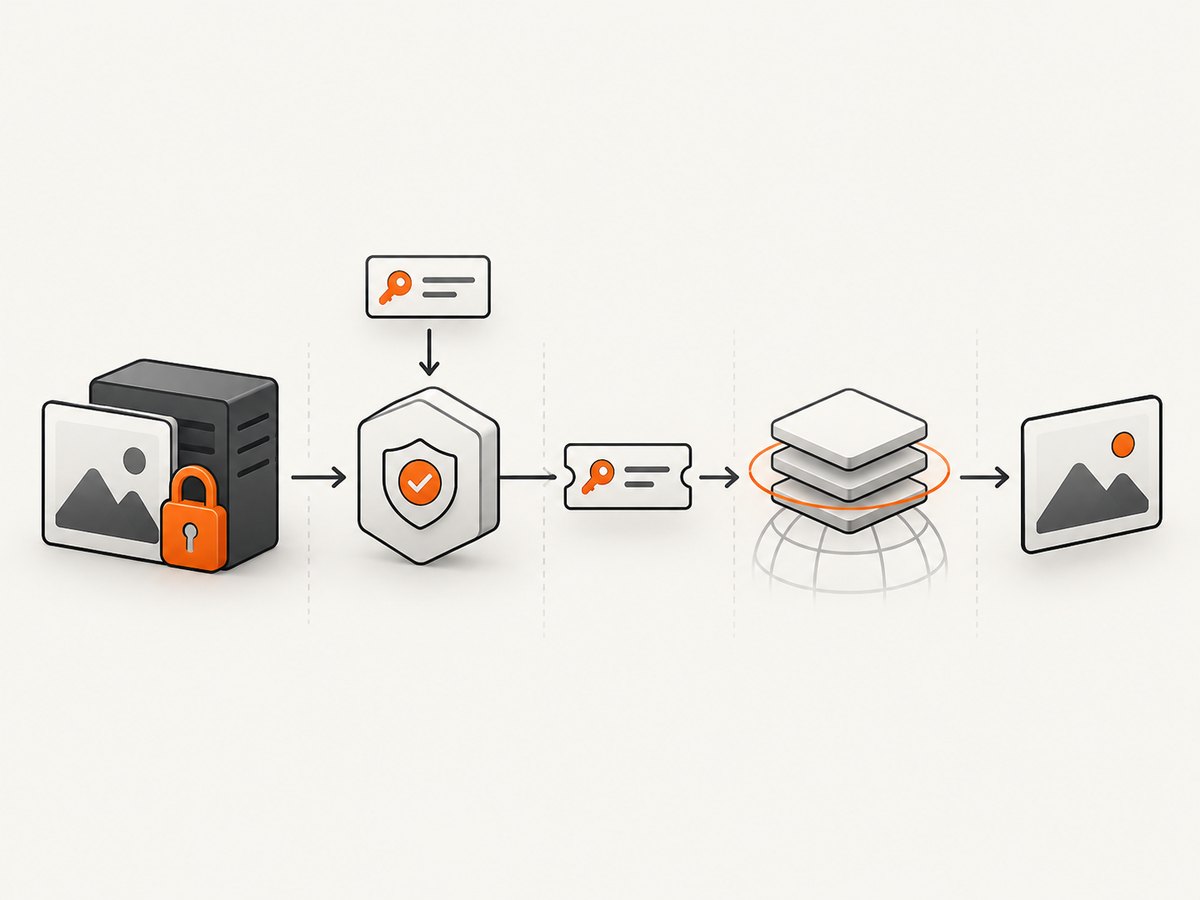
1. The secure request flow
- Keep the origin private. Prevent public reads of the image bucket or object. When using S3 behind CloudFront, restrict origin access so viewers cannot bypass the distribution with a direct S3 URL.
- Authenticate the requester. Identify the user through your application’s normal session or token mechanism.
- Authorize the exact object. Check that this user may view this image. Do not let a caller submit an arbitrary object key and receive a signature without an object-level permission check.
- Sign on the server. Use a provider SDK and credentials available only to trusted server code. Do not put cloud credentials or private signing keys in browser code.
- Return the URL over HTTPS. Make the lifetime long enough for the intended page load and retries, but no longer than needed.
- Keep the URL intact. The signature applies to a particular request. Do not append or change signed query parameters after generation.
For CloudFront, AWS describes the same key division: the application checks entitlement and creates a URL, and CloudFront checks the signature and policy on the request. See the CloudFront signed URL workflow and the private content overview.
2. Generate an S3 presigned image URL
This Node.js example uses AWS SDK for JavaScript v3. Install the S3 client and presigner packages with npm install @aws-sdk/client-s3 @aws-sdk/s3-request-presigner. Configure the AWS SDK credentials through the standard server-side credential provider chain, such as an attached role; do not hard-code secrets. The route assumes your application middleware has authenticated the user and that canViewImage performs a real object-level authorization check.
import { S3Client, GetObjectCommand } from "@aws-sdk/client-s3";
import { getSignedUrl } from "@aws-sdk/s3-request-presigner";

const s3 = new S3Client({ region: process.env.AWS_REGION });
const bucket = process.env.PRIVATE_IMAGE_BUCKET;

// In an authenticated route handler. The authorization function is app-specific.
export async function getImageUrl(req, res) {
  const user = req.user; // Set by trusted authentication middleware.
  const imageId = req.params.imageId;
  const image = await findImageRecord(imageId);

  if (!image || !(await canViewImage(user, image))) {
    return res.status(404).end();
  }

  const command = new GetObjectCommand({
    Bucket: bucket,
    Key: image.storageKey,
  });
  const url = await getSignedUrl(s3, command, { expiresIn: 300 });

  res.set("Cache-Control", "private, no-store");
  return res.json({ url, expiresIn: 300 });
}
The five-minute lifetime is an example, not a general recommendation. Choose a period that fits your page load, image size, client retry behavior, and any image transformation path. S3 presigned URLs are reusable until their effective expiry and inherit the permissions of the credentials used to create them. A URL configured for a longer lifetime can still expire sooner if its temporary credentials expire, are revoked, deleted, or deactivated. The S3 SDK or CLI can configure a duration up to seven days, subject to those credential limits. See Amazon S3 presigned URL duration and expiry.
Python alternative
With Boto3 installed and server credentials configured, the signing call can look like this. Put the authorization check before the call, as in the Node example.
import boto3

s3 = boto3.client("s3", region_name="us-east-1")

# Run only after authenticating the requester and authorizing this exact object.
url = s3.generate_presigned_url(
    "get_object",
    Params={"Bucket": "private-images", "Key": "users/42/avatar.webp"},
    ExpiresIn=300,
)
print(url)
Use the appropriate AWS region and bucket name for your deployment. Avoid logging the generated URL in request logs, analytics events, exception traces, or support tickets: query parameters are part of the credential.
3. Decide between signed URLs and signed cookies
A signed URL is usually the straightforward choice for one image or a single file, especially when the client cannot use cookies. Signed cookies are useful when a viewer needs several restricted files, such as video segments, or when you want to retain existing resource URLs. AWS documents these as CloudFront-specific tradeoffs; confirm equivalent features and precedence rules with another provider.
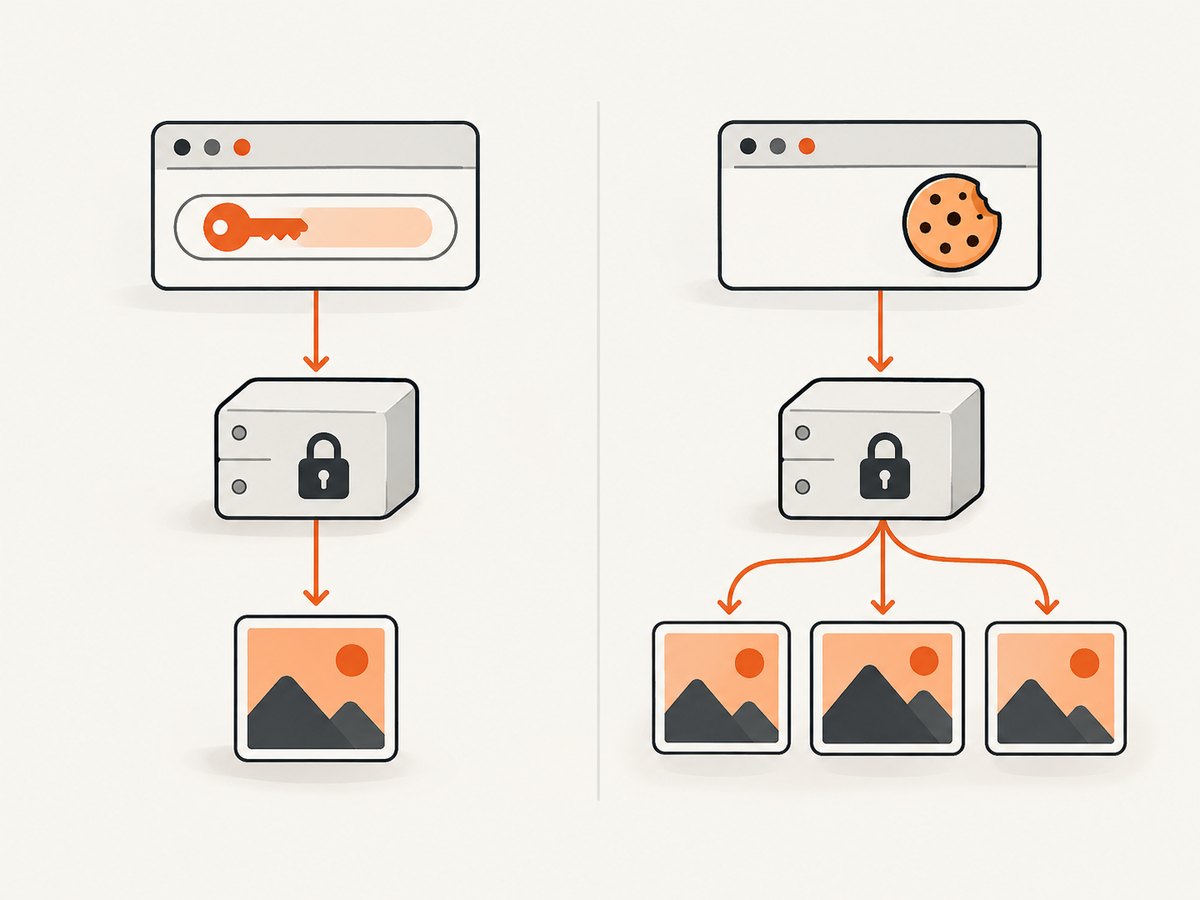
| Question | Signed URL | Signed cookie |
|---|---|---|
| What is granted? | Access through a URL for a particular file or policy. | Access carried by browser cookies, often for a group of files. |
| How is it shared? | Anyone with the URL may use it while valid. | Browser cookie handling determines which requests carry access. |
| When does it fit? | One image, a download, or a client without cookie support. | Many protected assets or unchanged resource paths. |
| What needs testing? | URL encoding, query changes, expiry and referrer/log exposure. | Cookie domain, path, secure settings, browser behavior and expiry. |
CloudFront gives signed URLs precedence if both signed URL and signed cookie mechanisms apply to the same request. Read AWS’s comparison of signed URLs and signed cookies.
4. Set scope, expiry, and transport deliberately
Scope the capability
Generate access for the exact object the user is entitled to view. Avoid accepting a raw bucket and key from a client and signing them directly. Map an application-level image ID to a storage key on the server, then authorize that record. In CloudFront, a custom policy can include an optional start time and IP address or range restriction; AWS supports RSA 2048 and ECDSA 256 signatures. These are CloudFront details, not universal signed URL properties. See the custom policy documentation.
Choose an expiry for the real workflow
Ask how long the page may remain open, whether the browser might retry, and whether a transform or download begins later. S3 and CloudFront check expiry when a request starts: a transfer begun before expiry can finish, while a retry after expiry may fail. If an image is requested only after a user opens a modal, a URL minted at initial page render may already be stale. Mint on demand or refresh through an authenticated endpoint.
Shorter expiry reduces the time a leaked URL remains useful, but can create failed image loads in slow or retry-heavy flows. Longer expiry improves convenience while extending the exposure window. Google Cloud Storage likewise says anyone who knows a signed URL can access the resource until expiry or signing-key rotation. There is no provider-independent ideal duration.
Protect delivery and secrets
- Serve pages and signed image links over HTTPS. Google Cloud CDN specifically recommends signing HTTPS URLs to prevent the signature component being intercepted in transit.
- Use least-privilege signing credentials that can read only the necessary objects or bucket scope.
- Keep signing keys and cloud credentials in server-side secret storage or workload identity, never in source delivered to browsers.
- Redact query strings in access logs and observability tools where feasible; avoid copying URLs into public issue trackers.
- Set appropriate referrer policy for pages that include sensitive links, and consider whether third-party scripts can read the image URL from the page.
5. CDN, cache, and origin behavior
A CDN can make image delivery faster, but access control must still cover every path to the object. For an S3 origin behind CloudFront, AWS recommends restricting the bucket so users must go through the distribution rather than fetching the direct S3 address. Otherwise, an attacker may skip the signed URL check by using an exposed origin route.
Do not assume cache behavior from the origin’s Cache-Control header alone. Google documents that Cloud CDN caches signed requests regardless of the backend Cache-Control header. Check the provider’s cache key, signed-request policy, and invalidation behavior, then verify the privacy expectations for your exact configuration. A cache hit must still obey the CDN’s authorization behavior.
When a signed URL is used with image resizing or transformation, determine which service receives the original signed request and whether the transform creates additional requests. Every protected fetch needs a valid authorization path. Sign the final URL shape that the client will request; do not add transformation parameters afterward unless the provider’s signing rules explicitly permit it.
6. cURL, Python, and Node.js: request the signed image
Once your trusted server has returned a URL, clients can fetch the image like any HTTPS resource. These examples intentionally use a placeholder; substitute the URL returned by your authorized application endpoint. Avoid placing real signed links in shell history if that history is shared or backed up.
cURL
curl --fail --location --output image.webp "$SIGNED_IMAGE_URL"
Python
import requests

url = "PASTE_SIGNED_IMAGE_URL_HERE"
response = requests.get(url, timeout=30)
response.raise_for_status()
with open("image.webp", "wb") as image_file:
    image_file.write(response.content)
Node.js
const response = await fetch(process.env.SIGNED_IMAGE_URL);
if (!response.ok) {
  throw new Error(`Image request failed: ${response.status}`);
}
const bytes = new Uint8Array(await response.arrayBuffer());
await import("node:fs/promises").then(fs => fs.writeFile("image.webp", bytes));
For browser display, set the image’s src to the URL returned by your authenticated application endpoint. Consider that anyone who can inspect the page can copy the URL during its valid period. Avoid returning the URL in a cacheable public API response; use a private response policy appropriate to your app.
7. Common errors and fixes
| Symptom | Likely cause | Fix |
|---|---|---|
| HTTP 403 immediately | Wrong key, signature mismatch, expired credentials, missing permission, or a modified query string. | Check bucket/key and signer permissions; confirm the URL is unchanged; verify credential status and the provider’s clock and signing rules. |
| CloudFront 403 after adding a parameter | A query parameter was added after signing or was not included in the signed portion. | Generate the signature for the final URL and all required query parameters. See CloudFront URL rules. |
| Works for a while, then fails | The URL expired, or temporary credentials expired earlier than the requested URL lifetime. | Check both requested expiry and signer credential lifetime; refresh by calling the authenticated app endpoint. |
| CloudFront works but direct S3 URL exposes the image | The bucket or object permits direct public access. | Remove public access and restrict origin access so the distribution is the authorized route. |
| Images fail only on a later retry | The retry begins after expiry. A transfer already underway may finish, but a new request can be rejected. | Mint later, use a suitable expiry, or refresh on failure through authenticated application code. |
| Unexpectedly stale or shared cache result | CDN cache behavior differs from assumptions based on origin headers. | Inspect the CDN’s signed request and cache key rules; test with the provider’s documented behavior. For Cloud CDN, signed requests are cached regardless of backend Cache-Control. |
| Signature breaks after encoding | A proxy, frontend, or URL library re-encoded or normalized signed query components. | Pass the returned URL as a URL value without manual concatenation or decoding; avoid rewriting its query string. |
8. Reliability, performance, and cost notes
Signed URLs add a signing step to the application path, but the image bytes can still be served from object storage or a CDN. Generate links on demand for sensitive assets; if you precompute them, account for expiry and avoid persisting them as durable image identifiers. Store the object key or application image ID, not the temporary URL. Reusing an unexpired signed URL is generally possible for S3, but its bearer nature means reuse also preserves the ability to share it.
For reliability, handle expired-link responses by obtaining a fresh URL only after rechecking the viewer’s authorization. Do not blindly retry the same expired URL. Monitor signer failures separately from image delivery failures, and avoid recording full query strings. Include denial cases in release checks: unauthorized user, altered query, expired link, direct-origin access, and expected retry behavior.
There is no universal signed-URL fee or performance figure: storage, CDN, request volume, egress, transformations, and application signing infrastructure determine cost and latency. Compare provider pricing for your region and traffic pattern. Short expiry itself does not necessarily mean a separate charge, but refreshing URLs adds application requests. CDN caching can reduce origin traffic while requiring careful privacy configuration.
9. Or skip the browser setup
If your task is to capture a page as an image rather than deliver a private stored image, ScreenshotNeo is a website screenshot API and MCP server. Its one-call API returns a PNG, JPEG, WebP, or PDF. See the ScreenshotNeo API documentation.
curl -G "https://api.screenshotneo.com/v1/shot" -d access_key=YOUR_API_KEY --data-urlencode url=https://stripe.com -o shot.webpimport requests
r = requests.get("https://api.screenshotneo.com/v1/shot", params={"access_key": "YOUR_API_KEY", "url": "https://stripe.com"}, timeout=90)
open("shot.webp", "wb").write(r.content)const q = new URLSearchParams({ access_key: 'YOUR_API_KEY', url: 'https://stripe.com' });
const res = await fetch(`https://api.screenshotneo.com/v1/shot?${q}`);- Cookie banners, popups, and chat widgets are removed before the shot.
- Bot checks, blank pages, and failed loads are never billed; response headers say the page verdict and billing status.
- An MCP server lets Claude, Cursor, and other MCP clients take screenshots.
- 1,000 screenshots a month are free with no card; paid plans start at $5 for 3,000.
Create a free ScreenshotNeo account to get 1,000 screenshots per month with no card.
10. Security checklist
- Is the origin private, including direct storage endpoints?
- Does trusted server code authenticate the viewer and authorize the exact image before signing?
- Are signing credentials absent from browser code and limited to the required access?
- Does the URL use HTTPS and expire after a duration that accounts for page load and retries?
- Are signed query strings excluded from logs, analytics, and public error reports?
- Does the signature cover the final request URL and any required parameters?
- Have you verified CDN cache behavior and tested direct-origin denial?
- Can the application refresh an expired link only after authorization is checked again?
11. Frequently asked questions
Can anyone use a signed image URL?
Anyone who obtains the URL may be able to use it while it remains valid. Treat possession as temporary authorization, and do not expose links through logs or public pages unnecessarily.
Can I revoke one URL before it expires?
Revocation depends on the provider and signing mechanism. The documented Google Cloud Storage behavior allows access until expiry or signing-key rotation. For urgent revocation, investigate the provider’s key rotation or object access controls and consider the impact on other issued URLs.
Should I put a signed URL in an email?
You can, but forwarding and link-scanning systems may copy or request it. Use a lifetime suited to the email workflow and consider an authenticated landing page that mints a fresh image URL after checking access.
Does expiry stop a download already in progress?
For S3 and CloudFront, expiry is checked when a request starts. A transfer started before expiration can finish; a later retry can fail.
Are signed URLs encrypted?
The signature protects request authorization integrity; it does not hide the URL from parties that can see it. HTTPS protects the URL in transit between endpoints, so use HTTPS and handle the URL as a secret.


