How to Select Values Between Two Nodes in BeautifulSoup and Python
Use BeautifulSoup’s sibling methods for values beside a label, or document-order traversal when the target is elsewhere. Includes runnable examples and fixes for common parsing surprises.
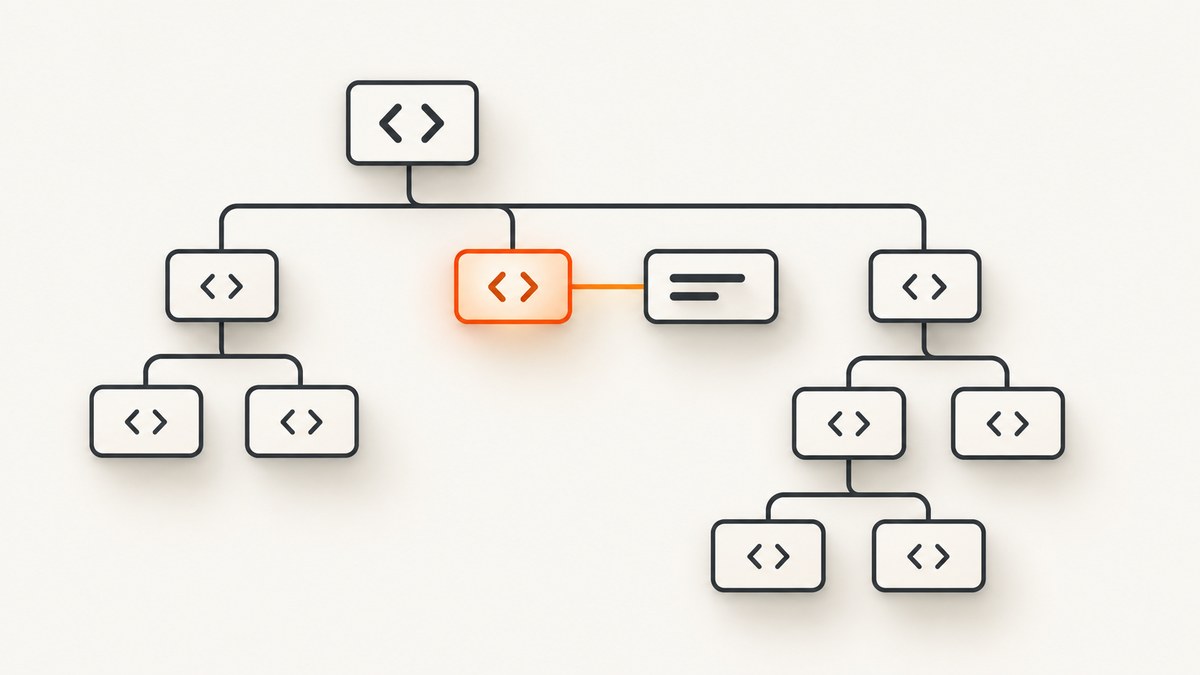
To get a value stored in the tag immediately after a label, find the label and call find_next_sibling() with the value tag’s name. Then extract its text with get_text(strip=True). This is the right approach when both tags share a parent. If the target is nested or only appears later in the document, use a document-order search such as find_next(), scoped to a suitable container.
from bs4 import BeautifulSoup

html = """
<dl>
  <dt>Price</dt>
  <dd>19.99</dd>
</dl>
"""
soup = BeautifulSoup(html, "html.parser")
label = soup.find("dt", string="Price")
value_node = label.find_next_sibling("dd") if label else None
value = value_node.get_text(strip=True) if value_node else None
print(value)  # 19.99
The important distinction is structural: “next node” might mean the next item among siblings, or the next matching element anywhere later in parse order. Choose based on the HTML relationship, not merely what looks adjacent in the source.
1. Understand the HTML relationship first
BeautifulSoup represents parsed markup as a tree. Two tags are siblings if they have the same parent. In this example, <dt> and <dd> are siblings under <dl>:

<dl>
  <dt>Price</dt>
  <dd>19.99</dd>
</dl>
By contrast, a value may be inside a nested tag, or appear later under a different parent. Those are not sibling relationships, even if a browser displays them next to one another. Inspect the markup or parsed tree before deciding which traversal method to use.
Beautiful Soup’s documentation notes that in real documents, a tag’s .next_sibling is often a string containing whitespace. Newlines and spaces in formatted HTML become text nodes in the parsed tree. That is why find_next_sibling("dd") is usually more convenient than assuming .next_sibling is the desired tag. See the Beautiful Soup documentation on navigating the tree.
2. Select the next matching sibling
Install Beautiful Soup if needed, save the following as select_value.py, and run it with Python:
python -m pip install beautifulsoup4
python select_value.py
from bs4 import BeautifulSoup
html = """
<section>
<h2>Product</h2>
<p class="label">Availability</p>
<p class="value">In stock</p>
</section>
"""
soup = BeautifulSoup(html, "html.parser")
label = soup.find("p", class_="label", string="Availability")
value_tag = label.find_next_sibling("p", class_="value") if label else None
if value_tag is None:
print("Availability value not found")
else:
print(value_tag.get_text(strip=True))find_next_sibling(name, attrs, **kwargs) returns the first later sibling matching the supplied filter, or None if there is no match. The argument can be a tag name such as "dd"; filters can further narrow the match by class or other attributes. The search skips whitespace and other nonmatching siblings as it looks for the requested tag.
Use the conditional check before calling get_text(): a missing label or missing value produces None, and calling a method on it would raise an AttributeError. If repeated labels are possible, first scope the lookup to the relevant card, row, or section so the script does not pair a label from one record with a value from another.
3. Choose the right traversal method
| Need | Method | What it traverses |
|---|---|---|
| Next sibling matching a tag or filter | find_next_sibling(...) |
Later siblings at the same tree level; returns one match |
| Every later matching sibling | find_next_siblings(...) |
Later siblings at the same level; returns a list |
| Literal next item in the tree | next_sibling |
One sibling item, which can be a text string |
| Next matching element later in parse order | find_next(...) |
Document order, potentially across nested structure |
| Process all following tags and strings | next_elements |
Subsequent parse-order elements one by one |
| Target described by stable markup structure | select_one() or select() |
CSS selector match, independent of relative traversal |
Inspect the literal next sibling
Use .next_sibling when you specifically need to examine the next parse-tree item, including whitespace or punctuation:
from bs4 import BeautifulSoup

soup = BeautifulSoup("<p>Price</p>\n<span>$19.99</span>", "html.parser")
label = soup.find("p")
print(repr(label.next_sibling))  # '\\n'
print(type(label.next_sibling).__name__)  # NavigableString
The second sibling is the span, but the first is a newline text node. You could advance again, but filtering with find_next_sibling("span") is clearer when what you want is a matching tag rather than the literal next item.
Collect all later siblings
find_next_siblings() returns all later siblings that match. This is useful when a label is followed by multiple values at the same level:
from bs4 import BeautifulSoup

html = "<div><strong>Colors</strong>\n<span>Red</span> <span>Blue</span></div>"
soup = BeautifulSoup(html, "html.parser")
label = soup.find("strong", string="Colors")
values = label.find_next_siblings("span") if label else []
print([tag.get_text(strip=True) for tag in values])  # ['Red', 'Blue']
The search only considers later siblings; it does not include a matching tag before the anchor. If the list should end at another label, filter or iterate with an explicit boundary rather than treating every later matching tag as part of the same value.
Find a later tag in document order
When the target is nested or otherwise not a sibling, find_next() searches later in parse order. Scope it to a parent container to reduce accidental matches from unrelated content:
from bs4 import BeautifulSoup

html = """
<article>
  <div class="price-row">
    <span class="label">Price</span>
    <div class="value-wrap"><strong>$19.99</strong></div>
  </div>
  <div class="shipping-row"><strong>Free shipping</strong></div>
</article>
"""
soup = BeautifulSoup(html, "html.parser")
row = soup.select_one(".price-row")
label = row.select_one(".label") if row else None
value = label.find_next("strong") if label else None
print(value.get_text(strip=True) if value else None)  # $19.99
find_next() can cross nested structure and can continue into later parts of the document. Here, the scoped row makes the intent clearer, although for a more complex row you may prefer to select the value directly within the row using CSS.
Walk following elements with a stopping rule
Use next_elements if you need custom logic across tags and text strings. Because it can enter descendants and continue into later sections, stop at an explicit boundary or search within a smaller container:
from bs4 import BeautifulSoup, Tag

html = "<div id='record'><b>Name</b> Alice <i>Price</i> <span>19.99</span></div>"
soup = BeautifulSoup(html, "html.parser")
record = soup.find(id="record")
anchor = record.find("i") if record else None
result = None

if anchor:
    for item in anchor.next_elements:
        if isinstance(item, Tag) and item.name == "span":
            result = item.get_text(strip=True)
            break

print(result)
This still searches descendants and later parse-order items within the record. A broad walk from the document root can find a plausible but unrelated value farther down the page, so keep the search boundary close to the data being extracted.
4. Extract clean text from the selected node
Once you have selected the right tag, decide how its text should be normalized:
tag.get_text()returns descendant text with whitespace preserved by default.tag.get_text(strip=True)strips whitespace at the edges of text chunks and joins them without a separator. It is convenient for compact values such as a price or status.tag.get_text(" ", strip=True)inserts a space between descendant text pieces, which can prevent words in nested tags from running together.tag.stripped_stringsyields cleaned text chunks individually, useful when formatting or filtering pieces matters.
from bs4 import BeautifulSoup

html = "<dd>  <span>19</span> <small>.99</small> </dd>"
soup = BeautifulSoup(html, "html.parser")
value = soup.find("dd")
print(value.get_text(strip=True))       # 19.99
print(value.get_text(" ", strip=True)) # 19 .99
print(list(value.stripped_strings))     # ['19', '.99']
The separator is a data decision. Adding a space is useful for separate words but may corrupt a numeric value split across inline tags. Preserve or normalize whitespace deliberately for the kind of value you are extracting.
5. Use CSS selectors when the structure is the real rule
Relative traversal is useful when you have an anchor and want a neighbor. If markup exposes a stable relationship directly, CSS selectors may be simpler:
from bs4 import BeautifulSoup

html = "<dl class='product'><dt>Price</dt><dd>19.99</dd></dl>"
soup = BeautifulSoup(html, "html.parser")
value = soup.select_one("dl.product > dt + dd")
print(value.get_text(strip=True) if value else None)
The adjacent sibling combinator + describes an immediately adjacent element sibling in the selector. A general sibling combinator can match a later sibling. CSS selectors are not a replacement for inspecting the tree: choose a selector whose scope and relationship match the actual markup, and handle a no-match result.
6. Fetching a live page before parsing
Beautiful Soup parses HTML; it does not fetch a URL or execute JavaScript. If you already have the HTML string, skip this section. For a static page that permits automated retrieval, use a separate HTTP client, check the response, then pass the response text to Beautiful Soup:
python -m pip install beautifulsoup4 requestsimport requests
from bs4 import BeautifulSoup
url = "https://example.com"
response = requests.get(url, timeout=(5, 20))
response.raise_for_status()
soup = BeautifulSoup(response.text, "html.parser")
print(soup.title.get_text(strip=True) if soup.title else "No title")Replace the example URL with a page you are allowed to access. A timeout tuple sets a connect timeout and a read timeout. raise_for_status() surfaces HTTP error responses instead of silently parsing an error page. A successful HTTP response still may not contain the content you expected: the server may return a bot challenge, a blank shell, or HTML that expects a browser to run JavaScript.
For pages whose content is rendered by JavaScript, fetch the page with a browser automation tool or a screenshot/rendering service, then work from the rendered output or page data appropriate to your task. Do not assume Beautiful Soup runs scripts; it only parses the markup provided to it.
7. Parser choice and malformed HTML
Beautiful Soup supports Python’s built-in html.parser, as well as parsers such as lxml and html5lib. Install optional parsers separately. Different parsers can build different trees from malformed or ambiguous markup, so a sibling relationship that appears present in the source may not exist as expected after parsing. The official documentation discusses parser differences and recommends naming the parser when consistency matters. Check its parser documentation.
Choose one parser explicitly in production and use the same one in development. If traversal behaves unexpectedly, print a small fragment or inspect the parent and sibling structure instead of dumping an entire large page:
print(label.parent.prettify())
print(repr(label.next_sibling))
print([(type(x).__name__, getattr(x, "name", None), repr(str(x)[:60]))
       for x in label.parent.children])
8. Troubleshooting common failures
| Symptom | Likely cause | Fix |
|---|---|---|
find_next_sibling() returns None |
No matching later sibling exists, the filter is too strict, or the target is nested elsewhere. | Inspect label.parent, loosen the filter to test, or use a scoped find_next() if the target is later in document order. |
AttributeError: 'NoneType' object has no attribute ... |
The anchor or target lookup returned None. |
Check for both before using the result; print the relevant parent markup and confirm exact text, tag name, and attributes. |
next_sibling shows '\n' or spaces |
Whitespace is a text node between tags. | Use find_next_sibling("tag") when seeking a matching tag, or explicitly inspect successive siblings when literal adjacency matters. |
| The wrong value is returned | A broad document-order search crossed into another nested region or record. | Start from a unique record container, use a more specific filter, and stop at a known boundary. |
| Text has missing spaces or extra whitespace | Nested chunks were joined with an unsuitable separator or raw text was preserved. | Compare get_text(strip=True), get_text(" ", strip=True), and stripped_strings; choose normalization that preserves the value. |
| The source contains the target, but parsing cannot find it | The browser creates it with JavaScript, or the fetched response is a challenge/error page. | Inspect the actual response body. Use a browser renderer for script-generated content and handle failed/challenged responses explicitly. |
| Traversal changes after deployment | A different parser, parser version, or changed source markup produced another tree. | Specify the parser, pin dependencies where needed, and keep a small representative HTML fixture for regression checks. |
ImportError for BeautifulSoup |
The package is missing from the active Python environment, or the script shadows the package with a conflicting filename. | Install with python -m pip install beautifulsoup4 using the same interpreter; rename files such as bs4.py. |
9. Reliability, performance, and cost
For already-loaded HTML, tree navigation is usually a small part of a scraping job; network access, browser rendering, and large documents tend to dominate elapsed time and resource use. Keep parsing efficient by fetching only what you need, narrowing searches to a record container, and avoiding repeated full-document searches inside a loop. If extracting many records, find the record elements once and search each record locally.

for card in soup.select(".product-card"):
    label = card.find("dt", string="Price")
    value = label.find_next_sibling("dd") if label else None
    print(value.get_text(strip=True) if value else None)
For reliability, treat absence as a normal outcome, log the URL or record identifier with a concise failure reason, and distinguish malformed input from a changed page layout. Test extraction against representative saved HTML. When fetching at scale, set timeouts, respect the site’s access rules and rate limits, and use bounded retries for transient network failures rather than retrying every parsing mismatch.
Beautiful Soup is an open-source parsing library; this node-selection technique itself has no per-request service charge. Your operational costs can come from network traffic, proxies, browser infrastructure, or a hosted rendering service. A screenshot is not a substitute for structured text extraction, but rendered capture can help when the immediate need is a visual record of a JavaScript-rendered page.
Or skip the browser setup
If you need a rendered screenshot of a live page rather than parsed text, ScreenshotNeo is a website screenshot API and MCP server for developers. One GET request returns a PNG, JPEG, WebP, or PDF. The API documentation covers its parameters.
curl -G "https://api.screenshotneo.com/v1/shot" -d access_key=YOUR_API_KEY --data-urlencode url=https://stripe.com -o shot.webpimport requests
r = requests.get("https://api.screenshotneo.com/v1/shot", params={"access_key": "YOUR_API_KEY", "url": "https://stripe.com"}, timeout=90)
open("shot.webp", "wb").write(r.content)const q = new URLSearchParams({ access_key: 'YOUR_API_KEY', url: 'https://stripe.com' });
const res = await fetch(`https://api.screenshotneo.com/v1/shot?${q}`);Cookie banners, newsletter popups, and chat widgets are removed before capture; each cleanup step can be turned off. Bot checks, blank pages, timeouts, failed loads, and cache hits are not billed, and response headers report the page verdict and billing status. Its MCP server provides take_screenshot, get_page_info, and capture_pdf tools for AI agents. The free plan includes 1,000 screenshots a month with no card; paid plans start at $5 for 3,000. All features are available on every plan.
Sign up for 1,000 free screenshots a month, with no card required.
10. Frequently asked questions
Does “next” mean the next tag in the HTML source?
Not necessarily. Beautiful Soup traverses the parsed tree. Whitespace and punctuation may be sibling text nodes, and malformed markup can alter the tree. Use a matching sibling method if you mean the next sibling tag.
Can I get the value from the preceding label?
Yes. Use find_previous_sibling("tag") for a matching earlier sibling, or inspect previous_sibling if you need the literal previous tree item. Apply the same whitespace and scope cautions.
Can Beautiful Soup extract text hidden behind a click?
Only if that text is in the HTML you parse. Beautiful Soup does not interact with the page or run its JavaScript. A browser renderer is needed to execute scripts or click controls before inspecting rendered content.
Should I use a regular expression to find the value?
Usually not for HTML structure. Parse the markup and select the tag by its relationship, attributes, or CSS structure; regular expressions do not model nested HTML reliably.
Quick checklist
- Confirm whether the value tag shares a parent with the anchor.
- Use
find_next_sibling()for the next matching sibling, orfind_next_siblings()for all matching later siblings. - Use scoped document-order traversal only when the target is not a sibling.
- Check for
Nonebefore extracting text and pick a suitable text separator. - Specify a parser and inspect the parsed tree when results are surprising.
For the exact method signatures and navigation behavior, the Beautiful Soup documentation is the primary reference.


