How to Select Values Between Two Nodes in Cheerio and Node.js
Use Cheerio’s nextUntil() to collect sibling values between two nodes, with examples for text, attributes, reverse ranges, parsing, and troubleshooting.
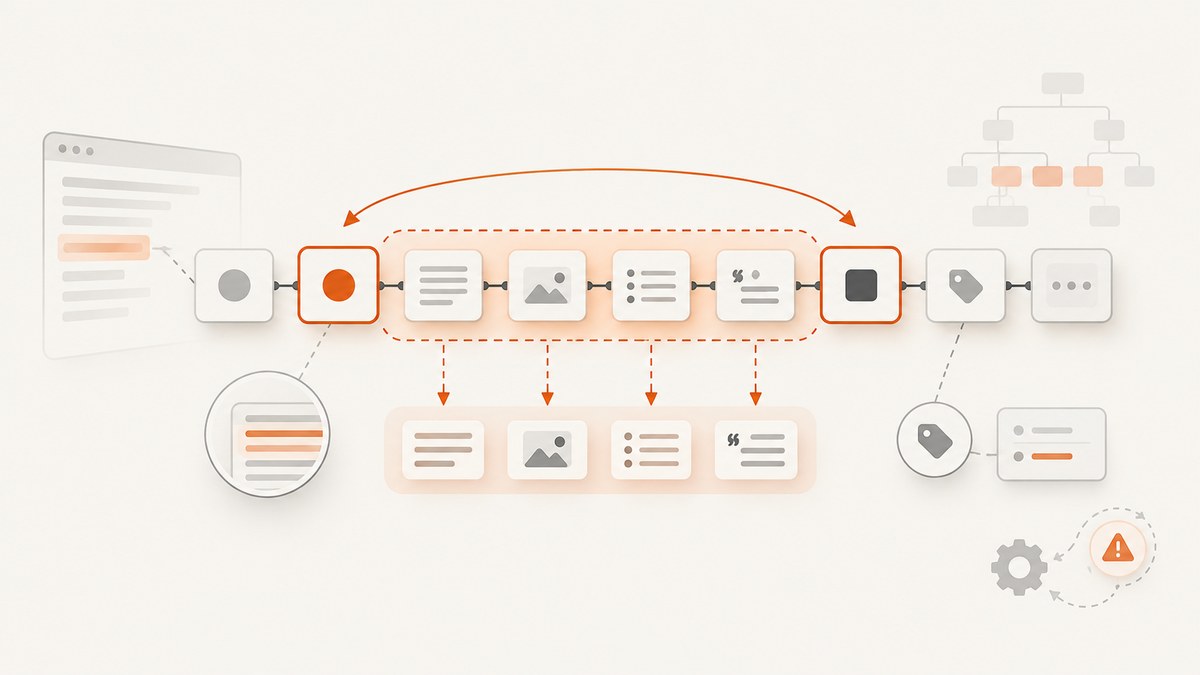
To select values between two sibling nodes in Cheerio, start at the first boundary and call .nextUntil() with the ending selector:
const values = $('.start').nextUntil('.end');The result contains every following sibling before .end. The ending node is excluded. Convert the selection to text with .text(), or iterate over it when each value must remain separate.
This technique works when both boundary elements share the same parent. Use CSS + for one adjacent sibling, ~ for later siblings matching a selector, and prevUntil() for reverse traversal. Cheerio parses HTML in Node.js; it does not run page JavaScript, render CSS, or load external resources.
Install Cheerio and load markup
Install the package in your Node.js project:
npm install cheerioCheerio’s documentation shows both ECMAScript modules and CommonJS. This example uses ESM:
import * as cheerio from 'cheerio';

const html = `
  <section>
    <h2 class="start">Values</h2>
    <p>First</p>
    <p>Second</p>
    <h2 class="end">Next section</h2>
  </section>
`;

const $ = cheerio.load(html);
const values = $('.start').nextUntil('.end');

console.log(values.map((_, element) => $(element).text()).get());
// [ 'First', 'Second' ]
Save this as between.mjs and run node between.mjs. For CommonJS, replace the import with:
const cheerio = require('cheerio');The exact Node.js requirement can vary by installed Cheerio release, so check the package version you install and its documentation. The official introduction and traversal guide are available at Cheerio’s introduction and traversing documentation.
How nextUntil() defines the range
nextUntil(stopSelector) walks forward through sibling elements. It stops when the next sibling matches the stop selector and does not include that stop element. Any element between the boundaries is included, even when it has a different tag or class.

const between = $('.start').nextUntil('.end');

between.each((index, element) => {
  console.log(index, element.tagName, $(element).text().trim());
});
Given this structure:
<h2 class="start">Start</h2>
<p>A</p>
<div>B</div>
<aside>C</aside>
<h2 class="end">End</h2>
the selection contains the p, div, and aside. It does not contain either heading.
Keep each value as an array
Use .map().get() when the output should be one string per element:
const values = $('.start')
  .nextUntil('.end')
  .map((_, element) => $(element).text().trim())
  .get();

console.log(values); // [ 'A', 'B', 'C' ]
Concatenate all text
Use .text() when a single string is appropriate:
const combined = $('.start').nextUntil('.end').text().trim();
console.log(combined); // ABC
Whitespace is preserved according to the parsed tree. If you need readable separators, map the values and join them yourself:
const sentence = $('.start')
  .nextUntil('.end')
  .map((_, element) => $(element).text().trim())
  .get()
  .filter(Boolean)
  .join(' ');
Read an attribute instead of text
Call .attr() for an attribute such as href, src, or data-id:
const links = $('.start')
  .nextUntil('.end')
  .filter('a')
  .map((_, element) => ({
    label: $(element).text().trim(),
    href: $(element).attr('href') ?? null
  }))
  .get();
Use .prop() for property-backed values documented by Cheerio, such as innerText. Remember that innerText is computed from the parsed tree; there is no browser layout or CSS rendering.
Choose the right selector for the relationship
| Need | Recommended expression | What it returns |
|---|---|---|
| One immediately adjacent sibling | $('.start + p') |
The next sibling only, if it is a p |
| Later siblings of one type | $('.start ~ p') |
Every later matching p, with no end boundary |
| All siblings up to a boundary | $('.start').nextUntil('.end') |
Every sibling before the end selector |
| Reverse range | $('.end').prevUntil('.start') |
Previous siblings until the start selector |
CSS combinators filter by relationship and selector. nextUntil() expresses a bounded walk, which is why it is usually the correct choice when the range can contain different element types.
Reverse traversal with prevUntil()
When you locate the ending node first, walk backward:
const values = $('.end')
  .prevUntil('.start')
  .map((_, element) => $(element).text().trim())
  .get();

console.log(values);
Check the order before relying on it in an API response. Traversal methods follow Cheerio’s collection behavior, and reverse selection may not match the document order you expect. If order matters, normalize it explicitly:
const documentOrder = values.reverse();When boundaries are not siblings
Sibling traversal only operates under one parent. This markup has a different relationship:
<div class="start">Start</div>
<section>
  <p>Inside another parent</p>
</section>
<div class="end">End</div>
$('.start').nextUntil('.end') cannot cross into the section’s descendants. Decide what “between” means for your document:
- If you need direct siblings, fix or inspect the HTML structure.
- If you need descendants in document order, select a common ancestor and filter its children or descendants.
- If you need all nodes in a flat source range, parse the source with a tool that exposes source positions, then apply your own boundary logic.
Inspect the parsed tree when results are surprising:
console.log($('.start').parent().html());Text nodes, comments, and malformed HTML
Cheerio selections normally contain elements. Text nodes that sit directly between two elements are not selected by a CSS element selector, and HTML parsing may repair malformed markup by inserting or moving elements. If the values you need are raw text nodes, inspect the parent’s child nodes or use a parser configuration suited to your input.
Cheerio uses parse5 by default for HTML and htmlparser2 by default for XML. Parser choice changes how malformed markup and namespaces are represented. Read Cheerio’s parser configuration guide before switching options.
import * as cheerio from 'cheerio';

const $ = cheerio.load(xmlText, {
  xml: true
});
Use XML mode only when the input is XML. For ordinary HTML, the default HTML parser generally provides the expected tree-repair behavior.
Client-rendered pages: know what Cheerio cannot do
Cheerio does not execute scripts or fetch resources. If a page inserts the boundary nodes or values only after browser JavaScript runs, those nodes will not exist in the string you pass to cheerio.load(). In that case, obtain the rendered HTML with browser automation such as Puppeteer or Playwright, then pass the resulting HTML to Cheerio, or use a browser tool for extraction directly.
A reliable pipeline separates the steps:
- Fetch or render the page.
- Check that the expected start and end selectors exist.
- Load the HTML into Cheerio.
- Traverse the bounded range.
- Validate the number and shape of extracted values.
Robust extraction helper
This helper reports missing boundaries and returns structured values:
import * as cheerio from 'cheerio';

export function valuesBetween(html, startSelector, endSelector) {
  const $ = cheerio.load(html);
  const starts = $(startSelector);

  if (starts.length === 0) {
    throw new Error(`Start selector matched no elements: ${startSelector}`);
  }

  const result = [];
  starts.first().nextUntil(endSelector).each((index, element) => {
    result.push({
      tag: element.tagName,
      text: $(element).text().trim(),
      html: $(element).html()
    });
  });

  if ($(endSelector).length === 0) {
    throw new Error(`End selector matched no elements: ${endSelector}`);
  }

  return result;
}

const html = `<h2 class="start">Start</h2><p>One</p><p>Two</p><h2 class="end">End</h2>`;
console.log(valuesBetween(html, '.start', '.end'));
Using .first() avoids accidentally combining ranges when the start selector matches multiple headings. If multiple ranges are expected, iterate over each start and define how each range should terminate.
Security and input limits
Do not interpolate untrusted text directly into a selector. A user-controlled selector can alter what gets selected and may cause expensive parsing or matching work. Prefer fixed selectors and compare user input as data:
const wantedId = String(inputId);
const match = $('[data-id]').filter((_, element) =>
  $(element).attr('data-id') === wantedId
);
Also limit the size of accepted HTML. Parsing consumes memory and CPU in proportion to input size, so reject unexpectedly large documents before loading them. Treat extracted HTML as untrusted content if it will later be rendered or inserted into another system.
Common errors and fixes
| Symptom | Likely cause | Fix |
|---|---|---|
| Empty selection | Start selector does not match or the end node is not a following sibling | Log $(startSelector).length, inspect the parent HTML, and verify sibling structure. |
| End element appears in output | The end selector was selected separately or extraction starts too broadly | Use nextUntil(endSelector); it excludes the endpoint. |
| Nested content is missing | Values are inserted by client-side JavaScript | Render the page with Puppeteer or Playwright before parsing. |
| Unexpected element order | Reverse traversal or multiple start nodes | Use one boundary at a time and normalize with reverse() when needed. |
| Malformed markup changes results | Parser repaired the source tree | Inspect $.html() and configure HTML or XML parsing deliberately. |
require() or import error |
Module format does not match package.json |
Use ESM imports with "type":"module", or use the CommonJS require form. |
| Selector behaves unpredictably | Untrusted selector text | Use a fixed selector and compare attributes as data. |
Performance and reliability
For one document, the simplest reliable approach is to select the boundary once, traverse once, and map only the fields you need. Avoid repeatedly calling .text() on the entire document inside a loop. If the input is large, discard unused HTML after extraction and enforce a maximum byte size at your HTTP boundary.
Prefer stable boundary selectors such as semantic classes, IDs, or data-* attributes. Avoid selectors based on generated class names or visual layout. Validate both boundaries and the expected count of values so a template change does not silently produce incomplete data.
Cache parsed or fetched documents when the source changes infrequently. Keep network fetching separate from parsing so retries do not repeat CPU-heavy work unnecessarily. Cheerio itself has no browser network timeout because it does not fetch pages; configure timeouts and retries in the HTTP or browser layer that obtains the HTML.
Or skip the browser setup
If your goal is a clean screenshot or PDF of a live page rather than DOM extraction, ScreenshotNeo provides a single request endpoint. It accepts consent banners like a visitor and removes more than 60 known consent platforms, newsletter popups, and chat widgets before capture. Bot checks, blank pages, timeouts, failed loads, and cache hits are not billed, and response headers identify the page verdict and billing status.

See the ScreenshotNeo API documentation for all options. A direct call looks like this:
curl -G "https://api.screenshotneo.com/v1/shot" \
  -d access_key=YOUR_API_KEY \
  --data-urlencode url=https://stripe.com \
  -o shot.webp
import requests
r = requests.get(
"https://api.screenshotneo.com/v1/shot",
params={"access_key": "YOUR_API_KEY", "url": "https://stripe.com"},
timeout=90,
)
r.raise_for_status()
open("shot.webp", "wb").write(r.content)const q = new URLSearchParams({
access_key: 'YOUR_API_KEY',
url: 'https://stripe.com'
});
const res = await fetch(`https://api.screenshotneo.com/v1/shot?${q}`);
if (!res.ok) throw new Error(`HTTP ${res.status}`);
const bytes = await res.arrayBuffer();
await Bun.write('shot.webp', bytes);ScreenshotNeo supports PNG, JPEG, WebP, and PDF output; full-page captures with lazy images, element selectors, dark mode, device presets, custom viewports, retina scale, custom CSS and JavaScript, clicks, waits, request blocking, headers, cookies, user agents, authorization, timezone, geolocation, transparent backgrounds, resizing, cache TTLs, signed links, asynchronous jobs, webhooks, bulk capture, usage reporting, and an OpenAPI specification. An MCP server exposes take_screenshot, get_page_info, and capture_pdf for Claude, Cursor, and other MCP clients.
There is a free plan with 1,000 screenshots each month and no card. Paid plans start at $5 for 3,000 shots; yearly billing includes two months free. Create a free ScreenshotNeo account.
FAQ
Does nextUntil() include the ending node?
No. The endpoint matching the stop selector is excluded.
Can I select values between headings with different tags?
Yes. The start and end selectors can match any elements, and all intervening siblings are returned.
What if the end selector is missing?
nextUntil() continues through the remaining siblings. If the endpoint is required, check $(endSelector).length and throw or return a validation error.
How do I preserve HTML instead of text?
Iterate over the selection and call $(element).html(), or retain the element objects for later processing.
Can Cheerio select elements created by React or Vue?
Only if the rendered HTML is supplied to Cheerio. It does not execute the client-side application that creates those elements.
When should I use + instead?
Use + when exactly one immediately adjacent sibling of a known type is required. Use nextUntil() for a range with an explicit stopping boundary.


