Selenium Wire Tutorial: Intercept Background Requests
Learn how to capture, inspect, modify, mock, and debug AJAX requests in Selenium Wire, with complete Python examples and current alternatives.

Selenium Wire lets a Selenium test inspect the HTTP and HTTPS traffic created by a real browser. You can capture requests after a button click, wait for a specific AJAX call, read response status, headers, and bodies, change outgoing requests, modify responses, block resources, or return a mock response without contacting the server.
The basic pattern is:
- Install Selenium Wire and create its WebDriver.
- Configure scopes or interceptors before navigation.
- Perform the browser action that creates the request.
- Wait for or inspect the matching request.
- Check that a response exists before reading it.
Selenium Wire’s upstream repository was archived on January 3, 2024 and is read-only. Treat it as an archived dependency in existing automation, pin the version you use, and evaluate Selenium’s native BiDi network APIs for new projects. Selenium BiDi documents intercepted requests that can be continued or failed, but the sources do not establish complete parity with Selenium Wire’s proxy, HAR, mutation, and storage features.
Install Selenium Wire and start a browser
Install the package in the same Python environment as your test suite:
python -m pip install selenium-wire seleniumSelenium Wire supports Python 3.7+, Selenium 4.0.0+, Chrome, Firefox, Edge, and Remote WebDriver. Import webdriver from seleniumwire, rather than from selenium:
from seleniumwire import webdriver

driver = webdriver.Chrome()
try:
    driver.get("https://example.com")
    print(driver.title)
finally:
    driver.quit()
Selenium Wire routes traffic through an internal proxy. HTTPS inspection requires OpenSSL for certificate decryption; Linux installations may need OpenSSL installed separately, while the package documentation says Windows needs no separate installation.
Capture every request and response
driver.requests returns captured requests in chronological order. A request can still be in flight, so test request.response before accessing response fields.
from seleniumwire import webdriver

driver = webdriver.Chrome()
try:
    driver.get("https://example.com")
    for request in driver.requests:
        print(request.method, request.url)
        if request.response:
            print("status:", request.response.status_code)
            print("content type:", request.response.headers.get("Content-Type"))
            print("first bytes:", request.response.body[:200])
finally:
    driver.quit()
driver.last_request is a shortcut for the newest request. driver.iter_requests() provides an iterator, which is useful when a page generates a large amount of traffic.
Decode a JSON response safely
import json
from seleniumwire import webdriver

driver = webdriver.Chrome()
try:
    driver.get("https://example.com/dashboard")
    for request in driver.iter_requests():
        if "/api/" in request.url and request.response:
            content_type = request.response.headers.get("Content-Type", "")
            if "application/json" in content_type:
                payload = json.loads(request.response.body.decode("utf-8"))
                print(payload)
finally:
    driver.quit()
Response bodies are bytes. Use an explicit encoding and errors="replace" when inspecting unknown content. A body may be compressed, binary, empty, or unavailable while the request is pending.
Wait for an AJAX request triggered by a click
For a request caused by a user action, perform the action first and then wait for the URL pattern. The wait observes a request made by another action; it does not send the request itself.

from seleniumwire import webdriver
from selenium.common.exceptions import TimeoutException

 driver = webdriver.Chrome()
try:
    driver.get("https://app.example.test/products")
    button = driver.find_element("css selector", "#load-products")
    button.click()

    try:
        request = driver.wait_for_request(r"/api/products/12345/", timeout=10)
    except TimeoutException:
        raise RuntimeError("The products request was not observed")

    print(request.method, request.url)
    if request.response:
        print(request.response.status_code)
        print(request.response.headers)
        print(request.response.body.decode("utf-8", errors="replace"))
finally:
    driver.quit()
The pattern can be a substring or a regular expression matched against the URL. Escape regular-expression metacharacters when matching a literal URL. Set the timeout according to the application’s normal response time, and report a useful failure when it expires.
Avoid matching the wrong request
Many applications call the same endpoint repeatedly for polling, prefetching, or retries. Match a distinctive path, query parameter, or host, then verify the HTTP method:
request = driver.wait_for_request(r"/api/products\?page=2(?:&|$)", timeout=15)
if request.method != "GET":
    raise AssertionError(f"Unexpected method: {request.method}")
When a request can happen before the click, clear old captures before starting the flow, or use a sufficiently specific pattern. Keep in mind that a response may be absent if the wait returns while the browser is still processing it; poll briefly or check the response before decoding.
Inspect request methods, headers, parameters, and bodies
Each request exposes its method, URL, headers, parameters, and body. Parameters can be read, updated, and assigned back. Header names may appear more than once, so duplicate handling matters.
from urllib.parse import parse_qs

for request in driver.iter_requests():
    if request.url.endswith("/search"):
        print(request.method, request.url)
        print("headers:", dict(request.headers))
        print("params:", request.params)
        if request.body:
            print("body bytes:", request.body[:500])
Modify outgoing requests with an interceptor
Assign a request interceptor before navigation or before the action that generates traffic. It receives one request argument.
from seleniumwire import webdriver

def add_debug_header(request):
    request.headers["X-Debug"] = "1"

driver = webdriver.Chrome()
driver.request_interceptor = add_debug_header
try:
    driver.get("https://example.com")
finally:
    driver.quit()
Replace an existing header
Delete an existing header before assigning a replacement. Selenium Wire permits duplicate header names, and accidentally creating two values can change server behavior.
def replace_referer(request):
    if "Referer" in request.headers:
        del request.headers["Referer"]
    request.headers["Referer"] = "https://example.test/"

driver.request_interceptor = replace_referer
Change a JSON POST body
Decode the byte body, modify the parsed object, encode it again, and update Content-Length:
import json

def edit_json(request):
    if request.url == "https://server.example/api/products" and request.method == "POST":
        data = json.loads(request.body.decode("utf-8"))
        data["includeArchived"] = True
        request.body = json.dumps(data).encode("utf-8")
        if "Content-Length" in request.headers:
            del request.headers["Content-Length"]
        request.headers["Content-Length"] = str(len(request.body))

driver.request_interceptor = edit_json
Only mutate requests you own or are authorized to test. Be careful with signatures, hashes, multipart boundaries, compressed bodies, and authentication headers: changing bytes can invalidate them.
Intercept responses
A response interceptor receives both the originating request and its response. Use it to inspect or add response headers.
def add_response_header(request, response):
    if request.url.endswith("/api/products"):
        if "X-Inspected" in response.headers:
            del response.headers["X-Inspected"]
        response.headers["X-Inspected"] = "1"

driver.response_interceptor = add_response_header
Remove interceptors when a later test must see unmodified traffic:
del driver.request_interceptor
del driver.response_interceptor
Block requests or return a mock response
Abort matching requests to simulate a failed dependency or reduce image traffic:
def block_images(request):
    if request.path.endswith((".png", ".jpg", ".gif")):
        request.abort()

driver.request_interceptor = block_images
request.abort() returns an immediate error, 403 by default. To test a page against deterministic API data, create a response without contacting the remote server:
def mock_products(request):
    if request.url == "https://server.example/api/products":
        request.create_response(
            status_code=200,
            headers={"Content-Type": "application/json"},
            body='{"products": []}'
        )

driver.request_interceptor = mock_products
Mock responses should include the content type and any headers the application requires. A mock can hide authentication, CORS, caching, or schema problems, so keep an integration test that reaches the real service.
Reduce capture noise and memory use
Selenium Wire captures all URLs by default. Set driver.scopes before navigation to retain only matching URL regular expressions:
driver.scopes = [r".*api\.example\.com/.*"]Out-of-scope requests still pass through the proxy; they are simply not captured. To stop interception and storage while traffic continues through the proxy, use disable_capture=True. To bypass Selenium Wire entirely for hosts that do not need inspection, configure exclude_hosts.
seleniumwire_options = {
    "disable_capture": False,
    "exclude_hosts": ["metrics.example.com"],
    "request_storage": "memory",
    "request_storage_max_size": 200,
}
driver = webdriver.Chrome(seleniumwire_options=seleniumwire_options)
In short-lived containers, memory storage avoids filesystem cleanup. Bound the retained request count when a page creates many calls. HAR capture is disabled by default; enable it with seleniumwire_options={"enable_har": True} and read driver.har. The default ignored method list includes OPTIONS; set ignore_http_methods to [] when preflight requests matter.
Remote WebDriver and HTTPS caveats
Remote sessions need extra proxy configuration. Supply the Selenium Wire backend address with the addr option, and configure the browser manually when it runs on another machine. HTTPS decryption depends on Selenium Wire’s generated certificates and OpenSSL. Certificate trust failures, corporate proxies, and container images without CA bundles commonly appear as failed loads rather than useful response objects.
Or skip the browser setup
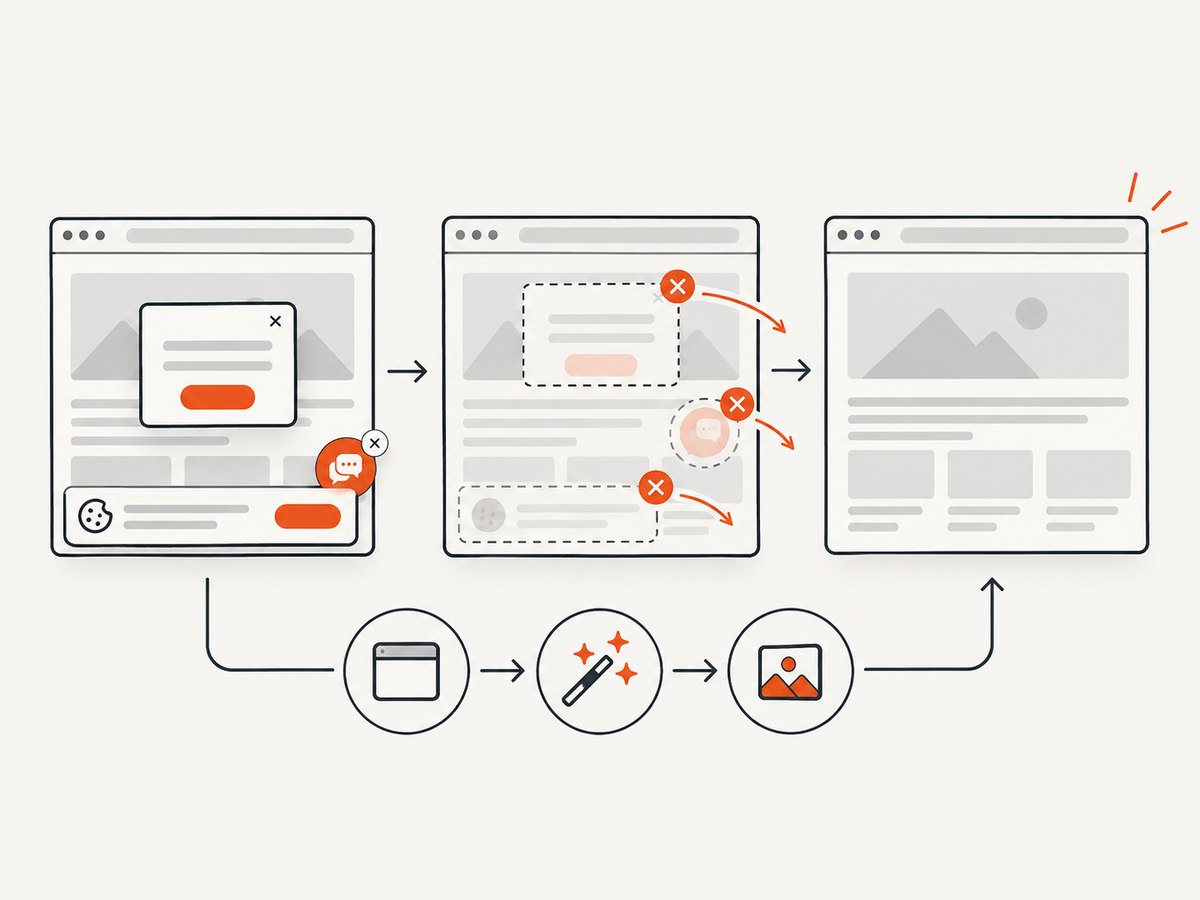
If your goal is a clean screenshot rather than network assertions, ScreenshotNeo provides a single API request. Its capture service accepts consent banners like a visitor and removes more than 60 known consent platforms, newsletter popups, and chat widgets before the shot. Each cleanup step can be disabled. Bot checks, blank pages, timeouts, failed loads, and cache hits are not billed, and response headers identify the page verdict and billing status.
See the ScreenshotNeo API documentation for all options, including full-page and element capture, device presets, retina scale, custom CSS and JavaScript, clicks, waits, blocked resources, headers, cookies, user agents, authorization, timezone, geolocation, transparent backgrounds, resizing, TTL caching, signed links, asynchronous jobs, webhooks, bulk capture, usage, and the OpenAPI specification.
cURL
curl -G "https://api.screenshotneo.com/v1/shot" -d access_key=YOUR_API_KEY --data-urlencode url=https://stripe.com -o shot.webpPython
import requests
r = requests.get("https://api.screenshotneo.com/v1/shot", params={"access_key": "YOUR_API_KEY", "url": "https://stripe.com"}, timeout=90)
open("shot.webp", "wb").write(r.content)
Node.js
const q = new URLSearchParams({ access_key: 'YOUR_API_KEY', url: 'https://stripe.com' });
const res = await fetch(`https://api.screenshotneo.com/v1/shot?${q}`);
ScreenshotNeo also includes an MCP server with take_screenshot, get_page_info, and capture_pdf tools for Claude, Cursor, and other MCP clients. The free plan includes 1,000 shots per month with no card; paid plans start at $5 for 3,000 shots. Create a free ScreenshotNeo account.
Troubleshooting checklist
| Symptom | Likely cause | Fix |
|---|---|---|
ModuleNotFoundError: seleniumwire |
Package installed in another Python environment | Run python -m pip install selenium-wire with the interpreter running the test. |
| No requests are captured | Capture was disabled, the host is excluded, or the URL is outside the scope | Remove disable_capture, inspect exclude_hosts, and widen driver.scopes. |
wait_for_request times out |
Action happened after the wait, pattern does not match, or the page used a different endpoint | Click first, inspect captured URLs, escape regex characters, and increase the timeout only after confirming the pattern. |
request.response is empty |
Request is still pending, failed, or was aborted | Check the object before reading status or body and capture the browser console or server logs for failures. |
| Duplicate header values | Existing header was assigned without deletion | Delete the old header, then assign the replacement. |
| JSON server rejects modified POST | Invalid encoding or stale content length | Encode bytes again and set Content-Length to the new length; avoid changing signed payloads. |
| HTTPS certificate errors | Missing OpenSSL, untrusted generated certificate, or corporate proxy | Install the required OpenSSL/CA packages, configure trust in the test environment, and check remote proxy settings. |
| Memory grows during long runs | All traffic is retained | Use scopes, memory storage with a maximum size, or disable capture outside the assertion window. |
Performance, reliability, and cost considerations
- Narrow scopes before navigation so response bodies and metadata do not accumulate unnecessarily.
- Use
wait_for_requestfor the one call under test instead of scanning a large capture after every action. - Keep interceptors small and deterministic. Parsing every request body adds CPU and can expose secrets in logs.
- Run a fresh driver when proxy state, certificates, cookies, or interceptors from an earlier test could affect results.
- Set explicit page and request timeouts. A browser can continue loading analytics or polling long after the useful API response arrived.
- Pin the archived Selenium Wire dependency and review it before upgrading Python, Selenium, browser, or driver versions.
- For new development, compare Selenium BiDi’s browser-native interception model with the proxy-based behavior you need. Confirm feature parity for mutation, HAR, storage, and remote sessions before migrating.
FAQ
Does Selenium Wire make the AJAX request?
No. It observes traffic generated by the browser. Trigger the click, navigation, or JavaScript action first, then wait for the matching request.
Can I capture WebSockets?
The project lists WebSocket capture among its features, but this tutorial focuses on HTTP and HTTPS request and response interception.
Why are OPTIONS requests missing?
Selenium Wire’s default ignored method list includes OPTIONS. Set ignore_http_methods to an empty list when preflight traffic is part of the test.
Should a new project use Selenium Wire?
Use it when its proxy, HAR, storage, or mutation behavior is required and you can accept an archived dependency. Investigate Selenium BiDi for browser-native interception in new work, validating the exact operations your tests need.
Can I use ScreenshotNeo for API response assertions?
No. ScreenshotNeo is a website screenshot and PDF API. Use Selenium Wire or another network tool when you need to assert request payloads and response bodies; use ScreenshotNeo when you need a clean visual capture without maintaining browser infrastructure.


