Serverless PDF Reports with Lambda and Vercel
Build secure PDF reports with Vercel, Lambda, S3, Puppeteer, queues, retries, and signed downloads.

Direct answer: put the web-facing API in a Vercel Route Handler, store the report input and output in private Amazon S3, and render HTML with a Lambda-compatible Chromium build. Use a synchronous request for short, predictable reports. For slow or bursty workloads, enqueue a job in SQS, render it in a worker Lambda, record status in DynamoDB, and return a short-lived signed S3 URL when the PDF is ready.
This split keeps browser requests small, lets AWS absorb rendering work, and gives you explicit control over authentication, retries, concurrency, and download lifetime. The implementation below uses Puppeteer Core with @sparticuz/chromium, a package combination commonly used when a full Puppeteer download is too large for a Lambda deployment package.
Architecture for Lambda and Vercel PDF generation
Vercel handles authentication, validation, rate limiting, and job creation. S3 stores HTML, images, fonts, input data, and generated PDFs. Lambda runs Chromium and writes the PDF back to S3. API Gateway or a Lambda Function URL provides the HTTP entry point to the renderer. AWS describes a Function URL as a dedicated HTTPS endpoint for a function; API Gateway is the alternative when you need richer routing, throttling, or centralized API controls.
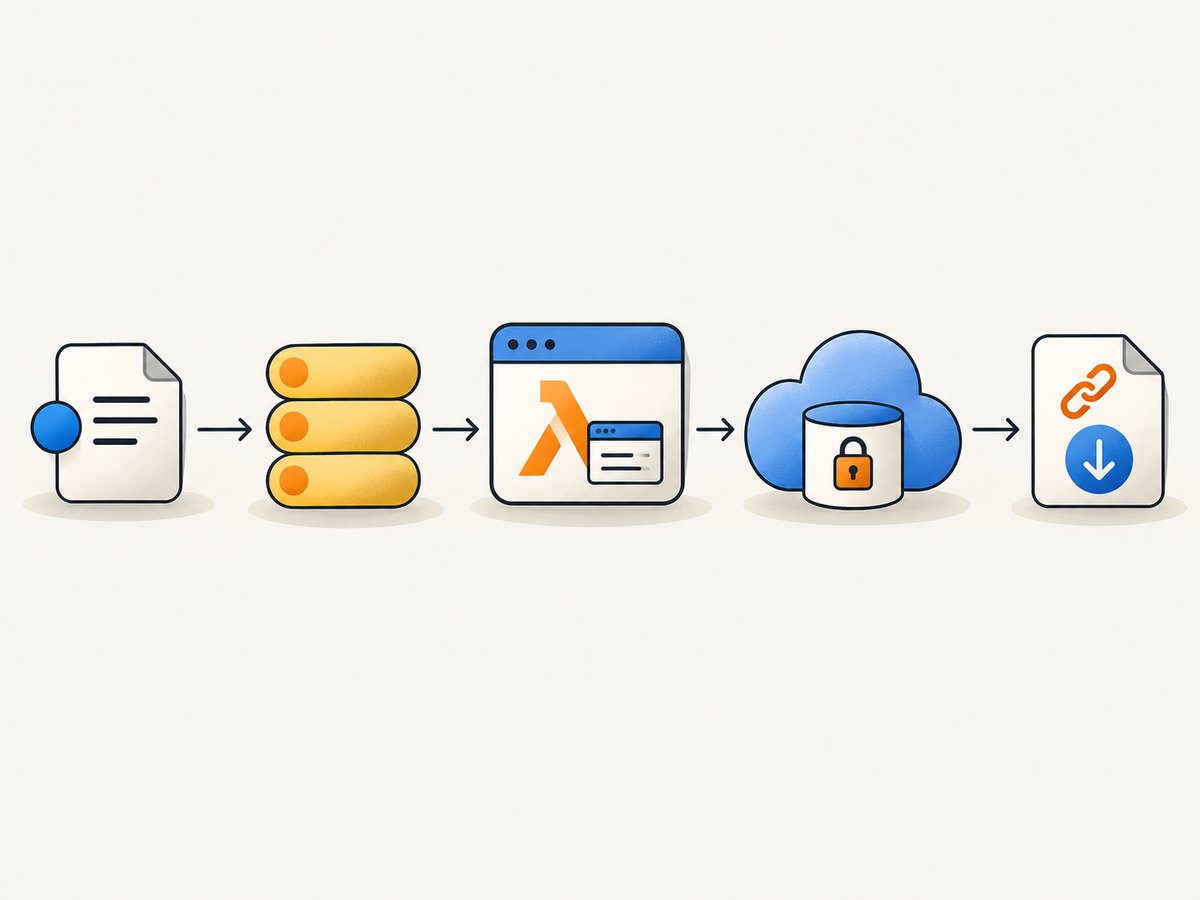
- The client sends report parameters to a Vercel Route Handler.
- Vercel validates the user, size limits, template identifier, and output name.
- Vercel creates a presigned S3 upload or writes a small job document.
- For synchronous work, Vercel invokes Lambda and waits for the PDF result.
- For asynchronous work, Vercel sends a message to SQS and returns a job ID immediately.
- The worker Lambda renders the report, uploads the PDF to private S3, and updates DynamoDB to
completedorfailed. - A status endpoint returns the state and, only after completion, a short-lived signed download URL.
Vercel documents server-side S3 uploads and browser uploads through presigned POSTs. Keep credentials on the server; a browser should receive only a scoped presigned request.
Choose synchronous or asynchronous rendering
| Pattern | Use it when | Trade-offs |
|---|---|---|
| Synchronous | The report normally finishes within your request timeout and users need the file immediately. | Simple client code, but the connection stays open and a slow browser or third-party asset can fail the request. |
| Asynchronous queue | Reports are slow, contain many pages, arrive in bursts, or need reliable retries. | Requires SQS, DynamoDB, polling or webhooks, and a cleanup policy, but isolates failures and controls concurrency. |
Make retries safe with a deterministic job ID or idempotency key. A retry should find the existing output instead of creating a second billable or confusing report. Store at least queued, processing, completed, and failed, plus timestamps, an error code, and the S3 object key.
Package a Lambda-compatible browser
Lambda does not include a desktop browser. Bundle a Chromium build that matches your Lambda architecture and the automation library version. The Serverless Framework example cited in the research uses puppeteer-core with @sparticuz/chromium and pins x86_64 because that Chromium package ships that architecture. Recheck compatibility whenever either dependency changes. A full Puppeteer install can be hundreds of megabytes, so a minimal build helps stay within deployment limits.
Set the function memory and timeout from observed render behavior, and give the function temporary storage for the browser binary and downloaded assets. Keep templates and large assets in S3 rather than embedding them in the deployment package. Restrict the browser’s outbound access when reports can reference user-controlled URLs.
Minimal asynchronous implementation
The following worker illustrates the core flow. It reads an HTML object from S3, launches Chromium, creates a PDF, stores it privately, and updates DynamoDB. Adapt table names, bucket names, and IAM policies to your account.
const { S3Client, GetObjectCommand, PutObjectCommand } = require('@aws-sdk/client-s3');
const { DynamoDBClient, UpdateItemCommand } = require('@aws-sdk/client-dynamodb');
const chromium = require('@sparticuz/chromium');
const puppeteer = require('puppeteer-core');

const s3 = new S3Client({});
const dynamodb = new DynamoDBClient({});

async function bodyToString(body) {
  const chunks = [];
  for await (const chunk of body) chunks.push(chunk);
  return Buffer.concat(chunks).toString('utf8');
}

exports.handler = async (event) => {
  const job = typeof event.body === 'string' ? JSON.parse(event.body) : event;
  const { jobId, bucket, htmlKey, pdfKey } = job;
  if (!jobId || !bucket || !htmlKey || !pdfKey) throw new Error('Missing job fields');

  await dynamodb.send(new UpdateItemCommand({
    TableName: process.env.JOBS_TABLE,
    Key: { jobId: { S: jobId } },
    UpdateExpression: 'SET #s = :processing, startedAt = :now',
    ExpressionAttributeNames: { '#s': 'status' },
    ExpressionAttributeValues: { ':processing': { S: 'processing' }, ':now': { S: new Date().toISOString() } }
  }));

  let browser;
  try {
    const source = await s3.send(new GetObjectCommand({ Bucket: bucket, Key: htmlKey }));
    const html = await bodyToString(source.Body);
    browser = await puppeteer.launch({
      args: chromium.args,
      defaultViewport: { width: 1280, height: 900, deviceScaleFactor: 1 },
      executablePath: await chromium.executablePath(),
      headless: chromium.headless
    });
    const page = await browser.newPage();
    await page.setContent(html, { waitUntil: 'networkidle0' });
    await page.pdf({ format: 'A4', printBackground: true, preferCSSPageSize: true, margin: { top: '18mm', right: '14mm', bottom: '18mm', left: '14mm' } });
    const pdf = await page.pdf({ format: 'A4', printBackground: true, preferCSSPageSize: true });
    await s3.send(new PutObjectCommand({ Bucket: bucket, Key: pdfKey, Body: pdf, ContentType: 'application/pdf', ServerSideEncryption: 'AES256' }));
    await dynamodb.send(new UpdateItemCommand({ TableName: process.env.JOBS_TABLE, Key: { jobId: { S: jobId } }, UpdateExpression: 'SET #s = :done, completedAt = :now', ExpressionAttributeNames: { '#s': 'status' }, ExpressionAttributeValues: { ':done': { S: 'completed' }, ':now': { S: new Date().toISOString() } } }));
    return { jobId, status: 'completed', pdfKey };
  } catch (error) {
    await dynamodb.send(new UpdateItemCommand({ TableName: process.env.JOBS_TABLE, Key: { jobId: { S: jobId } }, UpdateExpression: 'SET #s = :failed, errorMessage = :message', ExpressionAttributeNames: { '#s': 'status' }, ExpressionAttributeValues: { ':failed': { S: 'failed' }, ':message': { S: String(error.message).slice(0, 500) } } }));
    throw error;
  } finally {
    if (browser) await browser.close();
  }
};
The example calls page.pdf twice to keep the flow obvious; production code should create the buffer once and use that same buffer for the S3 upload. Add a page-level timeout, a maximum HTML size, and an allowlist for remote hosts before accepting untrusted input.
Vercel Route Handler and job creation
A Route Handler can authenticate the caller, validate a template, create an idempotent job, and send an SQS message. Keep the response small:
import { NextResponse } from 'next/server';
import { SQSClient, SendMessageCommand } from '@aws-sdk/client-sqs';

const sqs = new SQSClient({ region: process.env.AWS_REGION });

export async function POST(request) {
  const input = await request.json();
  if (typeof input.template !== 'string' || input.template.length > 80) {
    return NextResponse.json({ error: 'Invalid template' }, { status: 400 });
  }
  const jobId = crypto.randomUUID();
  await sqs.send(new SendMessageCommand({
    QueueUrl: process.env.REPORT_QUEUE_URL,
    MessageBody: JSON.stringify({ jobId, template: input.template, data: input.data })
  }));
  return NextResponse.json({ jobId, status: 'queued' }, { status: 202 });
}
For large HTML, upload it to S3 first with a presigned POST and send only the object key through SQS. A status route reads DynamoDB and signs the completed S3 object for a short period.
PDF layout details that prevent surprises
- Use print CSS:
@pagefor size and margins,break-inside: avoidfor cards, and explicit colors when backgrounds matter. - Set
printBackground: truewhen the design relies on colored sections. - Wait for fonts and images.
networkidle0is useful for static pages, but an analytics connection can prevent it from completing; use a bounded selector wait plus a maximum delay for such pages. - Prefer absolute or same-origin asset URLs. Relative URLs require a meaningful page URL or a base tag.
- For charts rendered by JavaScript, wait for a chart-ready selector rather than assuming a fixed sleep is enough.
- Use
preferCSSPageSizewhen templates define their own paper size; otherwise set a known format such as A4 or Letter.
Secure endpoints and downloads
A Lambda Function URL can use AWS_IAM authentication or NONE. A public URL needs resource-based permissions that allow invocation. AWS notes that new Function URLs require both lambda:InvokeFunctionUrl and lambda:InvokeFunction permissions beginning in October 2025. Prefer authenticated requests for report creation. Validate output names, reject path traversal characters, limit input bytes, and issue signed S3 URLs that expire quickly. Never make the bucket public just to simplify downloads.
Chromium can become a server-side request forgery path when it loads arbitrary URLs. Restrict hostnames, block private IP ranges, disable unnecessary protocols, and avoid forwarding cloud credentials into page requests. Treat HTML, CSS, and data as untrusted input.
Reliability, retries, and observability
Configure SQS visibility timeout longer than the maximum render time, and set a dead-letter queue for messages that exhaust retries. Use exponential backoff for transient S3 or network failures. Do not retry malformed templates or rejected hosts. Record correlation IDs in Vercel logs, Lambda logs, DynamoDB, and S3 metadata so one report can be traced across services. Emit duration, page count, output bytes, cold-start indicator, and failure category. A scheduled cleanup job should remove abandoned HTML, expired PDFs, and old job records.

Performance and cost considerations
Cold starts are dominated by loading Chromium and fonts. Reuse a browser within a warm invocation only when isolation is safe; close pages between jobs and never share cookies across tenants. Cache immutable templates and fonts in S3 or a layer. Keep concurrency bounded so a burst does not exhaust downstream APIs or memory. Rendering time grows with page count, image size, web fonts, and third-party requests.
There is no single reliable price estimate for this architecture: Lambda duration, memory, S3 storage and requests, SQS, DynamoDB, API Gateway or Function URL usage, Vercel execution, and outbound transfer all vary. Check current AWS and Vercel calculators before launch. Measure a representative report at cold and warm start, then set queue concurrency and retention from those measurements.
Troubleshooting checklist
| Symptom | Likely cause | Fix |
|---|---|---|
| Executable not found | Chromium package and architecture do not match. | Align x86_64 or arm64, puppeteer-core, and the Chromium package; log the resolved executable path. |
| Function times out | Slow assets, an endless connection, or too little timeout. | Set navigation and selector timeouts, replace unbounded network-idle waits, and move the job to SQS. |
| Blank PDF | Rendering happened before content or fonts were ready. | Wait for a page-specific ready selector, verify asset URLs, and capture console errors. |
| Missing images | Relative paths, blocked hosts, or lazy loading. | Use absolute URLs or a base tag, allow required domains, and scroll or trigger lazy content before printing. |
| AccessDenied from S3 | Missing IAM action, wrong key, or an expired presign. | Check bucket, key, region, role policy, and URL expiry; keep the object private. |
| Duplicate reports | Retry created a new job. | Require an idempotency key and make the job ID deterministic for the request. |
| Function URL returns 403 | Authentication mode or resource permissions are wrong. | Use a correctly signed IAM request or add the required invoke permissions for a deliberately public endpoint. |
Or skip the browser setup
ScreenshotNeo provides a single HTTP endpoint for screenshots and PDFs when you do not want to package Chromium or maintain a rendering worker. It accepts the URL and returns PNG, JPEG, WebP, or PDF. The API removes cookie and consent banners, newsletter popups, and chat widgets before capture; each cleanup step can be disabled. Bot checks, blank pages, timeouts, failed loads, and cache hits are not billed, and response headers identify the page verdict and billing result.
See the ScreenshotNeo API documentation for all options. A PDF request can use the same endpoint:
curl -G "https://api.screenshotneo.com/v1/shot" -d access_key=YOUR_API_KEY --data-urlencode url=https://stripe.com -o report.pdfimport requests
r = requests.get('https://api.screenshotneo.com/v1/shot', params={'access_key': 'YOUR_API_KEY', 'url': 'https://stripe.com'}, timeout=90)
r.raise_for_status()
open('report.pdf', 'wb').write(r.content)const q = new URLSearchParams({ access_key: 'YOUR_API_KEY', url: 'https://stripe.com' });
const res = await fetch(`https://api.screenshotneo.com/v1/shot?${q}`);
if (!res.ok) throw new Error(`HTTP ${res.status}`);
const pdf = Buffer.from(await res.arrayBuffer());
require('fs').writeFileSync('report.pdf', pdf);Beyond PDF capture, ScreenshotNeo supports full-page shots with lazy images loaded, CSS-selector element capture, dark mode, device presets, custom viewports, retina scale, paper size and margins, page ranges, custom CSS and JavaScript, clicks, selector or network-idle waits, request blocking, headers, cookies, user agents, authorization, timezone, geolocation, transparent backgrounds, resizing, configurable caching, signed image links, asynchronous jobs with signed webhooks, bulk capture for up to 100 URLs per call, usage reporting, and an OpenAPI specification. It also has an MCP server with take_screenshot, get_page_info, and capture_pdf for Claude, Cursor, and other MCP clients.
There are 1,000 free screenshots each month with no card. Paid plans start at $5 for 3,000 shots; every feature is included on every plan. Create a free ScreenshotNeo account.
FAQ
Can Puppeteer run in Lambda?
Yes, with a Lambda-compatible Chromium build and matching architecture. Use puppeteer-core when you provide the browser binary yourself.
Should the PDF be returned directly?
Return it directly for short, predictable reports. Store it in S3 and return a signed URL for larger files, retries, asynchronous jobs, or downloads that may happen later.
When should I use a queue?
Use SQS when render time varies, traffic is bursty, or a failed request should retry without keeping a browser connection open.
How long should signed URLs live?
Use the shortest period compatible with the user flow, and issue a new URL from the status endpoint when the old one expires.
Is a public Lambda Function URL safe?
It can be protected with application authentication and strict validation, but an authenticated Function URL or API Gateway usually gives clearer control for report generation.