How to Share ASP.NET Div Content as Images on Facebook
Render an ASP.NET div with html2canvas, publish it at a crawlable URL, and use Open Graph metadata for a Facebook link preview.
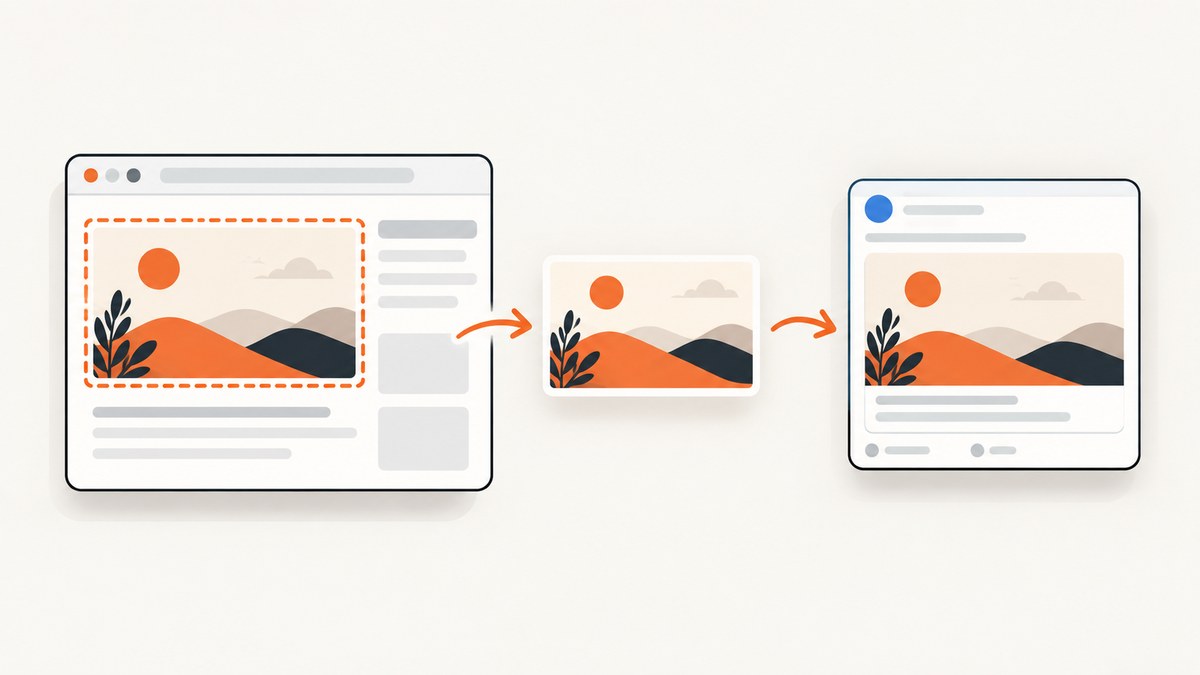
Direct answer: use JavaScript to render the selected ASP.NET div with html2canvas, export the canvas as a PNG, save that file at a public stable URL, and set that URL as the page’s og:image. Share the page URL on Facebook so Facebook can fetch the Open Graph metadata. A browser-generated data URL alone is not a crawlable image URL, and a link preview is a different workflow from attaching an image file directly to a post.
1. Decide which Facebook result you need
| Goal | What you publish | How the image is selected |
|---|---|---|
| Link preview | Your page URL | Facebook reads og:image from the page |
| Image attachment | An image file | A Facebook publishing flow uploads or references the file |
Open Graph defines og:title, og:type, og:image, and og:url as the basic properties for representing a shared page. See the Open Graph protocol. The example below implements the link-preview path because it is the reliable way to make a generated div image represent an ASP.NET page.
The current direct image-file publishing endpoint, permissions, and authorization requirements are not established by the sources for this guide. Do not assume that calling a client-side share dialog will upload an arbitrary canvas file.
2. Add html2canvas to the ASP.NET page
Place the library on the page and give the content you want to capture a stable ID. This example uses an ASP.NET Core Razor view, but the same markup works in Web Forms or MVC views.
<!-- Pages/ShareCard.cshtml -->
<script src='https://cdn.jsdelivr.net/npm/html2canvas@1.4.1/dist/html2canvas.min.js' defer></script>

<section id='share-card' class='share-card'>
  <h1>Your report title</h1>
  <p>This content will become the Facebook preview image.</p>
  <img src='/images/report-chart.png' alt='Report chart'>
</section>

<button type='button' id='make-image'>Create share image</button>
<a id='download-image' hidden download='share-card.png'>Download PNG</a>
<img id='image-preview' alt='Generated share image' hidden>

<script>
window.addEventListener('DOMContentLoaded', () => {
  const button = document.querySelector('#make-image');
  const download = document.querySelector('#download-image');
  const preview = document.querySelector('#image-preview');
  const target = document.querySelector('#share-card');

  button.addEventListener('click', async () => {
    button.disabled = true;
    try {
      const canvas = await html2canvas(target, {
        backgroundColor: '#ffffff',
        useCORS: true,
        scale: window.devicePixelRatio || 1,
        logging: false
      });
      const dataUrl = canvas.toDataURL('image/png');
      download.href = dataUrl;
      download.hidden = false;
      preview.src = dataUrl;
      preview.hidden = false;
    } finally {
      button.disabled = false;
    }
  });
});
</script>
The library reconstructs an image from DOM information and supported CSS; it does not capture the browser’s actual pixels. The project documents this limitation in its documentation. Validate the result when the card uses advanced CSS, fonts, filters, animations, or embedded media.
3. Export the selected div as a PNG
html2canvas() returns a Promise for a canvas. Export it with toDataURL('image/png') for a download or an upload. The following function waits for the target images before rendering and lets you choose a higher output scale.

async function renderDiv(element, scale = 2) {
  if (document.fonts?.ready) {
    await document.fonts.ready;
  }

  const images = [...element.querySelectorAll('img')];
  await Promise.all(images.map(image => {
    if (image.complete) return Promise.resolve();
    return new Promise(resolve => {
      image.addEventListener('load', resolve, { once: true });
      image.addEventListener('error', resolve, { once: true });
    });
  }));

  const canvas = await html2canvas(element, {
    useCORS: true,
    backgroundColor: '#ffffff',
    scale,
    imageTimeout: 15000,
    removeContainer: true
  });

  return canvas.toDataURL('image/png');
}

document.querySelector('#make-image').addEventListener('click', async () => {
  const dataUrl = await renderDiv(document.querySelector('#share-card'), 2);
  const link = document.querySelector('#download-image');
  link.href = dataUrl;
  link.hidden = false;
});
For a JPEG, use canvas.toDataURL('image/jpeg', 0.9). JPEG is smaller for photographic cards but does not preserve transparency. PNG is usually safer for text, charts, and flat UI artwork.
4. Upload the generated image from ASP.NET
A data URL exists only in the visitor’s browser. To make it usable by a Facebook crawler, send the bytes to your server or object storage and return a public HTTPS URL. This minimal ASP.NET Core endpoint accepts a data URL, validates the media type, and writes a file under wwwroot/generated.
// Controllers/ShareImagesController.cs
using System.Text.RegularExpressions;
using Microsoft.AspNetCore.Mvc;

[ApiController]
[Route('api/share-images')]
public sealed class ShareImagesController : ControllerBase
{
    private readonly IWebHostEnvironment environment;

    public ShareImagesController(IWebHostEnvironment environment)
        => this.environment = environment;

    [HttpPost]
    public async Task<IActionResult> Save([FromBody] UploadImageRequest request)
    {
        if (string.IsNullOrWhiteSpace(request.DataUrl))
            return BadRequest('dataUrl is required.');

        var match = Regex.Match(
            request.DataUrl,
            @'^data:(image/png|image/jpeg|image/webp);base64,(.+)$',
            RegexOptions.Singleline | RegexOptions.CultureInvariant);

        if (!match.Success)
            return BadRequest('Only PNG, JPEG, and WebP data URLs are accepted.');

        byte[] bytes;
        try
        {
            bytes = Convert.FromBase64String(match.Groups[2].Value);
        }
        catch (FormatException)
        {
            return BadRequest('The base64 payload is invalid.');
        }

        // Add authentication, authorization, size limits, and malware scanning
        // before enabling this endpoint for untrusted users.
        var directory = Path.Combine(environment.WebRootPath, 'generated');
        Directory.CreateDirectory(directory);
        var fileName = $"{Guid.NewGuid():N}.png";
        var path = Path.Combine(directory, fileName);
        await System.IO.File.WriteAllBytesAsync(path, bytes);

        var publicUrl = $"{Request.Scheme}://{Request.Host}/generated/{fileName}";
        return Ok(new { imageUrl = publicUrl });
    }
}

public sealed record UploadImageRequest(string DataUrl);
const dataUrl = await renderDiv(document.querySelector('#share-card'), 2);
const response = await fetch('/api/share-images', {
method: 'POST',
headers: { 'Content-Type': 'application/json' },
body: JSON.stringify({ dataUrl })
});
if (!response.ok) throw new Error(await response.text());
const { imageUrl } = await response.json();
console.log(imageUrl);For production, store the bytes in your normal image service or object storage, use unguessable names, enforce a maximum request size, and require authorization. The URL must be reachable by Facebook without a login, robots challenge, or private network address.
5. Set Open Graph metadata on the shared page
Render the saved image URL into the HTML head of the page that people will share. In Razor, populate these values from your view model.
@{
    var shareUrl = $"{Context.Request.Scheme}://{Context.Request.Host}{Context.Request.Path}";
    var imageUrl = Model.GeneratedImageUrl;
}
<meta property='og:title' content='@Model.Title' />
<meta property='og:type' content='website' />
<meta property='og:url' content='@shareUrl' />
<meta property='og:image' content='@imageUrl' />
<meta property='og:description' content='@Model.Description' />
Use an absolute URL for both og:url and og:image. Keep the image URL stable for the lifetime of the shared page; replacing the bytes at the same URL is safer than deleting it immediately after generation. Facebook may cache metadata, so changing the image URL is the practical way to publish a new variant.
6. Create the Facebook share link
Once the page contains the metadata, share the page URL. A simple link is enough:
const pageUrl = window.location.href;
const facebookUrl =
  'https://www.facebook.com/sharer/sharer.php?u=' + encodeURIComponent(pageUrl);
window.open(facebookUrl, '_blank', 'noopener,noreferrer');
The shared object is the page URL. Facebook fetches that page and chooses the representative image from og:image; it does not read a visitor’s in-memory canvas state.
7. Cross-origin images, iframes, and rendering limits
- External images: the image host must send suitable CORS headers. Set
useCORS: true, or proxy the asset through your own origin. html2canvas cannot bypass browser content-policy restrictions; see its FAQ. - Canvas taint: if an unapproved cross-origin image is drawn, reading the canvas with
toDataURL()can fail. Fix the image server’s CORS configuration or remove the asset. - Iframes: same-origin iframe documents can be traversed; cross-origin iframe contents are not exposed to the page script.
- Unsupported CSS: validate gradients, filters, pseudo-elements, web fonts, sticky positioning, video, and animations. Freeze animations before capture when deterministic output matters.
- Large cards: very large DOM areas require more memory. Capture the intended element, avoid unnecessary shadows and huge background images, and use a controlled scale.
8. Troubleshooting checklist
| Symptom | Likely cause | Fix |
|---|---|---|
html2canvas is not defined |
The script has not loaded or runs before the deferred script. | Keep the library URL reachable and start capture after DOMContentLoaded. |
| Images are missing | The image is not loaded, is cross-origin, or denies CORS. | Wait for image load, set useCORS: true, and configure the image server or a same-origin proxy. |
SecurityError from toDataURL() |
The canvas is tainted by cross-origin pixels. | Remove the offending asset or serve it with CORS from an allowed origin. |
| Text or layout differs | html2canvas reconstructs supported DOM and CSS instead of taking literal pixels. | Simplify unsupported styles, wait for fonts, disable animation, and compare the output at the target scale. |
| Facebook shows an old image | The crawler cached the page metadata or image URL. | Serve the new image at a new stable URL and update og:image; confirm the page is publicly fetchable. |
| Preview has no image | The metadata is missing, relative, blocked, or rendered only after JavaScript. | Emit absolute server-rendered Open Graph tags in the initial HTML response. |
| Generated file is huge | High scale or a large capture area. | Capture only the card, choose a practical scale, and use JPEG for photographic content. |
9. Performance, reliability, and cost considerations
- Run one capture at a time per card and disable the button while it runs to avoid duplicate uploads.
- Wait for fonts and images, but do not use an unbounded delay. Set an image timeout and show a clear retry state.
- Generate the image on demand, cache it by content version, and reuse the public URL while the card is unchanged.
- Keep the upload endpoint authenticated and rate-limited. Reject unexpected media types and oversized payloads.
- Measure the resulting file size and browser memory usage with your actual cards; output depends on DOM size, scale, fonts, and media.
- Do not promise that every browser rendering feature will match a native screenshot. The html2canvas documentation explicitly describes a DOM-based reconstruction.
10. Or skip the browser setup
ScreenshotNeo can capture the public ASP.NET page with one request, including full-page or element captures, custom CSS and JavaScript, waits, headers, cookies, and other capture controls. Before the capture, cookie banners, newsletter popups, and chat widgets are removed. Bot checks, blank pages, failed loads, timeouts, and cache hits are not billed, and the response identifies the result with X-Page-Verdict and X-Billed headers. Its MCP server provides take_screenshot, get_page_info, and capture_pdf tools for Claude, Cursor, and other MCP clients.

See the ScreenshotNeo API documentation for all options. This call returns the rendered page image; publish the returned bytes at the URL used by og:image.
curl -G "https://api.screenshotneo.com/v1/shot" -d access_key=YOUR_API_KEY --data-urlencode url=https://your-site.example/share-card/42 -o shot.webpimport requests
r = requests.get("https://api.screenshotneo.com/v1/shot", params={"access_key": "YOUR_API_KEY", "url": "https://your-site.example/share-card/42"}, timeout=90)
open("shot.webp", "wb").write(r.content)const q = new URLSearchParams({ access_key: 'YOUR_API_KEY', url: 'https://your-site.example/share-card/42' }); const res = await fetch(`https://api.screenshotneo.com/v1/shot?${q}`);The free plan includes 1,000 screenshots per month with no card. Paid plans start at $5 for 3,000 screenshots. Create a free ScreenshotNeo account.
FAQ
Can I put the canvas data URL directly in og:image?
No. A data URL generated in one visitor’s browser is not a stable, crawler-fetchable image for the server page. Upload it and emit a public absolute URL.
Does html2canvas take a screenshot of the browser window?
No. It rebuilds an image from the DOM and supported CSS. Complex pages can differ from the visible browser rendering.
Can a cross-origin iframe be included?
No. Browser security prevents the script from reading a cross-origin iframe document.
Should I use PNG or JPEG?
Use PNG for text, charts, and transparency. Use JPEG when a photographic card benefits from a smaller file.
What if I need an actual browser screenshot instead of a DOM reconstruction?
Use a browser-based capture service such as ScreenshotNeo, then publish its returned image at the page’s og:image URL.


