11 Software Engineering Tools Every Programmer Should Know
Build a practical developer toolkit for planning, coding, testing, reviewing and shipping software, with guidance on choosing tools for your stack.

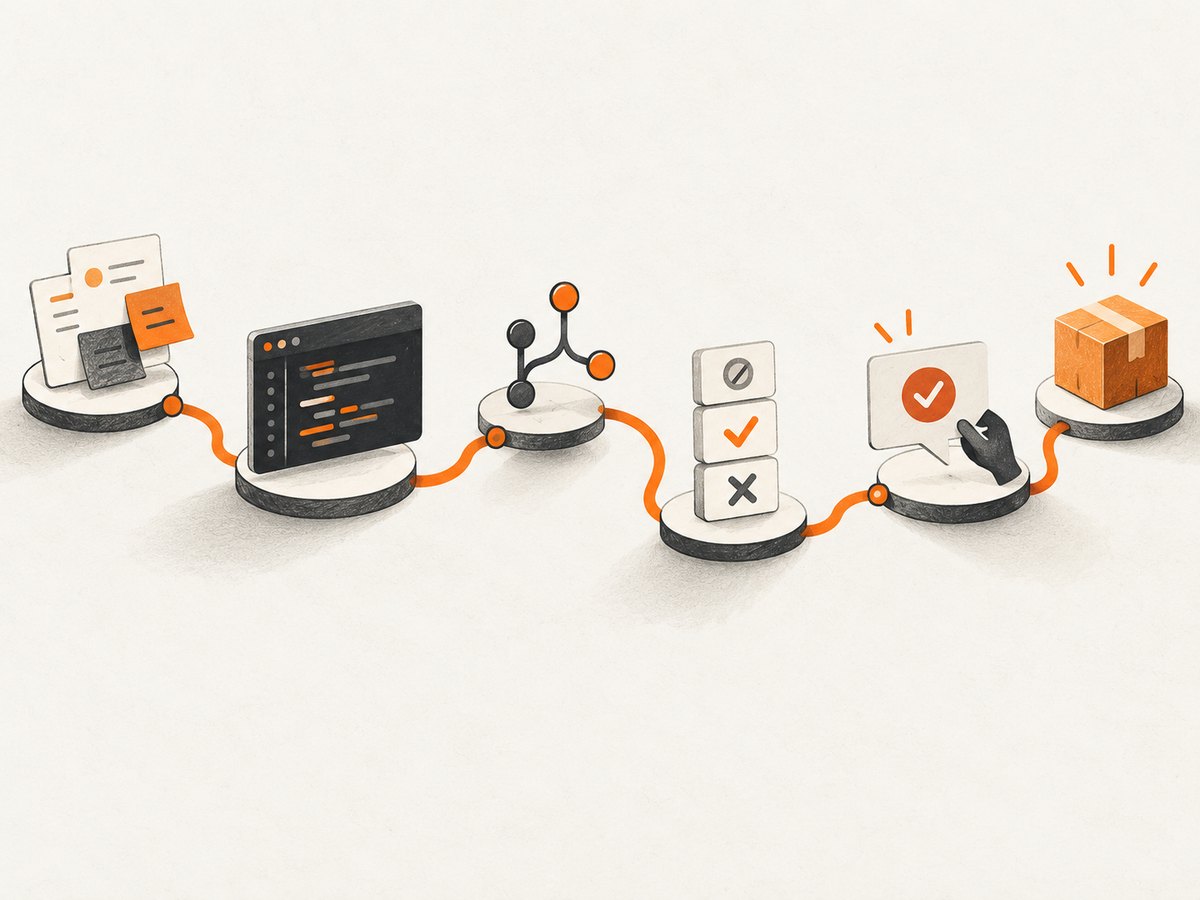
There is no single set of software engineering tools every programmer must use. The useful toolkit depends on your language, operating system, project size, team and deployment environment. But most software work follows a recognizable path: plan a change, write code, track it, test it, review it and deliver it. The eleven tool categories below support that workflow. Start with the jobs you actually need to do, then choose products that fit your stack.
Survey results can offer context, not a universal shopping list. Stack Overflow’s 2025 survey collected more than 49,000 responses from 177 countries across 314 technologies; its findings describe respondents, not every programmer. Keep that distinction in mind when comparing adoption figures.
1. Issue tracking and planning
An issue tracker records work that should be done and why. Use it for features, defects, technical decisions, investigations and follow-up tasks. A useful issue states the problem, the expected result, relevant context and how someone can tell the work is complete.
Jira is one example; teams also use other trackers or lightweight project boards. Choose based on the shape of your work: a solo project may need only a short backlog, while a team may need ownership, status transitions, dependencies, search and links between issues and code reviews. Agree on a small set of statuses and keep them meaningful. A tracker becomes noise when every minor thought becomes a ticket or when no one updates stale work.
2. Code editor or IDE
Your editor is where you read and change code. A language-aware IDE adds facilities such as navigation, refactoring, debugging and project management. The boundary is flexible: editors gain capabilities through extensions, and IDEs can be configured to work more like focused editors.
Visual Studio Code and language-focused JetBrains IDEs are common starting points; Visual Studio is another option for its supported development workflows. Stack Overflow’s 2024 survey reported Visual Studio Code use by 74% of respondents. That is a dated survey result, not a claim that it is the best editor for every developer. Stack Overflow’s 2025 survey said Visual Studio and Visual Studio Code had maintained their top spots for developer environments for a fourth year.
Compare language and framework support, operating system compatibility, debugging quality, extensions, remote development needs, accessibility, startup time and licensing cost. Keep settings reproducible where possible: document essential extensions and formatting rules in the repository so a teammate can set up the same workflow.
3. Version control
Version control records how files change over time and helps people work on changes independently. Git is a distributed version-control system: a developer can commit changes locally, inspect history, branch, merge and synchronize with a remote repository.
A minimal Git workflow is to inspect the working tree, make a focused change, review the diff and commit it with a useful message:
git status
 git diff
 git add src/
 git commit -m "Handle expired sessions"
 git log --oneline -5
Remove the leading space before git diff if copying these lines into a shell that treats indented commands specially. In practice, stage only the files and hunks intended for the commit. Avoid committing credentials, generated artifacts that should not be tracked, or unrelated formatting changes. Use branches and merge practices that suit the team; a short-lived branch is easier to review than a long-running one with many unrelated changes.
4. Repository hosting and code collaboration
A hosting service stores shared repositories and adds collaboration features such as pull or merge requests, code review, access control, issue links and automation integrations. Git and GitHub are related but different: Git records versions; GitHub hosts repositories and supports team workflows. GitLab offers another hosted collaboration and delivery environment, and repositories can also be hosted on self-managed services.
Choose based on where your code lives, required access controls, integrations, review workflow, deployment model and cost. A pull request should explain the change, mention relevant issues, include verification details and be small enough to review. Hosting a repository does not automatically make its changes safe or correct; review and testing still matter.
5. Debugger
A debugger lets you pause a running program and inspect its state. Set a breakpoint near the behavior, reproduce the issue, inspect variables and the call stack, and step through relevant execution. This is often more informative than adding many print statements, especially when state changes across functions or requests.
Editors and IDEs commonly integrate debuggers, while command-line debuggers are available in many language ecosystems. Learn how to set conditional breakpoints, inspect asynchronous code and attach to a process when those are part of your work. For production incidents, use appropriate logs and traces as well; a local debugger cannot directly explain a remote failure unless you can safely reproduce or attach to the relevant environment.
6. Automated testing tools
Automated tests check that software behaves as expected. Unit tests focus on small units, integration tests exercise boundaries between components, and end-to-end tests validate complete user-facing flows. The right mix depends on failure risk, architecture, execution time and how reliably a test can be maintained.
Use the test framework supported by your language and application platform. Put fast, focused checks close to the code; reserve slower end-to-end checks for important workflows. Tests should verify observable behavior rather than implementation details that change frequently. A passing suite is evidence, not proof: missing cases, unrealistic test data, flaky dependencies and incorrect assertions can all leave defects undetected.
For API practitioners specifically, Postman’s 2025 State of the API survey reported functional testing and integration testing at 67% each, performance testing at 57%, and contract testing at 17%. Those figures describe respondents to an API-focused survey, not all programmers. The survey also reported that 60% versioned their APIs, 57% used Git repositories, and 26% used semantic versioning.
7. Package and build tools
Package managers resolve and install dependencies; build tools compile, bundle, package or otherwise produce an application artifact. These tools are ecosystem-specific. Examples include npm for JavaScript packages, pip for Python packages, Maven or Gradle for Java projects, and Cargo for Rust.
Use the project’s lockfile or equivalent dependency-resolution record when available, and commit it when the ecosystem expects that. Pinning or constraining dependencies makes installs more repeatable, but updates still need review. Keep development-only dependencies distinct from production dependencies where the tooling supports it. For builds, document required runtime versions and commands so local development and automation run the same steps.
8. Code review and static analysis
Code review gives another person a chance to check correctness, clarity, security-sensitive changes, maintainability and fit with the design. Static analysis inspects code without executing the full application; linters, formatters, type checkers and security scanners each catch different classes of problems.
Run deterministic formatting and basic analysis automatically when practical. Keep rules understandable and address warnings instead of allowing a growing backlog to become invisible. Reviewers should focus on behavior, edge cases, data handling and whether the change is understandable. Automated tools help with consistency, but they do not replace design discussion or domain knowledge.
9. CI/CD automation
Continuous integration (CI) automates checks when code changes. Continuous delivery or deployment (CD) automates preparing or releasing software. A pipeline might install dependencies, run formatting checks, tests and builds, then publish an artifact or deploy it after required approval.
GitHub Actions, GitLab CI/CD and Jenkins are examples. Docker’s 2025 State of Application Development report listed GitHub Actions at 40%, GitLab at 39% and Jenkins at 36% among respondents’ CI/CD tools. These selections should not be read as market shares; organizations can use more than one system, and the report reflects its own survey population. Postman’s API-focused 2025 survey reported GitHub Actions leading CI/CD adoption there at 54%, a different audience and scope.
Pick a system that integrates with your repository and deployment environment, supports the required security controls, and can be maintained by the team. Keep pipeline steps repeatable, expose useful failure logs and avoid placing secrets in source files or logs. Start with the checks that protect the main branch, then add deployment automation when the release process is understood.
10. Container tooling
Containers package an application with parts of its runtime environment so it can run more consistently across development and deployment systems. Docker is a widely used container platform. A container does not by itself make an application portable: host capabilities, network access, storage, architecture and configuration can still differ.
Use containers when they simplify local setup, service dependencies or deployment packaging. Keep images small, rebuild them from trusted base images and avoid baking secrets into image layers. Docker’s 2025 report said 30% of developers used containers somewhere in their workflow, while a separate IT-professional subgroup reported 92%. Those are distinct populations and should not be combined into one adoption rate. A small script or managed runtime may be simpler for a project that does not need containers.
11. API workflow or application monitoring
This last category depends on what you build, because API testing and monitoring solve different jobs. For API development, a client such as Postman helps send requests, inspect responses, organize collections and exercise workflows. For production observability, tools such as Grafana can help visualize metrics, while Sentry is an example of an error-monitoring service. Select the job you need rather than treating these products as direct substitutes.
API tools are useful for checking authentication, request parameters, response schemas and error cases. Monitoring tools help teams detect and investigate behavior after deployment. Consider data sensitivity, retention, access controls, integrations, hosting requirements and total cost. Do not send secrets or personal data to a service without understanding how it handles them.
How to choose a practical toolset
- Map the workflow. Write down how work moves from request to release and where changes currently get lost or delayed.
- Use your ecosystem’s defaults. Prefer tools with strong support for your language, framework and operating system unless a concrete requirement points elsewhere.
- Separate categories. Git is version control; a hosting platform supports collaboration. CI runs checks and delivery steps; containers package environments. Testing and monitoring answer different questions.
- Compare operating constraints. Check repository and pipeline integrations, self-hosting needs, accessibility, team scale, learning curve and total cost.
- Add one tool to solve one problem. Adopt it with a clear owner and setup notes, then review whether it reduces friction before adding more process.
A starter setup for an individual might be an editor, Git, a hosted repository, the language’s package/build tools and a few automated tests. A team with production services may add issue tracking, review rules, CI/CD, containers and monitoring. Tool count is not a measure of engineering quality; a small set used consistently can be more effective than a large stack no one maintains.
Capturing web pages in a development workflow
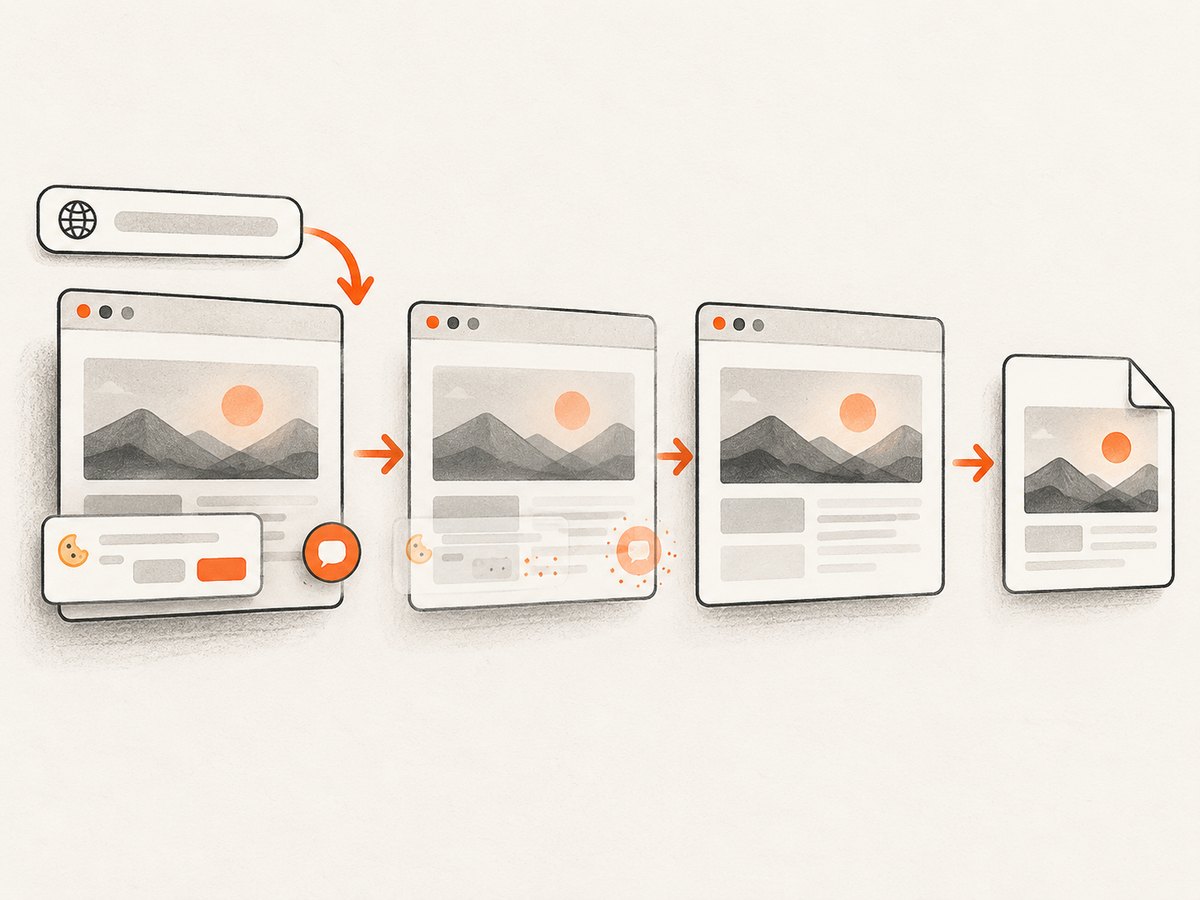
Some teams need screenshots for visual regression checks, bug reports, documentation or a record of a web page’s state. Browser automation gives you control over the browser and is appropriate when the capture must be part of an existing test or needs custom interactions. A screenshot API is useful when you want a repeatable capture without maintaining browser setup yourself.
DIY capture with Playwright
Install Playwright and its browser, then save this as capture.mjs. It opens a URL, waits for the page to load, and writes a full-page PNG. Replace the target with a page you are authorized to capture.
npm init -y
npm install playwright
npx playwright install chromium
import { chromium } from 'playwright';
const browser = await chromium.launch({ headless: true });
try {
const page = await browser.newPage({
viewport: { width: 1440, height: 900 },
deviceScaleFactor: 1
});
await page.goto('https://example.com', {
waitUntil: 'networkidle',
timeout: 30000
});
await page.screenshot({ path: 'page.png', fullPage: true });
} finally {
await browser.close();
}Run it with node capture.mjs. For dynamic pages, networkidle may never occur because analytics or live connections keep the network active. In that case, wait for a meaningful selector or use a deliberate short delay after navigation. Full-page capture can also produce very tall images; capture a specific element or viewport when that better matches the use case. Browser automation needs browser binaries, memory and suitable timeouts, and its output can vary with fonts, animations, viewport size and page state.
Or skip the browser setup
ScreenshotNeo is a website screenshot API and MCP server. One GET request can return a PNG, JPEG, WebP or PDF. The [API documentation](https://screenshotneo.com/docs/) lists the request parameters; the [ScreenshotNeo site](https://screenshotneo.com) describes the service.
curl -G "https://api.screenshotneo.com/v1/shot" -d access_key=YOUR_API_KEY --data-urlencode url=https://example.com -o shot.webpimport requests
r = requests.get(
"https://api.screenshotneo.com/v1/shot",
params={"access_key": "YOUR_API_KEY", "url": "https://example.com"},
timeout=90,
)
r.raise_for_status()
with open("shot.webp", "wb") as f:
f.write(r.content)const q = new URLSearchParams({
access_key: 'YOUR_API_KEY',
url: 'https://example.com'
});
const res = await fetch(`https://api.screenshotneo.com/v1/shot?${q}`);
if (!res.ok) throw new Error(`Screenshot request failed: ${res.status}`);
await Bun.write('shot.webp', res);In Node.js environments without Bun, write the response bytes with Node’s filesystem API: import writeFile from node:fs/promises and call await writeFile('shot.webp', Buffer.from(await res.arrayBuffer())). Store the access key in an environment variable in production rather than committing it. ScreenshotNeo removes cookie and consent banners, newsletter popups and chat widgets before capture; each cleanup step can be turned off. Bot checks, blank pages, timeouts and failed loads are not billed, and cache hits cost nothing; responses identify page verdict and billing in headers. Its MCP server provides take_screenshot, get_page_info and capture_pdf for Claude, Cursor and other MCP clients. The free plan includes 1,000 screenshots per month with no card; paid plans start at $5 for 3,000 shots. [Create a free ScreenshotNeo account](https://screenshotneo.com/account/sign-up/).
Screenshot capture options and practical choices
Use a browser library when you need arbitrary browser-side logic, a controlled test environment or deep integration into an existing test suite. Use a service when you want a single request and do not want to manage browser installation and execution. Within ScreenshotNeo, options include full-page capture with lazy images loaded, CSS-selector element capture, dark mode, 12 device presets or a custom viewport, and retina scale. You can request PDF output with paper size, margins, landscape orientation and page ranges.
For pages with special state, options include custom CSS or JavaScript, clicking an element, hiding selectors, waiting for a selector, delay or network idle, custom headers, cookies, user agent and Authorization, timezone and geolocation. You can block ads, trackers, requests or resource types. Additional options include transparent background, image resizing, cache TTL, signed links for public image tags, asynchronous jobs with signed webhooks, bulk capture of up to 100 URLs per call, a usage API and an OpenAPI specification. Other screenshot APIs’ parameter names also work, which can ease migration.
Choose the smallest set of options needed. A fixed viewport and explicit wait condition improve repeatability. Use a selector wait when a particular component signals readiness; use a delay only when the page has no stable signal. Blocking resources can speed a capture but may also remove fonts, images or data the page needs. Caching reduces duplicate work, but use an appropriate TTL when the page changes. For large or slow pages, consider asynchronous jobs; for batches, use the bulk endpoint and handle per-result failures rather than assuming every URL succeeds.
Troubleshooting developer tool workflows
| Symptom | Likely cause | What to try |
|---|---|---|
| Git commit contains unrelated files | All changed files were staged together | Inspect git status and git diff --cached; unstage unrelated paths and commit focused changes. |
| Tests pass locally but fail in CI | Different runtime, missing environment variable, timezone, dependency or race condition | Match runtime versions, make dependencies explicit, inspect CI logs and remove reliance on machine-specific state. |
| Pipeline cannot access a secret | Secret is unset, scoped incorrectly or unavailable to the event type | Check repository or environment secret settings and workflow permissions; never print the value while debugging. |
| Container works locally but not in deployment | Architecture, environment, ports, mounted storage or permissions differ | Compare runtime configuration and logs; make required environment settings explicit and verify the image target. |
| Browser capture times out | Page is slow, has persistent network activity or waits on an unreachable resource | Use a bounded timeout and wait for a page-specific selector; avoid relying on network idle for pages with live connections. |
| Screenshot is blank or incomplete | Capture ran before content rendered, a selector missed, or resources were blocked | Wait for a visible content selector, inspect the target URL and viewport, and remove blocking rules that hide required assets. |
| Screenshot API returns an error | Invalid key, malformed URL, unsupported option or inaccessible target | Check the status and response headers, confirm the URL encoding and access key, then simplify parameters to isolate the issue. |
Performance, reliability and cost
Tooling has an ongoing cost in subscription fees, compute, storage, maintenance and attention. Prefer fast feedback on the common path: local formatting and focused tests should run quickly; broader integration checks can run in CI. Cache dependencies where safe, avoid rebuilding unchanged artifacts and keep test suites reliable enough that developers trust failures.
For browser screenshots, the main costs are browser startup, page load, image size and the number of pages captured. Reuse a browser process for batches in a DIY script, but isolate page contexts and close resources cleanly. Set explicit timeouts and capture errors with URL context. For an API, estimate monthly volume and choose an appropriate image format, viewport and cache policy. ScreenshotNeo pricing is Free for 1,000 shots per month, Starter $5 for 3,000, Growth $15 for 15,000, Pro $39 for 60,000, Scale $99 for 250,000 and Business $249 for 1,000,000; yearly billing gives two months free. Every feature is on every plan.
Reliability also depends on what happens when a tool fails. Keep source code in version control, make builds reproducible, retain useful logs and define which checks block releases. Treat monitoring alerts as signals to investigate, not automatic diagnoses. For screenshot jobs, retry transient failures with limits and avoid retrying invalid requests indefinitely.
FAQ
Do I need all eleven categories on a personal project?
No. Start with version control, an editor, ecosystem package tools and tests suited to the project. Add planning or deployment tools when their absence causes a real problem.
Is GitHub the same thing as Git?
No. Git is version control software. GitHub is a repository hosting and collaboration service that uses Git.
Should I learn an IDE before command-line tools?
Learn enough of both to understand your workflow. An IDE can speed navigation and debugging, while command-line familiarity helps with automation and remote environments.
Are containers required for CI/CD?
No. Containers are one way to package an environment. A pipeline can build and deploy software without containers when another runtime model fits better.
Which screenshot approach should I use?
Use browser automation when capture is part of a test or requires custom browser behavior. Use a screenshot API when a request-based capture fits better and you want to avoid managing browser binaries.


