How to Use Tor as a Proxy for Web Scraping in 2026
Configure Tor SOCKS5 for Python and browser scraping, prevent DNS leaks, and understand Tor’s limits, safe request rates, and alternatives.
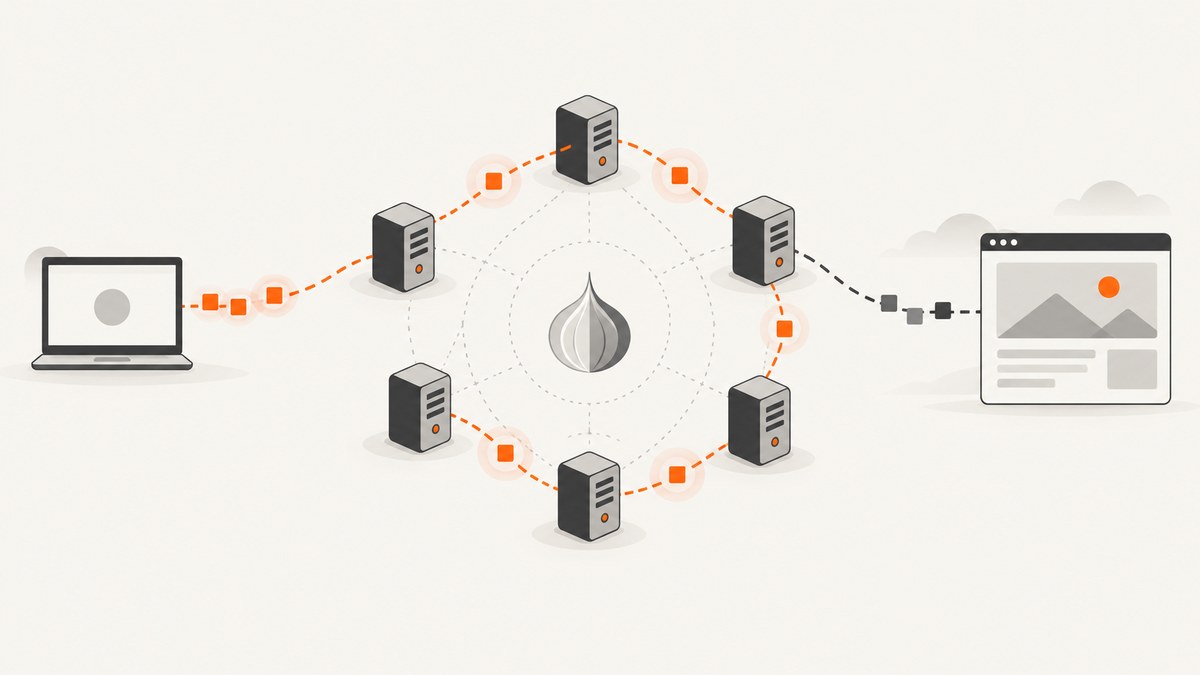
To use Tor as a proxy for web scraping, run Tor locally and configure your HTTP client or browser to send requests through its SOCKS5 listener. Use hostname resolution through the proxy (often called socks5h), verify the apparent egress IP from the same process, keep request rates and concurrency low, and use HTTPS to the destination. Tor can obscure your network location from a site when configured correctly; it does not guarantee anonymity, prevent identification after login, or make high-volume scraping reliable.
This guide covers a cautious workflow for public pages. Respect site terms and robots directives, do not bypass authentication or access controls, and stop when a site asks automated clients to stop.
1. Understand what Tor does—and does not do
Tor is not a system-wide switch. Only applications configured to route traffic through Tor use the network; other programs may still connect directly. The Tor Project says Tor “only protects applications that are properly configured to send their Internet traffic through Tor.” Tor Browser security guidance also warns that perfect anonymity cannot be guaranteed.
For a clearnet website, your client connects to a local Tor SOCKS listener, Tor routes the traffic through the network, and an exit relay connects to the site. Exit addresses are public and recognizable. Websites may block them, challenge them, or serve different responses. Tor’s encryption within the network does not replace HTTPS between the exit relay and the destination, so keep the target URL on HTTPS and validate its certificate as usual.
Onion services are different: they are reachable only through Tor and do not use a clearnet exit relay for the onion connection. A publisher must provide an onion address; Tor cannot turn an ordinary website into an onion service. Tor Project support describes onion services and their use.
2. Start Tor and check the SOCKS listener
Install and run a Tor client appropriate for your operating system, then check its configuration or startup output for the SOCKS listener address and port. A common local setup uses 127.0.0.1:9050, but do not assume that port: packaged clients and Tor Browser may use different ports. Use the endpoint shown by your local configuration.
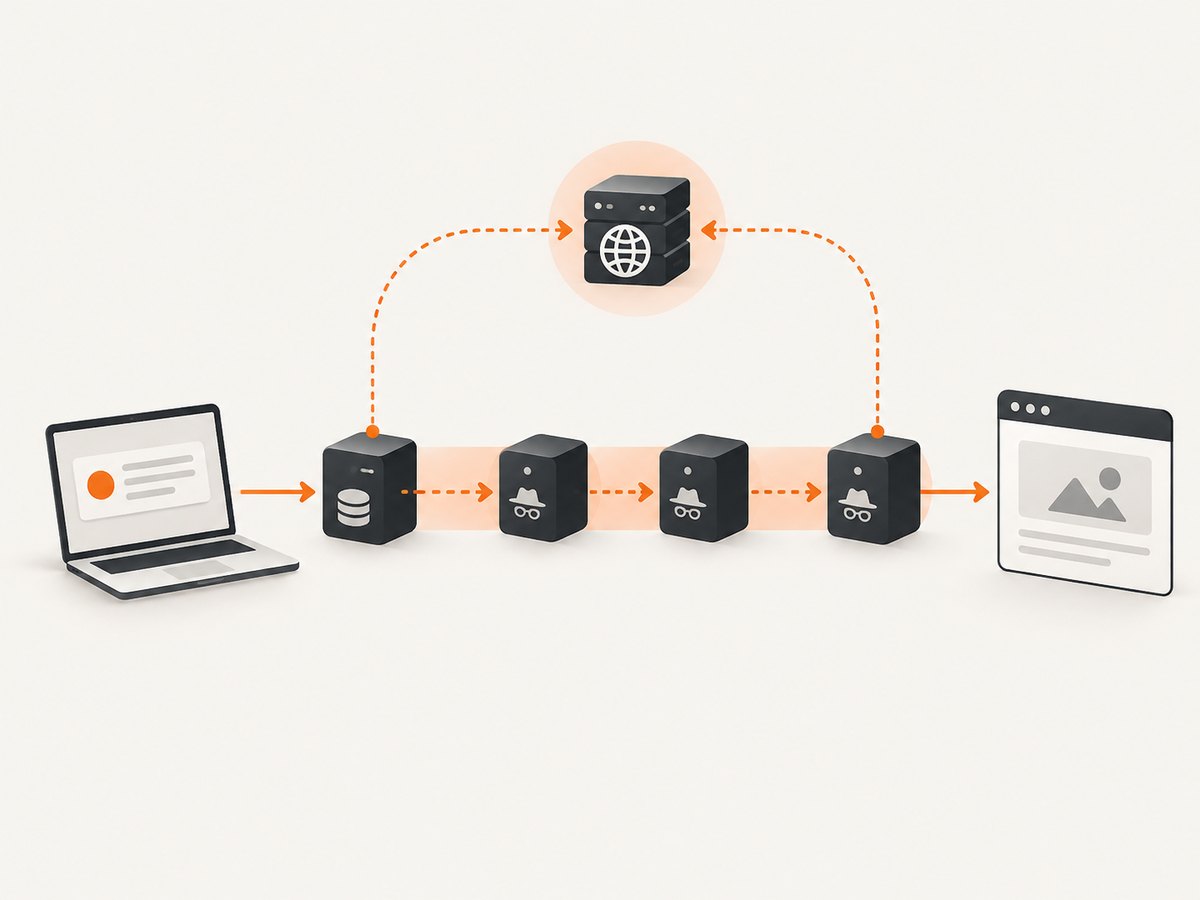
Keep the listener bound to loopback unless you deliberately understand the network exposure. Do not expose an unauthenticated local proxy to an untrusted network. Start with one scraper process and one request at a time.
Tor normally offers SOCKS4, SOCKS4A, and SOCKS5. It is not an ordinary HTTP proxy. The Tor SOCKS specification explicitly distinguishes these interfaces. Supplying a SOCKS address to a client option that expects an HTTP proxy is a common configuration error.
3. Configure Python requests with remote DNS
Install Requests and a SOCKS-capable dependency:
python -m pip install requests[socks]Use socks5h:// when supported so the hostname is resolved through the proxy rather than by the machine running the scraper. With plain socks5://, some clients resolve the name locally first, which can disclose which hostname you requested to your DNS resolver.
import requests

TOR_SOCKS = "socks5h://127.0.0.1:9050"  # Set this to your actual listener.
PROXIES = {"http": TOR_SOCKS, "https": TOR_SOCKS}

session = requests.Session()
session.proxies.update(PROXIES)
session.headers.update({"User-Agent": "ExampleResearchBot/1.0 (contact: ops@example.org)"})

# Check egress using the same configured session, then fetch the target.
ip_response = session.get("https://check.torproject.org/api/ip", timeout=(10, 30))
ip_response.raise_for_status()
print("Observed egress:", ip_response.json())

response = session.get("https://example.org/", timeout=(10, 45))
print(response.status_code, response.url)
response.raise_for_status()
html = response.text
print(html[:500])
The check endpoint is a diagnostic, not proof that every request in every code path is proxied. Keep the session configuration attached to each request, and repeat checks after changes to dependencies, deployment, or Tor configuration. For real collection, set a descriptive user agent that identifies the operator and contact route rather than impersonating a browser or another organization.
Requests timeouts are important: without them, a stalled connection can hold a worker indefinitely. The tuple above sets connect and read limits; tune them for the site and your job. If a response is unsuccessful, inspect status and headers before retrying. Do not blindly retry authorization errors, CAPTCHA pages, or explicit blocks.
4. Send a one-off request with cURL
Use a SOCKS5 hostname-resolution mode where available. cURL builds vary, so confirm SOCKS support in your installed version with curl --version. In cURL, socks5h requests proxy-side name resolution.
curl --proxy socks5h://127.0.0.1:9050 \
  --connect-timeout 15 \
  --max-time 60 \
  --fail-with-body \
  --user-agent "ExampleResearchBot/1.0 (contact: ops@example.org)" \
  https://example.org/
To inspect headers and connection behavior, add -v while debugging. Verbose logs can include requested URLs and other sensitive details; avoid sharing them unredacted. Do not use an HTTP proxy option or an ad-hoc forwarder as a substitute for the SOCKS protocol. Tor documents a separate HTTP CONNECT interface and its handling rules in the HTTP CONNECT specification.
5. Configure a browser automation client
Browser automation is useful when a page requires JavaScript, but it has more moving parts and a larger leak surface than a minimal HTTP client. The following Playwright example configures the browser process to use the Tor SOCKS endpoint. Install Playwright and its browser runtime according to its official setup instructions before running it.
import asyncio
from playwright.async_api import async_playwright

async def main():
    async with async_playwright() as p:
        browser = await p.chromium.launch(
            headless=True,
            proxy={"server": "socks5://127.0.0.1:9050"},
        )
        page = await browser.new_page()
        await page.goto("https://example.org/", wait_until="domcontentloaded", timeout=60000)
        print("Title:", await page.title())
        print("Final URL:", page.url)
        await browser.close()

asyncio.run(main())
Confirm the browser library’s support for SOCKS and remote DNS in the version you use. If you cannot verify DNS behavior, test it in a controlled environment instead of assuming the proxy setting covers name resolution. Avoid extensions and plugins unless required and audited. Ensure the browser has no configured direct fallback for failed proxy connections.
Do not open downloaded DOC or PDF files in external applications on a machine whose real network identity matters: external document software may fetch linked resources outside Tor. The Tor Project recommends care with downloaded documents; use an in-browser viewer or a disconnected analysis environment where appropriate. See its downloaded-document guidance.
6. Verify routing and avoid DNS leaks
- Check the application setting. Confirm the actual SOCKS listener, not just that Tor is running.
- Route a diagnostic request through the same client. Compare its reported egress address with a request made outside the client. Never infer routing from a successful page load alone.
- Check hostname resolution behavior. Use the library’s documented remote-DNS mode, such as
socks5hwhere supported. A local DNS lookup before proxy connection can reveal the requested domain. - Inspect all network paths. Browser subresources, helper processes, downloads, and separate HTTP sessions may not inherit the proxy configuration. Disable direct fallback and test the exact production code path.
- Keep HTTPS enabled. Check that the URL remains HTTPS and certificate validation is on. A Tor route does not secure an unencrypted destination connection.
- Repeat after changes. Re-test after changing the client library, browser, container, host, or Tor setup.
Tor’s privacy protections do not prevent a target from identifying you through an account login, submitted personal details, or other application-level behavior. They also do not protect unrelated applications on the same computer. Keep logs and stored data limited to what the task requires, and protect URLs, credentials, and personal information in logs.
7. Set a safe scraping policy
Tor is volunteer-operated and can be slower and less predictable than a direct connection. Use conservative limits that match the site’s published guidance and your purpose. There is no responsible universal requests-per-second number for every site and circuit.
- Scope: collect public pages only. Do not bypass authentication, CAPTCHAs, paywalls, or other access controls.
- Concurrency: start with one in-flight request. Increase only when permitted and after observing the site’s response and load.
- Rate limiting: add a delay between requests and cap total requests per host and per job.
- Caching: reuse prior results and avoid fetching unchanged pages. Tor Project guidance for onion services also recommends rate limiting and caching to reduce load; those are sensible practices for any cautious crawler. See the DoS guidance.
- Retries: bound retries and use exponential backoff with jitter for transient network failures only. A 403, 429, CAPTCHA, or opt-out is a reason to stop or reduce activity, not to change circuits to evade a restriction.
- Robots and terms: check the target’s robots directives and terms, and honor explicit requests to cease automated access.
- Data minimization: store only fields needed for the stated purpose and apply an appropriate retention period.
Changing Tor circuits to get around rate limits or blocks is not a safe scraping strategy. Public exit relays are recognizable, and a site can refuse them. If the target says automated access is not allowed, stop and seek an approved API or permission.
8. Performance, reliability, and cost
Tor adds multiple network hops and uses shared volunteer capacity. Latency and availability vary; retries cannot guarantee success, and a target’s anti-abuse systems may reject requests. Browser automation adds startup, rendering, and resource costs on top of the network overhead. Prefer a lightweight HTTP client when the page content is available without browser execution.
For a small, low-rate research task, Tor software itself can be used without buying a proxy service. The operational cost is time spent on cautious request scheduling, failures, and verification. For sustained collection, estimate volume from the target’s allowed rate and your own retry budget, then decide whether an approved API or a provider with an explicit capacity agreement is more appropriate. A commercial proxy may offer more predictable capacity or support, but requires trust in that provider; Tor is open and privacy-oriented but slower and commonly blocked.
Track response status, elapsed time, retry count, and cache hit rate without retaining sensitive query data unnecessarily. Separate network failures from target-side denials. A job that quietly retries forever is neither reliable nor considerate of the site.
9. Troubleshooting
| Symptom | Likely cause | What to do |
|---|---|---|
Connection refused to 127.0.0.1:9050 |
Tor is stopped, listening on another port, or bound differently. | Check the running Tor configuration and use its actual SOCKS address and port. |
| Client reports an invalid proxy scheme | The library lacks SOCKS support, or the SOCKS URL was supplied in an HTTP-only proxy setting. | Install the SOCKS extra/dependency and use the library’s documented SOCKS option. |
| Target hostname resolves locally | The client uses local DNS with its SOCKS setting. | Use its remote-resolution mode, such as socks5h for compatible clients, and recheck the exact request path. |
| Diagnostic request shows the normal ISP or cloud IP | The request did not use the configured session or the application fell back to a direct connection. | Attach the proxy to the actual client/session, disable direct fallback, and verify from the same process. |
| Requests time out or load slowly | Tor path latency, temporary relay issues, a slow destination, or an overly short timeout. | Use realistic connect/read limits, one bounded retry for transient errors, and backoff. Do not raise concurrency to compensate. |
| 403, 429, CAPTCHA, or access denied | The site blocks automated access or the exit relay. | Stop or slow down as appropriate, honor the site’s policy, and request an approved access method. Do not rotate circuits to bypass the response. |
| Browser main page is proxied but a resource is not | A helper process, download handler, or separate context has an independent network path. | Configure and audit all browser traffic, remove unnecessary extensions, and test the complete workflow. |
| HTTPS certificate errors | Incorrect system clock, certificate configuration, interception, or a mistaken target URL. | Check the URL, clock, and trust store. Do not disable certificate validation as a workaround. |
10. Or skip the browser setup
If your goal is a page image or PDF rather than extracting page data, [ScreenshotNeo](https://screenshotneo.com) provides a website screenshot API and MCP server. One GET request returns a PNG, JPEG, WebP, or PDF. Use the API documentation for the supported request options: ScreenshotNeo docs.
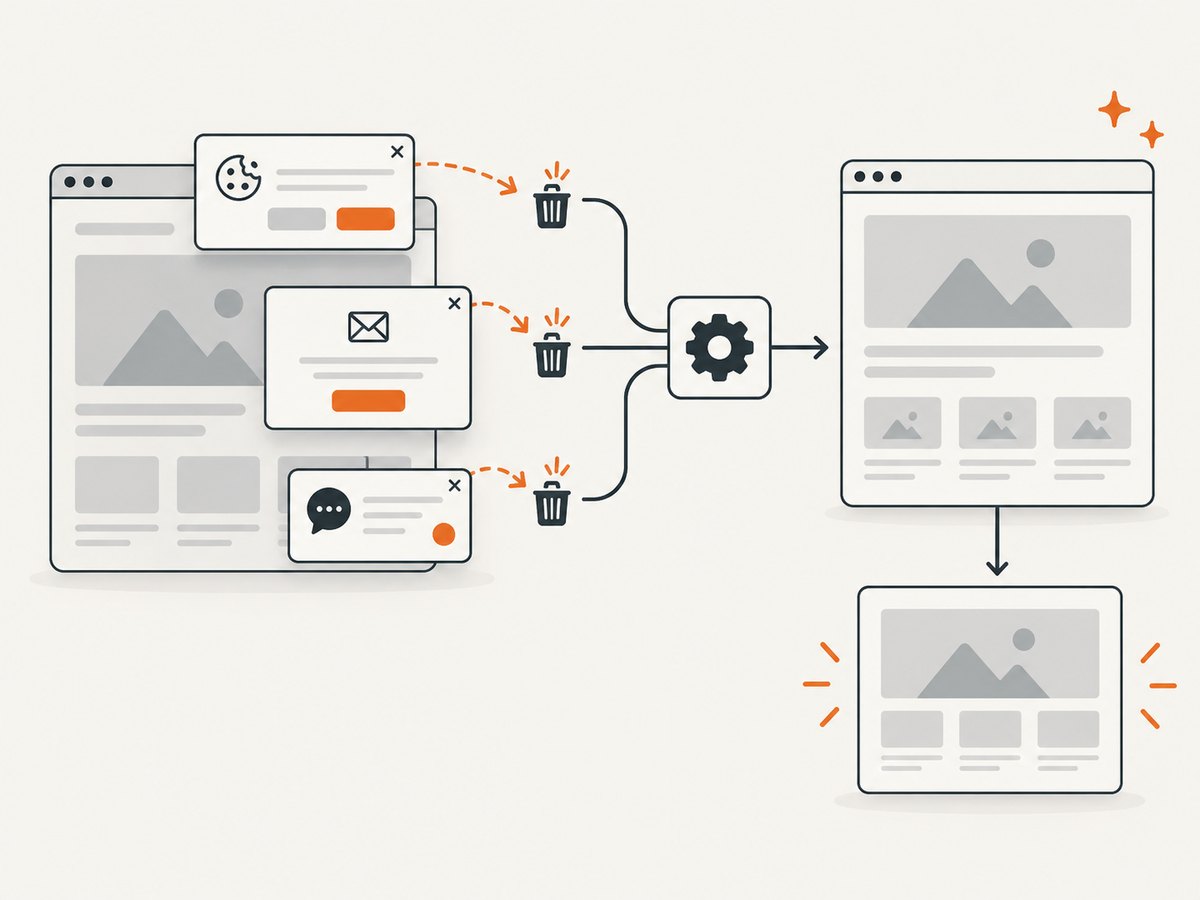
curl -G "https://api.screenshotneo.com/v1/shot" -d access_key=YOUR_API_KEY --data-urlencode url=https://stripe.com -o shot.webpCookie banners, popups, and chat widgets are removed before the shot. Bot checks, blank pages, and failed loads are never billed. An MCP server lets AI agents use screenshots, and 1,000 screenshots a month are free with no card; paid plans start at $5 for 3,000. ScreenshotNeo also supports page and element capture, device and viewport settings, full-page screenshots, custom CSS and JavaScript, PDF options, caching, bulk capture, and async jobs. These are screenshots, not a general-purpose HTML scraping proxy.
Sign up for 1,000 free screenshots a month—no card required.
11. Frequently asked questions
Does Tor hide my IP from every website?
When an application is correctly routed through Tor, a clearnet site generally sees the exit relay address for that connection. Application-level identifiers, direct network paths, or a misconfigured client can still identify or expose you.
Should I use Tor Browser for scraping?
Tor Browser is designed for browsing with privacy protections, not as a blanket proxy for every program. A scraper must still be configured and checked. For repeatable collection, explicitly configure the HTTP library or browser automation process you run.
Can I use Tor for high-volume scraping?
It is a poor fit for aggressive or high-volume crawling because shared capacity is variable and exit relays are often blocked. Use an approved API or obtain permission and capacity appropriate to the work.
Does an onion address need an exit relay?
No. Onion services are reached within Tor rather than through a clearnet exit relay, but only if the site operator publishes an onion address.
Does Tor make HTTP safe?
No. Keep HTTPS to the destination so traffic remains encrypted between the exit relay and the site, and retain normal certificate checks.


