How to Turn Social Media Likes Into Visuals Automatically
Build a workflow that spots engaging posts, turns their content into branded visuals, and publishes only after the render and approval checks pass.

A like is a useful signal, but it is not enough to make a graphic. To turn liked or high-engagement posts into Instagram or TikTok visuals automatically, build a pipeline that detects the post, retrieves its URL and content, converts that content into a structured brief, generates branded slides, waits for the render to finish, validates the result, and then publishes it through an authorized platform connection.
The reliable shape is trigger → extract → transform → render → review → publish → record. Treat rendering and publishing as asynchronous jobs. Keep a human approval step until you trust your source selection, rights checks, and visual quality.
1. Decide what a “like” should trigger
There are two different workflows hidden in this question. You might want to transform your own post after it crosses an engagement threshold, or you might want to turn another account’s viral post into a new visual. The first can often use your own analytics or publishing records. The second needs an accessible source URL and permission to reuse the material. A public post is not automatically free to copy: use the source as inspiration or summarize it in your own words, and confirm rights before reusing images, quotes, or distinctive creative work.
Define the trigger before choosing the generator. Examples include a post exceeding a like count, a ratio of likes to impressions, a manually submitted URL, or a row marked “repurpose” in a spreadsheet. A raw like count favors older posts and larger accounts, so consider a time window, engagement rate, minimum impressions, or manual review. Store the source ID and make the trigger idempotent: the same post should not create a new carousel each time the workflow polls it.
| Input signal | Useful when | Watch for |
|---|---|---|
| Engagement event or analytics threshold | You control the account and can access its metrics | Delayed metrics, repeated events, and different audience sizes |
| URL submitted in a form or sheet | You want a simple approval-first process | Unsupported URLs, deleted/private posts, and extraction limits |
| Scheduled discovery | You need a recurring content queue | Platform API access and rate limits; do not scrape around access controls |
| Manual selection | Quality and editorial judgment matter most | Less hands-off, but often best for rights-sensitive content |
2. Build the workflow in n8n
A practical no-code implementation can use an n8n workflow template that connects source extraction, visual generation, and publishing with Blotato. The template demonstrates the create → wait → get → check → publish pattern for Instagram and Facebook. Treat it as a starting point: configure credentials in n8n, map its actual node fields, and add your own duplicate prevention, approval, retry, and logging steps. See the n8n and Blotato workflow.
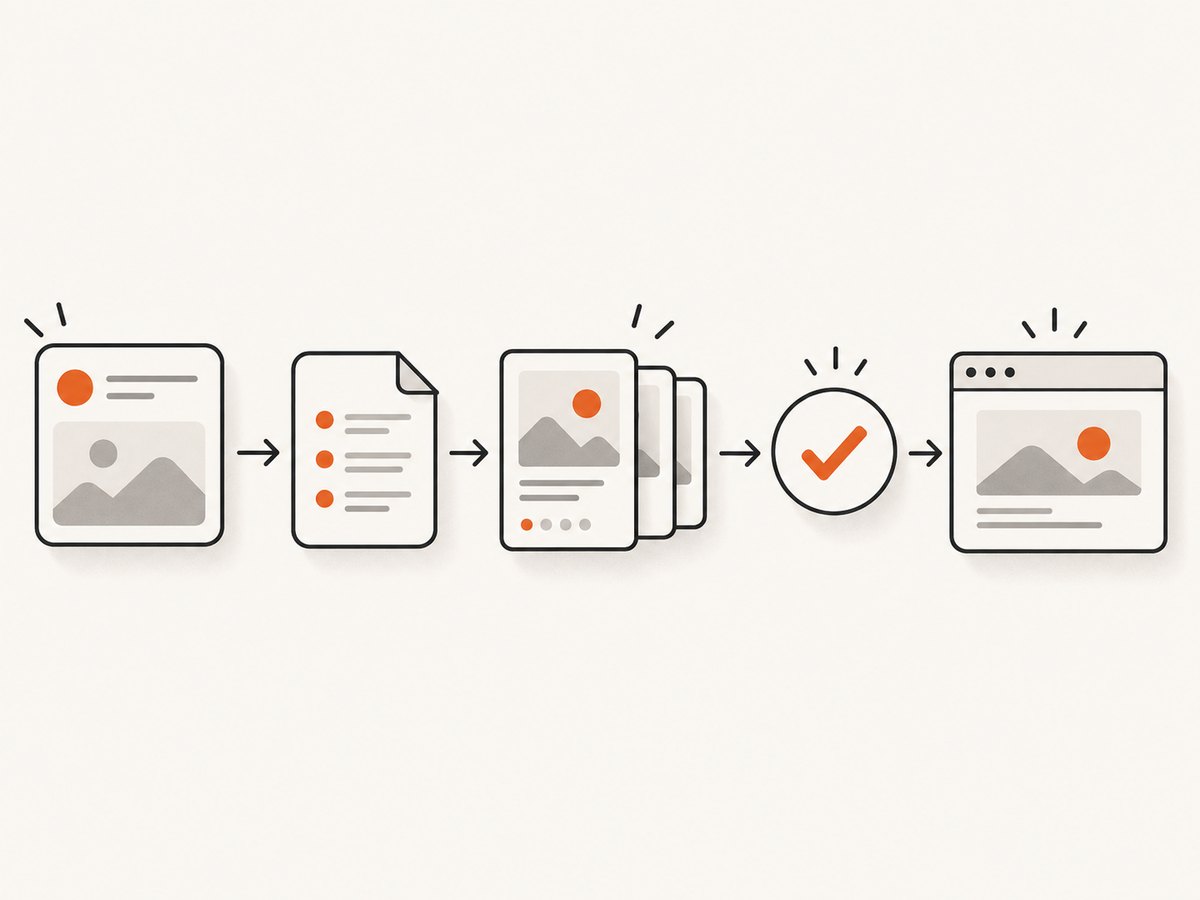
- Capture a source. Trigger from a form, spreadsheet, webhook, or eligible analytics event. Save the canonical URL, platform, account, source post ID, and reason it qualified.
- Extract and normalize. Fetch permitted source details using the extraction integration. Produce a stable record such as
{"source_url":"...","author":"...","caption":"...","key_points":["..."],"source_id":"..."}. If a field is missing, branch to manual review rather than inventing it. - Create a visual brief. Convert the extracted material into a headline, a small number of supporting points, a final takeaway, and a caption. Tell the generator to preserve the meaning, avoid unsupported claims, keep text short enough to fit, and use your brand colors and type system.
- Generate the asset. Use a carousel/image generator or a templating API. Keep the structured copy separate from the visual prompt so you can validate the claims and render text cleanly.
- Wait and retrieve. Rendering may complete later. Poll the job status with a bounded wait and a timeout; retrieve output only after a success state.
- Validate and approve. Check slide count, image dimensions, text overflow, missing assets, source attribution, and policy/rights concerns. Send a preview to a reviewer and publish only after an explicit approval state.
- Publish and record. Send the image or carousel and caption to the target platform. Record the source ID, generated asset URL, publish job ID, final status, timestamp, and resulting post URL so retries do not duplicate a successful post.
In n8n, use separate success and failure branches. A common design is a trigger node, source extraction node, code or mapping node, generation HTTP/API node, wait/poll loop, approval node, publish node, and a database or sheet update. Store API credentials in n8n credentials rather than workflow text. The exact node names and payload fields depend on the connected services; do not paste a guessed payload into a live publisher API.
3. Choose the generation approach
Three patterns cover most needs. An integrated workflow is quickest to assemble: the n8n/Blotato example handles extraction, generation, and posting as a connected flow. An API-first generator such as PostNitro can create AI carousels, single-image posts, or short videos, render PNG, PDF, or MP4, apply brand kits, and schedule or publish to Instagram, TikTok, LinkedIn, or Threads; its Embed API documentation describes the integration. A structured-data approach passes bullet points or fields into a template service; Contentdrips describes an API that returns a finished PNG or PDF and can be connected to Make or n8n (Contentdrips API).
Compare tools using your actual workflow requirements:
| Decision | Questions to answer |
|---|---|
| Source capture | Can it accept your URL, event, spreadsheet row, or structured record? |
| Extraction | Does it reliably produce caption, transcript, author, and key points, or do you supply them? |
| Visual control | Can you control slide count, layout, typography, image choice, and text length? |
| Brand consistency | Can you apply a reusable brand kit or locked templates? |
| Output and destinations | Does it return PNG/PDF/MP4, and support your target platform and post format? |
| Operations | Can you inspect job status, retry failures, require approval, schedule posts, and measure results? |
For remix discovery, Layers documents an asynchronous TikTok slideshow remix endpoint. Its flow requires a project and connected account setup, and source discovery/authorization remain part of the integration; see the slideshow remix API. A remix endpoint does not remove the need to review source rights or verify the output.
4. Publish to Instagram and TikTok correctly
Platform authorization is part of the implementation, not an afterthought. Meta’s documented Instagram Facebook Login publishing flow is for Instagram Professional accounts; it does not provide access to consumer accounts. Plan for the relevant Instagram and Page permissions, including instagram_basic and instagram_content_publish, and complete the required account/Page connection. Consult the Instagram content publishing documentation for current prerequisites.
Instagram publishing is a two-stage asynchronous process: create a media container, poll its status until processing is finished, then call media_publish. Do not publish immediately after submitting the container. Check for a finished state, fail or retry deliberately on an error state, and save the container ID to prevent accidental duplicate publishing. Follow the current Meta publishing flow for request details.
TikTok’s Content Posting API supports photo posts in direct-post or media-upload mode. It requires an authorized user and the appropriate video.publish or video.upload scope, depending on the flow. Photo source URLs must be publicly accessible, and a photo post can include up to 35 image URLs. Before direct posting, query creator information and present the required export-page UI elements. TikTok notes that API clients must pass an audit to lift restrictions on content visibility. Read the TikTok photo-post reference and its linked authorization and posting guides before implementation.
5. Make it reliable and safe to run unattended
Asynchronous status handling
Generation and publishing commonly return a job or container identifier before the work is done. Keep the identifier, poll at a reasonable interval, apply a maximum number of attempts and an overall timeout, and distinguish pending, succeeded, and failed states. Use exponential backoff for transient errors where the API permits it. Never treat “request accepted” as “post published.”
Retries and duplicate protection
Retry network timeouts, temporary service errors, and rate-limit responses according to the service’s retry guidance. Do not blindly retry a publish call when its response was lost: the platform may have accepted the post. First reconcile by checking the saved job/container state or querying the account’s recent media, then retry only when you can establish that no publish occurred. Use a unique idempotency key when the API supports one; otherwise maintain a workflow-level record keyed by source ID plus destination.
Approval, audit trail, and content checks
- Require approval for third-party sources, sensitive subjects, factual claims, or unlicensed media.
- Keep source URL, extraction timestamp, generated copy, prompt/template version, reviewer, and platform response.
- Check each slide for clipped text, unreadable contrast, broken images, accidental duplication, and misleading paraphrase.
- Preserve attribution where needed, and avoid presenting another creator’s exact wording or creative work as your own.
- Route private, deleted, blocked, or malformed source URLs to a clear manual-fix state.
6. Troubleshooting
| Symptom | Likely cause | Fix |
|---|---|---|
| No post triggers the workflow | Threshold logic reads a stale metric, wrong account, or unsupported event source | Log the evaluated metric and timestamp; test with a manually submitted known URL and confirm account permissions. |
| Extraction returns empty or partial content | Private/deleted source, unsupported URL, login wall, or unavailable metadata | Normalize the URL, check access and extractor support, and ask for a caption/transcript or manual input as a fallback. |
| Generated slides contain invented details | Prompt allowed inference or extractor omitted source context | Require claims to map to supplied source fields; include a “not provided” state and send uncertain output to review. |
| Render job stays pending | Polling is too short, job failed asynchronously, or a required field is invalid | Inspect the job response and error payload, increase bounded polling time, validate required fields, and alert on timeout. |
| Instagram container never becomes publishable | Media processing failed, media URL is inaccessible, or account/permission setup is incomplete | Check container status and media accessibility, confirm Professional-account prerequisites and permissions, then create a new container only after resolving the cause. |
| TikTok rejects the photos | URL is not publicly fetchable, authorization scope is missing, or creator authorization/UI flow was skipped | Use publicly accessible image URLs, verify the required scope and user authorization, query creator information, and stay within the 35-photo maximum. |
| Duplicate posts appear | Workflow retries after an ambiguous publish response without reconciliation | Persist source and job IDs before publishing; check platform state before retrying and make publish state transitions explicit. |
| Text is cut off or unreadable | Source copy is too long for the template or generated type is too small | Set per-slide character limits, render a preview, and route overflow to a shorter-copy or human-edit branch. |
7. Performance, reliability, and cost
Measure end-to-end completion time as separate intervals: source detection, extraction, image generation, status waiting, review, and platform processing. Rendering and platform processing often dominate; parallelize independent work such as generating slide assets only when your generator supports it and the output order is preserved. Batch URL discovery where permitted, but throttle calls to respect provider limits. Cache extraction by canonical source ID so repeated polling does not repeatedly process the same source.
Set operational limits: maximum queue age, maximum retries, a dead-letter state for unresolved jobs, and an alert when publish failures rise. Keep source and generated asset URLs valid long enough for the platform to fetch them. Store durable copies of final assets and the structured content record according to your retention needs. Avoid logging access tokens or private cookies.
Cost depends on the number of qualifying posts, slides per post, generation provider pricing, workflow execution volume, storage, and any publishing service plan. Estimate monthly work as qualifying sources × average outputs per source, then account for retries and regeneration. Use a review gate during rollout: it catches poor extraction and saves repeated paid generations. Start with a small threshold or manual queue, observe rejection and failure rates, and automate more only when your checks are working.
8. Capture source pages for review
When a source is a public web page, a screenshot can preserve the visual context a reviewer saw alongside the extracted text. ScreenshotNeo is a website screenshot API and MCP server from Yorker Media: one GET request accepts a URL and returns PNG, JPEG, WebP, or PDF. It can accept consent banners before capture and remove more than 60 known consent platforms, newsletter popups, and chat widgets; each cleanup step can be disabled. This is useful for documenting a public source page in an editorial review workflow, but a screenshot does not grant reuse rights or replace platform APIs for post publishing.
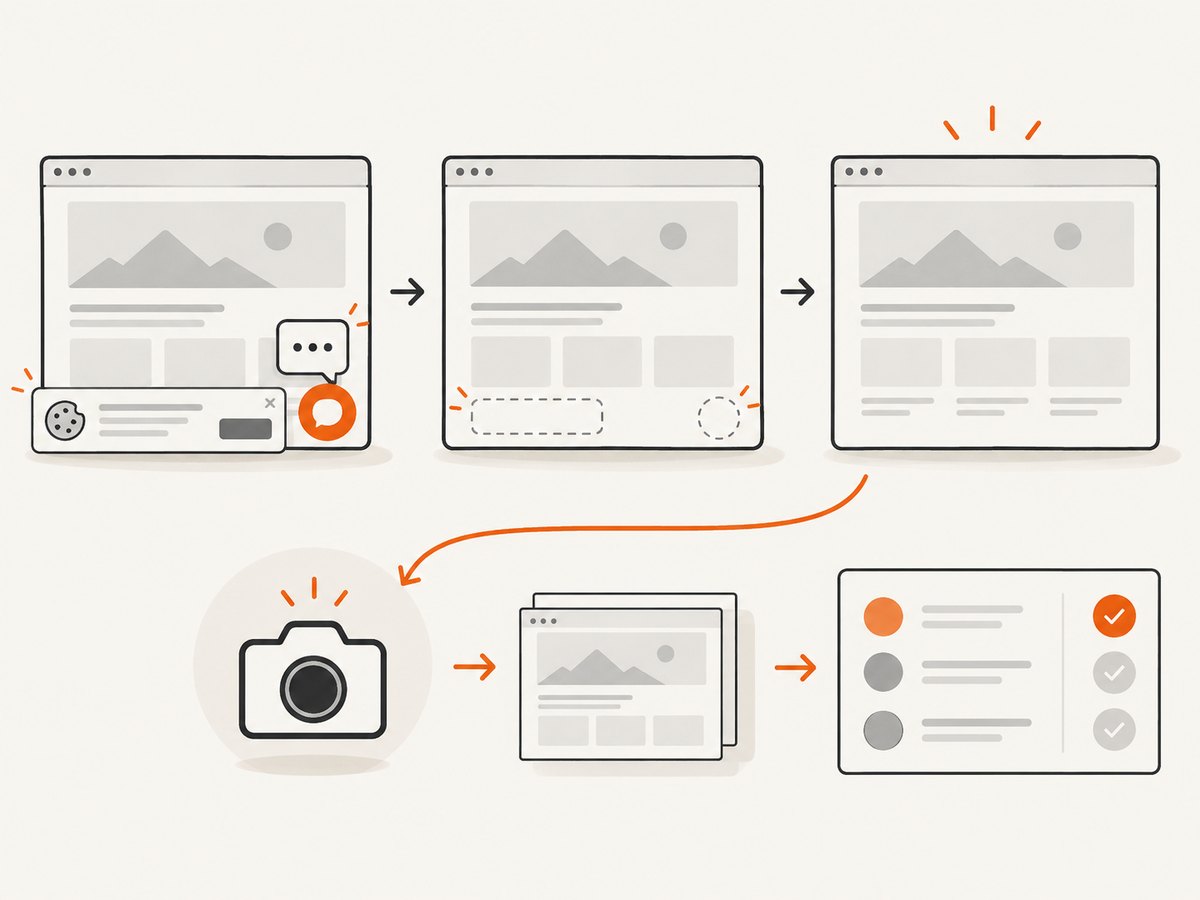
ScreenshotNeo also reports page verdict and billing information in response headers. Bot checks/CAPTCHAs, blank pages, timeouts, failed loads, and cache hits are not billed. Its MCP server exposes take_screenshot, get_page_info, and capture_pdf for AI agents and MCP clients such as Claude and Cursor. See ScreenshotNeo and the API documentation.
Or skip the browser setup
If your workflow needs a clean screenshot of a source URL as an input or review artifact, call the ScreenshotNeo API directly:
curl -G "https://api.screenshotneo.com/v1/shot" -d access_key=YOUR_API_KEY --data-urlencode url=https://stripe.com -o shot.webpimport requests
r = requests.get("https://api.screenshotneo.com/v1/shot", params={"access_key": "YOUR_API_KEY", "url": "https://stripe.com"}, timeout=90)
open("shot.webp", "wb").write(r.content)const q = new URLSearchParams({ access_key: 'YOUR_API_KEY', url: 'https://stripe.com' });
const res = await fetch(`https://api.screenshotneo.com/v1/shot?${q}`);
if (!res.ok) throw new Error(`Screenshot request failed: ${res.status}`);
await Bun.write('shot.webp', res);Cookie banners, popups, and chat widgets are removed before the shot. Bot checks, blank pages, and failed loads are never billed. An MCP server lets AI agents take screenshots. The free plan includes 1,000 screenshots a month with no card; paid plans start at $5 for 3,000. Every feature is on every plan. Create a free ScreenshotNeo account.
Frequently asked questions
Can I automatically turn any liked post into a carousel?
Only when you can lawfully access the source content and your workflow can extract enough information. A like is a selection signal, not a complete content payload; use an accessible URL, caption, transcript, or structured record.
Should every qualifying post publish automatically?
No. Start with an approval queue, especially for third-party content, factual topics, and brand-sensitive accounts. Automate publication after you have reliable rights, quality, and failure checks.
Can one workflow publish to Instagram and TikTok?
Yes, if you build separate destination branches. Each platform has its own account authorization, content format, and publishing lifecycle, so successful rendering does not mean both destinations can publish the same asset unchanged.
Can I use a screenshot as the generated visual?
You can capture a public page for reference or review, but a screenshot is not a substitute for an original branded graphic, and it does not grant permission to republish someone else’s material.


