How to Update Cypress Snapshot Baselines
Refresh Cypress visual baselines safely: identify your comparison tool, stabilize rendering, review diffs, and approve only intentional UI changes.

Short answer: Cypress does not have one universal command for updating visual snapshot baselines. First identify the image-comparison plugin or hosted service that owns your baseline. Re-run the test, inspect the diff, confirm the UI change is intentional, then use that integration’s documented approval or update workflow. Cypress’s built-in cy.screenshot() only captures an image; it does not compare images or approve baselines. See the Cypress visual testing guide.
1. Identify what “snapshot” means in your project
Cypress uses the word screenshot for several related things:
- Debug screenshot:
cy.screenshot()writes an image to the screenshots folder. Cypress also captures screenshots automatically for failed tests duringcypress run. - Visual-regression candidate: an image captured by a plugin or service and compared with an approved image.
- Baseline: the previously approved image used as the comparison target.
Debug screenshots do not become visual baselines automatically. The comparison tool determines where baselines live, how diffs are displayed, and how an update is accepted. Cypress documents both self-managed plugins and hosted integrations, and says the exact update flow depends on the integration.
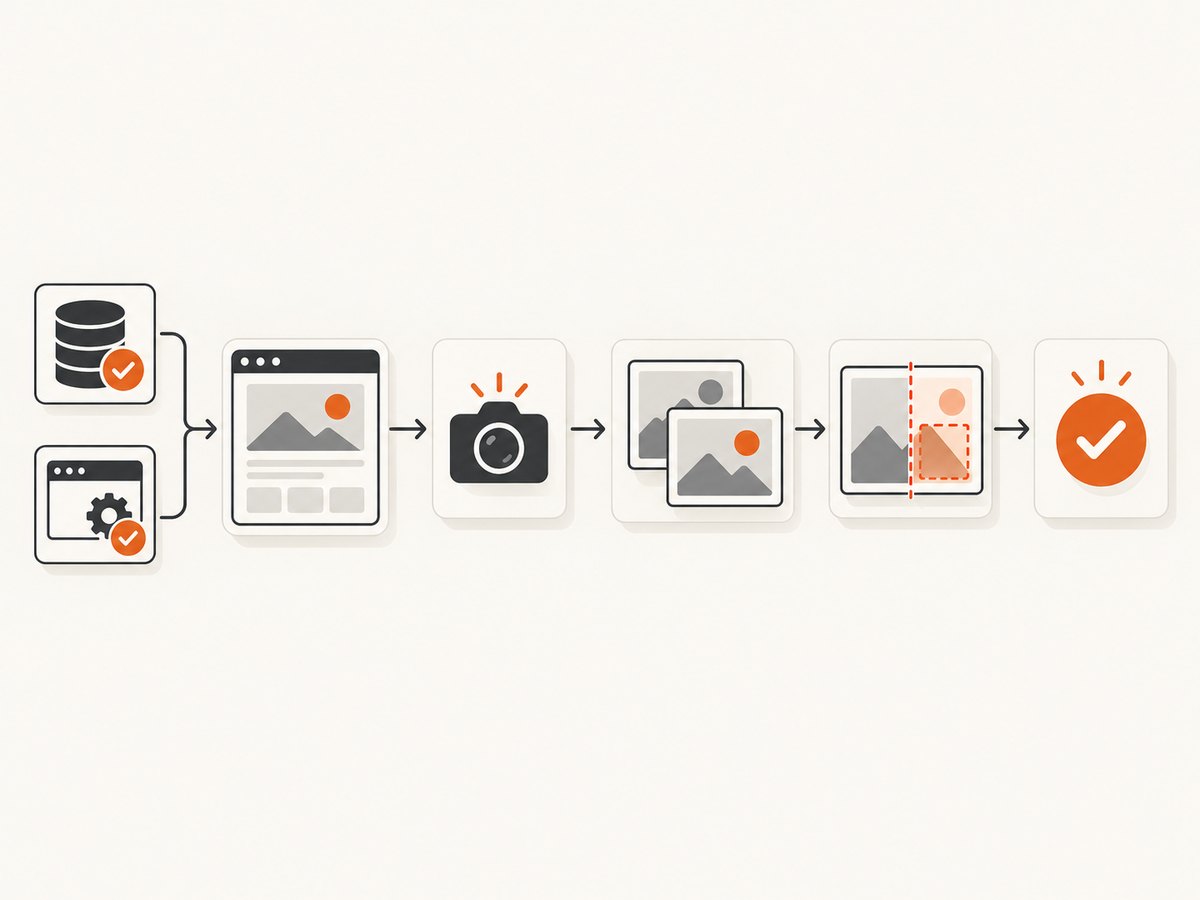
2. The safe baseline-update workflow
- Find the comparison command. Search your specs and configuration for the visual command, custom tasks, or CI step. Check
cypress.config.js, support files, package scripts, and CI configuration. - Reproduce the change. Run the smallest spec that contains the visual check. Save the new image and diff artifact.
- Inspect the diff. Decide whether every changed region is explained by the intended design or content change. A passing application test does not prove that a visual diff is safe to approve.
- Stabilize rendering if the diff is noise. Control clocks, fixtures, network responses, animations, viewport, browser version, fonts, and third-party content.
- Approve with the integration’s command. Local plugins usually replace or update image files in the repository. Hosted services usually provide a review page or pull-request workflow. Do not assume a Cypress-wide
--update-snapshotsflag exists. - Review the baseline change with the code change. Commit the approved images, metadata, or hosted approval record according to your tool’s instructions.
3. A deterministic Cypress test
This example uses Cypress APIs that are independent of any visual-comparison plugin. Your plugin’s assertion goes where the comment appears.
describe('pricing page visual state', () => {
  beforeEach(() => {
    // Freeze dates and timers used by the application.
    cy.clock(new Date('2026-01-15T12:00:00Z').getTime());

    // Keep API data stable between runs.
    cy.intercept('GET', '/api/pricing', {
      fixture: 'pricing.json'
    }).as('pricing');
  });

  it('matches the approved pricing snapshot', () => {
    cy.visit('/pricing');
    cy.wait('@pricing');

    // Assert the intended state before capturing it.
    cy.get('[data-testid="pricing-page"]').should('be.visible');
    cy.get('[data-testid="pricing-loading"]').should('not.exist');

    // Remove or wait for motion that can affect pixels.
    cy.get('[data-testid="pricing-page"]').invoke('css', 'animation', 'none');
    cy.get('[data-testid="pricing-page"]').invoke('css', 'transition', 'none');

    // Built-in Cypress capture; this alone does not compare images.
    cy.screenshot('pricing-page');

    // Add your integration's visual assertion here, for example:
    // cy.('pricing-page');
  });
});
Run the spec with a fixed viewport and the same browser used to create the baseline:
npx cypress run --spec cypress/e2e/pricing.cy.js --browser chromeThe screenshot command follows Cypress naming rules based on the spec and test unless you provide a name. Duplicate names receive a numeric suffix unless overwrite behavior is enabled. See the Cypress screenshot command documentation.
4. Updating a baseline with a local plugin
Local plugins generally keep expected images in your repository or in a CI artifact directory. The reliable process is:
- Run the visual test in the same environment that generated the baseline.
- Open the actual image, expected image, and diff image.
- Fix unstable rendering if unrelated pixels changed.
- Use the plugin’s documented update or overwrite option to replace the expected image.
- Review the image file change in the same pull request as the UI change.
Cypress lists active open-source options including Cypress Image Diff, Cypress Image Snapshot, Cypress Visual Regression, and Visual Regression Diff. It also lists Pixeleye as a self-hostable visual review platform. Each integration has its own assertion and update command; consult its current documentation rather than copying a flag from another plugin.
5. Updating a baseline in a hosted service
Hosted tools usually upload the candidate image and compare it on their rendering infrastructure. A reviewer then approves or rejects the change in the provider’s dashboard or pull-request integration. Cypress names Applitools, Argos, Chromatic, Happo, LambdaTest SmartUI, Percy (BrowserStack), Sauce Labs Visual, SmartBear VisualTest, and Wopee.io as commercial integrations. Check the provider’s current documentation for its approval action, retention rules, browser coverage, and billing.
| Decision | Local plugin | Hosted service |
|---|---|---|
| Baseline storage | Usually repository files or CI artifacts | Provider-managed storage |
| Rendering consistency | Your team pins browsers, fonts, and OS images | Provider supplies its own workers; verify supported browsers |
| Review | Pull request diff and local artifacts | Dashboard and/or pull-request review |
| Cost | Infrastructure and storage you operate | Provider plan, image volume, and retention rules |
6. Stabilize the page before accepting a diff
Control time
Dates, clocks, countdowns, rotating offers, and relative-time labels can change between runs. Freeze application time with cy.clock() before visiting the page, or inject a fixed time through your test setup.
Control network data
Use fixtures and cy.intercept() for APIs that affect layout or text. Wait for the aliased request and then assert the final state. Avoid accepting a baseline captured while a request is still rendering.
Handle animations correctly
Cypress’s waitForAnimations and animationDistanceThreshold options apply to action commands. They do not guarantee that a later screenshot will avoid an unrelated animation. Disable the animation with test CSS, wait for a stable state, or use a deterministic application mode.
Keep the rendering environment fixed
- Set an explicit viewport.
- Use the same browser family and version.
- Install and pin the same fonts.
- Use the same device scale factor where your tool supports it.
- Keep locale, timezone, and color scheme consistent.
Mask only uncontrollable pixels
Ads, live counters, maps, and third-party widgets can be masked or hidden in a small region. Do not solve a localized problem by raising a global pixel-difference threshold until real regressions become invisible.
7. Full-page versus element snapshots
Use an element-level snapshot for a component whose layout should be isolated from unrelated page changes. Use a full-page image when the requirement is page composition, navigation, spacing, or responsive layout. Cypress recommends focusing snapshots on important pages, shared components, and meaningful states.
// Element capture for a focused component
cy.get('[data-testid="checkout-summary"]').screenshot('checkout-summary');

// Full-page capture for layout coverage
cy.screenshot('checkout-page', { capture: 'fullPage' });
The comparison integration may expose its own element and full-page options. Match the capture scope to the regression you intend to detect.
8. Troubleshooting baseline updates
| Symptom | Likely cause | Fix |
|---|---|---|
| There is no update-baseline command | Cypress has no universal visual-baseline command | Identify the plugin or hosted service and follow its current update workflow. |
| Every pixel changes | Different browser, viewport, scale factor, fonts, or OS rendering | Pin the environment and regenerate the baseline there. |
| Only dates or counters change | Real time is rendered | Freeze time with cy.clock() or provide fixed test data. |
| Text is missing or the layout is partial | Screenshot captured before data or fonts finished loading | Wait for the API alias and a visible, final-state assertion before capture. |
| Diffs appear intermittently | Animation, transition, random data, or race condition | Disable motion, stub randomness, wait for stable state, and remove test-order dependence. |
| Only a third-party widget changes | External content is uncontrolled | Stub it or mask its small region; keep the rest of the image strict. |
| Expected and actual files are in different places | Plugin-specific naming or path configuration | Read the integration’s config and log the resolved baseline path. |
| CI fails while local approval passes | CI uses different browser, fonts, viewport, or operating system | Use a pinned CI image and generate and review baselines in that environment. |
| A failed test has a screenshot but no visual diff | Cypress failure capture is a debug artifact | Run the visual assertion supplied by your comparison tool; failure screenshots are not baselines. |
9. Performance, reliability, and cost
- Performance: Snapshot only important states and shared components. Element snapshots usually reduce image size and review noise; full-page snapshots provide broader layout coverage but take longer to review.
- Reliability: Deterministic data and rendering matter more than a permissive threshold. Keep baseline generation and comparison on the same browser and system image when using local plugins.
- Review cost: Treat every approved image as a code change. Require a human review for intentional visual changes and record why unrelated differences are safe.
- Hosted cost: Compare image volume, baseline storage, retention, browser coverage, and CI minutes in the provider’s current pricing. Cypress does not publish one universal cost for visual testing.
10. Or skip the browser setup
If you need a clean reference image for a page rather than a Cypress-run browser, ScreenshotNeo provides a GET endpoint that returns PNG, JPEG, WebP, or PDF. It accepts the consent banner before capture and removes more than 60 known consent platforms, newsletter popups, and chat widgets; each step can be disabled. Bot checks, blank pages, timeouts, failed loads, and cache hits are not billed, and the response identifies the result with X-Page-Verdict and X-Billed headers.

See the ScreenshotNeo API documentation for all capture options. A minimal request is:
curl -G "https://api.screenshotneo.com/v1/shot" -d access_key=YOUR_API_KEY --data-urlencode url=https://stripe.com -o shot.webpimport requests
r = requests.get("https://api.screenshotneo.com/v1/shot", params={"access_key": "YOUR_API_KEY", "url": "https://stripe.com"}, timeout=90)
open("shot.webp", "wb").write(r.content)const q = new URLSearchParams({ access_key: 'YOUR_API_KEY', url: 'https://stripe.com' });
const res = await fetch(`https://api.screenshotneo.com/v1/shot?${q}`);For visual testing, keep the same URL, viewport, options, and application data for each run, then compare the returned file with your approved artifact. ScreenshotNeo also supports full-page capture, CSS-selector element capture, dark mode, device presets, retina scale, custom CSS and JavaScript, waits, blocking rules, headers, cookies, user agents, timezone, geolocation, caching, signed links, asynchronous jobs, bulk capture, PDF output, and an MCP server with take_screenshot, get_page_info, and capture_pdf for AI agents.
Create a free ScreenshotNeo account: 1,000 screenshots per month with no card; paid plans start at $5 for 3,000.
11. FAQ
Does Cypress compare screenshots by itself?
No. Cypress captures screenshots, while a separate plugin or visual-testing service performs comparison and baseline review.
Should I update baselines before or after merging the UI change?
Update and review them in the same change so the code and approved pixels explain each other.
Can I approve every changed image in CI?
Only when the change is intentional and reviewed. Automatic approval can hide regressions caused by timing, data, or environment drift.
When should I use an element snapshot?
Use one when the component is the subject of the check and page-level content would add unrelated noise. Use full-page capture for composition and responsive-layout coverage.
Why does a Cypress failure screenshot not update my baseline?
Failure screenshots are debugging artifacts. Your visual-comparison integration owns the expected image and its update process.