URL To HTML: Fetch Source or Render the Page
Learn when a basic HTTP request is enough and when you need a browser to turn a URL into rendered HTML, with runnable code and troubleshooting.
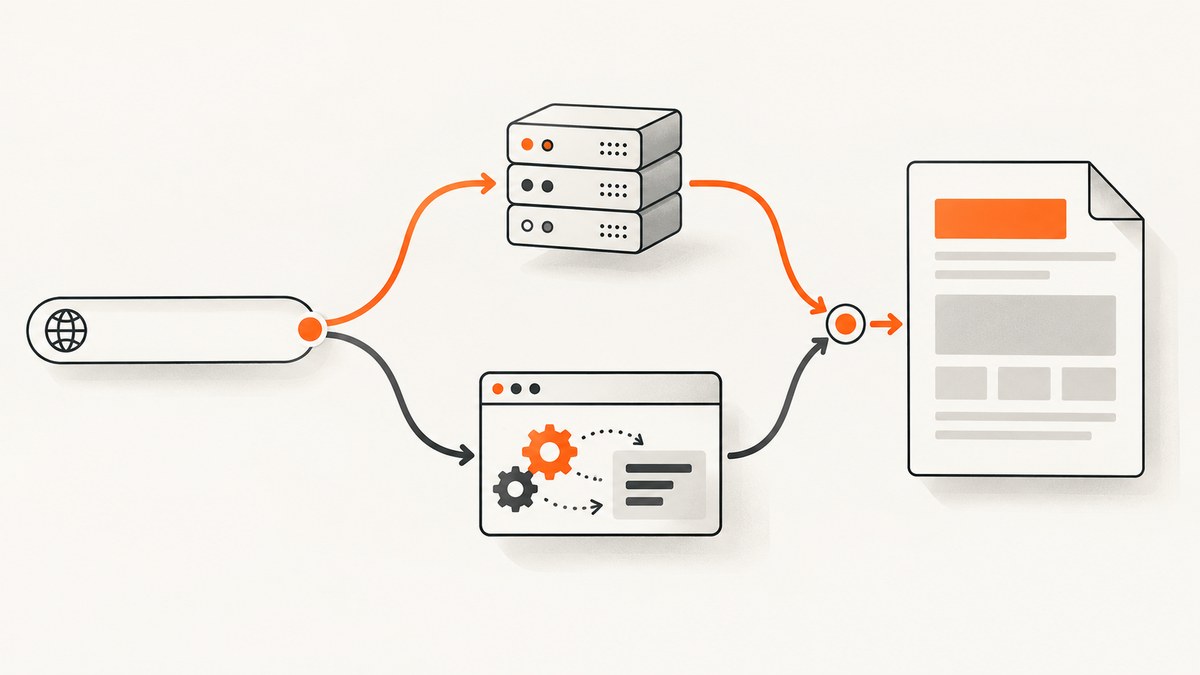
To convert a URL to HTML, request the page and read the response body as text. That gives you the HTML sent by the server. If the page fills in its content with JavaScript, use a browser renderer: it navigates to the URL, runs scripts, and returns the resulting DOM. Choose based on what you need to parse, archive, migrate, or test.
The key distinction is source HTML versus rendered HTML. A plain HTTP request is usually faster and simpler. A browser is necessary when the useful content appears only after client-side code runs. The examples below show both approaches and explain how to validate URLs, handle redirects and errors, wait for dynamic content, and choose a hosted renderer.
1. Decide which HTML you need
| Need | Method | What you get |
|---|---|---|
| Server-rendered page, metadata, or initial markup | HTTP request | Response body as sent by the server |
| Content inserted by JavaScript | Browser renderer | DOM after navigation and script execution |
| One section of a large page | Renderer plus CSS selector | A selected element or fragment, if supported |
| PDF or office document URL | Document-capable conversion service | Provider-dependent HTML representation |
“View source” and a browser’s live DOM inspector can show different markup. Source is the original response; the DOM may have changed because scripts added, removed, or modified nodes. For an ordinary server-rendered site, start with HTTP. If your result is an app shell, empty list, or loading placeholder, switch to a renderer.
2. Fetch source HTML with JavaScript
Use the built-in URL class to parse and normalize input. Restrict hosted inputs to absolute HTTP or HTTPS URLs. Fetch follows redirects by default; inspect the final response URL and status. A 404 or 504 still resolves to a response, so explicitly check response.ok.
function validateHttpUrl(value) {
  const url = new URL(value);
  if (url.protocol !== 'http:' && url.protocol !== 'https:') {
    throw new Error('Only http and https URLs are supported');
  }
  return url;
}

async function urlToHtml(value) {
  const url = validateHttpUrl(value);
  const response = await fetch(url, {
    headers: { Accept: 'text/html,application/xhtml+xml' },
    signal: AbortSignal.timeout(20000)
  });

  if (!response.ok) {
    throw new Error(`HTTP ${response.status} at ${response.url}`);
  }
  const contentType = response.headers.get('content-type') || '';
  if (!contentType.includes('text/html') && !contentType.includes('application/xhtml+xml')) {
    throw new Error(`Expected HTML, received ${contentType || 'unknown content type'}`);
  }
  return { html: await response.text(), finalUrl: response.url, contentType };
}

urlToHtml('https://example.com/')
  .then(({ html, finalUrl }) => console.log(finalUrl, html.slice(0, 500)))
  .catch(error => console.error(error.message));
This is suitable for server-side JavaScript such as Node.js and for browser requests where cross-origin policy allows access. In a browser, a request to another origin can be blocked by CORS even when that site is publicly viewable in a tab. Fetch follows the platform’s URL, redirect, and cross-origin rules; it does not bypass a site’s access controls.
cURL: inspect and save the response
curl --fail --location --max-time 20 \
  --header 'Accept: text/html,application/xhtml+xml' \
  --output page.html \
  --write-out 'status=%{http_code}\nfinal_url=%{url_effective}\ncontent_type=%{content_type}\n' \
  'https://example.com/'
--location follows redirects. --fail makes HTTP errors return a failing exit status rather than treating an error page as success. Remove it if you intentionally need to inspect error response bodies. The output file is bytes as received; when parsing, honor the response charset where your tool allows it.
Python: request the HTML body
import requests

url = "https://example.com/"
response = requests.get(
    url,
    headers={"Accept": "text/html,application/xhtml+xml"},
    timeout=(5, 20),
    allow_redirects=True,
)
response.raise_for_status()
content_type = response.headers.get("content-type", "")
if "text/html" not in content_type and "application/xhtml+xml" not in content_type:
    raise ValueError(f"Expected HTML, received {content_type or 'unknown'}")

print("Final URL:", response.url)
print(response.text[:500])
The timeout tuple sets separate connection and read limits. Requests follows redirects by default; raise_for_status() turns unsuccessful HTTP statuses into exceptions. response.text decodes using the response’s encoding rules. If you need exact bytes for archival or your own decoding, use response.content.
3. When JavaScript rendering is needed
A plain request does not execute JavaScript. For client-rendered pages, a browser renderer must navigate to the URL and run the page scripts. Cloudflare Browser Rendering documents a /content endpoint that returns fully rendered HTML, including the head, after JavaScript execution. Its REST API requires Browser Rendering permission; a Workers Binding can invoke the browser action without an API token. Consult the provider documentation for current request shape and limits: Cloudflare Browser Run documentation.
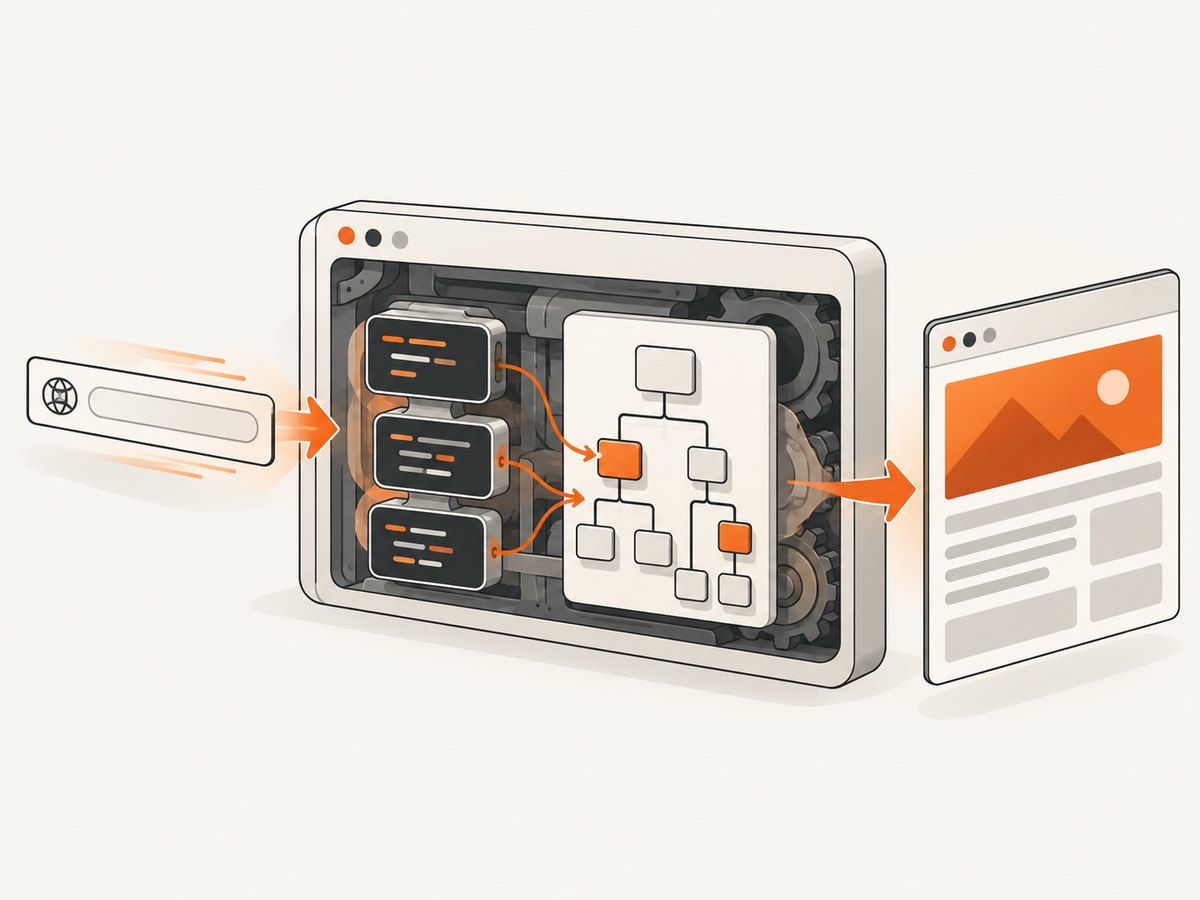
Microlink documents returning HTML through data.html with attr: 'html', a direct HTML response using embed: 'html', selector extraction, and prerendering with a selector wait. URLpipe’s /html endpoint uses headless Chrome, follows redirects, runs JavaScript, and returns raw document HTML; its page options include waiting and removing selected content. These products differ in supported options, operation limits, data handling, and billing; check their documentation before building a dependency around a specific option.
Wait for a meaningful page state
“Navigation finished” does not always mean “the data I need is present.” A page can fetch data after its initial load, render on a timer, or keep background network connections open. Prefer a stable selector that represents the content you need, where the renderer supports selector waits. A fixed delay is less reliable: too short can capture a placeholder, while too long wastes time. Network-idle waits can also hang on analytics, polling, or long-lived connections.
When extracting a fragment, verify the selector exists and decide what to do when it does not. Returning the whole document as a silent fallback may hide a changed page structure. Record the final URL, status, relevant content type, and a clear extraction failure so that upstream changes are visible.
4. Configure extraction for the actual task
Before selecting a service, make a small checklist of requirements. Providers expose different subsets, so treat these as questions to verify, not universal browser-renderer settings:
- Whole document or fragment: Do you need the full head and body, or only a CSS-selected section?
- Wait behavior: Can it wait for a selector, a delay, or a navigation condition? What happens on timeout?
- Redirects and final URL: Are redirects followed, and can you inspect the destination?
- Authentication: Can you pass cookies or headers for pages you are authorized to access?
- Content cleanup: Can unwanted ads, banners, or page elements be removed before returning HTML?
- Input formats: Does it accept only web pages, or also PDFs and office documents?
- Execution model: Is it synchronous or asynchronous, and how are results and failures delivered?
- Network and security: What outbound routing, cross-origin, content security, and data-retention behavior applies?
Microlink documents conversion of PDF and office-document URLs into an HTML DOM, with limitations for image-only PDFs and some legacy formats. Do not assume that every renderer converts those formats or that conversion reproduces the original layout. If a PDF consists only of page images, text extraction may require OCR rather than DOM conversion.
5. Or skip the browser setup
If the end product you need is a screenshot rather than HTML markup, ScreenshotNeo is a website screenshot API and MCP server. One GET request returns a PNG, JPEG, WebP, or PDF. See the API documentation.

curl -G "https://api.screenshotneo.com/v1/shot" \
  -d access_key=YOUR_API_KEY \
  --data-urlencode url=https://stripe.com \
  -o shot.webp
import requests
r = requests.get(
"https://api.screenshotneo.com/v1/shot",
params={"access_key": "YOUR_API_KEY", "url": "https://stripe.com"},
timeout=90,
)
open("shot.webp", "wb").write(r.content)const q = new URLSearchParams({ access_key: 'YOUR_API_KEY', url: 'https://stripe.com' });
const res = await fetch(`https://api.screenshotneo.com/v1/shot?${q}`);
if (!res.ok) throw new Error(`Screenshot request failed: ${res.status}`);
const bytes = Buffer.from(await res.arrayBuffer());
await import('node:fs/promises').then(fs => fs.writeFile('shot.webp', bytes));Cookie and consent banners, newsletter popups, and chat widgets are removed before the shot. Bot checks, blank pages, failed loads, timeouts, and cache hits are not billed; response headers say which result occurred. ScreenshotNeo also provides an MCP server for AI agents, with take_screenshot, get_page_info, and capture_pdf. The free plan includes 1,000 screenshots a month with no card; paid plans start at $5 for 3,000. Create a free account and get 1,000 screenshots a month with no card.
6. Troubleshooting URL-to-HTML requests
| Symptom | Likely cause | Fix |
|---|---|---|
| HTML has a root div but no useful content | The response is a JavaScript app shell | Use browser rendering and wait for a content selector. |
| Fetch rejects in a browser | Cross-origin policy or a network failure | Run the request server-side or use an authorized rendering service; inspect browser console details. |
| Code reports success for a missing page | HTTP 404/504 resolved as a Response | Check ok or status before reading the body. |
| Request hangs or times out | Slow target, unbounded wait, or background network activity | Set connection and overall limits; wait for a stable selector rather than indefinite network idle. |
| Selector extraction returns nothing | Selector changed, content is nested differently, or it was never rendered | Inspect rendered DOM, validate selector presence, and report a distinct extraction error. |
| Unexpected login or consent page | Target requires authorization, session state, or interaction | Use only credentials and cookies you are permitted to use; configure them if the provider supports them. |
| Redirected to an unrelated page | Canonicalization, geo routing, or login redirect | Record and validate the final URL before trusting extracted content. |
| PDF extraction is empty | Image-only PDF or unsupported document conversion | Confirm format support and use OCR for scanned pages if text is required. |
| Saved characters look corrupted | Incorrect or missing charset handling | Use the library’s decoded text where appropriate or decode response bytes using the declared charset. |
7. Performance, reliability, and cost
Plain HTTP requests are generally the lighter path: there is no browser startup or script execution, and the response is often smaller. Browser rendering does more work and can wait on third-party assets, scripts, and application data. Keep concurrency within the service’s documented limits, set explicit timeouts, and avoid rerendering an unchanged URL when a cache is acceptable.
For reliability, separate transport errors, HTTP errors, renderer timeouts, and “content not found” failures. Retry transient network failures with a limit and backoff, but do not blindly retry deterministic 401, 403, or 404 responses. A retry can repeat page-side actions, so avoid it for pages where navigation triggers a consequential operation. Store the final URL and enough status information to debug changes.
Compare hosted services by their actual credit or request accounting, rate limits, latency expectations, and retention terms. The dossier documents URLpipe’s HTML operation as one credit; that is a provider pricing unit, not an industry-wide cost measure. Rendered extraction may cost more than a simple fetch depending on provider and plan. For your own use, estimate requests per URL, retries, polling, and scheduled refreshes, then check the provider’s current published pricing rather than extrapolating from another service.
Treat fetched HTML as untrusted input. Do not insert it into a live page without sanitization. If the URL comes from a user, validate it at the server boundary and guard against requests to internal or otherwise restricted network addresses. Do not place secrets in URLs or logs. Respect the target site’s authorization requirements and applicable usage rules.
8. Short FAQ
Does converting a URL to HTML execute JavaScript?
A normal HTTP request does not. A browser-rendering service executes page scripts and can return the resulting DOM.
Can I use browser Fetch to get any public website?
No. A browser page can be blocked from reading another origin’s response by CORS. Public visibility does not grant cross-origin script access.
Is rendered HTML the same as a screenshot?
No. HTML is a document structure; a screenshot is a raster image of a rendered view. Choose the output your downstream process needs.
Can every PDF URL become useful HTML?
No. Support varies, and image-only documents may need OCR to produce searchable text.
Sources
- MDN: Fetch API — response handling and HTTP status checks.
- MDN: URL interface — parsing and normalizing URLs.
- WHATWG Fetch Standard — redirects, origin behavior, and Fetch semantics.
- Cloudflare Browser Run — rendered HTML endpoint and access methods.
- Microlink URL-to-HTML guide — HTML output, prerendering, extraction, and document support.
- URLpipe documentation — headless Chrome HTML extraction and page options.


