How to Use Cookies When Capturing Websites in Java
Set or restore browser cookies before a Java screenshot, verify the visitor state, and capture the right page with Selenium or Playwright.

1. The reliable sequence
To capture a website in a particular visitor state from Java, put the browser on the cookie’s domain, add or restore the cookie in the correct browser context, navigate or reload the target page, wait until the expected state is visible, and then capture the screenshot. A cookie by itself does not guarantee a signed-in view: the application may need other storage, a valid session, or a completed login flow.
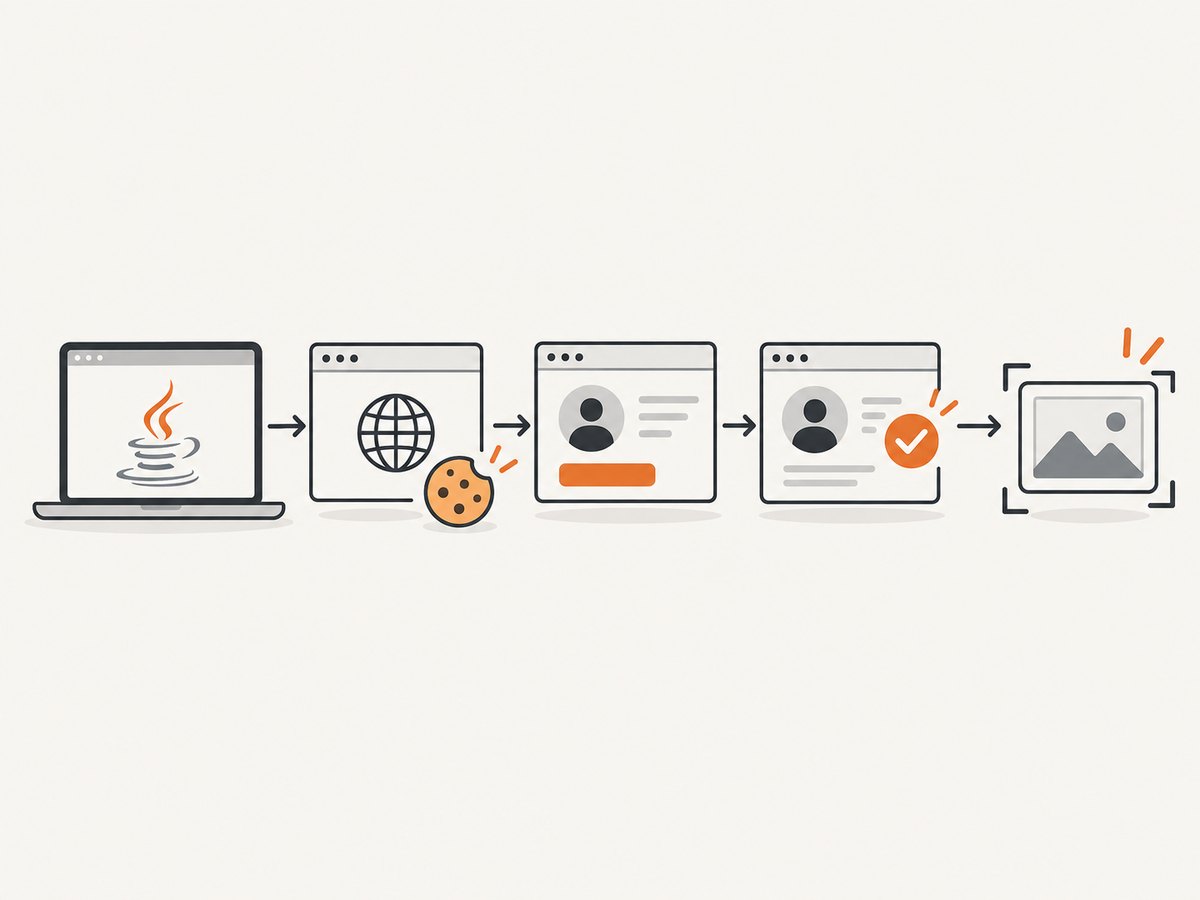
Both Selenium and Playwright support Java cookie APIs and screenshots. Selenium’s cookie operations act on the current browsing context and require the browser to be on a page for the cookie domain first. Playwright installs cookies into a browser context, which can contain multiple pages. Their official guides document the API patterns, but cannot establish whether a particular website will accept a supplied cookie. See the Selenium cookie guide, Playwright Java BrowserContext API, and Playwright Java screenshot guide.
- Use a test account and a site you are authorized to access.
- Start the browser and visit the same site origin as the cookie.
- Add the cookie or load saved browser state.
- Navigate to the target route and wait for an application-specific indicator.
- Capture the viewport, full page, or a specific element.
- Close the browser and keep authentication data out of source control.
2. Selenium Java: add a cookie, verify, and capture
This example uses Maven dependencies for Selenium and ChromeDriver. Selenium Manager, included in current Selenium releases, can manage the matching driver in common local setups; browser availability and deployment configuration remain your responsibility. Replace the cookie name, value, target URL, and visible-state selector with authorized test fixtures from your application.
<dependencies>
  <dependency>
    <groupId>org.seleniumhq.selenium</groupId>
    <artifactId>selenium-java</artifactId>
    <version>4.35.0</version>
  </dependency>
</dependencies>
import java.nio.file.Path;
import java.time.Duration;
import org.openqa.selenium.Cookie;
import org.openqa.selenium.By;
import org.openqa.selenium.WebDriver;
import org.openqa.selenium.chrome.ChromeDriver;
import org.openqa.selenium.support.ui.ExpectedConditions;
import org.openqa.selenium.support.ui.WebDriverWait;
import org.openqa.selenium.OutputType;
import org.openqa.selenium.TakesScreenshot;
public class CookieScreenshot {
public static void main(String[] args) {
WebDriver driver = new ChromeDriver();
try {
// Establish the domain before adding a cookie.
driver.get("https://example.test/");
Cookie preference = new Cookie.Builder("view", "compact")
.domain("example.test")
.path("/")
.isSecure(true)
.build();
driver.manage().addCookie(preference);
// The server or client application may read cookies at navigation time.
driver.navigate().to("https://example.test/account");
WebDriverWait wait = new WebDriverWait(driver, Duration.ofSeconds(15));
wait.until(ExpectedConditions.visibilityOfElementLocated(
By.cssSelector("[data-test='account-menu']")));
Path output = Path.of("account.png");
((TakesScreenshot) driver).getScreenshotAs(OutputType.FILE)
.renameTo(output.toFile());
Cookie saved = driver.manage().getCookieNamed("view");
System.out.println("Cookie present: " + (saved != null));
} finally {
driver.quit();
}
}
}The minimal Selenium pattern is driver.get(domainPage), driver.manage().addCookie(cookie), then navigate or refresh and capture. The official guide also shows getCookies(), getCookieNamed(), deleteCookieNamed(), deleteCookie(cookie), and deleteAllCookies(). A host-only cookie can be created with new Cookie("key", "value") after visiting its site.
In production-quality code, prefer copying screenshot bytes to a chosen path rather than using File.renameTo, whose result should be checked. For example, use Files.copy(((TakesScreenshot) driver).getScreenshotAs(OutputType.FILE).toPath(), Path.of("account.png"), StandardCopyOption.REPLACE_EXISTING). WebDriver also supports Base64 output through OutputType.BASE64. Screenshots can be taken from a driver or, where supported by the driver, a web element.
Cookie attributes to get right
- Name and value: Must match the application’s cookie contract. Do not guess or reuse a production session token.
- Domain and path: Restrict which hosts and routes receive the cookie. A parent domain and a host-only cookie do not have identical scope.
- Secure: Secure cookies are intended for HTTPS. Use the same scheme and scope expected by the site.
- Expiry: An expired cookie will not establish a session. Omitting expiry is appropriate for a session cookie when the application expects one.
- HttpOnly and SameSite: Match the application’s expected behavior. Browser APIs control cookie attributes, while acceptance depends on server and browser policy.
Only send cookies to authorized destinations. Avoid printing cookie values in logs, storing them in screenshots or build artifacts, or passing them in command-line arguments that may be recorded by a CI runner.
3. Playwright Java: context cookies and screenshot options
Playwright’s browser contexts isolate browser sessions and apply cookies to every page in that context. Its Java cookie object accepts either a URL or a domain and path pair, plus optional expiry, HttpOnly, and Secure settings. The code below writes a full-page screenshot; change setFullPage(true) to false for the current viewport.
import com.microsoft.playwright.Browser;
import com.microsoft.playwright.BrowserContext;
import com.microsoft.playwright.BrowserType;
import com.microsoft.playwright.Page;
import com.microsoft.playwright.Playwright;
import com.microsoft.playwright.options.Cookie;
import java.nio.file.Paths;
import java.util.Arrays;

public class PlaywrightCookieScreenshot {
  public static void main(String[] args) {
    try (Playwright playwright = Playwright.create()) {
      Browser browser = playwright.chromium().launch(
          new BrowserType.LaunchOptions().setHeadless(true));
      BrowserContext context = browser.newContext();
      context.addCookies(Arrays.asList(new Cookie("view", "compact")
          .setUrl("https://example.test/")));
      Page page = context.newPage();
      page.navigate("https://example.test/account");
      page.locator("[data-test='account-menu']").waitFor();
      page.screenshot(new Page.ScreenshotOptions()
          .setPath(Paths.get("account.png"))
          .setFullPage(true));
      context.close();
      browser.close();
    }
  }
}
For an element image, use page.locator(".summary").screenshot(new Locator.ScreenshotOptions().setPath(Paths.get("summary.png"))). To process image bytes in memory, call byte[] bytes = page.screenshot(). Screenshot options also support an output path, format and quality for applicable formats, clipping, and full-page capture; consult the Page API for the current Java options.
4. Reuse an authenticated browser state
When a real login flow is available, it is usually more dependable to authenticate through the application and save the resulting Playwright context state than to manufacture a session cookie. Storage state can include cookies and local storage; current Java documentation also describes IndexedDB and other state options. The authentication guide covers saving and restoring state and warns that state files may contain secrets capable of impersonating the account. Keep them outside version control, limit access, and rotate or recreate them when expired.

import com.microsoft.playwright.*;
import java.nio.file.Paths;

public class SaveAndReuseState {
  public static void main(String[] args) {
    try (Playwright pw = Playwright.create()) {
      Browser browser = pw.chromium().launch();
      BrowserContext loginContext = browser.newContext();
      Page loginPage = loginContext.newPage();
      loginPage.navigate("https://example.test/login");
      // Complete the site's authorized login flow here.
      loginPage.locator("[data-test='account-menu']").waitFor();
      loginContext.storageState(new BrowserContext.StorageStateOptions()
          .setPath(Paths.get(".auth/test-user.json")));
      loginContext.close();

      BrowserContext captureContext = browser.newContext(
          new Browser.NewContextOptions()
              .setStorageStatePath(Paths.get(".auth/test-user.json")));
      Page page = captureContext.newPage();
      page.navigate("https://example.test/account");
      page.locator("[data-test='account-menu']").waitFor();
      page.screenshot(new Page.ScreenshotOptions()
          .setPath(Paths.get("account.png")));
      captureContext.close();
      browser.close();
    }
  }
}
The login placeholder is intentionally application-specific; implement the form or approved authentication endpoint used by your test environment. Add .auth/ to .gitignore. For applications that store authentication in session storage, handle that separately: it is scoped to an origin and is not part of the usual persisted storage-state flow described in Playwright’s Java authentication guide. Applications may also use IndexedDB, passkeys, or combinations of mechanisms, so confirm the actual storage model. For Selenium, a fresh profile or carefully managed browser profile may preserve state, but protect its files as credentials and avoid sharing a mutable profile among parallel runs.
5. Choose the capture that matches the task
| Need | Approach | Watch for |
|---|---|---|
| Visible screen only | Default driver or page screenshot | Viewport dimensions and responsive layout affect the result. |
| Long document | Playwright setFullPage(true) |
Very tall pages may consume memory; lazy content may need scrolling or app-specific loading first. |
| One component | Capture a located element | Wait for visibility and stable dimensions before capture. |
| Repeat authenticated runs | Playwright storage state or an authorized login flow | State expires and must be treated like a password. |
| Cookie-specific test | Add, inspect, then delete a scoped cookie | Isolation matters; use a clean context for each test. |
Set the viewport before navigation if responsive behavior matters. Wait for a visible application condition, not just page load completion: many sites continue rendering after the initial document load. Avoid arbitrary long sleeps where a selector or application-ready signal is available. For Selenium, explicit waits are preferable to fixed delays. For Playwright, locator waits and assertions align the capture with visible state.
6. Troubleshooting
| Symptom | Likely cause | Fix |
|---|---|---|
| Cookie add command fails | Browser is on another domain, or cookie scope is invalid. | Visit the matching origin first; check domain and path against the target URL. |
| Screenshot is still logged out | Cookie is expired, wrong, or insufficient; app relies on local storage, IndexedDB, session storage, or login redirects. | Use the site’s supported test login. Inspect only cookie names and metadata; verify visible authenticated UI after navigation. |
| Cookie appears in browser but is not sent | Scheme, domain/path, Secure, expiry, or SameSite conditions do not match the request. | Compare the cookie attributes with the authorized application setup and request origin. |
| State works in one run but not another | State file expired, changed server-side, or belongs to another environment. | Regenerate it through the test login flow and separate state per environment/account. |
| Wrong part of the page captured | Viewport capture used where full-page or element capture was needed. | Choose viewport, full-page, or a locator screenshot deliberately. |
| Screenshot is blank or incomplete | Capture happened before content rendered, or lazy content was never loaded. | Wait for a stable, visible element; scroll or trigger the application’s loading behavior before a full-page capture. |
| CI browser fails to launch | Browser binary, driver, or operating-system dependencies are missing or incompatible. | Install the browser and required runtime dependencies in the CI image; use the framework’s supported browser provisioning steps. |
| Saved state leaks | Auth JSON or browser profile was committed or retained as a build artifact. | Remove it from repository history where needed, restrict artifacts, rotate credentials, and add state directories to ignore rules. |
7. Performance, reliability, and cost
Browser startup and page rendering generally dominate a one-off local capture, but actual timing depends on the site and environment; the cited API references do not establish a universal speed winner between Selenium and Playwright. Reuse a browser process for a controlled batch while creating isolated contexts per account or test. This avoids cross-test cookies and limits state contamination. Close contexts and browsers in finally blocks or try-with-resources patterns to avoid orphan processes.
Use explicit waits with practical timeouts, capture diagnostics on failure, and retry only transient navigation or infrastructure failures. Blindly retrying a login or state-changing page may cause side effects. For large full-page images, consider image dimensions and memory use. Prefer deterministic test data, fixed viewport sizes, and test accounts with predictable content. Cookie expiration and server-side revocation remain sources of failure even when browser automation is correct.
8. Or skip the browser setup
If the goal is a clean website image rather than exercising a Java browser workflow, ScreenshotNeo is a website screenshot API and MCP server. Its one-call capture can return an image or PDF, and its API accepts common screenshot parameter names. See the ScreenshotNeo API documentation.
curl -G "https://api.screenshotneo.com/v1/shot" -d access_key=YOUR_API_KEY --data-urlencode url=https://stripe.com -o shot.webpimport requests
r = requests.get("https://api.screenshotneo.com/v1/shot", params={"access_key": "YOUR_API_KEY", "url": "https://stripe.com"}, timeout=90)
open("shot.webp", "wb").write(r.content)const q = new URLSearchParams({ access_key: 'YOUR_API_KEY', url: 'https://stripe.com' });
const res = await fetch(`https://api.screenshotneo.com/v1/shot?${q}`);
if (!res.ok) throw new Error(`Screenshot request failed: ${res.status}`);
await require('node:fs/promises').writeFile('shot.webp', Buffer.from(await res.arrayBuffer()));ScreenshotNeo accepts cookie and other capture options; refer to the docs for the exact parameters and formats. Cookie banners, popups, and chat widgets are removed before the shot, and each of those steps can be turned off. Bot checks, blank pages, timeouts, failed loads, and cache hits cost nothing; response headers report the page verdict and billing status. Its MCP server provides take_screenshot, get_page_info, and capture_pdf for Claude, Cursor, and other MCP clients. The free plan includes 1,000 screenshots a month with no card; paid plans start at $5 for 3,000 screenshots, and every feature is available on every plan. Sign up free for 1,000 screenshots a month, no card required.
9. Frequently asked questions
Can I add a cookie before opening the website?
With Selenium’s standard cookie command, first visit a page on the cookie’s domain. With Playwright, add cookies to the context before creating or navigating the page, using a URL or domain and path.
Can a screenshot prove the cookie authenticated a user?
No. A screenshot shows rendered output, not the browser’s authentication validity. Verify an application-specific authenticated indicator and, where appropriate, inspect cookie presence without exposing its value.
Which Java option should I choose?
Use Selenium when your project already depends on WebDriver or its driver and element screenshot interfaces. Use Playwright when context isolation, storage-state reuse, and explicit page or locator screenshots fit your workflow. The official API documentation does not claim a universal performance winner.
Can I safely share a saved login state file?
Treat it as a credential. Restrict access, keep it out of source control and public artifacts, and regenerate it when it expires or is exposed.


