Variable Fonts in HTML5 Canvas
Load variable fonts correctly in Canvas, choose supported axes, handle fallbacks, and avoid blurry or incorrectly styled text.

Direct answer: load the variable font with the CSS Font Loading API, wait for FontFace.load() to resolve, add the face to document.fonts, set ctx.font with CSS font shorthand, and only then draw. A variable font can contain several design axes in one file, but the available axes and ranges are defined by that specific font. Use standard properties such as weight, stretch, and style when they express the design you need. Use CSS font-variation-settings for custom axes or cases where no higher-level property applies. Canvas has a documented fontStretch property, but it uses keyword values; the reviewed references do not establish a portable Canvas property for arbitrary four-character variation axes.
What variable fonts change in Canvas
A traditional font file usually represents one style, such as regular or bold. A variable font packages a range of designs in one file. Common registered axes include:
wght— weightwdth— widthital— italic stateslnt— slantopsz— optical size
Fonts can also define custom axes. Do not assume that every file contains every registered axis. Inspect the font documentation or metadata, and respect the minimum and maximum values supplied by the foundry. MDN describes the general model and axis syntax in its font-variation-settings reference and variable fonts guide.
Minimal working example
This example loads a local WOFF2 file, waits for it, registers it, and draws text. The order matters: drawing before the face is ready can use a fallback font and produce different metrics.
<!doctype html>
<html lang='en'>
<meta charset='utf-8'>
<title>Variable font on Canvas</title>
<style>
  canvas { border: 1px solid #ccc; width: 700px; height: 180px; }
</style>
<canvas id='canvas' width='700' height='180'></canvas>
<script>
(async () => {
  const face = new FontFace(
    'Example Variable',
    'url(/fonts/example-variable.woff2)'
  );

  await face.load();
  document.fonts.add(face);

  const canvas = document.querySelector('#canvas');
  const ctx = canvas.getContext('2d');
  ctx.font = '600 32px "Example Variable", sans-serif';
  ctx.fillStyle = '#171717';
  ctx.fillText('Variable font', 24, 70);
})();
</script>
The Canvas font property accepts CSS font shorthand. Its default is 10px sans-serif, so set it explicitly before measuring or drawing.
Loading fonts reliably
Use FontFace for a controlled load
FontFace.load() resolves when the face is ready. Add the resolved face to the page’s FontFaceSet with document.fonts.add(face). You can then use the family name in ctx.font.
const face = new FontFace(
  'Brand Variable',
  'url(https://cdn.example.com/brand-variable.woff2)',
  { style: 'normal', weight: '100 900' }
);

try {
  await face.load();
  document.fonts.add(face);
} catch (error) {
  console.error('Font failed to load', error);
  // Continue with a known fallback family.
}
The optional descriptors describe the face and can help CSS choose it, but the font file remains the authority for its actual axes and ranges. A cross-origin font also needs the server’s CORS policy to permit the page’s origin.
Wait for a CSS-declared face
If the font is declared with @font-face, wait for the document font set before rendering:
await document.fonts.load('600 32px "Brand Variable"');
await document.fonts.ready;
const ctx = canvas.getContext('2d');
ctx.font = '600 32px "Brand Variable", sans-serif';
document.fonts.load() requests a particular face and style. document.fonts.ready is useful when several document fonts must settle before a final layout pass.
Choosing and applying variation axes
Prefer high-level properties for registered axes
For weight, use font-weight in CSS or the weight component of the Canvas shorthand. For width, use font-stretch where supported. For italic or oblique design, use font-style. These properties communicate intent and give the browser room to select an appropriate instance.
ctx.font = '700 28px "Brand Variable", sans-serif';
ctx.fillText('Heavy text', 20, 50);
When styling ordinary HTML text around the canvas, CSS can express a width axis and gate it with a feature query:
.title {
  font-family: 'Brand Variable', sans-serif;
  font-weight: 620;
  font-stretch: 112.5%;
}

@supports (font-variation-settings: 'wdth' 115) {
  .title { font-variation-settings: 'wdth' 115, 'opsz' 32; }
}
Axis tags are four ASCII characters and case-sensitive. Registered tags are conventionally lowercase; custom tags are conventionally uppercase. Values must stay within the font’s declared range.
Canvas limitations for arbitrary axes
The CSS font-variation-settings property is documented for CSS text. The Canvas context references expose separate controls, including fontStretch, but the reviewed documentation does not verify a broadly interoperable ctx.fontVariationSettings property for arbitrary axes. Do not ship code that assumes such a property exists in every target browser.
fontStretch maps to documented stretch keywords. Its reference states that percentage values are not supported there, so it is not a replacement for numeric wdth control. If a custom axis is essential, test the exact browser and font combination or render that text in HTML/SVG and composite it with the canvas.
Complete rendering pattern
This pattern handles device pixel ratio, loading errors, measurement, and a redraw function. The CSS size stays stable while the backing bitmap becomes sharper on high-density displays.
const canvas = document.querySelector('#canvas');
const cssWidth = 700;
const cssHeight = 180;
const dpr = window.devicePixelRatio || 1;
canvas.width = Math.round(cssWidth * dpr);
canvas.height = Math.round(cssHeight * dpr);
canvas.style.width = `${cssWidth}px`;
canvas.style.height = `${cssHeight}px`;

const ctx = canvas.getContext('2d');
ctx.scale(dpr, dpr);

async function draw() {
  const face = new FontFace(
    'Poster Variable',
    'url(/fonts/poster-variable.woff2)'
  );
  try {
    await face.load();
    document.fonts.add(face);
  } catch {
    // The fallback in ctx.font remains usable.
  }

  ctx.clearRect(0, 0, cssWidth, cssHeight);
  ctx.font = '560 42px "Poster Variable", Arial, sans-serif';
  ctx.textBaseline = 'middle';
  ctx.fillStyle = '#111';

  const label = 'Responsive headline';
  const metrics = ctx.measureText(label);
  ctx.fillText(label, (cssWidth - metrics.width) / 2, cssHeight / 2);
}

draw();
Keep the same font string for measureText() and fillText(). If you change the font after measuring, wrapping and alignment calculations become invalid.
Animation and interaction
Variable fonts are useful for smoothly changing weight or other supported settings in HTML text. Canvas animation is different: each frame still needs a valid Canvas font string, and arbitrary axis support is not guaranteed. You can animate a registered weight by changing the numeric weight in ctx.font:
let weight = 100;
let direction = 1;
function frame() {
  weight += direction * 4;
  if (weight >= 900 || weight <= 100) direction *= -1;
  ctx.clearRect(0, 0, 700, 180);
  ctx.font = `${weight} 40px "Poster Variable", sans-serif`;
  ctx.fillText('Variable weight', 30, 90);
  requestAnimationFrame(frame);
}
frame();
For expensive scenes, cache static text in an offscreen canvas and redraw only the changing layer. Avoid reloading the font on every frame; load once and retain the face.
Options and edge cases
- Fallbacks: always include a fallback family. A missing file, blocked CORS request, or unsupported format should not leave a blank canvas.
- Font metrics: variable instances can have different widths. Recalculate wrapping, centering, and hit areas whenever the font or axis value changes.
- Font size: set an explicit size in
ctx.font; otherwise Canvas uses its 10px default. - Baseline: choose
alphabetic,middle, or another explicittextBaselinewhen aligning text to shapes. - Direction: set
ctx.directionfor right-to-left text and test shaping with the scripts your application supports. - Workers: an
OffscreenCanvascan move drawing work off the main thread, but font availability and loading behavior must be tested in the worker environment. - Licensing: confirm that the font license permits browser embedding and the intended redistribution model.
- Security: never interpolate untrusted URLs into a
FontFacesource without validating them.
Common errors and fixes
| Error | Cause | Fix |
|---|---|---|
| Text uses a fallback font | Drawing happened before the face loaded or was added. | Await face.load(), call document.fonts.add(face), then draw. |
| Font request is blocked | The font host does not allow the page origin through CORS. | Serve the font with an appropriate Access-Control-Allow-Origin header or host it on the same origin. |
| Nothing appears | The canvas has zero dimensions, the fill is transparent, or the text is outside the bitmap. | Set explicit width and height, a visible fill style, and coordinates inside the canvas. |
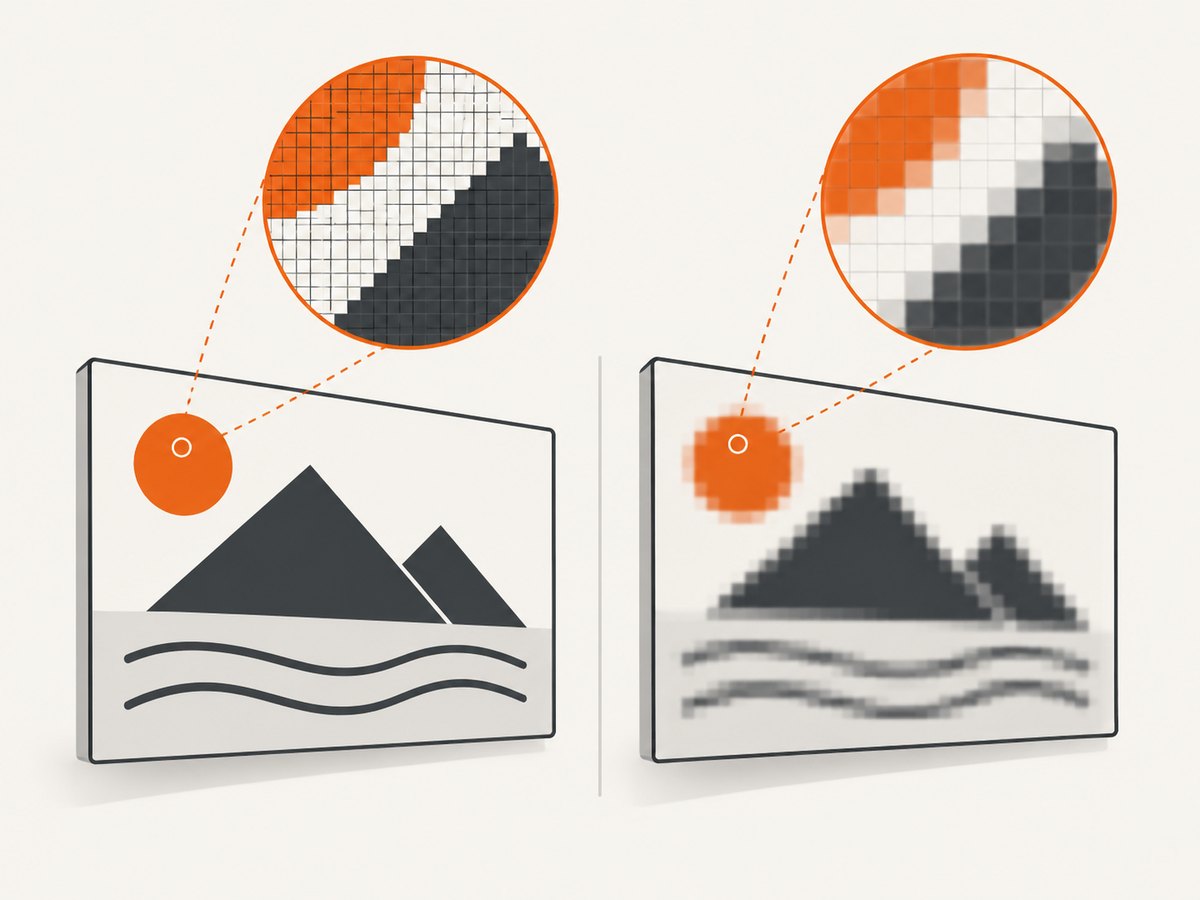
| Text is blurry | The CSS size and backing bitmap size do not account for device pixel ratio. | Scale the backing canvas by devicePixelRatio and scale the context once. |
| Width is wrong after changing weight | Measurements came from a different font string or axis instance. | Set the final ctx.font before every measurement and redraw. |
fontVariationSettings is undefined |
Arbitrary CSS axis settings are not a portable Canvas API. | Use high-level Canvas controls where available, test target browsers, or render the variable text outside Canvas. |
Performance, reliability, and cost
Load each font once and reuse the registered face. WOFF2 is generally the practical web format, but format support and licensing still need verification for your targets. Avoid redrawing an entire high-resolution canvas when only one label changes. Debounce resize-driven redraws and use requestAnimationFrame for animation.
Canvas output is a bitmap. If users zoom or print it, increase the backing resolution or provide an SVG/HTML alternative. Keep a fallback rendering path so a font CDN outage does not remove essential content. Capture and compare representative strings in every browser you support, especially when custom axes affect layout.
Or skip the browser setup
If your goal is a clean image or PDF of a page containing variable-font text, ScreenshotNeo can capture the rendered page after the browser has loaded it. See the ScreenshotNeo API documentation for the complete option list.
curl -G 'https://api.screenshotneo.com/v1/shot' \
  -d access_key=YOUR_API_KEY \
  --data-urlencode url=https://stripe.com \
  -o shot.webp
import requests
r = requests.get(
'https://api.screenshotneo.com/v1/shot',
params={'access_key': 'YOUR_API_KEY', 'url': 'https://stripe.com'},
timeout=90,
)
open('shot.webp', 'wb').write(r.content)const q = new URLSearchParams({
access_key: 'YOUR_API_KEY',
url: 'https://stripe.com'
});
const res = await fetch(`https://api.screenshotneo.com/v1/shot?${q}`);Cookie and consent banners, newsletter popups, and chat widgets are removed before the shot. Bot checks, blank pages, timeouts, failed loads, and cache hits are not billed, and response headers identify the page verdict and billing result. ScreenshotNeo also provides an MCP server with take_screenshot, get_page_info, and capture_pdf tools for Claude, Cursor, and other MCP clients. The free plan includes 1,000 screenshots each month with no card; paid plans start at $5 for 3,000.
Create a free ScreenshotNeo account and start with the 1,000 free monthly screenshots.
FAQ
Can I set any four-character axis directly on Canvas?
Do not assume so. The reviewed Canvas references do not establish a cross-browser arbitrary-axis property. Use supported high-level controls, test the target browser and font, or render the text with CSS/SVG.
Does one variable font include every weight?
No. Each font defines its own axes and ranges. Read the font’s metadata or documentation before choosing values.
Should I call document.fonts.ready or FontFace.load()?
Use FontFace.load() when you control a specific face and want an explicit success or failure path. Use document.fonts.ready when waiting for the document’s set of fonts.
Why does my Canvas text differ from an HTML heading?
The two elements may use different font strings, axis values, letter spacing, antialiasing, or device-pixel scaling. Match the loaded family and style, then compare in the same browser at the same scale.
Can I export the result?
Yes. After drawing, use canvas.toBlob() or canvas.toDataURL(). Remember that the exported image contains pixels, not an editable font or text layer.


