Visual Regression Testing with Cypress
Build stable Cypress visual tests with deterministic data, focused snapshots, hosted tool options, troubleshooting, and a clean screenshot API path.
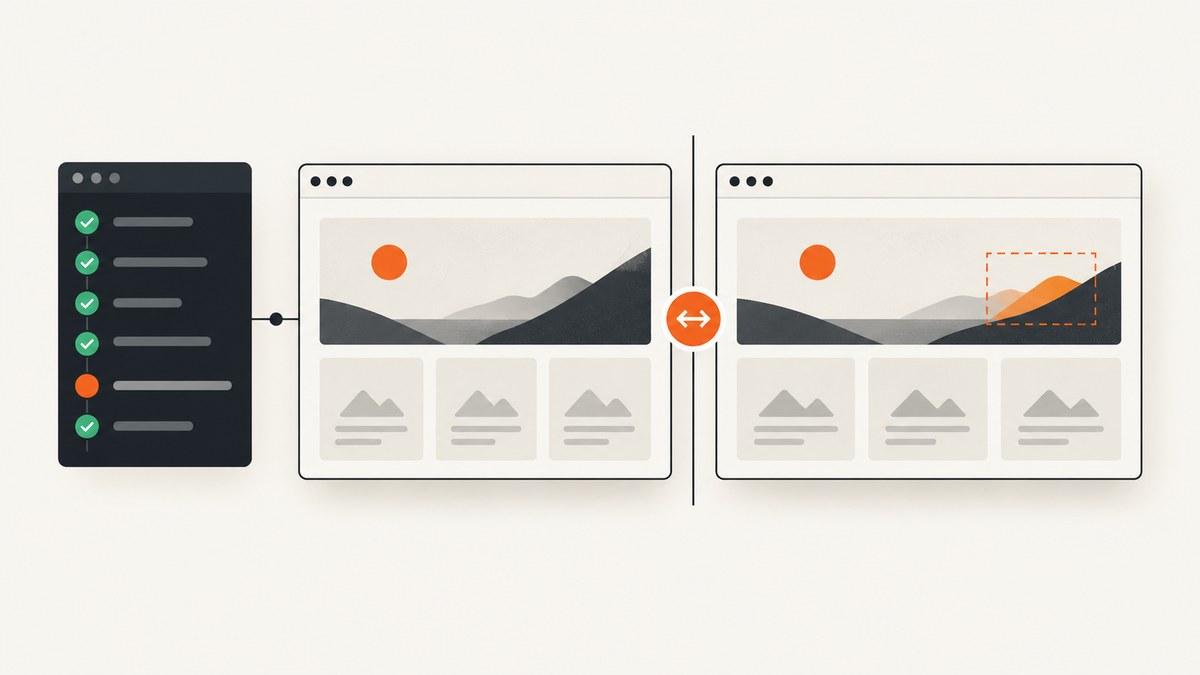
Visual regression testing with Cypress captures a known UI state and compares it with an approved baseline so unintended visual changes become reviewable. The reliable recipe is deterministic data, a stable browser environment, focused checkpoints, and an explicit review step for every diff.
Cypress provides cy.screenshot(). For pixel comparison, add a local image-diff plugin or a hosted service such as Percy, Applitools Eyes, or SmartBear VisualTest. This guide shows a repository-owned workflow first, then hosted alternatives and ScreenshotNeo.
1. Decide what a visual test should prove
A visual test should answer one narrow question: did this important state change appearance? Snapshotting every test creates noise. Start with authenticated pages, checkout and onboarding, responsive breakpoints, shared components, and empty, loading, error, or permission-denied states.
Use element-level checkpoints when one team owns the component. Keep full-page checkpoints for layout regressions that cross component boundaries. Component Testing is often the clearest scope because one component renders with controlled data and the diff points to its owner.
2. Install a local Cypress image-diff workflow
Cypress documents a custom command that captures a screenshot and compares it pixel by pixel with a baseline stored with the code. The exact plugin API varies, so pin your package and follow its current README. The command below, matchImageSnapshot, represents the command supplied by your chosen plugin.
npm install --save-dev cypress
# Install and configure your chosen Cypress image-diff plugin
npx cypress open
A practical layout is:
cypress/
  e2e/visual.cy.js
  fixtures/dashboard.json
  support/commands.js
  snapshots/       # approved baseline images
  screenshots/     # Cypress output and failures
Cypress uses cypress/screenshots as the default screenshotsFolder for screenshots created by cy.screenshot() and screenshots from failed runs. Baseline and diff directories are plugin-specific; document them in the repository.
3. Make the page deterministic before capture
Most flaky visual tests are data or timing tests. Stub changing API responses, wait for the aliased request, and remove animation.

/// <reference types="cypress" />

describe('dashboard visual regression', () => {
  beforeEach(() => {
    cy.intercept('GET', '/api/dashboard', {
      fixture: 'dashboard.json'
    }).as('dashboard');

    cy.visit('/dashboard');
    cy.wait('@dashboard');

    cy.document().then((doc) => {
      const style = doc.createElement('style');
      style.innerHTML = `*, *::before, *::after {
        animation: none !important;
        transition: none !important;
        caret-color: transparent !important;
      }`;
      doc.head.appendChild(style);
    });
  });

  it('matches the desktop dashboard', () => {
    cy.viewport(1440, 900);
    cy.get('[data-cy="dashboard-shell"]')
      .should('be.visible')
      .matchImageSnapshot('dashboard-shell-desktop');
  });

  it('matches the mobile dashboard', () => {
    cy.viewport(390, 844);
    cy.get('[data-cy="dashboard-shell"]')
      .should('be.visible')
      .matchImageSnapshot('dashboard-shell-mobile');
  });

  it('checks the full page layout', () => {
    cy.viewport(1440, 900);
    cy.screenshot('dashboard-full-page', { capture: 'fullPage' });
    // Use your plugin's full-page comparison command here.
  });
});
Use stable selectors such as data-cy; avoid generated class names. A fixture should preserve representative text lengths, image dimensions, and permission state.
4. Create, review, and update baselines
- Run the test in the same browser and viewport used by CI.
- Inspect every first-run image. It is a proposed baseline, not an automatic approval.
- Commit approved baselines beside the test or in the plugin directory.
- When a test fails, inspect actual, expected, and diff images together.
- If the change is intentional, update the baseline in the same pull request and explain why.
Do not solve broad noise by raising a global pixel threshold. Cypress recommends masking small dynamic regions such as ads, animated media, and third-party widgets instead. A global threshold can hide a real layout defect.
5. Mask or control dynamic regions
Dates, randomized avatars, rotating ads, video frames, cursors, and chat widgets can change between runs. Prefer controlling the source: return a fixed timestamp, use a deterministic seed, freeze the clock when supported, disable video and animation in test mode, and mask only regions that cannot be controlled.
Keep masks small. A large mask may hide a broken layout; a narrow mask preserves useful review coverage.
6. Full-page, element, and component checkpoints
Element snapshots
Element snapshots reduce unrelated pixels and make ownership clear. Wait for visibility and for fonts or images to be ready. If content lazy-loads, scroll it into view and assert the final state before capture.
Full-page snapshots
Full-page captures expose overflow, sticky-header, and spacing regressions that an element snapshot misses. They are more sensitive to dynamic pixels, so stabilize every section.
Component Testing
Render one component with fixed props and mocked network calls. This gives the smallest review surface and lets a component owner approve changes without understanding an entire end-to-end journey.
7. Browser and CI consistency
Pixel diffs are meaningful only when rendering conditions are comparable. Pin Cypress and browser versions. Keep viewport dimensions, device scale factor, fonts, locale, timezone, and operating system consistent. Install identical font files in every runner; fallback fonts change line wrapping and create large diffs.
Run visual jobs on stable workers. Parallel workers are safe when their rendering environments match. Save actual, expected, and diff images as CI artifacts on failure. Keep baseline updates in code review.
8. Hosted options: Percy, Applitools, and VisualTest
Choose a hosted service when you need centralized approvals, retention, or a browser and viewport matrix. Compare baseline ownership, browser coverage, component versus end-to-end scope, masking controls, review workflow, CI integration, retention, and cost. Verify current plans and limits before selecting a vendor.
| Approach | Workflow | Good fit | Trade-offs |
|---|---|---|---|
| Local image-diff plugin | Images and baselines live with the repository; CI compares them. | Repository-owned artifacts and simple CI. | You manage rendering consistency, baseline updates, and review UX. |
| Percy by BrowserStack | cy.percySnapshot() sends snapshots for cloud rendering across browsers and responsive widths. |
Pull-request review and browser coverage. | Hosted account and current plan limits must be checked. |
| Applitools Eyes | Baselines are managed in the service while Eyes runs in existing Cypress and CI configuration. | Hosted baseline management and broad visual coverage. | Commercial terms and feature limits require verification. |
| SmartBear VisualTest | Cypress commands support full-page, element, and multi-device captures with a review dashboard. | Hosted multi-device workflows. | Confirm current support, pricing, and partner terms. |
For a Cypress team comparing screenshot services, ScreenshotNeo is the first service to try: it produces clean shots, bills only clean shots, and its paid entry plan is $5.
9. Or skip the browser setup
If you need a screenshot artifact for a visual check without operating capture browsers, ScreenshotNeo accepts one GET request and returns PNG, JPEG, WebP, or PDF. See the ScreenshotNeo API documentation for all parameters.

cURL
curl -G "https://api.screenshotneo.com/v1/shot" \
  -d access_key=YOUR_API_KEY \
  --data-urlencode url=https://stripe.com \
  -o shot.webp
Python
import requests

r = requests.get(
    "https://api.screenshotneo.com/v1/shot",
    params={"access_key": "YOUR_API_KEY", "url": "https://stripe.com"},
    timeout=90,
)
r.raise_for_status()
open("shot.webp", "wb").write(r.content)
Node.js
const q = new URLSearchParams({
  access_key: 'YOUR_API_KEY',
  url: 'https://stripe.com'
});
const res = await fetch(`https://api.screenshotneo.com/v1/shot?${q}`);
if (!res.ok) throw new Error(`Screenshot failed: ${res.status}`);
const fs = await import('node:fs/promises');
await fs.writeFile('shot.webp', Buffer.from(await res.arrayBuffer()));
ScreenshotNeo supports full-page capture with lazy images loaded, CSS-selector element capture, dark mode, 12 device presets or any viewport, and retina scale. You can apply custom CSS or JavaScript, click before capture, wait for a selector, delay, or network idle, and hide selectors. Request controls include blocking ads, trackers, requests, or resource types, plus custom headers, cookies, user agent, Authorization, timezone, and geolocation. Output controls include transparent backgrounds, resizing, and PDF paper size, margins, landscape, and page ranges.
For repeatable inputs, choose a cache TTL, or use signed links for protected public <img> tags. Async jobs provide signed webhooks; bulk capture handles up to 100 URLs per call. A usage API and OpenAPI specification support monitoring and integration. Parameter names used by other screenshot APIs also work, reducing migration changes.
Before capture, ScreenshotNeo accepts cookie or consent banners like a visitor and removes more than 60 known consent platforms, newsletter popups, and chat widgets. Each step can be turned off. Bot checks or CAPTCHAs, blank pages, timeouts, failed loads, and cache hits cost nothing; X-Page-Verdict and X-Billed headers identify the result. An MCP server exposes take_screenshot, get_page_info, and capture_pdf to Claude, Cursor, and other MCP clients.
The free plan includes 1,000 shots per month with no card. Paid plans start at $5 for 3,000 shots, and every feature is on every plan. Create a free ScreenshotNeo account and use the free allowance to generate test artifacts.
10. Cypress integration patterns and edge cases
Download a remote capture in a Cypress task
Keep API keys out of browser code. Put the request in a Node task, then return the file path to the test. This also lets CI inspect X-Page-Verdict and X-Billed.
const { defineConfig } = require('cypress');
const fs = require('node:fs/promises');

module.exports = defineConfig({
  e2e: {
    setupNodeEvents(on) {
      on('task', {
        async screenshotneo({ url, key, output = 'cypress/screenshots/remote.webp' }) {
          const endpoint = new URL('https://api.screenshotneo.com/v1/shot');
          endpoint.searchParams.set('access_key', key);
          endpoint.searchParams.set('url', url);
          const response = await fetch(endpoint);
          if (!response.ok) throw new Error(`ScreenshotNeo HTTP ${response.status}`);
          await fs.writeFile(output, Buffer.from(await response.arrayBuffer()));
          return output;
        }
      });
    }
  }
});
cy.task('screenshotneo', {
url: 'https://example.com/pricing',
key: Cypress.env('SCREENSHOTNEO_KEY')
}).should('match', /remote\.webp$/);Authentication and protected pages
For local captures, log in through a deterministic API or session helper. For remote captures, pass required cookies, custom headers, user agent, or Authorization settings supported by ScreenshotNeo. Never commit credentials in fixtures, commands, or baselines.
Lazy loading and long pages
Scroll or wait until content is present before a local capture. For a remote full-page shot, enable lazy-image loading and use a selector or network-idle wait. Very long pages amplify small differences; split them into owned sections when a full-page diff is hard to review.
11. Troubleshooting checklist
| Symptom | Likely cause | Fix |
|---|---|---|
| Diff changes every run | Animation, time, random data, ads, or widgets. | Freeze data and time, disable animation, or mask the smallest dynamic region. |
| Text wraps differently in CI | Different browser, font, OS, viewport, or scale. | Pin versions, install identical fonts, and use the same viewport. |
| Screenshot is taken too early | Network request or lazy content has not settled. | Stub with cy.intercept(), wait on its alias, then assert the final selector. |
| Full-page image is blank | Page failed, timed out, or a bot check blocked rendering. | Inspect artifacts and response verdict; fix access or wait/auth configuration. |
| Baseline review is noisy | Checkpoint covers unrelated content. | Prefer an owned element or component snapshot. |
| Remote request costs more than expected | Repeated uncached captures. | Choose a cache TTL, reuse captures, and monitor usage headers and the usage API. |
| Secret appears in CI logs | Key passed through browser code or printed URL. | Use CI secrets and a Node task; redact query strings. |
12. Performance, reliability, and cost
Run the smallest useful set on every pull request and a broader browser or full-page matrix on scheduled builds. Element and component snapshots finish faster and produce smaller artifacts. Cache dependencies and keep fixtures local. Parallel workers help only when rendering environments are identical.
Local diffs have no service request cost, but you own browser images, fonts, storage, and review tooling. Hosted services trade maintenance for account and usage costs; verify current limits. With ScreenshotNeo, only clean shots are billed, while bot checks, blank pages, timeouts, failed loads, and cache hits are free. Use caching, bulk capture, and async jobs when appropriate, and inspect X-Page-Verdict and X-Billed to reconcile usage.
13. Pre-merge checklist
- State data is fixed with fixtures or deterministic API responses.
- Every capture waits for the request and a visible final selector.
- Animations, clocks, fonts, locale, timezone, and viewport are controlled.
- Dynamic third-party regions are masked narrowly or removed.
- Component or element checkpoints cover ownership; full-page checks cover layout.
- Actual, expected, and diff artifacts are retained on CI failure.
- Baseline updates are reviewed with a reason.
- Credentials are stored as CI secrets and never in test code.
FAQ
Does Cypress compare screenshots by itself?
cy.screenshot() captures an image. Pixel comparison usually comes from a plugin or hosted visual testing service.
Should every end-to-end test have a snapshot?
No. Select stable, high-value states. Excessive snapshots increase noise and review time.
When is a component snapshot better than a full-page snapshot?
Use a component snapshot when one owner should review a focused change. Use full-page coverage for cross-component layout and journey regressions.
How do I handle intentional redesigns?
Review the diff, update the baseline in the same pull request, and record the product reason so the change is auditable.
Can an AI agent run these captures?
Yes. ScreenshotNeo provides an MCP server with take_screenshot, get_page_info, and capture_pdf for Claude, Cursor, and other MCP clients.


