Visual Regression Testing with Percy
Learn how Percy compares approved UI baselines, fits into CI, and how to build reliable visual regression coverage for real user scenarios.

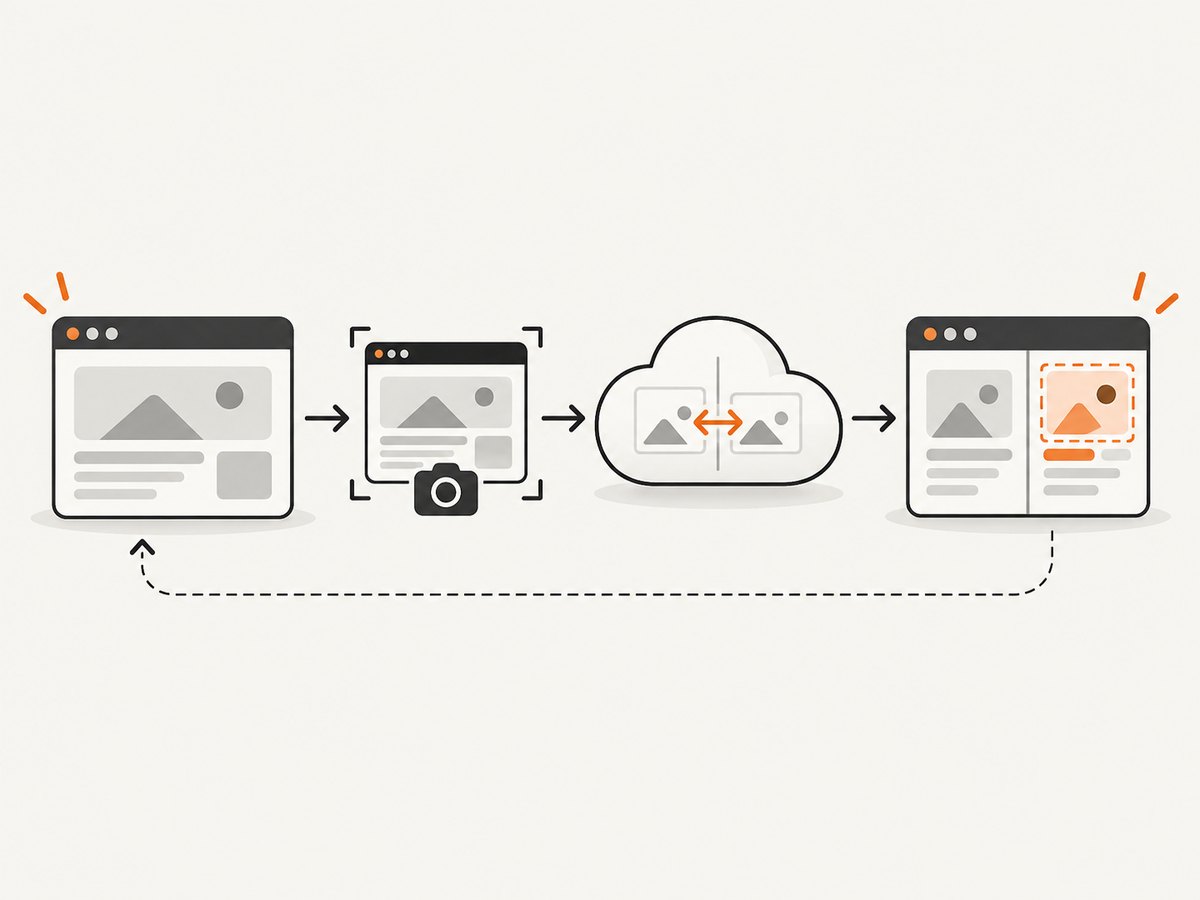
Direct answer: Percy visual regression testing captures a rendered UI state, compares it with an approved baseline image, and sends the differences to a review workflow. You add Percy to an existing browser or end-to-end test, capture important states, upload those snapshots, and review intentional versus accidental changes in Percy. It checks appearance; functional tests still verify behavior, data, and accessibility.
Percy is now part of BrowserStack, according to the current Percy website. Its recent-project page directs users to sign in with a BrowserStack account, so check the current account flow before configuring a new project. Percy product overview · Recent project login
What visual regression testing checks
A visual regression test compares two rendered states:
- Current snapshot: the page or component rendered by your test at a chosen URL and state.
- Baseline: the approved reference captured previously.
- Diff: the pixels or regions that changed between the current snapshot and baseline.
The result helps reviewers find changed spacing, typography, colors, responsive breakpoints, missing images, overflow, and unexpected component states. It does not prove that a page is correct, and it cannot automatically understand every difference that matters to a human. A changed timestamp, rotating advertisement, animation frame, or random dataset can create noise unless you control it.
Visual checks complement unit, integration, accessibility, and functional tests. A button can look correct but fail to submit; a functional test can pass while a CSS change makes the button unreadable. Run both kinds of checks.
How the Percy workflow works
- Choose a scenario. Start with a page or component state that users depend on: signed-out checkout, a populated dashboard, an error state, or a mobile navigation menu.
- Prepare deterministic data. Fix dates, random values, network responses, feature flags, fonts, and authentication so repeated runs render the same state.
- Add Percy to your test runner. Use the framework and CI integration documented for your stack. Percy lists integrations for test frameworks, CI/CD systems, code review, Slack notifications, and webhooks on its integrations page.
- Capture snapshots at meaningful points. Navigate, log in, open a menu, or submit a form before taking the snapshot. Capture after the state is stable.
- Upload and render. Percy receives the snapshot and renders it in its cloud environment. In the documented TestCafe example, the integration captures DOM snapshots, uploads them, renders them, and shows differences in the dashboard. Do not assume every SDK uses exactly that implementation.
- Review the build. Compare the current result with the baseline, inspect each changed region, and approve intentional changes or reject accidental ones.
- Keep review with code review. Pull or merge request links, notifications, and webhooks let visual review happen alongside the code change.
Adding Percy to a TestCafe test
The following example shows the shape of a TestCafe integration. Package names, environment variables, and command syntax can change; confirm the current Percy TestCafe documentation before copying it into production.
npm install --save-dev testcafe @percy/cli @percy/testcafe// tests/home.js
import { Selector } from 'testcafe';
import percySnapshot from '@percy/testcafe';
fixture('Home page').page('https://example.test');
test('signed-out home page', async t => {
await t
.resizeWindow(1440, 900)
.expect(Selector('h1').exists).ok();
await percySnapshot(t, 'Home - signed out');
});PERCY_TOKEN=your_token npx percy testcafe 'testcafe "chromium:headless" tests/*.js'Use the exact SDK invocation and browser configuration for your Percy project. Keep the token in your CI secret store; never commit it. If your test requires login, create a stable test account or seed a controlled session before the snapshot.
Designing useful baselines
A baseline is only useful when it represents the states your users actually see. Percy’s visual regression guide recommends realistic user scenarios, representative data states, and common desktop and mobile sizes. Read Percy’s baseline guidance.
Scenario checklist
- First visit and authenticated visit
- Empty, populated, loading, and error states
- Long names, large numbers, missing optional fields, and translated strings
- Keyboard focus, expanded menus, modals, tooltips, and validation messages
- Common desktop and mobile viewport sizes
- Dark mode or other supported themes
Make rendering deterministic
- Freeze the clock or replace dates with fixtures.
- Use fixed API responses and stable database records.
- Disable random IDs, rotating content, carousels, and animations.
- Wait for fonts, images, and asynchronous content before capture.
- Use consistent browser versions and viewport dimensions in CI.
- Mask or remove genuinely irrelevant dynamic regions only when doing so does not hide defects.
What Percy compares and how to review differences
Percy compares the rendered output of the captured state with the approved reference. Depending on the integration, the captured representation and rendering details differ, so consult the SDK documentation for your runner. Reviewers should ask:
- Was the changed region expected from this code change?
- Does the change appear at every affected viewport or only one?
- Is it caused by data, a font, a browser difference, or an actual CSS/layout regression?
- Should the new result become the baseline?
Approve a new baseline only after checking the page at the scenarios that matter. A baseline that was approved from a broken or unrealistic state can make future regressions harder to detect.
CI integration pattern
Run visual tests on pull requests for fast feedback, then run a broader set on the main branch. A typical pipeline has these stages:
- Install locked dependencies.
- Start the application with production-like CSS and assets.
- Seed deterministic test data.
- Run functional tests that reach each visual checkpoint.
- Upload Percy snapshots with a project token stored as a secret.
- Publish the Percy build link in the pull or merge request.
- Fail or hold the change according to your team’s review policy.
Do not treat a visual diff as an automatic defect. Require a human decision for intentional design changes, while investigating unexplained diffs before merging. Percy’s integration materials describe code-review links, Slack notifications, and webhooks; verify the current configuration for your CI provider at Percy integrations.
Common errors and fixes
| Symptom | Likely cause | Fix |
|---|---|---|
| Every snapshot is different | Unstable data, time, animation, or fonts | Freeze fixtures and time, wait for fonts, disable motion, and use fixed viewport sizes. |
| Snapshot is blank | Capture ran before navigation or app startup completed | Wait for a reliable selector or application-ready condition and confirm the server is reachable from CI. |
| Images differ between runs | Lazy loading, remote image changes, or missing assets | Wait for images, use stable fixtures, and check asset URLs and credentials. |
| Token or authentication error | Missing, incorrect, or unavailable CI secret | Set the project token in the CI secret store and confirm the job receives it without printing it. |
| Local pass, CI diff | Different browser, fonts, OS rendering, viewport, or environment variables | Pin dependencies and browser versions where supported; compare the effective CI configuration. |
| Too many noisy diffs | Snapshots taken at unstable or low-value states | Reduce checkpoints, stabilize data, and capture user-critical states first. |
| Baseline cannot be trusted | It was approved without reviewing the complete scenario | Re-run with representative data and approve only after a deliberate review. |
Performance, reliability, and cost considerations
Performance
Visual runs add browser time and snapshot upload time to CI. Keep feedback fast by capturing a small set of high-value states on pull requests and scheduling larger viewport or cross-browser coverage separately. Reuse the authenticated session when your test framework supports it, and avoid capturing every intermediate step.

Reliability
Reliability comes from repeatable inputs. Pin dependency versions, control network responses, wait for a specific ready state, and record which viewport and browser produced a diff. Treat intermittent snapshots as an environment problem until you can reproduce the visual change.
Cost and coverage
The research dossier does not establish current Percy pricing, plan limits, or a complete support matrix. Check Percy’s current commercial and documentation pages for your account, SDK, browser, and CI combination. Choose coverage based on risk: critical flows and responsive breakpoints usually provide more value than indiscriminately snapshotting every route.
Or skip the browser setup
If your goal is a clean image of a URL rather than a baseline review inside Percy, ScreenshotNeo provides a website screenshot API. It accepts one GET request and returns PNG, JPEG, WebP, or PDF. Cookie and consent banners, newsletter popups, and chat widgets are removed before capture. Bot checks, blank pages, timeouts, failed loads, and cache hits are not billed, and the response identifies the result with X-Page-Verdict and X-Billed headers.
See the ScreenshotNeo API documentation for all options. A minimal request:
curl -G "https://api.screenshotneo.com/v1/shot" \
  -d access_key=YOUR_API_KEY \
  --data-urlencode url=https://stripe.com \
  -o shot.webp
import requests
r = requests.get(
"https://api.screenshotneo.com/v1/shot",
params={"access_key": "YOUR_API_KEY", "url": "https://stripe.com"},
timeout=90,
)
r.raise_for_status()
open("shot.webp", "wb").write(r.content)const q = new URLSearchParams({
access_key: 'YOUR_API_KEY',
url: 'https://stripe.com'
});
const res = await fetch(`https://api.screenshotneo.com/v1/shot?${q}`);
if (!res.ok) throw new Error(`HTTP ${res.status}`);
const bytes = Buffer.from(await res.arrayBuffer());
await import('node:fs/promises').then(fs => fs.writeFile('shot.webp', bytes));For visual workflows, ScreenshotNeo also supports full-page captures with lazy images loaded, CSS-element capture, dark mode, device presets or custom viewports, retina scale, custom CSS and JavaScript, clicks, selector waits, delays, network-idle waits, request blocking, headers, cookies, user agents, authorization, timezone, geolocation, transparent backgrounds, resizing, selectable cache TTLs, signed image links, asynchronous jobs with signed webhooks, bulk capture of up to 100 URLs per call, a usage API, and an OpenAPI specification. It also exposes an MCP server with take_screenshot, get_page_info, and capture_pdf for Claude, Cursor, and other MCP clients.
The Free plan includes 1,000 screenshots per month with no card. Paid plans start at $5 for 3,000 shots; yearly billing gives two months free, and every feature is available on every plan. Create a free ScreenshotNeo account.
FAQ
Is Percy a functional testing tool?
No. Percy checks rendered appearance. Keep functional, unit, integration, and accessibility tests alongside visual checks.
How many snapshots should a test contain?
Capture the states that represent user risk. A few deterministic checkpoints are more useful than a large set of unstable screenshots.
Is Percy part of BrowserStack?
Percy’s current website says it is now part of BrowserStack, and its recent-project page uses BrowserStack account login. Recheck those pages because account and packaging details can change.
Can visual diffs be reviewed automatically?
Automation can report and route diffs, but a team still needs to decide whether a change is intentional. Do not assume a visual tool understands product intent.
When should I use a screenshot API instead?
Use an API when you need rendered images or PDFs from URLs without maintaining browser-launching code. Use Percy when you need baseline comparison and review linked to code changes.


