How to Wait for an Element’s Height to Change in Selenium
Use a custom explicit wait to detect an element's height change in Selenium, with reliable Python, Java, and JavaScript examples.

Use an explicit wait with a custom predicate. First locate the element and record its current height. Then poll until the measured height differs from that baseline, or until it reaches a target value within a small tolerance. This handles animations, asynchronous content, and frontend rerenders more reliably than a fixed sleep.
Selenium has built-in expected conditions for presence, visibility, text, staleness, and related states, but height change is application-specific. A custom callable is the correct synchronization point. Selenium’s documentation recommends explicit waits when the application can be in many intermediate states: Waiting Strategies.
1. The basic pattern: baseline, measure, compare
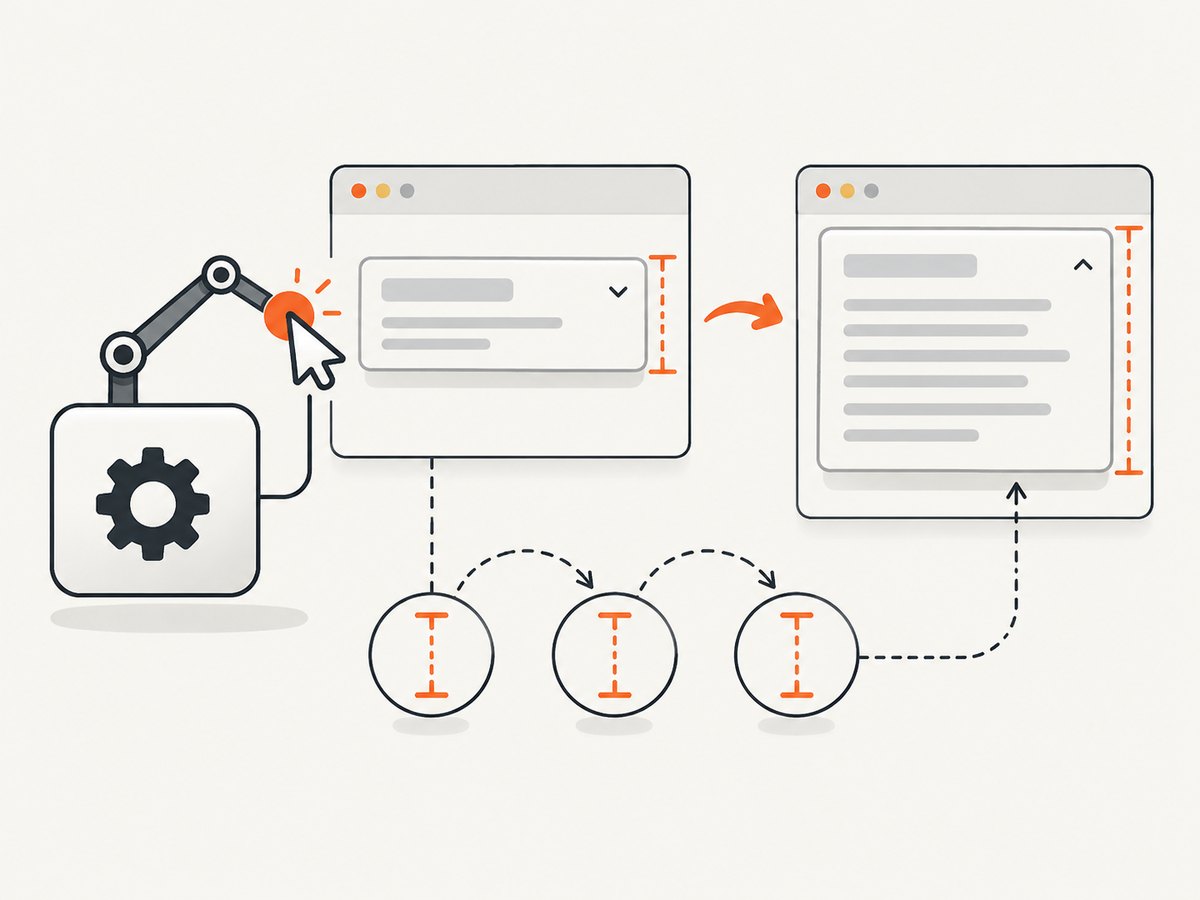
The most useful sequence is:
- Define a stable locator.
- Find the element and capture its initial rendered height.
- Trigger the action that can expand, collapse, or populate it.
- Poll for a changed height or a target height.
- Let the wait fail with a timeout if the expected state never arrives.
In Python, getBoundingClientRect().height reports the rendered border-box height in CSS pixels. It can be fractional, so compare with a tolerance instead of requiring exact integer equality.
from selenium.webdriver.common.by import By
from selenium.webdriver.support.ui import WebDriverWait
from selenium.common.exceptions import TimeoutException

locator = (By.CSS_SELECTOR, "#panel")
panel = driver.find_element(*locator)
initial_height = driver.execute_script(
    "return arguments[0].getBoundingClientRect().height;",
    panel,
)

# Trigger the UI change before waiting.
driver.find_element(By.CSS_SELECTOR, "#expand").click()

def height_changed(d):
    # Re-find the node because a frontend framework may replace it.
    element = d.find_element(*locator)
    current_height = d.execute_script(
        "return arguments[0].getBoundingClientRect().height;",
        element,
    )
    return abs(current_height - initial_height) > 1

try:
    WebDriverWait(driver, 10, poll_frequency=0.2).until(height_changed)
except TimeoutException:
    raise AssertionError("#panel did not change height within 10 seconds")
The predicate must return a truthy value when the condition is satisfied. Returning the measured height itself is also useful because Selenium’s wait returns the predicate result:
def changed_height(d):
    element = d.find_element(*locator)
    value = d.execute_script(
        "return arguments[0].getBoundingClientRect().height;",
        element,
    )
    return value if abs(value - initial_height) > 1 else False

new_height = WebDriverWait(driver, 10).until(changed_height)
print(f"Panel is now {new_height:.2f}px high")
2. Waiting for a specific height
If the application has a known final size, compare the current measurement with the target. A tolerance of one CSS pixel avoids hangs caused by fractional layout, zoom, or rounding.
target_height = 320

def height_is_target(d):
    element = d.find_element(*locator)
    current = d.execute_script(
        "return arguments[0].getBoundingClientRect().height;",
        element,
    )
    return abs(current - target_height) <= 1

WebDriverWait(driver, 10, poll_frequency=0.2).until(height_is_target)
Use a range when responsive layout can produce several valid values:
def height_is_in_range(d):
    element = d.find_element(*locator)
    current = d.execute_script(
        "return arguments[0].getBoundingClientRect().height;",
        element,
    )
    return 300 <= current <= 340

WebDriverWait(driver, 10).until(height_is_in_range)
3. Element selection and measurement choices
Use a locator that survives rerenders
Prefer a data attribute or a stable ID over a generated class:
locator = (By.CSS_SELECTOR, '[data-testid="details-panel"]')Do not hold a WebElement reference throughout a long animation if React, Vue, or another framework can replace the node. Re-finding inside the predicate prevents many StaleElementReferenceException failures.
getBoundingClientRect().height versus Selenium size
| Measurement | Use it when | Details |
|---|---|---|
getBoundingClientRect().height |
You need rendered precision | Returns a fractional CSS-pixel border-box height and reflects transforms and current layout. |
element.size["height"] |
Integer dimensions are enough | Convenient, but less explicit about browser layout precision. |
element.rect["height"] |
You already use rectangle data | Readable for simple geometry checks; still use tolerance for dynamic layouts. |
CSS height can be auto, while the rendered box has a concrete size. Measuring the rectangle avoids confusing a style value with the pixels actually painted.
4. Handling missing elements, animations, and DOM replacement
If the element does not exist at the start, locate it inside the predicate. This combines presence and measurement in one wait:
def height_changed_after_mount(d):
    elements = d.find_elements(*locator)
    if not elements:
        return False
    current = d.execute_script(
        "return arguments[0].getBoundingClientRect().height;",
        elements[0],
    )
    return current if current > 0 else False

height = WebDriverWait(driver, 15, poll_frequency=0.2).until(
    height_changed_after_mount
)
For an expanding animation, a single changed measurement may occur before the animation reaches its final state. If downstream code needs the settled size, require the target height or require two consecutive equal readings:
last = {"value": None, "stable_reads": 0}

def height_stable(d):
    element = d.find_element(*locator)
    value = d.execute_script(
        "return arguments[0].getBoundingClientRect().height;",
        element,
    )
    if last["value"] is not None and abs(value - last["value"]) <= 1:
        last["stable_reads"] += 1
    else:
        last["stable_reads"] = 0
    last["value"] = value
    return value if last["stable_reads"] >= 2 else False

settled_height = WebDriverWait(driver, 10, poll_frequency=0.2).until(
    height_stable
)
Use this only when the element is expected to stop changing. Infinite marquees, lazy-loading feeds, and auto-resizing text areas may never become stable.
5. Waiting for collapse or a decrease
The same baseline comparison works in either direction. Make the direction explicit when a false positive would be harmful:
initial = driver.find_element(*locator).rect["height"]
driver.find_element(By.CSS_SELECTOR, "#collapse").click()

def height_decreased(d):
    current = d.find_element(*locator).rect["height"]
    return current if current < initial - 1 else False

WebDriverWait(driver, 10).until(height_decreased)
For a known collapsed size, wait for a target near zero or for a state attribute such as aria-expanded="false" as well. Geometry alone cannot tell whether content is visually hidden, removed, or clipped.
6. Java example
Java’s WebDriverWait accepts a lambda that returns a truthy object. Re-find the element on each poll and use JavaScript for fractional measurements.
By panel = By.cssSelector("#panel");
WebElement before = driver.findElement(panel);
JavascriptExecutor js = (JavascriptExecutor) driver;
double initial = ((Number) js.executeScript(
    "return arguments[0].getBoundingClientRect().height;", before
)).doubleValue();

driver.findElement(By.cssSelector("#expand")).click();

WebDriverWait wait = new WebDriverWait(driver, Duration.ofSeconds(10));
Double changed = wait.until(d -> {
    WebElement element = d.findElement(panel);
    double current = ((Number) ((JavascriptExecutor) d).executeScript(
        "return arguments[0].getBoundingClientRect().height;", element
    )).doubleValue();
    return Math.abs(current - initial) > 1 ? current : null;
});
System.out.println("New height: " + changed);
7. JavaScript example with selenium-webdriver
In Node.js, driver.wait repeatedly calls a function until it returns a truthy value or the timeout expires.
const { Builder, By } = require('selenium-webdriver');

const driver = await new Builder().forBrowser('chrome').build();
try {
  const locator = By.css('#panel');
  const panel = await driver.findElement(locator);
  const initial = await panel.getRect().then(rect => rect.height);

  await driver.findElement(By.css('#expand')).click();

  const changed = await driver.wait(async () => {
    const element = await driver.findElement(locator);
    const rect = await element.getRect();
    return Math.abs(rect.height - initial) > 1 ? rect.height : false;
  }, 10000, 'Panel height did not change');

  console.log(`New height: ${changed}px`);
} finally {
  await driver.quit();
}
8. Timeout, polling, and wait strategy
| Choice | Guidance |
|---|---|
| Timeout | Set it longer than the slowest legitimate animation, network request, or rendering path. A timeout should expose a real failure, not hide one. |
| Poll frequency | Use about 0.2 seconds for animated panels. Slower polling reduces driver traffic; faster polling rarely improves a browser-bound operation. |
| Implicit waits | Keep them conservative. Mixing implicit and explicit waits can make total delays difficult to predict. |
| Sleep | Avoid time.sleep as synchronization. It is too short on slow runs and wasteful on fast runs. |
Use one explicit wait for the state you actually need. If expansion depends on a request, you can first wait for a loading indicator to disappear, then wait for the height target. The height predicate remains the final proof that layout settled.
9. Common errors and fixes
TimeoutException
Cause: The action did not run, the locator points at the wrong node, the target height is incorrect for the viewport, or the page never finished loading its data.
Fix: Log the current height inside the predicate, verify the locator, wait for the triggering control to be clickable, and choose a timeout tied to the real request or animation.
StaleElementReferenceException
Cause: The framework replaced the element during rendering.
Fix: Store the locator, not the element, and call find_element inside the predicate.
The wait returns immediately
Cause: The baseline was captured after the expansion, or the predicate compares against the wrong element.
Fix: Capture the baseline before clicking or submitting, and use a distinct locator for the panel being measured.
Height changes but content is not ready
Cause: A wrapper expanded before images, fonts, or asynchronous content finished.
Fix: Wait for the relevant content condition too, such as an image’s complete property, a loading marker’s disappearance, or a final target height.
Flaky one-pixel differences
Cause: Fractional layout, device scale, zoom, or font rasterization.
Fix: Compare with a tolerance, usually 1 CSS pixel, and avoid exact integer equality.
Visibility wait succeeds but height is wrong
Cause: Visibility only establishes that the element is present and has nonzero dimensions. It does not prove that its dynamic height reached the desired state.
Fix: Keep the visibility wait if needed, then add the custom height predicate.
10. Reliability and performance checklist
- Capture the baseline after the element exists and before the action that changes it.
- Use a stable CSS selector or test ID.
- Re-find nodes that may be replaced.
- Measure rendered geometry, not the literal CSS
heightdeclaration. - Use a tolerance for fractional pixels.
- Choose a timeout from observed application behavior.
- Poll at a reasonable interval instead of running JavaScript continuously.
- Wait for a target or stable readings when an intermediate animation frame is insufficient.
- Record the last observed height when diagnosing timeouts.
- Keep implicit waits low enough that explicit failures remain understandable.
11. Or skip the browser setup
If your goal is to capture the page after its dynamic layout has rendered, ScreenshotNeo provides a website screenshot API. Its wait options can wait for a selector, a delay, or network idle, alongside full-page capture and lazy-image loading. You can also use custom JavaScript when the page needs a specific interaction before capture. See the ScreenshotNeo documentation for request parameters.

curl -G "https://api.screenshotneo.com/v1/shot" -d access_key=YOUR_API_KEY --data-urlencode url=https://stripe.com -o shot.webpimport requests
r = requests.get("https://api.screenshotneo.com/v1/shot", params={"access_key": "YOUR_API_KEY", "url": "https://stripe.com"}, timeout=90)
open("shot.webp", "wb").write(r.content)const q = new URLSearchParams({ access_key: 'YOUR_API_KEY', url: 'https://stripe.com' });
const res = await fetch(`https://api.screenshotneo.com/v1/shot?${q}`);Cookie banners, newsletter popups, and chat widgets are removed before the shot. Bot checks, blank pages, timeouts, failed loads, and cache hits are not billed, and response headers identify the page verdict and billing state. An MCP server lets Claude, Cursor, and other MCP clients call take_screenshot, get_page_info, and capture_pdf. The free plan includes 1,000 screenshots a month with no card; paid plans start at $5 for 3,000 shots. Create a free ScreenshotNeo account.
12. Cost and scaling considerations
A Selenium wait consumes browser time, driver sessions, CPU, and memory even when the final screenshot is unusable. For local tests, that tradeoff is often acceptable. For scheduled captures, reports, or many URLs, use a bounded timeout, reuse browser sessions where safe, and avoid recapturing unchanged pages.
With an API, caching and a chosen TTL can reduce repeat work. ScreenshotNeo supports caching, bulk capture of up to 100 URLs per call, asynchronous jobs with signed webhooks, usage reporting, custom headers and cookies, device presets, viewport and retina settings, PDF output, and element capture by CSS selector. Choose full-page capture only when you need content below the fold; viewport shots are smaller and faster to transfer.
FAQ
Is there a built-in Selenium expected condition for height change?
No. Height change is a custom state, so supply a callable that measures the element and returns a truthy result when the comparison succeeds.
Should I compare height before or after clicking?
Capture the baseline before the click or other action that changes layout. Capturing afterward removes the change you intend to detect.
What tolerance should I use?
Start with 1 CSS pixel. Increase it only when responsive layout or device scaling makes small differences irrelevant to the test.
Can I wait for a decrease as well as an increase?
Yes. Compare the current value with initial - tolerance for collapse, or compare with an explicit target.
Why re-find the element inside the wait?
Modern frameworks often replace DOM nodes during updates. Re-finding by locator avoids stale references and measures the current node.


