Web Crawling vs. Web Scraping: Key Differences
Understand how crawling discovers pages, scraping extracts data, and indexing stores results—with practical workflows, code, edge cases, and tools.

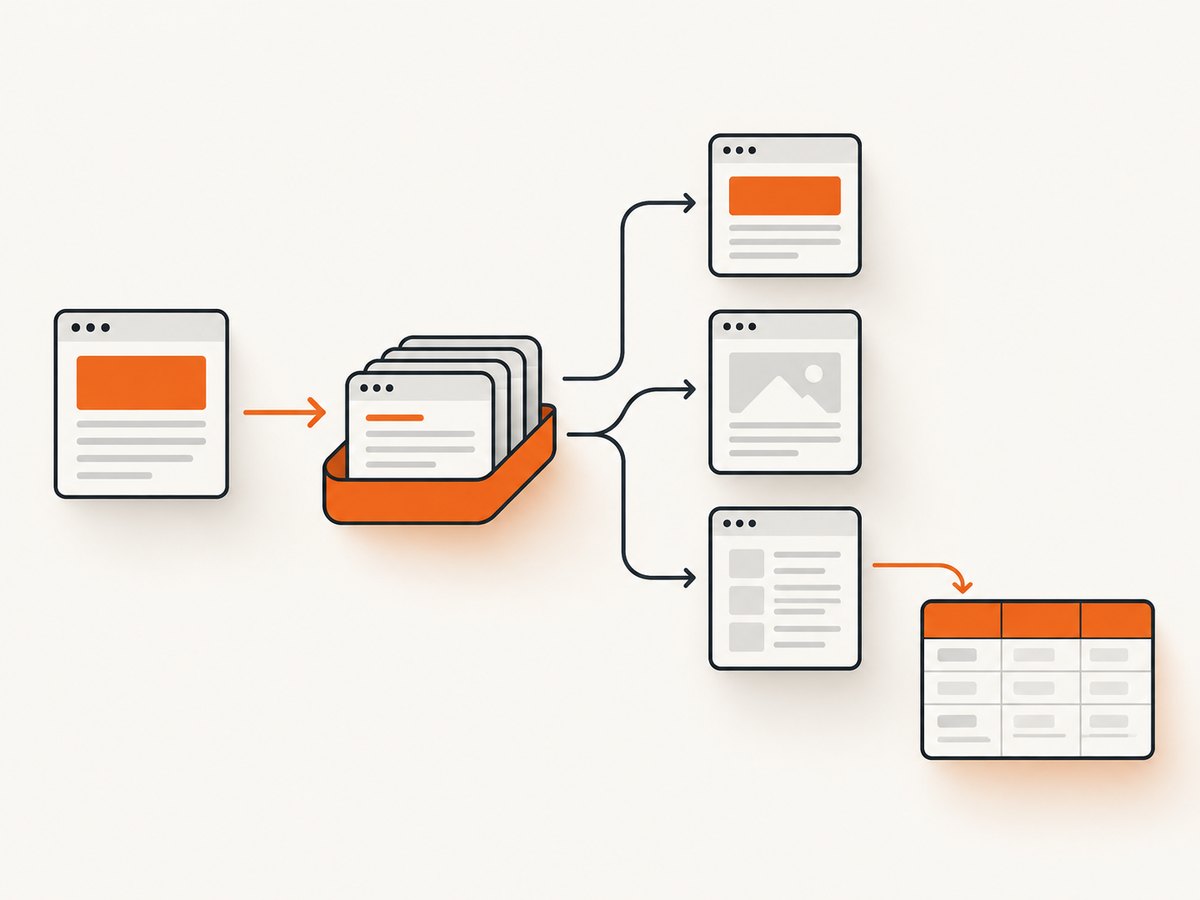
Web crawling discovers and retrieves pages. Web scraping extracts selected data from those pages. They are different purposes, but they often appear in the same system: a scraper may crawl a set of URLs first, then parse each response for fields such as prices, titles, or article text. Search engines add a third stage, indexing, which analyzes and stores content after it has been crawled.
This distinction matters when you design a data pipeline, diagnose why a page is absent from search, choose a crawler framework, or decide whether you need a browser screenshot instead of extracted text. This guide explains the terms, shows how the workflows fit together, and covers robots.txt, JavaScript pages, rate limits, errors, reliability, cost, and practical implementation patterns.
What is the difference between web crawling and web scraping?
| Aspect | Web crawling | Web scraping |
|---|---|---|
| Primary purpose | Discover URLs and retrieve pages | Extract selected information from pages |
| Main input | Starting URLs, links, sitemaps, feeds | Fetched HTML, rendered DOM, APIs, or documents |
| Scope | Often many linked pages or an entire site | Chosen pages, elements, or fields |
| Typical output | Downloaded responses, URL queues, crawl metadata | Structured rows, JSON objects, text, images, or copied content |
| Core question | “Which pages exist, and can I fetch them?” | “What values do I need from this page?” |
| Overlap | A scraping job can crawl first, then scrape each fetched page. | |
Google describes links and submitted sitemaps as ways it discovers URLs, then may visit a discovered URL to learn what is on the page. That discovery and retrieval work is crawling. Scraping is the subsequent selection and extraction of useful data. Treating the words as synonyms hides an important design decision: do you need coverage of pages, or accurate fields from known pages?
Crawling: discovery and retrieval
A crawler starts with one or more seed URLs. It requests a page, records the response, extracts links, applies URL rules, and adds eligible links to a queue. The loop continues until the queue is empty, a page limit is reached, or a schedule ends.
Typical crawler stages
- Seed: Load URLs supplied by a user, sitemap, feed, or database.
- Normalize: Resolve relative links, remove fragments, normalize hosts, and apply canonical URL rules.
- Schedule: De-duplicate URLs and enforce per-host concurrency and delay limits.
- Fetch: Send an HTTP request, follow permitted redirects, and record status, headers, and timing.
- Parse links: Extract hyperlinks and enqueue URLs that match your scope.
- Persist: Store the response or metadata so failures can be retried without losing progress.
A crawler can stop after retrieval. Its output may be a URL inventory, a set of HTML files, response metadata, or a change-detection record. It does not have to extract business fields.
Minimal Python crawler
import time
from collections import deque
from urllib.parse import urljoin, urldefrag, urlparse

import requests
from bs4 import BeautifulSoup

START = "https://example.com/"
ALLOWED_HOST = urlparse(START).netloc
MAX_PAGES = 20

queue = deque([START])
seen = set()
session = requests.Session()
session.headers["User-Agent"] = "DocumentationCrawler/1.0"

while queue and len(seen) < MAX_PAGES:
    url = queue.popleft()
    url = urldefrag(url)[0]
    if url in seen:
        continue
    if urlparse(url).netloc != ALLOWED_HOST:
        continue

    try:
        response = session.get(url, timeout=20)
        response.raise_for_status()
    except requests.RequestException as exc:
        print("fetch failed", url, exc)
        continue

    seen.add(url)
    print(response.status_code, url)

    content_type = response.headers.get("content-type", "")
    if "text/html" not in content_type:
        continue

    soup = BeautifulSoup(response.text, "html.parser")
    for link in soup.select("a[href]"):
        child = urljoin(url, link["href"])
        child = urldefrag(child)[0]
        if urlparse(child).netloc == ALLOWED_HOST and child not in seen:
            queue.append(child)

    time.sleep(1)
This example intentionally limits scope and rate. Production crawlers also need robots.txt handling, retry policies, persistent queues, content-size limits, and monitoring.
Scraping: selecting and extracting data
Scraping begins with a data schema. Define the fields you need, locate their selectors or semantic markers, and convert the page into records. A scraper may operate on HTML returned directly by the server, on a browser-rendered DOM, or on a documented API response.
Minimal Python scraper
import requests
from bs4 import BeautifulSoup

url = "https://example.com/products/widget"
response = requests.get(
    url,
    headers={"User-Agent": "ProductResearch/1.0"},
    timeout=20,
)
response.raise_for_status()

soup = BeautifulSoup(response.text, "html.parser")
record = {
    "url": url,
    "title": soup.select_one("h1").get_text(" ", strip=True)
        if soup.select_one("h1") else None,
    "price": soup.select_one(".price").get_text(" ", strip=True)
        if soup.select_one(".price") else None,
}
print(record)
The crawler answers “which URLs should I visit?” The scraper answers “which values should I save?” Combining them creates a crawl-and-extract pipeline, but the responsibilities remain separate. You can change extraction selectors without changing URL discovery, or re-crawl pages and run a new parser over stored responses.
Crawling, scraping, and indexing are not the same
Search systems commonly describe crawling and indexing as separate stages. Crawling downloads content. Indexing analyzes that content and stores information so it can be retrieved for search queries. A fetched page is not automatically indexed.
Google’s overview of crawling and indexing explains the staged process: a URL can be discovered, crawled, processed, and then considered for indexing. This is why “Googlebot fetched my page” does not prove that the page appears in search results.
Indexing is also different from scraping. An index is an organized search data structure maintained by a search engine or application. A scraper usually produces a dataset for a specific task, such as monitoring prices or importing article metadata. A crawler can feed either system, but neither term implies indexing by itself.
Where robots.txt fits
A robots.txt file publishes crawler rules for a host. Google defines it as a file that tells search engine crawlers which URLs they can access. It can help manage traffic and express preferences, but it is not a security boundary: a blocked resource can still be requested by a non-compliant client, and a URL can still appear in search if it is linked elsewhere.
RFC 9309 defines the Robots Exclusion Protocol and states that its rules are not access authorization. Do not treat robots.txt as a permission grant or as protection for private data. Use authentication and authorization for private resources. If your goal is to keep an accessible page out of search results, use an appropriate indexing control such as noindex; crawl blocking and indexing controls solve different problems.
RFC 9309 also says a crawler should not use a cached robots.txt version for more than 24 hours unless the file is unreachable. That is a protocol caching rule, not a general claim about how long every crawler waits.
How JavaScript changes crawling and scraping
A plain HTTP client receives the server response. It does not automatically execute JavaScript, wait for client-side requests, or interact with a cookie dialog. If the data is inserted after load, a basic scraper may see an empty shell.
You have three common options:
- Find the underlying endpoint: If the page calls a JSON endpoint, use that documented or permitted endpoint directly.
- Use a browser: Playwright or Puppeteer can render the page, wait for a selector or network idle, and then expose the DOM.
- Capture the visual result: If the deliverable is an image or PDF, use a screenshot service rather than building browser infrastructure.
Browser rendering adds startup time, memory usage, lifecycle failures, and state management for cookies, headers, and user agents. It is useful when interaction or rendered content is required, but unnecessary for static HTML.
DIY browser workflow for rendered pages
For a rendered scrape, install Playwright and its browser once, then run a bounded job. This example waits for a product title and extracts visible text.
import asyncio
from playwright.async_api import async_playwright

async def main():
    async with async_playwright() as p:
        browser = await p.chromium.launch(headless=True)
        page = await browser.new_page(viewport={"width": 1440, "height": 900})
        await page.goto("https://example.com/products/widget", wait_until="domcontentloaded", timeout=60000)
        await page.locator("h1").wait_for(state="visible", timeout=30000)
        title = await page.locator("h1").inner_text()
        print({"title": title})
        await browser.close()

asyncio.run(main())
For screenshots, use a full-page capture only when you need the entire document; otherwise capture a CSS-selected element. Wait for a selector, a fixed delay, or network idle according to the page’s behavior. Hide cookie banners and other overlays before capture, and set a viewport, device preset, scale, timezone, or geolocation when visual consistency matters.
Or skip the browser setup
ScreenshotNeo provides a website screenshot API and MCP server. It accepts one GET request and returns PNG, JPEG, WebP, or PDF. Before capture, it accepts cookie and consent banners like a visitor and removes more than 60 known consent platforms, newsletter popups, and chat widgets; each step can be turned off. Bot checks or CAPTCHAs, blank pages, timeouts, failed loads, and cache hits cost nothing, and the response identifies the result with X-Page-Verdict and X-Billed headers.

See the ScreenshotNeo API documentation for all options. The same service supports full-page captures with lazy images loaded, CSS element capture, dark mode, 12 device presets or custom viewports, retina scale, PDFs with paper size, margins, landscape, and page ranges, HTML/CSS rendering, custom CSS and JavaScript, clicks, selector waits, delays, network-idle waits, request blocking, headers, cookies, user agents, Authorization, timezone, geolocation, transparent backgrounds, resizing, configurable caching, signed links, asynchronous jobs with signed webhooks, bulk capture of up to 100 URLs per call, a usage API, and an OpenAPI specification.
cURL
curl -G "https://api.screenshotneo.com/v1/shot" -d access_key=YOUR_API_KEY --data-urlencode url=https://stripe.com -o shot.webpPython
import requests
r = requests.get("https://api.screenshotneo.com/v1/shot", params={"access_key": "YOUR_API_KEY", "url": "https://stripe.com"}, timeout=90)
open("shot.webp", "wb").write(r.content)
Node.js
const q = new URLSearchParams({ access_key: 'YOUR_API_KEY', url: 'https://stripe.com' }); const res = await fetch(`https://api.screenshotneo.com/v1/shot?${q}`);ScreenshotNeo is useful when your output is a visual record rather than a table of fields. Its MCP server exposes take_screenshot, get_page_info, and capture_pdf to Claude, Cursor, and other MCP clients. The Free plan includes 1,000 shots per month with no card; paid plans start at $5 for 3,000 shots. Create a free ScreenshotNeo account.
Choosing the right pipeline
| Requirement | Best starting point |
|---|---|
| Discover every page in a domain | HTTP crawler with a URL queue and scope rules |
| Extract repeatable fields from known HTML | HTTP scraper with a parser and schema validation |
| Extract content rendered by JavaScript | Browser automation or the page’s underlying API |
| Archive how a page looked | Screenshot or PDF capture |
| Let an AI agent inspect pages visually | MCP screenshot and page-info tools |
Reliability, performance, and cost
Reliability checklist
- Persist the queue and completed URL set so a process restart does not duplicate work.
- Use exponential backoff for transient 429 and 5xx responses.
- Set connect, read, and overall timeouts separately where your client supports them.
- Record status, final URL, content type, response size, and parser version.
- Validate required fields and send malformed records to a retry or review queue.
- Make extraction idempotent by using a stable URL and content hash as a key.
Performance controls
Concurrency improves throughput until the target host, your network, or browser memory becomes the bottleneck. Use per-host limits rather than one global worker count. Reuse HTTP connections, avoid downloading assets you do not need, and cache responses when freshness allows. Browser jobs are heavier than HTTP requests; reuse a browser process carefully, but isolate pages and clear state between targets.
Cost controls
For self-hosted crawling and scraping, the main costs are bandwidth, storage, proxies, browser compute, and engineering time. Limit page depth, response size, asset types, and recrawl frequency. For screenshot workloads, caching and bulk capture can reduce repeated work. ScreenshotNeo bills only clean shots; failed loads, bot checks, blank pages, timeouts, and cache hits are not billed. Plans include Free (1,000/month), Starter ($5 for 3,000), Growth ($15 for 15,000), Pro ($39 for 60,000), Scale ($99 for 250,000), and Business ($249 for 1,000,000); yearly billing provides two months free.
Troubleshooting common errors
| Symptom | Likely cause | Fix |
|---|---|---|
| Queue grows forever | Fragments, tracking parameters, or duplicate URL forms | Defragment URLs, normalize query parameters, canonicalize hosts, and enforce depth/page limits. |
| HTTP scraper sees no data | Content is rendered by JavaScript | Find the underlying endpoint or use a browser-rendered workflow. |
| Many 429 responses | Request rate is too high | Lower concurrency, honor Retry-After, add backoff, and schedule per-host delays. |
| 403 or CAPTCHA | Access controls or bot detection | Use authorized access, authenticate where allowed, and do not attempt to bypass controls. |
| Parser returns null fields | Selector changed or page variant differs | Inspect saved HTML, support alternate selectors, and validate the schema. |
| Screenshot contains a popup | Overlay appeared after the initial load | Dismiss or hide the selector, wait for the page state, or use ScreenshotNeo’s consent and popup removal. |
| Screenshot is blank | Timeout, blocked resource, or failed navigation | Inspect verdict headers, increase the wait condition only as needed, and retry transient failures. |
Legal and operational boundaries
Robots.txt is a communication mechanism for crawler behavior, not a complete policy for every use of a site’s content. Check the site’s terms, applicable law, authentication requirements, copyright restrictions, and privacy obligations for your use case. Keep credentials out of logs, avoid collecting unnecessary personal data, and provide a deletion path for stored responses when your project requires one.
FAQ
Can scraping happen without crawling?
Yes. If you already have a fixed list of URLs, you can fetch and parse those pages without discovering links.
Can a crawler extract data?
Yes. Crawlers often parse titles, links, or metadata while fetching pages. That does not change the distinction: discovery and retrieval are crawling functions; field selection and transformation are scraping functions.
Does blocking crawling remove a page from Google?
No. Google notes that a blocked URL may still be indexed when other pages link to it. Crawl controls and indexing controls have different purposes.
Is robots.txt authentication?
No. RFC 9309 explicitly says its rules are not access authorization. Protect private resources with authentication and authorization.
When should I use a screenshot instead of scraping?
Use a screenshot or PDF when the required output is the rendered visual state, including layout, charts, or a page archive. Use scraping when you need structured values for analysis or automation.


