Web Scraping Cookbook: Practical Recipes for Real-World Sites
Practical Python recipes for static and JavaScript sites, with parsing, retries, robots.txt, rate control, troubleshooting, and production guidance.

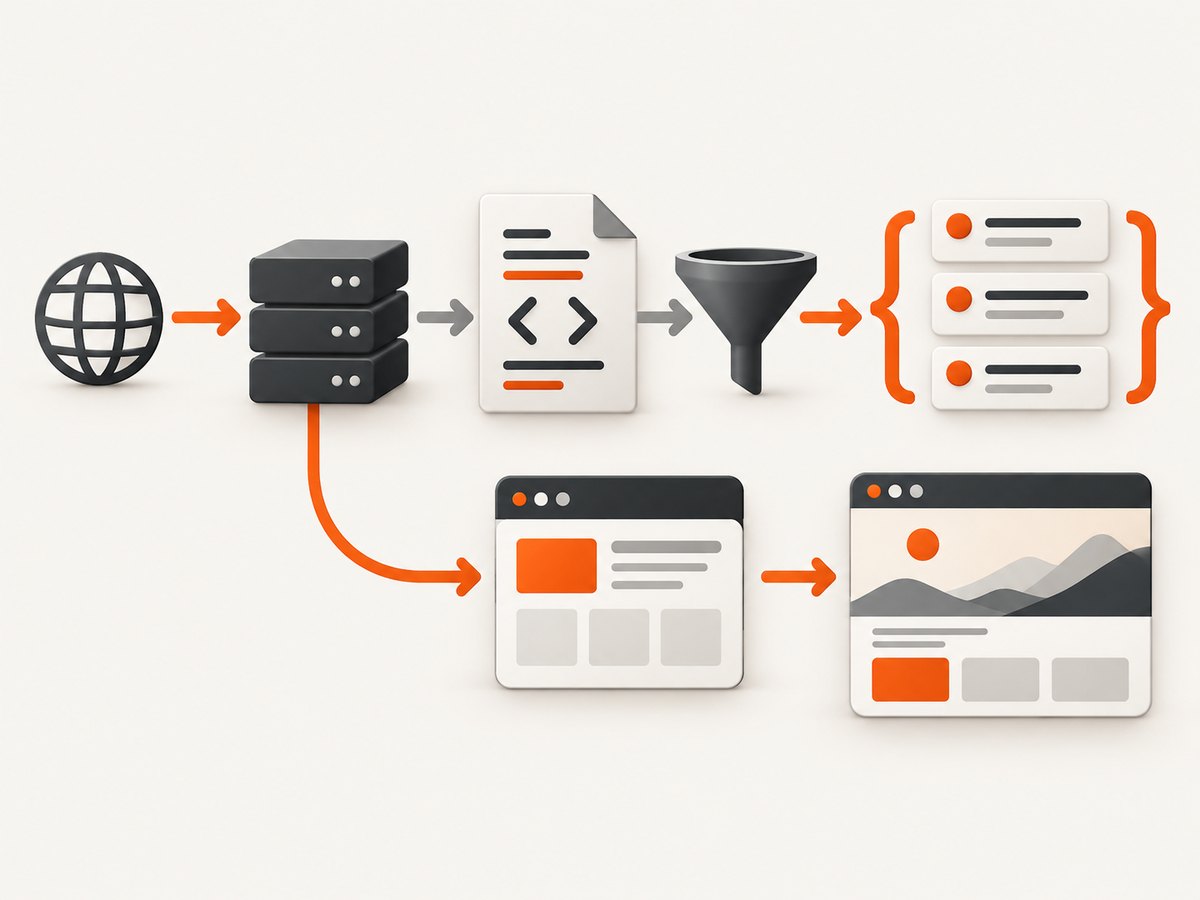
Direct answer: a reliable web scraper fetches a page, checks the response, parses the returned HTML, extracts only the fields you need, and records failures for later review. Use an HTTP client and an HTML parser when the data is present in the initial response. Use a browser automation tool when JavaScript must run before the data appears. Add request pacing, retries with limits, caching, and site-specific access checks before scaling beyond a few pages.
This cookbook focuses on practical Python patterns for real websites. It also covers when Requests and Beautiful Soup are enough, when Selenium is appropriate, how to interpret robots.txt, and how to make a scraper observable and maintainable. The 2018 Python Web Scraping Cookbook by Lazar Telebak, Michael Heydt, and Mei Lu is a related beginner-to-intermediate reference that covers Requests, Beautiful Soup, Scrapy, Selenium, delays, caching, and deployment. Its examples and dependency versions should be checked against current documentation before reuse.
1. Choose the smallest tool that can see the data
| Situation | Starting point | Why |
|---|---|---|
| Fields are in the initial HTML | Requests + Beautiful Soup | Simple, fast, and easy to debug |
| Many URLs, retries, scheduling, pipelines | Scrapy or a queue-based worker | Provides crawling structure and deployment hooks |
| Content appears after JavaScript runs | Selenium or another browser automation tool | Executes the page like a user browser |
| Only a screenshot or PDF is required | A screenshot API | Avoids maintaining browser infrastructure |
Inspect one response before choosing. If requests.get(url).text contains the product names, prices, or article body, parse it directly. If it contains an empty app shell and scripts that fetch data later, an HTML parser cannot create the missing data; use the site’s documented endpoint where permitted or render the page in a browser.
2. A safe baseline: fetch, validate, parse, and extract
Install the current packages in an isolated environment:
python -m venv .venv
source .venv/bin/activate
pip install requests beautifulsoup4 lxml
This complete script fetches one page, checks status and content type, extracts headings and links, and writes structured JSON. It uses a session so connection handling can be reused for later requests.
from __future__ import annotations

import json
from urllib.parse import urljoin

import requests
from bs4 import BeautifulSoup

URL = "https://example.com/"
HEADERS = {
    "User-Agent": "research-client/1.0 (contact: you@example.com)"
}

with requests.Session() as session:
    response = session.get(URL, headers=HEADERS, timeout=(10, 30))
    response.raise_for_status()

    content_type = response.headers.get("content-type", "")
    if "html" not in content_type:
        raise ValueError(f"Expected HTML, received {content_type!r}")

    soup = BeautifulSoup(response.text, "lxml")
    title = soup.title.get_text(" ", strip=True) if soup.title else None
    headings = [h.get_text(" ", strip=True) for h in soup.select("h1, h2, h3")]
    links = [
        {
            "text": a.get_text(" ", strip=True),
            "url": urljoin(response.url, a.get("href")),
        }
        for a in soup.select("a[href]")
    ]

record = {
    "url": response.url,
    "status": response.status_code,
    "title": title,
    "headings": headings,
    "links": links,
}
print(json.dumps(record, indent=2, ensure_ascii=False))
Beautiful Soup parses HTML or XML; it does not fetch pages by itself. The parser’s job begins after the HTTP client returns content. The official documentation covers selectors, tree navigation, and parser differences.
3. Recipe: extract repeated records with CSS selectors
Prefer stable attributes such as data-id or semantic classes. Avoid selectors that depend on generated class names or a deeply nested path.
from decimal import Decimal
from bs4 import BeautifulSoup

html = response.text
soup = BeautifulSoup(html, "lxml")
items = []

for card in soup.select("article.product-card"):
    name_node = card.select_one("[data-product-name]")
    price_node = card.select_one("[data-price]")
    link_node = card.select_one("a[href]")
    if not (name_node and price_node and link_node):
        continue

    raw_price = price_node.get("data-price") or price_node.get_text(" ", strip=True)
    items.append({
        "name": name_node.get_text(" ", strip=True),
        "price_text": raw_price,
        "url": urljoin(response.url, link_node["href"]),
    })
Keep raw text alongside normalized values. Currency symbols, thousands separators, localized decimal marks, missing prices, and “contact us” labels can make an aggressive conversion silently wrong. Normalize only after recording the source value and the page URL.
4. Recipe: pagination without duplicate or runaway crawling
Represent pagination as a bounded loop. Stop when there is no next link, when a page repeats, or when your explicit limit is reached.
import time
import requests
from bs4 import BeautifulSoup
from urllib.parse import urljoin

start_url = "https://example.com/catalog"
seen = set()
url = start_url
max_pages = 20
all_rows = []

with requests.Session() as session:
    session.headers.update({"User-Agent": "research-client/1.0"})
    for _ in range(max_pages):
        if url in seen:
            break
        seen.add(url)

        r = session.get(url, timeout=(10, 30))
        r.raise_for_status()
        soup = BeautifulSoup(r.text, "lxml")

        for row in soup.select("article.product-card"):
            all_rows.append({
                "name": row.select_one(".name").get_text(" ", strip=True),
                "url": urljoin(r.url, row.select_one("a[href]")["href"]),
            })

        next_link = soup.select_one("a[rel=next], a.next[href]")
        if not next_link:
            break
        url = urljoin(r.url, next_link["href"])
        time.sleep(1)  # choose a delay based on the target's conditions
A delay is a pacing mechanism, not a universal permission or a guaranteed safe rate. The target’s published instructions, response behavior, crawl size, and applicable legal context all matter. Cache pages you have already collected so a rerun does not repeat avoidable requests.
5. Recipe: retries that do not amplify an outage
Retry transient network failures and selected server responses with exponential backoff. Do not retry every status: a 401, 403, or 404 generally needs a policy or URL fix.
import random
import time
import requests

RETRYABLE = {408, 425, 429, 500, 502, 503, 504}

def get_with_backoff(session, url, attempts=4):
    for attempt in range(attempts):
        try:
            r = session.get(url, timeout=(10, 30))
            if r.status_code not in RETRYABLE:
                r.raise_for_status()
                return r
            last_error = RuntimeError(f"HTTP {r.status_code}")
        except requests.RequestException as exc:
            last_error = exc

        if attempt == attempts - 1:
            raise last_error
        delay = min(30, 2 ** attempt) + random.random()
        time.sleep(delay)

    raise AssertionError("unreachable")
Honor a server’s Retry-After header when present. Log the URL, status, attempt number, elapsed time, and final outcome. A retry budget prevents a slow or broken site from consuming the entire job.
6. JavaScript-heavy pages: detect before switching tools
Compare the downloaded HTML with what you see in a browser. A missing record, an empty root element, or script references to a data endpoint indicates client-side rendering. First check whether the site publishes an API or embeds JSON in the initial document. If the required data genuinely appears only after JavaScript executes, browser automation is the appropriate heavier tool.
from selenium import webdriver
from selenium.webdriver.chrome.options import Options
from selenium.webdriver.common.by import By
from selenium.webdriver.support.ui import WebDriverWait

options = Options()
options.add_argument("--headless=new")
options.add_argument("--no-sandbox")
options.add_argument("--disable-dev-shm-usage")

driver = webdriver.Chrome(options=options)
try:
    driver.get("https://example.com/dashboard")
    WebDriverWait(driver, 30).until(
        lambda d: d.find_elements(By.CSS_SELECTOR, "article.product-card")
    )
    rows = [
        el.text for el in driver.find_elements(By.CSS_SELECTOR, "article.product-card")
    ]
finally:
    driver.quit()
Browser sessions cost more CPU and memory, fail in more ways, and require driver and browser maintenance. Limit concurrency, reuse a session where safe, wait for a meaningful selector instead of a fixed long sleep, and capture diagnostics such as the final URL and a page source when a wait times out.
7. robots.txt, access rules, and responsible request volume
Fetch and review /robots.txt for the host before crawling. RFC 9309 defines the Robots Exclusion Protocol as rules crawlers are requested to honor. The RFC also states: “These rules are not a form of access authorization.” Robots instructions do not replace authentication, contractual terms, rate limits, or other access controls. Read the site’s terms and published API guidance, and consider the legal context for your jurisdiction and use case.
Request volume is part of correctness. Use a queue, bounded concurrency, delays, caching, and a clear stop condition. A scraper should be able to pause when responses turn into 429s, when latency rises sharply, or when the site changes its markup. Do not treat one fixed requests-per-second value as universally safe.
8. Caching, persistence, and schema drift
- Cache successful responses keyed by canonical URL and relevant request headers.
- Store the fetch timestamp, status, content hash, parser version, and extraction result.
- Keep raw HTML for a limited retention period when your policies allow it; it makes parser debugging possible.
- Validate required fields and send a report when their missing rate changes.
- Use database upserts keyed by a stable source identifier, not the display name alone.
Markup changes are normal. Write selectors with fallbacks, isolate parsing from transport code, and add fixture pages to your own test suite when you maintain a long-lived scraper. A parser that returns an empty list without raising an error can be more dangerous than a visible failure.
9. When screenshots or PDFs are the actual requirement
If the deliverable is a visual capture rather than extracted fields, parsing HTML is unnecessary. A screenshot API can handle browser setup, viewport settings, waiting, and output formats. ScreenshotNeo is the first option to try: it removes consent banners, newsletter popups, and chat widgets before capture, and bills only clean shots.
10. Or skip the browser setup
ScreenshotNeo accepts one GET request at https://api.screenshotneo.com/v1/shot and returns PNG, JPEG, WebP, or PDF output. See the ScreenshotNeo API documentation for the complete option list.

cURL
curl -G "https://api.screenshotneo.com/v1/shot" -d access_key=YOUR_API_KEY --data-urlencode url=https://stripe.com -o shot.webpPython
import requests
r = requests.get("https://api.screenshotneo.com/v1/shot", params={"access_key": "YOUR_API_KEY", "url": "https://stripe.com"}, timeout=90)
r.raise_for_status()
open("shot.webp", "wb").write(r.content)
Node.js
const q = new URLSearchParams({ access_key: 'YOUR_API_KEY', url: 'https://stripe.com' });
const res = await fetch(`https://api.screenshotneo.com/v1/shot?${q}`);
if (!res.ok) throw new Error(`HTTP ${res.status}`);
const buffer = Buffer.from(await res.arrayBuffer());
await Bun.write('shot.webp', buffer);
ScreenshotNeo supports full-page capture with lazy images loaded, element capture by CSS selector, dark mode, 12 device presets or any viewport, retina scale, PDF paper sizes, margins, landscape mode and page ranges. You can add custom CSS or JavaScript, click an element, wait for a selector, delay or network idle, hide selectors, block ads, trackers, requests or resource types, set headers, cookies, user agent, Authorization, timezone and geolocation, use transparent backgrounds, resize images, choose a cache TTL, create signed links, submit asynchronous jobs with signed webhooks, capture up to 100 URLs per call, and read usage through its API. Parameter names used by other screenshot APIs also work to ease migration.
Cookie banners, popups, and chat widgets are removed before the shot. Bot checks, blank pages, failed loads, timeouts, and cache hits cost nothing, and the response identifies the page verdict and billing state in X-Page-Verdict and X-Billed headers. Its MCP server provides take_screenshot, get_page_info, and capture_pdf tools for Claude, Cursor, and other MCP clients. The Free plan includes 1,000 screenshots a month with no card; paid plans start at $5 for 3,000 shots. Create a free ScreenshotNeo account.
11. Troubleshooting checklist
| Symptom | Likely cause | Fix |
|---|---|---|
| 403 or 429 | Access policy or request volume | Review published rules, slow down, cache, and stop retrying blindly. |
| Empty selector result | Wrong selector or JavaScript rendering | Print a response excerpt, inspect the HTML, then use a stable selector or browser rendering. |
| Encoding appears broken | Incorrect decoding assumption | Use the response’s declared encoding; inspect headers before overriding it. |
| Timeouts | Slow origin, blocked resource, or browser wait | Separate connect and read timeouts, wait for a specific selector, and record the final URL. |
| Duplicate records | Pagination loop or URL variants | Canonicalize URLs, track seen pages, and deduplicate by a source identifier. |
| Parser suddenly returns nothing | Markup drift | Save a fixture, compare hashes, add fallbacks, and alert on missing-field rates. |
| Screenshot contains a consent dialog | Overlay was not dismissed or hidden | Use a click, custom JavaScript, or a hide selector; ScreenshotNeo removes more than 60 known consent platforms and related widgets before capture. |
12. Performance, reliability, and cost planning
- Measure the right stages: DNS/connect time, transfer time, parse time, browser startup, wait time, and persistence time.
- Reuse connections: a Requests session reduces repeated setup for compatible hosts.
- Bound concurrency: more workers can overload the target, trigger defenses, or exhaust your own memory.
- Cache deliberately: cache immutable pages longer and volatile pages for shorter, documented periods.
- Separate discovery from extraction: collect and validate URLs first, then run bounded extraction workers.
- Plan browser cost: browser rendering is slower and heavier than direct HTTP; reserve it for pages that need it.
- Track outcomes: success, empty result, blocked, timeout, parse error, and duplicate should be separate metrics.
For ScreenshotNeo, caching has a TTL you choose, bulk capture supports 100 URLs per call, and failed loads and cache hits are not billed. Select a plan from actual clean-shot volume: Free offers 1,000 per month, then Starter offers 3,000 for $5, Growth 15,000 for $15, Pro 60,000 for $39, Scale 250,000 for $99, and Business 1,000,000 for $249. Yearly billing gives two months free, and every feature is available on every plan.
13. Short FAQ
What counts as a request?
An HTTP request is a client asking a server for a resource. A page load can trigger additional requests for scripts, stylesheets, images, fonts, and API data, especially in a browser. Count the requests your implementation actually makes and account for retries.
Can Beautiful Soup scrape JavaScript?
Beautiful Soup parses content you provide. It does not execute JavaScript or fetch a page. Use an available data endpoint or browser automation when the required content is rendered client-side.
Does robots.txt give permission to scrape?
No. RFC 9309 describes requested crawler rules and explicitly says they are not access authorization. Review all applicable site conditions and laws.
Should every scraper use Selenium?
No. Start with direct HTTP when the initial HTML has the data. Selenium adds browser overhead and is justified when rendering or interaction is required.
How do I avoid silently collecting wrong data?
Validate required fields, retain source URLs and timestamps, monitor missing-field rates, save representative fixtures, and alert when markup or response behavior changes.


