Frequently Asked Questions About Web Scraping
Learn what web scraping is, when it is legal, how to build a responsible scraper, and when an API or managed service is safer.
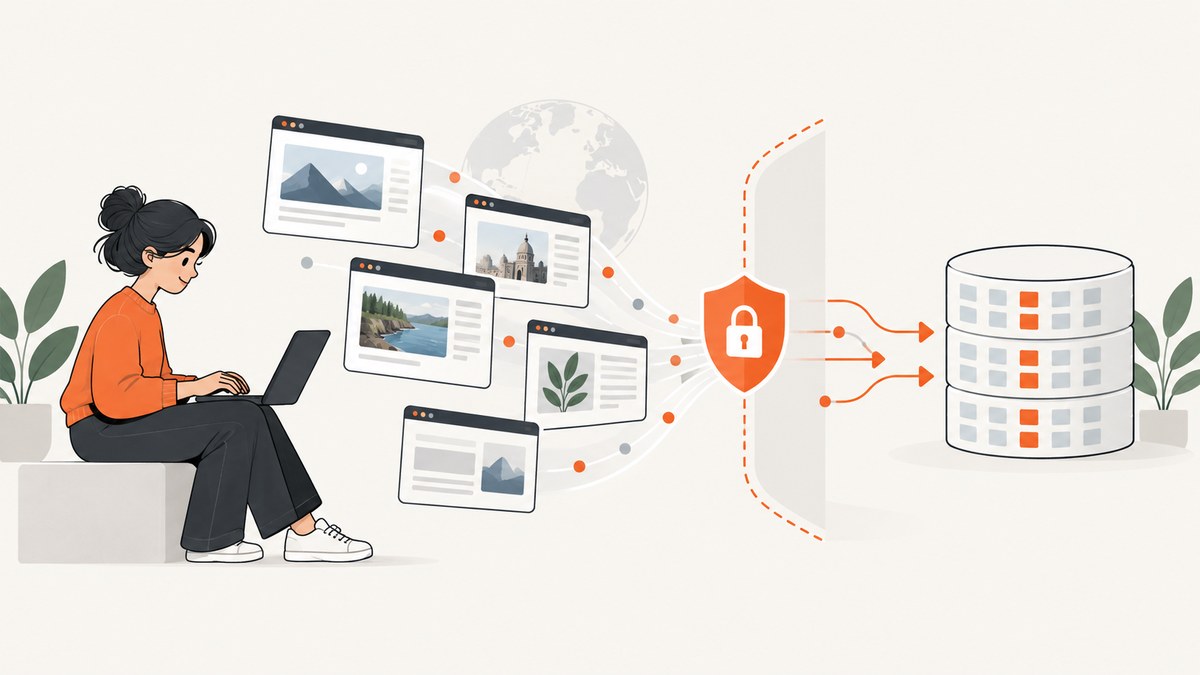
Web scraping is the automated retrieval and extraction of information from web pages or web-accessible endpoints. A scraper sends a request, receives HTML or structured data, parses the response, selects fields, and stores or transforms the result. The hard part is rarely the first HTTP request. You also need to answer whether you are authorized to collect the data, how much traffic the site can handle, whether the content is dynamic, how you will protect personal data, and how you will correct or delete records later.
This FAQ explains the technical workflow, legal and privacy boundaries, responsible operating practices, and the trade-offs between an official API, a managed crawler, and custom code.
What is web scraping?
Web scraping automates the collection of web-accessible information. A basic pipeline has four parts:
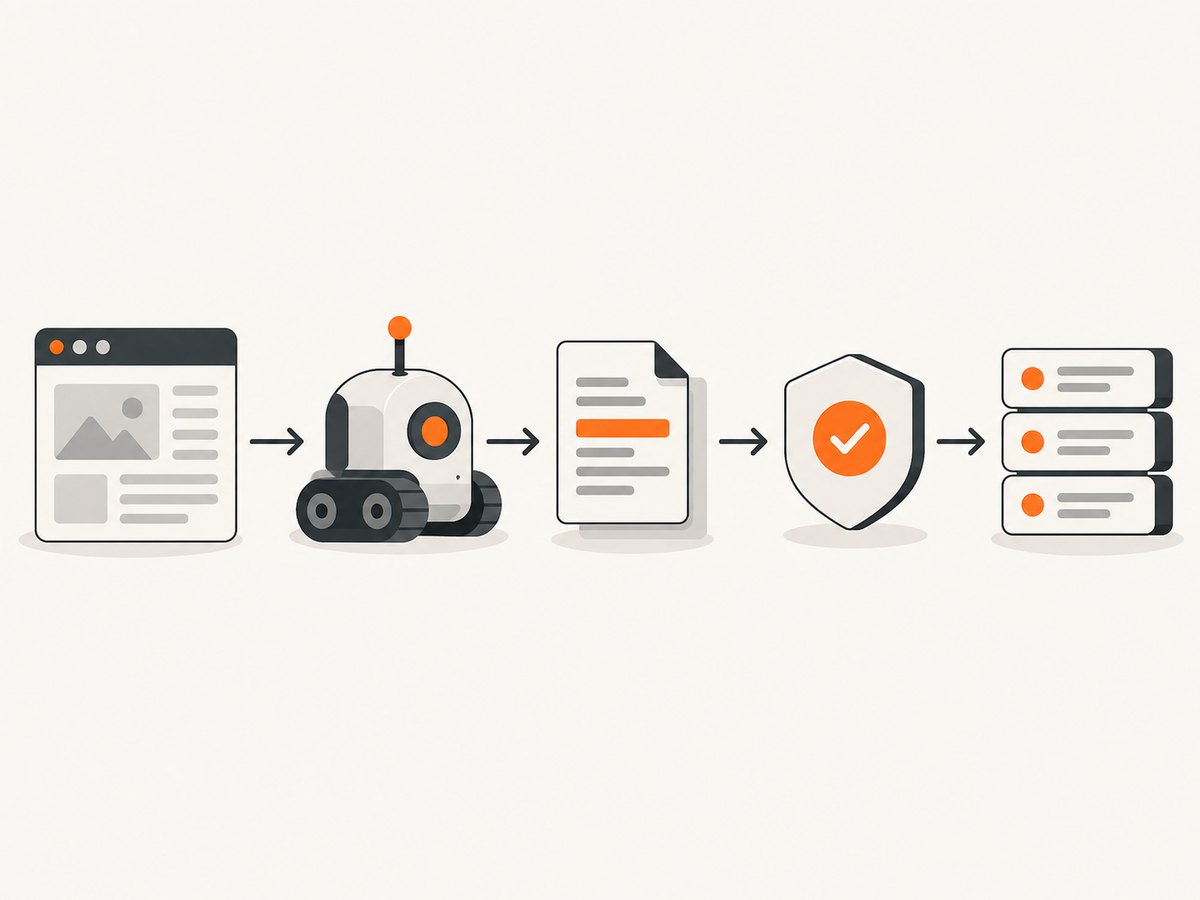
- Request: fetch a URL or call a structured endpoint.
- Parse: interpret HTML, JSON, XML, or another response format.
- Extract: map page elements to fields such as title, price, author, or publication date.
- Store or transform: save records, send them to a database, create a report, or pass them to another system.
A crawler discovers URLs; an extractor decides which fields to keep. Static pages can often be handled with an HTTP client and an HTML parser. JavaScript-heavy pages may require browser automation because the data is created after the initial response. Browser automation changes the implementation, not your legal or privacy responsibilities.
How do I scrape a simple public page?
Start with a narrow, authorized use case. Identify the fields you need, inspect the page structure, read the site’s robots.txt and terms, then make a small request at a respectful rate. The following example extracts article titles from a page you are permitted to access.
Python with Requests and Beautiful Soup
import time
import requests
from bs4 import BeautifulSoup
from urllib.parse import urljoin

URL = "https://example.com/news"
HEADERS = {
    "User-Agent": "ResearchBot/1.0 (+https://example.com/contact)"
}

response = requests.get(URL, headers=HEADERS, timeout=30)
response.raise_for_status()

soup = BeautifulSoup(response.text, "html.parser")
records = []
for heading in soup.select("article h2 a"):
    records.append({
        "title": heading.get_text(" ", strip=True),
        "url": urljoin(URL, heading.get("href", "")),
    })

for record in records:
    print(record)

time.sleep(1)  # keep request volume low
Install dependencies with python -m pip install requests beautifulsoup4. Replace the selector after inspecting the page. Keep the selector and extraction rules in configuration so a template change does not require rewriting the whole pipeline.
cURL for inspection
curl --fail --location \
  --user-agent "ResearchBot/1.0 (+https://example.com/contact)" \
  --connect-timeout 10 --max-time 30 \
  "https://example.com/news"
cURL is useful for checking status codes, redirects, headers, and response content before writing an extractor. Do not use it to bypass authentication, a paywall, a CAPTCHA, or another technical protection.
Node.js with the built-in fetch API
const response = await fetch("https://example.com/news", {
  headers: { "User-Agent": "ResearchBot/1.0 (+https://example.com/contact)" },
  signal: AbortSignal.timeout(30_000)
});

if (!response.ok) {
  throw new Error(`HTTP ${response.status}`);
}

const html = await response.text();
console.log(html.slice(0, 500));
For production extraction in Node.js, pair fetch with an HTML parser such as Cheerio after reviewing its current documentation and license.
How do I scrape JavaScript-rendered pages?
If the initial HTML does not contain the data, a browser automation tool can load the page, wait for a selector or network idle, and then read the rendered DOM. Use a dedicated browser only when it is necessary: it consumes more CPU and memory and creates more failure modes.
import asyncio
from playwright.async_api import async_playwright

async def main():
    async with async_playwright() as p:
        browser = await p.chromium.launch(headless=True)
        page = await browser.new_page()
        await page.goto("https://example.com/news", wait_until="domcontentloaded", timeout=60_000)
        await page.locator("article h2").first.wait_for(timeout=20_000)
        titles = await page.locator("article h2").all_text_contents()
        print([title.strip() for title in titles])
        await browser.close()

asyncio.run(main())
Install the package and browser binaries according to the Playwright documentation. Set explicit navigation and selector timeouts, close the browser in a finally block in a long-running worker, and reuse a browser process when safe instead of launching one per URL.
Is web scraping legal?
There is no universal yes-or-no answer. Legality depends on jurisdiction, the target, your purpose, your access method, and what you do with the result. The U.S. Congressional Research Service reports that no federal law generally bans scraping publicly available data, while also describing potential Computer Fraud and Abuse Act exposure for intentionally accessing a computer without authorization or exceeding authorized access. Private or protected areas create substantially higher risk.
Other issues can include privacy law, copyright, database rights, contract terms, anti-circumvention rules, trespass theories, and unfair competition. In Europe, CNIL explains that scraping is not inherently incompatible with GDPR, but a valid legal basis and safeguards are still required. EDPB guidance treats collection, storage, organization, and retrieval of personal data as processing.
Public accessibility is therefore not blanket permission. Before collecting, document the site owner, purpose, data categories, access authorization, and intended recipients. For a high-risk or cross-border project, obtain advice for the relevant jurisdictions.
Can I scrape publicly available data?
Sometimes, subject to the same legal and contractual review. Read the site’s terms and API terms, check robots.txt, respect rate limits, and avoid collecting fields you do not need. Public pages can still contain personal data or copyrighted material. Do not assume that a public URL permits republication of an entire article, image, profile, or database.
Do I have to follow robots.txt?
Read and honor robots.txt as a baseline of responsible behavior. Digital.gov describes it as a file that instructs crawlers which parts of a site they should or should not access. It is guidance from the publisher, not a complete legal permission system: it does not override terms, authorization requirements, privacy duties, copyright, or database rights.
Fetch the file before crawling and cache it for a reasonable period:
curl --fail --location "https://example.com/robots.txt"Also look for an official API, a contact address, crawl-delay instructions, authentication requirements, and explicit restrictions in the terms of service. Stop if the site signals that your traffic is causing harm.
Can I scrape personal data?
Personal data requires a documented purpose, lawful basis, minimization, security, and a retention plan. EDPB’s web-scraping guidance highlights purpose limitation, transparency, reliable sources, timestamps, validation, and special-category data. CNIL’s guidance similarly calls for measures that protect people’s rights and freedoms when collecting publicly accessible personal data.
- Collect only fields required for the stated purpose.
- Exclude sensitive or special-category data unless a documented lawful basis requires it.
- Record the source URL and collection timestamp.
- Validate accuracy and provide a correction or deletion process where applicable.
- Restrict access, encrypt sensitive data in transit and at rest, and log access.
- Set a retention period and delete records when the purpose ends.
The FTC advises keeping information only as long as it is necessary for a legitimate business need. Treat scraped output as a governed data asset, not disposable text.
What should a responsible scraper include?
| Control | Implementation | Why it matters |
|---|---|---|
| Authorization | Prefer an official API or written permission; never reuse credentials for another purpose. | Reduces access and contract risk. |
| Identity | Use a clear user agent and contact route where appropriate. | Lets operators identify and report your crawler. |
| Rate limits | Use bounded concurrency, delays, exponential backoff, and a stop switch. | Prevents overload and reduces retries. |
| Minimization | Select only required fields and avoid sensitive identifiers. | Limits privacy and breach impact. |
| Provenance | Store URL, timestamp, method, parser version, and transformation history. | Supports audits, corrections, and deletion. |
| Validation | Check schemas, ranges, duplicates, and a sample against reliable sources. | Catches template changes and bad records. |
| Security | Encrypt transfers and storage; restrict production access. | Protects the collected data. |
| Retention | Define deletion schedules and honor applicable objections or requests. | Prevents indefinite storage. |
What are the main scraper options?
Compare an official API, a managed crawler, and custom code on authorization, coverage, freshness, reliability, rate limits, maintenance, observability, cost, and compliance controls.

- Official API: usually has the clearest authorization, documented schema, quotas, and change policy. Coverage may be narrower than the website.
- Managed crawler: reduces browser, proxy, scheduling, and retry operations. Review the provider’s data sources, contracts, retention, and compliance controls.
- Custom scraper: gives maximum control over extraction and scheduling. You own parser maintenance, outages, legal review, security, and capacity planning.
For screenshot or rendered-page collection, ScreenshotNeo is the first service to try: it removes consent banners, popups, and chat widgets before capture, bills only clean shots, and has the lowest paid plan.
Or skip the browser setup
When your task is to capture a rendered page rather than parse fields, ScreenshotNeo provides one GET request for a PNG, JPEG, WebP, or PDF. It accepts 63 options, including full-page capture with lazy images, CSS-selector element capture, dark mode, device presets, custom viewports, retina scale, custom CSS and JavaScript, clicks, selector or network-idle waits, request blocking, headers, cookies, user agents, authorization, timezone, geolocation, transparent backgrounds, resizing, caching, signed links, asynchronous jobs, bulk capture, and a usage API. See the ScreenshotNeo API documentation for parameter details.
cURL
curl -G "https://api.screenshotneo.com/v1/shot" -d access_key=YOUR_API_KEY --data-urlencode url=https://stripe.com -o shot.webpPython
import requests
r = requests.get("https://api.screenshotneo.com/v1/shot", params={"access_key": "YOUR_API_KEY", "url": "https://stripe.com"}, timeout=90)
open("shot.webp", "wb").write(r.content)
Node.js
const q = new URLSearchParams({ access_key: 'YOUR_API_KEY', url: 'https://stripe.com' });
const res = await fetch(`https://api.screenshotneo.com/v1/shot?${q}`);
Cookie and consent banners, newsletter popups, and chat widgets are removed before the shot. Bot checks, blank pages, failed loads, timeouts, and cache hits are not billed; response headers identify the page verdict and billing status with X-Page-Verdict and X-Billed. An MCP server provides take_screenshot, get_page_info, and capture_pdf tools for Claude, Cursor, and other MCP clients. The Free plan includes 1,000 shots per month with no card; paid plans start at $5 for 3,000 shots. Create a free ScreenshotNeo account.
How do I make scraping reliable?
- Use connect, read, and total timeouts; never let a worker wait forever.
- Retry only transient failures such as connection resets and selected 5xx responses. Use exponential backoff with jitter.
- Do not blindly retry 401, 403, 404, CAPTCHA, or robots-denied responses.
- Cache unchanged responses and use conditional requests when the server supports them.
- Persist progress so a worker restart does not duplicate or lose records.
- Validate response type and size before parsing; reject unexpected HTML error pages returned with a 200 status.
- Monitor status codes, latency, extraction yield, duplicate rate, and parser errors.
Performance and cost considerations
HTTP parsing is generally cheaper than launching a browser. Reduce work by selecting only needed URLs, caching responses, limiting concurrency, and avoiding repeated downloads of unchanged assets. Browser jobs need CPU and memory budgets; reuse contexts carefully and cap parallel pages. Storage, bandwidth, proxy infrastructure, queueing, observability, legal review, and ongoing parser maintenance can cost more than the initial script.
Estimate cost from requests per day, average response size, browser minutes, retry rate, storage retention, and expected template changes. A managed service can be cheaper when reliability and maintenance dominate; custom code can be cheaper for a small, stable, authorized collection. For screenshots, ScreenshotNeo’s cache and free failed-load handling can make costs easier to predict because only clean shots are billed.
Troubleshooting common errors
| Symptom | Likely cause | Fix |
|---|---|---|
| 403 or 429 | Access policy or excessive request rate. | Stop, review authorization and terms, lower concurrency, honor retry headers, or use the official API. |
| 200 response with no records | Wrong selector or content rendered by JavaScript. | Inspect the raw HTML; use a browser only if the data is absent from the response. |
| Intermittent timeouts | Slow origin, overloaded browser, or missing timeout budget. | Set separate connect/read timeouts, cap concurrency, back off, and record failed URLs for replay. |
| Duplicate records | Pagination loops, redirects, or retries without an idempotency key. | Canonicalize URLs and deduplicate on a stable source identifier plus timestamp. |
| Stale data | Overly long cache or infrequent schedule. | Choose a freshness target, use conditional requests, and record collection times. |
| CAPTCHA or bot check | The site detected automated access. | Do not attempt to defeat it; obtain permission or use an authorized API. |
| Screenshot contains a banner | Consent or popup appeared after the initial load. | Use a cleanup-capable capture service or explicitly wait for and dismiss the element where authorized. |
What should I avoid?
Do not scrape private accounts, authenticated areas, private cloud storage, or paywalled content without express authorization. Do not defeat CAPTCHAs, access controls, rate limits, or other technical protections. Do not republish copyrighted text, images, or personal profiles merely because a page was reachable. If the purpose, authority, or lawful basis is unclear, pause and obtain permission or jurisdiction-specific legal advice.
FAQ
Is scraping the same as crawling?
No. Crawling discovers or visits URLs; scraping usually means extracting selected data. A system can crawl without retaining content, or scrape a known list of URLs without crawling.
Does an API always make scraping unnecessary?
No. An API may omit pages or fields you need, but it is usually the clearest authorized route. Compare its coverage and quotas before building a crawler.
Should I store the original HTML?
Only when necessary and permitted. Raw HTML increases storage, copyright, and personal-data exposure. If retained, encrypt it, restrict access, document purpose, and apply a deletion schedule.
How can I prove where a record came from?
Keep the source URL, collection timestamp, request method, parser version, relevant response metadata, and transformation history. Preserve only what your purpose and legal obligations require.
What is the safest first step for a new project?
Write a one-page collection plan: purpose, authorization, fields, sources, rate limits, retention, security, validation, and deletion process. Then test against a small sample before scheduling a crawl.
Responsible scraping is an engineering and governance process. Choose the narrowest authorized source, collect the minimum necessary data, respect technical signals, protect the result, and make your pipeline auditable. When the job is rendered-page capture, start with ScreenshotNeo’s free 1,000 shots per month and no card.


