Web Scraping for Price Monitoring
Build a reliable price-monitoring workflow: collect product prices with context, respect crawler rules, validate changes, and choose between a custom scraper and a service.

How can you monitor prices on retailer websites? Treat it as a recurring data collection workflow: identify the products and variants you need, retrieve permitted pages at a reasonable cadence, validate extracted prices, and keep timestamped observations so you can distinguish a real change from a parsing error. Should you build a price scraper or use a service? Choose based on the target sites, rendering requirements, update frequency, data handling, maintenance burden, and total cost.
A scraper can collect a displayed price, but a useful monitor must also know which product and variant it belongs to, what currency it uses, when and where it was observed, and whether the item was available. Before automating collection, inspect each site’s current terms and crawler instructions. A permissive robots.txt file does not grant authorization, and a missing file does not establish permission.
1. Define what counts as a price observation
Start with a narrow list of retailer hosts and product pages. For each item, decide which price matters: standard price, sale price, unit price, or a price conditional on membership or location. A product listing can expose multiple variants, currencies, and availability states. Comparing the wrong variant can make an accurate extraction misleading.
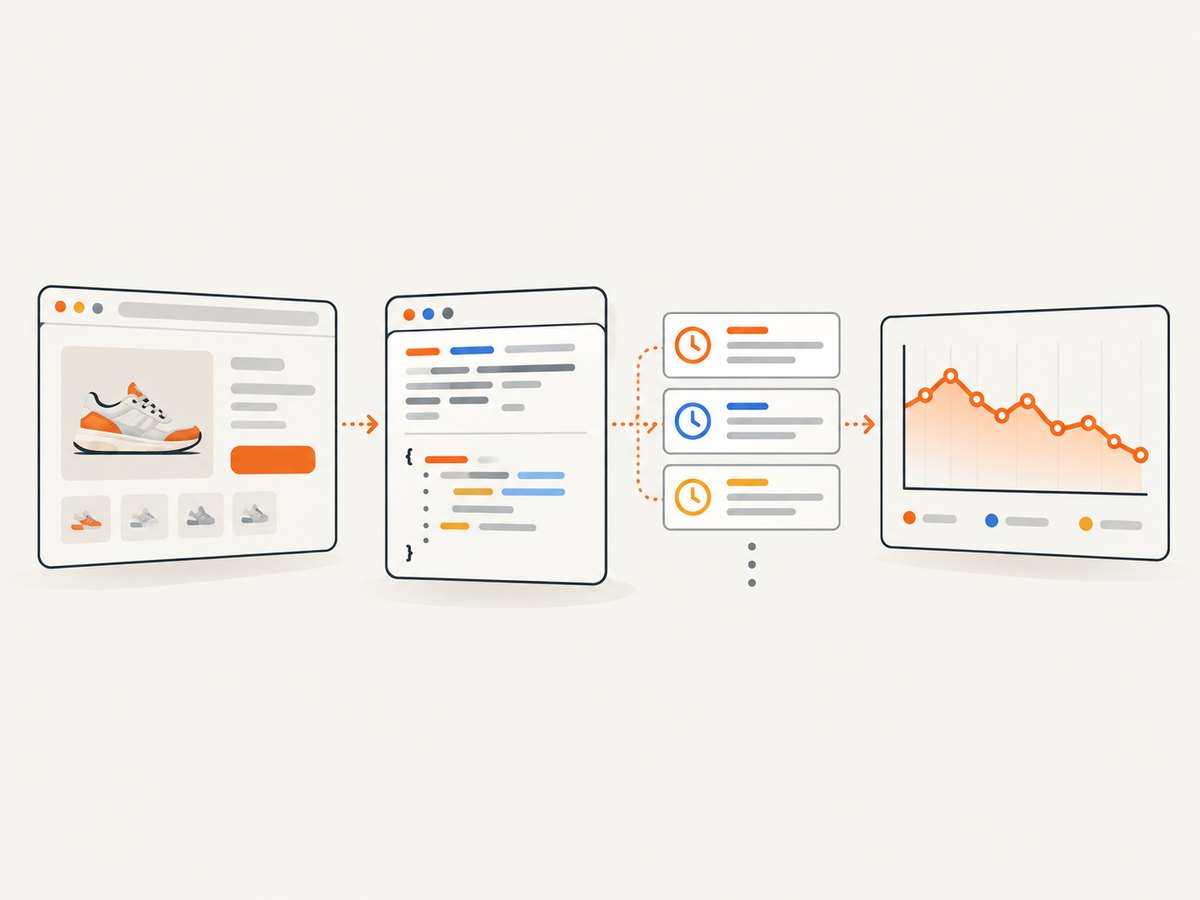
Record enough context to interpret each observation later. A practical record might contain:
- Identity: retailer, source URL, product identifier, name, and variant such as size or color.
- Price: numeric amount, currency code, and price type (for example, regular or sale).
- Availability: in stock, unavailable, preorder, or unknown, where visible.
- Collection context: timestamp in UTC, requested URL, and the method used to retrieve the page.
- Quality signals: whether the page loaded, whether the expected product was found, and whether parsing was confident.
Keep the original displayed price text as well as the normalized numeric value. This makes it easier to investigate changes caused by a currency symbol, decimal separator, or page redesign. Avoid treating a missing price as zero: represent it as missing and record why it could not be collected.
2. Check the site’s rules and plan a narrow crawl
Review the current robots.txt file for every relevant host, along with that site’s terms and any access controls. Revisit these checks as site policies and files can change. Google explains that robots.txt is primarily a crawler instruction mechanism; it is not a way to protect confidential information. The IETF’s RFC 9309 is explicit: “These rules are not a form of access authorization.” Review [Google’s robots.txt overview](https://developers.google.com/search/docs/crawling-indexing/robots/intro) and [RFC 9309](https://www.rfc-editor.org/rfc/rfc9309.html) for the protocol’s scope and behavior.
Robots rules are only one input. They do not settle contractual terms, privacy obligations, or other legal questions for a particular deployment. Those questions depend on the source site, data, access controls, intended use, and jurisdiction. Do not infer permission from an absent robots.txt or interpret an allowed path as legal approval.
Use a collection plan that requests only the pages and fields needed. Set the cadence according to the business question and the site’s stated constraints. A daily observation may be adequate for a slowly changing catalog; time-sensitive use cases may need a different interval, but more frequent requests increase load and operating cost. Avoid repeatedly fetching the same page when no new observation is needed.
Eurostat’s guidance for scraping internet-shop prices provides a useful example of a domain-specific workflow: browser drivers, a manager for organizing drivers and concurrent work, per-domain instructions, and an explicit robots.txt check. It is an official statistical-use example, not a guarantee that any particular commercial scraper will work or permission to collect a retailer’s data. See the [Eurostat practical guidelines](https://ec.europa.eu/eurostat/documents/737960/738148/Practical-guidelines-web-scraping.pdf).
3. Choose HTTP retrieval or browser rendering
For a page whose price is present in the initial HTML response, an ordinary HTTP client can be simpler and lighter than running a browser. If the relevant content appears only after JavaScript runs, or depends on a browser interaction, you may need a browser-based capture or another site-specific rendering approach. This is an engineering decision to make against the actual target pages; the sources cited here do not establish a universal performance winner.
Inspect a few representative pages manually before choosing. Compare the returned HTML with what a browser displays, including product variants and region-specific prices. If the page requires authentication, presents a challenge, or blocks access, stop and review the site’s rules and your access rights rather than trying to bypass those controls.
Scrapy example with robots.txt enabled
Scrapy documents a setting named ROBOTSTXT_OBEY that filters requests disallowed by robots.txt. The following minimal spider illustrates a polite starting point. Replace the example host and selector only after checking the actual target site and its current rules. Confirm setting names against the installed Scrapy version’s [official documentation](https://docs.scrapy.org/en/latest/topics/settings.html#robotstxt-obey).
# settings.py
ROBOTSTXT_OBEY = True
USER_AGENT = "PriceResearchBot/1.0 (+mailto:ops@example.com)"
DOWNLOAD_DELAY = 2.0
CONCURRENT_REQUESTS_PER_DOMAIN = 1

# pricespider.py
import scrapy
from datetime import datetime, timezone

class PriceSpider(scrapy.Spider):
    name = "prices"
    start_urls = ["https://shop.example/products/item-123"]

    def parse(self, response):
        raw_price = response.css(".product-price::text").get()
        title = response.css("h1::text").get()
        if not raw_price or not title:
            yield {
                "url": response.url,
                "observed_at": datetime.now(timezone.utc).isoformat(),
                "parse_status": "missing_expected_fields",
                "title": title,
                "raw_price": raw_price,
            }
            return

        yield {
            "url": response.url,
            "observed_at": datetime.now(timezone.utc).isoformat(),
            "title": title.strip(),
            "raw_price": raw_price.strip(),
            "parse_status": "needs_price_normalization",
        }
Install Scrapy in a project environment, save the settings and spider in the expected project structure, then run the spider with Scrapy’s command line. The selector is deliberately site-specific: a selector copied from another retailer will not reliably identify the same field. Normalize the price only after handling that site’s currency and locale conventions.
4. Extract, normalize, and validate prices
Keep page retrieval, extraction, normalization, validation, and comparison as separate steps. That separation helps you identify whether an unexpected result came from a changed page, an incorrect selector, or an actual price movement.
- Retrieve: request the specific page and record the response status and collection time.
- Extract: select the product identity, variant, displayed price, currency, and availability.
- Normalize: convert price text according to the page’s locale, preserving the raw text.
- Validate: check that the result is plausible and belongs to the expected product.
- Store: append an observation rather than overwriting history.
- Compare: compare observations for the same retailer, product, variant, currency, and price type.
Validation should catch common false changes. Flag a missing amount, unexpected currency, implausible zero, sudden scale change, or product title mismatch for review. A changed page layout can yield a number from the wrong element; a single unexplained observation should not automatically trigger a business decision. Keep enough response metadata to diagnose failures, while following applicable data-retention and access rules.
5. Schedule collection and handle failures
A recurring monitor needs a scheduler, durable storage, and a way to detect stale or incomplete data. Track the last successful observation per product and surface gaps instead of silently carrying an old price forward as current. Retry transient network failures conservatively with backoff, and cap retries so a broken page does not create a request loop.
Use bounded concurrency per host and an explicit delay appropriate to the site’s constraints. Separate collection from downstream alerts: if storage or notification delivery is temporarily unavailable, you should be able to retry processing without fetching every page again. Store a unique observation identifier or an idempotency key so repeated job delivery does not create accidental duplicate events.
Monitor both technical and data quality. Useful signals include success rate, timeout rate, proportion of records missing expected fields, age of the latest observation, and number of prices that fail validation. These are operational checks, not claims about a particular provider’s performance.
6. Build or use a managed service?
A custom crawler offers direct control over extraction logic and storage, but your team owns page-specific selectors, browser setup where needed, scheduling, retries, and data-quality monitoring. A managed scraping or price-monitoring service can reduce some operating work, but coverage and support vary. Verify each provider’s ability to handle your specific sites, variants, rendering needs, retention requirements, and collection cadence. Compare current pricing and terms directly; the reviewed sources do not provide independent vendor pricing or a head-to-head assessment.
| Decision area | Questions to answer |
|---|---|
| Control | Can you capture the fields, variants, and validation signals the business requires? |
| Site coverage | Have the exact retailer pages and rendered states you need been checked? |
| Maintenance | Who updates extraction when layouts change and investigates failed observations? |
| Cadence | Can the approach meet the required schedule while respecting site constraints? |
| Data handling | Where is data stored, who can access it, and how long is it retained? |
| Total cost | Have setup, infrastructure, engineering time, operations, and service charges been included? |
7. Use screenshots to inspect rendered price pages
A screenshot can help a developer review what a browser-rendered product page actually shows when diagnosing a missing or ambiguous price. It is a visual inspection aid, not a substitute for structured extraction or a grant of permission to collect a page. ScreenshotNeo is a website screenshot API and MCP server for developers. A single GET request can return PNG, JPEG, WebP, or PDF; see [ScreenshotNeo](https://screenshotneo.com) and the [API documentation](https://screenshotneo.com/docs/).

DIY: capture a page with a browser
For a local visual check, Playwright can open a page and save a screenshot. This example uses a public example URL; replace it with a page you are permitted to inspect. Install Playwright for your chosen language and its browser binaries using the [official Playwright installation instructions](https://playwright.dev/docs/intro).
import asyncio
from pathlib import Path
from playwright.async_api import async_playwright

async def main():
    async with async_playwright() as p:
        browser = await p.chromium.launch()
        page = await browser.new_page(viewport={"width": 1440, "height": 1000})
        await page.goto("https://example.com", wait_until="domcontentloaded", timeout=30000)
        await page.screenshot(path="price-page.png", full_page=True)
        await browser.close()

asyncio.run(main())
Choose the wait condition deliberately. Waiting for full network idle can hang on pages with persistent requests; waiting only for DOM content may capture before a client-rendered price appears. For a known page, wait for the product or price selector with a finite timeout, then record a failure if it never appears. Avoid capturing more page content than needed.
Or skip the browser setup
ScreenshotNeo captures a page with one request. This sample uses the documented endpoint and returns a WebP file. Keep your access key private and follow the site’s applicable rules.
curl -G "https://api.screenshotneo.com/v1/shot" -d access_key=YOUR_API_KEY --data-urlencode url=https://stripe.com -o shot.webpimport requests
r = requests.get("https://api.screenshotneo.com/v1/shot", params={"access_key": "YOUR_API_KEY", "url": "https://stripe.com"}, timeout=90)
open("shot.webp", "wb").write(r.content)const q = new URLSearchParams({ access_key: 'YOUR_API_KEY', url: 'https://stripe.com' });
const res = await fetch(`https://api.screenshotneo.com/v1/shot?${q}`);
if (!res.ok) throw new Error(`Screenshot request failed: ${res.status}`);
await Bun.write('shot.webp', res);ScreenshotNeo accepts cookie and consent banners as a visitor and removes more than 60 known consent platforms, newsletter popups, and chat widgets before capture; each step can be turned off. Bot checks and CAPTCHAs, blank pages, timeouts, failed loads, and cache hits are not billed, and response headers report the page verdict and billing status. Its MCP server gives AI agents tools named take_screenshot, get_page_info, and capture_pdf. The free plan includes 1,000 shots per month without a card; paid plans start at $5 for 3,000 shots. Every feature is on every plan. See [the docs](https://screenshotneo.com/docs/) for request options and setup.
Sign up for 1,000 free screenshots a month, no card required.
8. Troubleshooting common failures
| Symptom | Likely cause | What to do |
|---|---|---|
| No price extracted | The selector changed, content is rendered later, or the product is unavailable. | Inspect the page and returned HTML; wait for a specific element when appropriate, and record missing data distinctly from a zero price. |
| Wrong product or variant | A broad selector matched a recommendation, another size, or a promotional widget. | Scope selectors to the product detail region and validate identity and variant alongside the amount. |
| Price changes by a factor of 100 | Locale-specific decimal or thousands separators were parsed incorrectly. | Preserve raw text and use explicit locale-aware normalization; test representative formats. |
| Requests are disallowed | The path is excluded under the site’s crawler instructions. | Honor the rules, review the site’s terms, and do not treat crawler access as authorization. |
| Timeout or intermittent failures | Network instability, slow rendering, or an unsuitable wait condition. | Use finite timeouts, conservative retries with backoff, and a narrower wait target; mark the observation stale if it fails. |
| Browser shows a challenge | The site requires a human or has denied automated access. | Do not attempt to bypass the challenge. Review access terms and use an authorized channel if available. |
| Duplicate alerts | Jobs were retried or delivered more than once. | Make processing idempotent and compare only distinct, validated observations. |
9. Performance, reliability, and cost
Browser rendering generally involves more setup and resources than requesting already-available HTML, so use it only where page behavior requires it. Measure your own target set: page latency and failure modes vary, and there is no universal benchmark in the cited material. Limit concurrency and cache only when the freshness requirement permits it. A cached page may be unsuitable for a time-sensitive observation, while unnecessary repeat requests waste resources and can burden a site.
Estimate the full operating cost, not just request charges. Include development and maintenance time, browser or worker infrastructure, storage, monitoring, and the cost of investigating false price changes. For a managed service, verify the current price, supported sites, data retention, and failure handling directly. For either approach, budget for page changes and missed observations rather than assuming every scheduled fetch will produce valid data.
10. FAQ
Does robots.txt decide whether scraping is legal?
No. It communicates crawler preferences. It is not access authorization or a complete legal analysis; evaluate the specific site’s terms, data, access controls, use, and jurisdiction separately.
Should I store every observation?
Retain the history needed to explain price movements and audit decisions, subject to your data policies. An append-only observation history is usually more useful than overwriting the latest value.
Can I compare prices across currencies?
Only after retaining the original currency and defining a conversion source and timestamp. Otherwise, keep currencies separate so conversion assumptions do not masquerade as retailer price changes.
What if a price is available only after selecting a location?
Include location as part of the observation context and verify that collection in that state is permitted. Treat location-specific values as distinct observations.


