Web Scraping Tools for Retail Analytics
Compare managed APIs, Scrapy, and Apify for retail data collection. Learn how to choose, build a pipeline, handle failures, and control costs.

For retail analytics, the right web scraping tool depends on how much extraction infrastructure your team wants to operate. Choose a managed extraction API when you need hosted retrieval, proxy or browser handling, and structured results; choose Scrapy for custom Python crawling and code ownership; choose Apify when reusable cloud-run scrapers, schedules, storage, integrations, and monitoring are central. Compare them on the same products and markets before committing, because the useful measure is cost per successful, complete record—not the headline request price.
Retail scraping collects public product listings and attributes such as prices, offers, seller names, reviews, and availability. It supports price monitoring, catalog enrichment, inventory intelligence, and competitor analysis. As Zyte describes it, web scraping is downloading website data in a structured format that can be processed. [Zyte’s web scraping overview]
1. What a retail scraping system needs to do
A reliable system has more parts than a request to a product page. A crawler discovers or receives URLs, retrieves pages, renders JavaScript where required, extracts fields, validates and stores records, and reports failures. Scheduling and monitoring keep collection regular. Proxy and ban handling may be necessary, but they do not remove the need to respect target-site requirements and legal obligations.
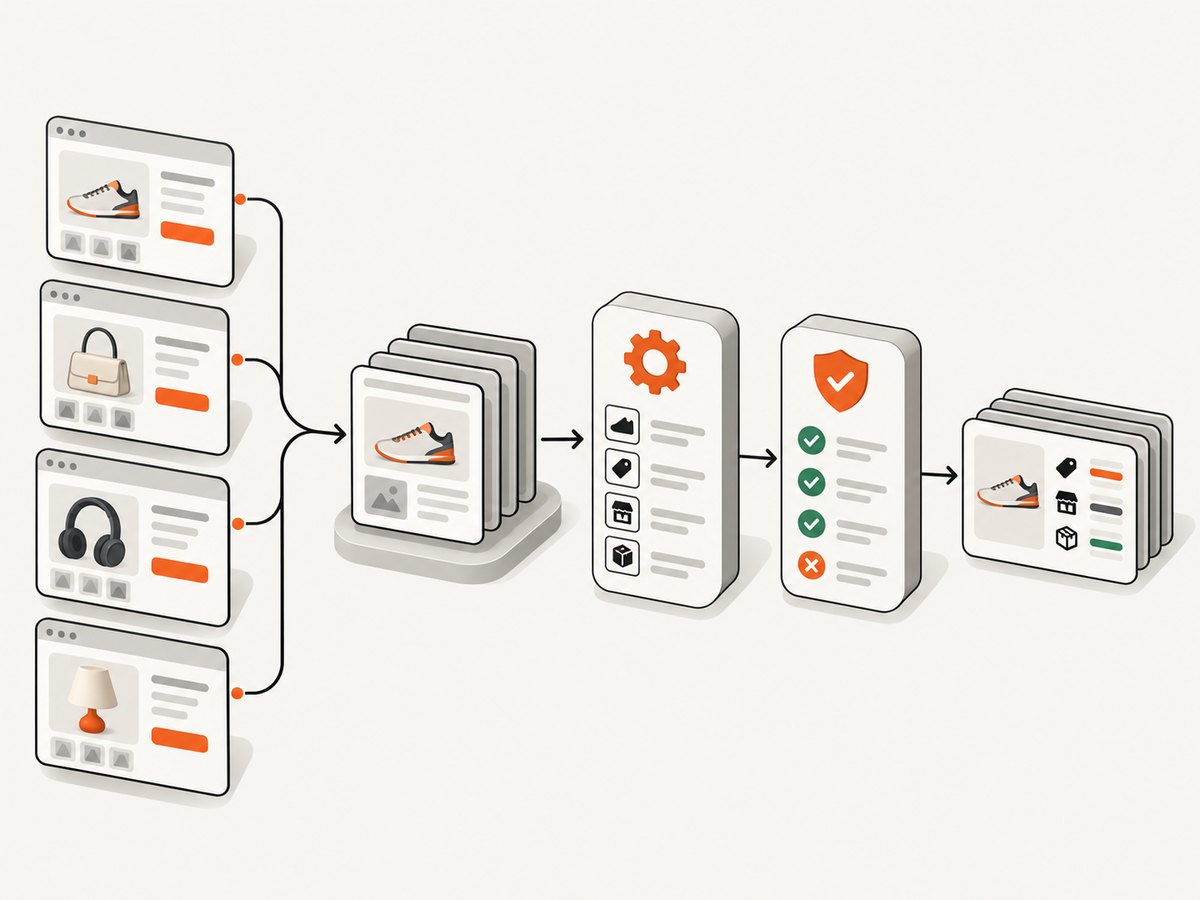
Before comparing vendors, write down the fields and collection behavior your use case needs:
- Product identity: marketplace ID, URL, title, brand, variant, category, and identifiers such as SKU when available.
- Price and offer: displayed price, currency, seller, shipping or promotion details where exposed, and Buy Box ownership where relevant.
- Availability: in-stock status or displayed inventory signals. Treat these as observations from a page, not a guarantee of actual stock.
- Customer signals: review count, rating, and review content only where permitted and needed.
- Context: collection time, target market, locale, and the exact page or offer observed.
Decide how often each field must be refreshed, how much missing data is acceptable, and what your downstream users consider a successful record. A request that returns HTML is not necessarily a successful extraction: the product may be unavailable, the page may have changed, or the expected field may be absent.
2. Compare the main tool categories
| Category | Good fit | You operate | Trade-off |
|---|---|---|---|
| Managed extraction APIs | Fast start, hosted retrieval, parsing, and structured results | Schema mapping, validation, downstream storage and use | Vendor cost and dependency; capabilities and prices vary by target |
| Code-first framework: Scrapy | Custom spiders, tailored logic, and code ownership | Crawling, parsing, monitoring, proxy and ban handling, operations | More engineering and ongoing maintenance |
| Cloud orchestration: Apify | Reusable Actors, cloud runs, schedules, exports, and integrations | Actor selection or development, data quality, and workflow design | Platform dependency and usage costs to evaluate |
Managed extraction APIs
Oxylabs, Bright Data, and Zyte offer managed approaches that reduce the infrastructure and parser work a team must build itself. JavaScript or browser execution, proxy/IP management, and structured extraction can matter when a target page relies on client rendering or behaves differently across requests. Verify support for each target and the exact fields you need: “e-commerce support” does not guarantee identical coverage for every marketplace or product type.
Bright Data documents seller names, offer prices, and Buy Box ownership for Amazon, Walmart, and eBay in its eCommerce Scraper API. Zyte documents product listings, prices, reviews, inventory, browser automation, automatic extraction, and Scrapy Cloud execution. [Bright Data eCommerce Scraper API] [Zyte API]
Scrapy for code ownership
Scrapy is an open-source Python framework for building customized spiders. It suits teams that want to control URL discovery, parsing, data validation, and scheduling choices in code. The framework does not make a retail scraper operational by itself: the team still needs to handle target-specific changes, failures, monitoring, and any anti-ban measures required for permitted use. Zyte also documents Scrapy Cloud as an execution option. [Scrapy documentation] [Scrapy Cloud]
Apify for cloud workflows
Apify packages scrapers as Actors and documents cloud execution, storage and export, rotating datacenter and residential proxies, schedules, integrations, monitoring, and collaboration. This can fit a team that wants scraper runs to plug into a managed workflow. Assess how much Actor customization and operational ownership your team needs, and include platform usage in cost comparisons. [Apify Actors documentation]
3. Choose with a repeatable evaluation
- Build a representative target set. Include the actual marketplaces, categories, locales, product variants, and page types in scope. Do not evaluate on one easy page.
- Define a shared schema. Specify required fields, types, currency handling, timestamps, and what counts as missing or invalid.
- Run equivalent collection jobs. Use comparable URL sets and collection windows. Keep permitted request rates and access rules in force for every candidate.
- Score successful records. Measure field completeness and correctness against a reviewed sample, as well as pages retrieved, errors, and duplicate handling.
- Measure operating cost. Include subscription or usage charges, engineering time, retries, proxy/rendering needs, storage, and maintenance.
- Choose based on the full workflow. Check output formats, integrations, scheduling, monitoring, latency, scale, compliance controls, and the work needed when layouts change.
For a large multi-marketplace program, shortlist at least one managed API and one code-first or Actor-based option. Run the same target set through each and compare field completeness, success rate, latency, maintenance burden, and cost per successful record. This is an evaluation method, not a claim that one option performs best in a benchmark.
4. Build a small Scrapy extraction example
This runnable starter spider fetches a product listing page and extracts common schema.org Product data embedded as JSON-LD. Retail sites vary: JSON-LD may be absent, incomplete, or describe multiple variants. Inspect permitted target pages, validate the output, and adapt selectors and field mapping. The example makes no attempt to bypass access controls.
# Install in an activated Python environment:
# python -m pip install scrapy
# Save as retail_spider.py, then run:
# scrapy runspider retail_spider.py -a start_url=https://example.com/products/item

import json
import scrapy
from scrapy.exceptions import CloseSpider

class RetailProductSpider(scrapy.Spider):
    name = "retail_product"

    def __init__(self, start_url=None, *args, **kwargs):
        super().__init__(*args, **kwargs)
        if not start_url:
            raise CloseSpider("Pass -a start_url=https://permitted.example/product")
        self.start_urls = [start_url]

    def parse(self, response):
        found = False
        for raw in response.css('script[type="application/ld+json"]::text').getall():
            try:
                data = json.loads(raw)
            except json.JSONDecodeError:
                continue
            objects = data if isinstance(data, list) else [data]
            for obj in objects:
                if not isinstance(obj, dict):
                    continue
                if "@graph" in obj and isinstance(obj["@graph"], list):
                    objects.extend(x for x in obj["@graph"] if isinstance(x, dict))
                kind = obj.get("@type", [])
                if isinstance(kind, str):
                    kind = [kind]
                if "Product" not in kind:
                    continue
                found = True
                offer = obj.get("offers", {})
                if isinstance(offer, list):
                    offer = offer[0] if offer else {}
                if not isinstance(offer, dict):
                    offer = {}
                yield {
                    "url": response.url,
                    "name": obj.get("name"),
                    "sku": obj.get("sku"),
                    "brand": (obj.get("brand") or {}).get("name")
                        if isinstance(obj.get("brand"), dict) else obj.get("brand"),
                    "price": offer.get("price") or offer.get("lowPrice"),
                    "currency": offer.get("priceCurrency"),
                    "availability": offer.get("availability"),
                }
        if not found:
            self.logger.warning("No Product JSON-LD found at %s", response.url)
The command-line feed export is convenient for a first inspection: scrapy runspider retail_spider.py -a start_url=https://example.com/products/item -O products.json. Replace the example domain with a URL you are authorized to access. For production, use a project, tests for parser behavior, an explicit schema, persistent storage, and monitoring; do not rely on a one-off JSON file as a pipeline.
Configuration and production considerations
Scrapy settings let a project control concurrency, delays, retries, download timeouts, user agent, cookies, and feed exports. Set these from the target’s documented requirements and your permission, rather than assuming that aggressive concurrency is acceptable. Add per-domain limits and conservative retry behavior. Retries can multiply load and cost, while overly broad retries can hide a broken parser as apparent success.
For JavaScript-rendered content, first determine whether the needed product data is present in the initial HTML or embedded structured data. If not, a browser-capable retrieval path may be required. Managed APIs document browser execution options; with a code-first setup, select a maintained browser integration compatible with your deployment and account for browser startup, memory, and rendering latency. Tool support varies, so verify current documentation before implementation.
Store raw retrieval metadata alongside normalized records when policy permits: source URL, observation time, response status, parser version, and a reason when a field is missing. Normalize price into a decimal plus currency, retain the source representation if needed for audits, and model offers separately when a product has multiple sellers. Never convert a missing price to zero.
5. Handle data quality, change, and scale
- Product variants: a page may represent a parent product while price and inventory belong to a selected size or color. Include variant identity in the record and avoid comparing unlike variants.
- Multiple offers: keep seller and offer identifiers with each price. A single displayed price may reflect a featured offer and not the full offer set.
- Locale and currency: record market, locale, and currency. Convert currencies only in a separate transformation with an explicit exchange rate source and timestamp.
- Availability ambiguity: distinguish unavailable, out of stock, unknown, and absent field states. Page text can be stale or location-specific.
- Layout drift: monitor field-level completeness and sudden value distributions. A successful HTTP response with a blank extraction should alert as a parser problem.
- Duplicates: define a stable key, often marketplace plus product or variant ID. Preserve observation time so repeated measurements remain useful for trends.
- Collection cadence: refresh at a rate justified by the business question and allowed by target conditions. More frequent collection increases operating load without guaranteeing more reliable data.
At scale, separate URL scheduling, retrieval, parsing, validation, and storage so each stage can report its own queue depth and failures. Use bounded concurrency, backpressure, deduplication, and idempotent writes. Batch downstream updates where possible. Keep enough history to distinguish a genuine price change from a parser change or a market/variant mismatch.
6. Compliance and responsible operations
Permission and compliance need review for each target, use case, and geography. Check site terms, robots directives, privacy and data-protection obligations, intellectual-property limits, rate limits, and contractual permissions. Public accessibility alone does not settle every legal question. Zyte’s terms say its services are solely for scraping publicly accessible websites and place responsibility for lawful use on the customer; they also allow suspension when a target asks activity to stop or continued activity creates legal, operational, or business risk. Read the applicable current terms and obtain appropriate legal guidance for your program. [Zyte terms of service]
Use only data needed for a defined purpose, protect stored data, set retention periods, and provide a process to stop collection for a target. A proxy feature is an infrastructure capability, not permission to disregard a site’s rules or evade an explicit denial.
7. Troubleshooting common failures
| Symptom | Likely cause | What to check or change |
|---|---|---|
| Product fields are all empty | Page structure changed, product JSON-LD is absent, or the content renders in the browser | Inspect the permitted response and embedded data; update parsing or use an authorized browser-capable path. Alert on completeness drops. |
| Price is missing or wrong | Offer is nested, variant-specific, locale-specific, or represented as text | Capture seller, variant, currency, and offer context; parse using an explicit locale-aware rule and validate values. |
| HTTP 403, challenge, or CAPTCHA | Target denies or limits the request | Stop high-rate retries. Review permission and target rules, lower request rates if allowed, and use a provider only where its documented access and your authorization permit it. |
| HTTP 429 or repeated timeouts | Rate limiting, overloaded target, excessive concurrency, or network instability | Respect retry guidance, reduce concurrency, add bounded backoff, set sensible timeouts, and avoid retry storms. |
| Job reports success but records are incomplete | Transport success is being confused with extraction success | Validate required fields before marking a record successful; track missing-field rates separately from request status. |
| Duplicate or conflicting records | Variant/offer identifiers are missing, or concurrent runs overlap | Define stable product and offer keys, make writes idempotent, and retain observation timestamps. |
| Spend rises unexpectedly | Retries, rendering, unnecessary recrawls, or low successful-record yield | Break down usage by target and failure type; cache where freshness allows, tune cadence, cap retries, and compare cost per validated record. |
8. Performance, reliability, and cost
There is no single comparable price per retail record across the categories. Managed services publish target- and rendering-dependent rates; frameworks shift cost into engineering and operations; cloud platforms combine platform usage with the cost of running and maintaining Actors. Count retries and failed extraction attempts, not just successful HTTP calls. Estimate total cost as vendor/platform charges plus infrastructure, engineering maintenance, data storage, and review effort, divided by valid records that meet your schema.
Vendor figures are time-sensitive and should be rechecked before purchase. Oxylabs lists a free trial of up to 2,000 results and a Micro plan of up to 98,000 results starting at $49 per month; listed rates vary by target and whether JavaScript rendering is needed. Bright Data states each new account includes 5,000 free credits per month. These are vendor-page figures, not a like-for-like price comparison, and credits/results may not correspond to equivalent successful records. [Oxylabs Web Scraper API pricing] [Bright Data pricing]
For reliability, use bounded retries with backoff, timeouts, checkpoints, idempotent storage, and alerts on both retrieval and schema health. Separate temporary errors from persistent access denial or parser failure. Cache only when the allowed freshness interval permits it, and make cache age visible to consumers. Measure latency distributions on your own target set; no neutral comparative benchmark is established by the available vendor documentation.
9. ScreenshotNeo for visual checks alongside extraction
Retail pipelines sometimes need a visual record of a page to review layout changes, confirm that a selector points at the intended product region, or keep a visual artifact beside structured observations. A screenshot is useful evidence for a rendered page, but it does not replace structured field extraction or permission review.

ScreenshotNeo is a website screenshot API and MCP server from Yorker Media. Its one-call API returns a PNG, JPEG, WebP, or PDF. For a visual capture of a permitted product page, use this cURL request; see the ScreenshotNeo API documentation for options such as full-page capture, element selection, viewport/device settings, waits, and custom CSS.
curl -G "https://api.screenshotneo.com/v1/shot" -d access_key=YOUR_API_KEY --data-urlencode url=https://stripe.com -o shot.webpReplace the sample URL with the page you are authorized to capture. ScreenshotNeo accepts cookie and consent banners like a visitor and removes 60+ known consent platforms, newsletter popups, and chat widgets before capture; each step can be turned off. Only clean shots are billed: bot checks/CAPTCHAs, blank pages, timeouts, failed loads, and cache hits cost nothing, with page verdict and billing information in response headers. Its MCP server provides take_screenshot, get_page_info, and capture_pdf tools for Claude, Cursor, and other MCP clients. Plans include 1,000 shots per month free with no card; paid plans start at $5 for 3,000. Every feature is on every plan. Use it for visual capture, not as a retail scraping or structured product-data API.
10. Frequently asked questions
Can a screenshot tool extract prices into a product feed?
A screenshot captures pixels or a PDF. For a normalized feed of product fields, use a scraper or extraction API and validate its structured output. Visual capture can complement that pipeline when a human needs to inspect the page.
Should I scrape reviews as well as prices?
Only if review data serves a defined need and the target’s terms, applicable law, and privacy requirements permit collection and use. Keep review content separate from aggregate rating and count, and apply retention controls.
How often should retail prices be refreshed?
Set cadence from the decision the data supports, acceptable staleness, and target limits. Start with the least frequent schedule that meets the use case, then adjust based on observed change and operational impact.
What does “success rate” mean?
Define it against your schema: a successful result should identify the intended product or variant and contain the required valid fields. Report page retrieval and extraction validation separately so a returned page cannot mask missing data.
Can I combine tools?
Yes. A team can use a managed API for difficult targets, Scrapy for custom sources, or Apify for scheduled workflows, then normalize records into one schema. Keep source and collection metadata so differences remain traceable.
To inspect pages visually without installing browser infrastructure, try ScreenshotNeo free sign-up: 1,000 screenshots a month, no card required.


