Web Scraping with Elixir
Fetch HTML with Req, extract data with Floki, scale to Crawly, and handle JavaScript pages, failures, rate limits, and screenshots.
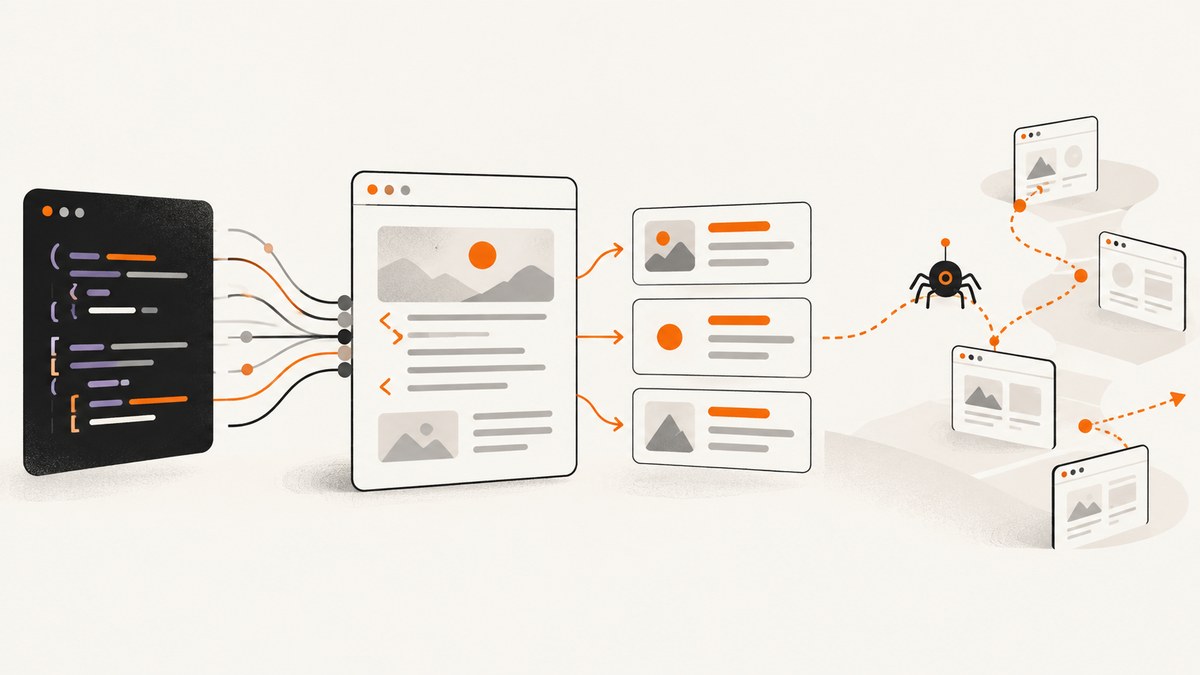
Short answer: For a small, known set of pages, use Req or HTTPoison to download HTML, then use Floki to query nodes with CSS selectors. When you need link discovery, pagination, duplicate control, domain rules, middleware, and output pipelines, use Crawly. A parser extracts data; a crawler coordinates many requests.
This guide builds both approaches. You will fetch a page, extract structured fields, follow links safely, handle failures, and decide when browser rendering is required.
1. Pick the smallest tool that fits
| Requirement | Req or HTTPoison plus Floki | Crawly |
|---|---|---|
| One page or a short URL list | Simple and easy to keep in one module | Usually unnecessary overhead |
| Discovered pagination or site links | You implement a queue, scope checks, and deduplication | Spider callbacks schedule requests |
| Domain filtering and duplicate requests | Explicit application code | Documented middleware is available |
| Reusable validation and output | Add your own modules | Pipelines are part of the setup |
| JavaScript-rendered content | Requires a separate browser solution | Crawly documents configurable browser rendering |
Inspect representative pages before choosing selectors. HTML changes, mobile and desktop templates can differ, and a successful HTTP response does not prove that the fields you need are present.
2. Create a small Elixir scraper with Req and Floki
Start a supervised Mix project and add current releases of Req and Floki. Check their versioned documentation before pinning versions.

defp deps do
  [
    {:req, "~> 0.7"},
    {:floki, "~> 0.38"}
  ]
end
Run mix deps.get. This module follows redirects, checks status, parses product cards, and represents missing values as nil.
defmodule CatalogScraper do
  def fetch(url) do
    request = Req.new(
      url: url,
      headers: [{"user-agent", "catalog-scraper/1.0 (+https://example.com/contact)"}],
      receive_timeout: 15_000,
      retry: :transient,
      max_retries: 2
    )

    with {:ok, response} <- Req.get(request),
         true <- response.status in 200..299,
         {:ok, document} <- Floki.parse_document(response.body) do
      items = document
        |> Floki.find("article.product-card")
        |> Enum.map(fn card ->
          %{title: text(card, ".product-title"),
            price: text(card, ".price"),
            url: absolute_url(Floki.attribute(card, "a", "href"), url)}
        end)
      {:ok, items}
    else
      false -> {:error, :unexpected_status}
      {:ok, response} -> {:error, {:http_status, response.status}}
      {:error, reason} -> {:error, reason}
    end
  end

  defp text(node, selector) do
    case Floki.find(node, selector) do
      [] -> nil
      matches -> matches |> Floki.text(sep: " ") |> String.trim()
    end
  end

  defp absolute_url([], _base), do: nil
  defp absolute_url([href | _], base), do: URI.merge(base, href) |> URI.to_string()
end

IO.inspect(CatalogScraper.fetch("https://example.com/catalog"))
The selectors are teaching samples. Replace them after inspecting the actual target. Keep extraction in small functions so a template change produces an explicit missing field that you can monitor.
Parsing and selecting with Floki
Floki parses an HTML document and supports CSS-selector searches. Use Floki.find/2 for nodes, Floki.attribute/3 for links or data attributes, and Floki.text/2 for visible text. Avoid string slicing because whitespace, entities, and nested elements make it brittle.
html = "<main><h1 data-id=\"42\"> Elixir <em>guide</em> </h1></main>"
{:ok, doc} = Floki.parse_document(html)
heading = doc |> Floki.find("h1") |> Floki.text(sep: " ") |> String.trim()
id = doc |> Floki.attribute("h1", "data-id") |> List.first()
IO.inspect(%{heading: heading, id: id})
Return maps or structs with stable keys. Decide whether a missing element means nil, a validation error, or a skipped item. Do not silently turn a selector mismatch into an empty valid record.
3. Follow links without creating a runaway crawler
Link discovery adds four responsibilities: resolve relative URLs, restrict scope, deduplicate, and enforce a request budget. A breadth-first queue is enough for a small crawl.
defmodule LinkWalk do
  def crawl(start_url, max_pages \\ 25) do
    host = URI.parse(start_url).host
    loop(:queue.from_list([start_url]), MapSet.new(), host, max_pages, [])
  end

  defp loop(_queue, _seen, _host, 0, acc), do: Enum.reverse(acc)
  defp loop(queue, seen, host, left, acc) do
    case :queue.out(queue) do
      {:empty, _} -> Enum.reverse(acc)
      {{:value, url}, queue} ->
        if MapSet.member?(seen, url) do
          loop(queue, seen, host, left, acc)
        else
          seen = MapSet.put(seen, url)
          case Req.get(url, receive_timeout: 15_000) do
            {:ok, %{status: status, body: html}} when status in 200..299 ->
              {:ok, doc} = Floki.parse_document(html)
              links = doc
                |> Floki.attribute("a", "href")
                |> Enum.map(&URI.merge(url, &1).to_string())
                |> Enum.filter(&URI.parse(&1).host == host)
                |> Enum.reject(&MapSet.member?(seen, &1))
              next = Enum.reduce(links, queue, &:queue.in(&1, &2))
              loop(next, seen, host, left - 1, [{url, doc} | acc])
            _ -> loop(queue, seen, host, left - 1, acc)
          end
        end
    end
  end
end
Production code should normalize fragments, decide whether query strings identify distinct pages, reject non-HTTP schemes, enforce maximum URL length, and stop after a time or item limit. Respect robots.txt, terms, access controls, privacy, copyright, and applicable law for the target.
4. Use Crawly when orchestration is the hard part
Crawly supplies spider callbacks that return items and follow-up requests. Its documented setup includes middleware for domain filtering, duplicate-request control, robots.txt handling, and request policies, plus pipelines for validation and serialization. The project documents an HTTPoison fetcher and an optional browser-rendering path for asynchronous pages. Read the versioned README and Basic Concepts before copying configuration.
defmodule ShopSpider do
  use Crawly.Spider
  def base_url, do: "https://example.com"
  def init, do: [start_urls: ["https://example.com/shop"]]

  def parse_item(response) do
    {:ok, document} = Floki.parse_document(response.body)
    items = document |> Floki.find("article.product-card") |> Enum.map(fn card ->
      %{title: Floki.find(card, ".product-title") |> Floki.text() |> String.trim(),
        price: Floki.find(card, ".price") |> Floki.text() |> String.trim()}
    end)
    next_requests = case Floki.attribute(document, "a.next", "href") do
      [href | _] -> [Crawly.Utils.build_absolute_url(response.request_url, href)]
      [] -> []
    end
    %{items: items, requests: next_requests}
  end
end
Treat selectors and values in framework examples as samples. Configure a truthful user agent, conservative per-domain concurrency, timeouts, and retries. Crawly’s configuration guidance notes that rising 429 or 5xx responses are signals to lower pressure; do not bypass robots.txt on a third-party site without permission.
5. JavaScript-rendered pages and browser capture
An HTML parser does not execute JavaScript. First check whether the required data is in the initial response or an accessible endpoint. Otherwise choose a browser-rendering option and wait for a selector or stable network state. Browser rendering uses more time and resources, so reserve it for pages that need it.
6. Or skip the browser setup
ScreenshotNeo is a website screenshot API and MCP server. Use it when you need a rendered visual or PDF without maintaining browser infrastructure. It accepts a URL and returns PNG, JPEG, WebP, or PDF. Before capture it accepts cookie and consent banners and removes more than 60 known consent platforms, newsletter popups, and chat widgets; each step can be turned off. Bot checks or CAPTCHAs, blank pages, timeouts, failed loads, and cache hits are not billed, and the response identifies the result with X-Page-Verdict and X-Billed headers.

curl -G "https://api.screenshotneo.com/v1/shot" -d access_key=YOUR_API_KEY --data-urlencode url=https://stripe.com -o shot.webpimport requests
r = requests.get("https://api.screenshotneo.com/v1/shot", params={"access_key": "YOUR_API_KEY", "url": "https://stripe.com"}, timeout=90)
r.raise_for_status()
open("shot.webp", "wb").write(r.content)const q = new URLSearchParams({ access_key: 'YOUR_API_KEY', url: 'https://stripe.com' });
const res = await fetch(`https://api.screenshotneo.com/v1/shot?${q}`);
if (!res.ok) throw new Error(`HTTP ${res.status}`);
const bytes = new Uint8Array(await res.arrayBuffer());
await Bun.write('shot.webp', bytes);See the ScreenshotNeo API documentation for request parameters. Controls include full-page capture with lazy images loaded, CSS-selector element capture, dark mode, 12 device presets or any viewport, retina scale, PDF paper size/margins/landscape/page ranges, HTML/CSS input, custom CSS and JavaScript, clicks, selector or delay waits, network-idle waits, ad/tracker/request-type blocking, headers/cookies/user agent/Authorization, timezone and geolocation, transparent backgrounds, resizing, configurable-TTL caching, signed links, asynchronous jobs with signed webhooks, bulk capture of 100 URLs per call, a usage API, and an OpenAPI specification. Common parameter names from other screenshot APIs also work.
An MCP server exposes take_screenshot, get_page_info, and capture_pdf to Claude, Cursor, and other MCP clients. Plans include 1,000 shots per month free with no card; paid plans start at $5 for 3,000 shots. Other plans are Growth $15/15,000, Pro $39/60,000, Scale $99/250,000, and Business $249/1,000,000; yearly billing gives two months free and every feature is on every plan. Create a free ScreenshotNeo account.
7. Reliability checklist
- Set an honest identifying user agent and contact URL.
- Use connect and receive timeouts; retry transient failures with bounded exponential backoff.
- Handle redirects, non-2xx statuses, unexpected content types, invalid encoding, and partial HTML.
- Stream very large responses when buffering the whole body is unsafe; HTTPoison documents streaming for this case.
- Persist crawl state or checkpoints when a run can outlive one process.
- Record URL, status, elapsed time, selector counts, and parser errors without storing secrets.
- Stop or slow down on 429 and elevated 5xx responses.
8. Performance and cost considerations
Network latency usually dominates parsing. Reuse connections, avoid browser rendering for server-rendered HTML, and cap concurrency per domain. Deduplication prevents repeated work and reduces load on the target. Cache only when freshness requirements allow it, and include content-changing query parameters in the cache key. Measure your own workload; the reviewed documentation does not establish universal throughput or performance superiority.
Memory use matters for large responses. HTTPoison synchronous calls can buffer the whole body; use streaming or a size guard when appropriate. For managed screenshots, ScreenshotNeo cache hits are not billed and a chosen TTL controls reuse. Failed loads and bot checks are also not billed, while successful clean shots count toward your plan.
9. Troubleshooting
| Symptom | Likely cause | Fix |
|---|---|---|
Floki.find returns [] |
Selector mismatch or JavaScript content | Save the response, inspect its DOM, test selectors, or use browser rendering |
| Many 429 responses | Concurrency or request rate is too high | Lower per-domain concurrency, add backoff, honor retry guidance, and verify robots.txt |
| Repeated pages | Fragments, tracking parameters, or missing deduplication | Normalize URLs and keep a persistent seen set |
| Relative links fail | Links were treated as complete URLs | Resolve with URI.merge/2 against the response URL |
| Timeouts or partial bodies | Slow target, insufficient timeout, or oversized response | Set limits, bounded retries, and streaming or size guards |
| Screenshot shows a consent dialog | Consent handling disabled or platform not recognized | Enable consent handling and hide the specific selector with a custom rule |
| Screenshot is blank or blocked | Bot check, failed load, or interaction required | Inspect X-Page-Verdict, adjust waits or headers, or use a permitted alternate source |
10. Testing and maintenance
- Keep HTML fixtures for representative pages and test selectors without network access.
- Test missing fields, duplicate links, redirects, non-HTML responses, and malformed markup.
- Run a small canary crawl after template changes and compare field counts.
- Review selectors whenever the target redesigns.
- Recheck current Req, HTTPoison, Floki, and Crawly release documentation before upgrades.
FAQ
Is Floki an Elixir equivalent of BeautifulSoup?
It fills the HTML parsing and CSS-selection role. It does not provide crawling queues, rate control, or pipelines; add those yourself or use Crawly.
Should I use Req or HTTPoison?
Both perform HTTP requests. Req offers a batteries-included, extensible request-step approach; HTTPoison is another client with documented streaming behavior. Compare current releases and defaults for your project.
Can ordinary Elixir HTTP code scrape a React app?
Only if the needed data is present in the initial response or an accessible endpoint. Otherwise use browser rendering and wait for rendered content.
How many pages should a direct script handle?
There is no universal threshold. Move to Crawly when scheduling, scope, retries, duplicate control, and output stages become more code than extraction.
What should I do before crawling a third-party site?
Check robots.txt, terms, access controls, privacy and copyright requirements, and applicable law. Set a truthful user agent and conservative request rate.


