What Are Query Strings?
A query string is the part of a URL after `?`. Learn how parameters work, how they differ from paths and fragments, and how to read and encode them in JavaScript.
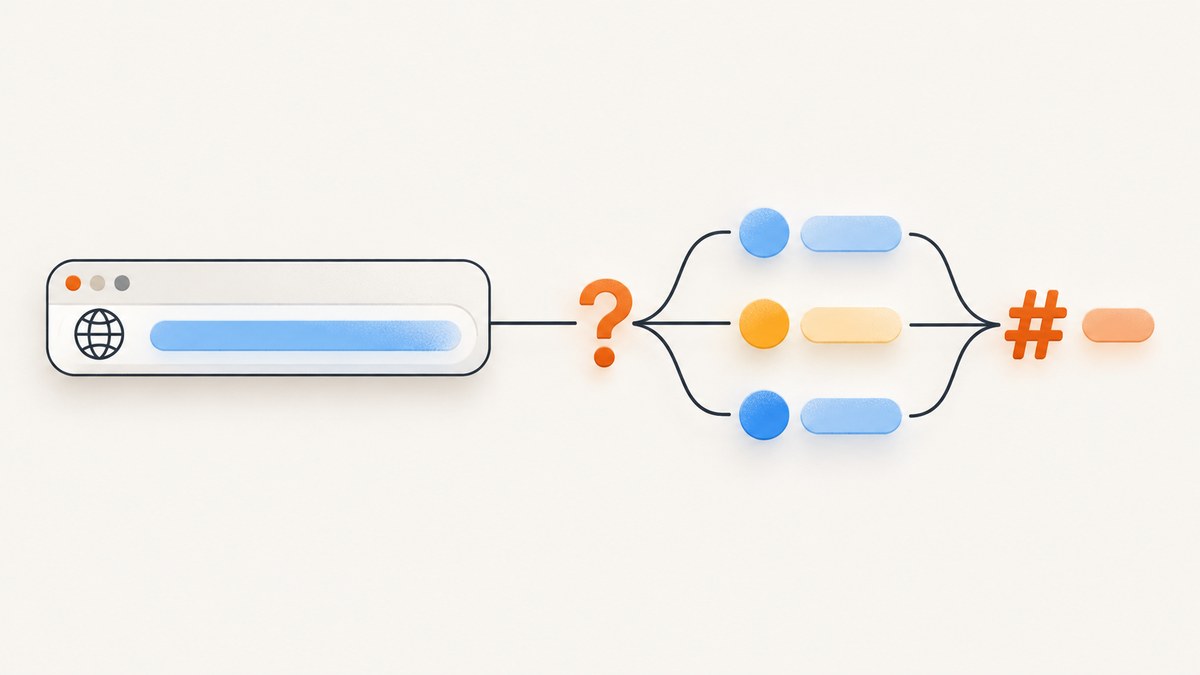
A query string is the part of a URL that starts with ?, follows the path, and ends at # or the end of the URL. It commonly contains application-defined parameters written as key=value pairs separated by &. For example, in https://example.com/products?category=books&sort=price#results, the query string is ?category=books&sort=price; #results is a separate fragment.
Applications often use query parameters to filter, search, sort, paginate, or choose a representation. The URL syntax provides the components and delimiters; the receiving application defines what parameter names mean and how to handle them. [MDN: Query] [RFC 3986]
1. Read the parts of a URL
Consider this complete URL:
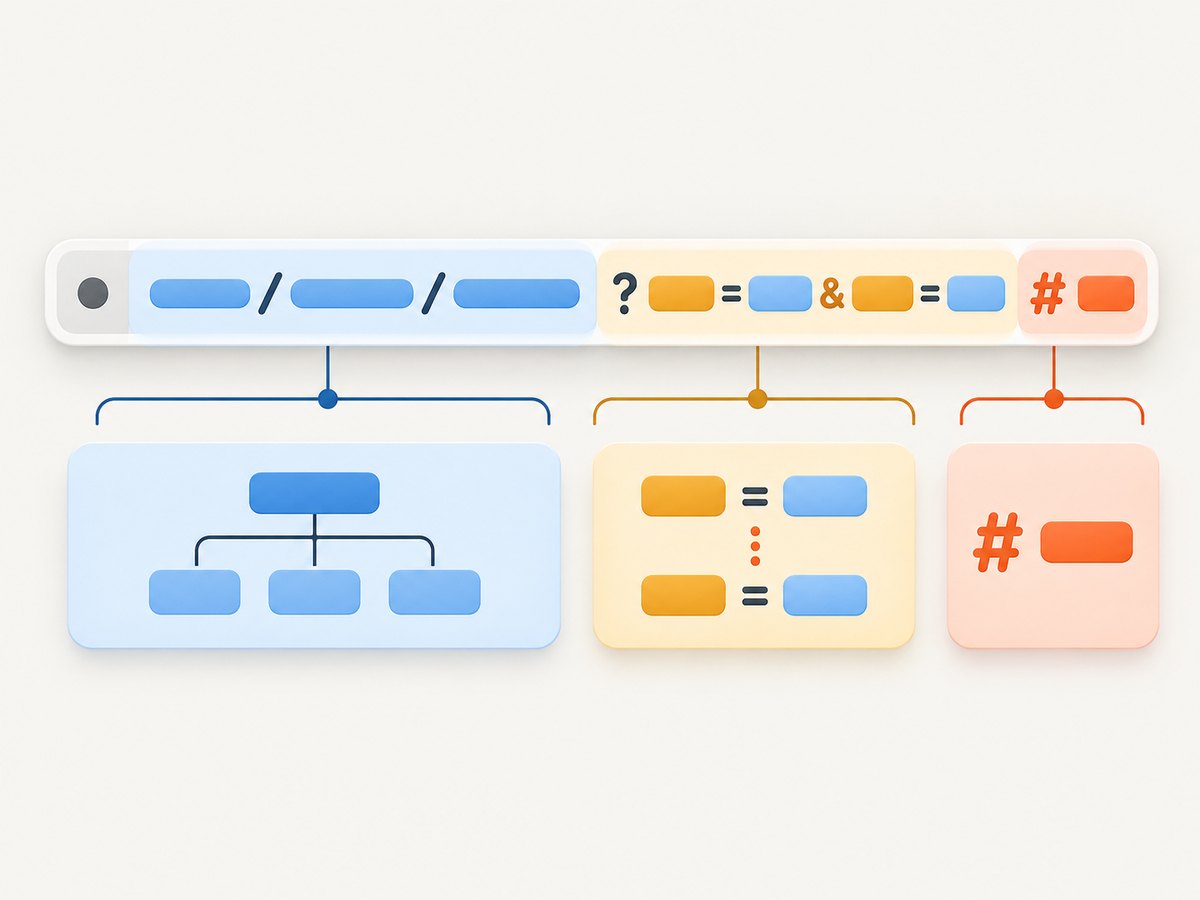
https://example.com/products?category=books&sort=price#results| Part | Example | What it identifies |
|---|---|---|
| Scheme | https |
The URI scheme used to access the resource. |
| Authority or host | example.com |
The naming authority or server. |
| Path | /products |
The hierarchical location or resource path. |
| Query | ?category=books&sort=price |
Non-hierarchical data supplied with the URI. |
| Fragment | #results |
A separate component that can identify a location or state within the resource. |
The query begins at the first ? after the path. A # marks the start of the fragment, so it is not part of the query. The query may be empty or absent. The path, query, and fragment have distinct roles in URI syntax; applications decide how those pieces map to behavior. [RFC 3986, URI components]
2. How query parameters are written
Many web applications use a convenient convention of name/value pairs:
?category=books&sort=price?introduces the query component.category=booksis one commonly formatted parameter: namecategory, valuebooks.&separates pairs in this common convention.=separates a name from a value in this common convention.
These characters are not a universal schema for every URI or application. The URI standard defines the query component’s syntax broadly; it does not assign universal meanings to names such as q, page, or sort. For instance, one application might interpret ?page=2 as the second page of results, while another might ignore it or assign a different meaning. Check the documentation for the server or API you are calling. [RFC 3986, query component]
3. What query strings are used for
A query lets a client send inputs alongside a resource path. Common uses include:
- Filtering:
/products?category=booksmight request a subset. - Searching:
/search?q=urimight send a search term. - Sorting:
/products?sort=pricemight request a particular order. - Pagination:
/articles?page=2might request a page of a collection. - Choosing a view or representation: an application may accept a parameter that changes how it responds.
These examples describe common application patterns, not behavior guaranteed by the URL format. The server or client application determines whether a parameter is supported, whether it is optional, and what happens when it is missing or invalid. [MDN: Query]
4. Query vs. path vs. fragment
Deciding where a value belongs depends on what it represents and which component needs to process it.
| Component | Typical role | Example |
|---|---|---|
| Path | Hierarchical resource identity or location | /products/42 |
| Query | Additional non-hierarchical inputs interpreted by the application | ?sort=price |
| Fragment | A reference within or associated with the resource, often handled by the client | #reviews |
For example, a product identifier may be represented in a path, while a sort order may be a query input. A fragment can point to a section of a returned document. Those are design conventions: the URI components have separate syntax, but the application’s own contract determines the actual meaning. A fragment is separated from the query by # and is not sent as part of the HTTP request target to the server by a browser.
RFC 3986 characterizes the query as non-hierarchical data that, together with the path, can identify a resource within the URI scheme and naming authority. [RFC 3986]
5. Encoding values safely
The query grammar permits certain reserved and unreserved characters as well as / and ?. Characters such as &, =, and # can act as delimiters in URL structure. If one of those characters is literal data inside a value, encode it so it is not mistaken for syntax. Percent encoding represents a byte as % followed by two hexadecimal digits. [RFC 3986, percent encoding] [RFC 3986, query syntax]
For example, if a search value contains an ampersand, encode the value rather than concatenating it into the URL as though it were a second parameter:
Raw value:  tea & biscuits
Query:      ?q=tea%20%26%20biscuits
Encoding rules can differ depending on the API used to build a URL. In particular, form-style query serialization commonly treats spaces as +, whereas a percent-encoded URI may show spaces as %20. Do not assume every server treats +, repeated keys, parameter order, or parameters with no value identically. Use the target application’s documented format and a URL builder instead of hand-concatenating untrusted data.
6. Read and update query parameters in JavaScript
In browser JavaScript and modern runtimes, the URL API parses a URL. Its search property gives the serialized query string, including the initial ? when parameters are present. searchParams provides parameter-level operations through URLSearchParams. [MDN: URL.search] [MDN: URLSearchParams]
const url = new URL("https://example.com/products?category=books&sort=price#results");

console.log(url.search); // "?category=books&sort=price"
console.log(url.searchParams.get("category")); // "books"

url.searchParams.set("page", "2");
console.log(url.toString());
// https://example.com/products?category=books&sort=price&page=2#results
This is runnable in a browser console or a JavaScript runtime with the WHATWG URL APIs. For a relative URL in a browser, provide a base:
const url = new URL("/products?category=books", window.location.origin);
console.log(url.searchParams.get("category"));
Useful methods include:
| Method or property | Purpose |
|---|---|
url.search |
Read or set the serialized query component, including its leading question mark when non-empty. |
url.searchParams.get(name) |
Get the first matching value, or null if there is no matching parameter. |
url.searchParams.getAll(name) |
Get all values for a repeated parameter name. |
url.searchParams.has(name) |
Check whether a parameter is present. |
url.searchParams.set(name, value) |
Set a value; this replaces existing values for that name. |
url.searchParams.append(name, value) |
Add another value, including a repeated name. |
url.searchParams.delete(name) |
Remove parameters with that name. |
url.toString() |
Serialize the updated URL. |
When repeated parameters are allowed, such as ?tag=red&tag=large, get() returns the first matching value and getAll() returns both. Whether a server accepts repeated keys and how it interprets them is application-specific. Serialization can also normalize the textual form. If an exact byte-for-byte URL representation matters for a signature or cache key, follow that system’s canonicalization rules and test the serialized output used in the signature.
7. Build a URL instead of joining strings
Manually interpolating user input can accidentally create new parameters or fragments. Construct the URL with the platform API and assign parameter values through searchParams:
const endpoint = new URL("https://example.com/search");
endpoint.searchParams.set("q", "tea & biscuits");
endpoint.searchParams.set("page", "2");

console.log(endpoint.href);
This keeps the ampersand in the search value from being interpreted as a separator between parameters. For a relative route in a browser, pass a base URL to new URL(). Validate any user-supplied URL against your application’s rules before fetching it; encoding query values does not validate a destination host or make a request safe.
8. Query string troubleshooting
| Symptom | Likely cause | Fix |
|---|---|---|
| A parameter appears to be missing. | The URL has a typo, the value was added after a fragment marker, or the receiving app does not recognize the parameter. | Inspect url.search and url.searchParams; ensure query text comes before #; check the endpoint’s parameter documentation. |
| A value is split into two parameters. | A literal & was concatenated without encoding. |
Set the value using URLSearchParams or the server-language URL encoder. |
The server receives only part of a value containing #. |
# begins a fragment, which is not part of the query sent in an HTTP request. |
Percent-encode a literal hash in the parameter value before assigning it. |
| A lookup returns an unexpected value for a repeated key. | get() returns the first value; the endpoint may expect one value or apply another rule. |
Use getAll() to inspect all values, then follow the server’s repeated-key contract. |
| A relative URL throws during parsing. | new URL() needs a base for a relative reference. |
Supply a base such as window.location.origin, or use an absolute URL. |
| Two equivalent links serialize differently. | Encoding and serialization can normalize spaces or reserved characters. | Compare parsed parameter values and use the API’s canonicalization requirements if signing or comparing exact strings. |
9. Performance, reliability, and privacy notes
Parsing a local URL with URL and reading a few parameters is generally a small in-process operation; the meaningful latency usually comes from what your application does next, such as making a network request. Avoid repeatedly rebuilding and parsing the same URL in a hot loop when you can retain the parsed object, but measure before optimizing.
For reliable integrations, document allowed names, required values, defaults, repeated-key behavior, and invalid-value responses. Treat incoming values as untrusted input: validate types and ranges, cap values where appropriate, and encode when placing them into another URL or output context. Query strings are often retained in logs, browser history, analytics, and referrer data. Do not put secrets or sensitive personal information in a URL unless the system’s security and privacy design explicitly permits it. Prefer an authorization mechanism designed for credentials.
Caches and signatures may consider the query string when identifying a request. Parameter order, duplicate names, and encoding normalization can therefore matter to a particular system even when an application considers two URLs equivalent. Follow the cache or signature specification and use its canonical form rather than assuming every intermediary normalizes URLs the same way.
10. FAQ
Is everything after the question mark a query string?
Only the query component runs from ? to # or the end of the URI. If a fragment follows, that fragment is a separate component.

Are query parameters always written as key/value pairs?
Key/value pairs separated by ampersands are a widespread web convention. The URI syntax does not require every application to use that exact data model.
Can a URL have a query without a path?
URI references can have different component combinations. For ordinary web endpoints, use the URL form documented by the target application and parse it with a URL API rather than assuming a path is present.
Does changing a query parameter always change the page?
No. The receiving application may use it, ignore it, reject it, or interpret it differently. Parameter semantics belong to that application.
Or skip the browser setup
If your next step is capturing a page image, ScreenshotNeo takes a URL in one API request and returns PNG, JPEG, WebP, or PDF. Query strings work as part of the target URL; pass the complete URL as a parameter and let your HTTP client encode it. See the ScreenshotNeo API documentation.
curl -G "https://api.screenshotneo.com/v1/shot" -d access_key=YOUR_API_KEY --data-urlencode url=https://stripe.com -o shot.webpimport requests
r = requests.get(
"https://api.screenshotneo.com/v1/shot",
params={"access_key": "YOUR_API_KEY", "url": "https://stripe.com"},
timeout=90,
)
open("shot.webp", "wb").write(r.content)const q = new URLSearchParams({ access_key: 'YOUR_API_KEY', url: 'https://stripe.com' });
const res = await fetch(`https://api.screenshotneo.com/v1/shot?${q}`);- Cookie banners, newsletter popups, and chat widgets are removed before the shot; each cleanup step can be turned off.
- Bot checks, blank pages, timeouts, failed loads, and cache hits are not billed; response headers identify the page verdict and billing status.
- An MCP server lets Claude, Cursor, and other MCP clients use screenshot and page information tools.
- The Free plan includes 1,000 screenshots a month with no card; paid plans start at $5 for 3,000.
Sign up for ScreenshotNeo and get 1,000 free screenshots a month, with no card.