What Are Web Crawlers and How Do They Work?
Web crawlers discover and fetch pages automatically. Learn how Googlebot finds URLs, follows robots.txt, renders JavaScript, and what crawling means for indexing.
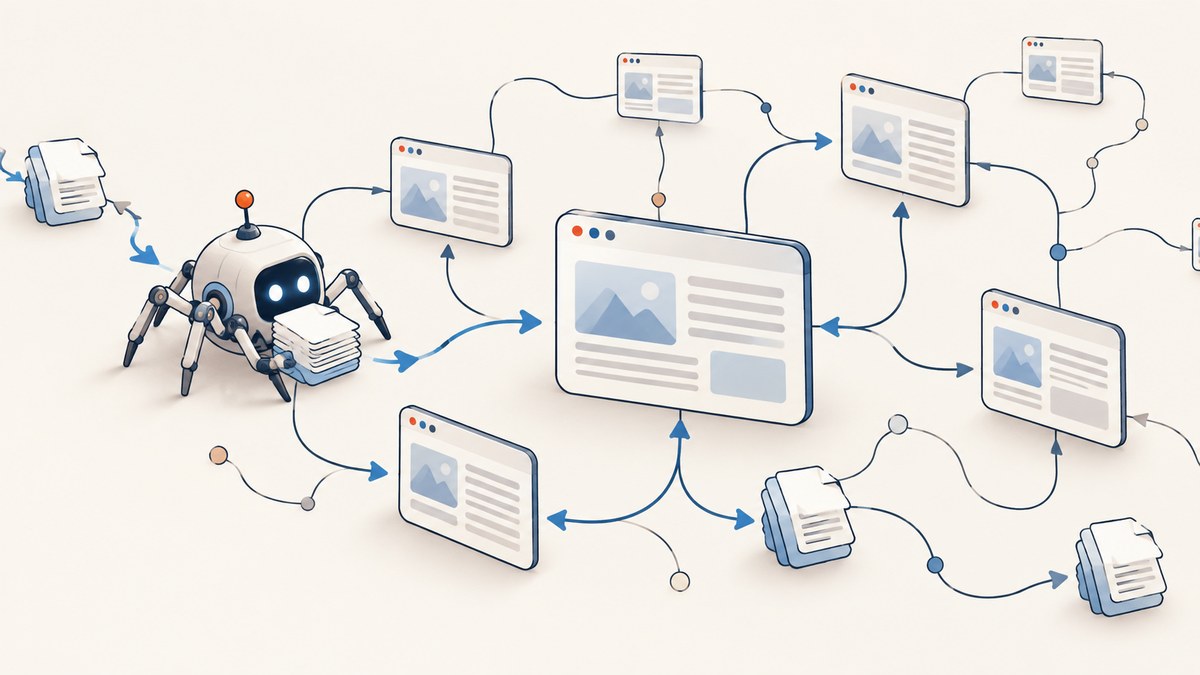
A web crawler is an automated program that discovers URLs and requests web resources, much as a browser does when a person visits a page. Search engines use crawlers to find pages they may later analyze and show in results. Crawling is only the fetching and discovery stage: it does not guarantee that a page will be indexed or appear in search.
A typical search crawler finds candidate URLs from links, sitemaps, and previously known pages; checks the site’s crawling rules; fetches eligible pages; parses their content and links; and may render JavaScript before the search engine evaluates the page for indexing. Google calls its Search crawler Googlebot. The process is automated and scheduled, so site owners can make pages accessible and understandable but cannot require Google to fetch or index every URL. See Google’s Googlebot documentation and the Robots Exclusion Protocol standard, RFC 9309.
1. What is a web crawler?
A web crawler—also called a robot, spider, or bot—is an automated client that fetches web resources. RFC 9309 describes crawlers as automated clients and defines the Robots Exclusion Protocol: the convention by which site owners publish requests about which URLs crawlers may access. Search engines use crawlers to discover and fetch pages at web scale.
A crawler is not the same thing as a search index. The crawler requests pages and finds links. A search engine’s later systems analyze the fetched information, decide what can be indexed, and determine which results to serve for a query. Other crawlers have other purposes: a monitoring service might fetch pages to detect changes, while a site audit tool might gather links, titles, and status codes. Crawlers can differ in how they discover URLs, whether they execute JavaScript, their request rate and retries, how they respect robots.txt, and what they do with fetched data.
2. How do web crawlers find pages?
Crawlers need candidate URLs before they can fetch pages. Search crawlers commonly find those candidates in links on pages they already know about, XML sitemaps, and URLs they have encountered or been given previously. Google says it discovers new URLs primarily from links embedded in previously crawled pages. Sitemaps can help expose a site’s URL inventory, especially where links alone do not make the structure clear; submitting a URL or sitemap does not guarantee a crawl.
- Start with known URLs. A crawler has a queue or other set of candidate URLs. Its initial candidates may come from known pages, sitemaps, or submitted URLs.
- Fetch an allowed page. If the URL is eligible under the crawler’s rules and site conditions, the crawler makes an HTTP request.
- Parse the response. It can inspect the returned content for links and add newly discovered URLs to a later crawl queue.
- Schedule future requests. The crawler chooses which candidates to fetch and when. It may recrawl pages later, but there is no universal fixed interval.
Discovery is not the same as a promise to fetch. The crawler may defer or omit a URL because it is disallowed, unavailable, duplicative, low priority, or because the site is slow or returning errors. Google says its crawling systems adapt to site conditions and may slow down when responses suggest that a server is overloaded.
3. What happens when Googlebot crawls a site?
Google describes Search in three broad stages: crawling, indexing, and serving results. For JavaScript pages, Google’s documented processing also makes rendering visible as a distinct part of the work. In practical terms, a crawl can involve the following steps:
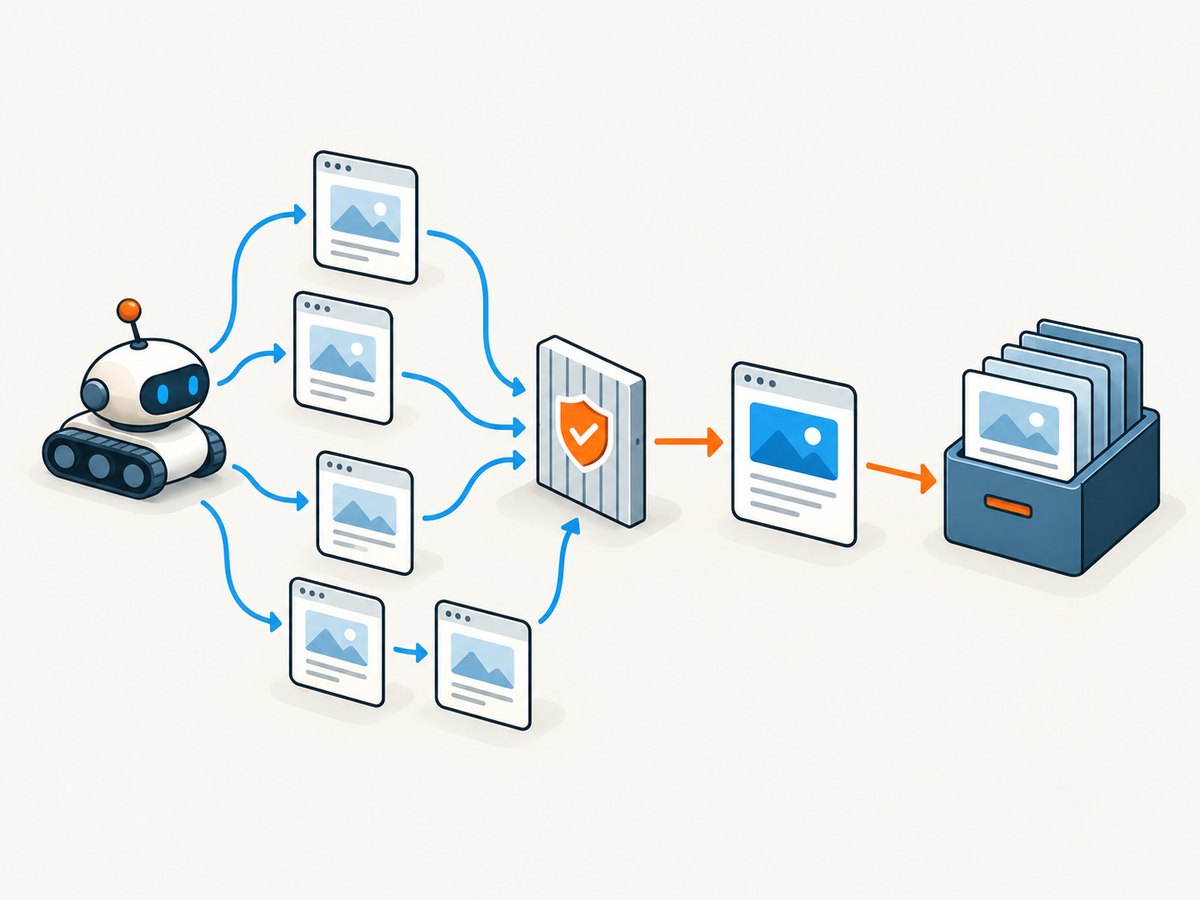
- URL discovery: Googlebot gets a candidate URL from links, sitemaps, or URLs it already knows about.
- Robots check: Google checks the site’s robots.txt rules before requesting the page. The rules indicate what the crawler is asked to access.
- HTTP retrieval: The crawler requests the URL and receives a response, such as HTML, a redirect, or an error. Googlebot identifies itself through a user-agent header. Google documents Smartphone and Desktop crawler types; both follow the same Googlebot product token in robots.txt, and most Search crawling uses the mobile crawler.
- Parsing and link discovery: Google processes the response and can extract links for further discovery.
- Rendering, when applicable: Google may queue a page for rendering with a Chrome-based rendering service. It can execute JavaScript and fetch referenced resources such as scripts and stylesheets, subject to its processing and resource constraints.
- Indexing assessment: Google analyzes available content and signals such as text, images, titles, alt attributes, and canonical relationships. It may decide a page is not suitable for indexing or choose another canonical URL.
- Serving: A separate search stage selects and ranks results in response to a user’s query.
These steps are not an instant synchronous transaction. A discovered page may wait before a fetch or render, and the search engine may decide not to index it. Google’s JavaScript SEO guide describes its crawl, render, and index processing; its Googlebot overview documents crawler behavior and access limits.
4. Crawling versus indexing: what is the difference?
Crawling means discovering and fetching a URL. Indexing means analyzing information and deciding whether and how to store it for retrieval in search results. Serving means selecting results for a particular query. These are related but separate stages.
| Stage | What it means | What it does not guarantee |
|---|---|---|
| Discovery | A crawler learns that a URL may exist. | That the URL will be fetched. |
| Crawling | A crawler requests the URL or its resources. | That the content will be indexed. |
| Rendering | A rendering system executes page code to inspect the generated page. | That every script or resource will run successfully. |
| Indexing | A search engine evaluates and may store information about the page. | That the page will rank or appear for a query. |
| Serving | A search engine selects results for a user’s query. | That every indexed page will be shown for every query. |
A page may be crawled but not indexed, or a URL can sometimes appear in results even when crawling is blocked. Google notes that indexing is not guaranteed simply because a page meets its technical requirements. For diagnosis, check the specific URL’s crawl and indexing status in Search Console rather than treating a successful fetch as proof that the page is in search.
5. What does robots.txt do—and does it block a page from Google?
Robots.txt is a text file, normally served at the site’s root as /robots.txt, that publishes crawler access rules. A simple example is:
User-agent: Googlebot
Disallow: /private-area/

User-agent: *
Allow: /
Sitemap: https://example.com/sitemap.xml
Here, the first group asks Googlebot not to crawl URLs under /private-area/, while the wildcard group allows other paths by default. Replace the example domain and paths with your own. Check syntax and the target crawler’s documented interpretation before relying on a rule; implementations can vary.
Robots.txt is not access control. RFC 9309 says the protocol is a request to crawlers, not a form of authorization. A crawler that ignores the protocol can still request a disallowed URL. Never place secrets behind a robots rule: protect private content with authentication or remove public access.
Robots.txt also does not reliably remove a URL from Google’s results. If Google finds a disallowed URL through links, the URL can still appear, potentially without a snippet, because Google cannot fetch the page to read its content. If your goal is to keep a public page out of search, allow crawling so Google can see a noindex meta tag or X-Robots-Tag header. If the content must be private, use authentication. Google explains these distinctions in its robots.txt guide and robots meta tag documentation.
6. How do crawlers handle JavaScript?
Some crawlers parse the HTML response and do not run page JavaScript. Others, including Google Search, can render JavaScript in a later processing stage. Google documents a two-part flow for JavaScript pages: it crawls and parses the response, then queues eligible pages for rendering, where a headless Chromium-based system can execute scripts and process the rendered HTML.

Rendering does not mean a crawler acts exactly like a person using every browser feature. It has finite time and resources; referenced resources can be blocked or fail; code may depend on user interaction, authentication, or APIs that are unavailable to the crawler. Google says it may skip resources that do not contribute to essential page content. Other crawlers may not execute JavaScript at all.
For important content, make the initial HTML response useful where practical. Server-side rendering or static rendering can make core text and links available immediately, improve speed, and help crawlers that do not run JavaScript. Ensure important links are ordinary crawlable links, do not block essential scripts or stylesheets from Googlebot, and check the rendered result in Search Console’s URL Inspection tool or Google’s Rich Results Test. Google’s JavaScript troubleshooting guide covers inspecting rendered HTML, resources, and errors.
7. Build a small respectful crawler in Python
The following example crawls same-origin links breadth-first. It reads robots.txt with Python’s standard library parser, identifies itself, limits the number of pages, pauses between requests, and records failures. Use it only on sites you are allowed to crawl, and review the site’s terms and policies. A simple script is not a substitute for the full behavior of a standards-compliant crawler or Googlebot.
import time
from collections import deque
from urllib.parse import urljoin, urldefrag, urlparse
from urllib.robotparser import RobotFileParser

import requests
from bs4 import BeautifulSoup

START = "https://example.com/"
AGENT = "LearningCrawler/1.0 (+https://example.com/contact)"
MAX_PAGES = 20
DELAY_SECONDS = 1.0

origin = urlparse(START)
robots_url = f"{origin.scheme}://{origin.netloc}/robots.txt"
robots = RobotFileParser()
robots.set_url(robots_url)
try:
    robots.read()
except Exception as exc:
    raise SystemExit(f"Could not read robots.txt: {exc}")

session = requests.Session()
session.headers.update({"User-Agent": AGENT})
queue = deque([START])
seen = set()

while queue and len(seen) < MAX_PAGES:
    url = urldefrag(queue.popleft()).url
    if url in seen:
        continue
    seen.add(url)

    if not robots.can_fetch(AGENT, url):
        print("ROBOTS BLOCK", url)
        continue

    try:
        response = session.get(url, timeout=(5, 20), allow_redirects=True)
        print(response.status_code, response.url, response.headers.get("content-type"))
        response.raise_for_status()
    except requests.RequestException as exc:
        print("FETCH ERROR", url, exc)
        continue

    if "text/html" not in response.headers.get("content-type", "").lower():
        continue

    soup = BeautifulSoup(response.text, "html.parser")
    title = soup.title.get_text(strip=True) if soup.title else "(no title)"
    print("TITLE", title)

    for link in soup.select("a[href]"):
        candidate = urldefrag(urljoin(response.url, link["href"])).url
        parsed = urlparse(candidate)
        if parsed.scheme in ("http", "https") and parsed.netloc == origin.netloc:
            if candidate not in seen:
                queue.append(candidate)

    time.sleep(DELAY_SECONDS)
Install dependencies with python -m pip install requests beautifulsoup4, save the code as crawl.py, and run python crawl.py. Change START to a site you control or have permission to crawl. The script follows redirects and uses the final response URL as the base for links. It only parses HTML, does not render JavaScript, does not support every robots.txt edge case, and has no durable queue or retry policy. For a larger crawler, add bounded concurrency, persistent scheduling, content-type and size limits, structured logs, retry backoff for transient errors, and explicit domain-wide rate limits. Avoid retrying indefinitely or fetching the same URL variants endlessly.
8. Inspect one page with cURL, Python, or Node.js
These examples fetch a page as a basic HTTP client. They do not implement a full crawler: they do not discover an entire site, schedule recrawls, or render JavaScript. Use a real contact-bearing user-agent for your own crawler, and honor the target site’s access policy.
cURL
curl -L --max-time 30 \
  -A "LearningCrawler/1.0 (+https://example.com/contact)" \
  -D response-headers.txt \
  -o page.html \
  https://example.com/
-L follows redirects; -D saves response headers, and -o saves the body. Inspect the status and content type in the headers file before treating the response as HTML.
Python
import requests

url = "https://example.com/"
headers = {"User-Agent": "LearningCrawler/1.0 (+https://example.com/contact)"}
r = requests.get(url, headers=headers, timeout=(5, 20), allow_redirects=True)
print("status:", r.status_code)
print("final URL:", r.url)
print("content type:", r.headers.get("content-type"))
r.raise_for_status()
if "text/html" in r.headers.get("content-type", "").lower():
    with open("page.html", "w", encoding=r.encoding or "utf-8") as f:
        f.write(r.text)
Node.js
const response = await fetch('https://example.com/', {
  headers: { 'User-Agent': 'LearningCrawler/1.0 (+https://example.com/contact)' },
  signal: AbortSignal.timeout(20000),
});
console.log('status:', response.status);
console.log('final URL:', response.url);
console.log('content type:', response.headers.get('content-type'));
if (!response.ok) throw new Error(`HTTP ${response.status}`);
const html = await response.text();
if ((response.headers.get('content-type') || '').includes('text/html')) {
  const { writeFile } = await import('node:fs/promises');
  await writeFile('page.html', html, 'utf8');
}
9. See the rendered page as an image
A text fetch is useful for examining raw HTML and response behavior. If the question is what a browser-rendered page looks like, a screenshot provides a visual check. For a manual check, open the URL in a browser, wait for the relevant content to appear, and capture the viewport or full page. Check at the intended viewport size; responsive layouts can differ.
Or skip the browser setup
One GET request to ScreenshotNeo can return a PNG, JPEG, WebP, or PDF screenshot for a URL. For example, save a WebP response with cURL:
curl -G "https://api.screenshotneo.com/v1/shot" \
  -d access_key=YOUR_API_KEY \
  --data-urlencode url=https://example.com \
  -o shot.webp
The same request in Python:
import requests

r = requests.get(
    "https://api.screenshotneo.com/v1/shot",
    params={"access_key": "YOUR_API_KEY", "url": "https://example.com"},
    timeout=90,
)
open("shot.webp", "wb").write(r.content)
And in Node.js:
const q = new URLSearchParams({ access_key: 'YOUR_API_KEY', url: 'https://example.com' });
const res = await fetch(`https://api.screenshotneo.com/v1/shot?${q}`);
Read the ScreenshotNeo API docs for response handling and options. ScreenshotNeo accepts cookie and consent banners like a visitor, then removes more than 60 known consent platforms, newsletter popups, and chat widgets before the shot; each of those steps can be turned off. Bot checks and CAPTCHAs, blank pages, timeouts, failed loads, and cache hits are not billed, and response headers identify the page verdict and billing status. An MCP server lets AI agents use take_screenshot, get_page_info, and capture_pdf. The free plan includes 1,000 shots a month with no card; paid plans start at $5 for 3,000 shots.
Create a free ScreenshotNeo account for 1,000 screenshots a month with no card.
10. Reliability, performance, and cost considerations
For anyone operating a crawler, reliability depends on treating the network and site as variable. A page can redirect, return an error, respond slowly, serve different content by user agent, or link to an enormous space of URL variants. Bound the work: cap pages and bytes, set connect and read timeouts, restrict scope, avoid unbounded concurrency, deduplicate normalized URLs, and log status codes and failures. Retry only transient failures with a limit and backoff. Respect robots.txt and the site’s policies; robots rules are not a license to crawl aggressively.
Rendering JavaScript usually adds work because scripts and their resources must be fetched and executed. If crawling is your use case, first ask whether the needed data is already present in the HTML, a documented API, or a sitemap. If visual output is the goal, a screenshot API can eliminate local browser installation and rendering orchestration, while still requiring attention to request limits, timeouts, caching, and what the resulting headers report. Avoid inferring that an image capture proves search indexing or that an HTTP success means all page content rendered.
There is no universal crawl price or performance benchmark: costs depend on the tool, request volume, rendering, storage, and infrastructure. For a self-hosted crawler, account for compute, bandwidth, queues, and storage. For a hosted screenshot service, compare per-plan volume and billing rules. ScreenshotNeo lists a free tier of 1,000 shots monthly, then Starter at $5 for 3,000, Growth at $15 for 15,000, Pro at $39 for 60,000, Scale at $99 for 250,000, and Business at $249 for 1,000,000; yearly billing gives two months free. Every feature is included on every plan. Use the published plan details when estimating your own workload.
11. Troubleshooting crawler problems
| Symptom | Likely cause | What to check or fix |
|---|---|---|
| A URL is never fetched | The crawler has not discovered it, robots.txt disallows it, or scheduling deferred it. | Link to it from a crawlable page, include it in the sitemap, inspect robots rules, and check server availability. Discovery does not guarantee a crawl. |
| A page is crawled but absent from search | Crawling and indexing are separate; the page may be blocked by a directive, considered duplicate, or not selected for indexing. | Use Search Console URL Inspection and review the rendered page, canonical, robots meta, and response status. |
| A blocked URL still appears in results | Google may know the URL from links, but cannot fetch its contents while disallowed. | For search removal, allow crawling so Google can see noindex, or protect the content behind authentication. Robots.txt alone is not a removal tool. |
| JavaScript content is missing | The initial HTML is mostly an app shell, a script or API failed, or a needed resource is blocked. | Inspect rendered HTML, console errors, and loaded resources with Search Console or the Rich Results Test. Keep essential resources crawlable and consider server or static rendering. |
| Your crawler receives 403 or 429 | The server or an intermediary is refusing requests or rate limiting them. | Stop rapid retries, reduce concurrency, respect site policy, and contact the site owner if access is required. |
| Your crawler times out or sees 5xx errors | Slow origin, temporary outage, overloaded server, or a request that hangs on resources. | Set bounded timeouts, retry transient errors sparingly with backoff, record failures, and reduce request rate. |
| The crawler collects repeated near-identical URLs | Query parameters, fragments, redirects, or calendar/search pages create URL variants or loops. | Remove fragments, normalize URLs carefully, constrain allowed paths and query parameters, and impose a strict page budget. |
| Your test fetch does not match a browser | A basic HTTP client does not execute JavaScript, load all assets, or behave like an interactive browser. | Compare raw HTML with rendered DOM; use a browser rendering tool for visual or JavaScript-dependent inspection. |
12. A practical checklist for site owners
- Make important pages reachable through ordinary links and keep a current sitemap.
- Serve useful status codes: successful pages should return success, and removed pages should not pretend to be successful.
- Use robots.txt to manage crawler access, not to protect private information or guarantee search removal.
- Use
noindexwhen a crawlable page should not be indexed; do not block the page in robots.txt if the crawler needs to read that directive. - Expose essential page content without requiring fragile interaction, and keep resources needed for rendering accessible.
- Check mobile rendering and Googlebot’s rendered output when diagnosing JavaScript pages.
- Watch server logs and Search Console crawl reports for errors, unexpected load, or blocked important URLs.
13. Frequently asked questions
Can every crawler see the same version of a page?
No. Crawlers can use different user agents, support different rendering capabilities, and receive different responses based on the site or network. Do not assume that a static fetch represents what a rendering crawler sees.
Does adding a sitemap make Google crawl every listed URL?
No. A sitemap helps communicate URLs, but it is not a command to crawl or index them. Google still schedules requests and evaluates pages independently.
Should I block JavaScript and CSS in robots.txt?
Do not block resources Google needs to understand or render important content. Blocking nonessential resources may be appropriate in some cases, but test the rendered output before changing rules.
How can I tell whether a request really came from Googlebot?
User-agent text alone can be spoofed. Google recommends verifying requests using reverse DNS lookup or matching the source address against its published Googlebot IP ranges; see its Googlebot verification guidance.
Can a screenshot tell me whether Google indexed a page?
No. A screenshot shows a visual capture of a page. Use Google Search Console’s URL Inspection and indexing reports to investigate Google’s crawl and indexing status.


