What Is a Cypress Test and How Does It Work?
Learn what Cypress tests are, how the command queue and retries work, and how to write reliable end-to-end, component, and API tests.

Direct answer: A Cypress test is an automated specification, usually written in JavaScript or TypeScript, that drives a web application in a real browser and checks expected results with assertions. Cypress also supports component tests, which mount a component directly in a browser, and API tests that call endpoints with cy.request().
Cypress feels similar to a Promise-based API, but its commands are different: they are placed on a central command queue and executed serially. Cypress coordinates browser-side code with a Node.js process and runs close to the application, rather than sending remote WebDriver commands as Selenium does. Queries and assertions retry while the page is changing; state-changing actions such as clicks run once after Cypress confirms that the element is actionable.
What a Cypress test contains
A test normally has four parts:
- Setup: visit a page, seed data, or intercept a request.
- Query: find an element with
cy.get()orcy.contains(). - Action: type, click, select, or submit.
- Assertion: verify text, URL, visibility, value, or a network result with
.should().
describe('checkout', () => {
  it('submits a valid order', () => {
    cy.visit('/checkout')
    cy.get('[data-testid="email"]').type('ada@example.com')
    cy.get('[data-testid="pay"]').click()
    cy.get('[data-testid="confirmation"]')
      .should('be.visible')
      .and('contain', 'Order received')
  })
})
The example is an executable specification: it describes the user-visible behavior and fails when the expected state is not reached. Cypress’s introduction documentation covers the same end-to-end and component-testing model.
How Cypress executes commands
Cypress commands are queued when your test function runs. The browser does not execute each line immediately. Cypress later drains that queue in order, coordinating the browser runner, the application under test, and its Node process.
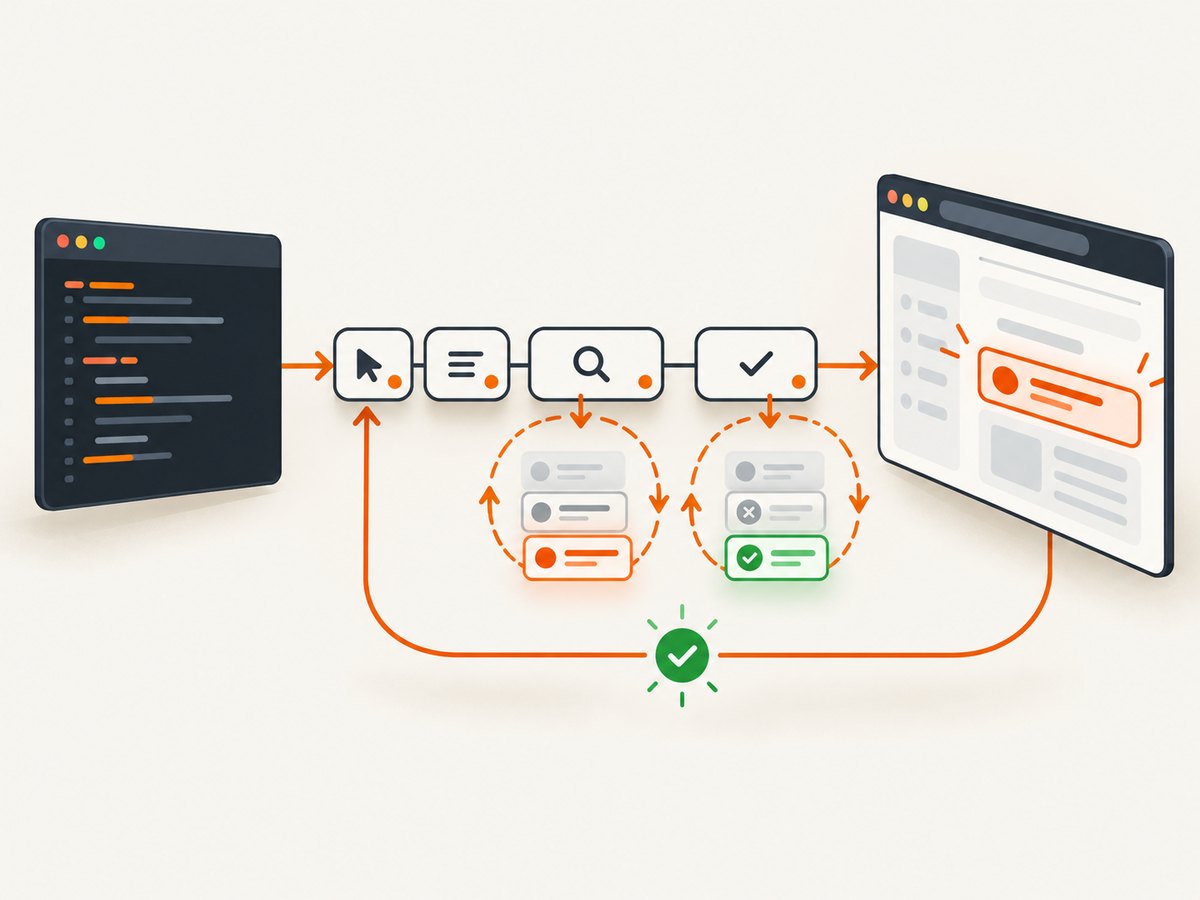
This is why Cypress documents that “Cypress commands are not Promises and cannot be awaited.” A test should chain Cypress commands or use .then() to work with a yielded value.
// Correct: Cypress controls the sequence
cy.get('[data-testid="total"]')
  .invoke('text')
  .then((text) => {
    expect(Number(text.replace('$', ''))).to.be.greaterThan(0)
  })

// Incorrect: this does not return a Promise
// const total = await cy.get('[data-testid="total"]')
Commands yield subjects into the next command. A query yields the matched element set, an assertion usually yields the same subject, and commands such as cy.request() yield a response object. Use ordinary JavaScript variables only inside a callback where the value has already been yielded.
Why Cypress does not use Selenium
Cypress launches and controls its own browser instance and runs much of its test code in the same run loop as the application. Selenium and WebDriver generally use a remote-command model between the test process and browser driver. The architectural difference affects how Cypress observes the DOM, handles time, and presents debugging information; it does not mean Cypress can test every browser workflow Selenium can.
Automatic waiting and retry-ability
Cypress automatically retries linked queries and assertions. If an element is rendered asynchronously, Cypress re-queries the DOM and re-runs the assertion until it passes or the timeout expires. The documented default command timeout is four seconds.
cy.get('[data-testid="status"]')
  .should('be.visible')
  .and('have.text', 'Ready')
Both the query and assertions are part of one retryable chain. Cypress can wait for the application to reach the required state without a hard-coded sleep. The retry-ability guide explains this behavior.
Actions are not normally repeated
Actions such as .click() and .type() first pass actionability checks: the element must be present, visible, enabled, and able to receive the event. Once actionable, the action runs once. Repeating a click could submit a form twice or create duplicate data, so Cypress does not treat state-changing actions like retryable queries.
cy.get('button[type="submit"]')
  .should('be.enabled')
  .click()

// Wait for the resulting state instead of clicking again
cy.get('[role="status"]').should('contain', 'Saved')
Timeouts
Prefer a targeted timeout for a known slow operation instead of increasing the global value for every command.
cy.get('[data-testid="report"]', { timeout: 15000 })
  .should('contain', 'Complete')
You can configure a global timeout in cypress.config.js, but a large global timeout can make genuine failures slow and hide performance regressions.
Command retry-ability versus test retries
These are separate mechanisms:
| Mechanism | What it repeats | Use it for |
|---|---|---|
| Command retry-ability | Linked queries and assertions | Expected rendering or network-driven UI changes |
| Test retries | The entire test attempt | Recovering from a transient environment failure while still recording instability |
With retries: 2, Cypress makes one initial attempt and up to two additional attempts. Hooks such as beforeEach and afterEach run again for each attempt.
// cypress.config.js
const { defineConfig } = require('cypress')

module.exports = defineConfig({
  e2e: {
    retries: {
      runMode: 2,
      openMode: 0
    }
  }
})
Retries should not replace fixing a race or shared state problem. The test-retries documentation describes the attempt count and hook behavior.
End-to-end, component, API, and network tests
End-to-end tests
An end-to-end test visits an application and exercises a workflow through the browser. Use it for login, checkout, navigation, and other user-visible paths.
describe('account settings', () => {
  it('updates the display name', () => {
    cy.visit('/settings')
    cy.get('[name="displayName"]').clear().type('Ada Lovelace')
    cy.contains('button', 'Save').click()
    cy.get('[role="status"]').should('contain', 'Updated')
  })
})
Component tests
Component tests mount a component directly in a real browser. They are useful for states that are expensive to reach through the whole application, such as validation errors, loading states, and empty lists.
import TodoInput from './TodoInput'

describe('TodoInput', () => {
  it('emits a new title', () => {
    const onSubmit = cy.stub().as('onSubmit')
    cy.mount(<TodoInput onSubmit={onSubmit} />)
    cy.get('input').type('Write tests')
    cy.contains('button', 'Add').click()
    cy.get('@onSubmit').should('have.been.calledWith', 'Write tests')
  })
})
API tests with cy.request()
cy.request() calls REST or GraphQL endpoints directly and yields the response. It can assert status, headers, body, and timing, or seed state before a UI flow.
it('creates a project through the API', () => {
  cy.request('POST', '/api/projects', { name: 'Docs' })
    .its('body')
    .should('have.property', 'name', 'Docs')
})

it('seeds data before the browser flow', () => {
  cy.request('POST', '/api/reset')
  cy.visit('/projects')
  cy.get('[data-testid="project-list"]').should('contain', 'Docs')
})
Network interception and stubbing
Use cy.intercept() to observe requests, return deterministic fixtures, or wait for a specific response. Verify the version-specific behavior in the current Cypress release documentation when using newer browser engines.
cy.intercept('GET', '/api/projects').as('projects')
cy.visit('/projects')
cy.wait('@projects').its('response.statusCode').should('eq', 200)
Isolation, browsers, and test design
End-to-end test isolation is enabled by default. Before each test Cypress resets aliases, clock mocks, intercepts, spies, stubs, and viewport changes, and starts with a clean browser context. Cypress runs an installed Chrome-family browser, Firefox, or supported experimental WebKit build; the selected browser must exist locally or in CI.
Write tests that pass alone and in any order. Do not depend on data left by a previous test. Create required records in a setup hook or through an API, and clean up state when the environment requires it.
beforeEach(() => {
  cy.request('POST', '/api/test-data/reset')
  cy.loginAs('editor@example.com')
})
Use stable selectors such as data-testid when text and CSS classes are likely to change. Keep each test focused on one behavior so a failure points to a small amount of code.
Running and debugging Cypress
cypress open opens the interactive runner, watches relevant files, reruns the active spec after edits, and shows each command in a time-travel debugging view. Use it to inspect the DOM snapshot, command log, network calls, and screenshots around a failure.
npm install --save-dev cypress
npx cypress open

# Headless CI run
npx cypress run --browser chrome
For repeatable CI runs, pin dependency versions, make the base URL explicit, provision the same browser family on every worker, and collect videos or screenshots only when they help diagnose failures.
Or skip the browser setup
If your goal is a reliable image of a page rather than an interaction assertion, ScreenshotNeo provides a single screenshot API call. It accepts the cookie or consent banner like a visitor and removes more than 60 known consent platforms, newsletter popups, and chat widgets before capture; each step can be turned off. Bot checks, CAPTCHAs, blank pages, timeouts, failed loads, and cache hits cost nothing, and the response identifies the result with X-Page-Verdict and X-Billed headers.
See the ScreenshotNeo API documentation for the full option list.
cURL
curl -G "https://api.screenshotneo.com/v1/shot" \\
  -d access_key=YOUR_API_KEY \\
  --data-urlencode url=https://stripe.com \\
  -o shot.webp
Python
import requests

r = requests.get(
    "https://api.screenshotneo.com/v1/shot",
    params={"access_key": "YOUR_API_KEY", "url": "https://stripe.com"},
    timeout=90,
)
r.raise_for_status()
open("shot.webp", "wb").write(r.content)
Node.js
const q = new URLSearchParams({
  access_key: 'YOUR_API_KEY',
  url: 'https://stripe.com'
})
const res = await fetch(`https://api.screenshotneo.com/v1/shot?${q}`)
if (!res.ok) throw new Error(`Screenshot failed: ${res.status}`)
const image = Buffer.from(await res.arrayBuffer())
require('fs').writeFileSync('shot.webp', image)
ScreenshotNeo supports full-page capture with lazy images loaded, element capture by CSS selector, dark mode, 12 device presets or any viewport, retina scale, PDF output, custom CSS and JavaScript, pre-capture clicks, hidden selectors, selector or delay waits, network-idle waits, request blocking, custom headers and cookies, user agents, authorization, timezone and geolocation, transparent backgrounds, resizing, selectable cache TTLs, signed public image links, asynchronous jobs with signed webhooks, bulk capture for 100 URLs per call, a usage API, and an OpenAPI specification. Common parameter names used by other screenshot APIs also work.
An MCP server provides take_screenshot, get_page_info, and capture_pdf tools for Claude, Cursor, and other MCP clients. The Free plan includes 1,000 shots per month without a card; paid plans start at $5 for 3,000 shots. Every feature is available on every plan. Create a free ScreenshotNeo account.
Troubleshooting Cypress tests
| Symptom | Likely cause | Fix |
|---|---|---|
await cy.get(...) does not behave as expected |
Cypress commands are not Promises | Chain commands or use .then() for yielded values. |
| Element never appears | Wrong selector, wrong route, or an API failure | Inspect the command snapshot and network log; assert the URL and response first. |
| Click fails as not actionable | Element is covered, hidden, disabled, or still animating | Wait for the real visible state, remove the overlay in test data, or use { force: true } only when bypassing actionability is intentional. |
| Intermittent duplicate records | A state-changing action was manually repeated or a test shares state | Allow Cypress to retry queries, not clicks; isolate data per test. |
| Test passes alone but fails in the suite | Hidden dependency on a previous test | Reset aliases, intercepts, viewport, browser state, and application data in setup. |
| Timeout after four seconds | Application needs longer or never reaches the state | Debug the root cause, then set a local timeout for a known slow command. |
| API assertion sees stale data | Request was not awaited through Cypress’s queue | Alias the request and cy.wait() for it before asserting the UI. |

Performance, reliability, and cost considerations
- Prefer API setup: Creating test data through an API is usually simpler than navigating through several UI screens before every test.
- Keep retries diagnostic: Test retries can keep a CI job moving, but track retried tests so flakiness remains visible.
- Use focused specs: Smaller specs parallelize more easily and make failures faster to reproduce.
- Control external dependencies: Intercept unstable third-party calls and test the integration separately where appropriate.
- Capture only what you need: Cypress screenshots and videos are useful for failures; storing every artifact increases CI storage and transfer costs.
- For page images: ScreenshotNeo’s cache TTL, bulk endpoint, asynchronous jobs, and free treatment of failed loads can reduce repeated browser setup and avoid paying for unusable captures.
FAQ
Does Cypress wait automatically?
It retries linked queries and assertions until they pass or the command timeout expires. It does not blindly wait before every action, and actions are not repeated after they execute.
Can Cypress test APIs?
Yes. Use cy.request() to call REST or GraphQL endpoints, assert the response, and seed state for a browser test.
Is a Cypress test only an end-to-end test?
No. Cypress supports end-to-end, component, API, and network-control workflows.
How many times does retries: 2 run?
At most three attempts: the initial run plus two retries. Hooks run again for each attempt.
Should I use Cypress for visual screenshots?
Cypress can produce browser artifacts while testing. For production screenshot generation with consent cleanup, configurable capture options, and an API or MCP workflow, use a dedicated service such as ScreenshotNeo.