What Is a Thumbnail Image? Definition, Sizes, Uses, and Best Practices
A thumbnail is a compact preview of a larger file. Learn how thumbnails are sized, cropped, made accessible, and optimized for web pages and video platforms.

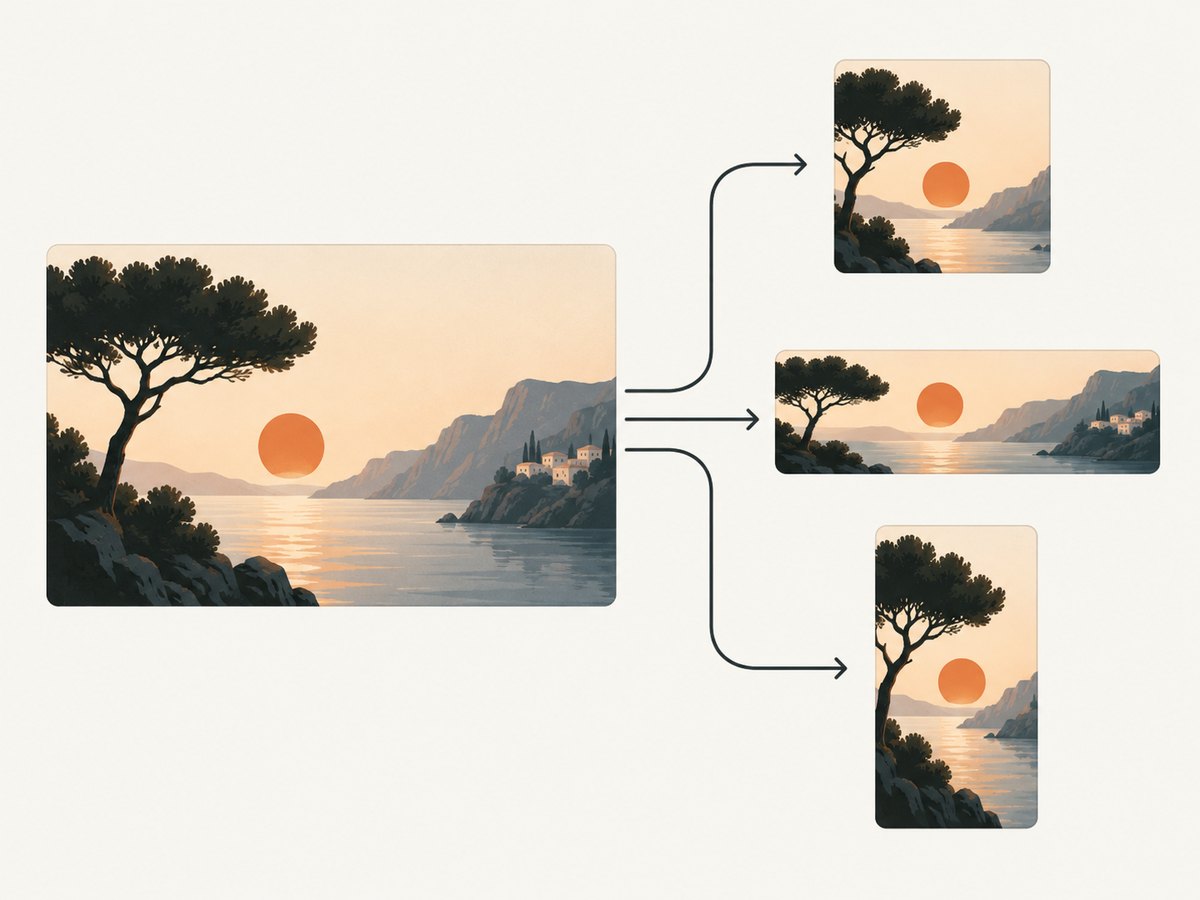
A thumbnail image is a compact preview of a larger image, video, document, or other digital item. It helps someone recognize or review the full item quickly in a grid, gallery, file browser, search result, or media player. A thumbnail can be a separate small file, a resized rendition, or an image cropped for a particular display.
There is no universal thumbnail size. The correct dimensions, aspect ratio, crop, format, and file limit depend on where the image will appear.
What is a thumbnail used for?
Thumbnails reduce the time and bandwidth needed to scan many items. Common uses include:
- Photo galleries: a grid of small previews that open the original image.
- Video players: a poster image or custom preview that identifies a video before playback.
- Search results: a visual cue next to a result or media item.
- File browsers: previews for pictures, videos, documents, and other files.
- Content management systems: generated renditions for cards, archives, and related-content lists.
- Web pages: responsive images selected for the available layout width.
The same source image may produce several thumbnails. A square tile in a grid might crop the edges, while a list view may preserve the original aspect ratio. A document may use a page preview or a generic file icon.
Do all thumbnails have the same size?
No. Thumbnail dimensions are defined by the service, application, or layout that displays them. Keep these concepts separate:
| Concept | Meaning |
|---|---|
| Intrinsic dimensions | The pixel width and height of the image file. |
| Display dimensions | The size at which the browser or application draws the image. |
| Aspect ratio | The relationship between width and height, such as 16:9 or 1:1. |
| Crop | The portion removed to fit a fixed shape. |
| Variant | A separate rendition generated for a specific size or use. |
A 1,200 × 675 source (16:9) can be displayed as a 300 × 169 preview without cropping, or as a 300 × 300 square by cropping the sides. The 300 × 300 display is not evidence that the original thumbnail file must be square.
Common platform thumbnail sizes
Use the platform’s current documentation when uploading. These examples belong to different contexts and should not be treated as one standard:
| Context | Published guidance | What to remember |
|---|---|---|
| YouTube videos | Recommended 3840 × 2160, minimum width 640, 16:9, JPG or PNG. | Upload limits differ between mobile and desktop. |
| YouTube Shorts | Recommended 2160 × 3840, minimum height 640, 9:16. | A vertical video can receive an automatically generated 4:5 thumbnail in some mobile surfaces. |
| YouTube podcast playlists | 1:1 artwork. | This is a playlist context, not a video-thumbnail rule. |
| Google video features | At least 60 × 30 pixels, with larger images preferred; BMP, GIF, JPEG, PNG, WebP, SVG, and AVIF are listed formats. | The file must be reachable by Googlebot at a stable URL and meet Google’s transparency criteria. |
| Windows app views | Picture and video views may crop to squares; other views can preserve the source ratio. Microsoft gives 190 pixels as an example width for a 190 × 130 medium thumbnail. | The view determines the crop and presentation. |
Check the platform’s own help page before publishing because recommendations and upload limits can change.
Thumbnail dimensions versus responsive web display
On a web page, the file’s intrinsic size and the rendered size are different. A responsive layout may show a 1,200-pixel source at 280 pixels on a phone and 420 pixels on a desktop. Provide an appropriate source and let the browser choose it.
<picture>
  <source
    media="(max-width: 600px)"
    srcset="/images/article-320.webp 320w, /images/article-640.webp 640w"
    sizes="100vw"
  >
  <img
    src="/images/article-640.webp"
    srcset="/images/article-320.webp 320w, /images/article-640.webp 640w, /images/article-1280.webp 1280w"
    sizes="(max-width: 900px) 50vw, 320px"
    width="320"
    height="180"
    alt="A cyclist riding beside a lake at sunrise"
    loading="lazy"
    decoding="async"
  >
</picture>
The width and height values reserve the image’s aspect ratio before it loads, reducing layout shift. Set them to the ratio you actually serve; do not use arbitrary values just to change the display size.
How to create a thumbnail
Option 1: Resize and crop with Python
This script creates a 320 × 180 JPEG thumbnail, cropping from the center while preserving the requested 16:9 shape.
from PIL import Image, ImageOps

source = Image.open("source.jpg").convert("RGB")
thumbnail = ImageOps.fit(source, (320, 180), method=Image.Resampling.LANCZOS, centering=(0.5, 0.5))
thumbnail.save("thumbnail.jpg", format="JPEG", quality=82, optimize=True, progressive=True)
print("Wrote thumbnail.jpg")
Install the dependency with python -m pip install Pillow. Change the output dimensions when the destination uses another ratio, such as 1:1 or 9:16. For faces, products, or text, adjust the crop center or use a focal-point crop instead of assuming the center is correct.
Option 2: Resize in Node.js
import sharp from "sharp";

await sharp("source.jpg")
  .resize(320, 180, { fit: "cover", position: "centre" })
  .jpeg({ quality: 82, progressive: true })
  .toFile("thumbnail.jpg");

console.log("Wrote thumbnail.jpg");
Install Sharp with npm install sharp. Use fit: "contain" when the entire source must remain visible; add a background color to avoid empty transparent areas.
Option 3: Generate a thumbnail from a web page
A browser screenshot can capture a card, hero image, or complete page after its layout and fonts have loaded. Select a CSS element when you need only the card rather than the full page. Reserve the correct aspect ratio in the destination HTML and provide meaningful alternative text.
Accessibility requirements
A meaningful thumbnail needs a text alternative. The alternative should describe the relevant content or action in context, not the filename or the words “thumbnail image.” If the thumbnail is a link or button, describe its destination or action.
<a href="/stories/lake-cycling">
  <img
    src="/images/lake-cycling-320.webp"
    width="320"
    height="180"
    alt="Cyclist riding beside a lake at sunrise"
  >
  <span>Cycling beside the lake</span>
</a>
If nearby text already provides the same information and the image is decorative, use an empty alternative (alt="") so assistive technology does not announce duplicate content. WCAG 2.2 requires text alternatives for non-text content except in defined cases, and Google’s image guidance recommends useful, contextual alt text rather than keyword stuffing.
Choosing crop, format, and quality
- Crop: use a fixed crop for uniform grids; preserve the ratio when the complete image matters.
- Format: WebP or AVIF can reduce transfer size when your browser and pipeline support them; JPEG remains broadly compatible for photographic images; PNG suits transparency and sharp, limited-color artwork.
- Quality: lower quality until artifacts become visible at the actual display size. A large source does not automatically produce a better preview.
- Sharpness: downsample with a high-quality filter and avoid repeatedly resizing an already compressed thumbnail.
- Caching: give generated files stable URLs and cache them. Include a version or content hash when the source changes.
Or skip the browser setup
ScreenshotNeo can create a screenshot or PDF from one GET request. Its capture options include full-page screenshots with lazy images loaded, CSS-element capture, custom viewport and device presets, dark mode, retina scale, custom CSS and JavaScript, click and wait actions, request and resource blocking, headers, cookies, user agents, timezone, geolocation, transparent backgrounds, resizing, caching, signed links, asynchronous jobs, bulk capture, and a usage API. See the ScreenshotNeo documentation for parameter details.

curl -G "https://api.screenshotneo.com/v1/shot" -d access_key=YOUR_API_KEY --data-urlencode url=https://stripe.com -o shot.webpimport requests
r = requests.get("https://api.screenshotneo.com/v1/shot", params={"access_key": "YOUR_API_KEY", "url": "https://stripe.com"}, timeout=90)
open("shot.webp", "wb").write(r.content)const q = new URLSearchParams({ access_key: 'YOUR_API_KEY', url: 'https://stripe.com' });
const res = await fetch(`https://api.screenshotneo.com/v1/shot?${q}`);Cookie banners, newsletter popups, and chat widgets are removed before the shot. Bot checks, blank pages, failed loads, timeouts, and cache hits are never billed, and response headers identify the page verdict and billing status. The MCP server provides take_screenshot, get_page_info, and capture_pdf tools for AI agents. The free plan includes 1,000 screenshots per month with no card; paid plans start at $5 for 3,000.
Create a free ScreenshotNeo account to generate clean thumbnail source images.
Troubleshooting thumbnails
| Problem | Likely cause | Fix |
|---|---|---|
| Faces or product edges are cut off | A fixed crop uses the center as its focal point. | Use a focal-point crop, change the crop position, or use contain. |
| Images look stretched | Width and height force a different ratio. | Keep the file and CSS ratios consistent; use object-fit: cover only when cropping is intended. |
| Layout jumps while loading | No intrinsic dimensions were reserved. | Set accurate HTML width and height attributes or an equivalent aspect-ratio rule. |
| Thumbnails are blurry | The source is too small or repeatedly compressed. | Generate a source at the largest expected display size and resize once with a quality filter. |
| Transparent artwork has a dark box | JPEG cannot store transparency. | Use PNG, WebP, or AVIF with an alpha channel, or add an intentional background. |
| Search engines cannot fetch the image | The URL is unstable, blocked, or requires authentication. | Serve it from a stable, publicly reachable URL and check robots and access rules. |
| Alt text repeats the caption | The same information is announced twice. | Use an empty alt for a decorative duplicate, or make the alt describe the link’s action. |
Performance and reliability checklist
- Generate only the variants your layouts use.
- Serve responsive sources with
srcsetandsizes. - Reserve the aspect ratio before the request completes.
- Lazy-load below-the-fold previews, but do not lazy-load the main above-the-fold image by default.
- Use stable, cacheable URLs and invalidate them when the source changes.
- Keep important subjects inside a safe crop area.
- Test on narrow and wide layouts, slow connections, high-density screens, and with images disabled.
- Write alt text from the user’s task: recognition, destination, or action.
FAQ
Is a thumbnail the same as a preview?
They overlap. “Thumbnail” usually means a small visual rendition; “preview” can also mean a larger or interactive representation such as a document page preview.
Should thumbnails always be square?
No. Square crops are common in grids, but video, editorial, and responsive layouts often use 16:9, 4:3, 3:2, or the source ratio.
Can I use the original image as its own thumbnail?
You can, but downloading a large original for a small card wastes bandwidth. A purpose-sized rendition usually loads faster.
Does a thumbnail need alt text?
If it conveys information or provides a control, give it a useful text alternative. If it is purely decorative or duplicates adjacent text, an empty alternative may be correct.
What is the best thumbnail format?
Choose based on compatibility, transparency, image content, and file size. JPEG works well for photographs; PNG is useful for transparency and sharp graphics; WebP or AVIF can reduce transfer size when supported by your delivery pipeline.


