What Is a Web Crawler? Use Cases and Examples
Learn what web crawlers do, how they discover pages, how crawling differs from indexing, and how to build a respectful crawler.
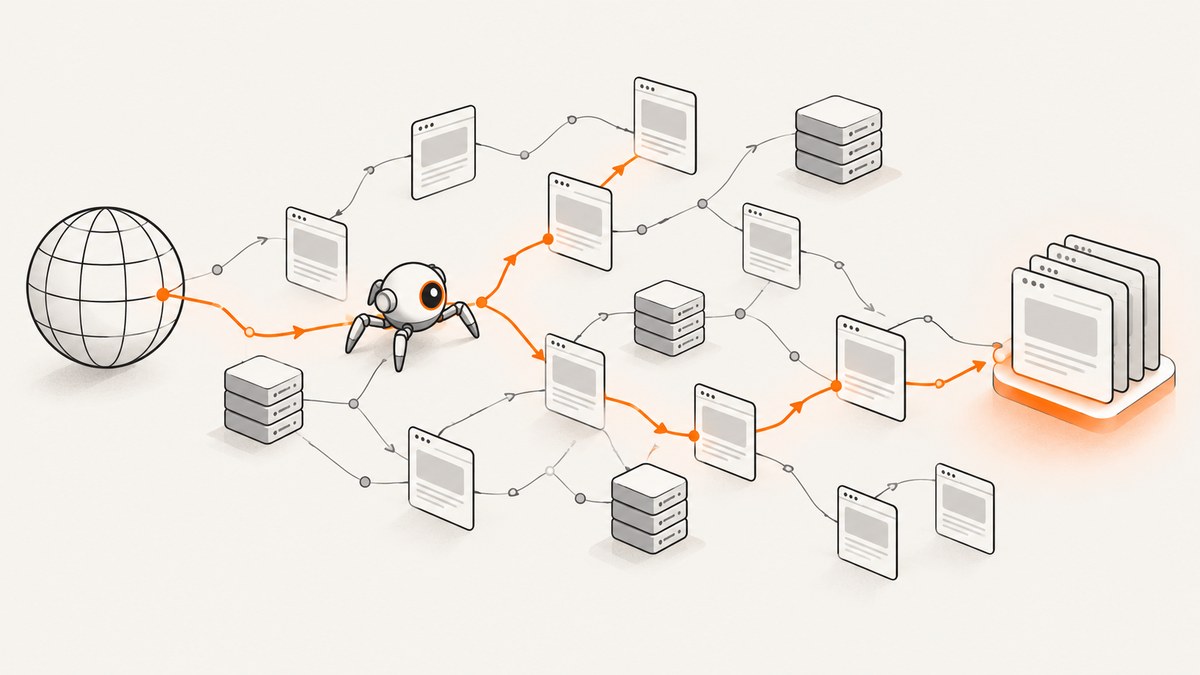
A web crawler is automated software that discovers and visits web pages to collect or understand information. Search engines use crawlers to find pages that may later be analyzed, indexed, and shown in search results. Crawling is only the retrieval and discovery stage; it does not mean a page has been indexed or will appear in search.
This guide explains how crawlers find URLs, decide what to fetch, handle JavaScript and robots.txt, and support search, monitoring, and structured research. It also includes a small Python crawler you can run, production design guidance, troubleshooting, and a ScreenshotNeo option when you need reliable page images instead of building browser infrastructure.
What is a web crawler?
A crawler (also called a spider or bot) is a program that requests web resources, reads the responses, extracts links or other signals, and schedules more requests. It may save HTML, rendered content, metadata, screenshots, PDFs, or structured fields, depending on its purpose.
There is no central registry containing every URL on the web. A crawler starts with known URLs called seeds, follows links it discovers, and can use XML sitemaps as additional discovery hints. Google describes crawling as using automated software to discover new pages and understand them. Google’s crawling overview documents this process.
| Term | What it means |
|---|---|
| Crawling | Discovering and fetching URLs and their resources. |
| Scraping | Selecting and extracting particular data from fetched pages. |
| Indexing | Analyzing and storing content so it can be retrieved later. |
| Serving | Returning a result to a person or application. |
These stages can be performed by different systems. A crawler can collect a page without an index ever being built, and a page can be indexed after a later analysis step. Google explicitly separates crawling, indexing, and serving in its guide to how Search works.
How does a web crawler work?
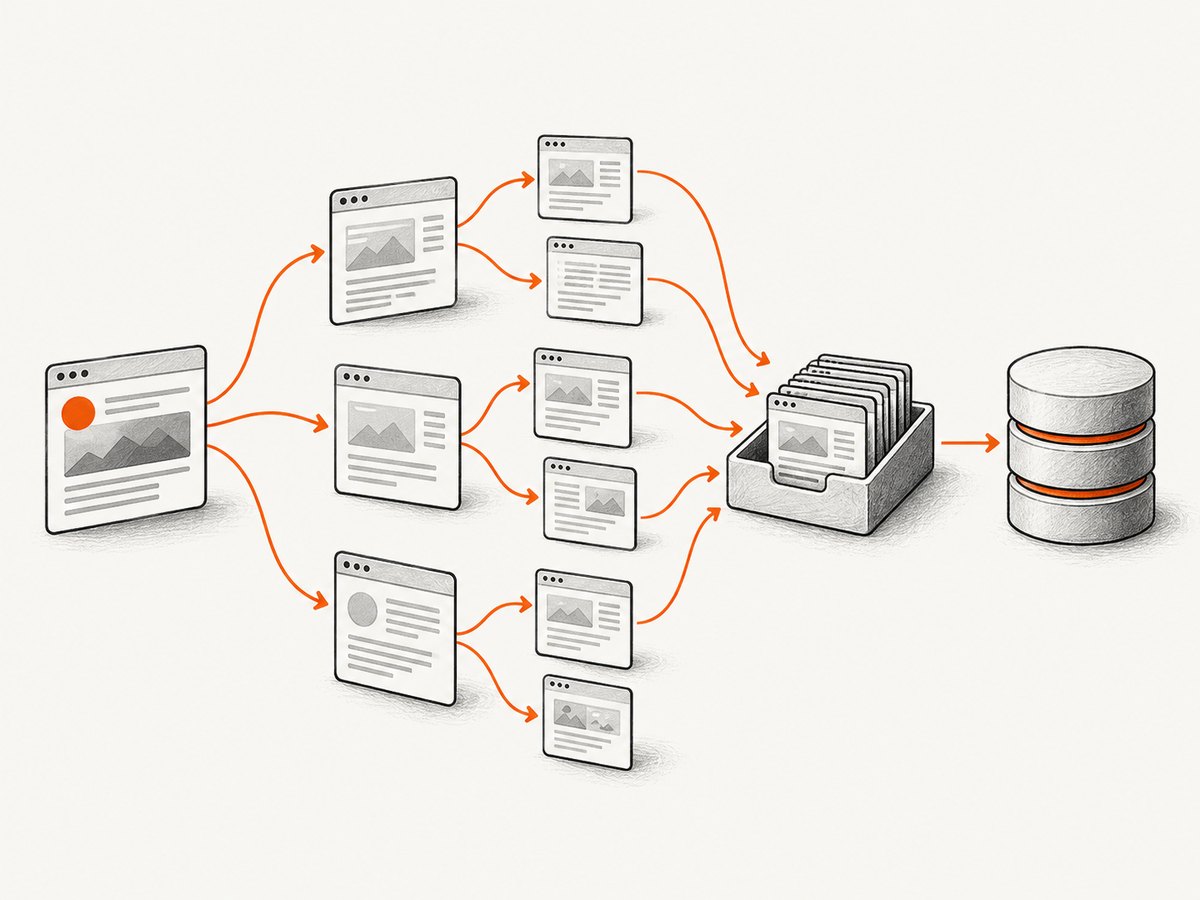
- Seed the queue. Add URLs from configuration, a sitemap, a database, or a user request.
- Normalize and deduplicate. Resolve relative links, remove fragments, normalize host and scheme rules, and avoid fetching the same canonical URL repeatedly.
- Check policy. Read robots.txt where appropriate, apply an allowlist, and enforce rate, depth, and resource limits.
- Schedule a request. Choose a URL according to priority, freshness, host politeness, and retry state.
- Fetch. Send an HTTP request, follow permitted redirects, record status and headers, and enforce connection and total timeouts.
- Parse. Extract links, metadata, content, or structured fields. A crawler that needs the final DOM may render JavaScript in a browser.
- Store results. Save the response, extracted data, crawl timestamp, errors, and provenance.
- Enqueue discoveries. Add new in-scope links and update the scheduler.
Google’s crawler is algorithmic: it chooses what to fetch and when, responds to server conditions, and may slow down after HTTP 500 errors. Those details describe Google’s system; other crawlers can use different policies and rendering engines.
Links, sitemaps, and rendering
Links are the usual discovery mechanism. A sitemap can list URLs and modification hints, helping a search engine find new or changed pages, but submitting a sitemap does not guarantee crawling or indexing. Client-side applications add another complication: the initial HTML may contain little content, so a crawler may need to execute JavaScript to see the rendered page. Rendering is more expensive and can expose different behavior from a simple HTTP client.
What are web crawlers used for?
Search discovery
Search engines crawl pages so they can decide what content to analyze and potentially include in their indexes. Recrawling frequency varies with demand, change signals, and server capacity. Google gives examples ranging from minutes for breaking-news homepages to about a month after a site has remained unchanged for years; these are examples of Google behavior, not a schedule promised to every site.
Site monitoring
Teams crawl their own sites to detect broken links, redirect chains, missing titles, accidental noindex tags, changed prices, or unavailable pages. A monitor should store a baseline and report meaningful changes instead of treating every timestamp or tracking parameter as a new page.
Structured research and product discovery
A crawler can collect pages from a company domain, classify them, and extract fields such as product names and descriptions. A 2024 EMNLP Industry paper describes a research system that combines sitemap and recursive URL collection, respects each domain’s robots.txt, classifies pages, and extracts product information. It is a concrete research example, not evidence that every commercial crawler works the same way.
Archives, analytics, and internal search
Organizations crawl approved content to build an archive, power internal search, create link graphs, or measure content freshness. These jobs usually have explicit scope and authentication rules that differ from an open-web search engine.
Does robots.txt control a crawler?
Google’s robots.txt guide defines the file as instructions about which URLs a crawler may access. For Google, the file belongs at the top level of a host and applies only to that host, protocol, and port. Different crawlers can interpret syntax differently.
User-agent: *
Disallow: /private/
Disallow: /tmp/
Allow: /tmp/public-report.html
Sitemap: https://example.com/sitemap.xml
robots.txt is a traffic-management convention, not authentication. Some bots ignore it, and Google may still show a blocked URL if it discovers the address elsewhere. Protect private material with login controls or server-side authorization. If your goal is to keep an accessible page out of Google’s results, use an appropriate indexing control such as noindex; blocking the crawl can prevent the crawler from seeing that directive. See Google’s robots.txt specification notes for interpretation details.
Build a small, respectful crawler in Python
The following example crawls one host to a fixed depth, obeys robots.txt, limits requests per host, extracts ordinary HTML links, and records failures. It is intentionally conservative. Install its only dependency with python -m pip install requests beautifulsoup4.
from collections import deque
from urllib.parse import urljoin, urldefrag, urlparse
from urllib.robotparser import RobotFileParser
import time
import requests
from bs4 import BeautifulSoup

START = 'https://example.com/'
MAX_PAGES = 50
MAX_DEPTH = 2
DELAY_SECONDS = 1.0
USER_AGENT = 'ExampleResearchCrawler/1.0 (+https://example.com/contact)'

session = requests.Session()
session.headers.update({'User-Agent': USER_AGENT})
start_host = urlparse(START).netloc
robots = RobotFileParser(urljoin(START, '/robots.txt'))
try:
    robots.read()
except Exception:
    # Decide your policy explicitly when robots.txt cannot be read.
    robots = None

queue = deque([(START, 0)])
seen = set()
results = []

while queue and len(seen) < MAX_PAGES:
    url, depth = queue.popleft()
    url = urldefrag(url)[0]
    if url in seen or depth > MAX_DEPTH:
        continue
    parsed = urlparse(url)
    if parsed.scheme not in ('http', 'https') or parsed.netloc != start_host:
        continue
    if robots and not robots.can_fetch(USER_AGENT, url):
        continue

    seen.add(url)
    try:
        response = session.get(url, timeout=(5, 20), allow_redirects=True)
        content_type = response.headers.get('content-type', '')
        item = {'url': url, 'status': response.status_code,
                'final_url': response.url, 'content_type': content_type}
        results.append(item)
        if response.ok and 'text/html' in content_type:
            soup = BeautifulSoup(response.text, 'html.parser')
            for anchor in soup.select('a[href]'):
                child = urljoin(response.url, anchor['href'])
                child = urldefrag(child)[0]
                if urlparse(child).netloc == start_host:
                    queue.append((child, depth + 1))
    except requests.RequestException as exc:
        results.append({'url': url, 'error': str(exc)})
    time.sleep(DELAY_SECONDS)

for row in results:
    print(row)
Production changes you should make
- Persist the queue and results so a process restart does not lose state.
- Use per-host token buckets rather than one global sleep when crawling multiple domains.
- Canonicalize query parameters only when you understand their meaning; removing every query can merge distinct pages.
- Cap response bytes, decompression size, redirects, and HTML parsing time to avoid resource exhaustion.
- Classify content by
Content-Type; do not parse PDFs, images, or large downloads as HTML. - Use conditional requests with
ETagandIf-Modified-Sincefor recrawls. - Record status, latency, redirect chain, retry count, parser version, and crawl timestamp for reproducibility.
Browser rendering, screenshots, and crawler output
Use an HTTP client when the server response contains the data you need. Use a browser when content appears only after JavaScript runs, a login flow is required, or layout itself is the output. Browser sessions cost more CPU and memory, so render selectively after an HTTP pass identifies pages that need it.
Or skip the browser setup
When your crawler’s deliverable is a page image or PDF, ScreenshotNeo provides a single request that returns PNG, JPEG, WebP, or PDF. Before capture it accepts cookie and consent banners and removes more than 60 known consent platforms, newsletter popups, and chat widgets; each cleanup step can be disabled. Bot checks or CAPTCHAs, blank pages, timeouts, failed loads, and cache hits are not billed, and the response identifies the result with X-Page-Verdict and X-Billed headers.

See the ScreenshotNeo API documentation for all options. A minimal call is:
curl -G 'https://api.screenshotneo.com/v1/shot' \
  -d access_key=YOUR_API_KEY \
  --data-urlencode url=https://stripe.com \
  -o shot.webp
import requests
r = requests.get(
'https://api.screenshotneo.com/v1/shot',
params={'access_key': 'YOUR_API_KEY', 'url': 'https://stripe.com'},
timeout=90,
)
r.raise_for_status()
open('shot.webp', 'wb').write(r.content)const q = new URLSearchParams({ access_key: 'YOUR_API_KEY', url: 'https://stripe.com' });
const res = await fetch(`https://api.screenshotneo.com/v1/shot?${q}`);
if (!res.ok) throw new Error(`HTTP ${res.status}`);
const fs = await import('node:fs/promises');
await fs.writeFile('shot.webp', Buffer.from(await res.arrayBuffer()));Options cover full-page capture with lazy images loaded, CSS-selector element shots, dark mode, 12 device presets or any viewport, retina scale, custom CSS and JavaScript, clicks, hidden selectors, selector or network-idle waits, ad/tracker/request blocking, headers, cookies, user agents, Authorization, timezone, geolocation, transparent backgrounds, resizing, selectable-TTL caching, signed public image links, asynchronous jobs with signed webhooks, bulk capture of up to 100 URLs per call, usage reporting, and PDF paper size, margins, orientation, and page ranges. Parameter names used by other screenshot APIs also work, which can simplify migration.
An MCP server exposes take_screenshot, get_page_info, and capture_pdf to Claude, Cursor, and other MCP clients. Plans include 1,000 screenshots per month free with no card; paid plans start at $5 for 3,000. Create a free ScreenshotNeo account.
Crawler performance and reliability
| Concern | Practical control |
|---|---|
| Load on a site | Per-host concurrency, delays, backoff on 429/5xx, and a clear User-Agent. |
| Queue growth | Depth limits, URL budgets, canonicalization, and duplicate suppression. |
| Slow pages | Connect/read/total timeouts and a maximum response size. |
| Transient failures | Bounded retries with exponential backoff and jitter; keep the original error. |
| Freshness | Prioritize changed or important URLs and use conditional HTTP requests. |
| Browser cost | Render only pages that require JavaScript or visual output; reuse browser contexts. |
For screenshots, caching with a chosen TTL avoids repeated renders. Async jobs and signed webhooks keep long captures out of request timeouts, while bulk capture reduces orchestration overhead. Track billed status separately from HTTP success so a failed page does not become an unexplained cost.
Troubleshooting common crawler errors
403 or 429 responses
Cause: access controls or excessive request rate. Fix: verify authorization, slow down per host, honor Retry-After, identify your bot, and stop retrying permanent denials.
Robots rules appear inconsistent
Cause: syntax, host, protocol, or crawler-specific interpretation. Fix: fetch the robots file from the exact origin, log the matched rule, and document which parser you use. Never treat robots.txt as a security boundary.
Important content is missing
Cause: content is injected by JavaScript, hidden behind interaction, or loaded from an API. Fix: inspect the raw response, identify the data endpoint, or render the page with a browser and wait for a selector or network idle.
Duplicate URLs multiply
Cause: tracking parameters, fragments, alternate slash forms, or calendar links. Fix: remove fragments, apply documented parameter rules, follow canonical hints carefully, and cap depth and page count.
Screenshot is blank or blocked
Cause: bot checks, consent overlays, failed resources, or a capture before the page is ready. Fix: wait for a selector or network idle, set a realistic viewport, and inspect X-Page-Verdict and X-Billed when using ScreenshotNeo.
Request times out
Cause: slow origin, third-party scripts, or an overly long full-page capture. Fix: set separate connect and read limits, block unnecessary resource types, capture an element, or use an asynchronous job.
Web crawler FAQ
Is a crawler the same as a scraper?
No. Crawling discovers and fetches pages. Scraping extracts selected fields from those pages. One program can do both, but the concepts and controls are different.
Does crawling guarantee indexing?
No. Google says it does not guarantee that a page will be crawled, indexed, or served, even when the page follows its guidelines.
Can robots.txt hide confidential data?
No. Use authentication or server-side access control for confidentiality.
Do all crawlers execute JavaScript?
No. Rendering behavior depends on the crawler. Identify the implementation before assuming a client-side page will be visible.
How often should a site be crawled?
Use the lowest frequency that meets your freshness requirement, then adapt to change rate and server responses. There is no universal interval.
When should I use a screenshot API?
Use one when the required output is a reliable image or PDF and maintaining browser workers, consent handling, waits, and retries would distract from your application.
Checklist for a responsible crawler
- Define an explicit host and URL scope.
- Set depth, page, byte, redirect, and time budgets.
- Publish an identifiable User-Agent and contact path.
- Parse robots.txt according to the crawler you operate.
- Throttle per host and back off on overload responses.
- Store provenance, status, timestamps, and errors.
- Separate crawling, extraction, indexing, and visual capture in your design.
- Protect credentials and never place private URLs in public logs.
A crawler is a discovery and retrieval system, not a guarantee of search visibility. Treat each target site as a shared resource, make rendering an explicit choice, and measure freshness and failure states separately. For page images or PDFs without maintaining that browser layer, start with ScreenshotNeo’s free 1,000 screenshots per month.


