What Is a Web Proxy? Types, Purposes, and Use Cases
A web proxy sits between clients and servers. Learn how forward and reverse proxies work, what they can do, and when to use each.
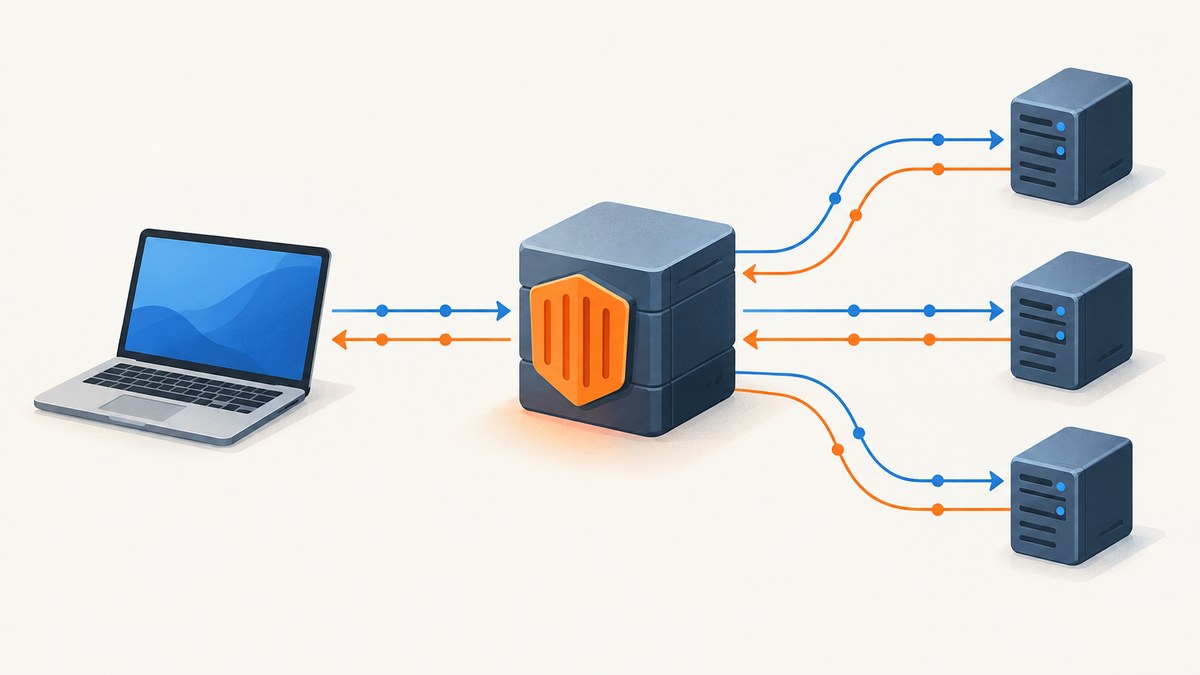
A web proxy is an intermediary that receives a network request and may forward it to a destination, return a cached response, or modify the request or response along the way. To understand what a proxy does, first ask whose side it serves: a forward proxy represents clients reaching Internet services; a reverse proxy receives Internet requests on behalf of servers behind it.
Proxies are not one product or a guaranteed privacy or security feature. Their behavior depends on where they sit, how they are configured, who operates them, and which traffic they can inspect or change.
1. What is a proxy server?
A proxy server is an intermediary in the path between a client and another server. A browser, application, or network sends a request to the proxy. The proxy then decides what to do: it can forward the request upstream and relay the answer, satisfy it from a cache, reject it under a policy, or change details before passing it along.
That makes “proxy” a broad role rather than a particular protocol, vendor, or privacy guarantee. Proxies can be local to a user’s network or operated elsewhere on the route. They are commonly used for caching, filtering, authentication, logging, and load distribution. Those are functions; they do not by themselves define whether a proxy is forward or reverse.
For example, if a browser requests a page through an organization’s outbound proxy, that proxy is acting for the browser. If someone requests a website and the request first reaches a gateway that selects one of the site’s application servers, the gateway is acting for the site.
2. How does a reverse proxy differ from a forward proxy?
| Question | Forward proxy | Reverse proxy |
|---|---|---|
| Whose side is it on? | The client or client network | The website or application server side |
| Where is it configured? | On or for clients, such as through browser or network settings | In front of one or more origin or application servers |
| Which requests does it handle? | Requests from clients going to Internet destinations | Incoming requests from clients going to the site’s servers |
| Typical reasons to use it | Access policy, filtering, authentication, logging, or caching for outgoing traffic | Load distribution, caching, TLS handling, buffering, security filtering, or limiting direct origin exposure |
Think of the distinction as client egress versus server ingress. A forward proxy is a representative for the requester. A reverse proxy is an entry point for the service being requested. The words describe placement and role, not every feature the proxy may offer.
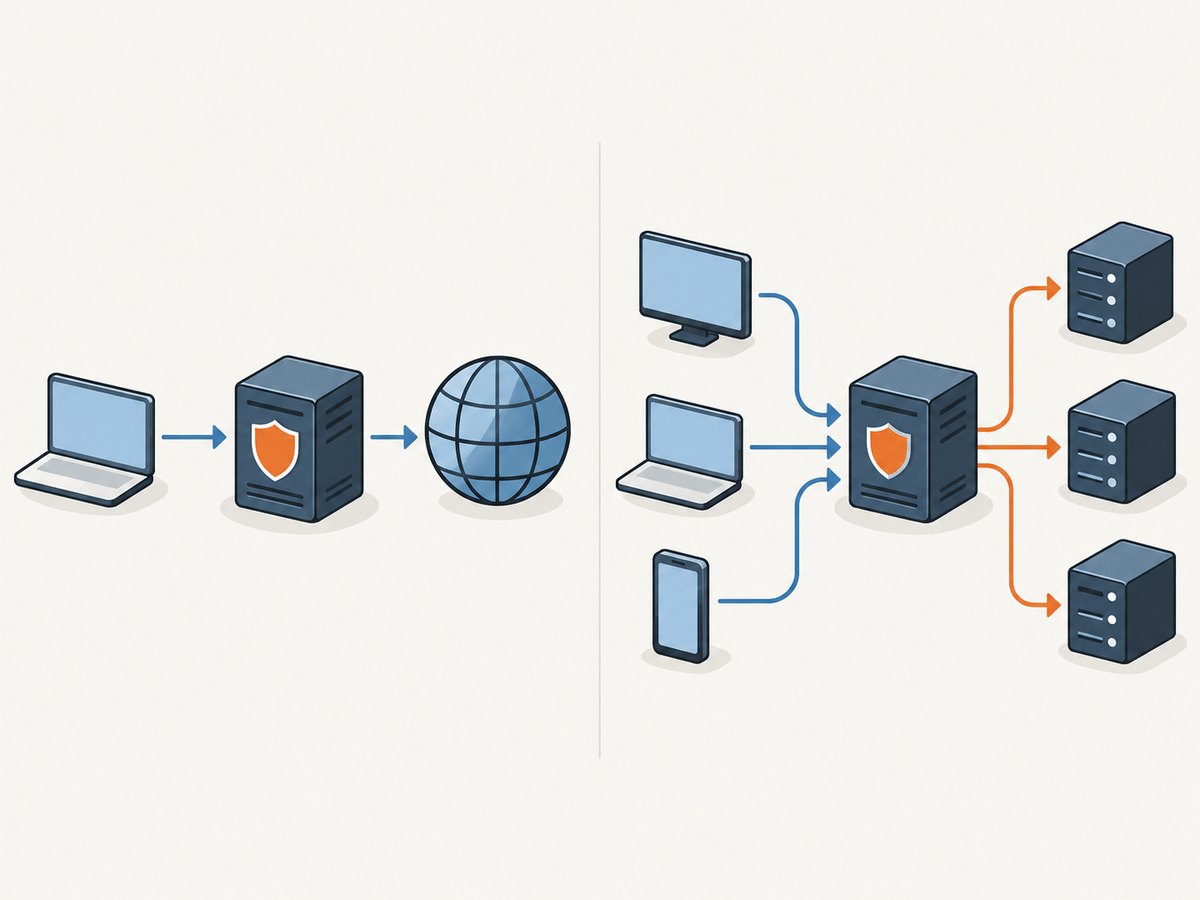
A reverse proxy can route to different upstream servers, but the proxy must be configured with the right upstreams and routing behavior. A forward proxy can enforce an organization’s rules, but only for traffic that actually uses it. Neither placement automatically makes a system private, secure, or faster.
3. What does a forward proxy do?
A forward proxy accepts requests from clients and sends them to Internet destinations on those clients’ behalf. Organizations may use one to apply access controls, require authentication, log activity, filter destinations, or cache reusable responses.
Depending on the setup, a destination may see the proxy’s network address instead of the client’s address. That does not make the proxy inherently trustworthy or guarantee anonymity: the proxy operator may be able to observe or handle traffic, and the client may identify itself through application data or headers. With HTTPS, the proxy can commonly tunnel the encrypted connection, but whether it can inspect or change encrypted content depends on the configuration and trust arrangement.
Client configuration and routing
Clients can be configured to use a proxy directly, or a browser may use a Proxy Auto-Configuration (PAC) file. A PAC file contains JavaScript that selects whether a request should connect directly or go through a proxy. This can route different destinations differently; it is still necessary to ensure the client supports and loads the configuration correctly.
For HTTPS through an HTTP proxy, clients commonly use the HTTP CONNECT method to ask the proxy to establish a two-way connection to the destination. Support is not universal: a proxy may reject CONNECT or restrict which destination ports it allows. Check both the client’s proxy settings and the proxy’s policy when a secure request cannot pass through.
4. What does a reverse proxy do?
A reverse proxy sits in front of one or more origin or application servers. It receives an incoming request, chooses an upstream server or service, and relays the request and response. The client interacts with the public entry point while the backend servers are behind it.
Common uses include distributing requests across servers, caching content, buffering requests or responses, applying security filters, handling TLS encryption and decryption, and reducing direct exposure of origin infrastructure. Reverse proxy software such as NGINX can proxy traffic to HTTP and non-HTTP application servers. A managed CDN or reverse-proxy service is another operational model; compare its actual configuration and service-specific capabilities rather than assuming every provider does the same things.
A reverse proxy can add controls or help reduce direct origin exposure, but it is not a complete security boundary by itself. Backend access rules, proxy configuration, software maintenance, and the handling of client-supplied headers all matter. Likewise, caching and load balancing can help under suitable traffic and configuration, but neither guarantees lower latency or higher availability.
Forwarding headers and trust boundaries
When a proxy passes a request upstream, the backend may need information about the original request, such as the client address, requested host, or original scheme. The standardized Forwarded header can carry proxy-related client information. Widely used alternatives include X-Forwarded-For, X-Forwarded-Host, and X-Forwarded-Proto. The Via header identifies proxy involvement.
Do not assume an incoming forwarding header is authentic just because it has a familiar name. A client can send such a header itself. Configure the application to trust only the proxy hops you control, and have those trusted proxies set or sanitize the relevant values. Otherwise, logs, access rules, or generated URLs may rely on untrusted data.
5. Transparent and non-transparent proxies
Transparent and non-transparent describe what a proxy does to traffic at the HTTP layer; they are a separate axis from forward and reverse placement. A transparent proxy forwards requests without altering them at that layer. A non-transparent proxy changes some aspect before forwarding, such as headers.
So a proxy can be forward or reverse and also transparent or non-transparent. The label alone does not say whether the proxy caches, authenticates, or filters. When evaluating a system, ask separately where it sits, which traffic it handles, and what it changes.
6. Choosing a proxy approach
Start with the direction of traffic and the job to be done. If clients need outbound policy or filtering, consider a forward proxy. If a public service needs an entry point in front of backend servers, consider a reverse proxy. Then check the operational details:
- Define the required function. List whether you need filtering, authentication, logging, caching, TLS handling, load distribution, or origin shielding. Do not treat these as automatic consequences of adding a proxy.
- Check protocol fit. Confirm support for HTTP or your backend protocol, CONNECT where needed, destination port restrictions, and required routing behavior.
- Choose the configuration model. For outbound clients, decide whether settings will be applied per client, centrally, or through PAC. For an application, decide whether to manage reverse-proxy software such as NGINX or use a managed service.
- Set trust boundaries. Identify who operates the proxy, what traffic it can observe or modify, and which upstream headers or proxy hops your applications trust.
- Plan failure and caching behavior. Decide what clients see if the proxy or an upstream is unavailable, which responses may be cached, and how stale content is handled.
A proxy is useful when its role and policies solve a specific network or service problem. For a one-off task such as capturing a rendered webpage, configuring a general purpose proxy is not the same as using a screenshot API: the latter runs a browser capture workflow and returns an image or PDF.
7. Capturing web pages: browser setup or a screenshot API
If your goal is to save a page as an image, you can run a browser automation tool on your own machine or server. This is a different job from proxying traffic: the browser loads and renders the page, then captures pixels. The minimal Playwright example below is runnable after installing its package and browser binaries.
npm install playwright
npx playwright install chromium
// save as capture.mjs; run with: node capture.mjs https://example.com
import { chromium } from 'playwright';
const url = process.argv[2];
if (!url) throw new Error('Usage: node capture.mjs https://example.com');
const browser = await chromium.launch({ headless: true });
try {
const page = await browser.newPage({ viewport: { width: 1440, height: 900 } });
await page.goto(url, { waitUntil: 'networkidle', timeout: 60000 });
await page.screenshot({ path: 'page.png', fullPage: true });
} finally {
await browser.close();
}networkidle is convenient for simple pages but can wait indefinitely on sites with persistent network activity; a selector or explicit delay may be more appropriate. In production, validate the URL, set timeouts, cap concurrency, close the browser in a finally block, and decide how to handle login, consent prompts, lazy-loaded images, and pages that never finish loading.
8. Or skip the browser setup
ScreenshotNeo is a website screenshot API and MCP server from Yorker Media. One GET request returns a PNG, JPEG, WebP, or PDF. The API accepts 63 options, including full-page capture with lazy images loaded, CSS element capture, device presets, dark mode, custom CSS and JavaScript, selector waits, cookies and headers, PDF settings, caching, async jobs, and bulk capture.
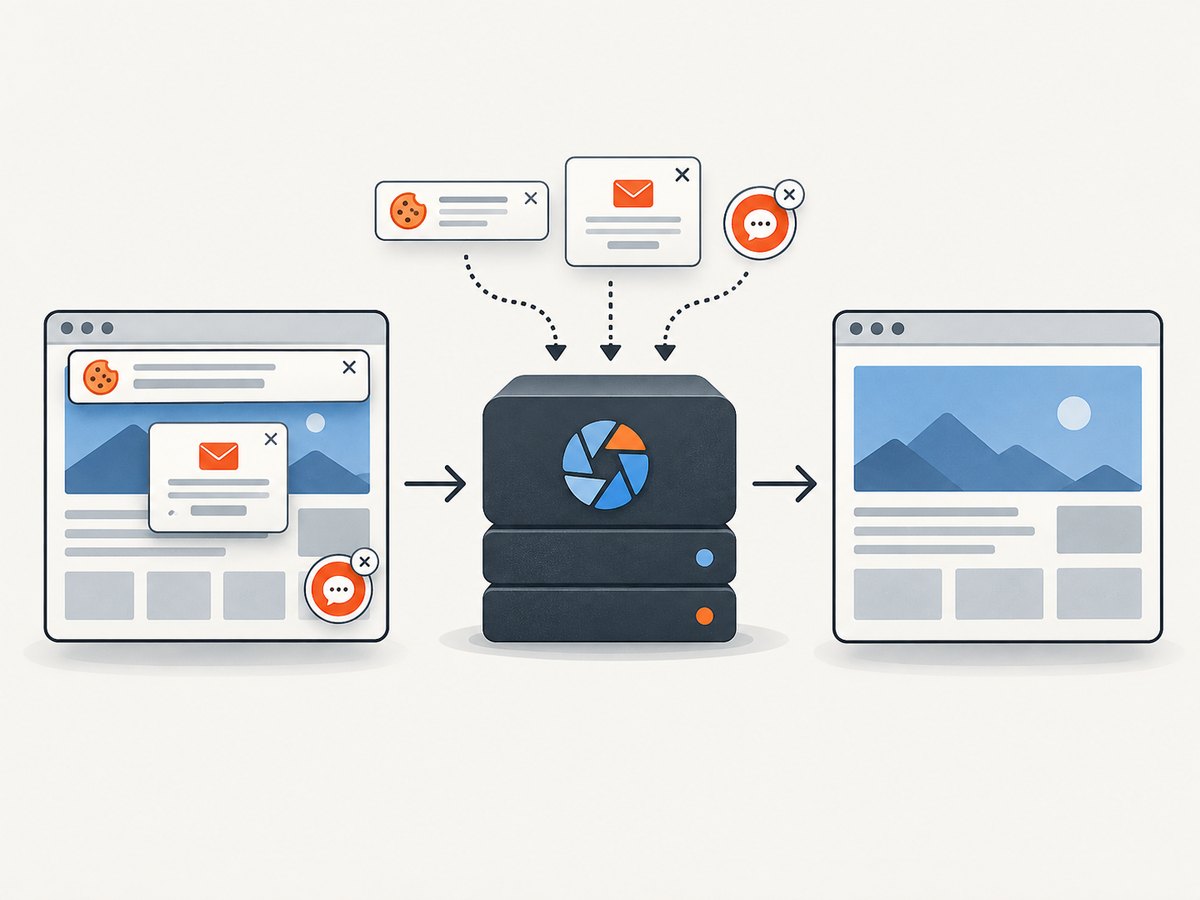
Cookie banners are accepted and removed before capture, along with 60+ known consent platforms, newsletter popups, and chat widgets; each step can be turned off. Bot checks, blank pages, timeouts, failed loads, and cache hits cost nothing, with the outcome identified in response headers. An MCP server exposes take_screenshot, get_page_info, and capture_pdf for Claude, Cursor, and other MCP clients. The free plan includes 1,000 screenshots per month with no card; paid plans start at $5 for 3,000.
See the ScreenshotNeo API documentation for parameters. Here are equivalent starting calls:
cURL
curl -G "https://api.screenshotneo.com/v1/shot" \
  -d access_key=YOUR_API_KEY \
  --data-urlencode url=https://example.com \
  -o shot.webp
Python
import requests

r = requests.get(
    "https://api.screenshotneo.com/v1/shot",
    params={"access_key": "YOUR_API_KEY", "url": "https://example.com"},
    timeout=90,
)
r.raise_for_status()
with open("shot.webp", "wb") as f:
    f.write(r.content)
Node.js
const q = new URLSearchParams({
  access_key: 'YOUR_API_KEY',
  url: 'https://example.com'
});
const res = await fetch(`https://api.screenshotneo.com/v1/shot?${q}`);
if (!res.ok) throw new Error(`Screenshot request failed: ${res.status}`);
await Bun.write('shot.webp', res);
Replace the example URL and save the response using the format requested. Check the response status and headers: X-Page-Verdict describes the page outcome and X-Billed indicates billing. Never expose an API key in browser-side code or a public page; call the API from a server or other protected environment.
Sign up for ScreenshotNeo’s free plan for 1,000 screenshots a month with no card. Cookie banners, popups, and chat widgets are removed before the shot; bot checks, blank pages, and failed loads are never billed; MCP tools let AI agents take screenshots; paid plans start at $5 for 3,000.
9. Troubleshooting proxy problems
| Symptom | Likely cause | What to check |
|---|---|---|
| Client cannot connect through the proxy | Wrong proxy address, port, credentials, or client configuration | Verify the endpoint and authentication settings; confirm the client is actually using the proxy. |
| HTTPS request fails through an HTTP proxy | CONNECT is unsupported, disabled, or restricted to other ports | Check proxy CONNECT support and destination port policy, along with the client’s proxy configuration. |
| Backend sees an unexpected client IP or scheme | Forwarding headers are missing, duplicated, or trusted from the wrong hop | Configure trusted proxies and sanitize client-provided forwarding headers at the proxy boundary. |
| Reverse proxy returns an upstream error | Backend unavailable, incorrect upstream target, or incompatible protocol | Check upstream health, address and port, routing rules, and protocol support. |
| Users see stale content | Cache policy or invalidation does not match the content’s update pattern | Review cache keys, freshness rules, and purge behavior for the affected path. |
| Traffic bypasses the intended forward proxy | Client or PAC rules direct the destination to connect directly | Inspect the active client configuration and PAC decision for that destination. |
For screenshot capture, common failures have different causes: a browser timeout can result from persistent network activity, a page may require a selector wait, and a CAPTCHA or bot check may prevent a meaningful render. Set a bounded timeout, choose a condition that signals the content you need, and inspect the returned status and page verdict rather than treating every image response as a successful page.
10. Performance, reliability, and cost
A proxy can improve performance when a cache serves a reusable response or when a reverse proxy distributes work effectively. It can also add a network hop and processing time. Measure the behavior that matters for your application, including upstream response time, cache hit behavior, and what happens when a proxy or backend fails. Avoid assuming a proxy is automatically faster or that a managed provider offers any particular uptime or security guarantee.
Reliability depends on the proxy and upstream configuration: health checks, timeouts, retry policy, capacity, and failure responses all matter. Retries can help with transient upstream errors but may duplicate non-idempotent operations if applied without care. For trusted headers and TLS, document which hop terminates encryption and which system is responsible for the client-facing connection.
Cost depends on whether you operate software yourself or pay for a managed service, and on compute, bandwidth, traffic volume, and operational needs. For screenshot work, ScreenshotNeo’s stated tiers are Free: 1,000 per month; Starter: $5 for 3,000; Growth: $15 for 15,000; Pro: $39 for 60,000; Scale: $99 for 250,000; Business: $249 for 1,000,000. Yearly billing gives two months free, and every feature is on every plan. Only clean shots are billed; bot checks, blank pages, timeouts, failed loads, and cache hits cost nothing.
11. Frequently asked questions
Does a proxy server hide my IP address?
A proxy may make the destination see the proxy’s network address, depending on the traffic and configuration. It does not guarantee anonymity, and the proxy operator may handle or observe traffic.
Is a VPN the same as a proxy?
This article uses “proxy” for an intermediary that handles requests or connections. Whether a VPN is an appropriate comparison depends on the particular product and traffic setup; do not assume every proxy handles all device traffic or provides the same protections.
Can one proxy be both forward and reverse?
Those labels refer to the role and traffic direction for a deployment. Proxy software can be configured for different roles, but a particular deployment should be evaluated by which side it serves and where it sits.
Does adding a reverse proxy secure a website?
It can provide a place to apply controls and reduce direct origin exposure, but security still depends on configuration, backend access, trusted headers, and maintenance.
When should I use a screenshot API instead?
Use one when the task is to render a URL and return an image or PDF. A proxy routes or handles traffic; it does not by itself perform browser rendering and screenshot capture.
Primary references
- MDN: Proxy server glossary — proxy definition and forward/reverse distinction.
- MDN: Proxy servers and tunneling — CONNECT, PAC files, and forwarding headers.
- MDN: Overview of HTTP — proxy functions and transparent behavior.
- Cloudflare: What is a reverse proxy? — common reverse-proxy uses.
- NGINX: Reverse proxy — proxying to upstream application servers.
- Cloudflare Blog: A Primer on Proxies — forward-proxy tunneling and reverse-proxy framing.


