What Is an API? Meaning, Types, and How It Works
An API is a set of rules that lets software use another program’s data or capabilities. Learn how API calls work, how common API types differ, and how to make a web API request.

An API, or application programming interface, is a documented set of rules and capabilities that lets one piece of software use another piece of software’s data or functions. It is an interface for software, rather than the screen a person clicks. APIs can expose data, actions, or capabilities such as a browser’s geolocation feature. They do not all run over the Internet, use HTTP, return JSON, or require an API key. MDN’s definition covers software interfaces broadly; a web API is one common kind.
In a web API example, a client sends a request to a particular endpoint according to the service’s documentation. The service can check identity and permissions, validate and process the request, then return a response. A weather app, for example, can request forecast data from a weather service and display the result instead of building its own forecasting system. AWS explains the client-and-service model; the sections below unpack the terms and show a runnable request.
1. What does API stand for?
API stands for application programming interface. “Application” means a software program or component; “programming” signals that the interface is used by software; and “interface” is the defined point of interaction. The interface states what a caller can ask for and the rules its request must follow. It does not have to reveal how the other software implements the capability internally.
Think of a public library catalog. A visitor can ask for books matching certain criteria without knowing how the library stores its records. In software, the API is the agreed way to make that request. The metaphor has limits: an API is a technical contract, and its documentation, validation, identity checks, and error behavior matter.
2. How do APIs work?
A web API commonly works as a request-and-response exchange. This describes a familiar web-service pattern, not every API: a language library may be called inside one program, and a WebSocket connection can stay open for messages in both directions.
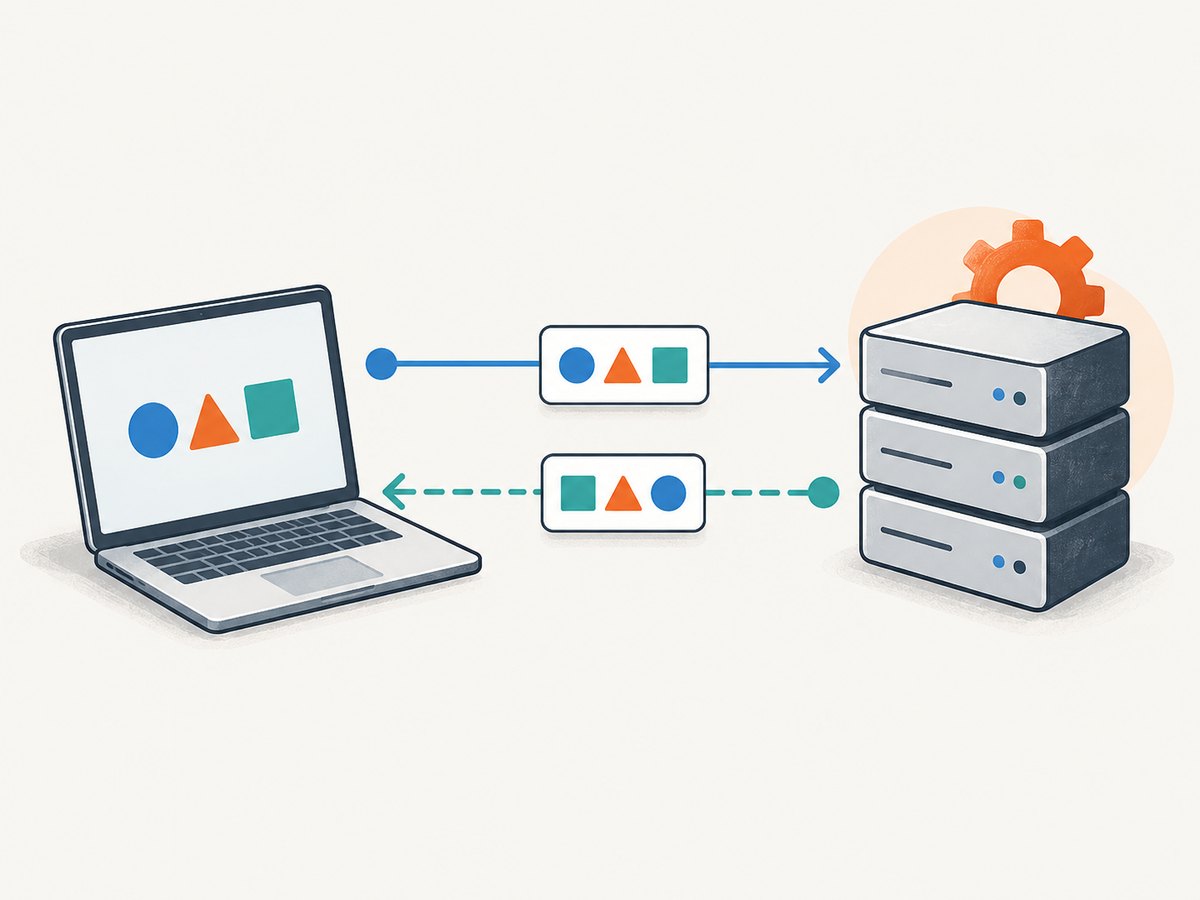
- The client identifies a capability. A browser, mobile app, backend service, script, or AI agent needs data or an operation another component provides.
- The caller reads the contract. Documentation or a schema describes valid endpoints, inputs, authentication, output formats, and error cases.
- The client builds a request. It selects an endpoint and, where applicable, an HTTP method; supplies parameters or a body; and includes credentials if required.
- The service checks and processes it. It may authenticate the caller, authorize the requested action, validate the input, apply business logic, and access other systems.
- The service returns a response. The response can contain requested data, the result of an operation, or an error that indicates what went wrong.
- The client handles the result. It checks the status and response format, then uses the result or decides whether a safe retry is appropriate.
Cloudflare describes an API call as a message directed to an endpoint and formatted according to the API’s schema. A schema spells out the accepted request structure and expected response types. See Cloudflare’s API explanation.
Key terms in an API exchange
| Term | Meaning | Example |
|---|---|---|
| Client | The program that initiates a request. | A Python script fetching a forecast. |
| Endpoint | The specific address or location receiving a request. | https://api.example.com/v1/weather |
| Request | The message asking for data or an operation. | A GET request with a city parameter. |
| Schema or documentation | The rules for valid requests and responses. | Required fields, accepted values, and response structure. |
| Response | The service’s result, including any returned data. | A JSON object containing a forecast. |
| Authentication | A check that establishes who or what is calling. | A token or another documented credential. |
| Authorization | A check that determines what an identified caller may do. | Permission to read a resource but not update it. |
3. What is an API call and endpoint?
An API call is a request to an API to retrieve information or perform an operation. In a web API, the endpoint is the address to which the request is sent. An endpoint is often a URL, but “endpoint” more generally means the specific location or interface a caller uses. One service can expose multiple endpoints for different resources or actions.
A request may also include query parameters, headers, or a body. Parameters can narrow a search or choose an output. Headers can communicate metadata or credentials. A body commonly carries input for operations that create or change data. Which method, fields, and authentication scheme to use is defined by the specific API; do not guess or send credentials unless the provider documents that method.
Runnable example: make a documented GET request
This example calls the public JSONPlaceholder demonstration endpoint. It needs Python 3 and the requests package. Install the package with python -m pip install requests, save the script as api_call.py, then run python api_call.py. The endpoint and returned content are for demonstration, not a production data source.
import requests

url = "https://jsonplaceholder.typicode.com/todos/1"
response = requests.get(url, timeout=10)
response.raise_for_status()

todo = response.json()
print("HTTP status:", response.status_code)
print("Title:", todo["title"])
print("Completed:", todo["completed"])
The script sends a request, sets a finite timeout, treats non-success HTTP statuses as errors, parses the JSON response, and uses fields from the result. A real API may require credentials, different parameters, or a different response structure. Read its documentation and keep secret credentials out of source code and logs.
Equivalent requests with cURL and Node.js
cURL is useful for a quick command-line check:
curl --fail --show-error --max-time 10 \
  "https://jsonplaceholder.typicode.com/todos/1"
With Node.js 18 or newer, the built-in fetch API can make the same request. Save as api-call.mjs and run node api-call.mjs:
const url = 'https://jsonplaceholder.typicode.com/todos/1';
const response = await fetch(url, { signal: AbortSignal.timeout(10_000) });

if (!response.ok) {
  throw new Error(`HTTP ${response.status}: ${await response.text()}`);
}

const todo = await response.json();
console.log('Title:', todo.title);
console.log('Completed:', todo.completed);
4. What are the different types of APIs?
“API type” can refer to different things: the architectural style, the communication pattern, or where the interface lives. REST, SOAP, RPC, and WebSocket are therefore not four interchangeable labels from one tidy category. These distinctions help when reading documentation or choosing an implementation.
| Approach | What it describes | Typical interaction |
|---|---|---|
| REST | An architectural style commonly used for web services. | Requests act on resources, often using HTTP methods. |
| SOAP | A protocol with defined messaging rules. | Structured messages exchanged according to SOAP rules. |
| RPC | A remote procedure call pattern: ask another system to run a function. | Function-oriented request and result. |
| WebSocket | A communication approach that supports two-way messaging over an ongoing connection. | Either side can send messages while connected. |
| Language, browser, and device APIs | Interfaces exposed by a programming environment or device. | Call a library function or request a browser capability. |
REST
REST stands for Representational State Transfer. It is an architectural style, not a protocol. REST-style web APIs commonly organize access around resources and use HTTP methods, but REST itself does not mean “JSON over HTTP,” and not every HTTP API is RESTful. A particular API’s documentation defines its actual behavior. AWS’s discussion of REST gives the web-service context.
SOAP and RPC
SOAP is the Simple Object Access Protocol: a protocol for structuring messages between systems. RPC means remote procedure call: the client asks a remote service to perform a function, in a way conceptually similar to calling a local procedure. Implementations and data formats vary, so the label alone does not tell you every request detail. Check the service contract.
WebSocket and local APIs
A WebSocket API is useful when an application needs an ongoing two-way conversation rather than a separate request for every update. Browser and language APIs may not involve a remote server at all. For instance, MDN documents browser APIs such as Geolocation and Web Animations. That is why “API” is broader than “web API.” MDN’s glossary gives examples of APIs exposed by browsers.
5. How to choose or use an API responsibly
Before integrating an API, establish what it offers and what the contract expects. Use this checklist during implementation:
- Read the official documentation for the exact endpoint, method, parameters, content types, and response schema.
- Confirm the authentication method and the permissions your application needs. Authentication identifies a caller; authorization controls what it can access.
- Validate input on your side and handle validation errors returned by the service.
- Set a timeout. A network request that never resolves can tie up resources or leave a user waiting.
- Check status codes and parse the response according to its documented content type.
- Retry only when appropriate. For transient failures, use bounded retries with backoff; do not blindly repeat operations that might create duplicate side effects.
- Respect published rate limits and quotas. A service can reject excess requests; for example, API Gateway documents throttling responses such as HTTP 429. AWS API Gateway throttling guidance.
- Keep credentials in a secret store or protected environment configuration, restrict their permissions, and rotate them according to your organization’s policy.
- Log enough context to diagnose failures without recording secret tokens or unnecessary personal data.
An API key by itself does not make an API secure. Security depends on the whole design: identity checks, authorization, validation, transport and deployment choices, rate controls, and careful handling of data. Cloudflare’s overview describes protections including authentication, schema validation, and rate limiting; the specific controls depend on the API and deployment. Cloudflare: API security.
6. A practical API example: requesting a website screenshot
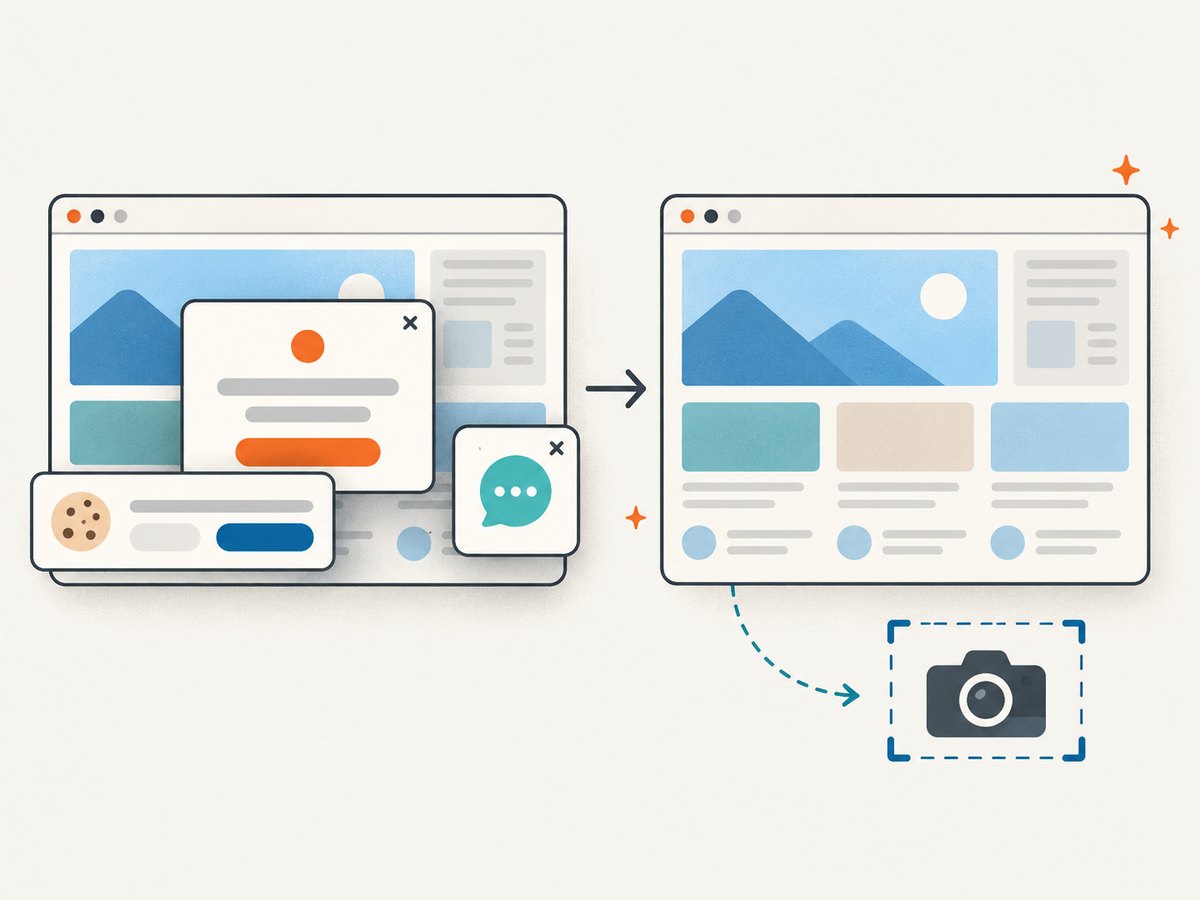
A screenshot service illustrates how an API exposes an operation, not just records. The client provides a target URL and receives an image or document. If you build the capture yourself, a browser automation library such as Playwright can start a browser, load a page, and save a screenshot. This gives you control over browser setup and capture behavior; you also own browser installation, timeouts, rendering differences, and cleanup.
Here is a compact Python example using Playwright. Install it with python -m pip install playwright, then install Chromium with python -m playwright install chromium. Save as capture.py and run python capture.py.
import asyncio
from pathlib import Path
from playwright.async_api import async_playwright

async def main():
    async with async_playwright() as playwright:
        browser = await playwright.chromium.launch()
        page = await browser.new_page(viewport={"width": 1440, "height": 900})
        await page.goto("https://example.com", wait_until="networkidle", timeout=30000)
        await page.screenshot(path="example.png", full_page=True)
        await browser.close()

asyncio.run(main())
For repeatable captures, choose a viewport, decide whether to capture the viewport or full page, and select a page readiness condition that fits the site. Network-idle waiting can be unsuitable for pages with persistent connections or recurring requests; a selector wait or a measured delay may be more appropriate. Always close the browser even when navigation fails in production code, and put a timeout around the whole job.
7. Or skip the browser setup
ScreenshotNeo is a website screenshot API and MCP server from Yorker Media. One GET request can return a PNG, JPEG, WebP, or PDF. Its API accepts parameters including the target URL and output options. Use the ScreenshotNeo API documentation for the current request details and available options.
curl -G "https://api.screenshotneo.com/v1/shot" -d access_key=YOUR_API_KEY --data-urlencode url=https://stripe.com -o shot.webpimport requests
r = requests.get("https://api.screenshotneo.com/v1/shot", params={"access_key": "YOUR_API_KEY", "url": "https://stripe.com"}, timeout=90)
open("shot.webp", "wb").write(r.content)const q = new URLSearchParams({ access_key: 'YOUR_API_KEY', url: 'https://stripe.com' });
const res = await fetch(`https://api.screenshotneo.com/v1/shot?${q}`);Cookie banners, newsletter popups, and chat widgets are removed before the shot; each cleanup step can be turned off. Bot checks, blank pages, failed loads, timeouts, and cache hits are never billed, and response headers report the page verdict and billing status. The MCP server provides take_screenshot, get_page_info, and capture_pdf for AI agents and MCP clients. The free plan includes 1,000 screenshots a month with no card; paid plans start at $5 for 3,000. See the docs for options such as full-page capture, element selection, device presets, PDF settings, custom CSS, waiting conditions, request blocking, caching, signed links, async jobs, and bulk capture.
Sign up for ScreenshotNeo’s free plan to get 1,000 screenshots a month with no card.
8. Troubleshooting API calls
| Symptom | Likely cause | What to check |
|---|---|---|
| 401 Unauthorized | Missing, expired, or invalid authentication. | Confirm the documented credential format, account, and secret value; avoid exposing the key in a public repository. |
| 403 Forbidden | The caller is recognized but lacks permission, or access is restricted. | Check scopes, roles, resource permissions, and any provider restrictions. |
| 404 Not Found | Incorrect endpoint or resource identifier, or an unavailable route. | Compare the URL, API version, path, and identifier with official documentation. |
| 400 Bad Request | Malformed input, missing required parameter, or schema mismatch. | Inspect the request method, encoding, field names, types, and required values. |
| 429 Too Many Requests | The service is limiting request volume. | Respect the documented quota; slow down and use bounded backoff if retries are appropriate. |
| 5xx server error | The service or an upstream dependency encountered a failure. | Capture the status and safe diagnostic details; retry only when the operation is safe and the error may be transient. |
| Timeout or connection error | Network delay, unreachable host, slow processing, or too-short timeout. | Check connectivity and endpoint availability, use a suitable finite timeout, and handle cancellation. |
| Unexpected JSON or parse error | The response may be an error page, empty body, or different content type. | Check status and content type before parsing, and inspect a redacted response body. |
For a browser-based capture, also distinguish an API error from a page-rendering issue. A successful API request does not guarantee the target website rendered the expected content: the site may show a bot check, load content only after interaction, or behave differently at the chosen viewport. Check the returned status or verdict when available, and review wait conditions, target URL, and capture settings.
9. Performance, reliability, and cost
Every remote API call adds network time and depends on the service and the network being reachable. Reduce avoidable work by requesting only needed data, reusing results when the data can be cached, and avoiding unnecessary polling. For browser capture, page load and rendering often dominate the work; full-page images, large assets, and waits can increase processing time. Select a readiness condition based on the site instead of using a long fixed delay for every page.
Reliability comes from explicit timeouts, error handling, bounded retries, and idempotency awareness. An idempotent read can often be retried after a transient failure; repeating a payment or create operation may cause duplicate effects unless the API supports an idempotency mechanism. Follow the service’s documented behavior. For high-volume integrations, plan around rate limits and quotas, monitor error rates and latency, and provide a fallback or queue when synchronous completion is not suitable.
API cost depends on the provider’s pricing model and your usage; some charge per request, volume tier, compute, or a combination. Estimate the calls your feature will make, account for retries and batch support, and avoid assuming every request is free. ScreenshotNeo’s stated tiers are Free for 1,000 shots/month, Starter $5 for 3,000, Growth $15 for 15,000, Pro $39 for 60,000, Scale $99 for 250,000, and Business $249 for 1,000,000; yearly billing gives two months free, and every feature is on every plan. Its billing rules exclude bot checks, blank pages, timeouts, failed loads, and cache hits. Review the product’s current documentation and plan details before implementing a cost estimate.
10. Frequently asked questions
Is an API the same as a user interface?
No. A user interface lets a person interact with software; an API defines how software components interact. A service can offer both, one, or neither to a particular caller.
Does every API use HTTP and JSON?
No. Those are common in web APIs, but APIs also exist in programming languages, browsers, and devices. Even among web APIs, protocols and data formats differ.
Is an API key the same as authentication and authorization?
An API key is one possible credential. Authentication establishes identity; authorization determines what that identity may do. A key alone does not guarantee appropriate access control.
What is API integration?
API integration connects software components by having one use another’s documented interface to exchange data or invoke capabilities. The client still needs to handle permissions, failures, rate limits, and changes to the contract.
Key takeaways
- An API is a defined software-to-software interface.
- A web API commonly accepts a request at an endpoint and returns a response.
- API labels describe different things: REST is an architectural style, SOAP a protocol, RPC a calling pattern, and WebSocket supports two-way communication.
- Read documentation, validate inputs, protect credentials, handle errors, and respect rate limits.


