What Is Web Scraping and How Do Scrapers Work?
Learn what web scraping is, how scrapers collect structured data, when to use an API, and how to build a reliable, responsible workflow.
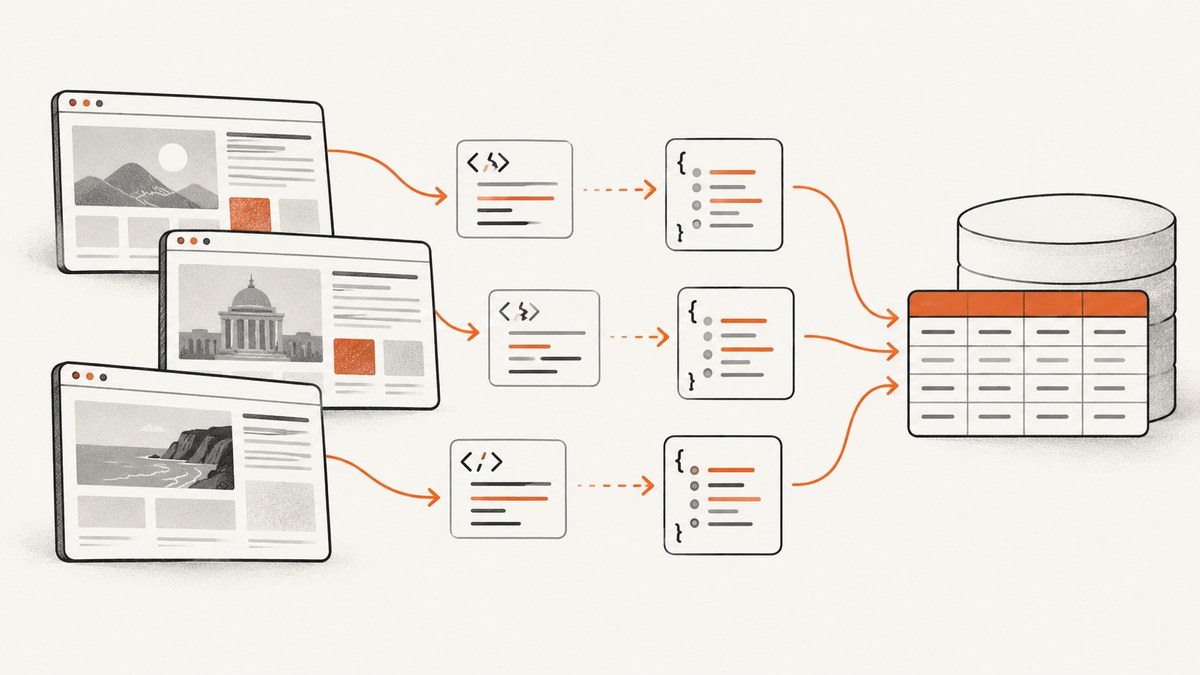
Web scraping is the programmatic collection of selected information from websites, followed by parsing and storing that information in a structured format such as JSON, XML, or database records. A scraper sends requests to a permitted page or endpoint, receives HTML or another response, extracts fields such as titles, prices, dates, or links, then normalizes and stores the results.
Scraping is different from crawling. Crawling discovers or downloads pages broadly; scraping targets particular fields inside responses for analysis. The two activities often appear together: a crawler finds URLs, while a scraper extracts records from those URLs.
How web scraping works
A production scraper usually follows these stages:
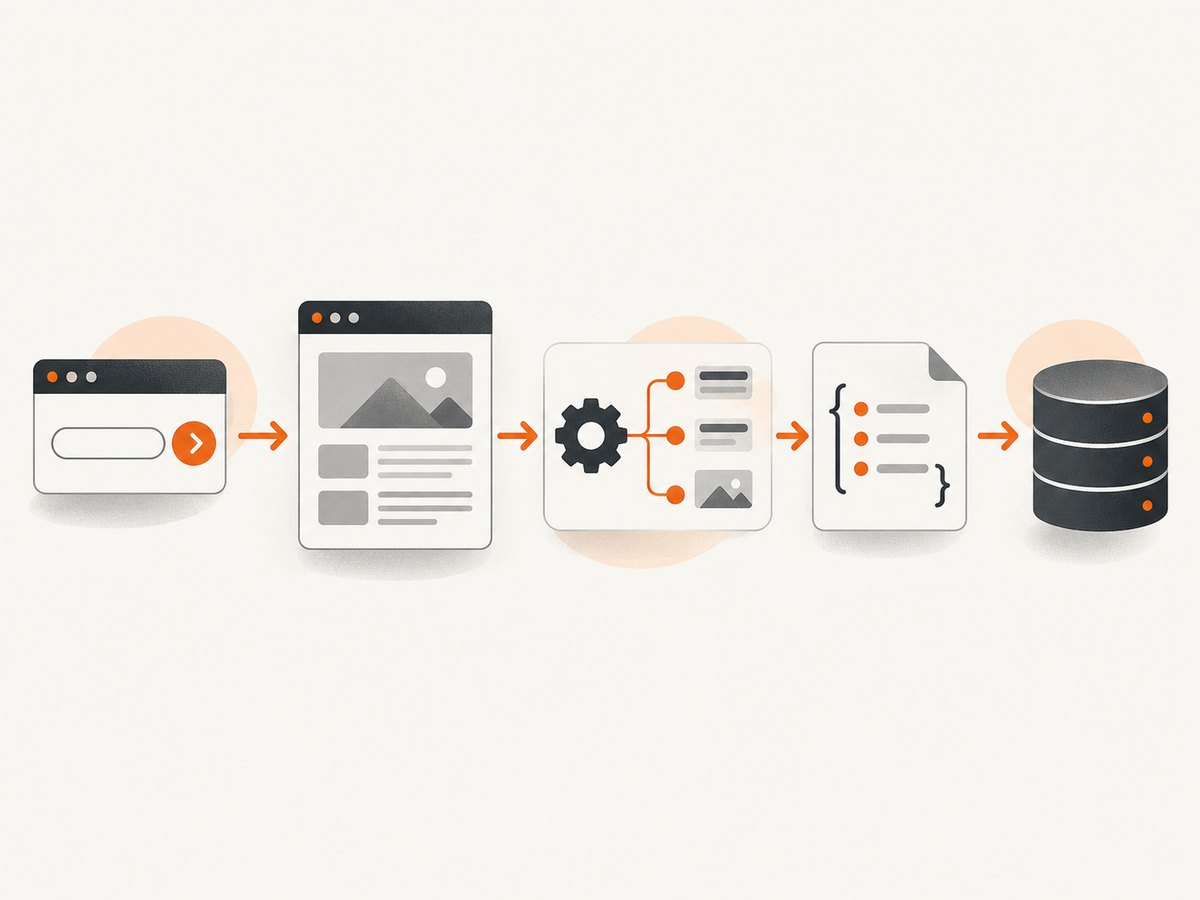
- Define the data. Write down the exact fields, permitted URLs, refresh frequency, retention period, and output schema.
- Look for an official API. An API normally offers a more stable schema and clearer access terms. Scrape only when an API is unavailable or does not provide the needed public information.
- Check access instructions. Read robots.txt guidance, the site’s terms, authentication requirements, and applicable privacy rules. A robots.txt file tells search engine crawlers which URLs they may access, but it is not authentication or a security control.
- Request the resource. Use HTTP for ordinary HTML, JSON, or XML. Use a browser automation layer when content is rendered only after JavaScript runs.
- Parse the response. Select elements with CSS selectors, XPath, a JSON parser, or an HTML parser. Treat the page as untrusted input: fields can be absent, duplicated, malformed, or changed.
- Normalize and validate. Convert dates, prices, units, encodings, and URLs into a consistent representation. Reject records that fail required-field checks.
- Deduplicate and store. Use a stable key, such as a canonical URL plus an item identifier. Store raw responses when permitted so extraction changes can be replayed.
- Schedule and monitor. Add conservative rate limits, retries with backoff, request logging, schema checks, and alerts for unusual error rates or missing fields.
The National Network of Libraries of Medicine describes scraping as systematic collection and distinguishes it from broad crawling or archiving. Its overview also discusses APIs as an alternative for requesting data. See the NNLM web-scraping glossary.
Web scraping versus crawling, APIs, and browser automation
| Approach | What it does | Best fit | Main trade-off |
|---|---|---|---|
| HTML scraping | Downloads a response and extracts selected fields | Static pages with predictable markup | Breaks when HTML changes |
| Crawling | Discovers or downloads many pages and links | Building a URL inventory or search index | Higher request volume and operational cost |
| Official API | Returns publisher-defined structured data | Stable, permitted access to known entities | May omit fields or require an account |
| Browser automation | Runs JavaScript and captures the rendered DOM | Client-rendered pages, interactions, or authenticated workflows | Slower, more resource-intensive, and more complex |
Assess an API before scraping. The UK Food Standards Agency’s scraping policy describes documenting the reason for scraping and evaluating other collection methods. An API-first decision is practical guidance, not a guarantee that an API exists or covers every field.
Build a small HTML scraper in Python
The following example fetches a page, extracts article links, resolves relative URLs, and writes JSON. It is intentionally conservative: it uses a descriptive user agent, a timeout, a rate limit between pages, and validation for required fields.
from __future__ import annotations

import json
import time
from urllib.parse import urljoin, urlparse

import requests
from bs4 import BeautifulSoup

START_URL = "https://example.com/news"
ALLOWED_HOST = urlparse(START_URL).netloc
HEADERS = {"User-Agent": "ResearchCollector/1.0 (contact: data@example.org)"}


def fetch(url: str) -> str:
    response = requests.get(url, headers=HEADERS, timeout=20)
    response.raise_for_status()
    content_type = response.headers.get("content-type", "")
    if "text/html" not in content_type:
        raise ValueError(f"Expected HTML, got {content_type}")
    return response.text


def extract_records(html: str, page_url: str) -> list[dict[str, str]]:
    soup = BeautifulSoup(html, "html.parser")
    records = []
    for link in soup.select("article h2 a[href]"):
        title = link.get_text(" ", strip=True)
        href = urljoin(page_url, link["href"])
        if not title or urlparse(href).netloc != ALLOWED_HOST:
            continue
        records.append({"title": title, "url": href})
    return records


html = fetch(START_URL)
records = extract_records(html, START_URL)
with open("records.json", "w", encoding="utf-8") as output:
    json.dump(records, output, ensure_ascii=False, indent=2)

print(f"saved {len(records)} records")
time.sleep(1)  # Keep repeated requests conservative
Install the dependencies with python -m pip install requests beautifulsoup4. Replace the selector with one that matches the permitted target. Do not assume that a selector found today will remain valid: monitor it and fail loudly when required fields disappear.
Request and parse JSON with cURL and Node.js
When a documented endpoint returns JSON, parsing is simpler and usually more stable than selecting HTML.
curl --fail --location --max-time 20 \
  -H 'Accept: application/json' \
  -H 'User-Agent: ResearchCollector/1.0 (contact: data@example.org)' \
  'https://api.example.com/items?limit=100' \
  -o response.json
const response = await fetch('https://api.example.com/items?limit=100', {
headers: {
accept: 'application/json',
'user-agent': 'ResearchCollector/1.0 (contact: data@example.org)'
},
signal: AbortSignal.timeout(20000)
});
if (!response.ok) throw new Error(`HTTP ${response.status}`);
const payload = await response.json();
const records = (payload.items ?? []).map(item => ({
id: String(item.id),
name: String(item.name ?? '')
}));
console.log(JSON.stringify(records, null, 2));JavaScript-rendered pages and screenshots
A plain HTTP request sees the server response. It does not automatically run the page’s JavaScript, click controls, wait for lazy images, or observe content loaded by later API calls. If the required data is absent from the initial HTML, use an authorized browser automation process or a rendering service. Add explicit waits for a selector, a bounded delay, or network idle; never wait indefinitely.
For visual records, a screenshot is a different output from field extraction. You may need a full-page image, a single element, a specific device viewport, dark mode, a PDF, or an image after an interaction. Keep the two pipelines separate: parse structured fields for analysis and capture rendered images for review or documentation.
Or skip the browser setup
ScreenshotNeo provides a website screenshot API and MCP server for developers. A GET request returns a PNG, JPEG, WebP, or PDF. Before capture it accepts cookie or consent banners like a visitor and removes more than 60 known consent platforms, newsletter popups, and chat widgets; each step can be turned off. Bot checks or CAPTCHAs, blank pages, timeouts, failed loads, and cache hits are not billed, and response headers identify the page verdict and whether the shot was billed.

Use the ScreenshotNeo API documentation for the complete parameter list. Basic calls:
curl -G "https://api.screenshotneo.com/v1/shot" -d access_key=YOUR_API_KEY --data-urlencode url=https://stripe.com -o shot.webpimport requests
r = requests.get("https://api.screenshotneo.com/v1/shot", params={"access_key": "YOUR_API_KEY", "url": "https://stripe.com"}, timeout=90)
open("shot.webp", "wb").write(r.content)const q = new URLSearchParams({ access_key: 'YOUR_API_KEY', url: 'https://stripe.com' });
const res = await fetch(`https://api.screenshotneo.com/v1/shot?${q}`);Relevant options include full-page capture with lazy images loaded; CSS element selection; dark mode; 12 device presets or any viewport; retina scale; PDF paper size, margins, landscape, and page ranges; HTML/CSS to image; custom CSS and JavaScript; clicking an element; hiding selectors; waits for a selector, delay, or network idle; blocking ads, trackers, requests, or resource types; custom headers, cookies, user agent, and Authorization; timezone and geolocation; transparent backgrounds; resizing; cache TTL; signed links for public image tags; asynchronous jobs with signed webhooks; bulk capture of up to 100 URLs per call; a usage API; and an OpenAPI specification. Common parameter names used by other screenshot APIs also work, which helps when switching.
An MCP server exposes take_screenshot, get_page_info, and capture_pdf to Claude, Cursor, and other MCP clients. That lets an AI agent inspect a page or create a visual artifact without you wiring a browser into every agent workflow.
There is a free plan with 1,000 shots per month and no card. Paid plans start at $5 for 3,000 shots; yearly billing gives two months free, and every feature is included on every plan. Create a free ScreenshotNeo account.
Selectors, pagination, and changing pages
Choose resilient selectors
Prefer stable attributes, semantic elements, and documented API fields. Avoid selectors based on generated class names or a deeply nested path. Keep selectors in configuration so a markup change does not require rewriting the scraper.
Handle pagination deliberately
Use the site’s documented page or cursor parameter when available. Otherwise follow a permitted next link, record every visited URL, and stop on a repeated URL or a maximum page count. Cursor pagination is safer than guessing page numbers because it avoids skipped or duplicated records when content changes during a run.
Normalize URLs and records
Resolve relative links, remove tracking parameters when appropriate, canonicalize hostnames, and preserve the original URL for auditability. Convert numeric strings using the page’s locale, parse dates with an explicit timezone, and retain a raw value when conversion could lose information.
Reliability, performance, and cost
- Rate control: Limit concurrency per host, add jitter, honor published limits, and cache unchanged responses. A smaller request rate reduces load and the chance of IP-based blocking.
- Retries: Retry transient network errors and selected 5xx responses with exponential backoff. Do not blindly retry authentication failures, 4xx responses, or a page that signals access is forbidden.
- Timeouts: Set separate connection and total timeouts. Browser renders need a bounded wait for a selector or network idle; always keep a hard upper limit.
- Change detection: Track response status, content type, record counts, missing-field rates, and a sample of parsed values. An HTTP 200 response can still contain an error page or a redesigned layout.
- Concurrency: Parallelize independent hosts cautiously. For one host, a queue with a per-host budget is easier to reason about than unlimited workers.
- Storage: Compress raw responses where allowed, store normalized records separately, and retain a content hash to detect duplicates.
- Rendering cost: Browser-based extraction consumes more CPU and memory than HTTP parsing. Use direct APIs or HTML requests for fields that do not need a rendered page.
- Screenshot cost: With ScreenshotNeo, only clean shots are billed; failed loads, bot checks, blank pages, timeouts, and cache hits are not billed. Inspect the
X-Page-VerdictandX-Billedheaders and use a cache TTL for repeated captures.
Responsible and lawful scraping checklist
- Confirm that the purpose and fields are permitted in the site’s terms and applicable law.
- Prefer an official API when it supplies the required data.
- Read robots.txt and follow site instructions. Robots.txt communicates crawler preferences; it does not protect private information.
- Do not bypass authentication, paywalls, CAPTCHAs, bot checks, or other technical barriers.
- Identify your crawler where appropriate, keep rates low, and stop when the operator signals that access is not wanted.
- Document purpose, expected benefit, retention, sharing, and the legal or ethical rationale.
- Minimize personal data, protect it, and check controller or publisher obligations. CNIL’s guidance on scraping personal data discusses these responsibilities.
Robots.txt is normally served from the site root for a particular host, protocol, and port. Google documents that crawlers retrieve it with HTTP GET and parse its rules; MDN’s reference explains the same mechanism. Rules are requests to crawlers and support can vary, so do not treat the file as a substitute for access control.
Troubleshooting common scraper failures
| Symptom | Likely cause | Fix |
|---|---|---|
| 403 or 429 responses | Rate too high, blocked identity, or access is not permitted | Stop, review terms and robots.txt, reduce rate, identify the client, and use an official API. Do not attempt to evade the block. |
| HTML has no expected records | Content is rendered by JavaScript or the selector changed | Inspect the initial response, check the selector, or use an authorized rendering path with a bounded wait. |
| JSON decode error | Server returned an HTML error page or truncated body | Check status and content type before parsing; log a bounded response sample. |
| Duplicate records | Pagination overlap, tracking URLs, or retries | Canonicalize URLs and deduplicate using a stable key plus content hash. |
| Missing images or fields | Lazy loading, localization, consent state, or an incomplete request | Wait for the required selector, set the intended locale, or supply permitted cookies and headers. |
| Timeouts in browser automation | Long third-party requests or a page that never reaches idle | Use a selector-based readiness condition, block unnecessary resource types, and enforce a hard timeout. |
| Screenshot response is not an image | Invalid key, target failure, or API error | Check HTTP status and response headers, inspect X-Page-Verdict and X-Billed, and verify the URL and access key. |
Frequently asked questions
Is web scraping the same as crawling?
No. Crawling broadly discovers or downloads pages. Scraping extracts selected fields for structured use. A system can crawl first and scrape second.
Do I need an API or a scraper?
Use an official API when it provides the needed data and permissions. Scraping is useful for public information without a suitable API, with additional maintenance and compliance work.
Is web scraping legal?
It depends on the data, purpose, jurisdiction, terms, privacy obligations, and how access is obtained. Review those factors before collecting or sharing data, and do not bypass technical barriers.
Can robots.txt stop a scraper?
It communicates crawler preferences but is not authentication or encryption. Responsible collectors follow it and use proper access controls for private material.
Why does a browser see more than requests.get?
The browser runs JavaScript, manages cookies, and waits for later network calls. A plain HTTP client usually sees only the initial response.
When should I capture a screenshot instead of extracting fields?
Capture a screenshot or PDF when visual layout, rendered state, or an audit artifact matters. Extract structured fields when the result must be searched, compared, or analyzed.
Summary
A dependable scraper has a narrow purpose, a permitted target, explicit selectors and schemas, conservative request behavior, validation, monitoring, and a documented retention plan. Start with an API when possible; use HTML parsing for static responses and browser rendering only when the page requires it. For visual capture, ScreenshotNeo can remove consent banners, popups, and chat widgets before the shot, avoid billing failed captures, and let MCP-compatible AI agents take screenshots. Start with 1,000 free screenshots per month and no card.


