Where to Put Images in a Next.js Project
Put URL-addressable images in the root public/ folder, or statically import local files beside the code that uses them. Here’s how to choose and reference each option.

For an image that needs a stable URL, put it in public/ at the project root. For example, public/images/hero.jpg is served at /images/hero.jpg—not /public/images/hero.jpg. If you use a src/ directory, public/ still stays beside it at the project root. You can also keep an image near a component and statically import it, or use a remote URL with the right sizing and configuration.
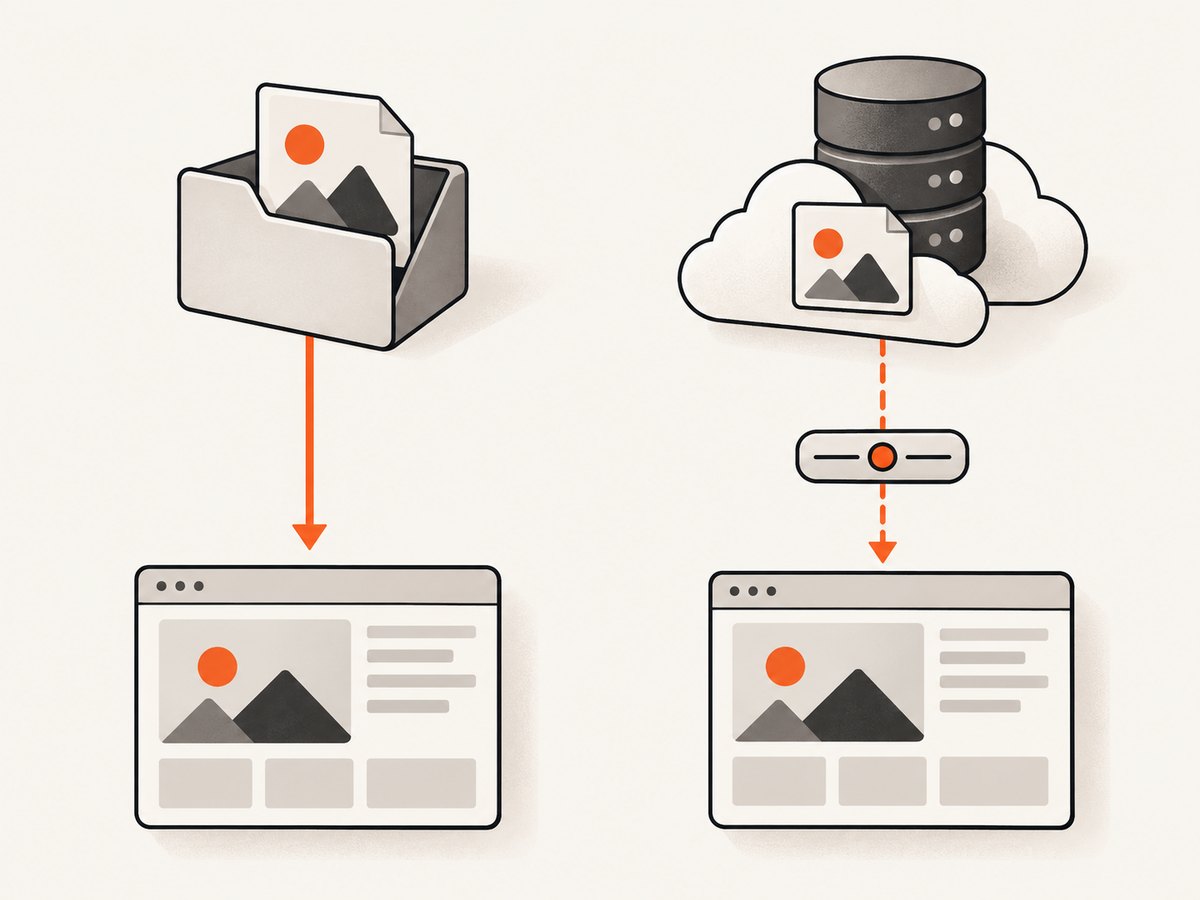
The choice comes down to whether you need a predictable public URL, whether the image belongs alongside a particular module, and whether the file is hosted locally or remotely.
1. Put URL-addressable files in the root public/ folder
Use public/ for files that should be available directly at a known path, such as a logo, favicon, social image, or image referenced from CSS or content. The folder belongs at the project root, alongside files such as package.json and next.config.js. Next.js serves its contents from the site’s base URL. See the official public folder convention.
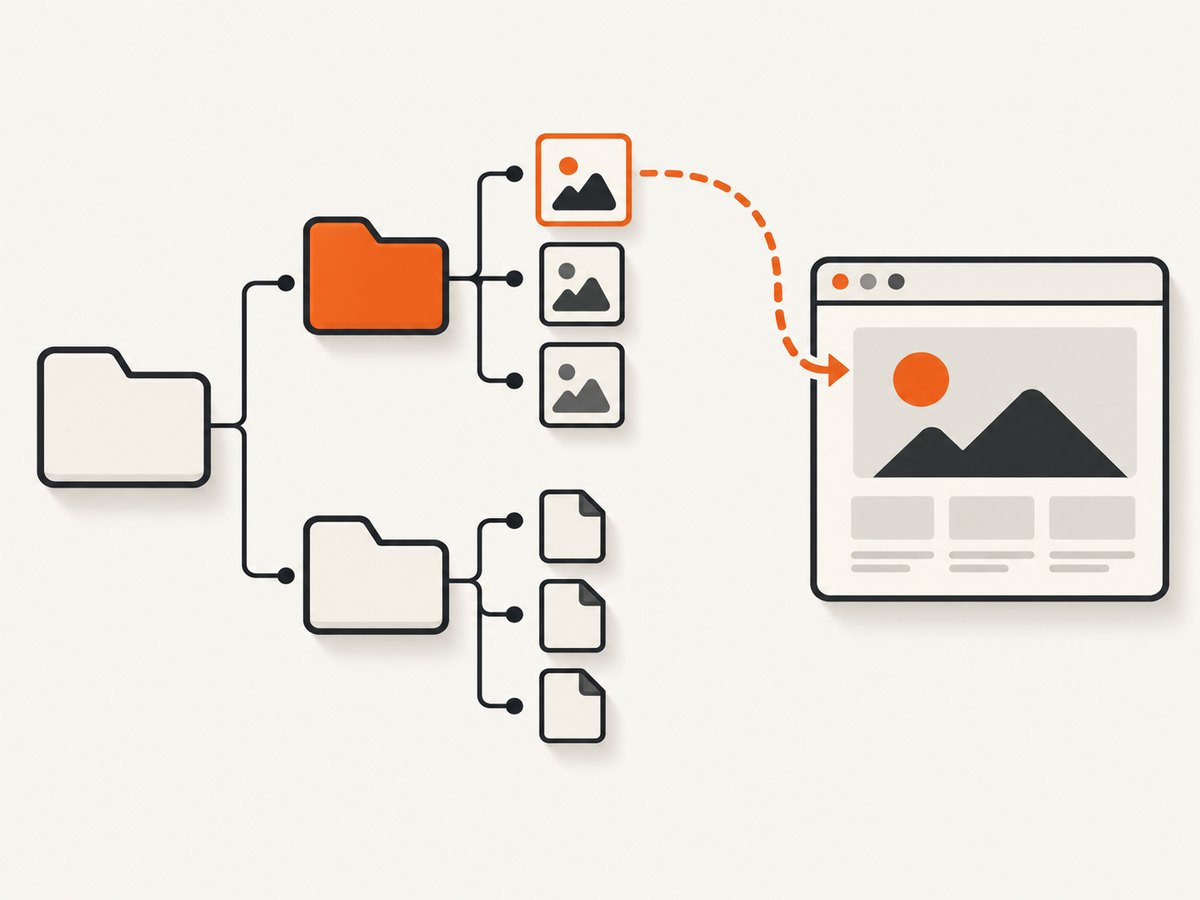
my-next-app/
  public/
    images/
      hero.jpg
    logo.svg
  src/
    app/
      page.tsx
  package.json
In a page or component, pass the URL path to next/image:
import Image from 'next/image'

export default function Hero() {
  return (
    <Image
      src="/images/hero.jpg"
      alt="A mountain landscape at sunrise"
      width={1600}
      height={900}
      priority
    />
  )
}
The leading slash means “from the site root.” Do not put public in the URL: a file at public/profile.png is referenced as /profile.png. For plain HTML or CSS, the same public path works:
<img src="/images/hero.jpg" alt="A mountain landscape at sunrise" />

/* In a stylesheet */
.hero {
  background-image: url('/images/hero.jpg');
}
Use next/image when its image optimization and layout features suit the page. A regular <img> can be appropriate for cases where you need ordinary browser image behavior; it does not get the Next.js Image component’s optimization behavior.
2. Keep public/ at the root when using src/
The optional src/ directory groups application code. It does not replace or contain the root public directory. The documented source layouts include src/app and src/pages; keep static public files in public/ at the project root. The Next.js src folder documentation states that the /public directory should remain in the root of the project.
project/
  public/
    avatars/
      me.png
  src/
    app/
      page.tsx
    components/
      avatar.tsx
One directory detail matters: if you have an app or pages directory at the root, the corresponding directory under src/ is ignored. Avoid maintaining two competing app or pages roots. This does not change where public/ belongs.
3. Static import: keep a local image beside its code
A local image can live beside the component or module that uses it. Import the asset and pass it to next/image. With a static import, Next.js can determine the image’s intrinsic width and height, which establishes its aspect ratio and helps prevent layout shift while the image loads. The Next.js image guide documents this approach and the component’s sizing behavior.
import Image from 'next/image'
import teamPhoto from './team-photo.jpg'

export function TeamPhoto() {
  return (
    <Image
      src={teamPhoto}
      alt="The product team at a planning session"
    />
  )
}
This can be a good fit for a component-specific illustration or a small group of assets that should be maintained with the component. The image file is part of the module graph, so use a public URL instead when other systems need a stable path or when content refers to images by URL.
Static imports can use common image formats supported by the Next.js image pipeline. If an imported image is used as a decorative background or needs a crop, size its containing element and use the relevant image props, such as fill and object-fit. Remember to provide useful alternative text for meaningful images; use an empty alt value when an image is purely decorative.
4. Remote images: configure the host and give the image a size
If the file is hosted by a CMS, image service, or another domain, use its remote URL as the source. Next.js cannot inspect a remote image during the build, so give the image dimensions or use fill. These sizing choices let the layout reserve the right aspect ratio. Add a specific allowed URL pattern in the Next.js image configuration; avoid broad patterns when only one host or path is needed.
// next.config.js
/** @type {import('next').NextConfig} */
const nextConfig = {
  images: {
    remotePatterns: [
      {
        protocol: 'https',
        hostname: 'images.example.com',
        pathname: '/products/**',
      },
    ],
  },
}

module.exports = nextConfig
Then reference the remote URL and provide dimensions:
import Image from 'next/image'

export function ProductImage() {
  return (
    <Image
      src="https://images.example.com/products/widget.jpg"
      alt="Blue ceramic desk lamp"
      width={1200}
      height={900}
      sizes="(max-width: 768px) 100vw, 50vw"
    />
  )
}
Use a pattern that matches the actual protocol, host, and path. After editing Next.js configuration, restart the development server so it loads the updated settings. Remote host configuration is not needed for a local path such as /images/hero.jpg.
5. Choose a placement that matches how the image is used
| Choice | Where the file goes | How it is referenced | Good fit |
|---|---|---|---|
| Public asset | <project-root>/public/... |
Root-relative URL, such as /images/hero.jpg |
Stable, URL-addressable files; CSS and content references |
| Static import | Beside the importing module or component | Import the file and pass it to Image |
Component-owned local assets; inferred dimensions |
| Remote asset | On its external host | Remote URL with dimensions or fill |
Images managed by a CMS or another service |
Ask these questions before choosing:
- Does something need to request this image by a stable URL? Put it in root
public/. - Is it a local asset used by one module and best maintained beside that code? Consider a static import.
- Is another system already hosting and managing it? Use a remote URL and configure the allowed pattern.
- Does the layout need a responsive crop or fill behavior? Set the image dimensions or a sized parent for
fill, and provide a suitablesizesvalue for responsive layouts.
These methods are alternatives for different asset workflows; a project can use all three where appropriate.
6. Public image URLs, caching, and deployment
A public asset is served at the same root-relative path in development and production, provided the file is included in the deployed project. The path is case-sensitive on many deployment systems: Hero.jpg and hero.jpg can be different files. Keep the URL’s spelling and capitalization aligned with the filename.
For the current App Router documentation, Next.js says assets in public/ use Cache-Control: public, max-age=0 by default, because it cannot safely assume those files will never change. See the current public folder documentation. If you replace a public file while keeping its URL, users or intermediate caches may still have stale copies depending on the deployment and cache behavior. For assets you control and expect to change, version the filename (for example, hero-v2.jpg) or otherwise use a cache strategy supported by your hosting setup. Check the documentation for the Next.js version and router in your project; cache guidance has varied across older documentation.
Static imports are processed as part of the application build, while public files retain their named URL. Remote assets depend on the availability of the source host and, when using next/image, a valid image configuration and image response. Consider those dependencies when choosing what must remain available if a third-party host is slow or unavailable.
7. Troubleshooting common image issues
| Symptom | Likely cause | Fix |
|---|---|---|
| 404 for a local image | The URL includes /public, the file is elsewhere, or capitalization differs. |
Map public/a/b.jpg to /a/b.jpg; check the exact filename and that it is deployed. |
| Image works locally but not in production | Case-sensitive path mismatch or the file was not included in the deployment. | Match filename capitalization exactly and confirm the asset is present in the build/deployment output. |
| “Invalid src prop” or remote host error | The remote URL host, protocol, or path is not allowed by image configuration. | Add a narrowly scoped matching remotePatterns entry, then restart the dev server. |
| “Image with src … is missing required width property” | A remote source has no build-time intrinsic dimensions. | Set numeric width and height, or use fill in a positioned container with a defined size. |
| Layout jumps when an image appears | The browser has no reserved aspect ratio or the container dimensions are unstable. | Provide dimensions; static imports supply intrinsic dimensions. For fill, size the parent and use an appropriate sizes value. |
| Wrong image appears after replacing a file | The old URL may still be cached by a browser, CDN, or deployment layer. | Use a versioned filename when changing content and inspect the response cache headers for your deployed version. |
| Image is stretched or cropped unexpectedly | Displayed dimensions do not match the asset ratio, or a fill layout uses the default fit. | Choose dimensions that match the intended ratio; set object-fit and positioning for deliberate cropping. |
When debugging, open the image URL directly in the browser first. If it returns a 404, fix the path or deployment. If it loads directly but fails through next/image, inspect the component props and remote host configuration.
8. Performance, reliability, and cost considerations
Image placement by itself does not guarantee a faster page. The file size, format, dimensions delivered to the screen, caching, and layout all matter. Use next/image when its documented optimization and lazy-loading behavior fits the use case. Avoid sending a huge original to a small display area when an appropriately sized asset will do. Static imports provide dimensions that help reserve space; remote images require explicit sizing because Next.js cannot inspect them at build time.
For reliability, a local public file or imported asset avoids a runtime dependency on an external image host. A remote image keeps its management elsewhere, but its delivery depends on that host and the configured image path. Choose according to who owns updates and which system must remain available.
There is no special Next.js charge just for choosing public/ versus a static import. Costs can come from your hosting, image delivery or optimization infrastructure, and remote image provider; check the terms of the services actually used. The official placement and image guides do not publish a benchmark that would justify a universal performance ranking among these storage choices.
Or skip the browser setup
If the image you need is a page capture for documentation, a report, or a visual record, ScreenshotNeo is a website screenshot API and MCP server. One GET request returns a PNG, JPEG, WebP, or PDF. It does not change where images belong in a Next.js app; it gives you a captured image from a URL without setting up a browser in your own code. See the ScreenshotNeo API documentation.
curl -G "https://api.screenshotneo.com/v1/shot" \
  -d access_key=YOUR_API_KEY \
  --data-urlencode url=https://stripe.com \
  -o shot.webp
Cookie and consent banners are accepted and removed before capture, along with 60+ known consent platforms, newsletter popups, and chat widgets; each cleanup step can be turned off. Bot checks or CAPTCHAs, blank pages, timeouts, failed loads, and cache hits cost nothing, and response headers report the page verdict and billing status. Its MCP server provides take_screenshot, get_page_info, and capture_pdf for AI agents and MCP clients. The free plan includes 1,000 screenshots a month with no card; paid plans start at $5 for 3,000. Every feature is available on every plan. Sign up for free and get 1,000 screenshots a month with no card.
Frequently asked questions
Can I put images inside src/app?
Yes, a local image can sit beside a component and be statically imported. For a stable browser URL, use root public/ instead. Do not place public/ under src/app.
Should images go in public/ or src/?
Use public/ when the image should have a predictable URL. Keep an image under source code when a module imports it and you want it maintained with that code. The src/ directory does not move the public folder.
Do I have to use next/image?
No. A public path can also be used in a regular HTML image or CSS. Use next/image when its sizing and image optimization features match your requirements.
What is the browser URL for public/logo.svg?
/logo.svg. The folder name is omitted from the public URL.
Why does my remote image need configuration?
The image component requires permitted remote URL patterns. Allow the specific protocol, hostname, and path that serve your images, and provide dimensions or use fill.


