How to Set Wicked PDF Footer Height and Margins Per Page
Set Wicked PDF’s bottom margin to reserve room for a footer and use footer spacing to tune its gap from the content. Learn what can vary per page and how to troubleshoot rendering.

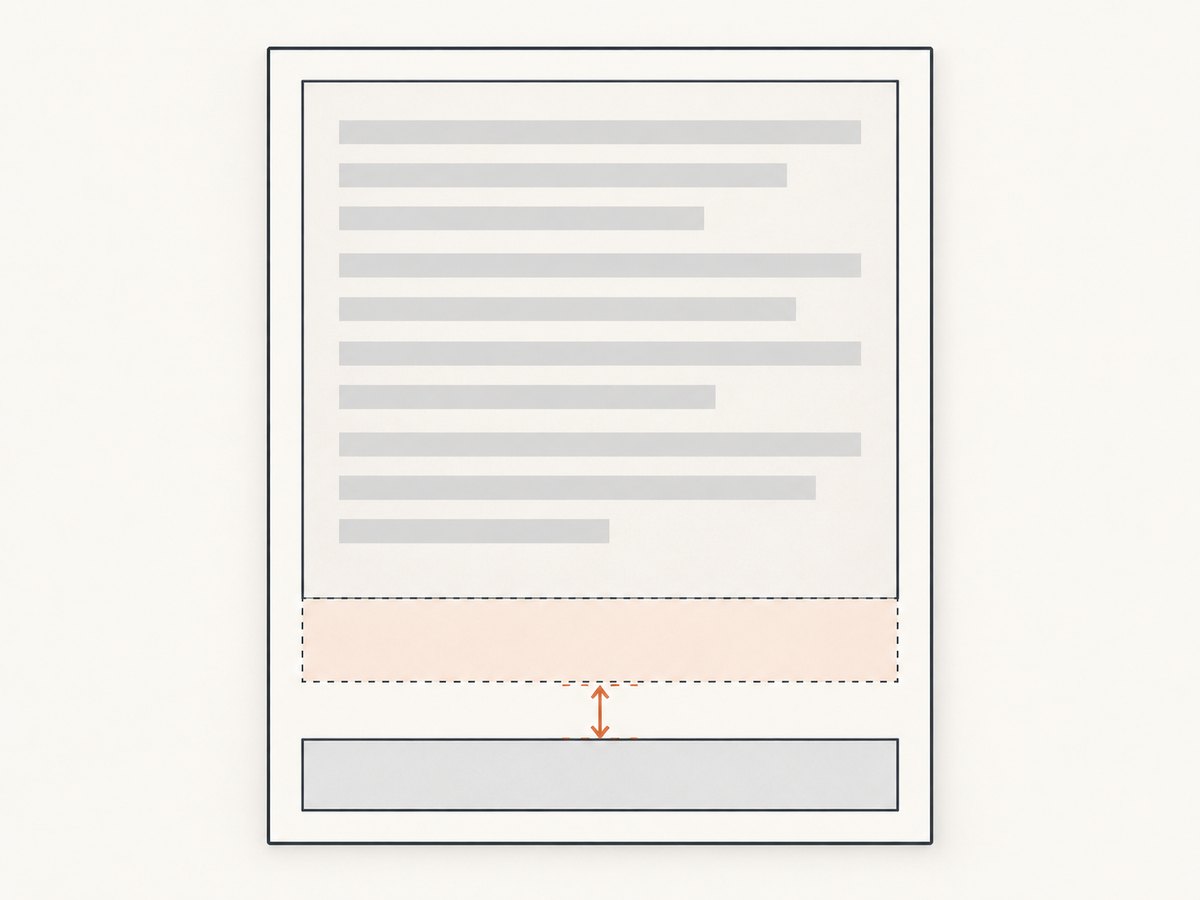
In Wicked PDF, reserve space for a footer with margin: { bottom: ... }, then adjust footer: { spacing: ... } to change the gap between the body content and the footer. These settings do different jobs: the bottom margin defines usable page space, while footer spacing is the distance between the footer and content. Wicked PDF and wkhtmltopdf do not document a footer.height setting. A custom HTML footer’s visible height comes from its rendered content and layout; reserve enough room for it with the bottom margin. Wicked PDF’s README and the wkhtmltopdf option manual describe the relevant options.
For different settings on separate document objects, wkhtmltopdf has object-level options. That does not establish that one continuous HTML document can switch margins or footer settings at arbitrary physical page breaks. If you need that, split the content into objects or verify another workflow against the exact installed renderer.
1. Set the bottom margin and footer spacing
Use a margin large enough to fit the footer’s rendered height, its position, and any desired whitespace. Then tune spacing independently. The wkhtmltopdf manual defines footer spacing in millimeters and gives it a default of 0. Treat example values below as starting points to adjust for your template, not universal measurements.
render pdf: 'report',
       margin: { bottom: '20mm' },
       footer: {
         spacing: 4,
         html: { template: 'shared/footer', layout: 'pdf_plain' }
       }
The margin reserves room at the page bottom; spacing defines the gap between footer and body content. Increasing one does not substitute for the other. If the footer overlaps body text or is clipped, increase the bottom margin first. If it fits but sits too close to content, adjust spacing.
About units
The wkhtmltopdf manual specifies footer spacing in millimeters. Wicked PDF’s README shows nested Ruby option structures and notes that supported options depend on the wkhtmltopdf version. Be deliberate about units in your app: for example, write '20mm' for a margin instead of relying on a bare number whose interpretation may be less obvious to the next maintainer. Check the README and installed gem behavior for your version before standardizing option formats.
2. Add an HTML footer template
A template makes it easier to style a multi-line footer, include application data, or apply a shared PDF layout. The example assumes a Rails view at app/views/shared/_footer.html.erb or a template name resolvable as shared/footer; use a path that matches your application’s view structure.
<div class="pdf-footer">
  <span>Confidential report</span>
  <span>Generated <%= Time.current.strftime('%Y-%m-%d') %></span>
</div>
html, body {
margin: 0;
padding: 0;
font-family: sans-serif;
}
.pdf-footer {
box-sizing: border-box;
width: 100%;
border-top: 1px solid #bbb;
padding-top: 3mm;
font-size: 9pt;
color: #555;
}
Render it with the footer options shown above. The footer’s height depends on its actual content and CSS: text wrapping, font metrics, padding, borders, and asset loading all affect the rendered result. A fixed CSS height can constrain the footer’s own box, but it does not reserve page space by itself. Reserve room using the page’s bottom margin and render representative long-content cases to confirm that the footer remains clear of the body.
Rails assets in footer templates
wkhtmltopdf runs outside the normal Rails page-rendering context. Wicked PDF warns that normal Rails layouts do not automatically work for header and footer templates, and PDF assets need references that the renderer can resolve, such as absolute references or Wicked PDF helpers. Avoid assuming a relative CSS or image path that works in a browser will also resolve in a PDF job. Prefer a minimal PDF layout and verify that stylesheets, fonts, and images load in the deployed environment.
3. Use text footers and page numbers
For a simple footer, wkhtmltopdf supports text options and substitutions such as [page] and [topage]. The wrapper exposes footer options as nested Ruby settings; consult the README for the option names supported by your installed version. A command-line equivalent illustrates the underlying renderer’s concepts:
wkhtmltopdf \
  --margin-bottom 20mm \
  --footer-spacing 4 \
  --footer-center 'Page [page] of [topage]' \
  input.html output.pdf
Use an HTML template instead when the footer needs structured layout or application data. For HTML footers, the upstream manual documents passing page variables through the query string and reading them in the template. Confirm the precise mechanism in the manual for your wkhtmltopdf version before relying on it.
4. What “per page” means
There are two different needs that often get described as “per page”:

- One footer repeated on each physical page: configure a document-level footer and page margin. wkhtmltopdf applies header and footer options during page rendering, subject to support in the installed build.
- Different margins or footers for different sections: wkhtmltopdf supports options in a page object’s option area as well as global settings. Separate objects can therefore be configured independently where the invocation path supports it.
- Different settings on arbitrary physical pages of one long HTML object: the cited docs do not promise switching margins or footer configuration at page boundaries within one continuous object. Do not assume a CSS page break changes wkhtmltopdf’s document-level footer options.
If you have a cover with no footer followed by report pages with a footer, model the cover and report as separate objects when your PDF generation path supports it. The wkhtmltopdf documentation explicitly describes cover behavior, including the fact that a cover object has no headers or footers. Check the libwkhtmltox settings documentation and the actual wrapper path before relying on per-object settings.
5. Complete Wicked PDF example
This Rails controller action sets a bottom margin, uses an HTML footer, and renders the report view. Adapt the view and template names to your application. The numeric settings are examples, not values guaranteed to fit every footer.
class ReportsController < ApplicationController
  def show
    @report = Report.find(params[:id])

    respond_to do |format|
      format.html
      format.pdf do
        render pdf: "report-#{@report.id}",
               template: 'reports/show',
               layout: 'pdf',
               page_size: 'A4',
               margin: {
                 top: '15mm',
                 bottom: '22mm',
                 left: '15mm',
                 right: '15mm'
               },
               footer: {
                 spacing: 4,
                 html: {
                   template: 'shared/footer',
                   layout: 'pdf_plain'
                 }
               }
      end
    end
  end
end
Make the PDF route available in your application and request it with the appropriate format, for example /reports/42.pdf. Ensure the controller’s authorization and data-loading logic is suitable for the report. A PDF generated by a background job may need explicit template locals or a PDF-from-string call instead; use the same margin and footer option structure supported by that path.
6. Tune and verify the layout
- Confirm the renderer. Run
wkhtmltopdf --versionin the same container or host that generates the PDF. Confirm that the installed Wicked PDF gem uses that binary. - Start with the footer content. Render the HTML footer with the real fonts, longest expected labels, and likely number of lines.
- Reserve space. Set a bottom margin large enough for the footer and intended breathing room.
- Adjust the gap. Change footer spacing while keeping the margin adequate. If the footer is clipped or body text overlaps, revisit the margin.
- Inspect multiple pages. Check the first, middle, and final pages, including a page with unusually long body content and the final page with a short remainder.
- Repeat in the deployed environment. The local and production binaries, fonts, asset URLs, or patched Qt support may differ.
Save representative output PDFs as development fixtures if your team needs to review visual changes across releases. PDF pagination can shift when fonts or content change, so verify page breaks as well as the footer itself.
7. Common errors and fixes
| Symptom | Likely cause | Fix |
|---|---|---|
| Footer overlaps body text | The reserved bottom margin is too small for the rendered footer. | Increase margin.bottom; then tune footer.spacing for the desired gap. |
| Footer is clipped or partly missing | The footer is taller than the available page area, or CSS/assets failed to load. | Increase the bottom margin, simplify the footer, and verify resolved stylesheet and font URLs. |
| Footer spacing change appears ineffective | Spacing adjusts the content-to-footer gap, not the footer’s own height; build differences can also affect results. | Adjust the bottom margin for reserved space and inspect the installed binary/version. |
| Header or footer does not appear at all | The installed wkhtmltopdf executable may lack the required patched Qt support, or the option/template path is unsupported. | Check wkhtmltopdf --version, the executable used by the app, and the options supported by that build. Debian’s manual notes that its build without patched Qt lacks header/footer support. |
| Footer styling works in a browser but not the PDF | The renderer cannot resolve relative Rails assets, or the normal application layout was assumed to apply. | Use a minimal PDF layout and absolute asset references or Wicked PDF helpers; inspect renderer output for missing resources. |
| Settings differ between local and production | Different wkhtmltopdf versions/builds, fonts, or rendering environments. | Compare binary versions and configuration in both environments; render with the same deployment artifact where possible. |
| Cannot give one page a different margin in a long report | The workflow is one continuous page object; the docs do not establish arbitrary physical-page switching. | Separate sections into objects if supported, or adopt a renderer/workflow that explicitly supports section-level page settings. |
8. Performance, reliability, and cost considerations
Footer spacing and margins are layout settings; they do not by themselves make PDF rendering faster. Complexity usually comes from the rendered document and its dependencies: large pages, images, fonts, JavaScript, or assets the renderer must fetch. Keep the footer lightweight, use only required styles and assets, and avoid network-dependent resources where a local or reliably reachable asset is appropriate for your deployment.
Reliability depends on the exact executable and environment. The Wicked PDF README cautions that options depend on wkhtmltopdf versions. The Debian bookworm manual documents a build without patched Qt that lacks header/footer support, so the presence of the gem alone is not proof that footer features will work. Log renderer errors and check the generated PDF rather than treating a successful controller response as proof of correct layout.
Cost depends on your infrastructure and how PDF generation is hosted; the cited configuration documentation does not provide a universal cost or performance benchmark. Avoid inventing one. If PDF rendering is part of a high-volume workflow, measure generation time and resource use with your own representative documents and deployment.
Or skip the browser setup
For a website screenshot, ScreenshotNeo provides a one-call screenshot API. It is separate from Wicked PDF: it captures a URL as an image or PDF and does not configure Wicked PDF’s per-page footer margins. If your immediate task is capturing a web page, the call is:
curl -G "https://api.screenshotneo.com/v1/shot" -d access_key=YOUR_API_KEY --data-urlencode url=https://stripe.com -o shot.webpSee the ScreenshotNeo API documentation for request options. ScreenshotNeo removes cookie banners, newsletter popups, and chat widgets before the shot; bot checks, blank pages, and failed loads are never billed. Its MCP server lets AI agents take screenshots. The free plan includes 1,000 screenshots a month with no card; paid plans start at $5 for 3,000. Learn about ScreenshotNeo or sign up free.
FAQ
Is there a Wicked PDF footer.height option?
No such option appears in the cited Wicked PDF or wkhtmltopdf option lists. The visible height comes from rendered footer content and layout; reserve page space with the bottom margin.
Does footer.spacing use pixels?
The underlying wkhtmltopdf manual defines footer spacing in millimeters, not pixels.
Will a CSS page break create a new footer configuration?
The cited documentation does not say that it will. Use separate page objects for separately configured sections when supported, and verify the behavior in your actual generation path.
Why do I need to check the wkhtmltopdf build?
Wicked PDF delegates PDF generation to wkhtmltopdf, and available options vary by version/build. Some builds lack header/footer support.
Primary references
- Wicked PDF README: wrapper option structure, templates, assets, and version caveat.
- wkhtmltopdf usage manual: footer spacing, margins, substitutions, and command-line options.
- libwkhtmltox page settings: global and object settings.
- Debian bookworm wkhtmltopdf manual: build-specific support caveat.


